Grok Connectors: Add a Custom MCP Connector for Live Twitter (X) Data
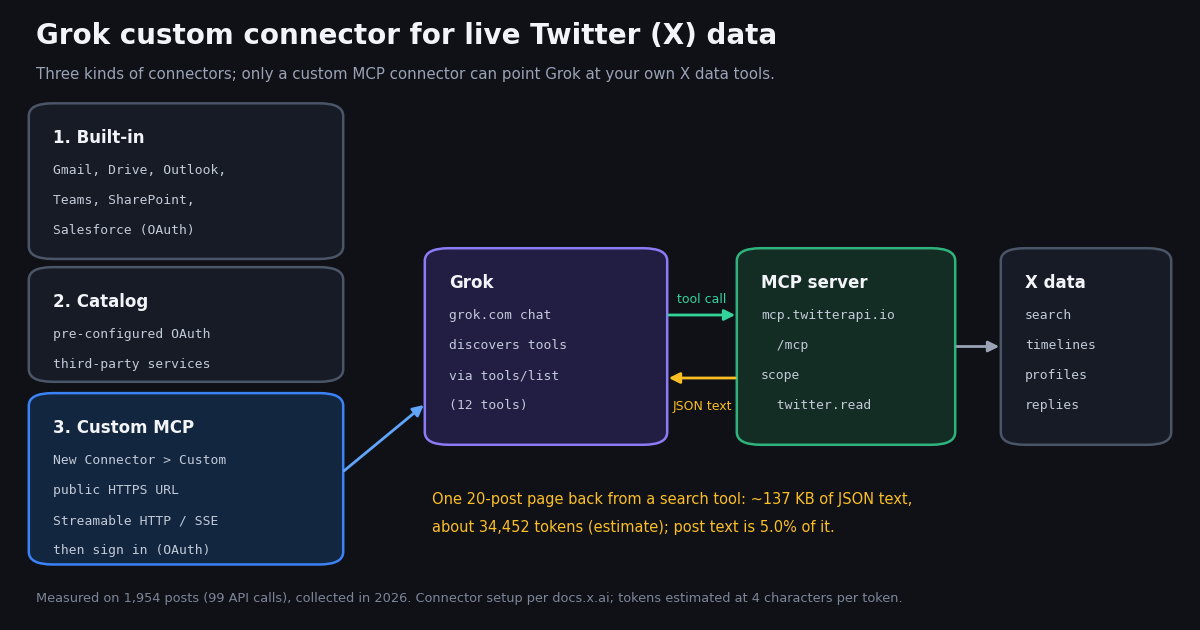
This page is about Grok connectors, the feature in the Grok chat app at grok.com/connectors that plugs outside services into a conversation. It is not about building your own agent on the xAI API (that is our Grok agent guide, which uses the API's remote MCP tool in your own code), and it is not about Grok Bot, which our sibling page covers. Here you will find what the three kinds of connectors are, exactly how a custom MCP connector is added according to the SpaceXSI docs, and a worked example that gives Grok live Twitter (X) data through a hosted MCP server.
Grok already searches X on its own, so why add a connector for it? Because the native search decides what to fetch and how much; a connector gives you named tools with explicit parameters (an exact search query with operators and a time window, a given account's timeline, the replies to one post, a follower list) and returns the raw fields, including counts such as viewCount and bookmarkCount. The trade-off is volume: every tool result lands in Grok's context as text. We measured that text on 1,954 posts collected in 2026, so the size and cost figures below are numbers, not guesses.
One honesty note before the steps. We verified the connector flow from the SpaceXSI documentation and verified our server's side (its tool list, its OAuth metadata, its 401 challenge) with live requests. We did not record a signed-in grok.com session for this page, so there are no screenshots of the dialog here, and the steps that depend on Grok's own screens are marked as documented rather than tested.
What Grok connectors are: built-in, catalog and custom MCP
The SpaceXSI docs (docs.x.ai/grok/connectors) describe connectors as a way to let Grok "access your external tools and data sources directly within a conversation" and state that connectors are available to all Grok users. Some third-party setup guides say custom connectors need a paid plan; the official page does not say that, so check grok.com/connectors on your own account rather than assuming either way. On Grok Business and Enterprise a team admin must provision a connector before members can use it.
Built-in connectors. The docs list seven: Gmail and Google Calendar, Google Drive (files, Docs, Sheets, Slides), OneDrive, Outlook Mail and Calendar, Microsoft Teams, SharePoint, and Salesforce (explore objects, query records, create and update). Once connected, "Grok can use the connector's tools automatically whenever your questions relate to that service."
Catalog connectors. A larger set of pre-configured OAuth connectors for popular third-party services, browsed at grok.com/connectors. The docs do not print the list, and third-party write-ups disagree about what is in it, so we do not repeat one here.
Custom MCP connectors. If a service is not in the catalog you can "bring your own" Model Context Protocol server. MCP is the open standard (modelcontextprotocol.io) that lets an AI client discover a server's tools through tools/list and call them through tools/call. The docs list three uses: expose an internal API or database, define your own tools, and control authentication on your own infrastructure. X data is a textbook case: there is no built-in or documented catalog connector for reading Twitter (X) data with parameters you choose.
Requirements for a custom connector: public URL, remote transport, authentication
Three requirements come straight from the SpaceXSI docs, and they decide which MCP servers can work at all.
A public URL. "Your MCP server must be reachable over the public internet." The tunneling page adds that servers on localhost or a private address (127.0.0.1, 10.x.x.x, 172.16.x.x, 192.168.x.x) "are not directly reachable, and Grok will reject these URLs." Grok's servers call your server, not your browser, so anything only your laptop can see is out.
A remote transport. The tunneling guide covers servers that speak HTTP: it warns that Cloudflare quick tunnels do not support Server-Sent Events, so an SSE server should use ngrok, while "servers using the newer Streamable HTTP transport work fine." The xAI API's remote MCP tool spells it out for developers: "Only Streaming HTTP and SSE transports are supported." A stdio server, the kind you start with npx in a desktop client config, has no URL, so it needs a bridge that serves it over HTTP before a tunnel can expose it.
Authentication still applies. "If your MCP server requires OAuth or API keys, you will still complete that flow in Grok after providing the tunnel URL." The docs do not describe the fields of the custom-connector dialog beyond the URL, so whether you can paste a static bearer token there is something we could not confirm. A server that implements the MCP authorization flow (a 401 challenge pointing at OAuth metadata) is the route that matches the docs' "complete any required authentication."
Tunnels are temporary. The docs warn that most free tunnel URLs change on restart, and then "you will need to remove the old connector in Grok and add a new one with the updated URL." For a connector you rely on every day, a stable hosted URL saves that churn.
Step by step: add the TwitterAPI.io MCP server as a Grok custom connector
TwitterAPI.io runs a hosted MCP server at https://mcp.twitterapi.io/mcp. It speaks Streamable HTTP over HTTPS, so it meets the public-URL and transport requirements without a tunnel. The published npm package @twitterapi_io/mcp-server (version 0.2.0 on npm) is the stdio build for desktop clients such as Claude Desktop and Cursor; for Grok, use the hosted URL instead.
Step 1: get an account and an API key. Sign up at twitterapi.io; new accounts that pass the automatic bot check get up to $1 of free credits (at most 100,000 credits, no card, one per person or network, expiring after 31 days). Your API key is on the dashboard. Reads need no X account.
Step 2: open the connectors page. Go to grok.com/connectors and click New Connector, then Custom (documented). On Grok Business or Enterprise, an admin with Team Read-Write permission first adds it at console.x.ai, under Grok Business, Connectors: + Add Connector, then Other, then the URL (documented). Members then connect their own accounts on grok.com/connectors.
Step 3: enter the server URL. Paste https://mcp.twitterapi.io/mcp. Grok's servers can reach it directly; no tunnel.
Step 4: authenticate. An unauthenticated tool call to the server returns HTTP 401 with a www-authenticate: Bearer header naming the resource metadata URL and the scope twitter.read. The metadata points at the authorization server https://api.twitterapi.io, which advertises the authorization-code and refresh-token grants, PKCE with S256, a dynamic registration endpoint and client ID metadata documents. That is the standard MCP OAuth flow, so the expected experience is a sign-in page for TwitterAPI.io and a consent step. We verified the server side of this chain; we did not complete the grok.com side in a recorded session, so treat the exact screens as unverified.
Step 5: let Grok discover the tools. Per the docs, "Grok will discover the tools your MCP server exposes." Our server's tools/list returns 12 tools, every one annotated readOnlyHint: true.
Step 6: ask a question that needs X data. For example: "Using the TwitterAPI.io connector, search Latest posts mentioning Supabase from the last 6 hours, skip replies, and summarize the top complaints with links." Naming the connector and the time window keeps Grok from falling back to its built-in X search and keeps each call to one or two pages.
Check the server before you add it: four requests
Most "connector won't connect" problems are on the server side, and you can test those in a minute without Grok. These are the requests we ran against the hosted server; the first two need no key and cost nothing, and the third deliberately fails.
What we saw. The initialize call returned HTTP 200 with serverInfo named twitterapi-mcp and protocol version 2025-06-18. The tools/list response listed 12 tools and weighed 11,390 bytes, about 2,848 tokens by our 4-characters-per-token estimate: that is the context Grok spends just knowing the tools exist. A tools/call without a key returned 401 with the resource_metadata pointer. The resource metadata listed https://api.twitterapi.io as authorization server, and that server's metadata listed S256 and refresh_token.
Run the same four checks against any MCP server you plan to add. If request 1 fails, Grok cannot reach the server. If request 3 returns 200 without a key, the server is open to anyone with the URL. If request 4 lacks S256, an OAuth client that requires PKCE will refuse it.
URL=https://mcp.twitterapi.io/mcp
H='-H Content-Type:application/json -H Accept:application/json,text/event-stream'

# 1. initialize: is the server reachable, which protocol version?
curl -s -X POST $URL $H -d '{"jsonrpc":"2.0","id":1,"method":"initialize","params":{"protocolVersion":"2025-06-18","capabilities":{},"clientInfo":{"name":"probe","version":"0"}}}'

# 2. tools/list: what will Grok discover, and how big is it?
curl -s -X POST $URL $H -d '{"jsonrpc":"2.0","id":2,"method":"tools/list"}' | wc -c

# 3. a tool call without a key: expect 401 + www-authenticate with resource_metadata
curl -s -i -X POST $URL $H -d '{"jsonrpc":"2.0","id":3,"method":"tools/call","params":{"name":"search_tweets","arguments":{"query":"x"}}}' | grep -i -E '^HTTP|www-authenticate'

# 4. OAuth metadata chain (RFC 9728, then RFC 8414)
curl -s https://mcp.twitterapi.io/.well-known/oauth-protected-resource
curl -s https://api.twitterapi.io/.well-known/oauth-authorization-serverHow big is a connector call? Payload sizes we measured
A connector tool result is text that Grok reads into its context. MCP servers commonly return the API response as a JSON string; the open-source npm build of our server, for example, returns JSON.stringify(result, null, 2), which is pretty-printed with two-space indentation. We could not inspect the hosted server's tool output without spending a key outside our study client, so we measured the REST responses those tools wrap, both compact and pretty-printed.
Post text is a small slice. The median post's text was 176 characters, and across all posts the text was 5.0% of the pretty-printed bytes. The rest is structure: the full author object on every post, entities, media variants, cards and quoted posts. Pretty-printing alone added 66.2% to a median page.
Timelines weigh more than searches. Organization timelines (360 posts) had a median of 9,393 bytes per post pretty-printed, against 3,514 for keyword-search posts (1,594), because brand accounts post more media (39.4% of timeline posts against 22.8%) and more link cards (26.4% against 11.4%).
What that means in tokens. At a rule-of-thumb 4 characters per token (an estimate, not a count from Grok's tokenizer), a median page is about 34,452 tokens, so grok-4.7's 500,000-token context holds roughly 14.5 such pages before anything else. In the Grok app that is a context limit, not a bill; on the xAI API it is input tokens you pay for (next section).
Size depends more on what a post carries than on the account: @grok had the most quoted posts in the sample (45.0%), and a quoted post embeds a second full post. A tenth handle we requested, @xai, returned an empty page.
How many tool calls a 24-hour keyword question needs
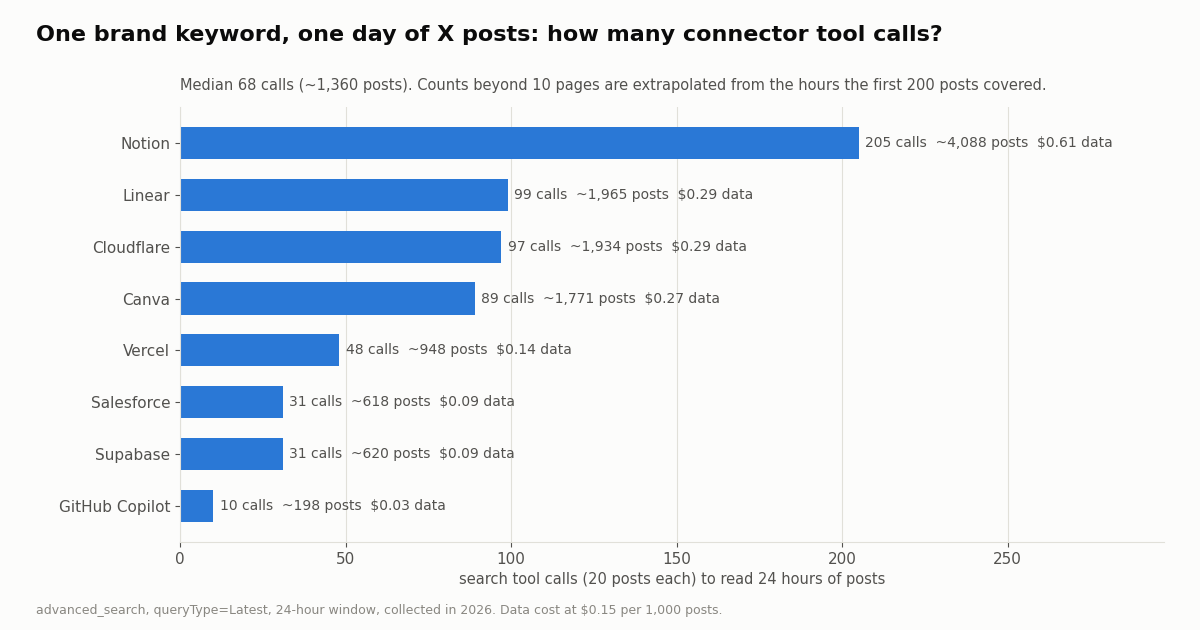
"What did people say about our brand yesterday?" is the obvious connector question, and it is the one that runs up calls. Each search call returns 20 posts. We ran a 24-hour Latest search for eight brand names, capped at 10 pages each, and extrapolated the full day from the hours those pages covered; only the GitHub Copilot query came close to covering the whole day inside the cap.
The median brand needed 68 calls for about 1,360 posts. No chat assistant pages through 68 tool results in one turn, and none should: at roughly 34,000 tokens a page, 68 pages would be far past any context window. The data cost is small; the context is the constraint.
Ask narrower questions. Shrink the window (since_time: and until_time: operators), drop replies and reposts (-filter:replies -filter:retweets), restrict language (lang:en), or switch queryType to Top and accept a sample instead of everything. Each of those cuts calls, and none needs a new tool. For a full day of a busy brand, run the search in code and hand Grok a summary or a file instead.
Note that "Notion" and "Linear" are also ordinary English words, which inflates their counts; that is exactly the kind of query a connector user should tighten with quotes and operators.
What a connector call costs, against X Search and the X API
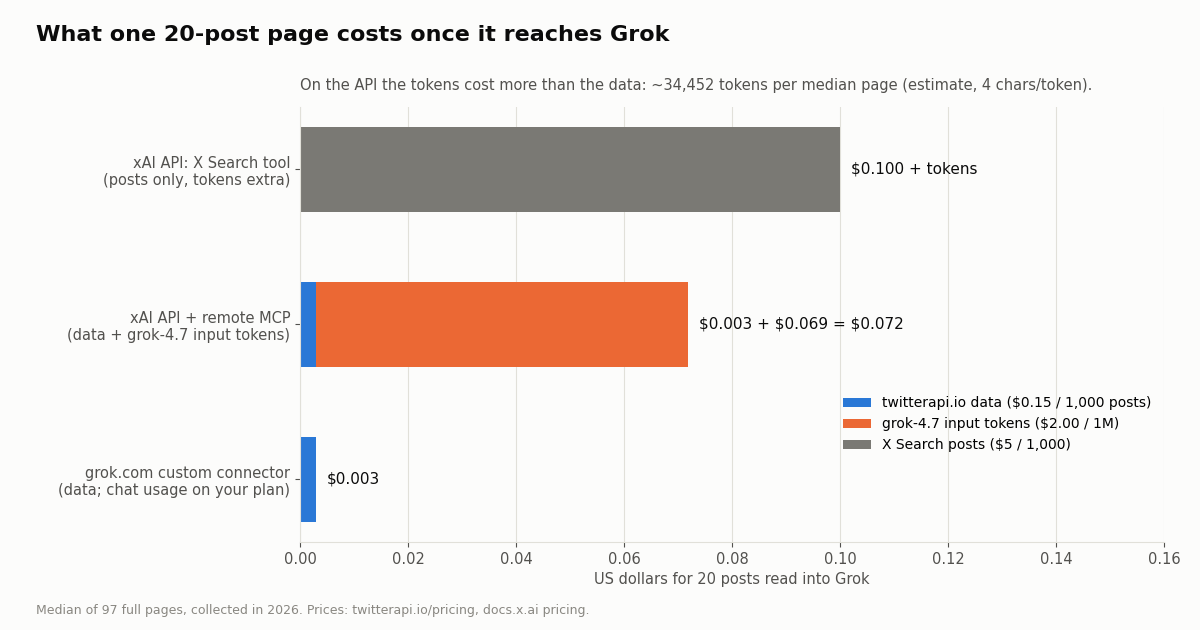
There are two bills to think about: the data the tool fetches, and the tokens Grok spends reading it.
Data. TwitterAPI.io tweet endpoints cost 15 credits per tweet returned, which is $0.15 per 1,000 tweets ($1 = 100,000 credits). A full 20-post page is $0.003. A request that returns nothing still costs the 15-credit minimum, $0.00015. Profiles are $0.18 per 1,000; followers and followings are 1 to 3 credits per user returned. Purchased credits never expire, and plans run from Starter at $29 a month to Business at $1,499 (see the pricing page).
Tokens, in the Grok app. The connector docs list no separate charge for connector calls; chat usage on grok.com is governed by your Grok plan, and the plans page lists Free, Plus, Premium, Super and Ultra tiers with different usage multipliers. How heavily a large tool result counts against that usage is not documented, but it certainly occupies the context window, which is why the page-count advice above matters.
Tokens, on the xAI API. If you call Grok from code with the remote MCP tool, SpaceXSI's pricing page says "you will not be charged for the tool invocation but will be charged for any tokens used." At grok-4.7's $2.00 per million input tokens, our median page of about 34,452 tokens (estimate) is about $0.069 in input tokens, against $0.003 for the data in it. On the API, the tokens cost more than the posts.
The native alternative. The X Search tool on the xAI API is billed per item fetched: $5 per 1,000 posts and $10 per 1,000 profiles, plus tokens. That is $0.10 for 20 posts before any tokens.
Per 1,000 posts, $5 against $0.15 is about 33x. The X API's pay-per-use rate card also charges $0.010 per user read and is capped at 3 million post reads a month, with Enterprise above that.
The same server from code: the xAI API remote MCP tool
Developers can attach the same server to Grok through the xAI API, without the chat app. The remote MCP tool takes server_url, server_label, an optional allowed_tools list and an optional authorization value that "will be set in the Authorization header on requests to the MCP server." Our server accepts a TwitterAPI.io API key as that bearer token (its initialize instructions say so), so no OAuth step is needed in code.
Limit the tools. Without allowed_tools, every tool definition the server exposes is injected into the model's context. Our 12 definitions are about 11 KB; allowing only search_tweets and get_user_last_tweets trims that and keeps Grok from wandering into follower lists.
What the docs say is unsupported. The OpenAI-compatible require_approval and connector_id parameters are not supported. For a full agent built this way, with reasoning about when to call which tool, see our Grok agent guide; this section only shows the connection. We did not run this request for the page (it needs an xAI key); the shape follows the SpaceXSI example.
import os
import requests

resp = requests.post(
    "https://api.x.ai/v1/responses",
    headers={"Authorization": f"Bearer {os.environ['XAI_API_KEY']}"},
    json={
        "model": "grok-4.7",
        "input": [{
            "role": "user",
            "content": "Search Latest posts about Supabase from the last 6 hours, "
                       "excluding replies, and list the three most-viewed with links.",
        }],
        "tools": [{
            "type": "mcp",
            "server_url": "https://mcp.twitterapi.io/mcp",
            "server_label": "twitterapi",
            "allowed_tools": ["search_tweets", "get_user_last_tweets"],
            "authorization": os.environ["TWITTERAPI_IO_API_KEY"],
        }],
    },
    timeout=120,
)
resp.raise_for_status()
print(resp.json())How we collected this
Question. When Grok calls a Twitter (X) data tool through a custom MCP connector, how large is what comes back, how many calls does a typical question take, and what do the data and the tokens cost?
Accounts and queries. Timelines of ten organization accounts (@grok, @xai, @OpenAI, @AnthropicAI, @vercel, @github, @NASA, @SpaceX, @nvidia, @Microsoft), two pages each through /twitter/user/last_tweets; and a 24-hour Latest search through /twitter/tweet/advanced_search for eight brand keywords (Notion, Vercel, Supabase, Cloudflare, Salesforce, Canva, "GitHub Copilot", Linear), up to 10 pages each. Plus one unauthenticated tools/list request to the hosted MCP server.
Window and sample. The accounts' most recent posts and the 24 hours before collection, collected in 2026: 1,954 posts from 99 API requests, about $0.29 in credits.
Method. Bytes are UTF-8 JSON as the REST API returned it, measured compact and pretty-printed with two-space indentation. Tokens are estimated at 4 characters per token; Grok's tokenizer may count differently. Daily volumes beyond the 10-page cap are extrapolated from the hours the first 200 posts covered, so busy keywords carry more uncertainty than quiet ones.
What the sample cannot show. It does not measure the hosted server's exact tool text (it may trim or reformat fields), Grok's actual token count or its choice of how many pages to request, or a full day for any keyword other than by extrapolation. One day of searches is one day; brand volume swings with news.
Privacy. Aggregates only. Organization timelines are kept as raw pages; keyword-search authors are private individuals, so their posts were reduced to de-identified size rows (no IDs, URLs, text or handles) and the raw pages were not kept.
"""Size a Grok connector question before Grok runs it.

Runs the same search the connector's search_tweets tool would run, pages through
the last N hours, and reports posts, pages (= tool calls), JSON bytes, estimated
tokens and data cost. Billing: 15 credits per tweet returned ($0.15 per 1,000).
"""
import json
import os
import time
from datetime import datetime

import requests

BASE = "https://api.twitterapi.io"
HEADERS = {"X-API-Key": os.environ["TWITTERAPI_IO_API_KEY"]}
CHARS_PER_TOKEN = 4  # rough estimate, not Grok's tokenizer


def size_question(keyword: str, hours: int = 24, max_pages: int = 10) -> dict:
    until = int(time.time())
    since = until - hours * 3600
    query = f"{keyword} -filter:replies since_time:{since} until_time:{until}"
    cursor, posts, pages, pretty_bytes, credits = "", 0, 0, 0, 0
    oldest = until
    complete = False
    while pages < max_pages:
        params = {"query": query, "queryType": "Latest"}
        if cursor:
            params["cursor"] = cursor
        r = requests.get(f"{BASE}/twitter/tweet/advanced_search",
                         headers=HEADERS, params=params, timeout=30)
        r.raise_for_status()
        body = r.json()
        tweets = body.get("tweets", [])
        pages += 1
        posts += len(tweets)
        credits += max(15, 15 * len(tweets))  # 15-credit minimum per request
        pretty_bytes += len(json.dumps(body, indent=2).encode())
        for t in tweets:
            ts = datetime.strptime(t["createdAt"], "%a %b %d %H:%M:%S %z %Y").timestamp()
            oldest = min(oldest, int(ts))
        if not body.get("has_next_page") or not tweets:
            complete = True
            break
        cursor = body.get("next_cursor", "")
    covered_h = max((until - oldest) / 3600, 0.01)
    est_posts = posts if complete else round(posts * hours / covered_h)
    return {
        "keyword": keyword,
        "pages_read": pages,
        "posts_read": posts,
        "complete": complete,
        "est_posts_in_window": est_posts,
        "est_tool_calls": -(-est_posts // 20),
        "pretty_kb_read": round(pretty_bytes / 1000),
        "est_tokens_read": pretty_bytes // CHARS_PER_TOKEN,
        "data_cost_usd": round(credits / 100_000, 5),
    }


if __name__ == "__main__":
    for kw in ['"GitHub Copilot"', "Supabase"]:
print(size_question(kw, hours=6, max_pages=3))Questions readers ask
What are Grok connectors?
Connectors let Grok read data from outside services inside a chat. The SpaceXSI docs list built-in connectors (Gmail and Google Calendar, Google Drive, OneDrive, Outlook Mail and Calendar, Microsoft Teams, SharePoint, Salesforce), a catalog of pre-configured OAuth connectors, and custom MCP connectors that point at your own Model Context Protocol server. They are managed at grok.com/connectors.
How do I add a custom connector to Grok?
Open grok.com/connectors, click New Connector, choose Custom, enter the MCP server URL and complete any authentication the server requires. Grok then discovers the server's tools. On Grok Business and Enterprise a team admin first adds the server in the cloud console (Grok Business, Connectors, + Add Connector, Other).
Can I use a local MCP server with Grok connectors?
Not directly. Grok rejects localhost and private addresses such as 127.0.0.1, 10.x.x.x and 192.168.x.x. The docs suggest a tunnel (ngrok, or Cloudflare Tunnel for Streamable HTTP servers, since quick tunnels lack SSE). A stdio-only server has no URL at all, so it needs an HTTP bridge first, or use a hosted server.
Do Grok custom connectors support API keys or only OAuth?
The docs say that if your server requires OAuth or API keys you complete that flow in Grok after entering the URL, but they do not describe the dialog's fields, and we could not confirm whether a static key can be pasted. Servers that implement the MCP OAuth flow, as mcp.twitterapi.io does with PKCE and refresh tokens, match the documented path. On the xAI API, the remote MCP tool has an explicit authorization field for a bearer token.
Can Grok connectors read Twitter (X) data?
None of the documented built-in connectors does. Grok has its own X search, but to call X data tools with your own parameters (exact search operators, a time window, an account's timeline, replies to one post, follower lists) you add a custom MCP connector such as https://mcp.twitterapi.io/mcp, which exposes 12 read tools.
How much does a Grok connector call cost?
The connector docs list no separate fee for connector calls. The tool's data is billed by the server's provider: on TwitterAPI.io, $0.15 per 1,000 tweets returned, $0.003 for a full 20-post page. In the Grok app the tokens count against your plan's usage; on the xAI API remote MCP calls are billed as tokens only, and our median page of about 34,000 tokens (estimate) is about $0.069 at grok-4.7's input price.
Is a custom connector cheaper than Grok's X Search?
For the data, yes by a wide margin on the published rate cards: X Search on the xAI API is $5 per 1,000 posts plus tokens, against $0.15 per 1,000 tweets on TwitterAPI.io. Both routes then pay for the tokens Grok reads, so keeping each question to a few pages matters on either route.
Why is my Grok custom connector failing?
Check the server first: an initialize request should return 200, tools/list should list tools, and an unauthenticated tool call should return 401 with a www-authenticate header pointing at OAuth metadata. If you use a free tunnel, its URL may have changed on restart; the docs say to remove the old connector and add a new one with the new URL. If the tunnel or local server stops, tool calls fail.
Continue
- SpaceXSI Docs: Grok Connectors (built-in, catalog, custom MCP)
- SpaceXSI Docs: Custom MCP Server Tunneling
- SpaceXSI Docs: Connector Management for Grok Business and Enterprise
- SpaceXSI Docs: Remote MCP Tools on the xAI API
- SpaceXSI Docs: API pricing, including X Search and remote MCP billing
- X API pricing (pay-per-usage rate card)
- X (Twitter) API hub: endpoints, pricing and guides
- Grok Bot: what it is and what it costs
- Build a Grok agent on live X data with the xAI API
- Grok Tasks: scheduled prompts on X data
- ChatGPT MCP: adding a custom MCP server in ChatGPT
- Claude + Twitter (X) API: MCP setup guide
- How to get a Grok API key, and xAI API pricing
- TwitterAPI.io pricing: pay only for the data returned
- 01X Radar Explained: Twitter (X) Keyword Monitoring, Tiers, Limits and an API Alternative
- 02TweetDeck (X Pro) Alternatives in 2026: Columns, Monitoring and Scheduling for Twitter (X)
- 03Twitonomy Review: What the Twitter (X) Analytics Tool Still Does, and an API Alternative
- 04llms.txt for API docs, measured on two Twitter (X) API doc sets
- 05Botometer in 2026: What It Scored, Its Status, and a Live Alternative for Twitter (X)
- 06How to Get a Grok API Key: Setup, Pricing and Live X Data for the xAI API
- 07Grok Voice Agent API: How to Call It and Feed It Live Twitter (X) Data
- 08Grok Bot and the Twitter (X) API: what it can read, what it costs, and how to give it cheaper X data
Stop reading. Start building.
Starter credits cover real testing on real data. Google sign-in, no card, no application queue.
Get an API key