X Chat API: Building on Encrypted Twitter (X) DMs with the Chat XDK
This page is about X's own encrypted-DM API: the X Chat API and the Chat XDK that X released for the rebuilt DM system. If you want a bot that answers public mentions, or a DM responder built on a logged-in account session, our guide to building a Twitter (X) chatbot covers that path end to end; here the subject is the official, end-to-end encrypted channel, where your code has to handle keys, signatures and ciphertext before a single message can be sent.
X's documentation for it lives under docs.x.com/xchat, and when we researched this keyword it was the only substantial result: no independent guide explained the flow, the scopes, the bot accounts or the price. We read every page in that section, the Chat XDK and agent-skeleton repositories on GitHub, the X API pricing page and changelog, and then pulled 88 posts from @XDevelopers and 106 public posts about the API through our own read endpoints to see what X has shipped and what developers say about it.
One honest note up front: twitterapi.io does not replace X Chat's encrypted DMs. We sell read access to public X data and a separate, session-based write path. Where those fit around an X Chat bot, and where they do not, is spelled out near the end.
What the X Chat API is, and how it differs from the old DM endpoints
The X Chat API lets an app send and receive encrypted direct messages on X. In the words of the introduction page (docs.x.com/xchat/introduction), message bodies are encrypted on the client, X routes ciphertext and cannot read plaintext content, and messages are signed so recipients can verify the sender. That is a different design from the X API v2 Direct Messages endpoints (/2/dm_conversations/...), where you post plaintext and X stores it.
Why it exists. An X engineer who worked on it described X Chat at launch as "a full rewrite of DMs" that "will replace legacy DMs over time", adding that businesses ran support and automation on the DM API for years but "none of it works with encrypted messages". @XDevelopers reposted that post on launch day. If you have a DM bot on the legacy endpoints, the X Chat API is the path X is pointing you toward.
The timeline, from X's own posts. The X Chat API and Chat XDK went live on July 30, 2026. X Chat Agents, with an official agent skeleton and project bot accounts, followed on August 26, 2026. On September 30, 2026 X API v2.169 added group, admin, invite, join-request, member, mute, TTL, pinned-message and chat-settings endpoints (an X engineer counted 23 new X Chat endpoints in that release). On October 16, 2026 @XDevelopers pointed to a long-form build guide written by a member of the team.
An app needs three pieces, which the introduction page lists as a table:
What it is not. It is not a bulk messaging channel and not a way into anyone's inbox: a conversation needs the other person's registered public keys, the bot account's DM permission setting decides who can reach it, and the troubleshooting page's first answer to "peer has no public keys" is that the person has not finished onboarding to X Chat yet.
How X Chat encryption works: the six steps
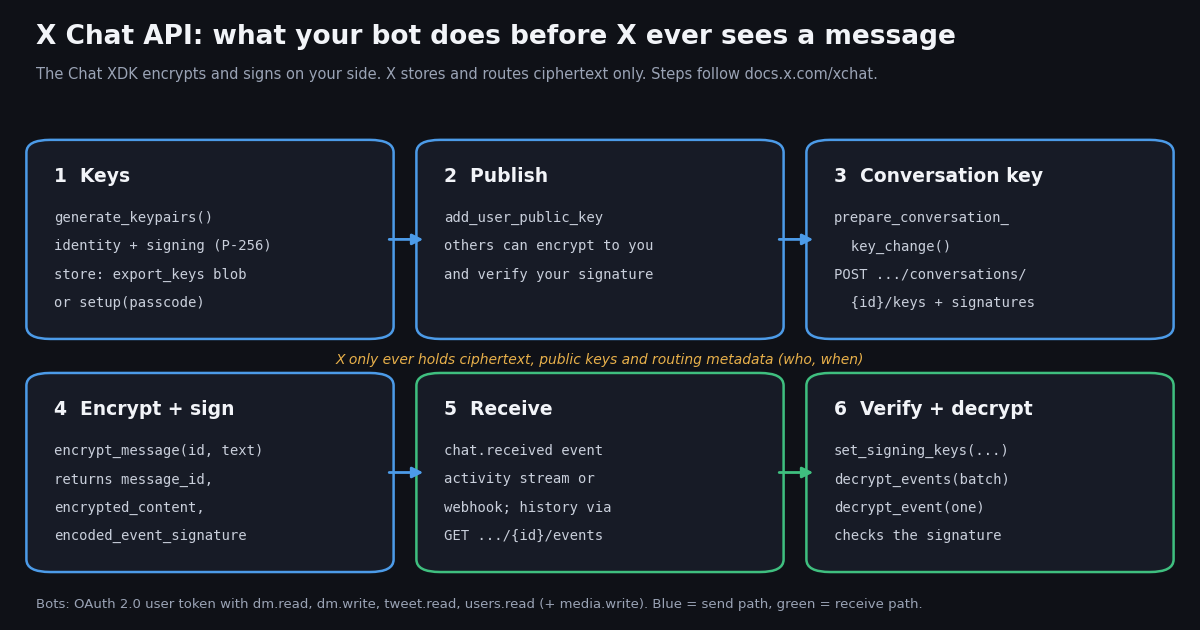
The introduction page summarizes the flow in six steps, and the hero diagram above follows them. In plain terms:
1. Create two keypairs. An identity keypair (used to receive conversation keys) and a signing keypair (used to sign what you send). All X Chat keypairs use the P-256 curve (secp256r1), per the cryptography primer's glossary. Store the private keys either with secure key backup (a passcode) or as an exported key blob.
2. Publish the public keys. Register them through the add-public-key endpoint so other people can wrap conversation keys to you and verify your signatures.
3. Share a conversation key. One call, prepare_conversation_key_change, generates a fresh symmetric key, encrypts a copy for each participant's identity key (ECIES, built on ECDH) and signs the change. You post the result to POST /2/chat/conversations/{id}/keys, including the required action_signatures.
4. Encrypt and sign each message. encrypt_message returns the ciphertext, a signature (ECDSA) and a message id that the SDK generates and embeds in the signed event. You send only those to X.
5. Receive ciphertext from the activity stream, a webhook, or the events history endpoint.
6. Verify and decrypt with the XDK, which checks each message's signature against the sender's published signing key.
Passcode backup, in one paragraph. Secure key backup uses the open-source Juicebox protocol. The XDK splits your private keys into shares held by three realms operated by X; two of the three run inside hardware security modules, and recovery needs shares from two realms, so every recovery passes through at least one HSM. Each realm allows at most 20 wrong passcode attempts before deleting its share. The configuration arrives on your public-key record as juicebox_config. Servers and bots usually skip this and keep an exported key blob in a secret store instead; the agent skeleton's README says bots should use a key blob, not a PIN.
The cryptography primer is unusually candid about the limits, which matter if you are promising users privacy:
The rule X repeats most. The handling-private-keys page tells app builders never to ask users for their encryption PIN or private keys on a server, a support chat or a helper app: the PIN unlocks root identity keys, and revoking OAuth does not take back keys a user already handed over. For user-facing web apps X recommends the WASM build of the XDK so the PIN never leaves the browser.
Authentication, scopes and X Chat bot accounts
User context, always. X Chat calls act for a user, so they need an OAuth 2.0 user access token. The Getting Started page lists dm.read, dm.write, tweet.read and users.read as prerequisites; the introduction adds media.write for uploads. X Chat activity for a user requires that user's authorization, which also applies when you subscribe to their chat.received events.
Bot accounts. Since the X Chat Agents release, a project can mint dedicated bot accounts (docs.x.com/xchat/bots). A bot is a real X account with a user id, @handle and display name, but it has no password and no login: the only way to act as it is its bearer token, returned once in the format xcbot_.... Bot accounts carry an "Automated by @owner" label pointing to the X account that owns the client app. The six bot-management endpoints use app-only auth (your app's bearer token) and are scoped to your project.
A bot token's scopes default to dm.read, dm.write, tweet.read, users.read and media.write; you can narrow them, not widen them. A bot has one active token at a time, and any mint revokes the previous one, which makes token rotation a deliberate act in your deploy pipeline rather than something two services can do independently.
# Create an X Chat bot account (app-only bearer token). Example from docs.x.com/xchat/bots
POST /2/bots
Authorization: Bearer <app bearer token>

{"handle": "my_support_bot", "display_name": "Support Bot"}

# 201 response: store data.token immediately, it is never shown again
# {"data": {"id": "2075014963136012288", "username": "my_support_bot",
#   "name": "Support Bot", "token": "xcbot_...", "expires_at": 1787761273000,
# "scopes": ["dm.read", "dm.write", "tweet.read", "users.read", "media.write"]}}X Chat API endpoints and real-time delivery
The reference section groups the X Chat endpoints by job. The names below are the ones in X's docs index (docs.x.com/enterprise-api/llms.txt, Chat section) plus the families @XDevelopers listed for v2.169:
Getting messages as they arrive. X delivers chat.received (the user received an encrypted DM), chat.sent (the user sent one) and chat.conversation_join (the user joined a group) with ciphertext in the payload. You have two transports. The activity stream, GET /2/activity/stream with an app bearer token, is what X calls often simplest for bots: hold the connection open and filter for the chat event types. Or register a webhook with POST /2/webhooks, answer the CRC challenge (HMAC-SHA256 of the token with your consumer secret), and create subscriptions with POST /2/activity/subscriptions. Creating a subscription for a user needs that user's authorization. Since the March 2026 changelog entry, subscriptions also take a direction filter (sent, received or both) for DM and chat events.
Deduplicate twice. The real-time page says to deduplicate deliveries on event_uuid and messages on the message_id inside the decrypted event, because that id is part of the signed content while sequence ids are unsigned metadata.
The primary-inbox catch. The agent skeleton's README warns that GET /2/chat/conversations returns only the primary inbox; DMs from people who do not follow the bot sit in message requests, and the activity stream is how the bot discovers those threads. A bot that only polls conversations will look broken to strangers.
The handler below is X's own Python example from the real-time page: it checks the event type, verifies any key rotation first, then decrypts the message.
# From docs.x.com/xchat/real-time-events (Python). `chat` has keys loaded and
# set_identity called; `body` is one webhook or stream delivery.
chat.set_cache_keys(True)
chat.set_signing_keys(participant_signing_keys)  # all participants, from the public-key routes
data = body.get("data") or {}
if data.get("event_type") in ("chat.received", "chat.sent"):
    p = data.get("payload") or {}
    if p.get("conversation_key_change_event"):
        # Verify the key change and retain its key in the cache
        chat.decrypt_events([p["conversation_key_change_event"]])
    ev = chat.decrypt_event(p["encoded_event"])
    if ev["type"] == "Message":
print(ev["sender_id"], ev["content"]["text"])The Chat XDK: languages, install, and a first encrypted message in Python
The Chat XDK is one Rust core (chat-xdk-core) with bindings for six languages. The repository (github.com/xdevplatform/chat-xdk) is MIT-licensed; when we checked, the Python package chatxdk and the npm package @xdevplatform/chat-xdk were both at 0.5.2, and the repository had commits within the last day.
The SDK only does cryptography. HTTP calls go through X's general XDK (Python or TypeScript) or plain HTTPS, so a Python bot installs two packages: chatxdk for the crypto and xdk for the API client. The examples/ folder in the repository has one clone-and-run echo bot per language that reads incoming DMs, decrypts them, encrypts a reply and sends it back; the separate xchat-agent-skeleton repository wraps the same flow around Grok and Grok Imagine.
The code below stitches together the Python snippets from X's Getting Started page for a first-time identity: create and register keys, set up a 1:1 conversation key, and send one encrypted message. It is X's code with the placeholders X uses, shortened only where the docs show the same mapping twice. Two details from the troubleshooting page save hours: send the message_id the SDK returns (any other value fails the signature), and on a retry resend the same encrypted payload instead of encrypting again.
What trips people up. From the troubleshooting and groups pages: passing the encrypted conversation key string instead of the raw key bytes; field-name mapping (encrypted_content becomes encoded_message_create_event); a URL path that needs the hyphenated conversation id while events give it with a colon; group names that must be byte-identical between the SDK call and the POST body; and key-change events signed by a member who later left the group, which can no longer be verified because X stops serving that member's keys. In serverless setups, the SDK's key cache lives in memory, so you persist conversation keys yourself and pass them explicitly.
# Assembled from docs.x.com/xchat/getting-started (Python), first-time setup.
from xdk import Client
from xdk.chat.models import AddUserPublicKeyRequest, SendMessageRequest
from chat_xdk import Chat
import json

client = Client(access_token="YOUR_OAUTH2_USER_TOKEN")  # dm.read dm.write tweet.read users.read

# The juicebox_config comes from your public-key record (see Getting Started, step 2)
record = client.chat.get_user_public_keys(
    "YOUR_USER_ID", public_key_fields=["public_key_version", "juicebox_config"]
).data[0]
chat = Chat(json.dumps(record["juicebox_config"]))

# Step 3: create and register keys
registration = chat.generate_keypairs()
pk = registration.public_key
client.chat.add_user_public_key(
    "YOUR_USER_ID",
    AddUserPublicKeyRequest(
        public_key={
            "identity_public_key_signature": pk.identity_public_key_signature,
            "public_key": pk.public_key,
            "public_key_fingerprint": pk.public_key_fingerprint,
            "registration_method": pk.registration_method,
            "signing_public_key": pk.signing_public_key,
            "signing_public_key_signature": pk.signing_public_key_signature,
        },
        version=registration.version,
        generate_version=registration.generate_version,
    ),
)
chat.setup("YOUR_PASSCODE")  # bots: chat.export_keys() and keep the blob in a secret store
chat.set_identity("YOUR_USER_ID", str(registration.version or "1"))

# Step 4: a conversation key for you + the recipient
def public_key_input(user_id):
    r = client.chat.get_user_public_keys(
        user_id, public_key_fields=["public_key_version", "public_key"]
    ).data[0]
    return {"user_id": user_id, "public_key": r["public_key"], "key_version": r["public_key_version"]}

prepared = chat.prepare_conversation_key_change(
    [public_key_input("YOUR_USER_ID"), public_key_input("RECIPIENT_USER_ID")]
)
resp = client.chat.add_conversation_keys(
    "RECIPIENT_USER_ID",
    {
        "conversation_key_version": prepared["conversation_key_version"],
        "conversation_participant_keys": [
            {"user_id": k["user_id"], "encrypted_conversation_key": k["encrypted_key"],
             "public_key_version": k["public_key_version"]}
            for k in prepared["participant_keys"]
        ],
        "action_signatures": [
            {"message_id": s["message_id"],
             "encoded_message_event_detail": s["encoded_message_event_detail"],
             "message_event_signature": {"signature": s["signature"],
                                         "public_key_version": s["public_key_version"],
                                         "signature_version": s["signature_version"]}}
            for s in prepared["action_signatures"]
        ],
    },
)
conversation_id = resp.data["conversation_id"]

# Step 5: encrypt, sign and send
payload = chat.encrypt_message(
    conversation_id, "Hello!",
    conversation_key=prepared["conversation_key"],
    conversation_key_version=prepared["conversation_key_version"],
)
client.chat.send_message(
    "RECIPIENT_USER_ID",
    SendMessageRequest(
        message_id=payload.message_id,
        encoded_message_create_event=payload.encrypted_content,
        encoded_message_event_signature=payload.encoded_event_signature,
    ),
)X Chat API pricing: what X has published
X's pricing page (docs.x.com/x-api/getting-started/pricing) is pay-per-usage with credits bought upfront in the Developer Console. It does not have a line called X Chat. Here is what it does list that touches chat and DMs, next to what X said at launch:
What we could not verify. The pricing page does not say whether an X Chat send is billed as a DM Interaction, and we found no page on docs.x.com that says whether the limited-time free allowance from the launch post is still running or when it ends. The page itself says rates are subject to change and that current rates are always shown in the Developer Console, so check there before you size a budget. For context, the same page lists $0.005 per post read, $0.010 per user read, $0.015 per post created, a cap of 3M post reads a month on pay-per-usage, and $20 in credits for a first saved card plus a match of the first auto-recharge up to $50.
A worked example on the published webhook rate. A support bot that receives 1,000 encrypted messages a day through a webhook would see 1,000 chat.received events at $0.010, which is $10 a day or about $300 over a 30-day month, before any replies, reads or the price of the model that writes the answers. Two developers in our sample of public posts called the cost prohibitive or "stupid expensive"; neither said which rate they were being charged, so treat that as sentiment, not a price.
What X shipped and what developers said: a study of the launch
We pulled the @XDevelopers posts from the four weeks before the July 30, 2026 launch through to collection, and every public post we could find that names the X Chat API, Chat XDK or X Chat bots or agents. The goal was to see how hard X is pushing the API and what builders actually say about it. Full method is in the last section.
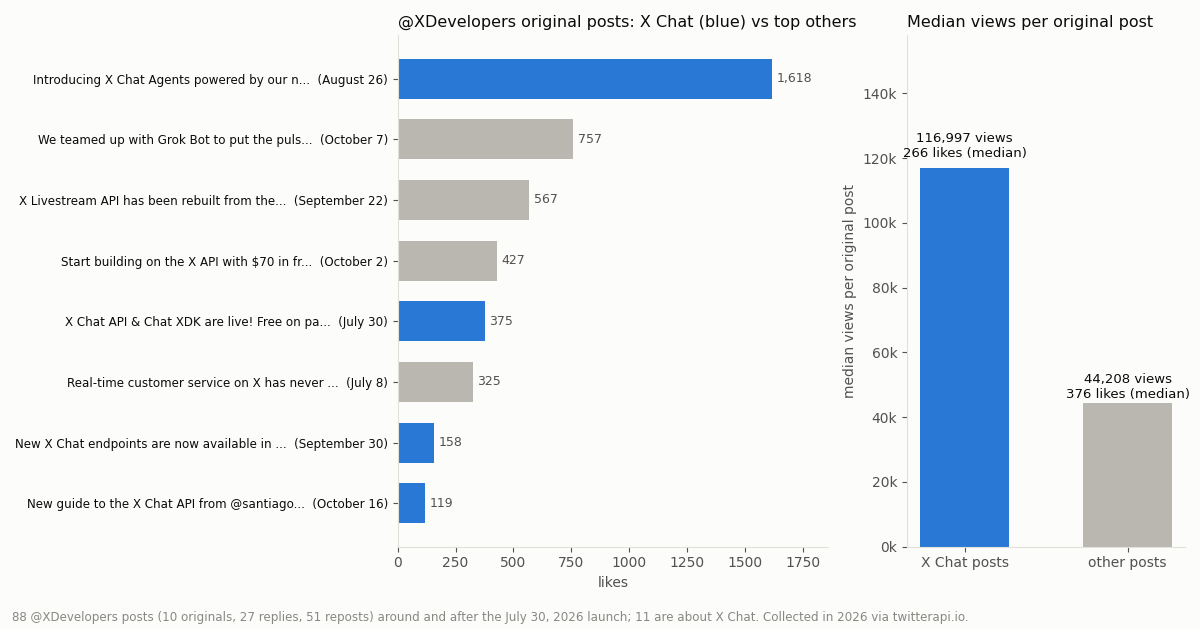
X's own channel. Of 88 @XDevelopers posts in the window (10 originals, 27 replies and 51 reposts), 11 were about X Chat (12.5%). Among original posts the share is 40%: 4 of 10. Those four drew a median of 116,997 views against 44,208 for the other six originals, though a lower median of 266 likes against 376, because the two later X Chat posts (the endpoint release and the guide) were quiet.
The X Chat Agents announcement was the account's most-liked original post in the window, with 1,618 likes, 431,111 views and 694 bookmarks, ahead of the Grok Bot partnership post and the Livestream API rebuild. Bookmarks are the tell for developer intent: people saving a post to build with it later.
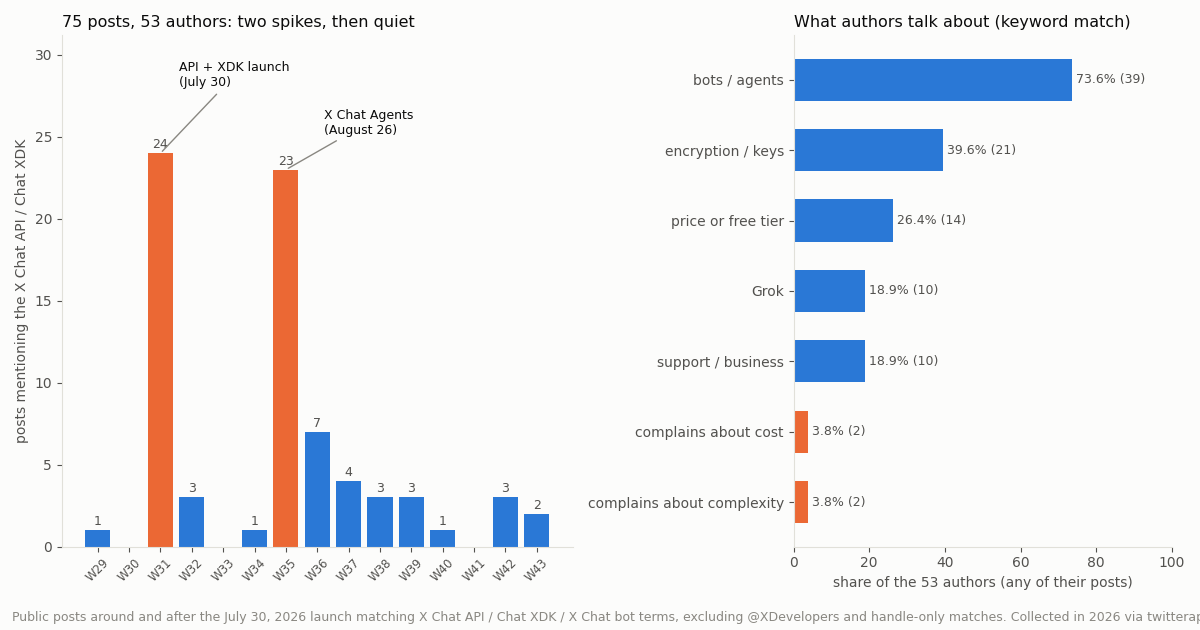
The developer conversation. The search returned 106 posts; 31 matched only because they tagged accounts named @chat and @bot, which leaves 75 posts from 53 authors. The conversation is launch-driven: 25 posts came in the launch week and 26 in the X Chat Agents week, 68.0% of the total, and no week since has passed 7. The median post had 5 likes and 909 views. 21.3% were not in English, most of them Japanese, including builders describing a DM career-advice bot on a small cloud VM.
What they talk about. Counting each author once, 73.6% (39) mentioned bots or agents, 39.6% (21) encryption or keys, 26.4% (14) price or the free allowance, and 18.9% (10) Grok. Explicit complaints were rare but pointed: 2 authors called the cost prohibitive or "stupid expensive", and 2 called the developer experience a nightmare or "dead on arrival" for large public group rooms. Positive build reports, a group-chat bot answering dozens of mentions in its first day and a hackathon podcast agent, came from small accounts in the first two weeks.
Where twitterapi.io fits around an X Chat bot (and where it does not)
It does not replace X Chat. We do not offer an X Chat API, we do not hold anyone's encryption keys, and nothing on our side can read or write an encrypted X Chat conversation the way the Chat XDK does. If your product needs end-to-end encrypted DMs, a project bot account with the "Automated by" label, or group chats with signed membership changes, build on X's API.
What our DM endpoint actually is. twitterapi.io has a session-based write path. One POST /twitter/user_login_v2 call ($0.10, with a residential proxy you supply) returns login_cookies for an account you own; POST /twitter/send_dm_to_user then sends a direct message as that account at $0.002 per call, to a user_id who accepts DMs, with optional media_id and reply_to_message_id. Every call acts as that account, so X can rate-limit, lock or suspend it; keep a human pace; the session can need a fresh login; and calls are billed per HTTP 200 response, including ones whose body says status: error. It suits answering people who wrote to you first. It is not for bulk messages or outreach, and X Chat bot accounts cannot use it at all, since they have no password to log in with. We have not tested whether a message sent this way lands in an encrypted X Chat thread or a legacy DM thread, so do not build on either assumption.
Where reads fit well. An X Chat bot decrypts a message and gets a sender_id and some text. Everything else a good answer needs is public: who the sender is, what they posted recently, whether they mentioned your product in public, what the thread they are asking about says. Those are read calls, and they need no X account and no OAuth token on our side: /twitter/user/batch_info_by_ids for the profile (18 credits per user, $0.18 per 1,000 profiles), /twitter/user/last_tweets and /twitter/tweet/advanced_search for posts (15 credits per tweet returned, $0.15 per 1,000 tweets). The official pay-per-usage card charges $0.005 per post read and $0.010 per user read, which is $5 per 1,000 posts against $0.15 here, about 33 times more per 1,000 tweets. The code example below shows a context lookup a bot can run between decrypting a message and writing the reply.
New accounts that pass the automatic bot check get up to $1 of free credits (at most 100,000 credits, no card, one per person or network, expiring after 31 days); purchased credits never expire. Rate limits are 0.2 requests per second before the first payment and 20 once paid.
How we collected this
Question. How prominent has the X Chat API been in X's official developer channel, how did its posts perform against the account's other posts, and what do people say about the API in public?
Accounts and queries. The @XDevelopers account (an organization account), read two ways: an advanced search for from:XDevelopers and the account's timeline, merged by post id (88 posts). For the discussion, one advanced search for the phrases "xchat api", "x chat api", "chat xdk", "chatxdk", "xchat bot", "x chat bot", "x chat agent(s)", "chat-xdk" and "xchat-agent-skeleton", excluding @XDevelopers (106 posts returned, 75 kept after dropping 31 that matched only through @handles).
Window. From four weeks before the July 30, 2026 launch to the day of collection. Collected in 2026 through twitterapi.io read endpoints, 14 requests in total, about $0.03 of credits.
Method. A post counts as about X Chat when its text, or the text it quotes or reposts, matches an X Chat pattern after removing @handles (so the livestream "chat" posts are not counted). Themes are keyword matches, counted once per author so that one prolific account (12 posts) does not dominate. The patterns are in analyze.py in the study folder.
What the sample cannot show. Ten original posts is a small base for medians, and view counts on older posts have had longer to accumulate. Search returns what X indexes for these phrases, so posts that discuss the API without naming it are missed, and keyword themes cannot tell praise from complaint except for the explicit complaint patterns. Nothing here measures how many bots are live.
Privacy. Aggregates only. Official @XDevelopers posts are named because it is an organization account. Posts by individuals are summarized without names, handles or quotes long enough to identify them; the de-identified rows keep only week, language, likes, views, a follower bucket and themes.
"""Context for an X Chat bot: after the Chat XDK decrypts a message and gives you
sender_id, look up who the sender is and what they posted recently, then hand
that to the model that writes the encrypted reply. Read-only; no X account needed.
"""
import os
import requests

BASE = "https://api.twitterapi.io"
HEADERS = {"X-API-Key": os.environ["TWITTERAPI_IO_KEY"]}


def sender_profile(sender_id):
    """One profile by numeric id (18 credits)."""
    r = requests.get(f"{BASE}/twitter/user/batch_info_by_ids",
                     headers=HEADERS, params={"userIds": sender_id}, timeout=30)
    r.raise_for_status()
    users = r.json().get("users") or []
    return users[0] if users else None


def recent_posts(user_name, max_pages=1):
    """Newest posts first, 20 per page (15 credits per tweet returned)."""
    posts, cursor = [], ""
    for _ in range(max_pages):
        r = requests.get(f"{BASE}/twitter/user/last_tweets", headers=HEADERS,
                         params={"userName": user_name, "cursor": cursor}, timeout=30)
        r.raise_for_status()
        body = r.json()
        posts += (body.get("data") or {}).get("tweets") or []
        if not body.get("has_next_page"):
            break
        cursor = body.get("next_cursor") or ""
    return posts


def public_mentions_of(bot_handle, user_name):
    """Did this sender mention the bot in public? (advanced search)"""
    q = f"from:{user_name} @{bot_handle}"
    r = requests.get(f"{BASE}/twitter/tweet/advanced_search", headers=HEADERS,
                     params={"query": q, "queryType": "Latest"}, timeout=30)
    r.raise_for_status()
    return r.json().get("tweets") or []


def build_context(sender_id, bot_handle):
    user = sender_profile(sender_id)
    if not user:
        return "Unknown sender."
    name = user.get("userName")
    lines = [f"Sender @{name}: {user.get('followers', 0)} followers, "
             f"{user.get('statusesCount', 0)} posts, bio: {user.get('description') or '-'}"]
    for t in recent_posts(name)[:5]:
        lines.append(f"recent post ({t.get('createdAt')}): {t.get('text', '')[:200]}")
    for t in public_mentions_of(bot_handle, name)[:3]:
        lines.append(f"public mention of the bot: {t.get('text', '')[:200]}")
    return "\n".join(lines)


if __name__ == "__main__":
    # sender_id comes from ev["sender_id"] after chat.decrypt_event(...)
    print(build_context("44196397", "my_support_bot"))  # 44196397: a public account id used as a stand-in
Questions readers ask
What is the X Chat API?
It is X's official API for end-to-end encrypted direct messages in X Chat, the rebuilt DM system. Your app encrypts and signs each message with the Chat XDK before sending, X routes only ciphertext, and recipients verify the signature when they decrypt. It launched on July 30, 2026, with bot accounts and an agent skeleton added on August 26, 2026.
Is the X Chat API free?
X's launch post on July 30, 2026 said it was free on pay-per-use for a limited time, up to 500 messages a day. The pricing page on docs.x.com does not have an X Chat line; it lists chat.received webhook events at $0.010 each and DM Interaction: Create at $0.015 per request. We found no page saying whether the free allowance is still running, so check the Developer Console, which X says always shows current rates.
Which languages does the Chat XDK support?
Python (package chatxdk, import chat_xdk, Python 3.10+), JavaScript and TypeScript via WASM (@xdevplatform/chat-xdk, Node 18+), Rust (chat-xdk-core as a git dependency), Go (cgo), C# (.NET 8+) and Java (JDK 17+, Maven Central). All six wrap one Rust core and are MIT-licensed.
What OAuth scopes does an X Chat bot need?
An OAuth 2.0 user access token with dm.read and dm.write, plus tweet.read and users.read; add media.write to upload encrypted attachments. A project bot account created with POST /2/bots gets a token with exactly those five scopes by default, and you can narrow but not widen them.
Can X read X Chat messages sent through the API?
X's cryptography primer says message bodies are encrypted before they reach X and conversation keys never leave participants' devices unwrapped, so X cannot read the content. It also says X still sees metadata (who messaged whom, and when), that there is no forward secrecy, and that a compromised device exposes everything on it.
How does my bot receive X Chat messages?
Subscribe to chat.received (and chat.sent if you want outbound copies) on the X Activity API. Bots usually hold the activity stream open with an app bearer token; alternatively register a webhook, pass the CRC check and create subscriptions. Payloads carry ciphertext, which you verify and decrypt with the Chat XDK. Deduplicate on event_uuid and on the message_id inside the decrypted event.
Can twitterapi.io send X Chat messages?
No. We do not offer an X Chat API or hold encryption keys. Our send_dm_to_user endpoint sends a direct message as an account you log in with user_login_v2, at $0.002 per call; it acts as that account (X can rate-limit, lock or suspend it), needs a human pace and occasional re-login, is billed per HTTP 200 call, and is meant for answering people who wrote first, never bulk or outreach. We have not verified which thread type such messages land in.
Why can't my X Chat bot see DMs from strangers?
Per X's agent skeleton README, GET /2/chat/conversations returns only the primary inbox; DMs from people who do not follow the bot sit in message requests. Use the activity stream to discover those threads, list known peers, or ask people to follow the bot first. Also check the bot's dm_permission setting (everyone, premium or no_one).
Continue
- X Chat API introduction (docs.x.com)
- X Chat API: Getting Started, send your first encrypted message (docs.x.com)
- Manage bot accounts with the Chat API (docs.x.com)
- How X Chat keeps your messages secure: cryptography primer (docs.x.com)
- X API pay-per-usage pricing and credits (docs.x.com)
- xdevplatform/chat-xdk: X Chat encryption SDK (GitHub, MIT)
- Twitter (X) API overview: read endpoints, pricing and limits
- How to build a Twitter (X) chatbot that answers mentions and DMs
- Twitter (X) welcome message: the DM API status and how to send one
- Grok Bot on X: what it does and what its X connector costs
- Connecting the Hermes agent to Twitter (X)
- Twitter (X) webhooks for real-time tweets: filter rules and payloads
- twitterapi.io pricing for read and write endpoints
- twitterapi.io API documentation
- 01Grok for Startups: what the xAI credits cover, who qualifies, and where Twitter (X) data fits
- 02Grok Bot API: Every Way to Drive a Grok Bot From Code, and How to Feed Your Own Agent Twitter (X) Data
- 03Grok Bot Alternatives: Open-Source and Hosted Agents for Twitter (X)
- 04Muse Connectors: What Exists, Custom Connectors, MCP, and Live Twitter (X) Data
- 05Grok Bot vs Claude: which agent can read and act on Twitter (X) data, and what it costs
- 06How to Search for Deleted Tweets
- 07Syften Alternative for Twitter (X) Keyword Alerts: The $40 Add-On vs Pay-Per-Tweet
- 08Twitter Scheduler — Three Routes, Including a DIY API Path
Stop reading. Start building.
Starter credits cover real testing on real data. Google sign-in, no card, no application queue.
Get an API keyAlready building with TwitterAPI.io? Publish an honest tutorial or build log about it and earn up to $200 a month in API credits.