Grok Bot API: Every Way to Drive a Grok Bot From Code, and How to Feed Your Own Agent Twitter (X) Data
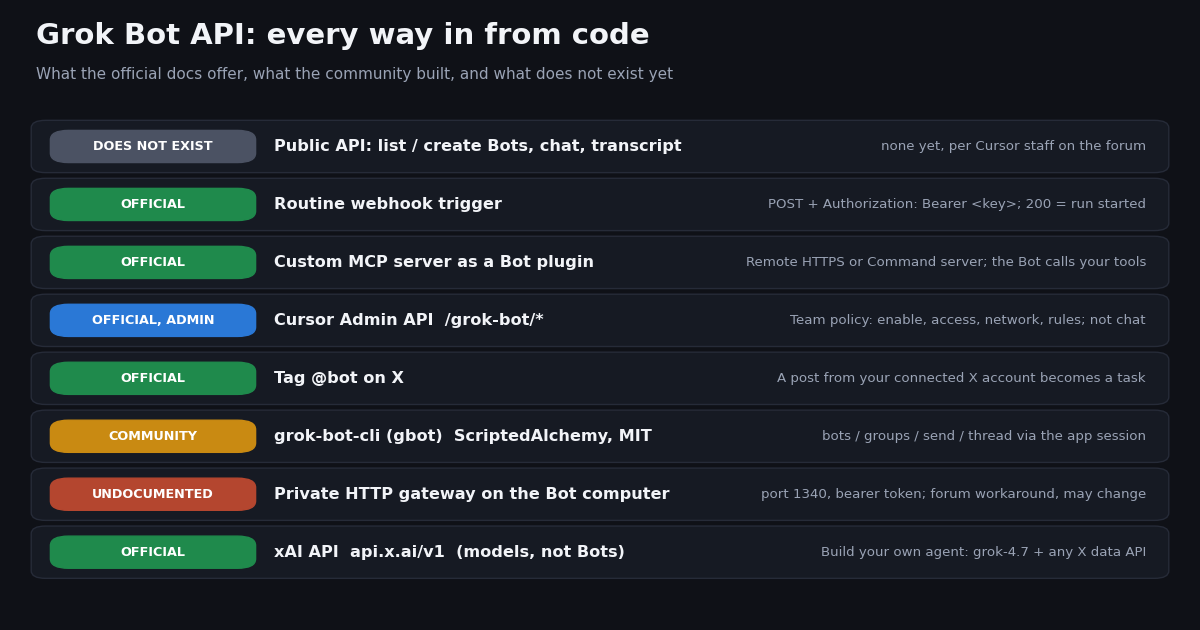
This page answers a developer question: can you drive or automate Grok Bot from your own code, and if not, what is the closest thing? It is not about the X data a Bot reads or what Grok Bot's X connector costs; that is covered in our Grok Bot overview (the "grok bot x api" question). Here the direction is reversed: your script, CI job or agent talking to Grok Bot, and your own app getting the X data Grok Bot would see.
Search interest in "grok bot api" went from zero to hundreds of monthly searches in about a month, and "grok bot cli" and "grok bot mcp" followed. On X the same question shows up about 321 times a day in our sample. Every fact below was read from xAI's Grok Bot documentation, Cursor's help center, API reference and forum, and the grok-bot-cli repository on GitHub in the same session the page was built; where something is undocumented we say so.
Does Grok Bot have an API? The short answer from the docs
No public API exists for the operations most people mean by "Grok Bot API": listing your Bots, creating one, sending it a message and reading its reply. On the Cursor forum feature request "Grok Bot: official API to create bots and send/receive chat (for companion UIs)", a Cursor staff member replied that there is "currently no official public API or SDK for Grok Bot for this use case (list/create bots, send message, read transcript)", that UI automation is "basically the only option right now", and that the request has been passed to the team with no timeline. xAI's Grok Bot docs at docs.x.ai/grok-bot describe talking to a Bot by messaging it in the desktop or mobile app; none of the Grok Bot pages documents a chat API.
Grok Bot runs on Cursor's infrastructure: the docs say Bots work on a persistent cloud computer in Cursor's cloud and that Grok Bot uses Cursor authentication. That is why the official programmatic surfaces live in Cursor's docs rather than in the xAI API reference. The table below lists every path we could verify, with its status.
What this means in practice. If you need to wake a Bot when something happens elsewhere, the webhook trigger is the supported tool. If you need a Bot to reach your systems, write or reuse an MCP server. If you need to hold a conversation with a Bot from another program, you are on community or undocumented ground today. And if you only want Grok plus X data inside your own product, you do not need Grok Bot at all.
The routine webhook: the one official way to start a Bot from code
A routine tells one Bot when to run a workflow. Cursor's help center (cursor.com/help/grok-bot/routines) lists the starts it supports: a schedule, a Slack message, a GitHub, Linear, Sentry or PagerDuty event, an email, or a webhook call. You create the routine by asking the Bot in chat, then ask it to add a webhook trigger. On desktop the routine's Webhook section shows three fields: POST to (the URL), key (the secret) and header (the full Authorization: Bearer <key> line).
What a call does. Send an HTTP POST to that URL with the header; you can include a JSON body, which the Bot receives together with the routine instruction. A 200 means Grok Bot accepted the call and started a run. It does not mean the Bot has finished; the result shows up in the Bot's chat. Any other response means no run started, usually because the routine is paused or the key was rotated.
Limits that matter for automation. Your routines can run up to 300 times an hour in total and each routine up to 200 times an hour; past either limit a run fails with "Automation run rate limit exceeded". A Bot can own up to 50 routines, schedules must be at least five minutes apart, and the app keeps the 20 most recent run records per routine (docs.x.ai/grok-bot/skills-routines-and-automations). Each run spends weekly Grok Bot usage, so a webhook on a noisy event source can burn a week of usage in a day.
One-way, by design. The webhook is a doorbell, not a conversation: you cannot read the Bot's answer back through it. Forum users building Slack and agent-to-agent bridges in August 2026 reported that the body did not always arrive and settled on writing the payload somewhere the Bot can read (a file, a ticket) before ringing; the current help article says the body is delivered. Either way, have the Bot report its result through a connector you can read (Slack, email, a GitHub comment) if your code needs the outcome.
import os

import requests

# Copy these from the routine's Webhook section in the Grok Bot desktop app.
URL = os.environ["GROK_BOT_WEBHOOK_URL"]   # the "POST to" field
KEY = os.environ["GROK_BOT_WEBHOOK_KEY"]   # the "key" field

r = requests.post(
    URL,
    headers={"Authorization": f"Bearer {KEY}"},
    json={"source": "ci", "event": "release_tagged", "ref": "v2.4.0"},  # optional JSON body
    timeout=30,
)
# 200 = Grok Bot accepted the call and STARTED a run. It does not mean the Bot finished.
# Anything else = no run started (paused routine, rotated key, or a rate limit).
print(r.status_code, r.text[:200])
MCP: give a Bot your tools (the other official direction)
Model Context Protocol is the supported way to let a Bot call your systems. Grok Bot's Team Bot docs (docs.x.ai/grok-bot/team-bots) list two kinds of custom MCP server a Bot can use: Remote HTTPS, which authenticates with the Bot's own credential or each person's OAuth sign-in, and Command, which runs on the cloud computer each conversation uses. Grok's consumer connectors page (docs.x.ai/grok/connectors) adds that a custom MCP connector must be reachable over the public internet, with tunneling as the fix for a server on your laptop.
Network policy applies. On Enterprise teams with a network allowlist, an admin can switch on Apply to MCP servers; a remote server not on the list is refused with an error naming the host (docs.x.ai/grok-bot/security). It is off by default for every team.
For X data specifically. Bots can already search and read public X without connecting an X account, read-only, and need the X plugin plus a sign-in for DMs, bookmarks, the home timeline and likes (docs.x.ai/grok-bot/computer-and-apps). Our Grok Bot overview walks through what those reads cost on X's rate card. If you prefer to bring your own X data source, an MCP server is the slot for it. Our open-source @twitterapi_io/mcp-server package (version 0.2.0 on npm, 12 read-only tools such as search_tweets, get_user_last_tweets and get_user_mentions) is a stdio server, which matches Grok Bot's Command type. We have not tested it inside Grok Bot, so treat that pairing as a reasonable fit rather than a documented recipe.
MCP in the other direction. People asking for a "Grok Bot MCP" often want the reverse: an MCP server that exposes Grok Bot to Claude Code, Codex or Cursor. No official one exists. The community grok-bot-cli package ships one (next section). And if what you need is Grok calling MCP tools from your own code, the xAI API supports remote MCP tools in the Responses API with server_url and server_label, Streaming HTTP and SSE transports only (docs.x.ai/developers/tools/remote-mcp).
The Cursor Admin API: Grok Bot policy, not chat
The closest thing to an official "Grok Bot API" in name is the Grok Bot group in Cursor's Admin API (cursor.com/docs/account/teams/admin-api). It lets a team admin enable Grok Bot and manage capabilities, enforced Auto-review, group access, network policy, team rules and setup scripts. Authentication is a team API key over Basic auth; reads need read:* or admin:*, writes need admin:*, and the rate limit is 20 requests per minute per team per endpoint, with 429 and Retry-After: 60 past it.
Member computers (recreate, terminate, delete, or delete all Grok Bot data) are handled by the separate Organization API with an admin:* key, one operation per team at a time (docs.x.ai/grok-bot/computers). None of these endpoints creates a Bot, sends it a message or reads a conversation, so they solve fleet management, not automation.
grok-bot-cli and the private gateway: what the community built
The top result for "grok bot cli" is github.com/ScriptedAlchemy/grok-bot-cli, a community project (MIT license, published on npm as grok-bot-cli, version 0.12.4 when we checked; about 130 stars and 27 forks). It is not published by xAI or Cursor. Its README describes a gbot command that manages Grok Bot agents, groups and messages from the terminal: gbot bots list, gbot bots create --name Researcher, gbot send Researcher "...", gbot thread Researcher --after <id> --json, plus group and skill-library commands.
How it authenticates. It needs Node.js 22.19.0 or newer and the Grok Bot desktop app; after you sign in to the app once, gbot reuses the app's encrypted session and routing credentials (or GROK_BOT_GATEWAY_URL plus GROK_BOT_GATEWAY_TOKEN, or CURSOR_ACCESS_TOKEN). By default it only sends credentials to *.cursor.sh, *.cursor.com and *.cursorvm.com hosts. The package also installs a grok-bot MCP server (gbot_send, gbot_thread) for Codex, Claude Code and Cursor, and bridges for Codex threads and opted-in Claude Code sessions.
The gateway underneath. A Cursor forum thread from August 2026 documents the mechanism: the Bot's computer runs a private HTTP gateway, normally on port 1340, with a bearer token stored on that computer, accepting calls such as POST /api/listAgents and POST /api/sendPrompt. The poster, and the author of an unofficial TypeScript SDK built on it, both call it "an undocumented internal API, not an official Cursor product": routes and storage paths may change after an update, the token should be treated like a password, and port 1340 should never be exposed to the internet.
Caveats before you build on it. Anything that rides on the app session or the gateway can break with an app or computer update (the docs say an update rebuilds the computer and removes installed packages), and you should read Cursor's terms for your plan before automating an account this way. For personal workflows it is the most capable option there is; for a product other people depend on, wait for an official API or design around the webhook and MCP surfaces.
What people on X actually ask for
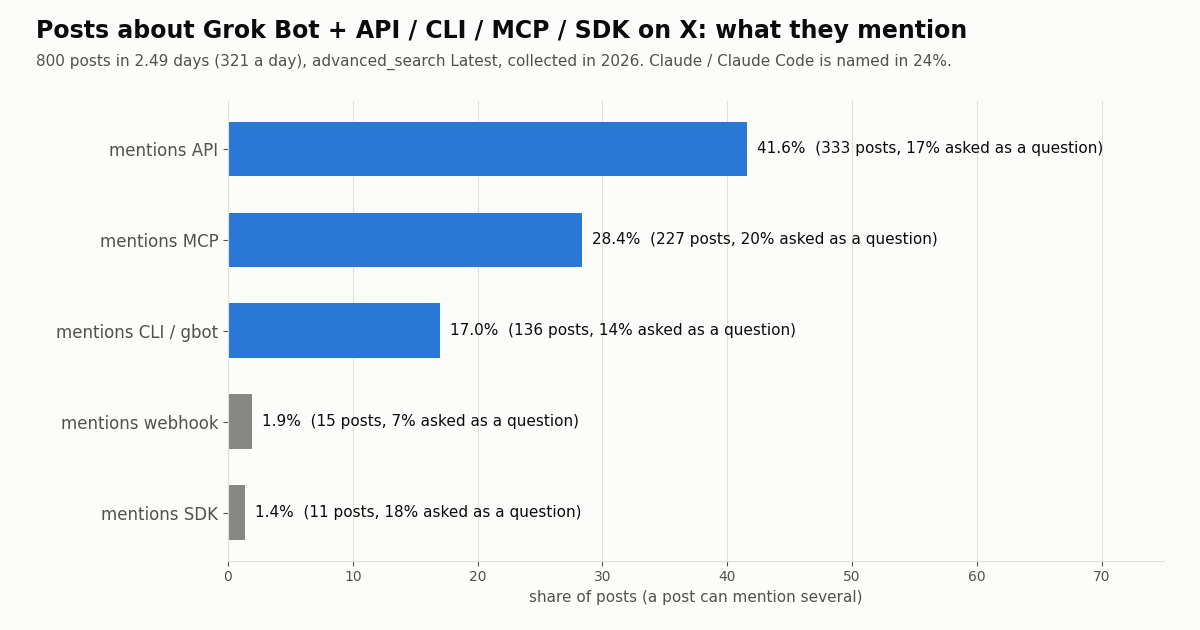
We searched X for "grok bot" together with api, cli, mcp or sdk and read 800 posts (newest first, 40 pages, collected in 2026). The search filled our page cap in 2.49 days, which works out to about 321 matching posts a day; the one complete UTC day in the window had 305.
Reading the numbers. "API" is the broadest word (it also covers API keys and the xAI API), so its 41.6% is an upper bound on people asking for a Grok Bot API specifically. MCP at 28.4% is the sharper signal: people want Grok Bot to sit in the same tool mesh as their other agents. Claude or Claude Code is named in 24.2% of posts, Codex in 10.0% and Cursor in 10.1%, which matches the forum threads: the common goal is handing work between Grok Bot and a coding agent. Only 15.9% of posts carry a question mark; most are people sharing a workaround or a template.
Engagement is thin and skewed. The median post had 1 like and 168 views; 34.9% had no likes, while the top 10% passed 4,729 views. English made up 58.9% of posts, Chinese 14.5% and Japanese 9.2%.
The developer path: your own agent with the xAI API and X data
Most "Grok Bot API" searches come from people who want Grok's reasoning over live X posts inside their own app, bot or agent. That does not need Grok Bot. The xAI API at https://api.x.ai/v1 serves the same Grok models with an xAI API key (our guide to getting a Grok API key covers the console steps). docs.x.ai lists grok-4.7 as the recommended model for chat and code, at $2.00 per million input tokens and $6.00 per million output tokens below 200k prompt tokens. The OpenAI-compatible endpoint is POST https://api.x.ai/v1/chat/completions; xAI's reference calls it the stateless predecessor of the Responses API and recommends Responses for new integrations, so treat Chat Completions as the quick start.
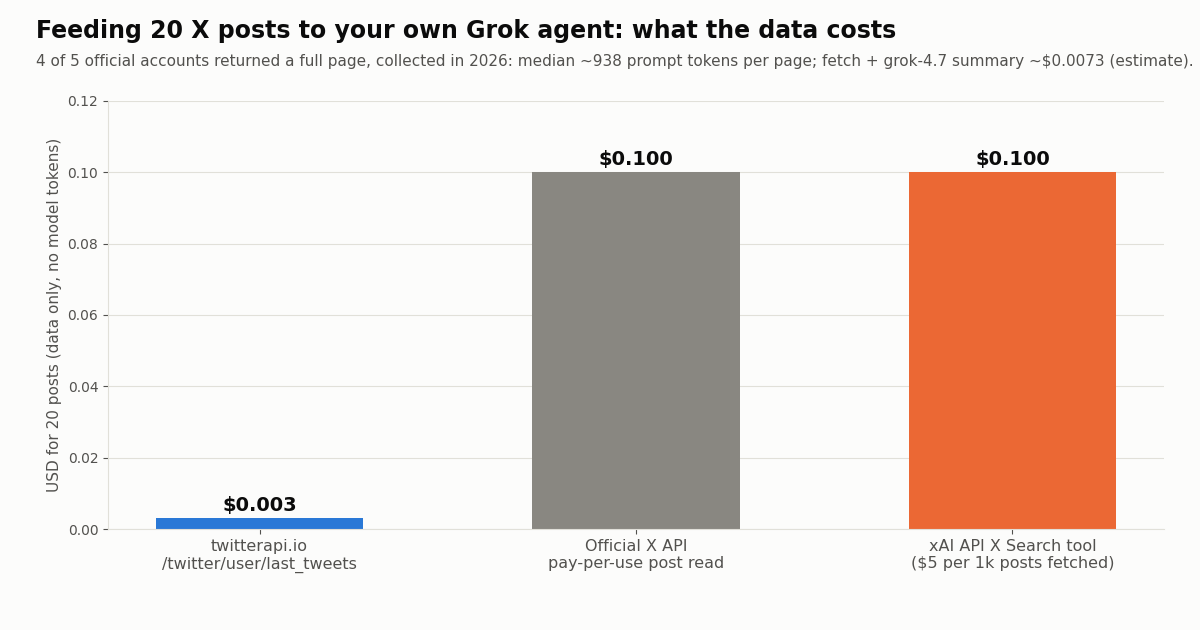
Where the X data comes from. Grok models have no live data unless you give it to them. You have three options. xAI's server-side X Search tool is billed at $5 per 1,000 posts fetched and $10 per 1,000 user profiles on top of tokens (docs.x.ai/developers/tools/x-search). The official X API pay-per-use rate card charges $0.005 per post read (docs.x.com/x-api/getting-started/pricing). twitterapi.io charges 15 credits per tweet returned, $0.15 per 1,000 tweets, with a 15-credit ($0.00015) minimum per request and no X account needed. Per 1,000 posts that is $5 against $0.15, about 33x apart.
The pattern. Fetch the posts yourself with /twitter/tweet/advanced_search (any X search operator, queryType=Latest, follow next_cursor), format them into a compact prompt, and send that to grok-4.7. You control exactly which posts the model sees, the cost of the data is fixed before the model runs, and the same fetch works for Claude, GPT or a local model. The full runnable script is at the end of this page.
Writing back to X. If your agent also needs to post, reply or follow, twitterapi.io has write endpoints that act through an authenticated session: one /twitter/user_login_v2 login ($0.10, with a proxy you supply) returns login_cookies, then each action such as /twitter/create_tweet_v2 costs $0.002, billed per HTTP 200 call. Every call acts as that account, so X can rate-limit, lock or suspend it; keep a human pace and expect to log in again when the session expires.
Measured: one fetch-and-summarize run on five official accounts
To size the pipeline we pulled one /twitter/user/last_tweets page (20 posts, newest first) from five official accounts: @xai, @grok, @cursor_ai, @XDevelopers and @bot. We did not call the xAI API in this study, so the model cost below is an estimate from the prompt size (characters divided by four, a common rule of thumb) at the grok-4.7 list price, with 400 output tokens assumed.
Takeaways. A full page of 20 posts made a prompt of roughly 938 tokens (median), and the whole run, data plus an estimated Grok summary, came to about $0.0073. The data is the smaller half: at these prices the model tokens cost more than the posts. The @xai call returned no posts on our request and was billed only the $0.00015 request minimum, which is also what an empty polling check costs. Each call took a median 2.3 seconds end to end in our client, which includes Python start-up and the shared rate-limit spacing our study tooling adds, so it overstates the API's own latency.
Scaling it. Polling one search every 60 seconds for a month is 43,200 checks; if most find nothing, the floor is $6.48 a month, or $1.30 at a five-minute interval. New accounts that pass the automatic bot check get up to $1 of free credits (at most 100,000 credits, no card, one per person or network, expiring after 31 days) and the rate limit is 0.2 requests per second before the first payment and 20 after it.
How we collected this
Question. What do people on X ask for when they look for a Grok Bot API, and what does the do-it-yourself pipeline cost per run? Query. "grok bot" (api OR cli OR mcp OR sdk) -filter:retweets on /twitter/tweet/advanced_search with queryType=Latest, 40 pages; plus one /twitter/user/last_tweets page each for @xai, @grok, @cursor_ai, @XDevelopers and @bot. Window. The newest 2.49 days of matching posts at collection time (collected in 2026). Sample. 800 unique posts and 80 timeline posts, 45 requests, about $0.13 of credits.
Method. Ask types are keyword matches on the post text (API, CLI or gbot, MCP, SDK, webhook); a post can match several, and 22.5% matched only through a handle, link or word form the patterns skip. Questions are posts containing a question mark. Prompt tokens are estimated as characters divided by four; the Grok cost uses docs.x.ai's grok-4.7 list price and an assumed 400-token answer.
What the sample cannot show. It covers two and a half days of a fast-moving topic, so the shares will drift as Grok Bot ships features. Keyword matching cannot tell a request for an API from a mention of one. The page cap means we saw the newest posts, not all of them. Latency was measured in our client, not at the API.
Privacy. Search authors are mostly private individuals: we keep aggregates and de-identified rows only (no ids, links, text or handles) and do not name or quote them. Only official organization accounts are named.
"""X posts -> Grok summary, for your own agent (not Grok Bot).
pip install requests; set TWITTERAPI_IO_KEY and XAI_API_KEY."""
import json
import os
import time

import requests

TWAPI = "https://api.twitterapi.io"
TW_HEADERS = {"X-API-Key": os.environ["TWITTERAPI_IO_KEY"]}
XAI_KEY = os.environ["XAI_API_KEY"]
MODEL = "grok-4.7"  # model id as listed on docs.x.ai/developers/models


def search_posts(query, max_pages=2):
    """Latest posts for an X search query; 20 per page, follows next_cursor."""
    posts, cursor = [], ""
    for _ in range(max_pages):
        params = {"query": query, "queryType": "Latest"}
        if cursor:
            params["cursor"] = cursor
        r = requests.get(f"{TWAPI}/twitter/tweet/advanced_search",
                         headers=TW_HEADERS, params=params, timeout=30)
        r.raise_for_status()
        body = r.json()
        posts.extend(body.get("tweets", []))
        if not body.get("has_next_page") or not body.get("next_cursor"):
            break
        cursor = body["next_cursor"]
    return posts


def as_prompt(posts):
    lines = []
    for t in posts:
        author = (t.get("author") or {}).get("userName", "?")
        lines.append(f"@{author} | {t.get('createdAt')} | {t.get('likeCount', 0)} likes | "
                     f"{t.get('viewCount', 0)} views\n{t.get('text', '')}")
    return "\n\n".join(lines)


def summarize(question, posts_text):
    r = requests.post(
        "https://api.x.ai/v1/chat/completions",
        headers={"Authorization": f"Bearer {XAI_KEY}", "Content-Type": "application/json"},
        json={
            "model": MODEL,
            "messages": [
                {"role": "system", "content": "You summarize X posts for a developer. "
                 "Quote handles for every claim and say when the evidence is thin."},
                {"role": "user", "content": f"{question}\n\nPosts:\n{posts_text}"},
            ],
            "max_completion_tokens": 600,
        },
        timeout=180,
    )
    r.raise_for_status()
    completion = json.loads(r.text)  # OpenAI-compatible chat completion object
    return completion["choices"][0]["message"]["content"], completion.get("usage", {})


if __name__ == "__main__":
    query = '"grok bot" (api OR cli OR mcp) -filter:retweets'
    t0 = time.monotonic()
    posts = search_posts(query)
    t1 = time.monotonic()
    summary, usage = summarize("What are developers asking for, and what workarounds do they use?",
                               as_prompt(posts))
    t2 = time.monotonic()
    pages = max(1, -(-len(posts) // 20))
    data_cost = max(len(posts) * 0.00015, pages * 0.00015)  # 15 credits per tweet, 15-credit minimum per call
    print(summary)
    print(f"\n{len(posts)} posts in {t1 - t0:.1f}s (about ${data_cost:.4f} of X data); "
          f"Grok answered in {t2 - t1:.1f}s; usage: {usage}")
Questions readers ask
Does Grok Bot have an API?
Not a public one for chat. Cursor staff confirmed on the Cursor forum that there is no official public API or SDK to list or create Bots, send a message or read a transcript, and that the request is logged. The official programmatic surfaces are routine webhook triggers (start a run with a POST), custom MCP servers (the Bot calls your tools) and Cursor's Admin API for team policy.
Is grok-bot-cli official?
No. grok-bot-cli is a community project by ScriptedAlchemy on GitHub, MIT licensed and published on npm. It works by reusing the Grok Bot desktop app's signed-in session and gateway, which Cursor does not document as a public interface, so commands can break after an app update.
How do I trigger a Grok Bot from a script or webhook?
Ask the Bot to create a routine with a webhook trigger, then copy the URL and key from the routine's Webhook section in the desktop app. POST to the URL with Authorization: Bearer <key> and an optional JSON body. A 200 means a run started; the result appears in the Bot's chat. Routines are limited to 300 runs an hour in total and 200 per routine.
Is there a Grok Bot MCP server?
Not an official one that exposes Grok Bot to other agents. Grok Bot can use MCP servers you add (Remote HTTPS or Command), and the community grok-bot-cli package includes a grok-bot MCP server with gbot_send and gbot_thread tools for Codex, Claude Code and Cursor.
Is a Grok API key the same as a Grok Bot API key?
No. A Grok API key authenticates the xAI API at https://api.x.ai/v1, which serves Grok models to your own code. It does not reach your Bots. Grok Bot routines use a per-routine webhook key, and the Admin API uses a Cursor team API key.
Can my own app get the same X data Grok Bot reads?
Yes. Grok Bot reads public X through built-in search and private data through the X plugin. Your own app can fetch public posts, timelines, mentions and profiles from a REST API: twitterapi.io returns 20 posts per page at $0.15 per 1,000 tweets, against $0.005 per post read on the official X API pay-per-use rate card.
Which Grok model id should I use with the xAI API?
docs.x.ai recommends grok-4.7 for chat and code, at $2.00 per million input tokens and $6.00 per million output tokens below 200k prompt tokens. Model ids change; check docs.x.ai/developers/models before you pin one.
Will an official Grok Bot API come?
Nothing is announced. On the forum, Cursor staff said the request was passed to the team with no timeline or promised interface, and asked which of list, create, send and transcript matters most. Until then, build on the webhook and MCP surfaces, which are documented.
Continue
- Cursor forum: feature request for an official Grok Bot API, with the staff reply (no public API or SDK)
- Cursor help: Grok Bot routines (webhook URL, Bearer key, 200 semantics, rate limits)
- xAI docs: Grok Bot computer and apps (connectors, Search and read X)
- grok-bot-cli on GitHub (community CLI and MCP server, MIT)
- xAI API reference: Chat Completions (https://api.x.ai/v1/chat/completions)
- twitterapi.io API docs (advanced_search, last_tweets)
- X API guide: endpoints, pricing and limits
- Grok Bot and the X API: what the Bot reads and what it costs
- How to get a Grok API key for the xAI API
- Grok connectors: built-in, catalog and custom MCP
- Grok Bot marketplace templates
- Twitter (X) MCP server for AI agents
- Use Claude with Twitter (X) data
- Pay-per-call pricing
- 01Grok for Startups: what the xAI credits cover, who qualifies, and where Twitter (X) data fits
- 02X Chat API: Building on Encrypted Twitter (X) DMs with the Chat XDK
- 03Grok Bot Alternatives: Open-Source and Hosted Agents for Twitter (X)
- 04Muse Connectors: What Exists, Custom Connectors, MCP, and Live Twitter (X) Data
- 05Grok Bot vs Claude: which agent can read and act on Twitter (X) data, and what it costs
- 06Grok Bot pricing, limits and the Twitter (X) API: plans, weekly usage, what X reads cost, and how to give it cheaper X data
- 07Grok Bot Marketplace: the templates, which ones read Twitter (X), and how to build on them
- 08Kalshi Bot: Read the Kalshi API and Track the Twitter (X) Post Markets It Settles
Stop reading. Start building.
Starter credits cover real testing on real data. Google sign-in, no card, no application queue.
Get an API keyAlready building with TwitterAPI.io? Publish an honest tutorial or build log about it and earn up to $200 a month in API credits.