Nitter Instances in 2026: Which Ones Still Work? We Checked All 18
This page is a status check, not a list of alternatives. Our Nitter alternatives page explains what replaces each thing Nitter did (private reading, RSS, link previews, scraping) and the xcancel page covers the most-linked instance's suspension. Here the question is narrower and the one most people type: which Nitter instances are working right now, why do the others show a bot check, a 403 or nothing at all, and what do you do when none of them answers.
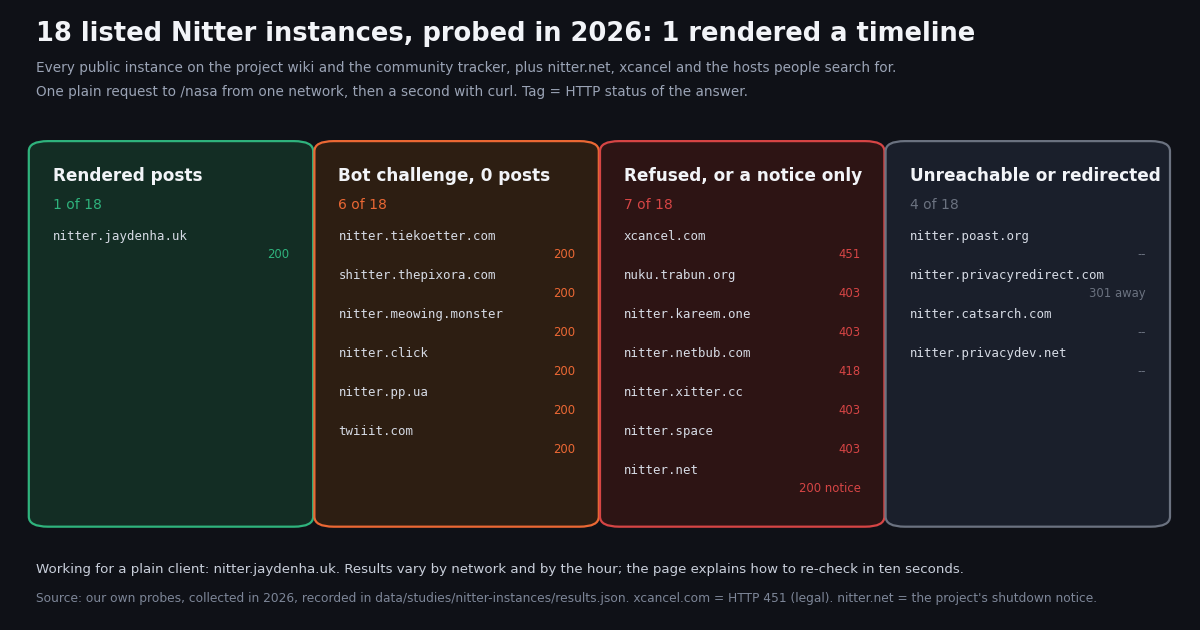
The problem with every "working Nitter instances" list on the web is that it is copied from the project wiki or from the community status tracker, and neither tells you what an instance does when you actually load a profile. So we checked. We took every public instance on the wiki (seven, all marked online and working), every instance the tracker at status.d420.de reports (nine, overlapping), the project's own nitter.net, xcancel.com, and the hosts that show up in search queries by name (nitter.poast.org, nitter.privacydev.net, nitter.space, twiiit.com), and sent each one a single plain request for the @NASA profile from one residential network, then a second request with curl about a minute later. Eighteen hosts, two attempts each, every response recorded.
The result is blunt: one instance rendered a timeline. The rest returned bot challenges, 403s, a legal block, a certificate error or the maintainer's shutdown notice. Below you get the full table, a ten-second way to re-run the check yourself (because results vary by network and by the hour), the reason instances keep dying, a freshness comparison between the one working instance and the X API for three organization accounts, and the two routes that still work when no instance does.
The list: what all 18 Nitter instances returned to a plain request
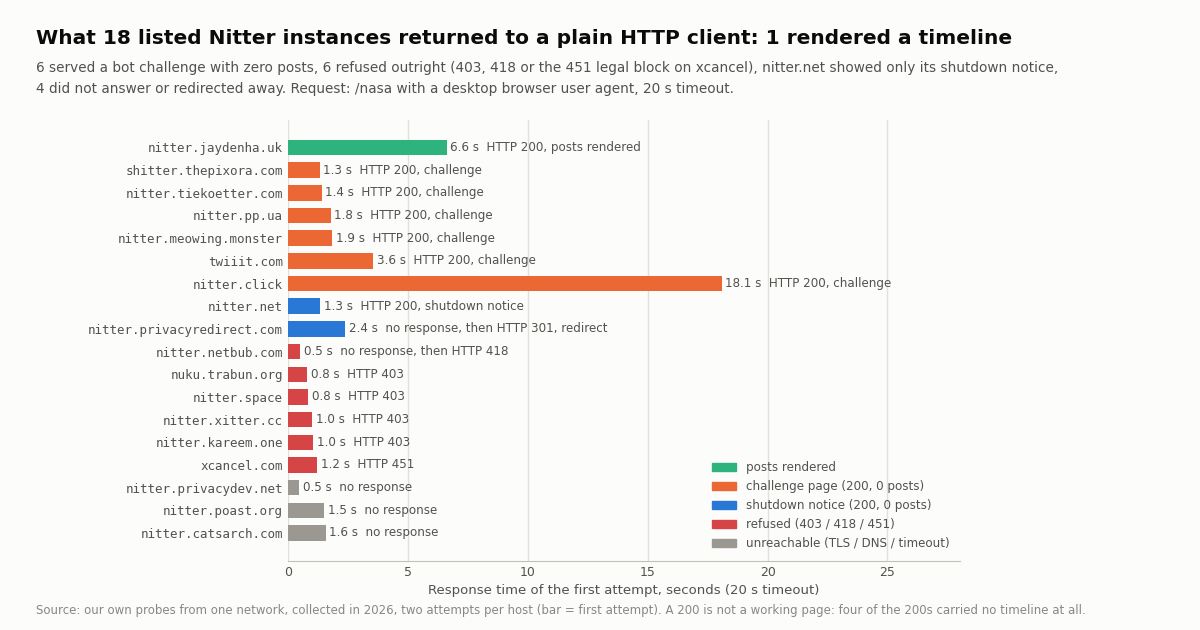
The request was GET https://<host>/nasa with a desktop Chrome user agent, no cookies, no JavaScript, a 20-second timeout, sent once from Python and once from curl. "Posts rendered" means the HTML contained Nitter's timeline-item markup; "challenge" means a 200 whose body was a proof-of-work or captcha page and nothing else. The second attempt is shown where it differed.
Three things stand out. The wiki is a historical document. All seven public instances it lists are marked online and working, and zero of the seven returned a post to us; two of them do not even complete a TLS handshake from here. The wiki itself says to use the tracker for what works right now, and the tracker's own "healthy" score counts eight of nine hosts as healthy, because it measures whether the server answers, not whether a visitor without JavaScript gets a page. Blocking is the norm. Twelve of the eighteen hosts actively refused or challenged us: Anubis (a proof-of-work page that needs JavaScript), DogWAF (a click-the-dog captcha), a bare 403 from a CDN, an 418 from the instance itself. Operators do this on purpose; the next section explains why. Our network is one vantage point. The three TLS failures and the 403s could be our route, a regional block or a block on data-center and VPN ranges. The median response time across all 18 was 1.4 seconds, so the servers are mostly up; they are just not serving.
If you want to point a feed reader, a redirect extension or a script at an instance, the only honest answer from this probe is nitter.jaydenha.uk, and "honest" includes the caveat that it answered in 6.6, 6.4 and 4.1 seconds for the three profiles we loaded, slower than any API call, and that it may be gone or behind a challenge by the time you read this. Re-check before you rely on it.
How to re-check any instance in ten seconds (and why a 200 is not enough)
Instance health changes by the hour and by where you sit, so the useful skill is the check, not the list. One curl line tells you the status code and the time; a grep tells you whether the HTML has posts in it. Nitter renders every post inside an element with the class timeline-item, so if that string is absent the page has no timeline regardless of the status code.
What the codes mean on a Nitter host. 200 with timeline-item in the body: working. 200 without it: a challenge page (look for "Anubis", "Prove You're Human", "not a bot" or "Access Queue" in the body), an error panel, or in nitter.net's case a notice. 403: a CDN or firewall decided you look automated; a real browser with JavaScript and cookies may get through. 418: the instance's own bot block (nitter.netbub.com uses it). 429: you are rate limited; wait. 451: the operator took the site down for legal reasons, which is xcancel.com's state since mid-September 2026. A TLS or certificate error: the host is gone, misconfigured, or unreachable from your network.
Why operators do this. A challenge that needs JavaScript keeps feed readers, redirect extensions and scripts out, and those are exactly the clients that hammer an instance. The project README notes that RSS feeds are "often disabled due to abuse", and the tracker's own page asks visitors not to use the instances for scraping. The side effect is that a status page that measures "does the server answer" overstates what you will get; our probe counted six hosts that a tracker would call up and that a visitor without JavaScript cannot use.
Results differ by network. We probed from a residential connection. From a data-center IP you will see more 403s; from a browser with JavaScript you will pass the Anubis and DogWAF pages (after a few seconds of proof-of-work) and see posts on some of the hosts we marked as challenges. Run the check from where you will actually use the instance.
# Status code, response time and whether the page has posts, for any Nitter host.
# A 200 with 0 posts is a challenge page, not a working instance.
for host in nitter.jaydenha.uk nitter.tiekoetter.com xcancel.com; do
  code=$(curl -s -o /tmp/nitter-$host.html -w '%{http_code} %{time_total}s' --max-time 20 \
    -A 'Mozilla/5.0 (Macintosh; Intel Mac OS X 10_15_7) AppleWebKit/537.36 Chrome/130.0 Safari/537.36' \
    https://$host/nasa)
  posts=$(grep -c 'class="timeline-item' /tmp/nitter-$host.html)
  echo "$host  $code  posts=$posts"
done
# Our run: nitter.jaydenha.uk 200 6.6s posts=20; nitter.tiekoetter.com 200 1.4s posts=0 (Anubis); xcancel.com 451 posts=0Is the working instance fresh? nitter.jaydenha.uk vs the X API for three accounts
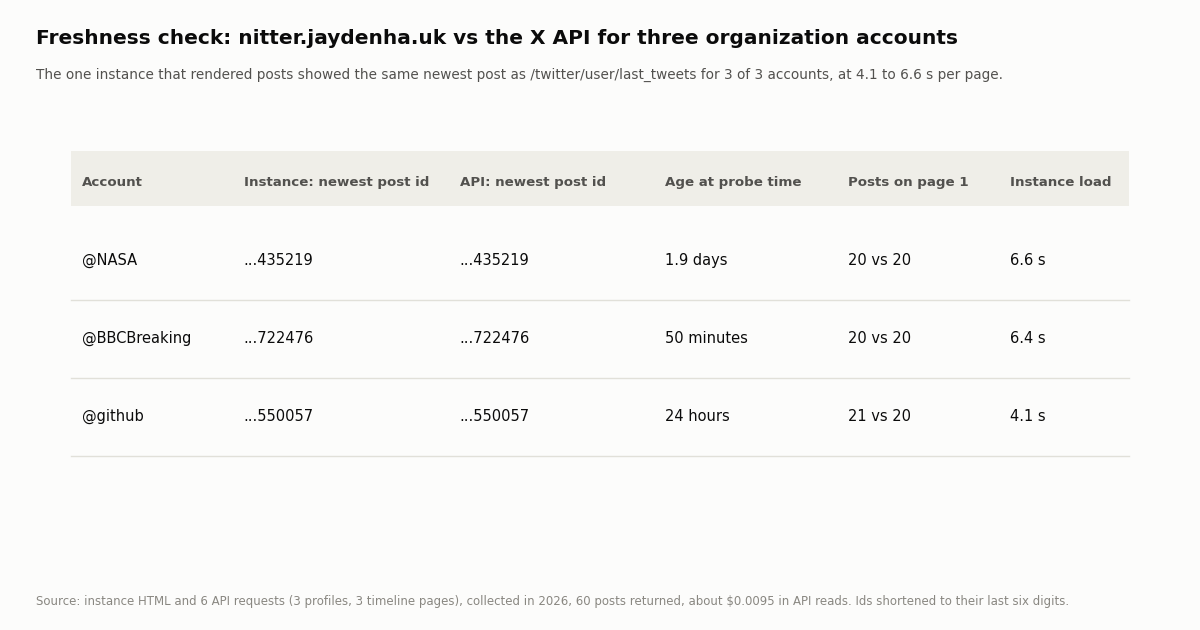
A page with posts can still be stale: an instance that has lost its X account sessions sometimes serves a cached timeline. So for the one instance that rendered posts we loaded three organization profiles, @NASA, @BBCBreaking and @github, read the newest post id from the HTML, and compared it with the newest post returned by one page of /twitter/user/last_tweets on twitterapi.io for the same account, fetched within the same hour. We also called /twitter/user/info for each account to show what the profile endpoint returns. Six API requests, 60 posts, about $0.0095 in reads.
The instance was current for all three: the newest post on its page was the newest post the API returned, including @BBCBreaking's post from 50 minutes before the probe. The extra item on @github's page is the pinned post, which Nitter shows above the timeline and the API's timeline page does not repeat. The difference is speed and dependability, not freshness: the instance needed 4 to 7 seconds per profile and had already been the only one of 18 to answer; the API returns the same 20 posts as JSON in well under a second and does not depend on an operator's account pool surviving the week.
Those are the numbers Nitter's profile header would show; on the API they arrive as followers, statusesCount, isBlueVerified and isVerified on data, with createdAt, description, location and canDm alongside.
Why Nitter instances die: guest tokens, account sessions, abuse, and the letters
Every row in the table above is a symptom of one architecture problem. Nitter was built in 2019 on Twitter's unofficial guest-token API, the same anonymous access the official app used for logged-out visitors. An instance could serve thousands of readers without owning a single account, which is what made free public instances possible.
January 2024: guest accounts removed. X turned the guest-token path off. The maintainer declared the project dead and nitter.net went offline; Wikipedia records the project as discontinued between February 2024 and February 2025. 6 February 2025: development resumed, with the condition that defines everything since. An instance now needs real X account sessions, exported by its operator into a sessions.jsonl file, as the wiki page on creating session tokens describes. The README warns that running a large public instance "is not feasible with a small amount of accounts".
Account sessions are the choke point. X rate-limits each account, so a busy instance spreads thousands of readers over a handful of logins and hits limits a single person never would: timelines go blank at peak hours with nothing "down". X also locks accounts it considers automated, and every lock shrinks the pool until the operator creates more. Scrapers make it worse by treating free instances as a free API, which is why operators now put Anubis, DogWAF and CDN rules in front of every page: the challenge protects the account pool at the price of breaking feed readers and scripts.
Then the legal pressure. The README records that on 24 August 2026 X Corp. sent cease-and-desist letters "demanding a permanent takedown of Nitter instances and the project's repository"; the letter, as reported by TechCrunch, gave a deadline of the next day and accused Nitter of unlawful use of X's API and of accessing account and session data. The repository was archived on 25 August. On 6 September the project announced it would continue following legal advice, and xcancel came back on 7 September. The maintainer's own notice on nitter.net adds the part the news cycle missed: on 8 September 2026 X Corp. sent a second letter with the same demands, the September announcement was based on assurances that "have since turned out to be untrue", and as of 10 October 2026 "Nitter currently has no legal counsel". The repository was archived again on 11 September, xcancel went offline on 14 September, and when we checked the GitHub repository this session the banner read "archived by the owner on Oct 9, 2026", after a last push on 9 October that added the funding appeal to the README.
The practical reading for a user: the code still exists and still runs, anyone can host it, and the remaining public instances are run by volunteers who are one locked account pool, one abuse wave or one letter away from a 451. "Find another instance" is a weekly chore now, not a fix.
nitter.net, xcancel, poast, privacydev, nitter.space: the names people search for
nitter.net is the project's official instance and answers HTTP 200 in about 1.3 seconds, which is why some status pages still list it as up. What it serves is a single page: the maintainer's notice dated 10 October 2026, the two cease-and-desist dates, the apology for the September announcement, a request for legal help and donation addresses. There is no front end behind it. If you came here because "nitter.net down" or "nitter is down", that is the answer: the server is up, the Nitter on it is not.
xcancel.com was the first instance on the wiki and the one most redirect extensions pointed at. It returns HTTP 451, "unavailable for legal reasons", on every request; Wikipedia records it going offline "until further notice" on 14 September 2026 after the second letter. A 451 is a deliberate, operator-chosen response, not an outage, so there is nothing to retry. The xcancel alternatives page covers what to point the extension at instead.
nitter.poast.org sits second on the wiki, marked online and working. From our network it did not complete a TLS handshake on either attempt (curl error 35, SSL_ERROR_SYSCALL). That can mean the host is gone, that it refuses connections it considers suspicious, or that our route to it is blocked; we cannot tell which from outside, and other networks may see it. If you search "nitter poast org down", the honest status is "unreachable from at least one residential network, listed as working on a wiki that is no longer maintained".
nitter.privacydev.net fails with a certificate error (curl exit 60, certificate not trusted), which usually means an expired or mismatched certificate on a host nobody is maintaining. nitter.space answers 403 to a plain request on both attempts, so it exists and is fronted by something that blocks non-browser clients; a real browser may get through. nitter.privacyredirect.com now redirects to the operator's main domain, so it is gone from that address. twiiit.com, the picker the wiki lists, redirected us to nitter.tiekoetter.com, which then served an Anubis challenge: a picker can only choose among the instances that exist.
nitter.kareem.one and nitter.tiekoetter.com, the two hosts on both the wiki and the tracker, are the clearest illustration of the 200-versus-working gap: kareem.one returns 403 to a plain request and tiekoetter a 200 that is a proof-of-work page. Both will likely work in a browser with JavaScript after a short wait; neither will feed a script or an RSS reader without one.
Other viewer sites publish their own instance lists and status pages; they are mostly copies of the wiki table with the same seven rows, which is why they tell you nitter.poast.org is up. If a list does not say when and from where it checked, treat it as the wiki with a different logo.
When no instance works, route 1: read X directly in a browser
If what you wanted was to open one profile or one post someone sent you, the fastest fallback is the original link in a private browser window. X's logged-out web view still opens individual post URLs and profile pages for many visitors, with search, the home timeline and most "show more" expansions behind the login wall; the official support site at help.x.com documents what a logged-out visitor can see and the behavior changes without notice, so treat it as "usually works for one link, never works for search". X sees the visit, which is the privacy trade-off Nitter existed to avoid.
For a single video or image, a downloader that takes the post URL does the job without an account; our Twitter video downloader is one. For "what did this account post this week" without logging in, a working instance in a browser is still the simplest reader when one exists, and the check in the section above tells you whether one does right now.
What this route cannot do is anything repeatable: a feed, a script, a redirect extension pointed at a host that will still be there next month, or any volume beyond what one person clicks. For those, the instance model was always the wrong tool, and in 2026 it is a tool that no longer exists reliably.
Route 2: the API for scripts, feeds and anything that must keep working
Nitter's underlying job, fetching a profile and its latest posts without an X account and returning them in a clean form, is two read calls on twitterapi.io: GET /twitter/user/info?userName=<handle> for the profile (the fields in the table above, under data) and GET /twitter/user/last_tweets?userName=<handle> for the newest posts, 20 per page under data.tweets, newest first, with has_next_page and next_cursor for more. Search is GET /twitter/tweet/advanced_search?query=<q>&queryType=Latest, with the same from:, since: and keyword operators Nitter's search box accepted. The only credential is an API key in the X-API-Key header; there is no X account, no session file and no instance to go down.
What it costs. Tweet endpoints bill 15 credits per tweet returned, $0.15 per 1,000 tweets, with a 15-credit ($0.00015) minimum per request, so a full 20-post timeline page is $0.003 and an empty search is $0.00015. Profiles are 18 credits each, $0.18 per 1,000. A Nitter-shaped unit of work, one profile plus its 20 newest posts, is therefore $0.00018 + $0.003, about $0.0032. $1 is 100,000 credits; purchased credits never expire; new accounts that pass the automatic bot check get up to $1 of free credits (at most 100,000 credits, no card, one per person or network, expiring after 31 days), which is about 300 profile-plus-timeline reads to test with. Accounts that have not yet paid are limited to 0.2 requests a second, 20 once paid.
Against the official X API. The pay-per-usage rate card at docs.x.com/x-api/getting-started/pricing charges $0.005 per post read and $0.010 per user read, so the same profile plus 20 posts is $0.010 + 20 x $0.005 = $0.11, about 34 times more, and per 1,000 posts read it is $5 against $0.15, about 33x; pay-per-usage is capped at 3 million post reads a month, with Enterprise above that, and you need a developer account before the first call.
The public instance is free, and in our probe it was also unavailable 17 times out of 18. The API costs money and answers every time; a self-hosted Nitter, covered next, sits between the two. Subscriptions with bonus credits (Starter $29, Builder $99, Pro $199, Scale $499, Business $1,499 a month) are on the pricing page. The script at the end of this page does both halves: it checks a list of instances the way we did, and when none renders posts it falls back to the API and prints the same timeline.
One more thing Nitter users ask: "nitter api". Nitter never had a JSON API; what it exposed was an RSS feed per profile, which the README says is often disabled due to abuse. If you were using an instance's RSS as an API, the Twitter to RSS guide builds the same feed from the API calls above, and the developer guide to building a Twitter viewer shows the full front end.
Self-hosting a Nitter instance for yourself in 2026
Archived is not deleted. The repository at github.com/zedeus/nitter is read-only but still clones, builds and runs, and a private instance serving one person never hits the abuse problem that forces public operators behind challenges. What it does not avoid is the account dependency.
You supply the X accounts. The wiki page on creating session tokens walks through logging in and exporting the session into the sessions.jsonl file the instance reads. Those accounts can be locked by X at any time, and the cease-and-desist letters specifically cite access to accounts and session tokens, so use accounts you can afford to lose and do not expect the process to stay the same.
You supply a server and Redis, ideally behind Nginx as the README recommends, and you accept that there will be no upstream fixes: when X changes a response shape, the instance breaks until a fork patches it. Keep it private. Do not list it, do not share the URL. The moment strangers' feed readers find it, you are the operator in the table above, and the 403 you put up to survive will be the 403 someone else writes about.
For one person who wants a JavaScript-free reader of a few dozen accounts, that is a reasonable weekend project. For anything that has to keep working without you babysitting account sessions, it is not, and the API route above is the one that does not share the dependency.
How we collected this
Question: which publicly listed Nitter instances serve a profile page with posts to a plain HTTP client right now, how fast, what do the others return instead, and is the working instance as fresh as the X API for the same accounts.
Hosts: every public clearnet instance on the project wiki at github.com/zedeus/nitter/wiki/Instances (seven, plus nitter.net as the official one), every host reported by the community tracker's API at status.d420.de (nine, four overlapping with the wiki), xcancel.com, twiiit.com, and three hosts people search for by name (nitter.poast.org is on the wiki; nitter.privacydev.net and nitter.space are not). Eighteen hosts. Tor and I2P addresses were not probed.
Method: one request to https://<host>/nasa from Python's standard library with a desktop Chrome user agent, no cookies, no JavaScript, a 20-second timeout, unproxied from one residential network; then a second request to the same URL with curl about a minute later. A host counts as "posts rendered" only when the HTML contains Nitter's timeline-item markup; a 200 without it is classified by its body (Anubis, DogWAF, "You seem like a bot", the nitter.net notice). The verdict shown is the better of the two attempts, and both are recorded. For the host that rendered posts we also loaded /bbcbreaking and /github. API side: /twitter/user/info and one page of /twitter/user/last_tweets for @NASA, @BBCBreaking and @github through a rate-limited read-only client, six requests, 60 posts, about $0.0095, collected in 2026 within the same hour as the probe. Freshness was compared by the newest status id on the instance page against the newest id on the API page.
What the sample cannot show: one network, one hour. A 403 or a TLS failure can be our route rather than the host, a challenge page may pass in a real browser, and an instance that answered us may be gone tomorrow; the page gives you the command to re-run the check for that reason. We measured the profile page only, not RSS feeds (our alternatives page covers those) and not search. Three organization accounts are enough to show that a working instance can be current, not to measure how often instances serve stale caches.
Aggregates and public hosts only. The three accounts fetched are organizations; no individual's posts were analyzed. The probe records, the analysis script, the charts and the gzip-compressed API pages are kept with the study.
"""nitter_check.py - find a Nitter instance that actually renders posts, or fall back to the API.

    pip install requests
    python nitter_check.py nasa                    # probe the instances, print the first working timeline
    TWITTERAPI_IO_API_KEY=... python nitter_check.py nasa   # same, but falls back to twitterapi.io when none works

A 200 is not enough: an instance only counts when its HTML contains Nitter's timeline-item markup.
"""
import os
import re
import sys
import time

import requests

INSTANCES = ["nitter.jaydenha.uk", "nitter.tiekoetter.com", "nitter.meowing.monster", "nitter.kareem.one", "xcancel.com"]
UA = "Mozilla/5.0 (Macintosh; Intel Mac OS X 10_15_7) AppleWebKit/537.36 (KHTML, like Gecko) Chrome/130.0 Safari/537.36"
CHALLENGE = ("Anubis", "Prove You", "not a bot", "Access Queue", "You seem like a bot")
BASE = "https://api.twitterapi.io"


def probe(host, handle):
    """Return (verdict, seconds, posts) for one instance; posts is a list of (id, text) when rendered."""
    t0 = time.time()
    try:
        r = requests.get(f"https://{host}/{handle}", headers={"User-Agent": UA}, timeout=20)
    except requests.RequestException as e:
        return f"unreachable ({type(e).__name__})", time.time() - t0, []
    secs = time.time() - t0
    if r.status_code != 200:
        return f"HTTP {r.status_code}", secs, []
    if "timeline-item" not in r.text:
        why = next((c for c in CHALLENGE if c in r.text), "no timeline")
        return f"200 but {why}", secs, []
    items = re.findall(r'href="/[^/"]+/status/(\d+)[^"]*"[^>]*title="([^"]+)"', r.text)
    return "posts rendered", secs, items


def api_timeline(handle):
    """The same timeline from twitterapi.io: profile + newest posts, no X account needed."""
    headers = {"X-API-Key": os.environ["TWITTERAPI_IO_API_KEY"]}
    info = requests.get(f"{BASE}/twitter/user/info", params={"userName": handle}, headers=headers, timeout=30)
    info.raise_for_status()
    user = info.json().get("data") or {}
    if not user:
        sys.exit(f"user not found: {handle}")   # status 'error', msg 'user not found' comes back as HTTP 200
    print(f"@{user['userName']}  {user['followers']:,} followers  {user['statusesCount']:,} posts")
    posts, cursor, pages = [], None, 0
    while pages < 2:                               # 2 pages = up to 40 posts = $0.006
        params = {"userName": handle}
        if cursor:
            params["cursor"] = cursor
        r = requests.get(f"{BASE}/twitter/user/last_tweets", params=params, headers=headers, timeout=30)
        r.raise_for_status()
        body = r.json()
        page = (body.get("data") or {}).get("tweets") or []
        posts.extend(page)
        pages += 1
        if not body.get("has_next_page") or not body.get("next_cursor"):
            break
        cursor = body["next_cursor"]
    return posts


if __name__ == "__main__":
    handle = sys.argv[1] if len(sys.argv) > 1 else "nasa"
    for host in INSTANCES:
        verdict, secs, items = probe(host, handle)
        print(f"{host:28} {secs:5.1f}s  {verdict}")
        if items:
            for tweet_id, when in items[:5]:
                print(f"   {when}  https://{host}/{handle}/status/{tweet_id}")
            break
    else:
        if not os.environ.get("TWITTERAPI_IO_API_KEY"):
            sys.exit("no instance rendered posts; set TWITTERAPI_IO_API_KEY to read the timeline from the API instead")
        for t in api_timeline(handle)[:5]:
            print(f"   {t['createdAt']}  {t['url']}\n      {t['text'][:120]}")
Questions readers ask
Which Nitter instances are working right now?
In our probe of all 18 listed hosts in 2026, exactly one rendered a timeline to a plain request: nitter.jaydenha.uk, in about 6.6 seconds. nitter.tiekoetter.com, nitter.meowing.monster, shitter.thepixora.com, nitter.pp.ua, nitter.click and twiiit.com answered 200 with a bot challenge and zero posts, so they may work in a browser with JavaScript. The rest returned 403, 418, 451, a TLS failure or a notice. Instances change by the hour; run the curl check on this page from your own network before relying on one.
Is nitter.net down?
The server answers HTTP 200, but it no longer runs Nitter. It serves one page: the maintainer's notice dated 10 October 2026, which records the cease-and-desist letters of 24 August and 8 September 2026, withdraws the September statement that the project would continue, and asks for legal help and funding. There is no profile, search or RSS behind it.
Why does xcancel.com show 'unavailable for legal reasons' (HTTP 451)?
451 is the status code for content withheld for legal reasons, and the operator chose it. xcancel was the first instance listed on the project wiki, went offline after the 24 August 2026 cease-and-desist, returned on 7 September, and went offline again 'until further notice' on 14 September 2026 after the second letter. Both of our requests got 451, so there is nothing to retry; the xcancel alternatives page linked above covers replacements.
Why do I get 'Prove You're Human', an Anubis page or a 403 on a Nitter instance?
Because the instance is protecting its X account sessions. Since the February 2025 revival every instance fetches data with real X accounts that X rate-limits and locks, and scrapers burn through them, so operators put proof-of-work pages (Anubis), captchas (DogWAF) or CDN rules in front of every page. A browser with JavaScript usually passes after a few seconds; feed readers, redirect extensions and scripts do not, which is why six of our 18 probes got a 200 with no posts.
Is Nitter dead, or is it coming back?
The repository is archived and read-only (the banner reads 9 October 2026 at our check), the official instance serves only a notice, and the maintainer wrote on 10 October 2026 that the project has no legal counsel and is seeking funding and help. The code still runs, so volunteer instances and private self-hosted ones continue, but there is no development and no official instance. Treat it as unsupported rather than dead, and treat any public instance as temporary.
Does Nitter have an API?
No. Nitter exposed an RSS feed per profile and search, which the project README says is often disabled due to abuse, and nothing in JSON. If you used an instance's RSS as an API, the equivalent calls are /twitter/user/info for the profile and /twitter/user/last_tweets for the newest posts on twitterapi.io, 20 posts per page as JSON for $0.003, no X account needed; the Twitter to RSS guide linked on this page builds the feed from them.
How can I view Twitter without an account if no Nitter instance works?
For one link, open it in a private browser window on x.com: single posts and profile pages usually load logged out, search does not. For a video or image, a downloader that takes the post URL works without an account. For a feed, a script or anything repeatable, use API read endpoints: a profile plus its 20 newest posts is about $0.0032 on twitterapi.io against about $0.11 on the official X API rate card, and new accounts that pass the bot check get up to $1 of free credits to test with.
Is it legal to use a Nitter instance?
The 2026 cease-and-desist letters are addressed to the project and to instance operators and allege scraping and misuse of accounts and session tokens; they are not addressed to readers. Reading public posts through an instance has not been treated as unlawful for users. Running a public instance now carries the legal risk the letters describe, which is why operators are going dark, and why a reader should expect any instance to disappear without notice.
Continue
- Nitter on GitHub: archived repository (banner: Oct 9, 2026), README notice on the 24 August 2026 cease-and-desist and the 10 October 2026 update
- Nitter wiki: public instance table (the seven hosts we probed), with its note to use the status tracker for what works right now
- Nitter wiki: creating session tokens, why every instance needs real X accounts since 2025
- nitter.net: the maintainer's notice of 10 October 2026 (second letter of 8 September, no legal counsel)
- Wikipedia: Nitter, dated history of the 2024 shutdown, the 2025 revival, the August and September 2026 archives and xcancel going offline
- X API pay-per-usage pricing ($0.005 per post read, $0.010 per user read)
- twitterapi.io docs: Get User Last Tweets (data.tweets, has_next_page, next_cursor)
- Twitter (X) API overview: the hub for reading X data
- Nitter alternatives by what you used Nitter for
- xcancel alternatives after the 451 suspension
- Twitter to RSS: build the feed Nitter used to give you
- Read Twitter (X) without an account through an API key
- Build your own Twitter (X) viewer on the API
- Twitter video downloader, no account needed
- Pay-per-call pricing for profile and timeline reads
- 01Twitter (X) Statistics 2026: Attributed Figures and First-Hand Data on the Biggest Accounts
- 02Twitter (X) to SMS: Get a Text Message When an Account Posts
- 03Tweet Hunter (TweetHunter) Review: What It Automates, What It Costs, and the API Route for the Data Half
- 04How to Search Twitter (X) for Images: Operators, What They Return, and the API Route
- 05SOCMINT on Twitter (X): What Social Media Intelligence Is, and a Worked Method
- 06Nitter Is Archived: Which Nitter Alternatives Still Work in 2026?
- 07Who Has the Most Twitter (X) Followers — Build a Live API Leaderboard
- 08How to Embed Tweets on Your Website — 3 Methods, Measured
Stop reading. Start building.
Starter credits cover real testing on real data. Google sign-in, no card, no application queue.
Get an API key