Twitter to RSS: How to Get an RSS Feed of Any X Account, Search or List
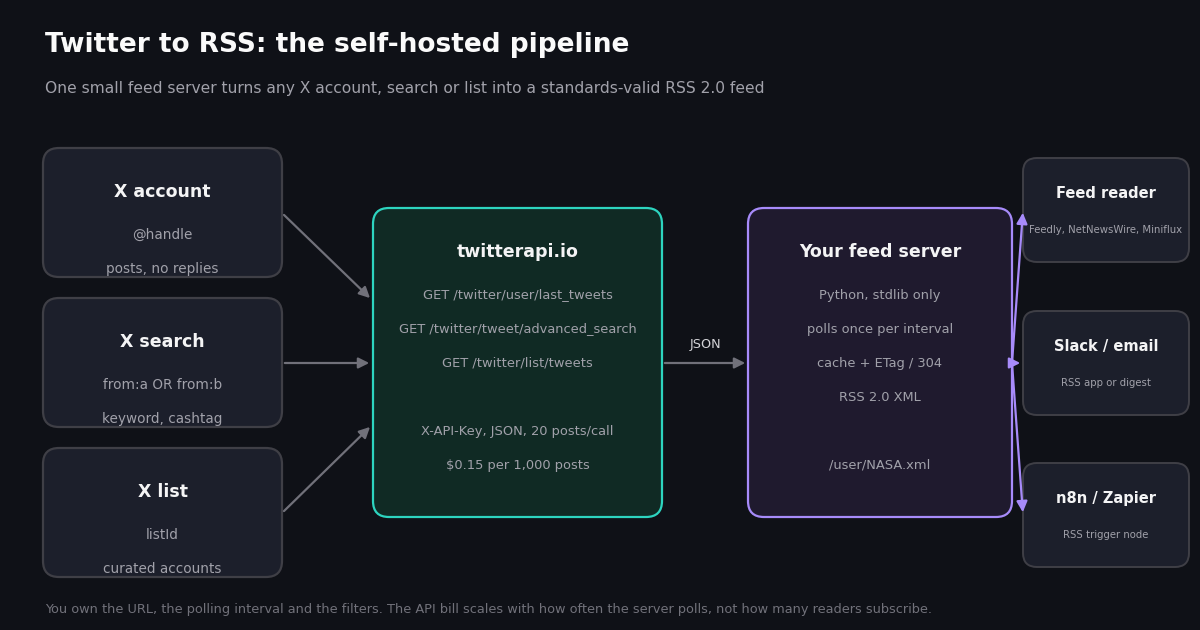
Searching "twitter to rss" returns a decade of workarounds: a Perl module that scraped the old search page, a Google Apps Script from the v1.1 era, Nitter mirror lists, and converter sign-up pages. Most are dead or dying, because every one of them depended on an interface X eventually removed. What has not changed is the need: you want new posts from an account, a search, or a list to show up in a feed reader, a Slack channel, or an automation tool, without opening the app and without X deciding what you see.
This guide takes the engineering route. It explains briefly why the feed is missing and what the remaining public options cost in reliability, then builds a complete Twitter to RSS server you can run on a $5 VPS, a Raspberry Pi, or a free-tier container. It uses the standard library only, so there is nothing to install, and it is written so a reader that revalidates with If-None-Match never triggers an upstream API call. Along the way it covers the parts of the RSS 2.0 specification that feed validators actually enforce, because a feed that fails validation silently drops items in some readers.
You need one thing to run it: an API key from the twitterapi.io dashboard. The endpoints are read-only, the key never touches your own X account, and the bill is per call, so the cost section can state exact monthly numbers rather than a plan tier.
Why there is no native Twitter to RSS feed
Twitter shipped RSS for profiles and searches in its early years, then removed the feeds as it retired the old API generations; the scripts that still rank for this query (a CPAN module, a Google Apps Script) were written to patch exactly that loss, and both depend on access that no longer exists. X has shown no sign of bringing feeds back, and its current developer offering is a pay-per-use JSON API, not syndication. So the honest framing is this: there is no Twitter RSS feed, only converters, and every converter is as reliable as its source of posts.
That source is the whole problem. A converter can read posts in three ways. It can scrape the website with a logged-in session, which is what Nitter does and what X has been shutting down; the Nitter README records cease-and-desist letters from X Corp dated 24 August 2026 demanding a takedown of instances and the repository, and GitHub shows the repository archived in September 2026 (checked 2026). It can pay the official API, which charges $0.005 per post read with a 3 million read monthly cap on pay-per-use (docs.x.com, verified 2026), a price that makes a 20-post feed refresh cost ten cents. Or it can use a third-party read API such as twitterapi.io, where the same 20-post call is $0.003 (twitterapi.io pricing, checked 2026), about 33 times less per post (0.005 / 0.00015 = 33.3).
Whoever runs the converter also decides what you see: how many items, how often they refresh, whether replies and reposts are included, and whether the feed exists next month. A hosted converter decides that for you; a public Nitter instance decides by going offline. Running the converter yourself moves every one of those decisions to your side, at a cost you can compute in advance. The rest of this page is that build.
Three ways to get a Twitter RSS feed in 2026, compared
The comparison below uses prices and limits as published when we checked them in 2026: RSS.app plan pages for the hosted converter, the Nitter README and our own instance probe for public Nitter, docs.x.com for the official API, and the twitterapi.io pricing page for the self-hosted column. The self-hosted costs assume one feed polled hourly with 20 posts per call; the cost section has the full grid.
Two readings of that table. If you need a handful of hourly feeds and do not care who hosts them, RSS.app's Basic plan is cheaper than polling the API yourself, and it is an honest product. If you need sub-hour freshness, more than 50 items, filtering logic, or a URL that will still resolve when a vendor changes plans, self-hosting wins, and it wins by a wide margin on cost against the official API. The incremental figure in the 100-feed row is explained in the cost section: a since_time search that returns nothing is billed the $0.00015 per-call minimum rather than 20 posts.
Step 1: pick the endpoint for your feed (account, search, or list)
A feed is a list of recent items in reverse chronological order, which maps onto three twitterapi.io endpoints. All three take the API key in an X-API-Key header, return JSON with a tweets array plus has_next_page and next_cursor, and return about 20 posts per page (docs.twitterapi.io, checked 2026).
Use last_tweets for the common case, one account one feed; pass userId once you know it, since the docs recommend it for stability. Use advanced_search with queryType=Latest when the feed is a topic rather than a person, or when you want several accounts in one feed (from:NASA OR from:SpaceX OR from:esa) and therefore one call instead of three. Use list/tweets when you already curate an X list; note that its includeReplies defaults to true, the opposite of last_tweets, so set it explicitly. The response shape is the same across the three, which is why the server below has one XML builder and three two-line fetchers.
This is what one post looks like in the response, trimmed to the fields the feed uses. createdAt is in X's classic %a %b %d %H:%M:%S %z %Y format, url is the canonical post link, and author.userName is the handle; everything else (counts, entities, quoted_tweet, retweeted_tweet) is available if you want richer items.
{
  "tweets": [
    {
      "id": "1866400000000000001",
      "url": "https://x.com/NASA/status/1866400000000000001",
      "text": "Artemis II crew update: training continues at Kennedy.",
      "createdAt": "Tue Dec 10 07:00:30 +0000 2024",
      "lang": "en",
      "isReply": false,
      "retweetCount": 412, "replyCount": 88, "likeCount": 3105, "quoteCount": 41, "viewCount": 182340,
      "author": { "userName": "NASA", "name": "NASA", "id": "11348282" },
      "entities": { "hashtags": [], "urls": [], "user_mentions": [] }
    }
  ],
  "has_next_page": true,
  "next_cursor": "DAABCgABG...",
  "status": "success",
  "message": ""
}Step 2: turn the JSON into valid RSS 2.0
RSS 2.0 is small. The specification maintained by the RSS Advisory Board requires three channel elements, title, link and description, and says of items that "all elements of an item are optional, however at least one of title or description must be present" (rssboard.org RSS 2.0 specification). Dates use RFC 822 format, which Python's email.utils.format_datetime produces; guid carries an isPermaLink attribute that defaults to true, so a post URL is the right value and lets readers de-duplicate across refreshes; ttl is an integer number of minutes a reader may cache the channel. The atom:link rel="self" element from RFC 4287's namespace is not required by RSS but the W3C validator recommends it, and most readers use it to fix a feed's own URL.
Two things the validator enforces that are easy to get wrong, because we got them wrong. First, RSS <author> must be an e-mail address, so putting @NASA there produces "Invalid email address"; the conventional fix is the Dublin Core dc:creator element. Second, channel-level elements such as lastBuildDate must come before the first <item>, or the validator reports "Misplaced Item". Our first draft of the builder below failed on exactly those two points and passed after the fix (W3C Feed Validator, checked 2026). Treat the validator as part of the build, not a final polish: a feed that fails it is usually still parsed by lenient readers but with missing dates or duplicated items.
The builder uses xml.etree.ElementTree, which escapes text and attribute values for you; the one place you escape manually is description, which RSS defines as entity-encoded HTML, so html.escape runs once and the XML serializer encodes it a second time. If you prefer Atom, the feedgen package (version 1.0.0 on PyPI, checked 2026) produces both formats from the same object model, at the cost of a dependency; the server on this page stays stdlib-only.
"""Turn twitterapi.io tweet JSON into RSS 2.0 (xml.etree only). Run it to see the XML."""
import html
import xml.etree.ElementTree as ET
from datetime import datetime, timezone
from email.utils import format_datetime

ATOM = "http://www.w3.org/2005/Atom"
DC = "http://purl.org/dc/elements/1.1/"
ET.register_namespace("atom", ATOM)
ET.register_namespace("dc", DC)


def parse_created(created_at):
    # twitterapi.io createdAt: "Tue Dec 10 07:00:30 +0000 2024"
    try:
        return datetime.strptime(created_at, "%a %b %d %H:%M:%S %z %Y")
    except (TypeError, ValueError):
        return datetime.now(timezone.utc)


def build_rss(title, html_link, self_url, tweets, ttl_minutes=15):
    rss = ET.Element("rss", version="2.0")
    ch = ET.SubElement(rss, "channel")
    ET.SubElement(ch, "title").text = title                 # required
    ET.SubElement(ch, "link").text = html_link              # required
    ET.SubElement(ch, "description").text = f"{title}, via twitterapi.io"   # required
    ET.SubElement(ch, "ttl").text = str(ttl_minutes)        # minutes a reader may cache
    ET.SubElement(ch, f"{{{ATOM}}}link", href=self_url, rel="self", type="application/rss+xml")
    ordered = sorted(tweets, key=lambda t: parse_created(t.get("createdAt")), reverse=True)
    newest = parse_created(ordered[0]["createdAt"]) if ordered else datetime.now(timezone.utc)
    ET.SubElement(ch, "lastBuildDate").text = format_datetime(newest)   # before the first <item>
    for t in ordered:
        author = (t.get("author") or {}).get("userName", "")
        link = t.get("url") or f"https://x.com/{author}/status/{t['id']}"
        text = (t.get("text") or "").strip()
        item = ET.SubElement(ch, "item")
        ET.SubElement(item, "title").text = f"@{author}: {text[:90]}"
        ET.SubElement(item, "link").text = link
        ET.SubElement(item, "guid", isPermaLink="true").text = link      # stable id = no duplicates
        ET.SubElement(item, "pubDate").text = format_datetime(parse_created(t.get("createdAt")))
        ET.SubElement(item, "description").text = html.escape(text).replace("\n", "<br/>")
        ET.SubElement(item, f"{{{DC}}}creator").text = f"@{author}"    # <author> must be an e-mail
    return ET.tostring(rss, encoding="utf-8", xml_declaration=True)


if __name__ == "__main__":
    sample = [{
        "id": "1866400000000000001",
        "url": "https://x.com/NASA/status/1866400000000000001",
        "text": "Artemis II crew update: training continues at Kennedy.",
        "createdAt": "Tue Dec 10 07:00:30 +0000 2024",
        "author": {"userName": "NASA"},
    }]
    print(build_rss("@NASA on X", "https://x.com/NASA", "http://localhost:8080/user/NASA.xml", sample).decode())
Step 3: serve it with a polling cadence and conditional caching
The complete server is the code block at the end of this article. It is http.server from the standard library with three routes, a per-feed cache, and conditional responses; here is the design, because the design is what keeps the bill predictable.
Polling cadence lives in the cache, not in a scheduler. The server never polls on its own. The first request for /user/NASA.xml calls the API, builds the XML, and stores it with an expiry of CACHE_SECONDS (default 900, fifteen minutes). Every request within that window, from any number of readers, gets the cached bytes. So the upstream cadence is at most one call per feed per interval, and a feed nobody reads costs nothing. The <ttl> element is set to the same interval so well-behaved readers do not ask more often than the cache changes.
Conditional requests are free. The response carries an ETag (a hash of the XML) and Last-Modified. A reader that sends If-None-Match with the current tag gets 304 Not Modified and no body; the check happens against the cache, so it never reaches the API. Most desktop and server-side readers (NetNewsWire, Miniflux, FreshRSS, Feedly's fetcher) revalidate this way. Set PUBLIC_BASE to the URL readers will use so the atom:link rel="self" matches the document location, which clears the one recommendation the validator still raised on our localhost test.
Errors are loud. If the API call fails, the server answers 502 with the message and keeps the last good copy out of the cache on purpose, so you notice. If you would rather serve stale content during an outage, keep the previous XML alongside the expiry and return it on exception; it is a four-line change.
Three URL shapes. /user/<handle>.xml maps to last_tweets with replies excluded, /search/<url-encoded query>.xml to advanced_search with queryType=Latest, and /list/<listId>.xml to list/tweets with replies excluded. The .xml suffix is cosmetic but helps readers that sniff the extension. Run it behind a reverse proxy with TLS (Caddy does this in two lines), or on any platform that gives you a public HTTPS URL. The commands below are the smoke test we ran.
# 1. start the server (key from the twitterapi.io dashboard)
export TWITTERAPI_IO_KEY=your_key_here
CACHE_SECONDS=900 python3 feed_server.py

# 2. first request: 200, full feed, note the ETag
curl -si http://localhost:8080/user/NASA.xml | head -8
#   HTTP/1.0 200 OK
#   Content-Type: application/rss+xml; charset=utf-8
#   ETag: "e57a70412d68f073"
#   Cache-Control: public, max-age=900

# 3. a reader that revalidates gets 304 and costs nothing upstream
curl -si -H 'If-None-Match: "e57a70412d68f073"' http://localhost:8080/user/NASA.xml | head -1
#   HTTP/1.0 304 Not Modified

# 4. the other two feed types
curl -s 'http://localhost:8080/search/from%3ANASA%20OR%20from%3ASpaceX.xml' | head -c 300
curl -s http://localhost:8080/list/1846987139428634858.xml | head -c 300

# 5. check the output against the W3C Feed Validator once it is on a public URL
# https://validator.w3.org/feed/check.cgi?url=https://feeds.example.com/user/NASA.xmlWhat the feed costs per month: polling interval x number of feeds
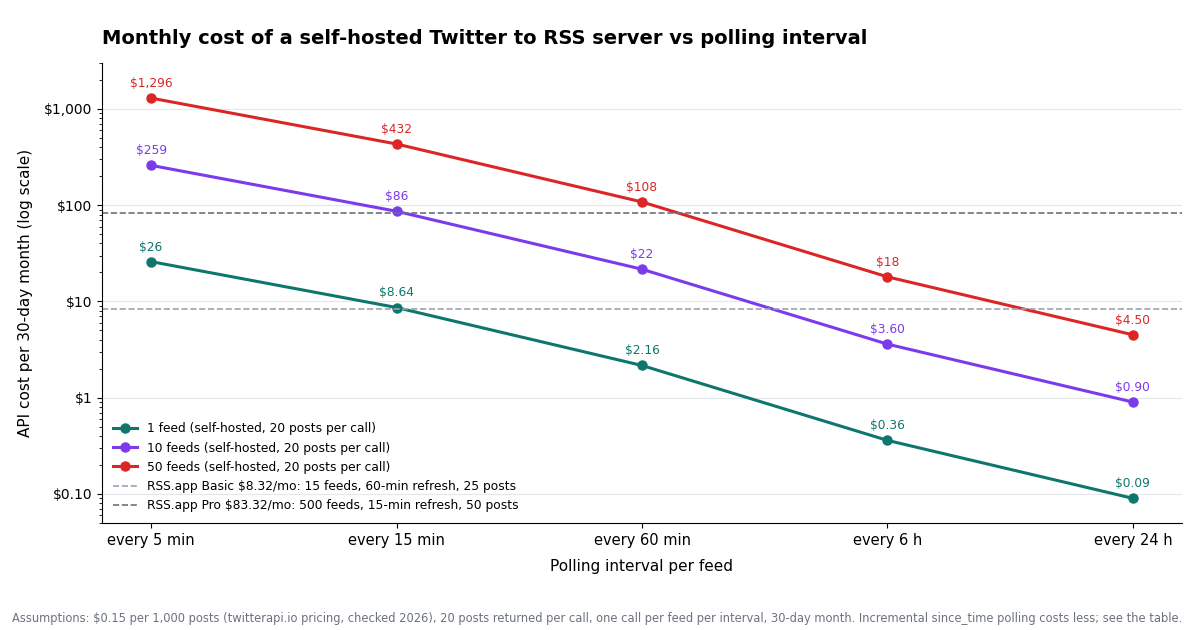
Pricing basis: $0.15 per 1,000 posts, a minimum of $0.00015 (15 credits) per API call, 1 USD = 100,000 credits (twitterapi.io pricing, checked 2026). Assumptions: each call returns 20 posts, so a call costs 20 x $0.00015 = $0.003; the cache makes exactly one call per feed per interval; a month is 30 days (43,200 minutes). The last column is the incremental variant described below the table, assuming each feed gains 5 new posts a day.
The arithmetic is linear, so the useful observations are about the shape. Plain polling pays for 20 posts on every call whether or not anything is new, which is why a quiet account polled every 5 minutes costs the same $25.92 as a busy one. The incremental variant fixes that: instead of last_tweets, run advanced_search with from:<handle> since_time:<last check>; a call that returns nothing is billed the $0.00015 minimum rather than $0.003, and you pay $0.00015 for each genuinely new post. At 5 posts a day that is 8,640 x $0.00015 + 150 x $0.00015 = $1.32 a month at a 5-minute interval, a 20-fold saving. The trade is state: the server must keep the last 20 items per feed itself (a JSON file per feed is enough) and merge new posts into it, where the plain version is stateless. Grouping accounts with OR in one query cuts the call count further.
For scale, the official X API at $0.005 per post read would make the same hourly 20-post refresh 720 x 20 x $0.005 = $72 a month per feed before its 24-hour deduplication, which charges a resource once per UTC day however often it is returned (docs.x.com, verified 2026); the deduplicated figure depends on how many distinct posts the account produces and is well below $72 for quiet accounts, but each new post still costs 33 times more to read. Against hosted converters, the numbers say: for a few hourly feeds RSS.app's $8.32 plan is the cheaper purchase; for 15-minute freshness on more than a handful of feeds, the incremental self-hosted variant costs less than the $16.64 Developer plan and has no item cap.
Subscribe to it: feed readers, Slack, e-mail, n8n
Once the server has a public HTTPS URL, every consumer is a standard RSS subscriber. In a feed reader (NetNewsWire, Miniflux, FreshRSS, Feedly, Inoreader) add https://feeds.example.com/user/NASA.xml like any other feed; readers that honour ttl and ETag will refresh on your interval and get 304s in between. For Slack, the built-in RSS app (/feed subscribe <url>) posts each new item to a channel. For e-mail, point a digest service or a self-hosted tool such as rss2email at the feed. For automation, n8n's RSS Feed Read trigger, Zapier's RSS by Zapier, and Make's RSS module all accept the URL and expose the item fields (title, link, pubDate, description) as variables, which is often simpler than wiring those tools to the API directly.
Three refinements earn their place quickly. Filter in the server rather than the reader: a MIN_LIKES environment variable that drops items below a likeCount, or a word list that excludes promotional posts, turns a noisy account into a usable feed and costs nothing extra. Expand reposts and quotes: when a post carries retweeted_tweet or quoted_tweet, append that text to the description so the item makes sense out of context. And add <enclosure> or inline <img> tags from extendedEntities.media if your reader shows images; RSS 2.0 has had the <enclosure> element since the specification was written, and most readers render media from it.
What goes wrong, in rough order of frequency:
If you want the alerting side of this rather than a feed to read (a Slack message within a minute of a post, or a webhook that pushes posts to you), the tweet-notification and keyword-alerts guides linked below cover polling and webhook rules on the same endpoints; the feed server here is for the many tools that already speak RSS.
"""Twitter to RSS: a small feed server on twitterapi.io, standard library only.

Routes (all return RSS 2.0):
  /user/<handle>.xml      posts from one account      -> GET /twitter/user/last_tweets
  /search/<query>.xml     posts matching a search     -> GET /twitter/tweet/advanced_search
  /list/<listId>.xml      posts from an X list        -> GET /twitter/list/tweets

Run:  TWITTERAPI_IO_KEY=... python3 feed_server.py        (listens on :8080)
Then subscribe to http://localhost:8080/user/NASA.xml in any feed reader.
Each upstream call is cached for CACHE_SECONDS (default 900 = 15 minutes), so
the API is polled at most once per feed per interval no matter how many readers
hit it, and readers that send If-None-Match get a 304 with no upstream call.
"""
import hashlib
import html
import json
import os
import threading
import time
import xml.etree.ElementTree as ET
from datetime import datetime, timezone
from email.utils import format_datetime, parsedate_to_datetime
from http.server import BaseHTTPRequestHandler, ThreadingHTTPServer
from urllib.parse import quote, unquote, urlencode
from urllib.request import Request, urlopen

API_KEY = os.environ["TWITTERAPI_IO_KEY"]
PORT = int(os.environ.get("PORT", 8080))
CACHE_SECONDS = int(os.environ.get("CACHE_SECONDS", 900))
PUBLIC_BASE = os.environ.get("PUBLIC_BASE", f"http://localhost:{PORT}")

_cache = {}            # path -> (expires_at, xml_bytes, etag, last_modified)
_lock = threading.Lock()


def api_get(path, params):
    url = "https://api.twitterapi.io" + path + "?" + urlencode(params)
    req = Request(url, headers={"X-API-Key": API_KEY, "Accept": "application/json"})
    with urlopen(req, timeout=30) as resp:
        body = json.loads(resp.read().decode("utf-8"))
    tweets = body.get("tweets")
    if tweets is None:                       # some responses nest under "data"
        tweets = (body.get("data") or {}).get("tweets", [])
    return tweets or []


def fetch_tweets(kind, key):
    if kind == "user":
        return api_get("/twitter/user/last_tweets", {"userName": key, "includeReplies": "false"})
    if kind == "search":
        return api_get("/twitter/tweet/advanced_search", {"query": key, "queryType": "Latest"})
    if kind == "list":
        return api_get("/twitter/list/tweets", {"listId": key, "includeReplies": "false"})
    raise ValueError(kind)


def parse_created(created_at):
    # X format: "Tue Dec 10 07:00:30 +0000 2024"
    try:
        return datetime.strptime(created_at, "%a %b %d %H:%M:%S %z %Y")
    except (TypeError, ValueError):
        try:
            return parsedate_to_datetime(created_at)
        except (TypeError, ValueError):
            return datetime.now(timezone.utc)


def build_rss(title, html_link, self_url, tweets):
    ns_atom = "http://www.w3.org/2005/Atom"
    ns_dc = "http://purl.org/dc/elements/1.1/"
    ET.register_namespace("atom", ns_atom)
    ET.register_namespace("dc", ns_dc)
    rss = ET.Element("rss", version="2.0")
    ch = ET.SubElement(rss, "channel")
    ET.SubElement(ch, "title").text = title
    ET.SubElement(ch, "link").text = html_link
    ET.SubElement(ch, "description").text = f"{title}, generated from the X API via twitterapi.io"
    ET.SubElement(ch, "ttl").text = str(max(1, CACHE_SECONDS // 60))
    ET.SubElement(ch, f"{{{ns_atom}}}link", href=self_url, rel="self", type="application/rss+xml")
    ordered = sorted(tweets, key=lambda t: parse_created(t.get("createdAt")), reverse=True)
    newest = parse_created(ordered[0].get("createdAt")) if ordered else datetime.now(timezone.utc)
    # channel-level elements must come before the first <item> (validator: "Misplaced Item")
    ET.SubElement(ch, "lastBuildDate").text = format_datetime(newest)
    for t in ordered:
        author = (t.get("author") or {}).get("userName", "")
        link = t.get("url") or f"https://x.com/{author}/status/{t.get('id')}"
        text = (t.get("text") or "").strip()
        created = parse_created(t.get("createdAt"))
        item = ET.SubElement(ch, "item")
        ET.SubElement(item, "title").text = f"@{author}: {text[:90]}" if author else text[:100]
        ET.SubElement(item, "link").text = link
        ET.SubElement(item, "guid", isPermaLink="true").text = link
        ET.SubElement(item, "pubDate").text = format_datetime(created)
        # description is entity-encoded HTML, so escape once for HTML (XML escaping is added on output)
        ET.SubElement(item, "description").text = html.escape(text).replace("\n", "<br/>")
        if author:
            # RSS <author> must be an e-mail address; Dublin Core creator takes a name
            ET.SubElement(item, f"{{{ns_dc}}}creator").text = f"@{author}"
    return ET.tostring(rss, encoding="utf-8", xml_declaration=True)


def feed_for(path):
    """Return (xml_bytes, etag, last_modified) for a request path, using the cache."""
    now = time.time()
    with _lock:
        hit = _cache.get(path)
        if hit and hit[0] > now:
            return hit[1:]
    kind, _, rest = path.lstrip("/").partition("/")
    key = unquote(rest[:-4] if rest.endswith(".xml") else rest)
    tweets = fetch_tweets(kind, key)
    if kind == "user":
        title, html_link = f"@{key} on X", f"https://x.com/{key}"
    elif kind == "search":
        title, html_link = f"X search: {key}", "https://x.com/search?q=" + quote(key) + "&f=live"
    else:
        title, html_link = f"X list {key}", f"https://x.com/i/lists/{key}"
    xml = build_rss(title, html_link, PUBLIC_BASE + path, tweets)
    etag = '"' + hashlib.sha1(xml).hexdigest()[:16] + '"'
    last_modified = format_datetime(datetime.now(timezone.utc), usegmt=True)
    with _lock:
        _cache[path] = (now + CACHE_SECONDS, xml, etag, last_modified)
    return xml, etag, last_modified


class Handler(BaseHTTPRequestHandler):
    def do_GET(self):
        path = self.path.split("?")[0]
        if not (path.startswith("/user/") or path.startswith("/search/") or path.startswith("/list/")):
            self.send_error(404, "use /user/<handle>.xml, /search/<query>.xml or /list/<listId>.xml")
            return
        try:
            xml, etag, last_modified = feed_for(path)
        except Exception as exc:  # upstream error: fail loudly, readers retry on their own schedule
            self.send_error(502, f"upstream error: {exc}")
            return
        if self.headers.get("If-None-Match") == etag:
            self.send_response(304)
            self.send_header("ETag", etag)
            self.end_headers()
            return
        self.send_response(200)
        self.send_header("Content-Type", "application/rss+xml; charset=utf-8")
        self.send_header("Content-Length", str(len(xml)))
        self.send_header("ETag", etag)
        self.send_header("Last-Modified", last_modified)
        self.send_header("Cache-Control", f"public, max-age={CACHE_SECONDS}")
        self.end_headers()
        self.wfile.write(xml)

    def log_message(self, fmt, *args):
        print(f"{self.address_string()} {fmt % args}")


if __name__ == "__main__":
    print(f"feed server on http://localhost:{PORT}  cache {CACHE_SECONDS}s")
    ThreadingHTTPServer(("0.0.0.0", PORT), Handler).serve_forever()
Questions readers ask
Does Twitter (X) have an RSS feed?
No. X removed its RSS output along with the early API generations and has not restored it. Anything that gives you a Twitter RSS feed today is a converter: a public Nitter instance, a hosted service such as RSS.app, or a feed server you run yourself against a read API, which is what this page builds.
Can I still use Nitter for Twitter RSS feeds?
Sometimes, and not for long. The Nitter repository was archived in September 2026 after cease-and-desist letters from X Corp, and its README has described RSS as instance-specific and often disabled due to abuse. In our probe for the Nitter alternatives guide, 3 of 12 listed instances still returned a feed. Use one for casual reading if you like, but do not build a workflow on it.
What is the cheapest way to get a Twitter RSS feed?
For one or two accounts refreshed daily, RSS.app's free plan (2 feeds, 5 posts, 24-hour refresh) costs nothing. For a few hourly feeds its $8.32 Basic plan is cheaper than polling the API yourself. For 15-minute freshness, more than 50 items, or many feeds, the incremental self-hosted variant on this page is cheapest: about $0.45 a month per feed at a 15-minute interval, with no item cap (prices as checked in 2026).
How often should my feed server poll the API?
Match the interval to how you consume the feed. Hourly is enough for a reader you open a few times a day and costs about $2.16 a month per feed with 20-post polling. Fifteen minutes suits a Slack channel ($8.64 plain, about $0.45 incremental). Five minutes is only worth it for the incremental variant ($1.32), since plain polling at that rate is $25.92 per feed. Faster than that, use a notification or webhook approach rather than RSS.
Can I make an RSS feed for a Twitter search or hashtag, not just an account?
Yes. Use the /search/<query>.xml route, which calls GET /twitter/tweet/advanced_search with queryType=Latest. The query takes X search operators, so #artemis -filter:replies lang:en or from:NASA OR from:SpaceX both work; URL-encode it in the feed path. Combining several accounts in one search query is also the cheapest way to produce a multi-account feed, since it is one call instead of several.
Why does my feed fail the W3C validator?
The two errors we hit ourselves: an X handle in <author>, which must be an e-mail address (use dc:creator), and channel elements such as lastBuildDate placed after the first <item>. Other common ones are a pubDate that is not RFC 822, a missing channel description, and an atom:link rel="self" that does not match the URL you submitted; set PUBLIC_BASE to your real feed URL to clear the last one.
Can I include reposts, quotes, and images in the feed?
Yes. Each post object carries retweeted_tweet and quoted_tweet when present, so append their text to the item description, and extendedEntities.media lists image and video URLs you can emit as <enclosure> elements or inline <img> tags in the description. The builder on this page keeps items to text and links so the output stays minimal; the fields are there when you want them.
Continue
- twitterapi.io docs: Get User Last Tweets (parameters, 20 posts per page, response shape)
- twitterapi.io pricing: $0.15 per 1K tweets, $0.00015 minimum per call, credits
- RSS 2.0 Specification (RSS Advisory Board): required channel and item elements, pubDate, guid, ttl
- RFC 4287, The Atom Syndication Format (IETF), source of the atom:link rel=self element
- W3C Feed Validation Service: check RSS and Atom output
- X API pay-per-usage pricing (docs.x.com): $0.005 per post read, the official and more expensive route
- Twitter (X) API overview: the hub for reading X data
- Nitter alternatives that still work, with the instance probe behind the numbers above
- xcancel alternatives and a script that writes one RSS file per account
- Tweet notifications: polling and webhook routes on the same endpoints
- Twitter (X) alerts for keywords: query design for search feeds
- Twitter (X) advanced search API guide: the operators your search feed can use
- Twitter (X) API with Python: requests, pagination, and error handling
- twitterapi.io pay-per-call pricing: $0.15 per 1,000 posts
- Get an API key in the twitterapi.io dashboard
Stop reading. Start building.
Starter credits cover real testing on real data. Google sign-in, no card, no application queue.
Get an API key