OpenClaw Mission Control: Built-in Control UI vs Third-Party Dashboards (and X Data)
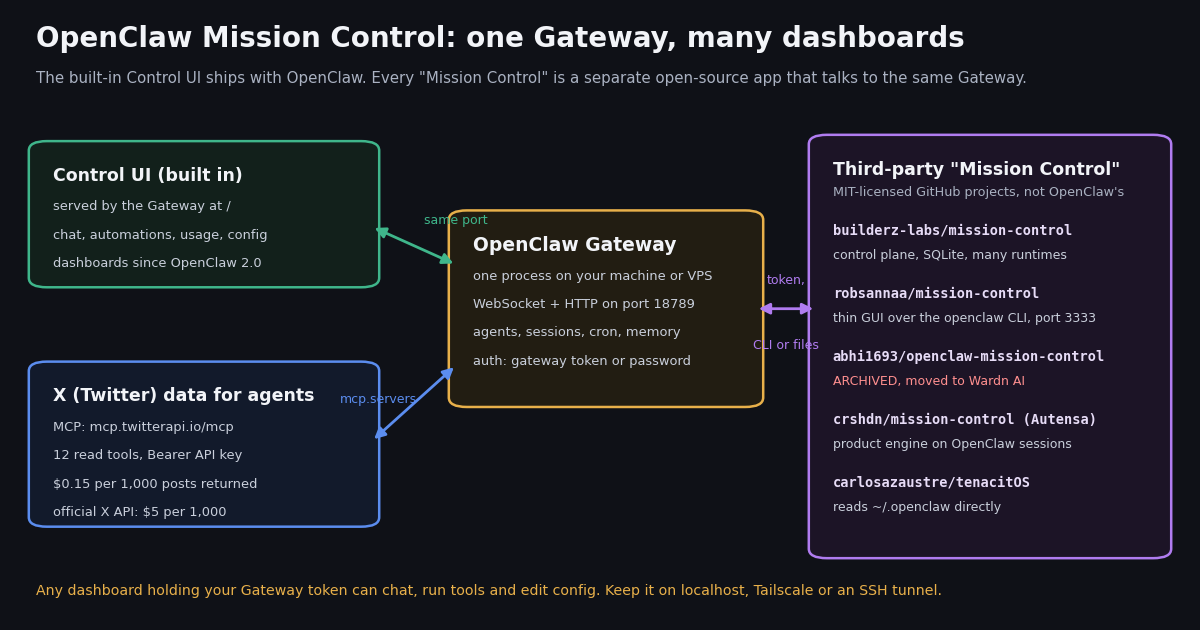
- Not one product. "OpenClaw Mission Control" names several third-party GitHub dashboards; OpenClaw's own dashboard is the Control UI, served by the Gateway on port
18789. - The two you will meet:
builderz-labs/mission-control(control plane, SQLite, REST + MCP + CLI, works with Claude Code and Codex too) androbsannaa/mission-control(thin GUI over theopenclawCLI, port3333). - One is archived:
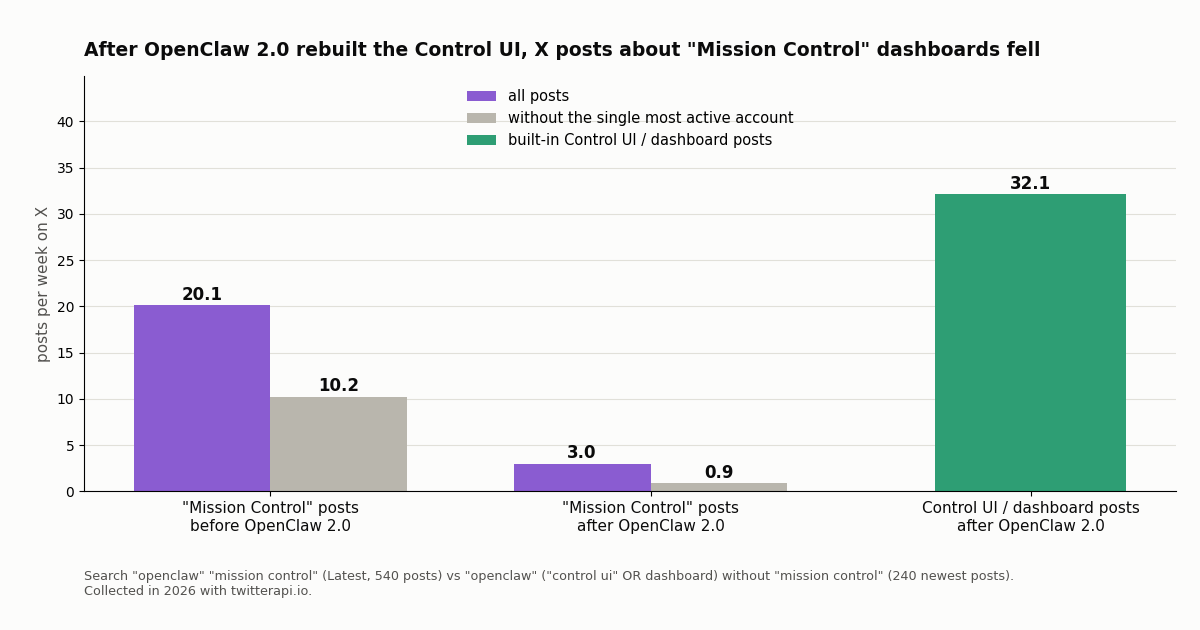
abhi1693/openclaw-mission-controlstopped receiving fixes and security updates and points to its successor, Wardn AI. - OpenClaw 2.0 changed the math: after the launch, X posts about Mission Control fell to 0.9 a week (one prolific account excluded) while Control UI / dashboard posts ran at 32.1 a week.
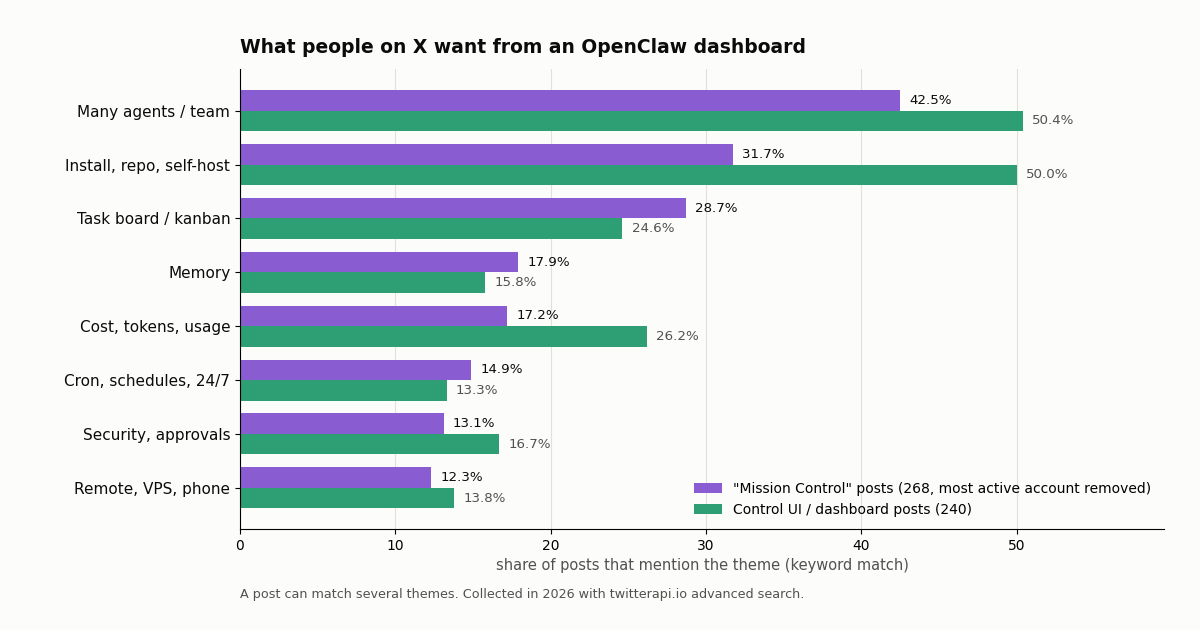
- What people want from a dashboard: many agents in one view (42.5% of posts), install and self-hosting (31.7%), a task board (28.7%) and cost tracking (17.2%).
- Security first: every one of these UIs holds a credential that can chat, run tools and edit config; keep it on localhost, Tailscale or an SSH tunnel. X data for the agents costs $0.15 per 1,000 posts via twitterapi.io vs $5 per 1,000 on X's pay-per-usage rate card.
Search for OpenClaw Mission Control and you get a dozen GitHub repositories, a Product Hunt listing, skill marketplace entries and blog posts that each describe a different app. That is because Mission Control is a name the community borrowed, not a feature of OpenClaw. This page sorts out which project is which, what each one actually does (read from the repositories themselves), how they differ from the Control UI that ships with OpenClaw, and which one is worth installing now that OpenClaw 2.0 has rebuilt its own dashboard.
We also measured how people on X (Twitter) talk about these dashboards: 894 posts from three searches plus 160 posts from the official @openclaw account, collected in 2026. And because most people want a dashboard to run agents that watch something, the last sections show how to feed X data to an OpenClaw agent and to a Mission Control task queue, and what that data costs.
This page is about the dashboards. For choosing between OpenClaw and Claude Code as the agent itself, see our OpenClaw vs Claude Code comparison; for the step-by-step OpenClaw X skill and MCP setup, see the OpenClaw Twitter guide. Both are linked at the end.
0.9 a week, down from 10.2 before the launch (one prolific account excluded), while posts about the built-in Control UI and dashboards ran at 32.1 a week (collected in 2026).
What "OpenClaw Mission Control" actually refers to
OpenClaw is a free, MIT-licensed personal agent you host yourself: one Gateway process runs on your machine or a server, keeps your agents, sessions, schedules and memory, and talks to you through chat apps and a browser UI. The project's GitHub repository (github.com/openclaw/openclaw) showed about 394,000 stars when we checked, and the newest release on npm was 2026.11.3.
The browser UI that comes with it is called the Control UI. OpenClaw's docs describe it as a single-page app served by the Gateway at http://<host>:18789/ that speaks directly to the Gateway WebSocket on the same port. The docs call it an admin surface (chat, config, exec approvals) and warn against exposing it publicly.
Mission Control is a different thing: a name that several independent developers gave to their own dashboards for OpenClaw. A GitHub repository search for "openclaw mission control" returned 514 repositories when we ran it. None of them are published by the OpenClaw organization. They are separate apps, with separate maintainers, licenses, install steps and security models, that connect to your Gateway with its token, drive the openclaw CLI, or read the files under ~/.openclaw directly.
So when someone says "I set up OpenClaw Mission Control", the first question is which one. The next section lists the five you are most likely to run into, with what we read on each repository this session.
The Mission Control projects compared
The table below comes from the GitHub repositories and their READMEs, read this session. Star counts move every day; treat them as rough size, not quality.
Smaller projects use the same name too: clawdeckio/clawdeck ("open source mission control for your OpenClaw agents", about 450 stars) and several skills on ClawHub. If a tutorial does not name the repository, assume it may describe any of them.
Archived means archived. The abhi1693 README now says no new features, bug fixes or security updates will be made and that new deployments are not recommended. Its last commit is the archive notice itself. Many 2026 blog posts and directory listings still describe it as the most complete option, so check the repo before following one of them.
The built-in Control UI after OpenClaw 2.0
Most Mission Control repositories were created early in 2026, when OpenClaw's own browser UI was much thinner. The @openclaw account announced OpenClaw 2.0 on August 31, 2026, and described it as bringing a rebuilt Control UI, multiplayer collaboration, dashboards, memory, skills and worker nodes. That launch post had about 3.1 million views in our timeline sample.
In the current docs (docs.openclaw.ai/web/control-ui), the Control UI covers chat with any agent and streamed tool calls; channels with QR login; threads and session grouping; memory; Automations (cron jobs with run history, failing counts and next wake); plugins and skills; device pairing; exec approvals with a 30-day history; full config editing of ~/.openclaw/openclaw.json; and a Usage page with session-derived token and estimated-cost analysis plus live provider plan and quota cards where the provider reports them.
OpenClaw 2.0 also added session dashboards: every thread can own a grid of live widgets the agent builds for you on request, and the /dashboards page lists them as a gallery. The docs stress there is no separate app to configure. In other words, the feature that gave Mission Control its name (a board of live status for your agents) now exists inside OpenClaw.
Which one should you run, and how to install it safely
One agent or a few, OpenClaw only: the Control UI. It ships with the Gateway, gets fixes with every OpenClaw release, and uses the Gateway's own device pairing. Run openclaw dashboard and you are in. Even the builderz README agrees: it calls its own Mission Control "probably the wrong tool" when one agent on one machine is already understandable from its native CLI.
Many agents across several runtimes: builderz-labs Mission Control. It is the only project in the list built as a control plane above several agent runtimes (OpenClaw, Claude Code, Codex, CrewAI, LangGraph, AutoGen), with roles, API keys, approvals and completion receipts. The price is a second service to run and secure, and the README labels it alpha software whose APIs and schemas may change between releases.
A GUI for someone who does not want the CLI: robsannaa Mission Control. It keeps almost no state of its own (two small local files for usage history and the task board) and reads and writes straight through the OpenClaw CLI, so if the dashboard stops, the agents keep running. Overlap with the 2.0 Control UI is large; its task board and terminal are the main additions.
An autonomous build pipeline: Autensa (crshdn/mission-control). It is less a dashboard than a product engine that turns research into pull requests on top of OpenClaw sessions. Pick it for that workflow, not for monitoring.
Avoid for new installs: the archived abhi1693 project. If you already run it, plan a migration; there will be no security fixes.
The commands below are copied from each project's README and OpenClaw's dashboard docs. Run them on the machine where the Gateway lives, then reach the UI through a tunnel instead of opening a port to the internet.
Every one of these UIs is an admin console. OpenClaw's docs describe the Control UI as an admin surface for chat, config and exec approvals and recommend localhost, Tailscale Serve or an SSH tunnel. A third-party dashboard that holds your Gateway token (OPENCLAW_GATEWAY_TOKEN) or runs the openclaw CLI as your user has the same power. The builderz README says to keep it on a trusted network unless a TLS reverse proxy and MC_ALLOWED_HOSTS are set, and to treat agent messages, skills, webhooks and MCP content as untrusted input.
Check the repository before you clone. Look at the last commit, open issues, license and whether it is archived. Read setup.sh or install.sh before running it; both projects ask for them to run as your user with access to ~/.openclaw.
# Built-in Control UI: nothing to install, it ships with the Gateway
openclaw gateway            # start the Gateway if it is not running
openclaw dashboard          # opens http://127.0.0.1:18789/ with a single-use pairing link

# robsannaa/mission-control: thin GUI that drives the openclaw CLI (Node 20+)
cd ~/.openclaw
git clone https://github.com/robsannaa/openclaw-mission-control.git
cd openclaw-mission-control && ./setup.sh      # serves http://localhost:3333

# builderz-labs/mission-control: self-hosted control plane (Node 22+ and pnpm, or Docker)
git clone https://github.com/builderz-labs/mission-control.git
cd mission-control && bash install.sh --local  # then open http://localhost:3000/setup
# or: docker run --rm -p 3000:3000 ghcr.io/builderz-labs/mission-control:latest

# Reach any of them from a laptop without exposing the port
ssh -N -L 18789:127.0.0.1:18789 -L 3333:127.0.0.1:3333 user@your-serverWhat people on X say about OpenClaw dashboards
We searched X for posts containing both "openclaw" and "mission control" (Latest, 540 posts from 181 accounts, plus 114 Top posts) and, separately, for "openclaw" with "control ui" or "dashboard" but without "mission control" (240 posts from 166 accounts).
One account wrote half of the Mission Control conversation. 50.4% of the Latest posts came from a single account, so every share below excludes it. Without it, 268 posts from 180 accounts remain, and 13.4% of them link to a GitHub repository.
The builderz-labs project is the one people name. Across the Mission Control posts, builderz-labs/mission-control was linked by 6 distinct accounts and named or linked by 10. The Autensa project was named by 4 accounts, the archived abhi1693 project by 3, TenacitOS by 3 and ClawDeck by 2. Most posts name no repository at all, which is why tutorials blur them together.
Interest moved to the built-in UI. Before the OpenClaw 2.0 launch, Mission Control posts outside the dominant account ran at 10.2 a week; after it, 0.9 a week, a 91% drop. Over the same post-launch weeks, posts about the Control UI or OpenClaw dashboards ran at 32.1 a week. The official account's own posts point the same way: of 160 recent @openclaw posts, 6 were about its dashboards or Control UI and 0 mentioned Mission Control; its OpenClaw Dashboards episode post had about 132,000 views.
Reach is uneven. The median Mission Control post (Latest, dominant account excluded) had 8 likes and 886 views; the 90th percentile had 19971 views. The Top tab, which X ranks by engagement, had a median of 8477 views, and its posts were older, from the first weeks of the Mission Control wave.
What people want a dashboard for
We tagged each post by keyword families. The point is the ranking, not the exact share: keyword matching misses sarcasm and counts a post once per theme.
Two things stand out. A task board is the most distinctive Mission Control ask (28.7% of posts vs 24.6% for the Control UI), which matches what the Control UI still lacks: it has threads and dashboards, not a kanban that agents pick work from. Cost is the reverse: Control UI posts mention tokens, usage or cost more often (26.2% vs 17.2%), consistent with the 2.0 Usage page being new.
If a task board is the reason you want Mission Control, the builderz-labs or robsannaa project still adds something. If you want cost tracking, schedules or a status board, try the 2.0 Control UI first.
Wire X (Twitter) data into OpenClaw and Mission Control
The most common job people show off on these dashboards is an agent that watches something and reports back, and X is a frequent source: brand mentions, a competitor's account, a keyword. The dashboard does not fetch data; the agent does. Two routes work with every project above.
Route 1: give the OpenClaw agent an MCP server. twitterapi.io runs a hosted MCP server at https://mcp.twitterapi.io/mcp with 12 read tools (search, user info, timelines, replies, followers, trends) and your API key as a Bearer token. Add it under mcp.servers in ~/.openclaw/openclaw.json, as below, and every agent you drive from the Control UI or a Mission Control board can call it. No X developer account is needed. The full walkthrough, including a curl-based skill, is in our OpenClaw Twitter guide.
Route 2: push X posts into the task queue. builderz-labs Mission Control has a REST API (POST /api/tasks with Authorization: Bearer <MC_API_KEY>). A small script can read new posts from /twitter/tweet/advanced_search, trim them, and create a task for an agent to summarize. The full example is in the code block at the end of this page.
Posting back to X is possible but acts as a real account. Writes run through an authenticated session: one /twitter/user_login_v2 login ($0.10, with a proxy you supply) returns login_cookies, then each post, like or follow (/twitter/create_tweet_v2, /twitter/follow_user_v2) is 60 credits, $0.0006, billed per HTTP 200 call. The call acts as that account, so X can rate-limit, lock or suspend it; keep a human pace and a human approval step, and expect the session to need a re-login now and then.
// ~/.openclaw/openclaw.json  (JSON5: comments and trailing commas are fine)
{
  mcp: {
    servers: {
      twitterapi: {
        url: "https://mcp.twitterapi.io/mcp",
        transport: "streamable-http",
        // ${VAR} is resolved from the Gateway environment, so the key never sits in this file
        headers: { "Authorization": "Bearer ${TWITTERAPI_IO_API_KEY}" },
      },
    },
  },
}What the X data costs an always-on agent
twitterapi.io bills per result: 15 credits per post returned, which is $0.15 per 1,000 posts, with a 15-credit minimum per request ($0.00015) when a search finds nothing. Profiles are 18 credits each ($0.18 per 1,000). $1 buys 100,000 credits, purchased credits never expire, and new accounts that pass the automatic bot check get up to $1 of free credits (at most 100,000 credits, no card, one per person or network, expiring after 31 days).
X's own pay-per-usage rate card (docs.x.com/x-api/getting-started/pricing) lists $0.005 per post read and $0.010 per user read, capped at 3 million post reads a month before Enterprise. For 1,000 posts that is $5 on the X rate card vs $0.15 on twitterapi.io, about 33 times less.
The study behind this page returned 1,054 posts in 53 requests, about $0.16 of credits. Rate limits are 0.2 requests per second before the first payment and 20 once paid (50 on Scale, 500 on Business). Subscription plans start at $29 monthly; see the pricing page for the current tiers.
How we collected this
Question. When people on X talk about an OpenClaw Mission Control, which dashboard do they mean, what do they want it for, and how does that compare with posts about the built-in Control UI?
Searches and account. Three twitterapi.io advanced searches: "openclaw" "mission control" (Latest, 27 pages, 540 posts; Top, 6 pages, 114 posts) and "openclaw" ("control ui" OR dashboard) without "mission control" (Latest, 12 pages, 240 posts). Plus the 160 most recent posts of the official @openclaw account. 53 requests in total, collected in 2026.
Window. The most recent matching posts at collection time. The Mission Control series reaches back to the early weeks of the Mission Control wave; the Control UI series holds only its 240 newest posts, all after the OpenClaw 2.0 launch, so its weekly rate covers a shorter span.
Method. Weekly rates are posts divided by weeks covered before and after the @openclaw launch post. Repository counts come from GitHub links in post text and expanded URLs, counted by distinct accounts. Themes are keyword families; a post can match several. One account wrote half the Mission Control Latest posts and is excluded from shares and rates marked as such.
What the sample cannot show. It counts posts, not installs or users. Searches miss posts that call a dashboard by another name, and the Control UI search also catches generic dashboard talk. Star counts and statuses were read on GitHub this session and will drift.
Privacy. Aggregates only. Search authors are private individuals: their raw posts were not stored in our repository and no handle is named here. Only the official @openclaw organization account and public GitHub project names appear.
import os
import requests

# 1. Read fresh X (Twitter) posts about your topic from twitterapi.io (no X account needed)
X_BASE = "https://api.twitterapi.io"
X_HEADERS = {"X-API-Key": os.environ["TWITTERAPI_IO_API_KEY"]}

# 2. Hand them to an agent as a task on a self-hosted Mission Control
#    (builderz-labs/mission-control REST API, key from its Settings page)
MC_URL = os.environ.get("MC_URL", "http://127.0.0.1:3000")
MC_HEADERS = {"Authorization": f"Bearer {os.environ['MC_API_KEY']}", "Content-Type": "application/json"}


def search_x(query, max_pages=2):
    """Latest posts for a query; each page holds up to 20 posts, billed per post returned."""
    posts, cursor = [], ""
    for _ in range(max_pages):
        params = {"query": query, "queryType": "Latest"}
        if cursor:
            params["cursor"] = cursor
        r = requests.get(f"{X_BASE}/twitter/tweet/advanced_search", headers=X_HEADERS, params=params, timeout=30)
        r.raise_for_status()
        body = r.json()
        for t in body.get("tweets", []):
            posts.append({
                "url": t["url"],
                "text": t["text"].replace("\n", " ")[:280],
                "likes": t.get("likeCount", 0),
                "views": t.get("viewCount", 0),
                "author": t["author"]["userName"],
            })
        if not body.get("has_next_page"):
            break
        cursor = body.get("next_cursor", "")
    return posts


def create_task(title, description, agent="scout"):
    payload = {"title": title, "description": description, "assigned_to": agent, "priority": "medium"}
    r = requests.post(f"{MC_URL}/api/tasks", headers=MC_HEADERS, json=payload, timeout=30)
    r.raise_for_status()
    return r.json()


if __name__ == "__main__":
    query = '"openclaw" (dashboard OR "control ui") lang:en -filter:replies'
    posts = search_x(query)
    posts.sort(key=lambda p: p["views"], reverse=True)
    lines = [f"- {p['text']} ({p['likes']} likes, {p['views']} views) {p['url']}" for p in posts[:15]]
    brief = "Summarize what these X posts say about OpenClaw dashboards. Flag bugs and feature requests.\n\n" + "\n".join(lines)
    task = create_task(f"X digest: {len(posts)} posts on OpenClaw dashboards", brief)
    print("created task:", task)
    print(f"X data bill for this run: {len(posts)} posts x $0.00015 = ${len(posts) * 0.00015:.4f}")
Researching this?Free starter credits cover end-to-end testing — Google sign-in, no card. Get a key.
Questions readers ask
Is OpenClaw Mission Control an official OpenClaw product?
No. Mission Control is a name used by several independent GitHub projects, such as builderz-labs/mission-control and robsannaa/mission-control. OpenClaw's official browser dashboard is the Control UI, served by the Gateway at http://127.0.0.1:18789/ and opened with openclaw dashboard.
Which OpenClaw Mission Control should I use?
It depends on the job. For one OpenClaw setup, the built-in Control UI covers chat, automations, usage and dashboards with nothing extra to install. For many agents across OpenClaw, Claude Code and Codex, builderz-labs/mission-control is the project built as a multi-runtime control plane. For a lightweight GUI over the openclaw CLI with a task board, robsannaa/mission-control. Avoid the archived abhi1693 project for new installs.
Is abhi1693/openclaw-mission-control still maintained?
No. Its maintainer archived the repository; the README says no new features, bug fixes or security updates will be made, new deployments are not recommended, and development moved to a successor project called Wardn AI.
How do I open the OpenClaw dashboard?
Start the Gateway (openclaw gateway) and run openclaw dashboard. It opens http://127.0.0.1:18789/ with a single-use pairing link for that browser. On a server, reach it through Tailscale Serve or an SSH tunnel rather than a public port.
What port does OpenClaw Mission Control use?
Each project picks its own. robsannaa/mission-control serves on port 3333 by default (change it with PORT=8080 ./setup.sh). builderz-labs/mission-control serves on port 3000. The built-in Control UI shares the Gateway's port, 18789.
Is it safe to expose Mission Control to the internet?
Not directly. These dashboards can chat with agents, run tools and edit config with your Gateway credentials. OpenClaw's docs call the Control UI an admin surface and recommend localhost, Tailscale Serve or an SSH tunnel; the builderz README says to keep Mission Control on a trusted network unless a TLS reverse proxy and allowed hosts are configured.
Can a Mission Control dashboard monitor Twitter (X)?
The dashboard does not fetch data itself; the agents it manages do. Give the OpenClaw agent the twitterapi.io MCP server (https://mcp.twitterapi.io/mcp, API key as a Bearer token) or a script that calls /twitter/tweet/advanced_search, and show the results as tasks or dashboard widgets. Reads cost $0.15 per 1,000 posts returned and need no X developer account.
Do I still need Mission Control after OpenClaw 2.0?
Often not. OpenClaw 2.0 rebuilt the Control UI with session dashboards, an Automations page and a Usage page. A kanban-style task board that agents pick work from, and managing non-OpenClaw runtimes, are the main reasons left to add a third-party Mission Control.
Continue
- OpenClaw docs: Control UI
- OpenClaw docs: Gateway dashboard access and auth
- builderz-labs/mission-control on GitHub
- robsannaa/mission-control on GitHub
- abhi1693/openclaw-mission-control (archived) on GitHub
- X API pricing (pay-per-usage rate card)
- X (Twitter) API guide and endpoints
- OpenClaw vs Claude Code for always-on X jobs
- OpenClaw Twitter (X) skill and MCP setup
- Hermes Agent vs OpenClaw compared
- OpenClaw Browser Relay explained
- how an MCP server works, with a live example
- twitterapi.io pricing and plans
- 01Bright Data Alternatives for Twitter (X) Data: Prices, Fit and a Measured Cost Test
- 02Make.com Pricing in 2026: Plans, Credits and What a Twitter (X) Workflow Really Costs
- 03CrewAI vs LangGraph: Which Multi-Agent Framework to Pick, and Where AutoGen Went
- 04Browser Use MCP Server: Setup, CLI and Twitter (X) Reads in 2026
- 05Manus Alternatives in 2026: Hosted, Chat-Plan and Open-Source Agents, and What People on Twitter (X) Switch To
- 06OpenClaw Browser Relay: How the Chrome Extension Drives Your Signed-In Browser (and When to Use an API for Twitter (X) Data Instead)
- 07Hermes Agent vs OpenClaw: Which Agent Fits Twitter (X) Work?
- 08OpenClaw vs Claude Code: which agent should run your Twitter (X) jobs?
Writing about something you built with TwitterAPI.io? Our community rewards program pays API credits for honest tutorials, build logs and videos.
Stop reading. Start building.
Starter credits cover real testing on real data. Google sign-in, no card, no application queue.
Get an API keyAlready building with TwitterAPI.io? Publish an honest tutorial or build log about it and earn up to $200 a month in API credits.