Meta Threads API: What It Does, Its Limits, and Where Twitter (X) Data Still Comes From
This page is about Meta's Threads API, the developer interface to the Threads app, and not about posting a multi-tweet thread on X; that is a different job, covered step by step in our X thread tutorial (how-to-make-twitter-thread-api-tutorial). It is also not about programming threads in Java or POSIX. If you searched for "threads api" because you want to publish to Threads, search Threads posts, or read Threads insights, you are in the right place.
Everything below about Threads comes from Meta's own developer documentation (developers.facebook.com/documentation/threads), read in full for this page: the overview and rate limits, get started, posts, keyword search, profile discovery, mentions, insights and the changelog. We do not have a Threads app in production, so nothing here claims we ran a Threads call; the Threads code is copied from the documented endpoints and parameters.
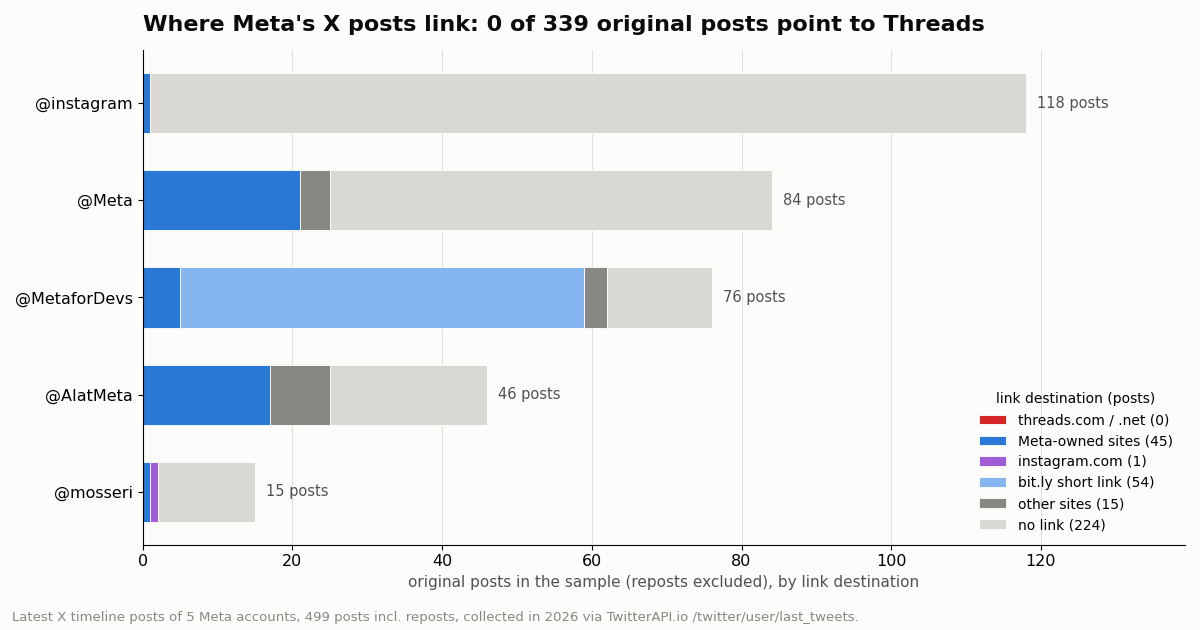
The second half answers the question builders usually reach next: if a product listens to social conversation, does the Threads API replace X data? We measured one piece of that directly. We pulled the latest X timelines of five Meta accounts (499 posts, collected in 2026) and checked where their posts send readers. Of 339 original posts, 0 link to Threads. The audiences are separate, and so are the APIs.
What the Threads API is, and what it is for
Meta's overview states the purpose in one sentence: the Threads API lets apps "create and publish content on a person's behalf on Threads, and to display those posts within your app solely to the person who created it." That framing matters. The core of the API is a first-party, user-authorized API: a Threads user signs in to your app, grants permissions, and your app acts for that user and reads that user's data. Public discovery features (keyword search, profile discovery, mentions from other users) were added later and each one sits behind its own permission and App Review.
Hosts and versioning. Calls go to graph.threads.com or graph.threads.net, with a version segment such as /v1.0/. The shape will feel familiar to anyone who has used Meta's Graph API: node IDs in the path, a fields parameter to choose the response fields, and an access_token parameter.
What you can build with it. A scheduler or social media manager that publishes to Threads; a reply-management inbox for a brand's Threads account; an analytics view of a creator's own Threads performance; a search feature over public Threads posts once approved; and a profile lookup of public accounts with at least 100 followers.
What it is not. It is not a firehose and has no streaming endpoint in the pages we read; reply and mention webhooks exist for the authorized user's account. It returns no data about X, Instagram feeds or Facebook. And the Threads docs pages we read publish quotas, not a per-call price list: cost is your engineering time and App Review, while volume is governed by the limits below.
Getting access: Meta app, permissions, tokens and App Review
Meta's get-started guide asks you to create an app and pick the Threads use case. Creating the app yields two app IDs and secrets; for the Threads API you use the Threads app ID and its secret. Users then authorize your app through the Authorization Window, which returns an authorization code that you exchange for a token.
Tokens. Short-lived user tokens are valid for 1 hour. Exchange them for long-lived tokens, valid for 60 days, and refresh those before they expire with GET /refresh_access_token. Permission grants from users with public profiles last 90 days and are extended when you refresh; for private profiles the grant cannot be extended and the user has to grant it again.
App Review is the real gate. Threads testers on your app can grant any permission at any time. For everyone else, "each permission must first be approved through the App Review process, and your app must be published." Until then, publishing only works for testers, keyword search only finds the token owner's posts, and mentions only return mentions made by testers. Plan for review time before you promise a launch date.
Media hosting. Meta downloads any image or video you publish from a public URL at the time of the attempt, so your media must sit on a publicly reachable server.
Threads API rate limits, in one table
Meta documents two layers of limits: an app-level call budget per app-and-user pair, and per-profile quotas on specific actions. All of these are rolling 24-hour windows.
How the call budget works. "Calls within 24 hours = 4800 * Number of Impressions", where impressions are the number of times content from the user's Threads account entered someone's screen in the last 24 hours, with a minimum of 10. A brand-new account with almost no reach therefore still gets 4,800 x 10 = 48,000 calls a day. Meta adds CPU-time ceilings of 720,000 x impressions for total CPU time and 2,880,000 x impressions for total time.
Reading your quota. GET /{threads-user-id}/threads_publishing_limit returns quota_usage and a config object with quota_total and quota_duration (86,400 seconds). Ask for reply_quota_usage, delete_quota_usage or location_search_quota_usage to see the other quotas. Meta tells schedulers to enforce the publishing limit themselves, especially when users can queue posts for later.
Search quota quirks. The 2,200-query limit follows the user, not the app: two apps searching for the same user share it. Repeating the same keyword still counts. Queries that return nothing do not count, and keywords Meta deems sensitive or offensive return an empty array rather than an error.
Publishing to Threads with the API
Publishing a single text, image or video post is two calls. First POST /{threads-user-id}/threads creates a media container (media_type of TEXT, IMAGE or VIDEO, plus text, image_url or video_url). Then POST /{threads-user-id}/threads_publish with the container's creation_id publishes it. Carousels add child containers first. Text posts are limited to 500 characters, and Meta counts emojis by their UTF-8 bytes.
Meta's posts guide also covers topic tags, link attachments, GIFs, polls, spoilers, quote posts, reposts and labeling AI-generated content. Replies use the same container pattern with a reply target and the reply permissions.
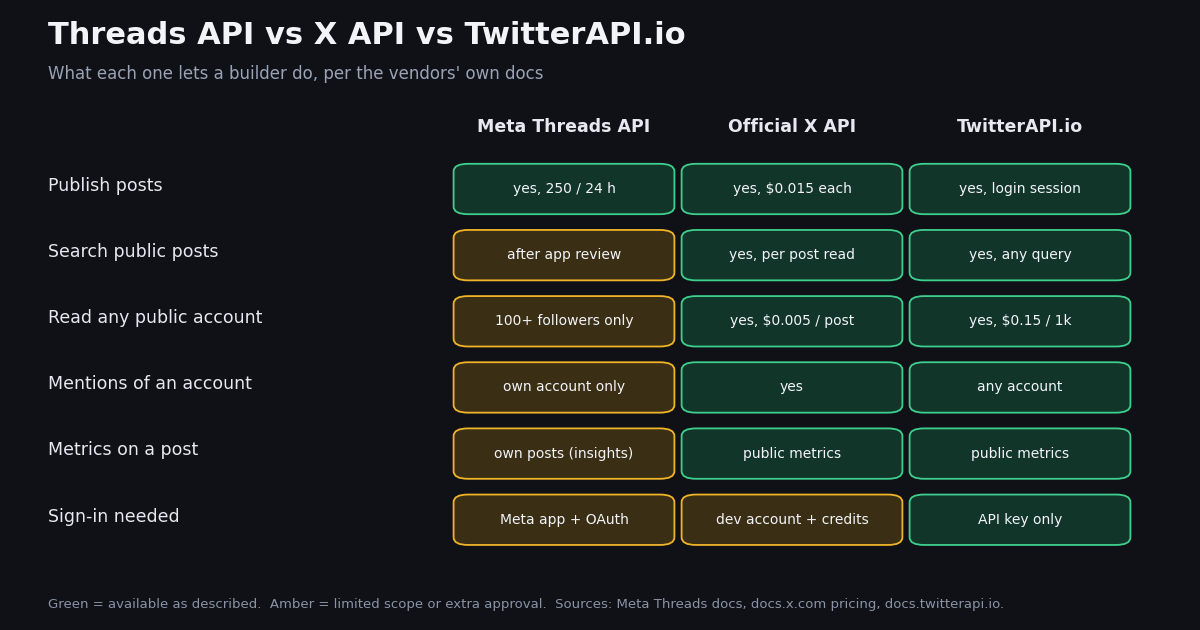
On X, for comparison. The official X API's rate card prices a created post at $0.015, or $0.200 when the post contains a URL. TwitterAPI.io offers writes through an authenticated session: one /twitter/user_login_v2 login ($0.10, with a proxy you supply) returns login_cookies, and each write after that (a post through /twitter/create_tweet_v2, or a like, retweet, follow or delete) is 60 credits, $0.0006, billed per HTTP 200 call. The call acts as that account, so X can rate-limit, lock or suspend it; keep a human pace, and expect the session to need a fresh login from time to time.
# Threads publishing is two calls (Meta docs: Posts). Text posts are capped at 500 characters.
import os, requests

T = "https://graph.threads.com/v1.0"
token, uid = os.environ["THREADS_ACCESS_TOKEN"], os.environ["THREADS_USER_ID"]

# 1) create a media container
c = requests.post(f"{T}/{uid}/threads",
                  params={"media_type": "TEXT", "text": "Shipping notes are up.", "access_token": token},
                  timeout=30).json()

# 2) publish it (counts against the 250-posts-per-24-hours profile limit)
p = requests.post(f"{T}/{uid}/threads_publish",
                  params={"creation_id": c["id"], "access_token": token}, timeout=30).json()

# check the remaining quota
q = requests.get(f"{T}/{uid}/threads_publishing_limit",
                 params={"fields": "quota_usage,config", "access_token": token}, timeout=30).json()
print(p, q)
Threads keyword search: what it returns and who it covers
Search is the feature most builders mean when they type "threads api keyword search". The endpoint is GET /keyword_search and it searches public Threads media by keyword or by topic tag.
Fields. Results use the media fields from the retrieval docs (id, text, media_type, permalink, timestamp, username, has_replies, is_quote_post, is_reply and more); the owner field is excluded from search results.
Coverage is the catch. Without approval for threads_keyword_search the search runs only over posts owned by the authenticated user. After approval, public posts are searchable, but private profiles never are, sensitive keywords come back empty, and the per-user budget is 2,200 queries a day. For a brand monitoring tool that is generous for a dashboard and tight for a background poller: a single keyword polled every minute is 1,440 queries a day on its own.
On X, the equivalent is search over public posts. With TwitterAPI.io, /twitter/tweet/advanced_search takes X's search operators (from:, since:, -is:retweet, lang:) and returns 20 tweets per full page at $0.15 per 1,000 tweets; an empty check costs the $0.00015 minimum, so polling one query every 60 seconds for a month has a floor of $6.48.
Profiles, mentions, replies and insights
Profile discovery. GET /profile_lookup?username=... returns basic public profile information (including follower_count), and GET /profile_posts?username=... pages through that profile's posts. Both need threads_profile_discovery, both are limited to 1,000 requests per user per 24 hours, and both only return public profiles with at least 100 followers. Meta's changelog notes that threshold was lowered from 1,000 followers to 100.
Mentions. The mentions endpoint returns public posts in which another profile tagged the authorized user. It needs threads_manage_mentions; before approval it only returns mentions made by your app's Threads testers, and posts by private users are never returned. It is a mentions inbox for your own user, not a way to watch mentions of an arbitrary brand.
Insights. GET /{threads-media-id}/insights returns views, likes, replies, reposts, quotes and shares for a post (Meta marks views and shares as metrics in development), and GET /{threads-user-id}/threads_insights returns account-level metrics. These are for the user's own Threads only; the since and until filters reject anything before Unix time 1712991600 (April 13, 2024).
On X, the same three needs map to public endpoints with no user authorization: /twitter/user/info for a profile ($0.18 per 1,000 profiles), /twitter/user/mentions for posts mentioning any account (20 per page), and public counters on every tweet (likeCount, retweetCount, replyCount, quoteCount, viewCount, bookmarkCount). Private account analytics on X still require the official API with the account owner's consent.
Threads API vs X API vs TwitterAPI.io: capability matrix
The three are not substitutes; they cover different networks and different trust models. The Threads API is user-authorized access to Threads. The official X API is X's own metered API. TwitterAPI.io is a third-party API for public X data plus session-based X actions.
Pricing context for X. X's rate card (docs.x.com/x-api/getting-started/pricing) lists $0.005 per post read, $0.010 per user read and $0.010 per follower or following read, with pay-per-usage capped at 3 million post reads a month (Enterprise above). New paying developers get $20 in credits after a first card and credit purchase, plus a match of the first auto-recharge up to $50. Against TwitterAPI.io's $0.15 per 1,000 tweets, X's $5 per 1,000 post reads is about 33x more for the same tweets.
A naming trap. If you look for Threads on X, the handle @threads is not Meta: its bio reads "Threads is a Slack replacement designed for makers" and says it has no affiliation with Meta. We excluded it from the study for that reason. Always confirm the account by ID before you build a feed around it.
What we measured: Meta's own accounts on X
To test whether a Threads-only listener would see Meta's X conversation, we pulled the latest X timelines of five Meta accounts through /twitter/user/last_tweets: 499 posts, 339 of them original (not reposts), collected in 2026.
Zero links to Threads. Of 339 original posts, 0 linked to threads.com or threads.net, 1 linked to instagram.com, 45 linked to other Meta-owned sites (about.fb.com, go.meta.me, meta.ai), 54 used bit.ly short links (almost all from @MetaforDevs, destinations not resolved), 15 linked elsewhere and 224 carried no link. Only 1 post in the sample even named Threads in its text.
Reach is real on X. @instagram's original posts had a median of 694,453 views; @AIatMeta's 149,600; @Meta's 145,244. @MetaforDevs, the developer account that announces Threads API changes, posted the most often, 7.42 times a week, with the highest median engagement rate (0.969% of views).
What this means for builders. Even the company that owns Threads runs its X presence as its own channel: the posts, the replies and the audience reaction live on X. A listening or analytics product that only connects the Threads API sees none of it; X data has to come from an X data source.
# Pull an organization's latest X posts (TwitterAPI.io): 20 per page, newest first.
import os, requests

BASE = "https://api.twitterapi.io"
H = {"X-API-Key": os.environ["TWITTERAPI_IO_API_KEY"]}

posts, cursor = [], ""
for _ in range(6):                      # about 120 posts, roughly $0.018 at $0.15 per 1,000
    r = requests.get(f"{BASE}/twitter/user/last_tweets", headers=H,
                     params={"userName": "MetaforDevs", "cursor": cursor}, timeout=30)
    r.raise_for_status()
    data = r.json()["data"]
    posts += data["tweets"]
    if not r.json().get("has_next_page"):
        break
    cursor = r.json().get("next_cursor", "")

for tw in posts[:5]:
    print(tw["createdAt"], tw["likeCount"], tw["viewCount"], tw["text"][:80])
How we collected this, and how to build with both APIs
Question. Do Meta's own accounts on X point their audience to Threads, and how much reach do their X posts get?
Accounts. @Meta, @mosseri (Adam Mosseri, whose X bio describes him as head of Instagram), @MetaforDevs, @instagram and @AIatMeta: organization and public-figure accounts. @threads was screened out (an unrelated company) and @zuck returned "user not found".
Window and sample. The most recent posts per account at collection time, up to 120 each (6 pages of 20), 499 posts in total, collected in 2026. @mosseri posts rarely, so his 19 posts span years; @MetaforDevs' 120 span about 113 days.
Cost. 33 requests, 499 tweets returned; at $0.15 per 1,000 tweets plus $0.18 per 1,000 profiles the study cost about $0.08.
What the sample cannot show. Timelines without replies (the default), so reply traffic is not counted. Short links were not expanded, so a bit.ly link could still lead to Threads. Five accounts are not all of Meta. And this says nothing about how these accounts perform on Threads itself, which only their owners can read through Threads insights.
Privacy. Aggregates only; organization and public-figure accounts only; reposted and quoted authors were not analyzed. The data and scripts live in data/studies/threads-api/.
Building with both. A practical stack for a cross-network product: the Threads API for the Threads side (publishing for your users, their insights, approved keyword search), and an X data API for the X side. To try the X half, create a key on the dashboard: new accounts that pass the automatic bot check get up to $1 of free credits (at most 100,000 credits, no card, one per person or network, expiring after 31 days), which covers about 6,600 tweets at $0.15 per 1,000. Rate limits are 0.2 requests per second before the first payment and 20 after; the full reference is at docs.twitterapi.io.
"""threads_and_x_search.py - search one keyword on Threads (Meta's API) and on X
(TwitterAPI.io), then print both result sets in one shape.

    pip install requests
    export THREADS_ACCESS_TOKEN=...     # Threads user token with threads_basic + threads_keyword_search
    export TWITTERAPI_IO_API_KEY=...    # twitterapi.io dashboard key; reads need no X account
    python threads_and_x_search.py "threads api"
"""
import os
import sys

import requests

KEYWORD = sys.argv[1] if len(sys.argv) > 1 else "threads api"
TW_BASE = "https://api.twitterapi.io"
TW_HEADERS = {"X-API-Key": os.environ["TWITTERAPI_IO_API_KEY"]}


def threads_search(q, limit=25):
    """Meta's documented GET /keyword_search. Before App Review approval of
    threads_keyword_search it only searches the token owner's own posts."""
    token = os.environ.get("THREADS_ACCESS_TOKEN")
    if not token:
        return []
    r = requests.get(
        "https://graph.threads.com/v1.0/keyword_search",
        params={
            "q": q,
            "search_type": "RECENT",  # or TOP (default)
            "fields": "id,text,media_type,permalink,timestamp,username",
            "limit": limit,  # default 25, max 100
            "access_token": token,
        },
        timeout=30,
    )
    r.raise_for_status()
    return [
        {"platform": "threads", "user": p.get("username"), "text": p.get("text") or "",
         "url": p.get("permalink"), "created": p.get("timestamp"), "likes": None}
        for p in r.json().get("data", [])
    ]


def x_search(q, max_pages=3):
    """TwitterAPI.io advanced search: 20 tweets per full page, $0.15 per 1,000 tweets."""
    out, cursor = [], ""
    for _ in range(max_pages):
        r = requests.get(
            f"{TW_BASE}/twitter/tweet/advanced_search",
            headers=TW_HEADERS,
            params={"query": f'"{q}" -is:retweet', "queryType": "Latest", "cursor": cursor},
            timeout=30,
        )
        r.raise_for_status()
        body = r.json()
        for tw in body.get("tweets", []):
            out.append({"platform": "x", "user": tw["author"]["userName"], "text": tw.get("text") or "",
                        "url": tw.get("url"), "created": tw.get("createdAt"), "likes": tw.get("likeCount")})
        if not body.get("has_next_page"):
            break
        cursor = body.get("next_cursor", "")
    return out


if __name__ == "__main__":
    rows = threads_search(KEYWORD) + x_search(KEYWORD)
    for row in rows:
        print(f"[{row['platform']:7}] @{row['user']}: {row['text'][:90]!r}  {row['url']}")
    x_count = sum(1 for r in rows if r["platform"] == "x")
    print(f"threads={len(rows) - x_count}  x={x_count}  x cost ~= ${x_count * 0.00015:.4f}")
Questions readers ask
Is the Threads API free?
None of the Threads developer docs pages we read lists a per-call price. Access is governed by quotas instead: an app call budget of 4,800 times the user's impressions per 24 hours, 250 published posts and 1,000 replies per profile per 24 hours, and 2,200 keyword-search queries per user per 24 hours. The cost is building a Meta app and passing App Review.
Can the Threads API search all public posts?
Yes, after your app is approved for the threads_keyword_search permission. Before approval, GET /keyword_search only searches the authenticated user's own posts. After approval it covers public posts (not private profiles), returns at most 100 results per call, and allows 2,200 queries per user per rolling 24 hours, shared across apps.
What are the Threads API rate limits?
Per Meta's overview: API calls are limited to 4,800 times the number of impressions per 24 hours per app and user (impressions floor of 10), with CPU-time ceilings on top. Profiles can publish 250 posts, 1,000 replies and 100 deletions per 24 hours, and run 500 location searches. Keyword search allows 2,200 queries and profile discovery 1,000 requests per user per 24 hours. Check usage with threads_publishing_limit.
How long does a Threads API access token last?
Short-lived user tokens last 1 hour. Exchanged long-lived tokens last 60 days and can be refreshed with GET /refresh_access_token before they expire. Permission grants from public profiles last 90 days and extend on refresh; private profiles must grant again.
Can I read another account's Threads posts?
Only public profiles with at least 100 followers, through the profile discovery endpoints (profile_lookup and profile_posts), which need the threads_profile_discovery permission and are limited to 1,000 requests per user per 24 hours.
Does the Threads API include X (Twitter) data?
No. It covers Threads only. For X posts, profiles and mentions you need an X data source: the official X API ($0.005 per post read on X's pay-per-usage rate card) or TwitterAPI.io ($0.15 per 1,000 tweets, API key only, no X account needed for reads).
Is @threads on X Meta's official account?
No. When we checked the X profile for this page, @threads belonged to a team-chat product whose bio says it has no affiliation with Meta. Confirm accounts by their numeric ID with a profile lookup before wiring them into a feed.
How is this different from an X thread API tutorial?
A "Twitter thread" is a chain of replies on X. Posting one uses X write endpoints, covered in our X thread tutorial. This page is about Meta's Threads app and its API.
Continue
- Meta for Developers: Threads API overview (hosts, call budget, publishing, reply, deletion and location quotas)
- Meta for Developers: Threads keyword and topic tag search (parameters, 2,200-query limit, approval scope)
- Meta for Developers: Threads get started (permissions, App Review, token lifetimes)
- Meta for Developers: Threads Insights API (media and user metrics)
- X developer docs: X API pricing (per-resource rate card, 3M post-read cap)
- twitterapi.io API reference: introduction and endpoints
- X API guide: endpoints, pricing and access options
- social media APIs compared across networks
- how to post a Twitter (X) thread through an API
- Bluesky API and the AT Protocol for builders
- TwitterAPI.io vs the official X API, side by side
- X data options for social listening tools
- TwitterAPI.io pricing per tweet and per profile
- get a TwitterAPI.io API key
- 01Twitter (X) API License: The Developer Agreement in Plain English
- 02n8n Pricing in 2026: Plans, Executions and the Twitter (X) Data Cost
- 03Claude Managed Agents: What It Is, What It Costs, and a Twitter (X) Monitoring Agent Built on It
- 04Cursor vs Claude Code: Plans, MCP Setup and Headless Runs Compared for Twitter (X) Data Work
- 05Codex Pricing in 2026: ChatGPT Plans, Usage Limits, Credits and API-Key Costs
- 06Twitter (X) Lists API — Programmatic Guide
- 07How to Audit a Twitter (X) Account for Fake Followers and Engagement Health
- 08Twitter (X) Lists: What They Are, How to Make One, and How to Use Them
Stop reading. Start building.
Starter credits cover real testing on real data. Google sign-in, no card, no application queue.
Get an API keyAlready building with TwitterAPI.io? Publish an honest tutorial or build log about it and earn up to $200 a month in API credits.