Social Media API Explained: Four Kinds, and What the Twitter (X) Data Costs
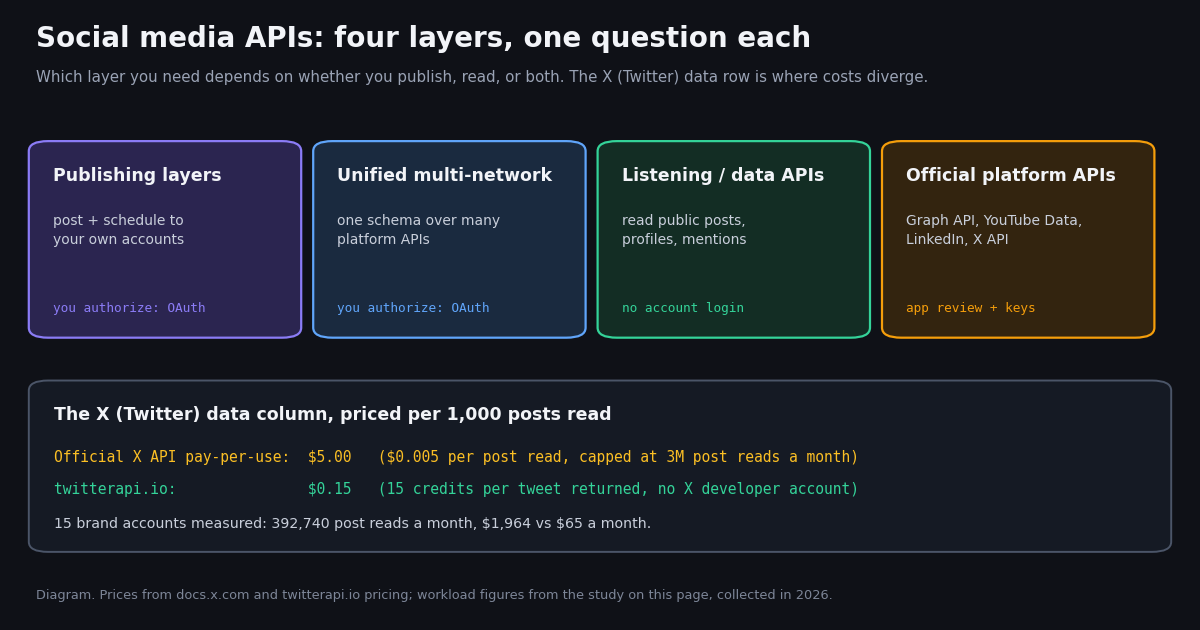
This page explains the social media API category as a whole: what the four kinds are, which job each one does, how they are priced, and where the X (Twitter) data column fits. It is not a ranking of X-only data providers; that comparison lives in our best third-party Twitter (X) API guide. Here the question comes one step earlier: do you need a social media API that publishes, one that reads, or one that wraps many networks, and what does the X part of that cost?
We are a Twitter/X data product, so we keep the other networks to one honest row each, with facts taken from their official developer docs, and go deep only on X. Vendors in the category (publishing and unified APIs such as ayrshare.com, zernio.com, outstand.so, bundle.social and blotato.com; data APIs such as data365.co, sociavault.com and socialapis.io) are named as plain domains and priced only where we read their pricing page ourselves.
Then the part the category roundups skip: we measured what an X data workload actually looks like for 15 well-known brand accounts (@Spotify, @netflix, @Xbox, @Wendys, @Nike and ten more). We counted how often each posts and how often it is mentioned, and priced a month of that data at the official X API rate card and at twitterapi.io.
What is a social media API?
An API (application programming interface) is a contract: send an HTTP request in a documented shape, get structured JSON back. A social media API applies that contract to a social network, so a program can do what a person does in the app (publish a post, read a timeline, look up a profile, search) or things the app does not offer at all (pull thousands of posts into a database, watch a keyword around the clock).
The phrase is used for four products that have very little in common beyond the word "social". Most confusion in this category, and most surprise invoices, come from mixing them up:
1. Official platform APIs. Run by the network itself: the X API (docs.x.com), Meta's Graph API for Facebook and Instagram, the YouTube Data API, LinkedIn's Marketing and Community Management APIs, TikTok's developer APIs. You register an app, pass whatever review the platform requires, and live within its quotas and price list.
2. Publishing layers. Services that post and schedule content to accounts you or your customers own. Each account holder connects their profile through OAuth, and the layer calls the official APIs on their behalf. Scheduling apps are built on this.
3. Unified multi-network APIs. A publishing or analytics layer that normalizes many official APIs behind one schema, so "create post" looks the same for X, LinkedIn and Instagram. In practice categories 2 and 3 overlap heavily; most unified APIs sell publishing first.
4. Listening and data APIs. Read-side services that return public posts, profiles, followers and mentions as JSON, usually without any account login, for analytics, research, brand monitoring and AI agents. twitterapi.io is one of these, for X only.
The first useful decision is therefore not "which vendor" but "which kind": are you writing to accounts you control, or reading what the public says? The table below compares the categories on the dimensions that decide architecture. Prices are left to the next sections because each kind bills on a different unit.
When a publishing or unified layer is right. You manage brand accounts on several networks, you want one integration for posting, and you are fine paying per connected account. The value is maintenance: the layer absorbs each network's API changes.
When a data API is right. The job is reading at volume: brand mentions, competitor timelines, keyword streams, datasets for a model or an agent. You do not own the accounts you read, so OAuth-based layers cannot help, and the cost per thousand posts becomes the number that matters.
When the official API is right. You need a capability only the platform grants (for example X's own write and account-management surfaces under your app's identity, or Meta's ads and Page insights), or a compliance team requires a first-party contract.
Official platform APIs: one row per network
Each network publishes its own rules. We read the official pages for this summary; the X row gets the rest of this article.
Sources for each row: docs.x.com/x-api/getting-started/pricing, developers.google.com/youtube/v3/getting-started, developers.facebook.com/docs/graph-api/overview/rate-limiting, learn.microsoft.com/en-us/linkedin/shared/api-guide/concepts/rate-limits and developers.tiktok.com/products/research-api. We could not load Reddit's Data API terms page in this review, so Reddit is left out rather than described from memory.
Two things stand out. First, only X sells reads on a published per-resource price list; the others ration by quota and gate by review. Second, X's official read price is the one that scales linearly with the volume of public conversation, which is why the X column dominates the bill of any integration that listens rather than posts. X also deduplicates billed resources within a 24-hour UTC day, so re-reading the same post that day is not charged twice, per the same pricing page.
Publishing and unified APIs: what they charge, and what happens to X
Publishing and unified APIs price on connected accounts, not on data volume. We fetched three pricing pages for this article; the rest of the category we name without prices because we did not verify them.
The X pass-through. The detail that matters for X is on zernio.com's pricing page: X usage is passed through "with no markup" at $0.005 per read request, $0.010 per user read, $0.015 per post and $0.200 per post with a URL. In other words, a unified layer that sits on the official X API inherits the official X price list; the convenience is the single schema, not cheaper X data.
What publishing layers do not cover. They act on accounts that connected through OAuth. They are not built to read the public conversation about a brand, a competitor's timeline, or a keyword across all of X. That read side is a separate purchase, usually from a data API.
What data APIs do not cover. A read-only data API does not schedule your campaign calendar. On X specifically, twitterapi.io does offer write actions through an authenticated session (covered below), but a multi-network content calendar is a publishing-layer job.
The X data column: official X API vs twitterapi.io
For reading X data, the two rate cards that matter are the official X API pay-per-use list and a pay-per-tweet data API. Both prices, per the same units:
Per 1,000 posts that is $5.00 against $0.15, about 33x. On twitterapi.io, $1 buys 100,000 credits, purchased credits never expire, and new accounts that pass the automatic bot check get up to $1 of free credits (at most 100,000 credits, no card, one per person or network, expiring after 31 days). Rate limits are 0.2 requests per second before the first payment and 20 once paid (50 on Scale, 500 on Business). Monthly subscriptions (Starter $29, Builder $99, Pro $199, Scale $499, Business $1,499) are on the pricing page.
The minimum matters for monitoring: twitterapi.io bills at least 15 credits per request, so a check that returns nothing costs $0.00015. Polling every 5 minutes for a month is 8,640 checks, a floor of $1.30 if every one came back empty. The study below includes that floor in every twitterapi.io number.
How big is an X data workload? 15 brand accounts measured
Category articles quote per-call prices but never the volume, and the volume is the bill. So we measured it. For 15 organization accounts that a social media integration would plausibly track, we read each account's recent posts and its most recent mentions, turned both into rates, and priced 30 days of reading them.
Own posts are tiny. Across the 15 accounts the median is 6.3 posts a week (range 0.2 for @Starbucks to 118.6 for @netflix, counting original posts, reposts and quotes, not replies). Reading a brand's own timeline costs cents a month at either rate card.
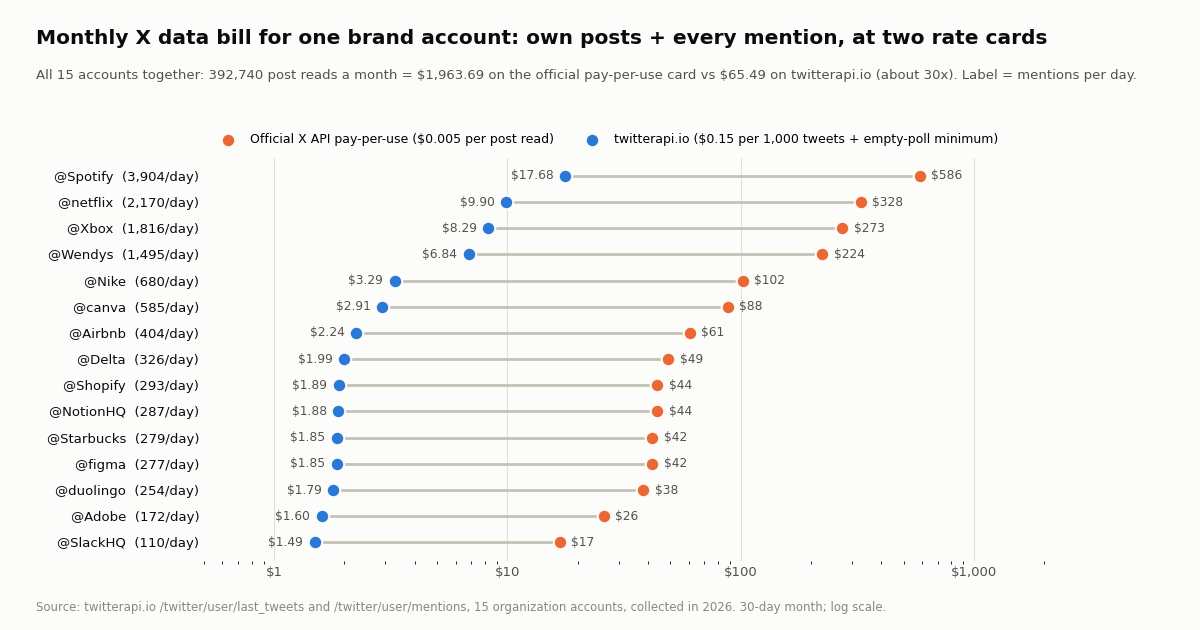
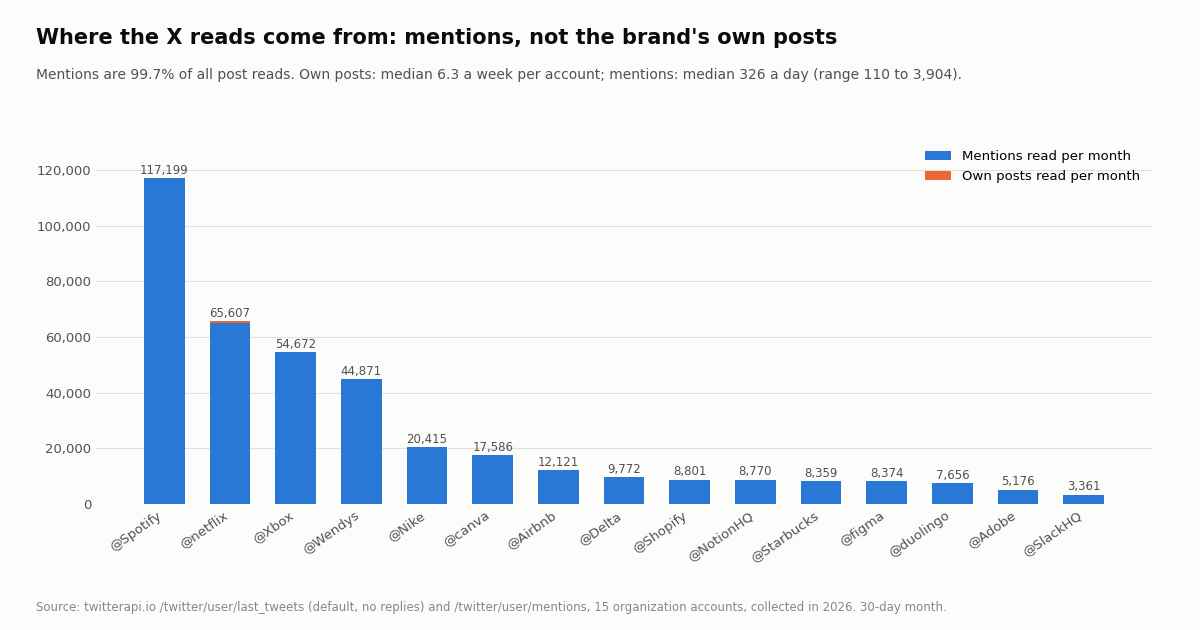
Mentions are the workload. The median account was mentioned 326 times a day; @Spotify drew 3,904 a day in our window, @netflix 2,170 and @Xbox 1,816. Mentions make up 99.7% of all post reads in the model.
Totals. All 15 together: 392,740 post reads a month. At the official X API pay-per-use rate ($0.005 per post read) that is $1,963.69 a month; on twitterapi.io it is $58.92 of tweets plus $6.58 of empty-poll minimums, $65.49 in all, about 30x less. Five of the 15 accounts would each cost more than $100 a month on the official card on their own.
Against the cap. 392,740 reads is 13.1% of the 3,000,000 post-read monthly cap on X's pay-per-use plans; at the same mix roughly 115 brand accounts would exhaust it, after which X points you to Enterprise. A data API has no such monthly ceiling, only a per-second rate limit tied to your plan.
Why mentions, not posts, set the price
The chart below splits each account's monthly reads into its own posts and the mentions it receives. The orange slivers (own posts) are barely visible: even @netflix, the most active poster at 118.6 posts a week, reads about 508 of its own posts a month against roughly 65,100 mentions.
This is the practical lesson for anyone choosing a social media API for X: a publishing layer meters accounts, but a listening integration meters the public. Its bill tracks how loud the conversation around an account is, which you do not control and which spikes during launches, outages and campaigns. Budget for the noisy account, not the median one; in our sample the loudest account produced about 35 times the mention volume of the quietest.
It also explains why the empty-poll minimum barely registers for busy accounts. A 5-minute mentions poll on @Spotify almost never comes back empty, so its floor is $0.10 a month; on @SlackHQ, the quietest account, about two-thirds of checks find nothing and the floor is $0.98. Combining several brands into one search query (shown in the next section) shares a single poll across all of them.
Building the X column: read endpoints and a polling loop
On twitterapi.io every read is a GET with an X-API-Key header against https://api.twitterapi.io. The three endpoints behind a brand-tracking integration are the same ones we used for the study:
Mentions of one account. /twitter/user/mentions with userName, optional sinceTime / untilTime (Unix seconds) and cursor; 20 mentions per page in the top-level tweets array, with has_next_page and next_cursor.
The account's own posts. /twitter/user/last_tweets with userName (or userId), optional includeReplies; posts arrive in data.tweets, 20 per page, newest first.
Many brands in one poll. /twitter/tweet/advanced_search with query and queryType=Latest. Combine handles with OR and add since_time:<unix> so each poll only returns posts newer than the last one. One query for several brands means one minimum charge per poll instead of one per brand.
Each tweet carries id, text, createdAt, lang, likeCount, retweetCount, replyCount, quoteCount, viewCount, entities and an author object with userName, followers and isBlueVerified, which is enough for sentiment, reach-weighting and routing without a second lookup. If you prefer push to poll, a filter rule (/oapi/tweet_filter/add_rule with tag, value and interval_seconds) sends matches to a webhook you host.
The loop below polls three brands every 5 minutes, keeps a seen-id set, and overlaps the window by a minute so nothing is lost between polls.
import os, time, requests

BASE = "https://api.twitterapi.io"
HEADERS = {"X-API-Key": os.environ["TWITTERAPI_IO_KEY"]}
BRANDS = ["Nike", "Spotify", "Xbox"]
since = int(time.time()) - 300
seen = set()

while True:
    query = " OR ".join(f"@{b}" for b in BRANDS) + f" since_time:{since}"
    cursor, new = "", []
    while True:
        r = requests.get(f"{BASE}/twitter/tweet/advanced_search", headers=HEADERS,
                         params={"query": query, "queryType": "Latest", "cursor": cursor}, timeout=30)
        r.raise_for_status()
        body = r.json()
        new += [t for t in body.get("tweets", []) if t["id"] not in seen]
        if not body.get("has_next_page"):
            break
        cursor = body.get("next_cursor", "")
    for t in new:
        seen.add(t["id"])
        print(t["createdAt"], t["author"]["userName"], t["text"][:80])
    since = int(time.time()) - 60   # small overlap; the seen set removes repeats
    time.sleep(300)
If your social media API also has to post to X
Many integrations need a little of both sides: read the conversation, then reply or publish from a brand account. On twitterapi.io, writes are a separate product that runs through an authenticated session. One /twitter/user_login_v2 call ($0.10, with a proxy you supply) returns login_cookies; each post, delete, like, retweet, follow or unfollow after that (/twitter/create_tweet_v2, /twitter/follow_user_v2 and so on) is $0.002 per call, billed per HTTP 200 response.
What that means in practice. Every write acts as that X account, so X can rate-limit, lock or suspend it if the activity looks automated. Keep a human pace, expect that the session can need a fresh login, and treat writes as a small, deliberate share of your traffic. For comparison, the official X API lists $0.015 per post created and $0.20 for a post containing a URL.
When a publishing layer is the better fit. If posting is the main job and spans several networks, with approval flows and a content calendar, a publishing or unified API built on OAuth is designed for it. Pair it with a data API for the read side rather than paying the official per-read rate through a pass-through.
How we collected this
Question. How many X posts does an integration that tracks brand accounts actually read in a month, and what does that cost at the official X API pay-per-use rate card versus twitterapi.io?
Accounts. 15 organization accounts: @Nike, @Starbucks, @Spotify, @netflix, @Airbnb, @duolingo, @Wendys, @Delta, @Shopify, @NotionHQ, @canva, @Adobe, @SlackHQ, @figma and @Xbox.
Method and sample. For each account, 2 pages of /twitter/user/last_tweets (default timeline, replies excluded; 600 posts in total) and 3 pages of /twitter/user/mentions (900 mentions in total), 75 requests, collected in 2026 through our rate-limited study client. Rates are items divided by the time from the oldest item to collection; monthly figures use 30 days. The official cost assumes each post is read once (X deduplicates within a UTC day) and that empty requests are free. The twitterapi.io cost adds the $0.00015 minimum for empty checks, assuming a 5-minute mentions poll and an hourly own-post poll per account, with the empty share estimated from a Poisson model at the measured rate.
What the sample cannot show. Mention rates come from short, recent windows (22 minutes for @Spotify, 13 hours for @SlackHQ), so they are snapshots that move with time of day, campaigns and news, not monthly averages. Replies posted by the brands (customer support) are not counted, which understates own-post reads for accounts such as @Delta. The mentions endpoint returns what the API indexes, not an audit of every post on X.
Privacy. Aggregates only. The brand timelines are organization accounts; mention pages, which are written by private individuals, were analyzed in memory and not stored with the study. The study's protocol, analysis script and results file are kept with the page source.
import os, time, requests
from datetime import datetime, timezone

API_KEY = os.environ["TWITTERAPI_IO_KEY"]
BASE = "https://api.twitterapi.io"
HEADERS = {"X-API-Key": API_KEY}

X_POST_READ = 0.005        # official X API pay-per-use, USD per post read
OURS_PER_TWEET = 0.00015   # twitterapi.io, 15 credits per tweet returned


def mentions_since(user, since_unix, max_pages=5):
    """Mentions of @user posted after since_unix, newest first."""
    out, cursor = [], ""
    for _ in range(max_pages):
        r = requests.get(f"{BASE}/twitter/user/mentions",
                         headers=HEADERS,
                         params={"userName": user, "sinceTime": since_unix, "cursor": cursor},
                         timeout=30)
        r.raise_for_status()
        body = r.json()
        out.extend(body.get("tweets", []))
        if not body.get("has_next_page"):
            break
        cursor = body.get("next_cursor", "")
    return out


def own_posts(user, pages=2):
    """The account's own recent posts (20 per page, newest first)."""
    out, cursor = [], ""
    for _ in range(pages):
        r = requests.get(f"{BASE}/twitter/user/last_tweets",
                         headers=HEADERS,
                         params={"userName": user, "cursor": cursor},
                         timeout=30)
        r.raise_for_status()
        body = r.json()
        out.extend((body.get("data") or {}).get("tweets", []))
        if not body.get("has_next_page"):
            break
        cursor = body.get("next_cursor", "")
    return out


def per_day(tweets, now):
    """Items per day, measured from the oldest item returned to now."""
    if not tweets:
        return 0.0
    oldest = min(datetime.strptime(t["createdAt"], "%a %b %d %H:%M:%S %z %Y") for t in tweets)
    days = max((now - oldest).total_seconds() / 86400, 1 / 1440)
    return len(tweets) / days


def size_workload(user, window_hours=3):
    now = datetime.now(timezone.utc)
    m = mentions_since(user, int(time.time()) - window_hours * 3600)
    mentions_per_day = per_day(m, now)      # page cap reached? the span shrinks, the rate stays honest
    posts_per_day = per_day(own_posts(user), now)
    reads_month = (mentions_per_day + posts_per_day) * 30
    print(f"@{user}: ~{mentions_per_day:,.0f} mentions/day, {reads_month:,.0f} post reads/month")
    print(f"  official X API pay-per-use: ${reads_month * X_POST_READ:,.2f}/month")
    print(f"  twitterapi.io:              ${reads_month * OURS_PER_TWEET:,.2f}/month (+ empty-poll minimum)")
    for t in m[:3]:
        print("  sample mention:", t["createdAt"], t["likeCount"], "likes")


if __name__ == "__main__":
    size_workload("SlackHQ")
Questions readers ask
What is a social media API?
A programmatic interface for publishing to or reading from a social network. The term covers official platform APIs (the X API, Meta Graph API, YouTube Data API, LinkedIn APIs), publishing layers that post to accounts you own, unified APIs that wrap many networks behind one schema, and data APIs that read public posts, profiles and mentions.
What is the difference between a unified social media API and a social media data API?
A unified API mostly acts on accounts that connected via OAuth: posting, scheduling, inbox and owned-account analytics across networks. A data API reads public content you do not own, such as mentions of a brand or a keyword across X, usually without any account login. Many teams need one of each.
Is there a free social media API?
Several official APIs have free quotas (YouTube's default is 10,000 units a day), but X's official API is pay-per-use at $0.005 per post read, with $20 of credits when you add a first card and buy credits. twitterapi.io gives new accounts that pass the automatic bot check up to $1 of free credits (at most 100,000 credits, no card, one per person or network, expiring after 31 days).
How much does it cost to monitor brand mentions on X through an API?
It depends on how often the brand is mentioned, because mentions are 99.7% of the reads in our study. For 15 brand accounts the total was 392,740 post reads a month: $1,963.69 on the official X API pay-per-use card versus $65.49 on twitterapi.io. A single quiet account (about 110 mentions a day) came to $16.80 versus $1.49.
Do unified social media APIs make X data cheaper?
Not in the case we checked: zernio.com states that X API usage is passed through at X's own rates with no markup ($0.005 per read request, $0.015 per post). A unified layer saves integration work, not X data cost.
Do I need an X developer account to read X data?
For the official X API, yes: you need a developer account and an app. With twitterapi.io you sign up, get an API key and send it in the X-API-Key header; no X account is needed for reads.
Can a social media API post to X?
Yes. The official X API lists $0.015 per post created ($0.20 with a URL), and publishing layers post through OAuth. twitterapi.io runs writes through an authenticated session: a $0.10 login, then $0.002 per action, acting as that account, so keep a human pace because X can rate-limit, lock or suspend it.
What is the monthly limit on the official X API?
The pay-per-use plans are capped at 3 million post reads per monthly billing cycle; above that X points to an Enterprise plan. Our 15 brand accounts used 13.1% of that cap.
Continue
- X API pricing (pay-per-use rates, 3M cap, deduplication)
- twitterapi.io docs: /twitter/user/mentions
- twitterapi.io docs: /twitter/tweet/advanced_search
- YouTube Data API: quota and unit costs
- Meta Graph API rate limiting
- LinkedIn API rate limiting
- X API overview and endpoint map
- best third-party Twitter (X) API comparison
- twitterapi.io vs the official X API
- how to search mentions on Twitter (X)
- X API options for social listening
- how the Twitter (X) GraphQL API works
- twitterapi.io pricing and subscription plans
- 01GetXBot: What the Twitter (X) Video Bot Is, Whether It Is Safe, and Alternatives
- 02The Best Twitter (X) Accounts to Follow, by Topic
- 03What Is xcancel (X Cancel)? The Twitter (X) Nitter Front End, Explained
- 04Twitter (X) Media Viewer: How to Browse an Account's Photos and Videos
- 05AllMyTweets: What It Did, Its Limits, and How to See Every Tweet on Twitter (X)
- 06Social Listening via X (Twitter) API — Build vs Buy
- 07Sprout Social API in 2026: What It Returns, What It Costs, and Where Twitter (X) Data Runs Out
- 08Download Twitter (X) Media — Bulk API Workflow (Photos + Videos)
Stop reading. Start building.
Starter credits cover real testing on real data. Google sign-in, no card, no application queue.
Get an API key