Twitter (X) API on Cloudflare Workers: a Cron Trigger mentions feed with KV
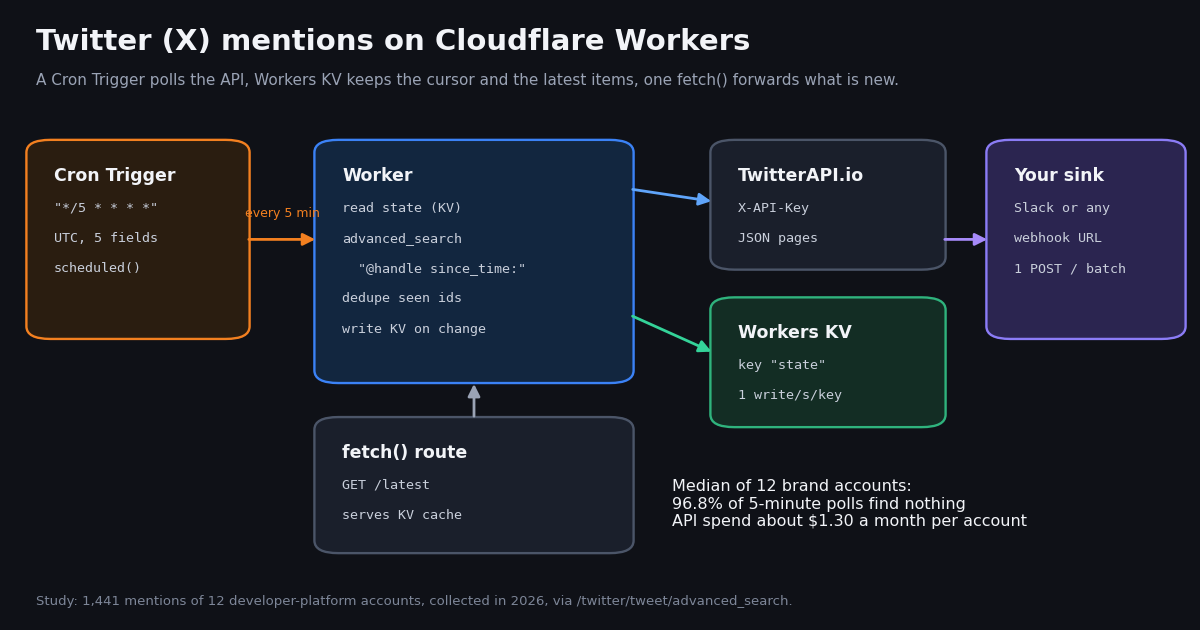
- The pattern: Cron Trigger (
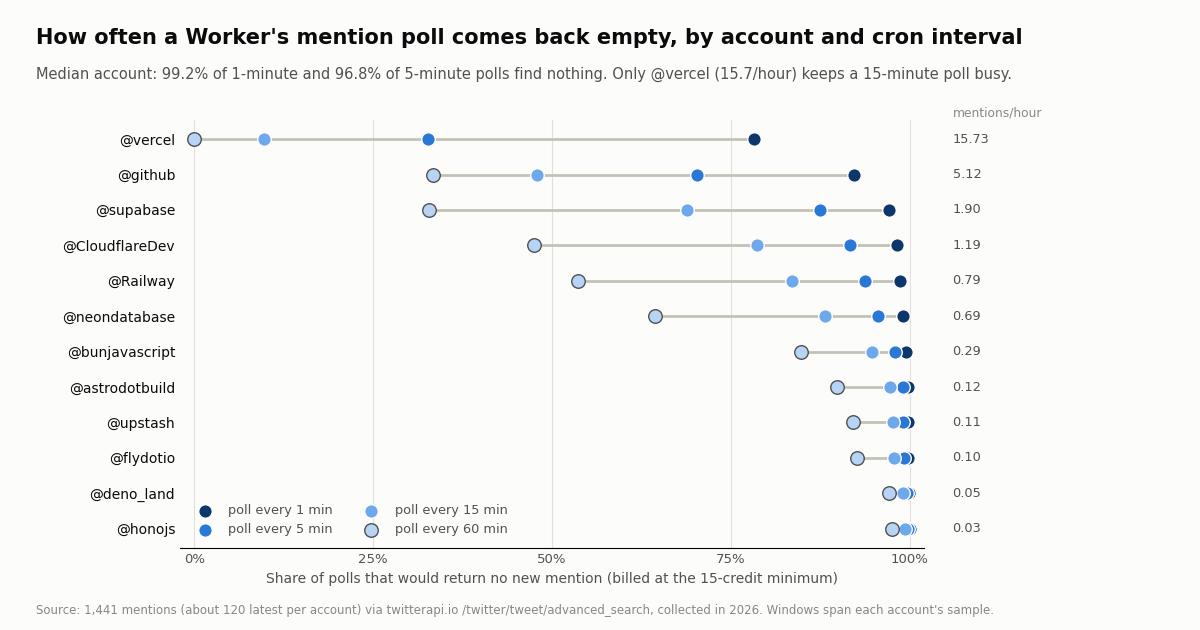
*/5 * * * *, UTC) callsscheduled(controller, env, ctx); the Workerfetch()es/twitter/tweet/advanced_searchwith@handle -from:handle since_time:<now - interval - 120 s>, dedupes against a seen-ids set in Workers KV, and POSTs new mentions to one webhook. - Empty polls are normal: across 1,441 mentions of 12 developer-platform accounts (collected in 2026), the median account had 99.2% empty 1-minute polls and 96.8% empty 5-minute polls. Only @vercel (15.7 mentions an hour) kept a 15-minute poll busy.
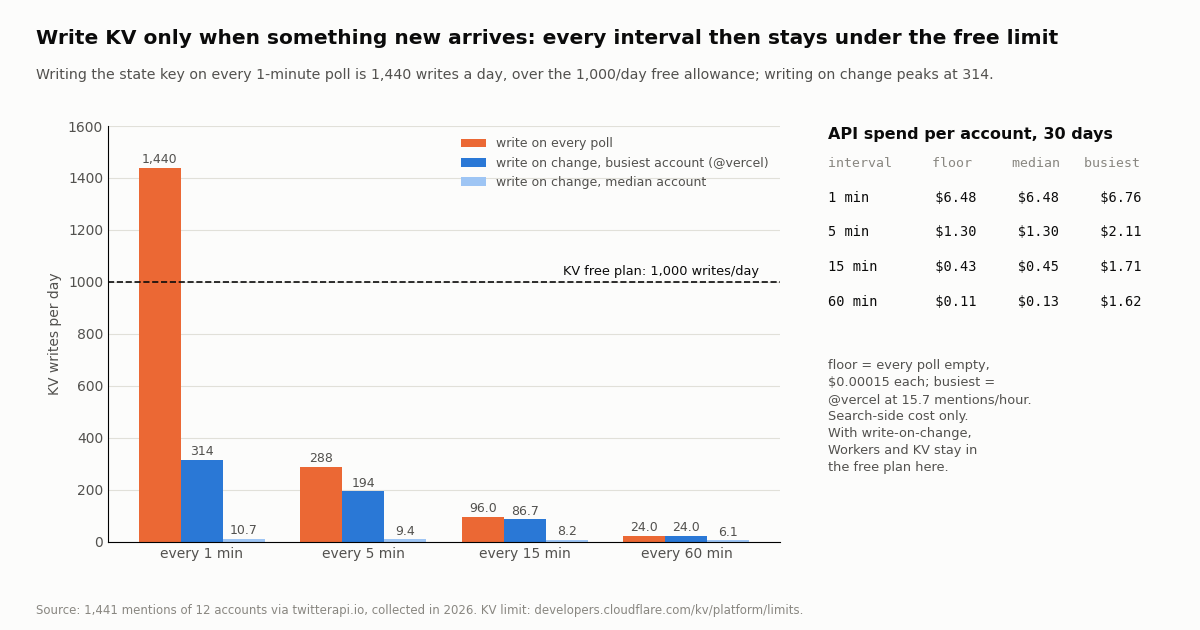
- API spend is mostly the floor: each check that finds nothing costs the $0.00015 minimum; every minute for a month is 43,200 checks = $6.48, every 5 minutes $1.30. New mentions add $0.15 per 1,000 returned.
- Write KV on change, not on every run: the free plan allows 1,000 KV writes a day and 1 write per second per key. Writing on every 1-minute poll is 1,440 a day; writing only when something new arrived peaked at 314 a day for the busiest account in our sample.
- Workers free plan fits: 100,000 requests a day, 10 ms CPU per run (waiting on
fetch()does not count), 50 subrequests per invocation, 5 Cron Triggers per account. This Worker uses up to 8 subrequests a run. - Versus the official X API: X's pay-per-usage rate card charges $0.005 per post read ($5 per 1,000); TwitterAPI.io charges $0.15 per 1,000 tweets returned, about 33x less per 1,000 posts, with no X developer account or OAuth needed for reads.
Cloudflare Workers are a good fit for small X (Twitter) automations: a mention alert, a brand-watch feed into Slack, a cached "latest posts" JSON endpoint for a website widget. There is no server to keep alive, Cron Triggers replace crontab, and Workers KV gives you a place to remember what you already forwarded. The friction is usually on the X side. Calling the official X API from a Worker means a developer account, OAuth credentials and X's per-read billing, and Node-oriented client libraries that sign requests with Node built-ins do not run unchanged on the Workers runtime.
This page takes the other route and treats the X data source as a plain JSON API: one fetch() with an X-API-Key header. The worked example is a complete Worker (TypeScript, wrangler.jsonc, about 100 lines) that watches mentions of one account. Every Cloudflare limit quoted here was checked on developers.cloudflare.com for this page, and the choice of cron interval is backed by a real measurement: how often mentions of 12 developer-platform accounts actually arrive, how many polls come back empty, and what that does to the API bill and the KV write budget.
If you want the same feed in a chat app other than Slack, the Discord and Telegram versions have their own guides (linked below), and the general monitoring patterns (keyword alerts, account lists, dashboards) live in the Twitter monitoring guide. This page stays on the Workers-specific parts: Cron Triggers, KV, secrets, the free-plan limits, and the code.
96.8% for the median of 12 developer-platform accounts (1,441 mentions, collected in 2026). Each empty poll bills the $0.00015 minimum, so a Worker polling every 5 minutes costs about $1.30 per 30 days in API spend.
The architecture: one Cron Trigger, one KV key, one outbound POST
The Worker has two entry points. scheduled() runs on the Cron Trigger and does the polling; fetch() answers HTTP requests and serves what the last poll stored. Cloudflare documents the handler as async scheduled(controller, env, ctx), where controller.scheduledTime is the planned run time in milliseconds since the Unix epoch and controller.cron is the expression that fired. Cron Triggers use five fields and run on UTC.
Step 1, the window. Each run asks only for mentions created since scheduledTime - POLL_SECONDS - 120. The extra 120 seconds re-read the tail of the previous window, because a post can show up in search a little after its createdAt. The window is derived from the clock, not from stored state, so a run that finds nothing never needs to touch KV at all.
Step 2, the search. One fetch() to /twitter/tweet/advanced_search with query=@CloudflareDev -from:CloudflareDev since_time:<unix> and queryType=Latest. The response has a top-level tweets[], has_next_page and next_cursor; each tweet carries id, url, text, createdAt, likeCount, isReply and an author object with userName. The Worker follows next_cursor for up to five pages (about 100 posts), which is far more than one interval holds for every account we measured.
Step 3, dedupe and forward. Only when the search returned something does the Worker read the KV key state, drop ids it has already seen, sort the rest oldest first and send them in one POST to SINK_URL. The body is {"text": "..."}, which is the minimal payload of a Slack incoming webhook; any endpoint that accepts JSON works the same way.
Step 4, remember. After a successful forward the Worker writes one value: the newest 2,000 seen ids and the latest 50 mentions. If the POST fails, the function throws before the write, so the next run sees the same mentions as new and retries. GET /latest reads the same key and returns the cached list as JSON with cache-control: public, max-age=60.
Why not /twitter/user/mentions? That endpoint returns an account's mentions directly, 20 per page, and accepts sinceTime in Unix seconds, so it can drive the same loop. We used the search form for two reasons: the query can be widened later (a brand name without the @, a hashtag, several handles joined with OR), and during our data collection the mentions endpoint answered HTTP 503 while search worked. The Twitter API mentions guide compares the two routes post by post.
Step 1: create the project, the KV namespace and the secrets
Everything runs through wrangler, Cloudflare's CLI. The commands below scaffold a TypeScript Worker, create the KV namespace, store the two secrets and run the cron locally before you deploy.
Secrets, not vars. npx wrangler secret put <KEY> stores the value encrypted and, per Cloudflare's docs, creates and deploys a new Worker version immediately. Inside the Worker it arrives on env like any binding (env.TWITTERAPI_KEY). For wrangler dev, put the same names in a .dev.vars or .env file next to the config, and keep that file out of git.
Testing the cron locally. wrangler dev exposes http://localhost:8787/cdn-cgi/local/scheduled; a curl to it runs scheduled() once, and Cloudflare's docs add optional cron and time query parameters to simulate a specific trigger or scheduledTime. Point SINK_URL at a request inspector while you test so nothing lands in a real channel.
Propagation. After npx wrangler deploy, Cloudflare notes that Cron Trigger changes can take up to 15 minutes to reach its network, and scheduled runs can be missed until then. Check the first real runs under the Worker's Cron Events in the dashboard before you rely on the feed.
# 1. scaffold a TypeScript Worker (pick "Worker only" and TypeScript in the prompts)
npm create cloudflare@latest x-mentions-worker
cd x-mentions-worker

# 2. a KV namespace for the seen-ids set and the latest items; copy the printed id
npx wrangler kv namespace create STATE

# 3. secrets never go in wrangler.jsonc
npx wrangler secret put TWITTERAPI_KEY     # your twitterapi.io API key
npx wrangler secret put SINK_URL           # e.g. a Slack incoming webhook URL

# 4. local run: put the same two values in .dev.vars, then fire the cron by hand
npx wrangler dev
curl "http://localhost:8787/cdn-cgi/local/scheduled"
curl "http://localhost:8787/latest"

# 5. ship it (cron changes can take up to 15 minutes to propagate)
npx wrangler deployStep 2: wrangler.jsonc with the cron, the KV binding and the vars
Cloudflare now recommends wrangler.jsonc for new projects (JSON config needs Wrangler 3.91.0 or later; some newer features only work with the JSON format). The TOML form still works if your project already uses it; the keys are the same.
triggers.crons takes a list of five-field expressions. */5 * * * * is every five minutes, * * * * * every minute, 0 * * * * hourly. Cloudflare's examples go down to the minute; a Worker that needs sub-minute freshness should use the push variant further down instead of a tighter cron.
POLL_SECONDS must match the cron. The Worker computes its search window from it, so if you change */5 to */15, change 300 to 900 in the same commit. A mismatch either leaves gaps (window shorter than the interval) or re-reads posts you already paid for (window much longer).
compatibility_date pins the runtime behavior your code was written against; set it to the day you create the project. observability.enabled turns on Workers Logs, which is where a thrown search HTTP 429 or sink HTTP 500 shows up.
{
  "$schema": "./node_modules/wrangler/config-schema.json",
  "name": "x-mentions-worker",
  "main": "src/index.ts",
  "compatibility_date": "<the day you create the project, YYYY-MM-DD>",
  "triggers": {
    "crons": ["*/5 * * * *"]
  },
  "kv_namespaces": [
    { "binding": "STATE", "id": "<id printed by wrangler kv namespace create>" }
  ],
  "vars": {
    "WATCH_HANDLE": "CloudflareDev",
    "POLL_SECONDS": "300"
  },
  "observability": { "enabled": true }
}Step 3: the Worker, scheduled() plus a /latest route
This is the complete src/index.ts. It type-checks under tsc --strict; when you scaffold with npm create cloudflare, the KVNamespace, ScheduledController and ExecutionContext types come from the generated Workers types, so there is nothing else to install. There are no npm dependencies: fetch, URL, Response.json and JSON are all built into the runtime.
ctx.waitUntil(poll(...)). Cloudflare's scheduled-handler docs say the runtime waits for the scheduled() promise anyway (up to the 15-minute wall-time limit for scheduled Workers), and that the first waitUntil promise to fail is what the Cron Events table records as the run's status. Wrapping poll() this way means a failed search or a failed forward shows up as a failed run, which is the signal you want to alert on.
Errors and rate limits. The API returns errors with status: "error" and the text in msg; a missing or invalid parameter is an HTTP 400 with the text in detail. HTTP 429 means you went over your requests-per-second tier (0.2 requests a second before the first payment, 20 once paid), and the code simply stops paging: the next run's overlap picks up anything it missed. A 5-minute cron with a few pages per run stays far below even the starting tier.
Missed runs. Because the window comes from the clock, a run that never fires (a deploy in progress, a Cloudflare incident) leaves a gap of one interval. If that matters, raise OVERLAP_S to a full interval: the extra overlap only costs the tweets it re-reads, which the seen-ids set then drops.
Who you forward. The forwarded text includes the mentioning account's handle and the post text. Mentions come from private people as often as from brands; keep the feed internal, do not build profiles of the people who mention you, and keep within X's rules for anything you republish.
// src/index.ts - poll new X (Twitter) mentions of one account on a Cron Trigger,
// keep a seen-ids set and the latest items in Workers KV, forward new ones to a webhook.
export interface Env {
  STATE: KVNamespace;          // kv_namespaces binding in wrangler.jsonc
  TWITTERAPI_KEY: string;      // wrangler secret put TWITTERAPI_KEY
  SINK_URL: string;            // wrangler secret put SINK_URL (a Slack incoming webhook works)
  WATCH_HANDLE: string;        // vars: account to watch, without the @
  POLL_SECONDS: string;        // vars: must match the cron interval, e.g. "300" for */5
}

interface Author { userName: string; name: string; followers: number; isBlueVerified?: boolean }
interface Tweet {
  id: string; url: string; text: string; createdAt: string;
  likeCount: number; replyCount: number; isReply: boolean; author?: Author;
}
interface SearchPage { tweets?: Tweet[]; has_next_page?: boolean; next_cursor?: string; status?: string; msg?: string }
interface State { seen: string[]; latest: Tweet[] }

const BASE = "https://api.twitterapi.io";
const OVERLAP_S = 120;   // re-read the tail of the previous window: indexing can lag
const MAX_PAGES = 5;     // 20 tweets a page; keeps one run far below the subrequest limit
const KEEP_SEEN = 2000;
const KEEP_LATEST = 50;

async function fetchMentions(env: Env, sinceTime: number): Promise<Tweet[]> {
  const handle = env.WATCH_HANDLE;
  const out: Tweet[] = [];
  let cursor = "";
  for (let page = 0; page < MAX_PAGES; page++) {
    const url = new URL(`${BASE}/twitter/tweet/advanced_search`);
    url.searchParams.set("query", `@${handle} -from:${handle} since_time:${sinceTime}`);
    url.searchParams.set("queryType", "Latest");
    if (cursor) url.searchParams.set("cursor", cursor);
    const res = await fetch(url.toString(), { headers: { "X-API-Key": env.TWITTERAPI_KEY } });
    if (res.status === 429) break;                       // over your QPS tier: the next tick retries
    if (!res.ok) throw new Error(`search HTTP ${res.status}: ${(await res.text()).slice(0, 200)}`);
    const body = (await res.json()) as SearchPage;
    if (body.status === "error") throw new Error(`search error: ${body.msg}`);
    out.push(...(body.tweets ?? []));
    if (!body.has_next_page || !body.next_cursor) break;
    cursor = body.next_cursor;
  }
  return out;
}

async function forward(env: Env, fresh: Tweet[]): Promise<void> {
  const lines = fresh.map((t) => `@${t.author?.userName ?? "unknown"}: ${t.text.slice(0, 280)}\n${t.url}`);
  const res = await fetch(env.SINK_URL, {
    method: "POST",
    headers: { "content-type": "application/json" },
    body: JSON.stringify({ text: `${fresh.length} new mention(s) of @${env.WATCH_HANDLE}\n\n${lines.join("\n\n")}` }),
  });
  if (!res.ok) throw new Error(`sink HTTP ${res.status}`);
}

async function poll(env: Env, scheduledTime: number): Promise<void> {
  const now = Math.floor(scheduledTime / 1000);
  const since = now - Number(env.POLL_SECONDS) - OVERLAP_S;
  const found = await fetchMentions(env, since);
  if (found.length === 0) return;                         // empty poll: no KV read or write
  const state = ((await env.STATE.get("state", "json")) as State | null) ?? { seen: [], latest: [] };
  const seen = new Set(state.seen);
  const fresh = found
    .filter((t) => !seen.has(t.id))
    .sort((a, b) => Date.parse(a.createdAt) - Date.parse(b.createdAt));   // oldest first
  if (fresh.length === 0) return;                         // only overlap duplicates: no write
  await forward(env, fresh);                              // throws before the write, so a failed POST is retried next tick
  const next: State = {
    seen: [...fresh.map((t) => t.id), ...state.seen].slice(0, KEEP_SEEN),
    latest: [...[...fresh].reverse(), ...state.latest].slice(0, KEEP_LATEST),
  };
  await env.STATE.put("state", JSON.stringify(next));     // one write per non-empty poll
}

export default {
  async scheduled(controller: ScheduledController, env: Env, ctx: ExecutionContext): Promise<void> {
    ctx.waitUntil(poll(env, controller.scheduledTime));
  },

  async fetch(request: Request, env: Env): Promise<Response> {
    const { pathname } = new URL(request.url);
    if (pathname !== "/latest") return new Response("not found", { status: 404 });
    const state = (await env.STATE.get("state", { type: "json", cacheTtl: 60 })) as State | null;
    const items = (state?.latest ?? []).map((t) => ({
      id: t.id, url: t.url, text: t.text, createdAt: t.createdAt, likeCount: t.likeCount,
      author: t.author?.userName ?? null,
    }));
    return Response.json({ handle: env.WATCH_HANDLE, count: items.length, items }, {
      headers: { "cache-control": "public, max-age=60" },
    });
  },
};
How often does the poll find anything? Mention arrival for 12 developer-platform accounts
Before picking a cron interval, it helps to know how often new mentions actually arrive. We pulled the latest mentions of 12 public developer-platform accounts (about 120 each, 1,441 in total, collected in 2026) through the same advanced_search query the Worker uses, then replayed four cron intervals over each account's sample to count how many polls would have come back empty.
The busy end is rare. Only @vercel, at 15.7 mentions an hour, kept a 15-minute poll busy (9.7% empty) and filled every hourly window. @github, with 2.7 million followers at collection time, drew 5.1 mentions an hour in the search's Latest view. Everyone else sat below two an hour, and half of the accounts below 0.5.
The quiet end is the common case. For the median account, 99.2% of 1-minute polls and 96.8% of 5-minute polls would return an empty list. The median gap between consecutive mentions across all accounts was 26.6 minutes, and the 90th-percentile gap 18 hours: mentions come in clusters (a launch, a thread, an outage) separated by long silences.
What that means for the interval. A 1-minute cron buys freshness you rarely use; for a typical account it mostly pays the minimum charge 1,440 times a day. A 5-minute cron delays an alert by two and a half minutes on average and cuts the floor by five. If you need seconds, not minutes, switch to push (below) rather than tightening the cron.
Run it for your own handle. The Python script at the end of this page repeats this measurement for any account in about six requests, so you can pick the interval from your own numbers before deploying the Worker.
What it costs: the API, Workers and KV, and the official X API
There are two bills: TwitterAPI.io for the data, Cloudflare for the compute and storage. At the rates in our sample, the Cloudflare side stays inside the free plan and the API side sits close to its floor.
The API floor. Tweet endpoints cost 15 credits per tweet returned, $0.15 per 1,000 tweets, with a minimum of 15 credits per request. A poll that finds nothing therefore costs $0.00015, and a full 20-tweet page $0.003. Every 60 seconds for a month is 43,200 checks, $6.48; every 5 minutes is $1.30; every 15 minutes about $0.43. Mentions actually returned add $0.00015 each on top.
Reading the table. For the median account the 30-day bill equals the floor to the cent, because almost every poll is empty. Even @vercel, the busiest account in the sample, only adds about $1.70 of returned mentions to the floor (11,326 mentions in 30 days at its sampled rate). The KV column is why the Worker writes only on change: at 1 minute, writing every run is 1,440 writes a day against the free plan's 1,000; writing on change peaked at 314 a day.
The Cloudflare side. These are the limits that matter for this Worker, as published in Cloudflare's Workers limits, pricing and KV limits pages. The Workers Paid plan starts at $5 a month per account and includes 10 million requests and 1 million KV writes a month, if you outgrow the free numbers.
KV is eventually consistent. Cloudflare's KV docs say a change can take up to 60 seconds or more to be visible in other locations, and that read-after-write in the same location is usual but not guaranteed. That is fine here: one cron run writes, the next run is minutes later, and /latest tolerates a minute of staleness. If you ever poll several handles from one Worker, give each its own key, so no key gets more than one write per second.
The official X API comparison. On X's pay-per-usage rate card (docs.x.com/x-api/getting-started/pricing), a post read costs $0.005, $5 per 1,000 posts, capped at 3 million post reads a month before Enterprise; X deduplicates repeat reads of the same post within a 24-hour UTC window. TwitterAPI.io charges $0.15 per 1,000 tweets returned, about 33x less per 1,000 posts. Applied to the mention volumes we measured (sampled rate times 30 days, returned mentions only, before any floor):
Starting out. New TwitterAPI.io accounts that pass the automatic bot check get up to $1 of free credits (up to 100,000 credits, no card, one per person or network, expiring after 31 days); purchased credits never expire. Reads need no X account. Note the starting rate limit of 0.2 requests per second until the first payment: fine for one Worker on a 5-minute cron, tight if you backfill several handles at once.
Push instead of poll: a filter rule that POSTs to your Worker
Polling is simple and cheap at minute granularity, but it cannot get below Cloudflare's one-minute cron step. For faster alerts, flip the direction: register a tweet filter rule on TwitterAPI.io and let the API POST matches to a Worker route you expose.
Register the rule. POST /oapi/tweet_filter/add_rule takes a tag, a value (the same search syntax, up to 255 characters, for example @CloudflareDev -from:CloudflareDev) and interval_seconds (0.05 to 86,400, default 60). New rules start inactive; switch the rule on with /oapi/tweet_filter/update_rule and is_effect set to 1. The receiving URL is set in the dashboard. Rule checks bill like polls: $0.00015 minimum per check plus $0.00015 per matched tweet, so a 60-second rule has the same $6.48-a-month floor as a 1-minute cron.
Receive it in the same Worker. Add a branch to fetch() for a path such as /push and hand it to the function below. Each push is a JSON body with event_type (tweet, or test_webhook_url from the dashboard's Test button), the rule's id, tag and value, a millisecond timestamp, and tweets[] in the same shape as advanced_search. The request carries your own API key in the x-api-key header, so compare it before trusting the body.
Answer within a second. The push times out after one second and is not retried, so the handler returns ok at once and forwards inside ctx.waitUntil. With push you can drop the Cron Trigger entirely, or keep a slow cron (hourly) as a safety net that catches anything a failed push dropped, reusing the same seen-ids set.
The Twitter webhooks guide covers the rule syntax, the payload and the receiver in depth, including how this differs from X's own Account Activity webhooks.
// Push variant: a filter rule on twitterapi.io POSTs matches to this route instead of a cron poll.
// Rule: POST /oapi/tweet_filter/add_rule {tag, value: "@CloudflareDev -from:CloudflareDev", interval_seconds},
// then /oapi/tweet_filter/update_rule with is_effect=1; set the webhook URL in the dashboard.
interface PushBody { event_type: string; rule_tag?: string; tweets?: Tweet[] }

async function handlePush(request: Request, env: Env, ctx: ExecutionContext): Promise<Response> {
  // twitterapi.io sends your own API key in the x-api-key header: compare before trusting the body
  if (request.headers.get("x-api-key") !== env.TWITTERAPI_KEY) return new Response("forbidden", { status: 403 });
  const body = (await request.json()) as PushBody;
  if (body.event_type !== "tweet" || !body.tweets?.length) return new Response("ok");  // e.g. test_webhook_url
  // answer fast (the push times out after 1 s and is not retried); do the slow work after the response
  ctx.waitUntil(forward(env, body.tweets));
  return new Response("ok");
}Variations: several handles, a keyword watch, a website widget
Several handles in one Worker. Join them in one query, (@vercel OR @github) -from:vercel -from:github since_time:<unix>, and keep the query under 512 characters. One request then covers all handles, so the floor stays $0.00015 per run rather than per handle. Split the forward by entities.user_mentions if each handle goes to a different channel.
A keyword or brand watch. Replace the @handle with the brand name and operators such as lang:en -filter:replies min_faves:5. Keyword feeds are usually busier than mention feeds, so run the Python estimator on the exact query first and check the KV column.
A "latest mentions" widget. The /latest route already returns cached JSON. Put it behind a custom domain or route, and the page that embeds it reads from KV at Cloudflare's edge instead of calling the API per visitor; the API cost stays fixed at the cron's rate no matter how much traffic the widget gets. cacheTtl: 60 on the KV read keeps each location's copy for a minute.
Storing history. KV is for small hot state. For a searchable archive, add a D1 database binding and insert one row per forwarded mention, or write the raw batch to R2; both are subrequests, so keep the per-run count under the 50 the free plan allows.
Other destinations. Discord takes the same pattern with a channel webhook and a content field; Telegram needs a bot token and sendMessage. Both have dedicated guides linked below, written for the same polling loop outside Workers.
How we collected this
Question. If a Cloudflare Worker with a Cron Trigger polls an account's mentions, how often do new mentions arrive, what share of 1, 5, 15 and 60-minute polls come back empty, how many KV writes a day does each interval imply, and what does each interval cost per month in API spend?
Accounts. 12 public organization accounts from the developer-platform space: @CloudflareDev, @vercel, @supabase, @github, @honojs, @deno_land, @bunjavascript, @flydotio, @Railway, @neondatabase, @upstash and @astrodotbuild. Each handle was checked with /twitter/user/info first; a look-alike handle with 30 followers was replaced with the real @deno_land.
Method and sample. /twitter/tweet/advanced_search with query=@<account> and queryType=Latest, six pages per account: 1,441 mentions after removing 2 posts by the accounts themselves. 72 search pages and 13 profile checks, about $0.22 of API spend. The mentions endpoint was tried first and returned HTTP 503 on every attempt during collection, so the study used the equivalent search. Collected in 2026.
Window. Each account's window runs from its oldest to its newest sampled mention: about 8 hours for @vercel, about a day for @github, several months for the quietest accounts. Empty-poll shares, KV writes and costs are computed by sliding each interval over that window and scaling to a day or 30 days.
What the sample cannot show. Search's Latest view may not list every mention an account receives, so busy accounts can be undercounted. Rates were sampled once and change with launches, incidents and the news; a 30-day figure is the sampled rate times 30 days, not a measured month. The cost model assumes one request per poll and ignores the overlap re-reads, which add only a few cents.
Privacy. Mention authors are private individuals: no handles, ids, texts or profiles of them are kept or shown. Raw pages stayed in temporary storage; the published sample holds only the watched account, minutes before the newest mention and a reply flag. The files are in data/studies/twitter-api-cloudflare-workers/.
"""estimate_poll_interval.py - before you pick a Cron Trigger interval for a Cloudflare
Worker, measure how often new mentions of an X (Twitter) account arrive and what each
interval would cost in API spend and Workers KV writes.

    pip install requests
    export TWITTERAPI_IO_API_KEY=...        # from the twitterapi.io dashboard
    python estimate_poll_interval.py CloudflareDev
"""
import math
import os
import sys
import time
from datetime import datetime

import requests

BASE = "https://api.twitterapi.io"
HEADERS = {"X-API-Key": os.environ["TWITTERAPI_IO_API_KEY"]}
PRICE = 0.00015          # USD per tweet returned (15 credits); also the minimum per request
KV_FREE_WRITES = 1000    # Workers KV free plan, writes per day


def latest_mentions(handle: str, pages: int = 6) -> list[dict]:
    """About 120 latest posts that mention @handle, excluding the account's own posts."""
    tweets, cursor = [], ""
    for _ in range(pages):
        params = {"query": f"@{handle} -from:{handle}", "queryType": "Latest"}
        if cursor:
            params["cursor"] = cursor
        r = requests.get(f"{BASE}/twitter/tweet/advanced_search", headers=HEADERS, params=params, timeout=30)
        if r.status_code == 429:          # free-tier QPS is 0.2/s: wait and try once more
            time.sleep(6)
            r = requests.get(f"{BASE}/twitter/tweet/advanced_search", headers=HEADERS, params=params, timeout=30)
        if r.status_code >= 400:            # 400 carries the reason in "detail", other errors in "msg"
            sys.exit(f"HTTP {r.status_code}: {r.text[:300]}")
        body = r.json()
        tweets += body.get("tweets") or []
        if not body.get("has_next_page") or not body.get("next_cursor"):
            break
        cursor = body["next_cursor"]
    return tweets


def epoch(created_at: str) -> float:
    # createdAt looks like "Thu Oct 16 12:34:56 +0000 2026"
    return datetime.strptime(created_at, "%a %b %d %H:%M:%S %z %Y").timestamp()


def main(handle: str) -> None:
    times = sorted({t["id"]: epoch(t["createdAt"]) for t in latest_mentions(handle)}.values())
    if len(times) < 2:
        print(f"@{handle}: too few mentions to estimate; any interval will sit at the minimum charge")
        return
    span = times[-1] - times[0]
    print(f"@{handle}: {len(times)} mentions over {span / 3600:.1f} h = {len(times) / (span / 3600):.2f} per hour")
    for minutes in (1, 5, 15, 60):
        width = minutes * 60
        windows = max(1, math.ceil(span / width))
        counts = [0] * windows
        for x in times:
            counts[min(windows - 1, int((x - times[0]) // width))] += 1
        empty = sum(1 for c in counts if c == 0)
        scale = (1440 / minutes) / windows                  # sample windows -> one day
        kv_writes = (windows - empty) * scale               # write only when something new arrived
        month = sum(max(1, c) for c in counts) * PRICE * scale * 30
        flag = "" if kv_writes <= KV_FREE_WRITES else "  (over the KV free plan)"
        print(f"every {minutes:>2} min: {100 * empty / windows:5.1f}% empty polls, "
              f"~{kv_writes:6.1f} KV writes/day, ~${month:.2f} per 30 days{flag}")


if __name__ == "__main__":
    main(sys.argv[1] if len(sys.argv) > 1 else "CloudflareDev")
Researching this?Free starter credits cover end-to-end testing — Google sign-in, no card. Get a key.
Questions readers ask
Can I call the Twitter (X) API from a Cloudflare Worker?
Yes. A Worker can call any HTTPS JSON API with fetch(). With TwitterAPI.io that is one GET with an X-API-Key header, for example /twitter/tweet/advanced_search, and no OAuth signing. The official X API also works over fetch with a Bearer token, but Node-oriented client libraries that rely on Node built-ins may not run unchanged on the Workers runtime.
How do I run a Worker on a schedule to check for new tweets?
Add a Cron Trigger in wrangler.jsonc ("triggers": {"crons": ["/5 *"]}) and export a scheduled(controller, env, ctx) handler. Cron Triggers use five fields and UTC. controller.scheduledTime gives the planned run time in milliseconds, which this page uses to compute the search window. Locally, request the /cdn-cgi/local/scheduled path on the wrangler dev server (port 8787 by default) to fire one run.
What is the shortest interval for a Cloudflare Cron Trigger?
Cloudflare's examples go down to every minute ( *). For anything faster, use a push model: a TwitterAPI.io filter rule with interval_seconds down to 0.05 that POSTs matches to a route on your Worker.
Is Workers KV a good place to store the last-seen tweet id?
For one feed, yes, if you write only when something changed. The free plan allows 1,000 KV writes a day and 1 write per second to the same key, and changes can take 60 seconds or more to show up in other locations. In our study, writing on change peaked at about 314 writes a day for the busiest account at a 1-minute interval; writing on every 1-minute run would be 1,440. For high-frequency state, Cloudflare points to Durable Objects.
How much does a Worker that polls Twitter mentions cost?
On Cloudflare, nothing at these rates: the free plan covers 100,000 requests a day and this Worker runs 288 times a day at 5 minutes. On the API side, an empty poll costs the $0.00015 minimum, so the floor is $6.48 a month at 1 minute and $1.30 at 5 minutes, plus $0.15 per 1,000 tweets returned. The official X API charges $0.005 per post read.
Where do I put the API key in a Worker?
Run npx wrangler secret put TWITTERAPI_KEY and read it as env.TWITTERAPI_KEY. Never put it in wrangler.jsonc vars or commit it. For local development, put it in a .dev.vars or .env file next to the config and keep that file out of git.
Why did my cron run not fire right after deploying?
Cloudflare notes that Cron Trigger changes can take up to 15 minutes to propagate to its network, and scheduled runs can be missed until then. Check the Worker's Cron Events in the dashboard; a run whose waitUntil promise rejected shows there as failed.
Can the Worker also post tweets or reply?
Yes, through an authenticated session: one /twitter/user_login_v2 login ($0.10, with a proxy you supply) returns login_cookies, and each post, like or reply through /twitter/create_tweet_v2 and related endpoints is then 60 credits ($0.0006), billed per HTTP 200 call. The call acts as that account, so X can rate-limit, lock or suspend it; keep a human pace, and expect the session to need a re-login now and then. An automated reply bot on every mention is exactly the pattern to avoid.
Continue
- Cloudflare docs: Cron Triggers (five-field syntax, UTC, wrangler.jsonc triggers.crons, local /cdn-cgi/local/scheduled, up to 15 minutes propagation)
- Cloudflare docs: scheduled() handler (controller.cron, scheduledTime, ctx.waitUntil status)
- Cloudflare docs: Workers limits (free plan 100,000 requests a day, 10 ms CPU, 50 subrequests, 5 Cron Triggers)
- Cloudflare docs: Workers KV limits (1,000 writes a day free, 1 write per second per key)
- X API pay-per-usage pricing ($0.005 per post read, 3M post reads a month cap)
- twitterapi.io API reference: /twitter/user/mentions (sinceTime in seconds, 20 per page)
- X (Twitter) API hub: endpoints, pricing and guides
- Twitter API mentions: mentions endpoint vs @handle search
- Twitter (X) webhooks: filter rules and the push payload
- Twitter monitoring: keyword alerts, account lists and dashboards
- Twitter API Telegram bot: forward new posts to a chat
- Twitter (X) to Discord bot with a channel webhook
- TwitterAPI.io pricing: $0.15 per 1,000 tweets returned
- 01How to Clear Twitter (X) Cache on iPhone, Android and Desktop
- 02How the X (Twitter) Algorithm Works, and How to Reset Your Feed
- 03Twitter (X) API in Rust with reqwest, serde and tokio
- 04Twitter (X) Communities in 2026: How They Work, and Are They Still Running?
- 05How much does Twitter (X) pay creators in 2026?
- 06Cloudflare Pay per Crawl: How the HTTP 402 Handshake Works, and What It Means for Twitter (X) Data
- 07What Is an MCP Server? How AI Clients Talk to It, With a Live Twitter (X) Example
- 08Twitter (X) Analytics Tools — Side-by-Side Comparison
Writing about something you built with TwitterAPI.io? Our community rewards program pays API credits for honest tutorials, build logs and videos.
Stop reading. Start building.
Starter credits cover real testing on real data. Google sign-in, no card, no application queue.
Get an API keyAlready building with TwitterAPI.io? Publish an honest tutorial or build log about it and earn up to $200 a month in API credits.