Twitter (X) Communities in 2026: How They Work, and Are They Still Running?
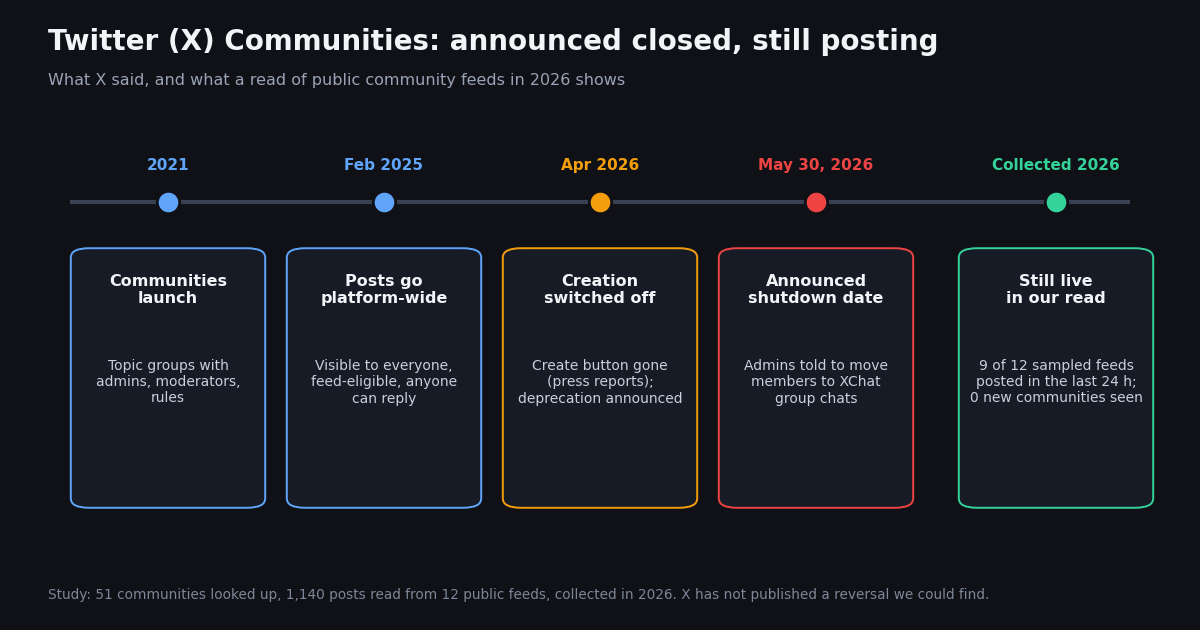
- What they are: topic groups on X with an admin, moderators, rules and an optional join approval. Posts are public and, since February 2025, can reach the main feed.
- The shutdown that did not land: X announced the end of Communities for May 30, 2026. In our 2026 read, 90% of 1,140 posts from 12 communities were published after that date.
- Still active: 9 of 12 sampled communities posted in the last 24 hours, 6 in the last hour.
- Creation is off: none of 80 community IDs found in public posts was created after the April 2026 announcement; the newest dates from April 1, 2026.
- Engagement is thin: median 2 likes and 160.5 views per community post; 31.6% had no likes.
- Plan B: keep an XChat group chat link, a List, or your own profile ready; for data work, community posts are still readable with
/twitter/community/tweets.
If you searched for Twitter communities, you probably want one of three things: to find a community worth joining, to start your own, or to know whether the feature still exists after X said it would shut it down. This page answers all three, in that order, and it uses a fresh read of real community feeds rather than the April 2026 headlines, because the headlines and the product no longer agree.
The short version: existing communities still run and still get posts every hour, joining and posting still work, starting a new one does not, and X has not said what happens next. We looked up 51 communities and read 1,140 of their newest posts to check each of those claims, and the method is at the end of the page.
This is the guide for people who use X. If you are a developer who wants to read community posts, members or moderators from code, the separate X Communities API guide covers the endpoints, response fields and costs in detail; this page only touches them in one short section.
90% (1,026 of 1,140)
What are Twitter (X) Communities?
A Community is a group on X built around one topic. It has a name, a description, a banner, a list of rules, one admin, a team of moderators and any number of members. When you post into a Community, the post is labeled with the Community's name and shows up in that Community's feed, so the people who joined for the topic see it even if they do not follow you.
Twitter launched Communities in 2021, and they worked like a lighter version of a subreddit or a Facebook Group: you joined for a topic rather than for a person. The design changed in an important way on February 3, 2025. X announced that "Communities are now fully integrated across X" and that "Community posts and replies are visible to your followers and other people on X", that Community posts became eligible for the main feed and for post recommendations, and that "Everyone on X can reply to Community posts", with replies from members shown first (Social Media Today, February 3, 2025).
That change matters for anyone who treats a Community as a private room. It is not one. Every Community post is a public post with a topic label on it. The join policy controls who can post into the group, not who can read it. In our read, a community whose join policy requires moderator approval returned its posts to a non-member exactly like an open one did.
Communities are not Lists and not Circle. A List changes what you read: you collect accounts into a feed, and the people on it do not post anywhere new. Twitter Circle, which X ended in October 2023, limited who could see one post. A Community does neither of those: it gathers posts about a topic and shows them to everyone. If privacy is what you are after, a protected account or a group chat is the right tool.
Is X shutting down Communities? What X said, and what actually happened
On April 22, 2026, Nikita Bier, then X's head of product, posted: "Due to declining usage, we're deprecating X Communities on May 6. To migrate your Community's members, pin your groupchat link so people can join it over the next 2 weeks." The same post introduced joinable links for XChat group chats with "support for 350 members per chat (and growing)" and pointed to Custom Timelines as X's new investment in niche interests.
After a wave of complaints from community admins and streamers, he followed up the same day: "We've heard you. To give sufficient time to migrate: You'll have until May 30th to transition to XChat. We'll also increase groupchat limits to 500 members tomorrow and aim to reach 1000 in the next couple weeks." In a reply he gave the reasoning: Communities "were used by less than 0.4% of users—yet contributed to 80% of spam reports, financial scams, and malware on X." TechCrunch reported the announcement and the extension on April 23, 2026.
Then May 30 came and went. On June 1, 2026, users were already posting that Communities were "still alive after yesterday's shutdown deadline." Through the summer and autumn, admins kept asking the same question, and some who had moved to group chats moved back. We searched Bier's posts from May onward and found no further statement about Communities; on August 5, 2026 he announced that he was stepping back from leading product to an advisor role. We found no post from X, its Support account or its press coverage announcing a reversal, a pause or a new date.
Our own read gives the clearest picture of the current state. Of 1,140 newest posts from 12 public communities, collected in 2026, 1,026 (90%) were published after May 30, 2026, all 12 communities had posts after that date, and 641 of the posts were less than seven days old when we read them. So Communities were not switched off on the announced date. They also were not restored: creation stays off (next section), and the deprecation has not been withdrawn on the record.
What that means for you. Use an existing Community if it serves you, but do not build anything you cannot afford to lose on it. If you run one, keep a pinned XChat group chat link or another channel up to date so members can follow you if X does switch the feature off without much notice.
Can you still create a community on X?
No, as far as anyone outside X can tell. Before 2026, creating a Community required a paid X Premium subscription, and guides such as Adobe Express's said each Premium member could create one Community. In early April 2026, PiunikaWeb and Roboin reported that the option had disappeared: the create button was gone on the web and in the Android app, and on iOS it returned an error, even for paying subscribers. Roboin noted that X made no announcement about it. Two weeks later came the deprecation post.
Our data agrees with those reports. Every Community has a numeric ID, and X's IDs encode the moment they were created. We collected 80 distinct community IDs from public posts that link to x.com/i/communities/..., decoded their creation time, and found 0 created after the April 22, 2026 announcement. The newest was created on April 1, 2026. Communities are still being promoted in posts every day, but no new ones are appearing among them.
Old tutorials still describe a create button in the Communities tab and a short setup flow: pick a name, write a purpose, choose whether anyone can join or join requests need approval, and add rules. If you follow one of them today and cannot find the button, nothing is wrong with your account. If you need a group now, the options X itself points to are an XChat group chat with a joinable link, a Custom Timeline for reading a topic, or a List.
How to find and join a Twitter community
Every Community has its own page at x.com/i/communities/ followed by its numeric ID, and that link works on the web and opens in the X apps. The quickest way to find one is to search X for your topic plus the word community, or to look for posts that link to an x.com/i/communities/ address: admins share their community links all the time. On mobile, the Communities entry point has lived in the bottom navigation bar in past versions of the app, but X moves and removes menu items often, so if you do not see it, use search or a direct link instead.
On a community's page you will see its name, description, member count and rules, and a button to join. What happens next depends on the join policy the admin chose. In the 51 communities we looked up, 45 were open, which means you join with one tap, and 6 required a moderator to approve each request, sometimes after you answer a question set by the admin (Build in Public's is "What are you working on?"). Older guides and X's help text have said that only public accounts can join; we could not re-check that help page, which blocks automated reading.
Check before you join. Look at the rules, the moderator count and the newest posts. A healthy community has rules that match its topic and posts from many different people. Of the 51 we looked up, 7 were flagged as adult content by X, including 4 of the 7 with more than 100,000 members, which is in line with Bier's description of Communities as a large source of spam and scam reports. Member count alone tells you little.
Twitter communities list. There is no official directory, and X has never published a ranked list. The 12 communities in our study, all public and named below with their member counts, are a reasonable starting set if your interests are startups, building in public, cybersecurity, web development, esports, crypto or Tesla.
Posting, roles, rules, leaving and deleting
Once you are a member, you can choose the Community as the audience when you write a post, the same place where you would otherwise post to everyone. Your post lands in the Community's feed with the Community's label. Since February 2025 it is also visible to your followers and to anyone else on X, and it can be recommended in the main feed. When posting from the web, Roboin reported in April 2026 that the "share with followers" option had disappeared, so the reach of a web post may now be narrower than one from the app. We could not check that inside the apps ourselves.
Admin. Each Community has one admin, usually the account that created it. The admin sets the name, description, rules, join policy and entry question, and appoints moderators. Our lookup returns the creator and the admin as separate fields, so the two can differ.
Moderators. Moderators review join requests, hide posts that break the rules, remove members, and since February 2025 can hide replies from non-members and stop non-members from posting (Social Media Today, February 3, 2025). In our 12 communities the moderator count ranged from 1 to 10.
Members. Members can post into the Community and their replies are shown first under Community posts. They can be removed by moderators, and X's general rules apply on top of the Community's own.
Rules. Every Community in our sample listed between 3 and 10 rules. Typical ones are "No self-promotion", "No engagement farming" and "Use a personal account" (all from Build in Public). Breaking them gets posts hidden or members removed; breaking X's own rules can get the account itself limited.
To leave, open the Community page and use the button that shows you are a member; the label and menu position change between app versions, so look for the membership button rather than a specific menu path. Leaving removes the Community from your list and stops you from posting there. It does not delete what you already posted.
Your Community posts are ordinary public posts on your profile. If you want them gone, delete them one by one like any other post. When X made Community posts public in February 2025, it also said that content stays up after a Community is deleted, and that people can still delete their own posts and replies (Social Media Today).
Deleting a whole Community is an admin action. With creation switched off, an admin who deletes a Community cannot start a new one in its place, so think twice. X has not said what it would do with Community pages and posts if it does switch the feature off; the April 2026 announcement covered moving members, not content.
What life inside a community looks like: 1,140 posts measured
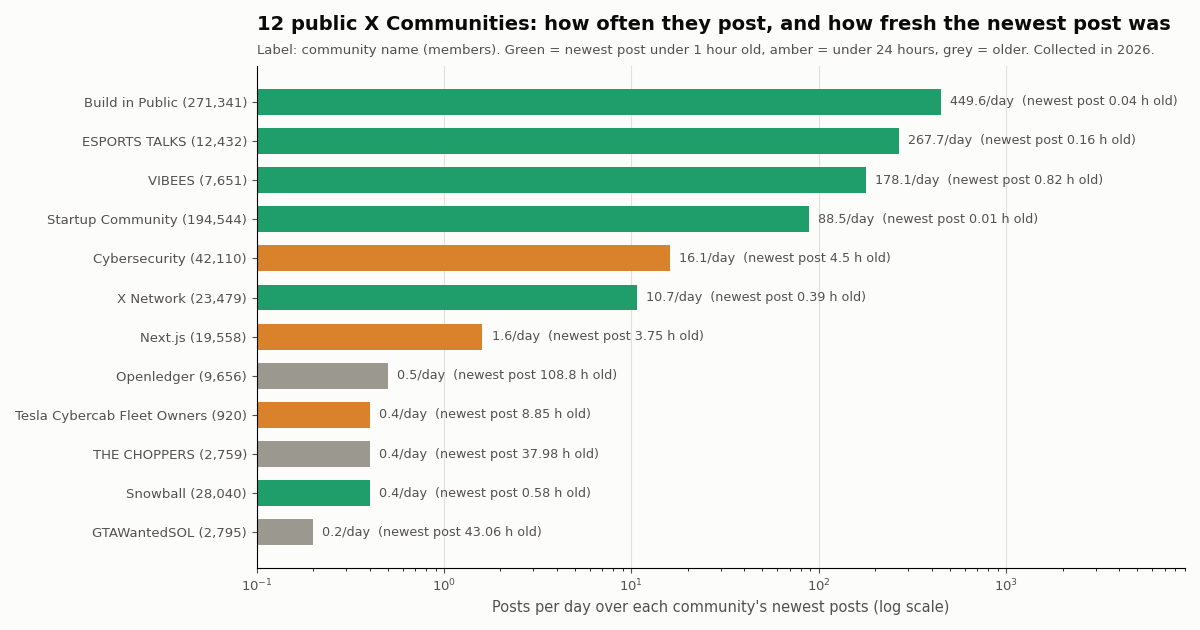
To get past anecdotes, we read the newest posts of 12 public communities, up to 100 each, collected in 2026. They range from 920 members to 271,341. The table shows how active each one was and how many of the posts we read came after the announced May 30, 2026 shutdown.
Three patterns stand out. First, size does not predict activity: ESPORTS TALKS, with 12,432 members, posted about 268 times a day, while Snowball, with 28,040, posted less than once a day. Second, the busy communities are very busy: Build in Public produced about 450 posts a day, which is roughly one every three minutes. Third, slow communities are still alive: even GTAWantedSOL, at 0.2 posts a day, had posts after the deadline.
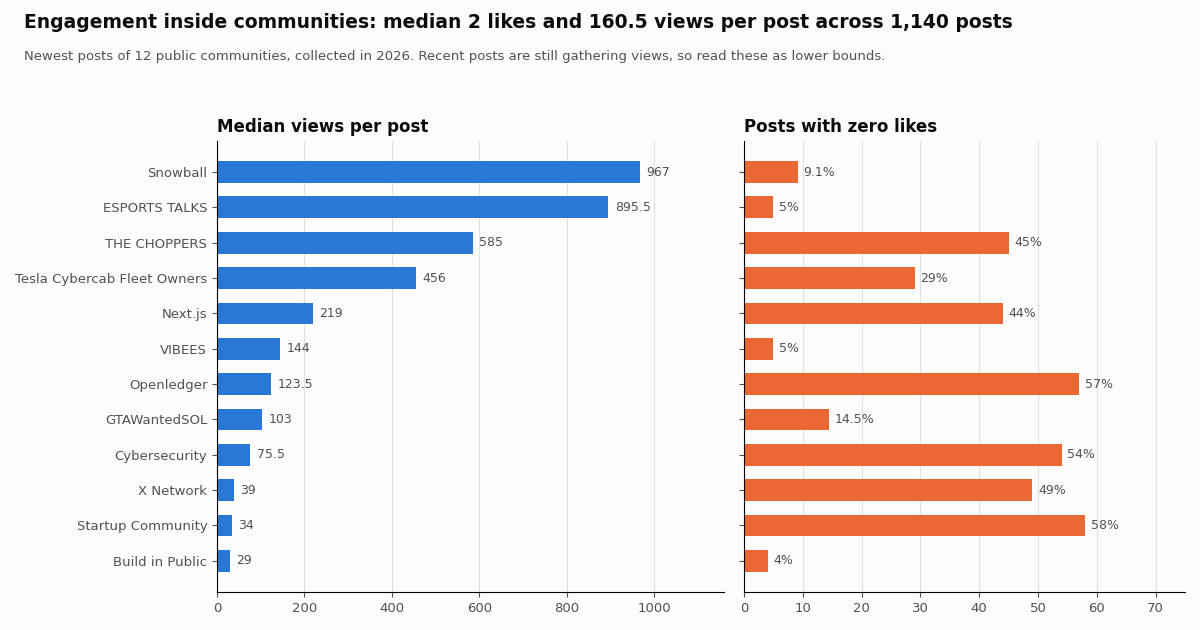
Engagement inside communities is modest. Across all 1,140 posts the median post got 2 likes and 160.5 views, 31.6% got no likes at all, and the top 10% reached 15 likes or more and 1,494 views or more. 36.2% carried a photo or video and 13.5% linked out of X. None of the posts were replies: the community feed returns top-level posts only.
Read the view counts as lower bounds: in the fast communities the posts were minutes old when we read them and were still collecting views. The communities with the highest median views, Snowball and ESPORTS TALKS, are slower or tighter groups where posts had had time to travel. The large, open communities show the opposite profile: Startup Community had 58% of posts with zero likes, a sign of many people posting and few reading.
Alternatives if your community needs a backup plan
X's own suggestion is an XChat group chat. Bier's posts put the cap at 350 members at the April 2026 announcement, raised to 500 the next day, with 1,000 as the goal. A group chat is private to its participants, which a Community never was, but it has no public feed, no discovery and no topic page. Our XChat guide covers the encrypted chat product and its current limits.
Custom Timelines launched for Premium subscribers the same week, per TechCrunch: they let you pin a topical feed to your Home tab. They help you read a niche, not run one; there are no members, rules or moderators.
Lists are the long-lived option for following a set of accounts around a topic, and anyone can make one. They change what you read, not who sees your posts. Our Twitter Lists guide covers how they work and their limits.
Your own profile plus a pinned post is the fallback that needs nothing from X. Bier himself argued that content from many small communities "should really live on Timeline". If your community is mostly a place to share work, a consistent hashtag and a pinned post with your group chat link will carry much of it.
For developers: reading community data
A short note for readers who work with X data. X's official API v2 documents a Community lookup, GET /2/communities/:id, that returns metadata such as name, description, created_at and member_count, and a separate search endpoint; it does not document an endpoint that lists a community's posts or members (docs.x.com, Communities lookup).
TwitterAPI.io reads community feeds with an API key and no X account: /twitter/community/info for metadata including rules, admin, creator, join policy and moderator count, /twitter/community/tweets for the newest posts, 20 per page with has_next_page and next_cursor, and /twitter/community/members and /twitter/community/moderators for people. Community posts are billed like other tweet reads: 15 credits per post returned, $0.15 per 1,000 posts, so a full page of 20 costs $0.003, and a request that returns nothing costs the 15-credit minimum of $0.00015. For comparison, X's pay-per-usage rate card charges $0.005 per post read, $5 per 1,000 posts, about 33 times $0.15 where an equivalent endpoint exists (docs.x.com pricing).
One detail for anyone parsing responses: the tweet object has a communityInfo field, but it was empty on all 1,140 posts we read through the community feed, so record the community ID from your own request rather than expecting it in each post. Joining or leaving a community from code is possible with /twitter/join_community_v2 and /twitter/leave_community_v2 after a /twitter/user_login_v2 login ($0.10, with a proxy you supply), at 60 credits ($0.0006) per call, billed per HTTP 200 call. Those calls act as your own X account, X can rate-limit, lock or suspend it, sessions can need a new login, and you should keep a human pace. We did not test community creation, which X has switched off in its own apps.
New accounts that pass the automatic bot check get up to $1 of free credits (up to 100,000 credits, no card, one per person or network, expiring after 31 days). Purchased credits never expire. Before your first payment the rate limit is 0.2 requests per second; it rises to 20 once you have paid. The X Communities API guide has full request and response examples, and the script below checks whether a community is still active.
import requests

r = requests.get(
    "https://api.twitterapi.io/twitter/community/info",
    headers={"X-API-Key": "YOUR_API_KEY"},
    params={"community_id": "1493446837214187523"},  # Build in Public
    timeout=30,
)
info = r.json()["community_info"]
print(info["name"], info["member_count"], info["join_policy"], len(info["rules"]), "rules")How we collected this
Question. Are public X Communities still active after the announced May 30, 2026 shutdown, can new ones still be created, and what does activity inside them look like?
Communities. We collected community IDs from public posts that link to x.com/i/communities/... (80 distinct IDs), looked up 51 of them, and picked 12 public, non-adult communities across startups, security, web development, esports, crypto and Tesla, plus Build in Public, which our API guide had measured before. Community names are public group names.
Window and sample. The newest posts of each community at collection time, up to 5 pages of 20, collected in 2026: 1,140 posts. Creation times of communities come from their IDs, which encode a timestamp, and from the creation date in each community's metadata.
Calls and cost. About 146 read requests in total, including the ID search and the fact checks of X's own posts, for about $0.27 of credits; no write endpoint was called.
What it cannot show. Our 12 communities are not a random sample of all communities, and the ID search only sees communities that someone linked to recently, so a community created quietly after April 2026 could be missed. We did not compare engagement inside and outside communities, because that would mean profiling individual authors. Recent posts were still gathering views. We could not open X's help pages, which block automated reading, and we did not test the apps' menus.
Privacy. Aggregates only. No member, author or moderator is named or profiled; raw feeds were not kept in our repository, and the per-post sample keeps only numbers, with no IDs, text or handles.
"""Is an X Community still active? Reads its info and newest posts with TwitterAPI.io."""
from datetime import datetime, timezone

import requests

BASE = "https://api.twitterapi.io"
HEADERS = {"X-API-Key": "YOUR_API_KEY"}
COMMUNITY_ID = "1493446837214187523"  # from x.com/i/communities/<id>


def parse(ts):
    return datetime.strptime(ts, "%a %b %d %H:%M:%S %z %Y")


info = requests.get(f"{BASE}/twitter/community/info", headers=HEADERS,
                    params={"community_id": COMMUNITY_ID}, timeout=30).json()
if info.get("status") != "success":
    raise SystemExit(info.get("msg"))
c = info["community_info"]
print(f"{c['name']}: {c['member_count']:,} members, join policy {c['join_policy']}, {c['moderator_count']} moderators")

posts, cursor = [], ""
for _ in range(3):  # up to 60 newest posts, 20 per page
    params = {"community_id": COMMUNITY_ID}
    if cursor:
        params["cursor"] = cursor
    page = requests.get(f"{BASE}/twitter/community/tweets", headers=HEADERS, params=params, timeout=30).json()
    posts += page.get("tweets", [])
    if not page.get("has_next_page"):
        break
    cursor = page["next_cursor"]

if not posts:
    print("No posts returned")
else:
    now = datetime.now(timezone.utc)
    newest = max(parse(t["createdAt"]) for t in posts)
    deadline = datetime(2026, 5, 31, tzinfo=timezone.utc)
    after = sum(1 for t in posts if parse(t["createdAt"]) >= deadline)
    likes = sorted(t["likeCount"] for t in posts)
    print(f"read {len(posts)} posts; newest is {(now - newest).total_seconds() / 3600:.1f} h old")
    print(f"{after} of {len(posts)} posted after the announced May 30, 2026 shutdown")
    print(f"median likes {likes[len(likes) // 2]}")
Researching this?Free starter credits cover end-to-end testing — Google sign-in, no card. Get a key.
Questions readers ask
Are Twitter (X) Communities shutting down?
X announced on April 22, 2026 that it was deprecating Communities, with a final date of May 30, 2026. That date passed without a visible shutdown: in our read of 12 public communities, collected in 2026, 90% of the newest posts were published after May 30, 2026. X has not announced a reversal or a new date, so the feature could still be switched off.
How do I join a community on X?
Open the community's page, either from search or from a link of the form x.com/i/communities/ followed by its ID, and use the join button. Open communities let you in at once; restricted ones send your request, and sometimes your answer to an entry question, to the moderators. Your account must be public.
How do I create a community on Twitter?
You currently cannot. Creation used to require an X Premium subscription, but press reports from April 2026 say the create option was removed on the web and Android and errors on iOS, and none of the 80 community IDs we checked was created after the April 22, 2026 announcement. An XChat group chat with a joinable link is the option X points to instead.
Can people outside a community see my community posts?
Yes. Since February 3, 2025, X has said Community posts and replies are visible to your followers and other people on X, can appear in the main feed, and can be replied to by anyone, with member replies shown first. A Community is not a private space.
What is the difference between an admin and a moderator?
Each Community has one admin who sets its name, description, rules and join policy and appoints moderators. Moderators enforce the rules: they approve join requests, hide posts, remove members and can limit what non-members do. In our sample, communities had between 1 and 10 moderators.
Is there a list of the top Twitter communities?
X does not publish one. Our table lists 12 active public communities with member counts and activity, from Build in Public (271,341 members) to Tesla Cybercab Fleet Owners (920). Member count is a weak signal on its own, so check the rules and the newest posts before you join.
What happens to my posts if I leave a community?
They stay. Community posts are public posts on your profile; leaving only stops you from posting there. Delete individual posts if you want them gone. X said in February 2025 that content stays up even when a Community is deleted.
What should I use instead of X Communities?
For a private group, an XChat group chat with a joinable link (500 members after the April 2026 increase, with 1,000 as X's stated goal). For reading a topic, a List or a Custom Timeline. For sharing your work, your own profile with a pinned post.
Continue
- Nikita Bier on X, April 22, 2026: deprecating X Communities on May 6, XChat joinable group links (350 members)
- Nikita Bier on X: deadline moved to May 30, group chats raised to 500 members, 1,000 planned
- TechCrunch, April 23, 2026: X is shutting down Communities (0.4% of users, 80% of spam reports, Custom Timelines)
- Social Media Today, February 3, 2025: Community posts visible to everyone, feed-eligible, open replies
- X Help Center: Communities on X
- X API docs: Communities lookup (GET /2/communities/:id)
- X API hub: guides for reading X data
- X Communities API: read community posts, members and moderators
- How Twitter (X) Lists work, and their limits
- Twitter Circle: what it was and what replaced it
- X Chat (XChat): encrypted messages and group chats
- TwitterAPI.io pricing: pay per post and profile returned
- 01How much does Twitter (X) pay creators in 2026?
- 02Twitter (X) API Telegram Bot: Forward New Tweets to a Channel in 2026
- 03Twitter (X) API in Golang: a typed net/http client with iterators and rate limiting
- 04How to Block Words on Twitter (X): Muted Words, Step by Step
- 05Twitter (X) Drafts: How to Find, Access and Keep Them
- 06X Communities API: How Do You Read Community Posts and Post to a Community?
- 07AllMyTweets: What It Did, Its Limits, and How to See Every Tweet on Twitter (X)
- 08Twitter (X) Analytics Free — What's Actually $0 in 2026?
Writing about something you built with TwitterAPI.io? Our community rewards program pays API credits for honest tutorials, build logs and videos.
Stop reading. Start building.
Starter credits cover real testing on real data. Google sign-in, no card, no application queue.
Get an API keyAlready building with TwitterAPI.io? Publish an honest tutorial or build log about it and earn up to $200 a month in API credits.