How the X (Twitter) Algorithm Works, and How to Reset Your Feed
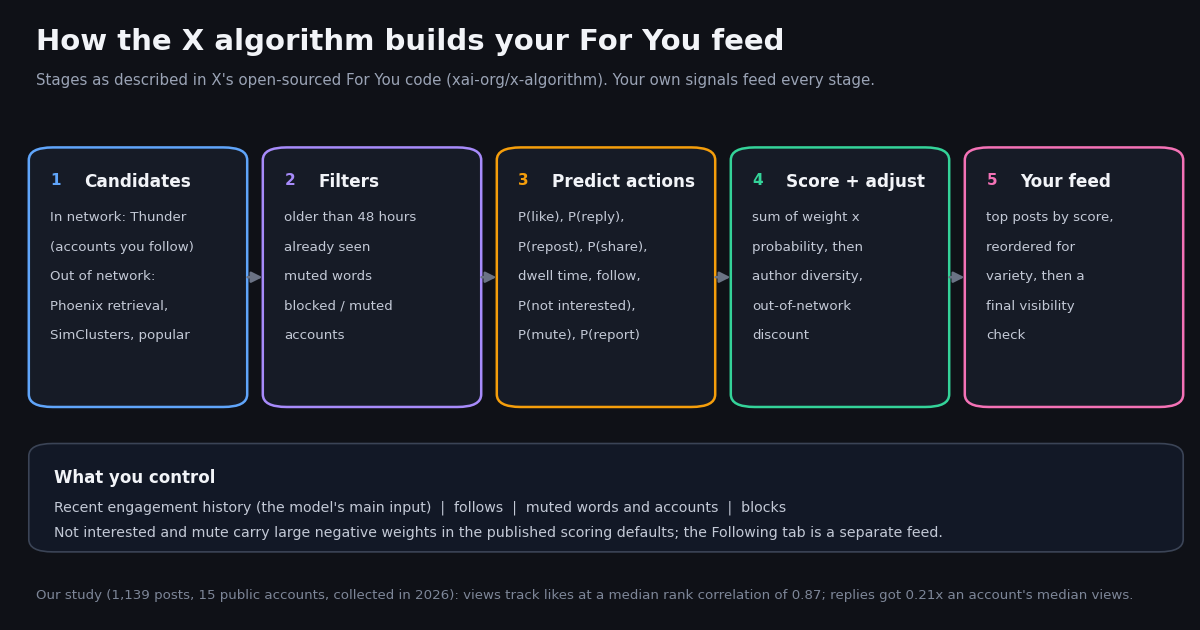
- No reset button exists. The For You model's main input is your recent engagement history, so a reset means changing it: Not interested, mute words and accounts, unfollow, block, and deliberate engagement.
- Negative feedback is weighted heavily in the published defaults of
param.rs: Not interested -53.07, mute -58.8, block -31.2, report -234.0, against a like at 0.708. Those weights multiply predicted probabilities, not raw counts. - The pipeline: candidates (Thunder for accounts you follow, Phoenix retrieval, SimClusters and popular posts for the rest), filters (48-hour age limit, already seen, muted, blocked), Phoenix predictions, a weighted sum, author-diversity and out-of-network adjustments.
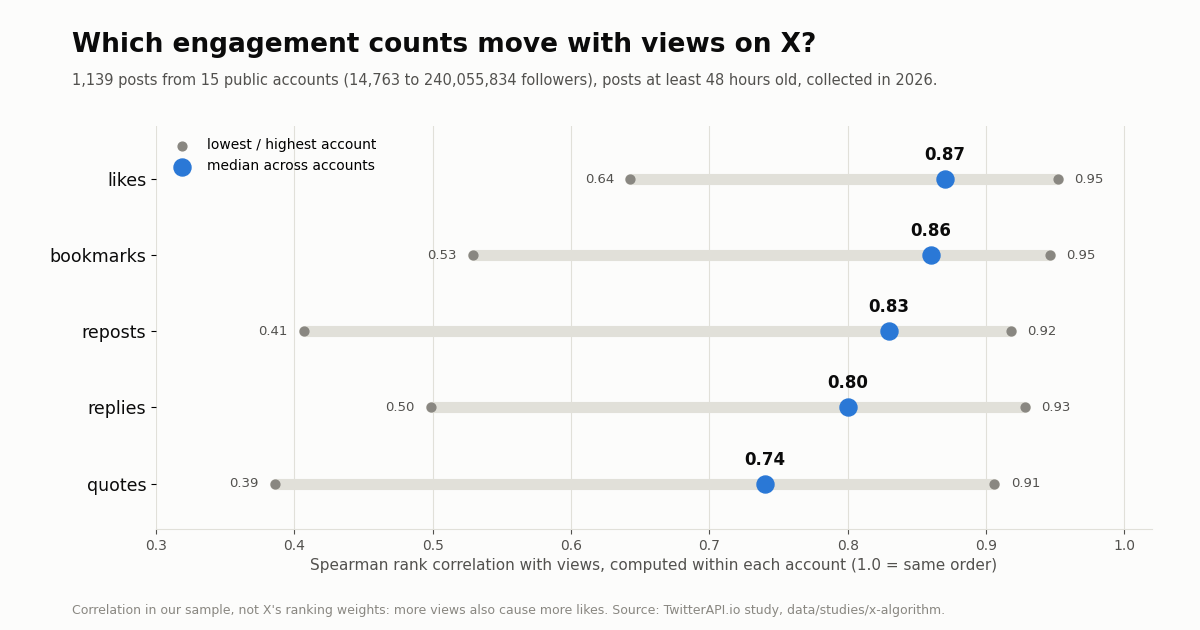
- Our study (1,139 posts, 15 public accounts, collected in 2026): views move with likes at a median within-account rank correlation of 0.87, bookmarks 0.86, reposts 0.83, replies 0.80, quotes 0.74.
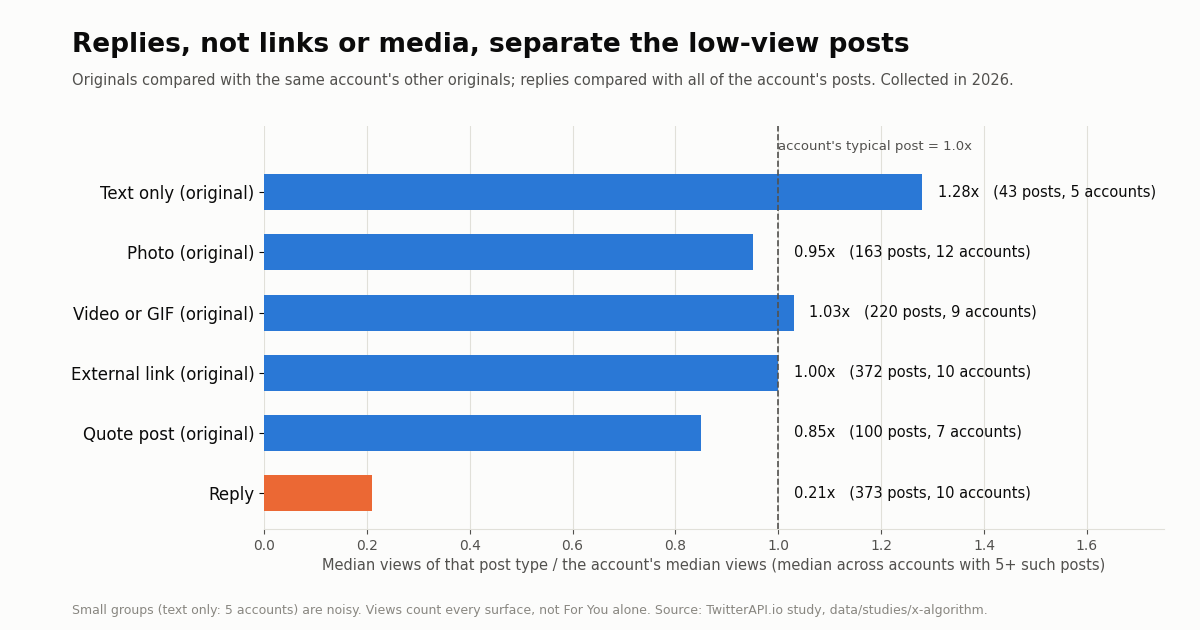
- Replies are the outlier: a reply drew 0.21x the account's median views. Among original posts, links (1.00x), video (1.03x) and photos (0.95x) sat at the account's normal level.
- For developers: the same view and engagement fields come back from
/twitter/user/last_tweetsat $0.15 per 1,000 posts returned, versus $0.005 per post read ($5 per 1,000) on X's pay-per-usage rate card.
Search for how the X algorithm works and you will find two kinds of answers: viral lists of secret multipliers, and complaints that the For You feed has gone wrong and needs a reset. This page answers both from primary sources. X publishes the code behind the For You feed, including the scoring weights, in the xai-org/x-algorithm repository on GitHub, and it is updated far more often than the 2023 the-algorithm release from the Twitter organization that many older guides still quote. We read the code, then measured what we could measure ourselves: how views relate to engagement on 1,139 real posts.
We start with the practical part, because it is what many readers came for: how to reset or retrain your feed, and which controls actually feed the ranking. Then we walk through the pipeline, the weights and what they do and do not mean, the dated changes X has published, and our study. One narrower topic has its own page: Tweepcred, the account reputation score inside the 2023 code, is covered in our Tweepcred guide, so here it gets a single mention.
A note on honesty. The repository describes the system X says it runs, with production defaults that X says its cron scripts copy into the code. Experiments run on slices of traffic, and the model's learned parameters are not something anyone can read off a file. Where we state a number from the code we name the file; where we state a number from our study it is a correlation in our sample, not a weight X uses.
0.21x across 373 replies from 15 public accounts (1,139 posts, collected in 2026), while links (1.00x), video (1.03x) and photos (0.95x) sat at the account's normal level.
How to reset the X algorithm (and what actually changes your feed)
Short answer: there is no reset button. We found no reset control in the For You code X publishes, and the repository's own overview explains why one would be hard to build: the model's main input is the viewer's recent engagements (the README calls it the user action sequence), read fresh on every request alongside your following list, blocks and mutes, muted keywords, posts already seen and served, and followed topics. Change those inputs and the next feed you load is built from different data. That is what a reset means on X.
The controls below are the ones that map directly onto those inputs. X moves its menus around between app versions, so we describe where each control lives in general terms; X's help center pages are listed in the sources for the current wording (help.x.com/en/using-x/x-timeline and help.x.com/en/using-x/advanced-x-mute-options).
1. Not interested in this post. Open the menu on a post in For You and choose the Not interested option. In the published scoring defaults the predicted chance of this action carries a weight of -53.07, the largest negative weight after report and mute. Because the model learns from what you do, repeating it on a type of post teaches Phoenix that the type is a poor match for you.
2. Mute accounts. Muting removes the account's posts before ranking even starts: a filter called AuthorSocialgraphFilter drops posts from accounts you block or mute. The predicted chance that you would mute an author also carries a weight of -58.8, so posts similar to ones you mute are pushed down too.
3. Mute words and phrases. Muted words are applied by MutedKeywordFilter before scoring, and the same muted-keyword list is applied to posts from accounts you follow. This is the strongest tool for a topic you never want to see, because filtered posts are never scored at all. You manage the list in the privacy and safety area of your settings.
4. Unfollow, and follow on purpose. Posts from accounts you follow arrive through Thunder, the in-network source. Following someone puts their recent posts into every candidate set you get, and unfollowing takes them out. Following a handful of accounts that post what you want is often a faster fix than dozens of Not interested taps.
5. Block or report when it is warranted. Blocking removes the account through the same filter as muting (weight -31.2 on the predicted block). Report is weighted -234.0, but the code comments are explicit that this is not a penalty multiplied by report counts; it scales your own predicted chance of reporting, which is rare, so the weight is large for the prediction to matter at all.
6. Change what you spend time on. Dwell and read-through count. The model predicts dwell time and video watch seconds, and the October 13th, 2026 repository update trained retrieval to surface posts people read all the way through. Scrolling past quickly, without opening or replying, is itself a signal (a small negative weight called not dwelled).
7. Use the Following tab while it retrains. The published repository covers the For You feed. The Following tab is a separate feed of accounts you follow, so it is the place to read while new signals accumulate in For You.
8. Topics and interests. The pipeline reads followed topics and runs a TopicIdsFilter for posts outside or inside excluded topics. Unfollowing topics you no longer care about, and reviewing the interests X lists for your account in your account data settings, removes another stale input.
What does not reset it. Clearing the app cache, logging out, reinstalling or switching phones does not touch any of the inputs above, because they live on X's servers and belong to the account. Search history is not among the inputs the README lists for the For You request, so clearing it may tidy the search box but is not a feed reset. Creating a new account is the only true clean slate, and it starts with no follows and the new-user rules in the code.
How fast it works. Candidates older than 48 hours are dropped by AgeFilter, so the pool you are ranked from turns over every two days, and your engagement sequence is read on each request. That is why consistent actions over a few sessions matter more than any single tap; X publishes no official timeline for a retrain.
How the X algorithm works, stage by stage
The repository describes the For You feed as a pipeline that runs per request inside a service called Home Mixer. The README draws it as seven stages; here they are in plain terms.
In-network and out-of-network. Thunder keeps recent posts from the accounts you follow in memory. Phoenix retrieval embeds you and every post as vectors and returns the nearest posts; SimClusters groups accounts and posts into communities by engagement; a shared list of popular recent posts is added on top. All of them are ranked together by the same model. Reposts and replies from accounts you do not follow are filtered out before scoring by OONRetweetReplyFilter.
Ranking versus visibility. The README separates the two on purpose: ranking decides the order, and visibility filtering decides whether a post can be shown at all, based on your own blocks and mutes and on labels other systems attach to posts and accounts. X also pilots a page called Under the Hood (x.com/i/jf/under_the_hood) that shows aggregate statistics about visibility-limiting labels on your own account and posts.
Variety. After scoring, each additional post from the same author is multiplied by a decaying factor down to a floor, and a reranking service reorders the list so neighboring posts are less similar. That is why even an account you love rarely fills your whole screen.
The weights X published, and how to read them
The final score is a sum: weight times predicted probability, over every action Phoenix predicts. The default weights live in home-mixer/params/param.rs, and X states that cron scripts set these defaults to the primary production values. These are the values in the file when we read it for this page.
Do not read the ratios as exchange rates. The code comment next to these values says so directly: a weight multiplies your predicted probability of an action, not a count of actions, so a report weighing 468 times a like does not mean one report cancels 468 likes. The baseline chance of a report is more than 1,000 times lower than a like, according to the same comment, which is why its weight is large: otherwise the prediction could never change the ranking.
Mass reporting is less effective than it sounds. The comment adds two reasons. Predictions are personalized, so reports from a group mainly change what that group and similar users see. And an action only counts when it happens on a post served in the Home timeline; navigating straight to a post from a link or a group chat has no ranking effect, according to X's comment.
Replies carry an extra boost between mutual follows. A parameter called the bidirectional follow reply weight boost is set to 15.0: it raises the weight on your predicted reply when the post's author is someone you and they both follow, which lifts original posts from mutual follows. X documents the history in docs/BIDIRECTIONAL_BOOST_CHANGE.md: an A/B test with values of 5, 10, 15 or 20 began on July 10, 2026, a value of 20 rolled out to many users on July 13, 2026, and on July 24, 2026 X set it to 15 after feedback that people were seeing less World Cup discussion from accounts they did not follow.
Several weights are zero by default. Video quality views, video opens, profile clicks and a Grok analyze action are all present in the file with a default of 0.0. A zero default means that prediction does not move the score in the default configuration, though X notes experiments run on part of the traffic.
X algorithm changes: what X has published
Many pages about the Twitter algorithm still describe the March 2023 release (a repository named the-algorithm under the Twitter organization on GitHub), with its light ranker, heavy ranker and roughly half of the feed sourced from the search index. That repository's last push was in September 2025. The ranking code people mean today is a different repository.
January 2026: a new repository. On January 10, 2026 Elon Musk posted that X would open source the new algorithm, including all code used to determine which organic and advertising posts are recommended, within 7 days, and repeat the release every 4 weeks with developer notes. The xai-org/x-algorithm repository was created on January 19, 2026, is licensed Apache 2.0, and GitHub lists Rust as its main language.
From the 2023 rankers to a transformer. The 2023 release ranked candidates with a light ranker and a neural heavy ranker. The current README describes Phoenix as a transformer that reads your recent engagement sequence and predicts the probability of each action, with a Phoenix retrieval model finding out-of-network candidates; the training and serving code is in JAX with a Rust serving layer.
Dated entries in the repository. The README keeps a list of notable updates. On August 14, 2026 it added the explanation of how weights work and a Brazil 2026 elections filter; on September 18, 2026 Under the Hood reports began to show when visibility was limited for legal compliance; on October 8, 2026 the ranking model was improved at predicting time spent; on October 13, 2026 retrieval was also trained to surface posts people read all the way through; and on October 26, 2026 the Brazil elections filter was removed.
How often it changes. The commit history shows pushes on consecutive days in the week we checked it, each titled Open-source X Recommendation Algorithm. Treat any article that quotes fixed multipliers without naming a file, or cites the 2023 repository as current, as out of date.
What is not published. X says a limited set of files is held back to reduce gaming, for example the LLM prompts used by a labeling system called Grox and some rules in its labeling engine. The Under the Hood page is X's stated substitute: it shows the outcome of those systems for your own account.
Study: what 1,139 real posts show about views and engagement
The code tells you what the ranker predicts. It cannot tell you how those predictions play out across real posts, so we measured that part. We pulled the recent timelines of 15 public organization and public-figure accounts, from 14,763 to 240,055,834 followers, kept original posts and replies at least 48 hours old (reposts excluded), and compared view counts with each engagement count inside each account. The result is 1,139 posts.
Every signal moves with views, likes and bookmarks the closest. A rank correlation of 0.87 means that within an account, the posts with more likes are generally the posts with more views. This is the expected shape for a ranker that rewards predicted engagement, but it runs both ways: a post shown to more people also collects more likes. The correlation cannot separate cause from effect, and it is not one of X's weights.
The top posts are engaging, not just widely shown. Within each account, the top tenth of posts by views reached a median of 6.6 times the views of the rest. In 9 of 14 accounts with enough posts, that top tenth also had a higher engagement rate per view (median 0.93% against 0.65%), which fits a system where engagement per impression earns further distribution.
Why bookmarks matter more than people think. Bookmarks are private, yet they tracked views at 0.86, ahead of reposts. Bookmarks do not appear in the weight list we read, but share via copy link (20.0) and dwell do, and a post people save is usually a post people stop on.
Do links, video or replies change reach on X?
A long-running claim is that X suppresses posts with external links and boosts video. We compared each post type with the same account's other posts, so a large account's numbers cannot swamp a small one's, and only counted accounts with at least 5 posts of that type.
Replies are where reach drops. A reply drew a median of 0.21 times the account's typical views, and replies were 32.7% of the posts we kept. This lines up with the code: replies from accounts a viewer does not follow are filtered out of For You, and replies from accounts the viewer does follow are discounted like out-of-network posts. Replies inside an account's own thread were barely different from replies to other people (4.51 against 3.65 views per 1,000 followers).
Links did not cost views in this sample. Original posts with an external link sat at 1.00 times the account's median, the same as everything else. What links did change is engagement per view: 0.43% against 1.03% for photos. If a link post earns fewer predicted likes and replies per impression, a ranker built on those predictions will show it less over time, which may be what people experience as a link penalty. We cannot see that loop in a snapshot.
Media is not a shortcut. Video (1.03x) and photos (0.95x) landed at the account's normal level. The text-only figure (1.28x) comes from only 5 accounts and 43 posts, so treat it as noise rather than a tip. In the published defaults the weights for video quality views and video opens are 0.0; video earns its place through dwell and watch time like any other post.
What this means for your own posts
Put the code and the study together and the practical guidance is plainer than the viral threads suggest.
Write for the reply, not the like. A predicted reply and a predicted quote each weigh about seven times a predicted like in the defaults, and the predicted reply on posts from accounts the viewer mutually follows gets the extra 15.0 boost. Posts that invite real answers from people who know you are the ones the model scores up.
Avoid the negative predictions. Not interested and mute weigh far more than any positive action. Engagement bait that draws clicks from the wrong audience raises the predicted chance of those actions for people like them, which works against you.
Do not count on replies for reach. In our sample a reply drew a fifth of an account's normal views. Replies are for conversation; if you want something seen, make it an original post.
Post when you can watch the first two days. With a 48-hour age limit on candidates, a post's For You life is short. Our guide to the best time to post on X measures when accounts get their engagement.
Check your own numbers, not someone else's. Views count every surface, including Following, search, profiles and embeds, so your view count is not a For You count. Our guide to what Twitter impressions are explains what is counted, and an engagement rate per view tells you more than raw likes.
Measure the X algorithm on any account with the API
Everything in the study above came from public fields on posts: viewCount, likeCount, replyCount, retweetCount, quoteCount, bookmarkCount, isReply, extendedEntities.media, entities.urls, quoted_tweet and retweeted_tweet. You can repeat it for any public account with TwitterAPI.io, no X account needed. The script at the end of this page pulls six pages of a timeline from /twitter/user/last_tweets with replies included, drops reposts and posts younger than 48 hours, and prints the rank correlation of views with each engagement count plus the view multiple for replies, media posts and link posts.
What it costs. Tweet endpoints are billed at 15 credits per post returned, which is $0.15 per 1,000 posts; a full 20-post page costs $0.003, so the 120 posts the script reads cost about $0.018. A request that returns nothing is billed the 15-credit minimum. Our whole study, about 120 requests and 1,918 timeline posts returned, cost about $0.31. New accounts that pass the automatic bot check get up to $1 of free credits (up to 100,000 credits, no card, one per person or network, expiring after 31 days), and purchased credits never expire.
Against the official X API. X's pay-per-usage rate card at docs.x.com/x-api/getting-started/pricing charges $0.005 per post read, or $5 per 1,000 posts, against our $0.15 per 1,000 posts returned, about 33x. User reads are $0.010 each on the same card; our profile lookups are $0.18 per 1,000 profiles.
Scaling it. Accounts are limited to 0.2 requests per second before the first payment and 20 per second once paid, which is plenty for a few hundred accounts a day. For a ratio view of a single post, our guide to the Twitter ratio covers replies against likes; for whole-account engagement, see the engagement rate calculator API guide.
How we collected this
Question. Within recent posts from public accounts of mixed sizes, how do views relate to the engagement counts the For You ranker predicts, and do replies, links, media or quotes get different views than the same account's other posts?
Accounts. 15 public organization and public-figure accounts: NASA, The New York Times, NBA, SpaceX, The Verge, GitHub, Duolingo, Netflix, National Geographic, Elon Musk, Marques Brownlee, Vercel, Astral, Tauri and Zed, from 14,763 to 240,055,834 followers. Each handle was checked with /twitter/user/info first.
Window and sample. The recent timeline of each account at collection time through /twitter/user/last_tweets with replies included, up to 6 pages per account and 12 for the two fastest posters, collected in 2026. Of 1,918 posts returned we dropped 329 reposts (their counters belong to the original), 415 posts younger than 48 hours (views still growing) and 35 duplicates, leaving 1,139 posts: 766 originals and 373 replies.
Method. Spearman rank correlation of views with each engagement count inside each account, summarized as the median across accounts. Post-type comparisons divide the median views of a type by the account's median views, then take the median across accounts with at least 5 posts of that type; originals are compared with originals.
What the sample cannot show. It is 15 accounts, skewed toward very large ones, and one snapshot. Views count impressions from every surface, not For You alone. Correlation is not causation, and nothing here is one of X's weights or tells you how any single viewer's feed is ranked.
Privacy. Aggregates only; organization and public-figure accounts only; no analysis of the people they replied to, quoted or reposted. The study files hold de-identified rows with no post ids, links, text or handles.
"""x_algorithm_check.py - measure, for one public X account, how views relate to likes,
replies, reposts, quotes and bookmarks, and how replies, links and media compare.
It repeats the method of the study on this page for an account you choose.

    pip install requests
    export TWITTERAPI_IO_API_KEY=...   # from the twitterapi.io dashboard
    python3 x_algorithm_check.py NASA
"""
import os
import statistics
import sys
from datetime import datetime, timezone

import requests

BASE = "https://api.twitterapi.io"
SESSION = requests.Session()
SESSION.headers["X-API-Key"] = os.environ["TWITTERAPI_IO_API_KEY"]
SIGNALS = ["likeCount", "replyCount", "retweetCount", "quoteCount", "bookmarkCount"]


def last_tweets(user, pages=6):
    """Newest-first timeline, 20 posts per page, replies included."""
    posts, cursor = [], ""
    for _ in range(pages):
        params = {"userName": user, "includeReplies": "true"}
        if cursor:
            params["cursor"] = cursor
        r = SESSION.get(f"{BASE}/twitter/user/last_tweets", params=params, timeout=40)
        r.raise_for_status()
        body = r.json()
        if body.get("status") != "success":
            sys.exit(f"API error: {body.get('msg')}")
        posts.extend((body.get("data") or {}).get("tweets") or [])
        if not body.get("has_next_page") or not body.get("next_cursor"):
            break
        cursor = body["next_cursor"]
    return posts


def ranks(xs):
    order = sorted(range(len(xs)), key=lambda i: xs[i])
    out, i = [0.0] * len(xs), 0
    while i < len(order):
        j = i
        while j + 1 < len(order) and xs[order[j + 1]] == xs[order[i]]:
            j += 1
        for k in range(i, j + 1):
            out[order[k]] = (i + j) / 2 + 1
        i = j + 1
    return out


def spearman(x, y):
    rx, ry = ranks(x), ranks(y)
    mx, my = statistics.mean(rx), statistics.mean(ry)
    num = sum((a - mx) * (b - my) for a, b in zip(rx, ry))
    den = (sum((a - mx) ** 2 for a in rx) * sum((b - my) ** 2 for b in ry)) ** 0.5
    return num / den if den else float("nan")


def main(user):
    now = datetime.now(timezone.utc)
    rows = []
    for t in last_tweets(user):
        if t.get("retweeted_tweet"):          # a repost carries the original post's counters
            continue
        created = datetime.strptime(t["createdAt"], "%a %b %d %H:%M:%S %z %Y")
        if (now - created).total_seconds() < 48 * 3600 or not t.get("viewCount"):
            continue                          # views are still growing on newer posts
        media = {m.get("type") for m in (t.get("extendedEntities") or {}).get("media", [])}
        urls = [u.get("expanded_url", "") for u in (t.get("entities") or {}).get("urls", [])]
        rows.append({
            "views": t["viewCount"],
            **{s: t.get(s) or 0 for s in SIGNALS},
            "reply": bool(t.get("isReply")),
            "media": bool(media),
            "link": any("x.com/" not in u and "twitter.com/" not in u for u in urls),
        })
    if len(rows) < 10:
        sys.exit(f"only {len(rows)} usable posts; try an account that posts more")

    views = [r["views"] for r in rows]
    overall = statistics.median(views)
    print(f"@{user}: {len(rows)} posts, median views {overall:,.0f}")
    for s in SIGNALS:
        print(f"  rank correlation, views vs {s:<14} {spearman(views, [r[s] for r in rows]):.2f}")
    groups = {
        "replies": [r for r in rows if r["reply"]],
        "originals with media": [r for r in rows if not r["reply"] and r["media"]],
        "originals with a link": [r for r in rows if not r["reply"] and r["link"]],
        "plain originals": [r for r in rows if not (r["reply"] or r["media"] or r["link"])],
    }
    for name, g in groups.items():
        if len(g) >= 5:
            ratio = statistics.median(r["views"] for r in g) / overall
            print(f"  {name:<24} {len(g):>4} posts, {ratio:.2f}x the account median")


if __name__ == "__main__":
    main(sys.argv[1] if len(sys.argv) > 1 else "NASA")
Researching this?Free starter credits cover end-to-end testing — Google sign-in, no card. Get a key.
Questions readers ask
Can you reset your algorithm on X?
Not with a button: X's published For You code has no reset control. The feed is rebuilt on every request from your recent engagement history, follows, blocks, mutes, muted words, topics and the posts you already saw, so you reset it by changing those inputs. Use Not interested on posts you do not want, mute words and accounts, unfollow accounts that no longer fit, follow a few that do, and read the Following tab while For You retrains.
How do I reset my For You feed on X fast?
Mute words and accounts first, because muted words and muted or blocked accounts are filtered out before ranking, so the change applies on your next refresh. Then use Not interested repeatedly on the kind of post you want gone, which carries a weight of -53.07 in the published defaults, and stop opening or replying to that content. Candidates older than 48 hours are dropped, so the pool turns over quickly; X publishes no official retrain time.
Does clearing the cache or search history reset the X algorithm?
No. Clearing the app cache, reinstalling, logging out or changing phones leaves the account-level inputs on X's servers untouched. Search history is not among the inputs X's For You README lists for the feed request. Only changing your engagement, follows, mutes, blocks and topics changes what the ranker reads; a new account is the only clean slate.
How does the X algorithm work in 2026?
Per X's open-sourced code at github.com/xai-org/x-algorithm, the For You feed gathers posts from accounts you follow (Thunder) and from accounts you do not (Phoenix retrieval, SimClusters, popular posts), filters out posts older than 48 hours, seen posts and muted or blocked content, then the Phoenix transformer predicts how likely you are to like, reply, repost, share, dwell, follow or give negative feedback. A weighted sum of those predictions, adjusted for author variety and out-of-network posts, sets the order.
Is the X algorithm open source?
Yes, the For You feed code is published under the Apache 2.0 license in the xai-org/x-algorithm repository, created in January 2026 and updated frequently, including default weights in home-mixer/params/param.rs. X holds back a limited set of files, such as the LLM prompts used by its Grox labeling system, to reduce gaming. The older the-algorithm repository from the Twitter organization (2023) is a different, earlier system.
Does X penalize posts with links?
In our study of 1,139 posts from 15 public accounts, original posts with an external link drew 1.00x the account's median views, no different from other originals. They did earn less engagement per view (0.43% against 1.03% for photo posts). Because the ranker scores predicted engagement, lower engagement per impression can mean less distribution over time, but we found no visible link penalty in views in this sample.
Why do my replies get so few views on X?
In X's published code, replies from accounts a viewer does not follow are filtered out of For You, and replies from accounts the viewer follows are discounted like out-of-network posts. In our study a reply drew a median of 0.21x the account's typical views. Replies still matter for the author you reply to, because a reply is one of the highest-weighted predicted actions on their post.
What is the difference between Tweepcred and the X algorithm?
Tweepcred is one account reputation score, a PageRank over the follow graph in the 2023 code, that search and the old light ranker read. The X algorithm is the whole For You system: candidate sourcing, filters, the Phoenix model and the weighted score. Our Tweepcred guide covers that one score in detail.
Continue
- X: xai-org/x-algorithm, the For You feed code (README: pipeline, filters, scoring, notable updates)
- X: home-mixer/params/param.rs, default ranking weights and the comment on how to read them
- X: bidirectional follow reply boost change log (July 2026)
- Twitter: the-algorithm, the 2023 recommendation code release
- X API pay-per-usage pricing (post and user read rates)
- TwitterAPI.io docs: user last tweets endpoint
- Twitter (X) API overview and endpoints
- Tweepcred: X's account reputation score, read from the code
- What Twitter (X) impressions are and how they are counted
- What a Twitter ratio is: replies against likes
- Calculate Twitter (X) engagement rate with the API
- Best time to post on X, measured
- Free Twitter engagement rate calculator
- TwitterAPI.io pricing: $0.15 per 1,000 posts returned
- 01How to Clear Twitter (X) Cache on iPhone, Android and Desktop
- 02Twitter (X) API on Cloudflare Workers: a Cron Trigger mentions feed with KV
- 03Twitter (X) API in Rust with reqwest, serde and tokio
- 04Twitter (X) Communities in 2026: How They Work, and Are They Still Running?
- 05How much does Twitter (X) pay creators in 2026?
- 06What Are Twitter (X) Bots and How Do They Work in 2026?
- 07Grok Agent: How to Build an Agent with Grok on Live Twitter (X) Data
- 08Grok Build: Install, Pricing, MCP Setup and an X (Twitter) Data Tool Built With It
Writing about something you built with TwitterAPI.io? Our community rewards program pays API credits for honest tutorials, build logs and videos.
Stop reading. Start building.
Starter credits cover real testing on real data. Google sign-in, no card, no application queue.
Get an API keyAlready building with TwitterAPI.io? Publish an honest tutorial or build log about it and earn up to $200 a month in API credits.