How to Clear Twitter (X) Cache on iPhone, Android and Desktop
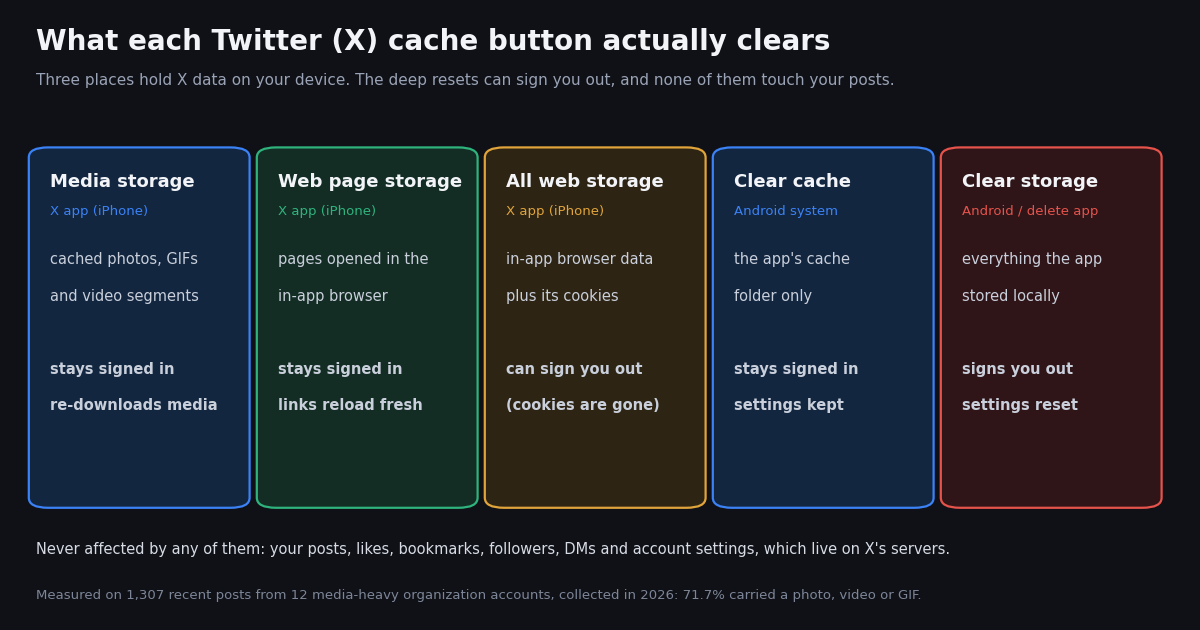
- iPhone: X app, Settings and privacy, Accessibility, display, and languages, Data usage, then Media storage and Web storage. Pick "Clear web page storage" to stay signed in.
- Android: system Settings, Apps, X, Storage, Clear cache. Clear storage (Clear data) resets the app and signs you out.
- Browser: clear cached images and files, or delete site data for
x.comonly (that one signs you out of X in that browser). - What it never touches: posts, likes, bookmarks, followers, DMs and account settings. Those are on X's servers.
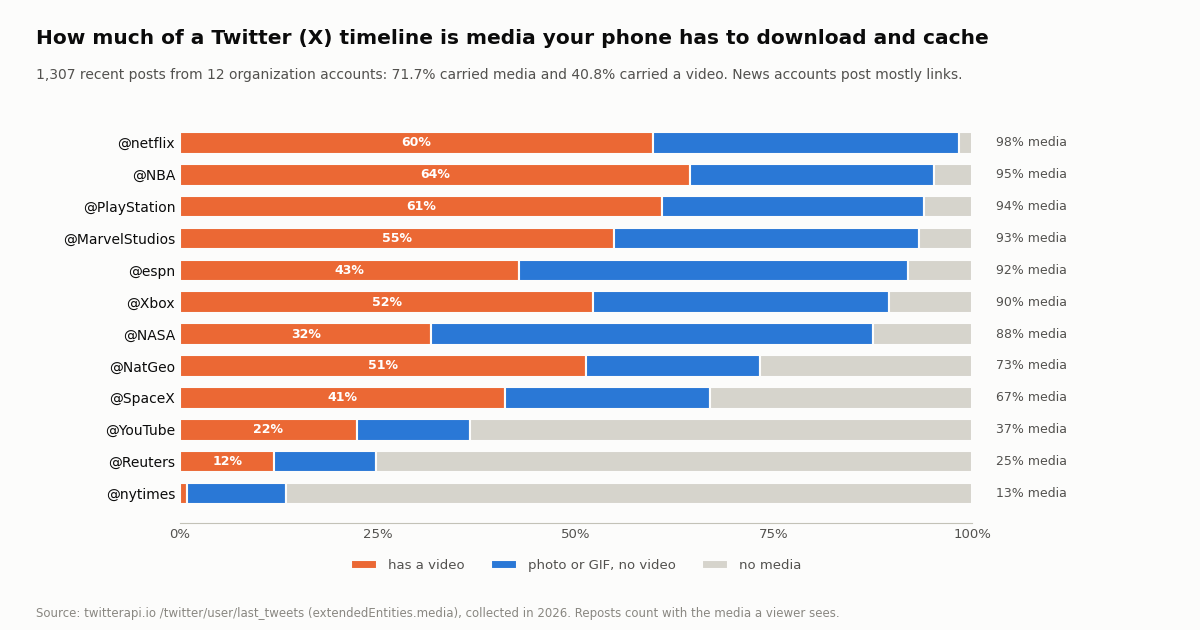
- Why it fills up: in our 2026 sample, 71.7% of 1,307 posts carried media and 40.8% carried a video; a clip's top MP4 rendition was a median 15x the size of its lowest.
- Still slow after clearing? Check Data saver, a rate-limit message, X's status, then browser extensions and VPNs, in that order.
"How do I clear the Twitter cache?" has three different answers, because the X app on iPhone, the X app on Android and x.com in a browser keep their temporary files in different places and expose different buttons. Some of those buttons keep you signed in, some quietly sign you out, and one popular tip (offloading the app on iPhone) does not clear much at all. This guide gives the exact steps for each device, says what each button removes, and then answers the question that usually sits behind the search: why is X so slow, and is the cache really the cause?
We also measured how fast the cache refills. We pulled 1,307 recent posts from 12 media-heavy organization accounts and read the size of real photo and video files on X's media hosts. The short version: a timeline like that is mostly media, and the video quality your app streams decides whether 100 posts cost tens of megabytes or hundreds. If posts are not loading at all, that is a different problem with its own fixes; our Twitter (X) not loading guide covers outages, error messages and account-level limits.
71.7%
What the X cache actually holds, and which button clears what
"Cache" on X means three separate stores on your device. The media cache holds photos, GIF loops and video segments you already scrolled past, so they do not download again when you scroll back. The web storage belongs to the in-app browser that opens links: cached pages plus cookies for the sites you visited from inside X. The app data is everything else the app keeps locally, including your sign-in session and local preferences. Your posts, likes, bookmarks, followers, DMs and account settings are not in any of them; they live on X's servers and come back the moment you sign in again.
That is the storage map the rest of this page uses. Read across a row to see what a button removes and what it costs you.
Rule of thumb. Start with the control in the first column that says "No" for your device. Only move to a row that signs you out if the gentle option did not fix the problem, and make sure you know your password (and have your two-factor method at hand) before you do.
How to clear Twitter cache on iPhone
Step 1: open the Data usage screen. In the X app, tap your profile picture, then Settings and privacy, then Accessibility, display, and languages, then Data usage. This is the path described by X's Help Center and by current how-to guides; help.x.com refuses automated reading, so we could not re-read it this session, and X does move menus between app versions. If you do not see it, search the settings screen for "Data usage".
Step 2: clear Media storage. At the bottom of Data usage, tap Media storage, then Clear media storage, and confirm. This removes cached photos, GIFs and video. You stay signed in, and media downloads again as you scroll, so expect the first minutes afterward to use more data than usual.
Step 3: clear Web storage. Back on Data usage, tap Web storage. You get two choices. "Clear web page storage" removes pages cached by X's in-app browser and keeps your cookies. "Clear all web storage" also deletes those cookies, which signs you out of any site you logged into from inside X. Pick the first unless a link inside X keeps misbehaving.
Step 4: force close and reopen. Swipe X away in the app switcher and open it again, so the app starts with empty caches instead of the copies still in memory.
What the iPhone itself can and cannot do. iOS has no per-app "clear cache" button. Under Settings, General, iPhone Storage, X, you get two options, and Apple's own wording explains why neither is a cache button. Offload App "frees up storage used by the app, but keeps its documents and data", so it removes the app binary and leaves the local data behind. Delete App "removes the app and its related data from the device". That is the true full reset: delete, reinstall from the App Store, and sign in again. Apple also notes that "cached data and temporary data might not be counted as usage", which is why the size shown there can disagree with what Media storage frees.
iPad. Current guides describe the same Data usage path in the X app on iPad, and Apple's storage screen there is called iPad Storage, with the same Offload and Delete options.
How to clear Twitter cache on Android
Android lets you clear one app's cache from the system settings, so you do not need to open X at all.
Step 1: open the app's storage page. Open Settings, then Apps, then X (you may need to tap "See all apps"), then Storage. On Pixel phones the page is called "Storage & cache". A shortcut that works on many phones: long-press the X icon, tap App info, then Storage.
Step 2: tap Clear cache. This empties the app's cache folder. Your sign-in and app settings stay in place. Samsung documents the same path for Galaxy phones: Settings, Apps, the app, Storage, then Clear cache.
Step 3, only if needed: Clear storage or Clear data. This is the deep reset. Samsung's support page says clearing data "will reset the app to factory default settings" and "any personal settings or data saved on the app will be removed", so you will sign in again and redo any app preferences. Use it when Clear cache did not help with crashes, a timeline stuck on old content, or settings that will not save.
Step 4: force stop and reopen. On the same App info page, tap Force stop, then open X again.
Labels vary. Menu names differ between phone makers and Android versions. If you cannot find Storage under the app, search the Settings screen for the app name or for "cache". If your version of the X app for Android shows a Media storage option under Data usage, it works the same way as on iPhone; the system path above works regardless of app version.
How to clear Twitter cache in a browser (x.com)
On a computer, or when you use x.com in a phone browser, X's cache is the browser's cache. You have three levels of reset, from gentle to thorough.
Level 1: hard reload. On x.com, press Ctrl+Shift+R (Windows and Linux) or Cmd+Shift+R (Mac). The page reloads without its cached files. This is enough when the page looks half-loaded after X shipped an update.
Level 2: clear cached images and files only. In Chrome, open the three-dot menu, then Delete browsing data, choose a time range, tick only "Cached images and files" and confirm; Google's help describes what it removes as "text and images from pages you've visited". You stay signed in everywhere. In Firefox, open Settings, Privacy & Security, Cookies and Site Data, Clear Data, and keep only the temporary cached files option ticked. On iPhone, Safari's cache sits under Settings, Apps, Safari, Advanced, Website Data.
Level 3: delete the stored data for x.com alone. In Chrome, open Settings, Privacy and security, Third-party cookies, See all site data and permissions, search for x.com, and delete it. This removes X's cookies, local storage, service worker and cache in that browser, and signs you out of X there and nothing else. It is the fix for a permanent "Something went wrong. Try reloading." that survives normal reloads. If images are the problem, also look for twimg.com, the host X serves media from.
Avoid clearing everything. "Cookies and other site data" for all time signs you out of every site. Google's help says plainly that if you were signed in, you will need to sign in again. That is rarely necessary for an X problem.
Private window test. Before any of this, open x.com in a private or incognito window. It starts with an empty cache and usually without extensions. If X works there, the problem is your browser's stored data or an extension, and Level 3 or disabling extensions will fix it.
What clearing the cache does, and what it does not do
Clearing the cache is a maintenance step with a narrow effect. It is worth knowing the edges, because a few common beliefs about it are wrong.
When it helps. Clearing is the right move when the app uses an unusual amount of storage, when media tiles stay broken after your connection is fine, when a profile or post shows stale content, or when the web app is stuck on an error after an X update. In those cases the cache holds a bad or outdated copy, and a fresh download fixes it.
When it does not. If X is slow on every device, or only on one network, or only for one account, the cache is not the cause. The decision tree further down sorts those cases.
What we measured: how fast the X media cache fills
To put a number on "the cache refills", we pulled the 1,307 recent posts of 12 public organization accounts that post a lot of media (NASA, NatGeo, PlayStation, Xbox, ESPN, the NBA, SpaceX, Netflix, Marvel Studios, Reuters, The New York Times and YouTube) and read the media attached to each post. Then we sent HEAD requests for 121 of the photos and 60 of the videos to X's media hosts to read their real file sizes, without downloading them.
Media is the majority of the timeline. 71.7% of the posts carried a photo, video or GIF, and 40.8% carried a video. Brand and entertainment accounts sat at 88% to 98% media; the two news accounts posted mostly text with links.
Every video comes in several sizes. All 553 videos offered an adaptive stream plus a median of 4 MP4 renditions. The top rendition's nominal bitrate was a median 10.4 Mbps, and the lowest was a median 288 kbps. The median clip ran 30 seconds and 24.4% ran longer than a minute.
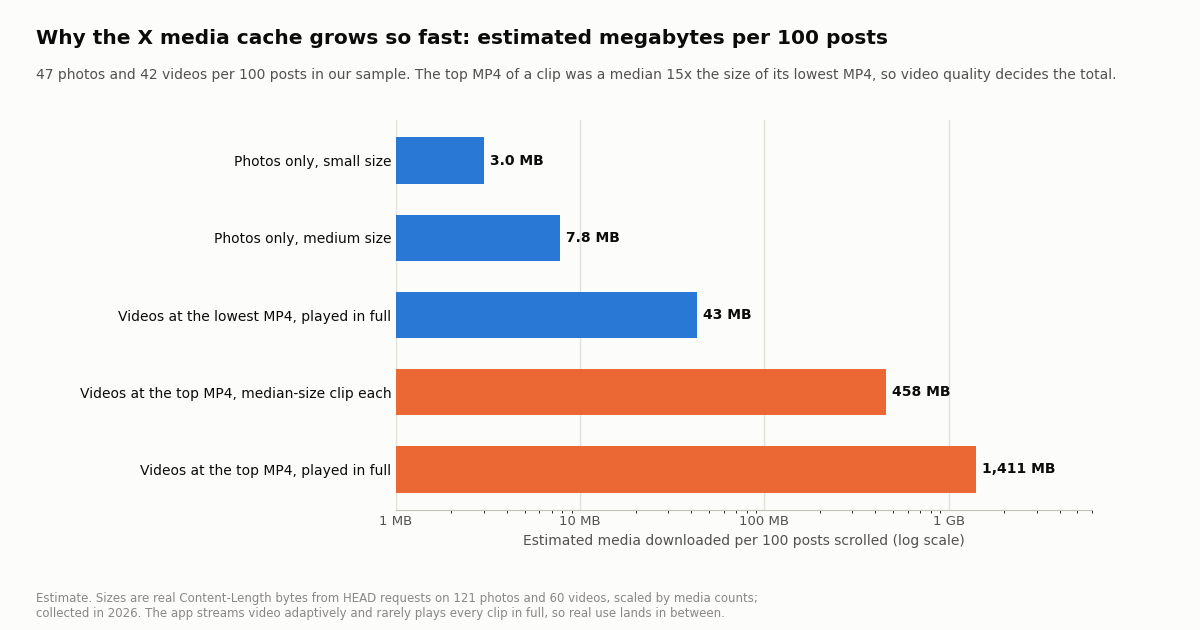
Real file sizes. A photo at X's small size was a median 61 KB and at medium size 155 KB. A video's top MP4 was a median 10.8 MB and its lowest a median 0.87 MB, a median 15x difference. Per minute of video that is about 25 MB at the top rendition and 1.4 MB at the lowest. Real files came in at a median 41% of what the nominal bitrate times duration would suggest, so the bitrate label overstates the download.
Per 100 posts scrolled (estimate). Our sample had 47 photos and 42 videos per 100 posts. Photos alone add 3 to 8 MB. Videos dominate: about 43 MB if every clip played in full at its lowest MP4, about 458 MB at the top rendition with median-size clips, and about 1,411 MB if every clip played in full at the top. Nobody watches every clip, and the app streams adaptively, so real use lands between those bounds. The point is the spread: video quality settings move the total by an order of magnitude, far more than clearing the cache once does.
Keep the cache small: settings that matter more than clearing. Clearing gives storage back once. The settings below decide how fast it fills again, and the measurement above says video quality is the lever that matters.
Turn off video autoplay, or limit it to Wi-Fi. In the X app, guides place the video autoplay option on the Data usage screen. With autoplay off, videos download only when you tap them, which removes the largest item in our per-100-posts estimate.
Lower media quality on mobile data. The Data usage screen also holds high-quality image and video options per network type in recent app versions. Because the top MP4 of a clip was a median 15x its lowest in our sample, the quality you allow sets the cache's growth rate.
Use Data saver when storage or data is tight. In current guides, Data saver loads lower-quality images and stops videos from playing automatically. Expect taps before media appears.
Clear on a schedule only if you need to. Clearing daily brings no lasting gain, because the cache refills as you scroll. Clear it when storage is tight or something looks broken; otherwise the cache saves you data by not downloading the same media twice.
Setting names differ slightly between iPhone and Android and between app versions. If a toggle is missing, look on the Data usage screen first; X keeps media options there.
What the sample cannot show. These are organization timelines, not your personal feed; a text-heavy feed caches far less. We measured file sizes on X's public media hosts, not the bytes your app actually stored, and we did not see how much of each video the app prefetches before you tap it.
Why is Twitter (X) so slow? A decision tree
"Why is Twitter so slow" and "Twitter taking forever to load" usually have a cause you can identify in a minute. Walk these questions in order and stop at the first "yes".
Data saver is the quiet one. On the same Data usage screen as Media storage, Data saver (as current guides describe it) loads lower-quality images and stops videos from playing automatically. It makes X lighter, but it can feel slower, because media loads only when you tap it. If you turned it on once and forgot, the app can look broken on a fast connection.
Rate limits look like slowness. When X limits how many posts an account can read in a period, the timeline stops filling and shows loading spinners or a "Rate limit exceeded" message. That limit belongs to your account, not your phone, which is why clearing the cache and reinstalling do nothing. Our Rate limit exceeded guide explains the messages.
Outages look like a broken phone. During an X incident, the app usually shows a blank timeline or "Something went wrong" on every device. If a second device on a different network shows the same thing, it is X, not you.
Extensions break the web app. Ad blockers and privacy extensions sometimes block the scripts or media hosts x.com depends on. A private window without extensions is the fastest test.
For outage symptoms and the exact error messages, our Twitter (X) not loading guide is the troubleshooting companion to this page. For videos that never start, see the video-not-playing guide, and for grey image tiles, the images-not-loading guide.
For developers: reading media URLs and sizes without the app
If you need the media itself, for an archive, a moderation queue or a research dataset, scrolling and caching in an app is the slow way. The post data already lists every photo URL and every video rendition with its bitrate and duration, which is exactly what our study read.
What the post object carries. On twitterapi.io, /twitter/user/last_tweets returns an account's recent posts in data.tweets, newest first, up to 20 per page, with has_next_page and next_cursor for paging. Each post's extendedEntities.media[] has type (photo, video or animated_gif) and media_url_https; videos add video_info.duration_millis and video_info.variants[] with content_type, bitrate and url. A repost carries the original post in retweeted_tweet, and the media sits there.
Cost. You pay only for the data returned: $0.15 per 1,000 posts, so a full 20-post page costs $0.003 and the 1,307 posts in our study cost about $0.20 plus the 12 profile lookups. The official X API's pay-per-usage rate card lists $0.005 per post read, which is $5 per 1,000 posts, about 33x more. Reads need no X account. New accounts that pass the automatic bot check get up to $1 of free credits (up to 100,000 credits, no card, one per person or network, expiring after 31 days).
One video, no code. For a single clip, our video downloader tool reads the same renditions for you; paste the post link and pick a size.
import requests

API_KEY = "YOUR_API_KEY"  # from your twitterapi.io dashboard
BASE = "https://api.twitterapi.io"


def media_of(tweet):
    """Media a viewer sees on this post (a repost shows the original post's media)."""
    media = (tweet.get("extendedEntities") or {}).get("media") or []
    if not media and tweet.get("retweeted_tweet"):
        media = (tweet["retweeted_tweet"].get("extendedEntities") or {}).get("media") or []
    return media


def media_report(user_name, max_pages=3):
    """List photos and videos from an account's recent posts, with each video's MP4 renditions."""
    cursor = ""
    for _ in range(max_pages):
        resp = requests.get(
            f"{BASE}/twitter/user/last_tweets",
            headers={"X-API-Key": API_KEY},
            params={"userName": user_name, "cursor": cursor},
            timeout=30,
        )
        resp.raise_for_status()
        body = resp.json()
        if body.get("status") != "success":
            raise RuntimeError(body.get("msg"))
        for tweet in (body.get("data") or {}).get("tweets", []):
            for m in media_of(tweet):
                if m.get("type") == "photo":
                    print(tweet["createdAt"], "photo", m.get("media_url_https"))
                    continue
                info = m.get("video_info") or {}
                mp4 = sorted(
                    (v for v in info.get("variants", []) if v.get("content_type") == "video/mp4"),
                    key=lambda v: v.get("bitrate") or 0,
                )
                seconds = (info.get("duration_millis") or 0) / 1000
                if mp4:
                    low, top = mp4[0], mp4[-1]
                    print(tweet["createdAt"], m.get("type"), f"{seconds:.0f}s",
                          f"{len(mp4)} MP4 renditions",
                          f"lowest {low.get('bitrate', 0) // 1000} kbps",
                          f"top {top.get('bitrate', 0) // 1000} kbps", top["url"])
        if not body.get("has_next_page"):
            break
        cursor = body.get("next_cursor") or ""


if __name__ == "__main__":
    media_report("NASA")  # 3 pages of up to 20 posts each: about $0.009
How we collected this
Question. How much media does a media-heavy X timeline push to a device, and how much does video quality change that?
Accounts. 12 public organization accounts, each confirmed with a profile lookup first: NASA, NatGeo, PlayStation, Xbox, ESPN, NBA, SpaceX, Netflix, Marvel Studios, Reuters, The New York Times and YouTube.
Method and window. Up to six pages of each account's latest posts from /twitter/user/last_tweets (replies excluded), collected in 2026: 1,307 posts in 84 API requests. Media read from extendedEntities.media[], with reposts counted with the media a viewer sees. File sizes from HEAD requests (Content-Length only, nothing downloaded) on a random sample of 121 photos at the small and medium sizes and 60 videos at their top and lowest MP4 renditions.
Limits. Organization timelines are media-heavier than a typical personal feed. The per-100-posts figures are estimates that scale measured median and mean file sizes by media counts; they are not measurements of an app's cache folder, and they ignore link-preview images and profile pictures.
Privacy. Aggregates only, organization accounts only. We did not analyze the authors of reposted or quoted posts. Study files are in our repository under data/studies/how-to-clear-twitter-cache/.
import requests

API_KEY = "YOUR_API_KEY"  # from your twitterapi.io dashboard
BASE = "https://api.twitterapi.io"


def media_of(tweet):
    """Media a viewer sees on this post (a repost shows the original post's media)."""
    media = (tweet.get("extendedEntities") or {}).get("media") or []
    if not media and tweet.get("retweeted_tweet"):
        media = (tweet["retweeted_tweet"].get("extendedEntities") or {}).get("media") or []
    return media


def media_report(user_name, max_pages=3):
    """List photos and videos from an account's recent posts, with each video's MP4 renditions."""
    cursor = ""
    for _ in range(max_pages):
        resp = requests.get(
            f"{BASE}/twitter/user/last_tweets",
            headers={"X-API-Key": API_KEY},
            params={"userName": user_name, "cursor": cursor},
            timeout=30,
        )
        resp.raise_for_status()
        body = resp.json()
        if body.get("status") != "success":
            raise RuntimeError(body.get("msg"))
        for tweet in (body.get("data") or {}).get("tweets", []):
            for m in media_of(tweet):
                if m.get("type") == "photo":
                    print(tweet["createdAt"], "photo", m.get("media_url_https"))
                    continue
                info = m.get("video_info") or {}
                mp4 = sorted(
                    (v for v in info.get("variants", []) if v.get("content_type") == "video/mp4"),
                    key=lambda v: v.get("bitrate") or 0,
                )
                seconds = (info.get("duration_millis") or 0) / 1000
                if mp4:
                    low, top = mp4[0], mp4[-1]
                    print(tweet["createdAt"], m.get("type"), f"{seconds:.0f}s",
                          f"{len(mp4)} MP4 renditions",
                          f"lowest {low.get('bitrate', 0) // 1000} kbps",
                          f"top {top.get('bitrate', 0) // 1000} kbps", top["url"])
        if not body.get("has_next_page"):
            break
        cursor = body.get("next_cursor") or ""


if __name__ == "__main__":
    media_report("NASA")  # 3 pages of up to 20 posts each: about $0.009
Researching this?Free starter credits cover end-to-end testing — Google sign-in, no card. Get a key.
Questions readers ask
Does clearing the Twitter cache delete my tweets?
No. Your posts, likes, bookmarks, followers, DMs and account settings are stored on X's servers. Clearing the cache only removes temporary copies of media and pages on your device, which download again as you use the app.
Will clearing the X cache log me out?
Not if you pick the gentle option. On iPhone, Media storage and "Clear web page storage" keep you signed in; "Clear all web storage" deletes in-app browser cookies. On Android, Clear cache keeps you signed in, while Clear storage (Clear data) signs you out. In a browser, clearing cached images and files keeps you signed in, but deleting x.com's site data or all cookies signs you out.
How do I clear the Twitter cache on iPhone?
In the X app, tap your profile picture, then Settings and privacy, Accessibility, display, and languages, Data usage. Tap Media storage and clear it, then go back and tap Web storage and choose Clear web page storage. iOS has no system-level cache button for one app; offloading keeps the app's documents and data, so the full reset is deleting and reinstalling X.
How do I clear the Twitter cache on Android?
Open Settings, Apps, X, Storage (or Storage & cache), and tap Clear cache. You can also long-press the X icon, tap App info and then Storage. Clear storage or Clear data is a deeper reset that removes the session and app settings.
Why does the X app take up so much storage?
Because a typical timeline is mostly media. In our 2026 sample of 1,307 posts from 12 media-heavy organization accounts, 71.7% carried a photo, video or GIF and 40.8% carried a video, and a clip's top-quality MP4 was a median 15x the size of its lowest. Turning off video autoplay or lowering media quality slows the growth more than clearing does.
Why is Twitter so slow even after I cleared the cache?
The cache is rarely the cause of general slowness. Check, in order: whether X is having an outage, whether you hit a rate limit, whether Data saver is on, whether it is slow only on one network or with a VPN, and, on the web, whether an extension is blocking X's scripts or media hosts. A private browser window is the quickest way to rule out extensions.
Does clearing the cache reset my For You feed?
No. X builds recommendations on its side from your activity and settings, not from files on your device. To change the feed, use controls such as Not interested, muting words or accounts, or switching to the Following tab.
How often should I clear the X cache?
Only when something looks wrong or storage is tight. The cache exists to save data by not downloading the same media twice, so clearing it daily only makes the app use more data afterward.
Continue
- Apple Platform Support: manage storage (Offload App keeps documents and data; Delete App removes related data)
- Samsung Support: clear the app cache and data on a Galaxy phone
- Google Chrome Help: delete, allow and manage cookies and site data
- Google Help: clear cache and cookies (clearing cookies signs you out)
- Apple Support: clear history, cache and cookies in Safari on iPhone
- twitterapi.io API reference: user last tweets (data.tweets, has_next_page, next_cursor)
- X API guide: how Twitter data access works
- Twitter (X) not loading: outages, errors and account limits
- Twitter (X) video not playing: settings, cache and network fixes
- Twitter (X) images not loading: a five-hop fix checklist
- What "Rate limit exceeded" on Twitter (X) means
- Twitter (X) video downloader: pick a rendition size
- TwitterAPI.io pricing: $0.15 per 1,000 posts returned
- 01How the X (Twitter) Algorithm Works, and How to Reset Your Feed
- 02Twitter (X) API on Cloudflare Workers: a Cron Trigger mentions feed with KV
- 03Twitter (X) API in Rust with reqwest, serde and tokio
- 04Twitter (X) Communities in 2026: How They Work, and Are They Still Running?
- 05How much does Twitter (X) pay creators in 2026?
- 06How to Clear Your Twitter (X) History: Searches, Watch History, and Posts
- 07How to Pin Someone Else's Tweet on Twitter (X): What Works in 2026
- 08What Is a Twitter (X) Chatbot, and How Do You Build One in 2026?
Writing about something you built with TwitterAPI.io? Our community rewards program pays API credits for honest tutorials, build logs and videos.
Stop reading. Start building.
Starter credits cover real testing on real data. Google sign-in, no card, no application queue.
Get an API keyAlready building with TwitterAPI.io? Publish an honest tutorial or build log about it and earn up to $200 a month in API credits.