Twitter (X) API Telegram Bot: Forward New Tweets to a Channel in 2026
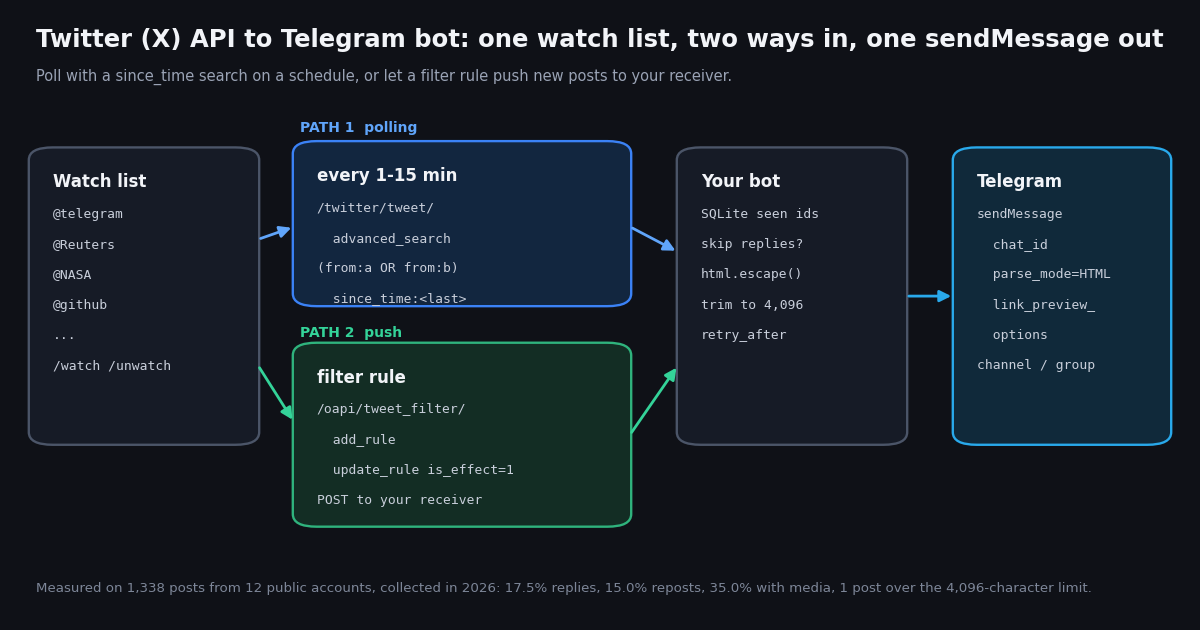
- Two ways in, one way out: poll
/twitter/tweet/advanced_searchwith(from:a OR from:b) since_time:<unix>on a schedule, or let a filter rule (/oapi/tweet_filter/add_rule+update_rule) push new posts to your receiver. Both end in one TelegramsendMessagecall. - Telegram rules that bite:
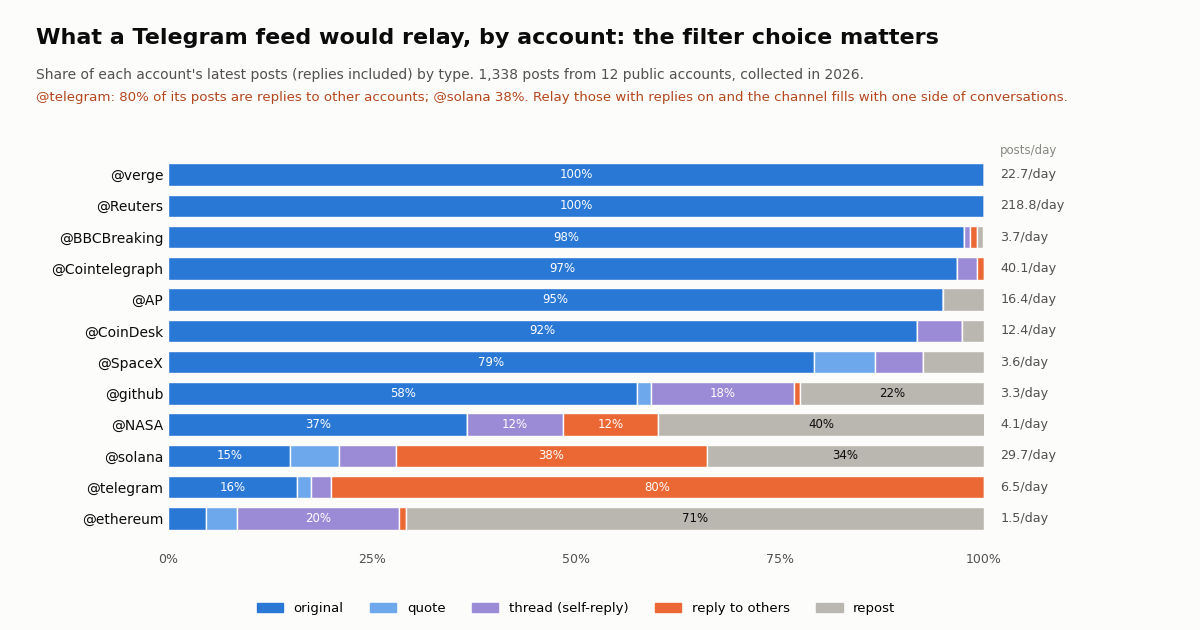
textis 1-4,096 characters after entity parsing; HTML mode needs&,<,>escaped;link_preview_optionsreplaced the old preview flag; about one message per second per chat and 20 per minute in a group; a 429 carriesretry_after. - Filter first: of 1,338 posts from 12 public accounts, 11.4% were replies to other accounts, 6.1% thread continuations and 15.0% reposts. @telegram itself is 80% replies to users.
- Length is rarely the problem: median formatted message 156 characters, 95th percentile 323, and 1 post of 1,338 over 4,096. 35.0% carry a photo or video.
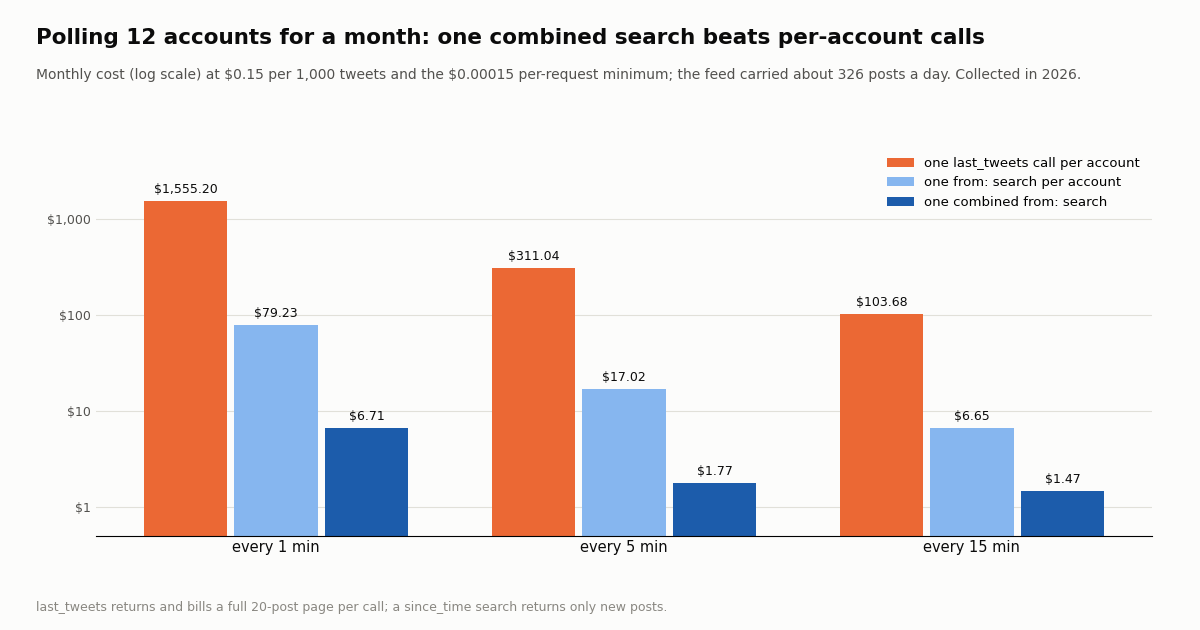
- Cost depends on the call, not the bot: for 12 accounts at 5-minute checks, one
last_tweetscall per account is about $311.04 a month (a full page each time), one search per account about $17.02, one combined search about $1.77. - Against the official X API: the same 9,788 posts a month are about $48.94 at X's pay-per-usage $0.005 per post read versus $1.47 at $0.15 per 1,000 tweets, about 33x apart.
This guide builds one thing: a Telegram bot that posts new tweets from a list of X (Twitter) accounts into a Telegram channel, group or private chat, from code you run and can change. It covers the X side (where new posts come from and what that costs), the Telegram side (sendMessage, HTML escaping, the 4,096-character limit, flood control) and the filter decisions in between. If your destination is Discord rather than Telegram, the same pipeline with a Discord webhook is in our Twitter to Discord bot guide (linked below); if you need monitoring with alerting and dashboards rather than a feed, see the Twitter monitoring overview.
Many of the open-source forwarders you will find on GitHub for this job were written against the old free X API with tweepy and OAuth keys. X now bills reads per resource on its pay-per-usage rate card, so those projects either need a paid X developer account or a different data source. Here the data source is twitterapi.io, which needs an API key and no X developer account, and the Telegram side is plain requests against https://api.telegram.org/bot<token>/sendMessage, so there is no framework to keep up with.
Before writing the code we measured what such a bot would actually forward. We pulled the latest posts, replies included, of 12 public accounts of the kind people put in Telegram feeds (news: @Reuters, @AP, @BBCBreaking, @verge; crypto: @CoinDesk, @Cointelegraph, @ethereum, @solana; organizations: @telegram, @NASA, @SpaceX, @github), 1,338 posts collected in 2026, and computed posts per day, the share of replies, reposts and quotes, media, formatted message length and the polling cost per interval. The filter, the interval and the truncation rule in the code all come from those numbers.
32.5%
How a Twitter to Telegram bot works, and which path to pick
The bot has five small parts: a watch list, a source of new posts, a memory of what it already sent, a formatter that turns a tweet into a Telegram message, and one HTTPS call to the Telegram Bot API. The memory is a SQLite table of tweet IDs. The formatter is a dozen lines. The only real design decision is the source.
Path 1, polling. Every few minutes the script asks twitterapi.io for posts newer than its last check. The call that fits is /twitter/tweet/advanced_search with queryType=Latest and a query such as (from:Reuters OR from:NASA OR from:github) since_time:1763880000. One query covers the whole watch list, and an idle check returns an empty tweets list billed at the $0.00015 minimum.
Path 2, push. You create a filter rule once with the same from: syntax, switch it on, and point your account's webhook URL at an HTTPS endpoint you host. The API checks the rule every interval_seconds and POSTs matching tweets to you; your receiver answers 200 within a second and forwards each post to Telegram. Nothing to schedule, but a server to keep running.
Start with Path 1. A news or project channel rarely needs posts within seconds, the script runs anywhere, and you can switch to Path 2 later without touching the Telegram half, because both paths hand the same tweet objects to the same keep() and format_message() functions.
Step 1: create the bot with @BotFather and find your chat_id
Open a chat with @BotFather in Telegram, send /newbot, pick a display name and a username, and copy the token it returns. The token is the bot's password: every request goes to https://api.telegram.org/bot<token>/METHOD_NAME, so keep it in an environment variable, never in the repository.
Posting to a channel. Add the bot to the channel as an administrator with the right to post messages (can_post_messages, which the Bot API describes as letting an administrator post in the channel). For a public channel the chat_id can be the username in the format @yourchannel; for a private channel or a group you need the numeric ID, which you can read from the chat.id field of an update the bot receives there.
Posting to yourself or a group. Telegram shows a Start button the first time you open a chat with a bot; press it so the bot has a chat with you, then call getUpdates once and read message.chat.id from the result. In a group, add the bot, send any message, and do the same. Chat IDs can be larger than 32 bits; store them as 64-bit integers or strings.
Test the Telegram half on its own before wiring in any tweets. A sendMessage call with your token, chat_id and a short text should come back with "ok": true and the sent message in result. If it returns "ok": false, the description field says why: a wrong chat_id, a bot that is not a member or administrator of the chat, or a malformed HTML tag.
export TELEGRAM_BOT_TOKEN="123456:ABC..."      # from @BotFather /newbot

# who has written to the bot? read chat.id from the result
curl -s "https://api.telegram.org/bot$TELEGRAM_BOT_TOKEN/getUpdates"

# send a test message to a channel where the bot is an administrator
curl -s "https://api.telegram.org/bot$TELEGRAM_BOT_TOKEN/sendMessage" \
  -H 'Content-Type: application/json' \
  -d '{"chat_id": "@yourchannel", "text": "<b>Test</b> from the feed bot", "parse_mode": "HTML"}'
# -> {"ok":true,"result":{"message_id":...}}Step 2 (Path 1): poll new tweets with one since_time search
The polling bot below is the whole Path 1: about 100 lines, requests and the standard library, no framework. It builds one query for the entire watch list, asks for everything since the last check minus a 60-second overlap, skips IDs already in the seen table, filters, formats, sends, and records the new checkpoint. Run it with python feed.py under systemd, a container or any process manager; set TWITTERAPI_IO_KEY, TELEGRAM_BOT_TOKEN and TELEGRAM_CHAT_ID first.
Why a search and not the timeline endpoint. /twitter/user/last_tweets is the natural call for one account's posts, but it has no since parameter, so every call returns a full page of up to 20 posts and is billed for them: $0.003 per call. Polled every minute for a month, that is $129.60 per account. A since_time: search returns only what is new, so the typical check returns nothing and costs the $0.00015 minimum.
Why one combined query. A search per account multiplies the minimum by the size of the watch list. For the 12 accounts in our study at a 1-minute interval, that is about $79.23 a month, against $6.71 for one (from:a OR from:b ...) query. Keep the query to a sensible length; the filter-rule value field in Path 2 is capped at 255 characters, which fits roughly 15 handles of average length, and a long watch list can be split into a few queries.
The overlap and the seen table. A post can be indexed a little after its timestamp, so each tick re-reads the last 60 seconds and relies on the primary key of the seen table to drop repeats. Posts are sent oldest first (sorted by numeric ID) so the channel reads in order, and the checkpoint only advances after the batch is sent, so a crash re-sends nothing and skips nothing.
Paging. A busy interval can hold more than one 20-post page. The loop follows next_cursor while has_next_page is true. In our study the busiest minute of the combined feed held 5 posts and the busiest hour 22, so at 1 to 5 minutes a single page is usually enough, but the loop costs nothing when it is not needed.
Your own rate limit. twitterapi.io allows 0.2 requests per second before the first payment and 20 once paid. One combined search per minute is far inside the first tier. Twelve per-account calls every minute would already sit at the 0.2 ceiling, another reason to combine.
import html, os, sqlite3, time
import requests

TWITTERAPI_KEY = os.environ["TWITTERAPI_IO_KEY"]
TG_TOKEN = os.environ["TELEGRAM_BOT_TOKEN"]
CHAT_ID = os.environ["TELEGRAM_CHAT_ID"]      # "@yourchannel" or a numeric chat id
WATCH = ["Reuters", "NASA", "github"]          # handles without @
INTERVAL = 300                                 # seconds between checks
BASE = "https://api.twitterapi.io"
TG = f"https://api.telegram.org/bot{TG_TOKEN}"
LIMIT = 4000                                   # under Telegram's 4,096, leaves room for UTF-16 surrogates

db = sqlite3.connect("telegram_feed.db")
db.execute("CREATE TABLE IF NOT EXISTS seen (id TEXT PRIMARY KEY)")
db.execute("CREATE TABLE IF NOT EXISTS state (k TEXT PRIMARY KEY, v TEXT)")


def get_since():
    row = db.execute("SELECT v FROM state WHERE k = 'since'").fetchone()
    return int(row[0]) if row else int(time.time()) - INTERVAL


def set_since(value):
    db.execute("INSERT OR REPLACE INTO state VALUES ('since', ?)", (str(value),))
    db.commit()


def new_tweets(since):
    """One combined search per tick: (from:a OR from:b ...) since_time:<unix>."""
    query = "(" + " OR ".join(f"from:{u}" for u in WATCH) + f") since_time:{since}"
    params = {"query": query, "queryType": "Latest"}
    found = []
    while True:
        r = requests.get(f"{BASE}/twitter/tweet/advanced_search",
                         headers={"X-API-Key": TWITTERAPI_KEY}, params=params, timeout=30)
        if r.status_code == 429:                 # over your QPS tier: wait and retry
            time.sleep(5)
            continue
        r.raise_for_status()
        body = r.json()
        found += body.get("tweets") or []
        if not body.get("has_next_page") or not body.get("next_cursor"):
            return found
        params["cursor"] = body["next_cursor"]


def keep(t):
    """Filter choices: no reposts, no replies to other accounts (threads are kept)."""
    if t.get("retweeted_tweet"):
        return False
    if t.get("isReply"):
        author = (t.get("author") or {}).get("userName", "")
        return (t.get("inReplyToUsername") or "").lower() == author.lower()
    return True


def format_message(t):
    a = t.get("author") or {}
    name, handle = a.get("name") or "", a.get("userName") or ""
    text = t.get("text") or ""
    room = LIMIT - len(name) - len(handle) - len("Open on X") - 6
    if len(text) > room:
        text = text[: room - 3] + "..."
    esc = lambda s: html.escape(s, quote=False)   # &, <, > as Telegram's HTML mode requires
    return (f"<b>{esc(name)}</b> @{esc(handle)}\n{esc(text)}\n"
            f'<a href="{html.escape(t["url"])}">Open on X</a>')


def send(text):
    while True:
        r = requests.post(f"{TG}/sendMessage", json={
            "chat_id": CHAT_ID,
            "text": text,
            "parse_mode": "HTML",
            "link_preview_options": {"is_disabled": True},
        }, timeout=30)
        body = r.json()
        if body.get("ok"):
            return
        if r.status_code == 429:                 # flood control: Telegram says how long to wait
            time.sleep((body.get("parameters") or {}).get("retry_after", 5))
            continue
        raise RuntimeError(body.get("description"))


def tick():
    started = int(time.time())
    tweets = new_tweets(get_since() - 60)        # 60 s overlap; the seen table removes repeats
    for t in sorted(tweets, key=lambda t: int(t["id"])):   # oldest first
        if db.execute("SELECT 1 FROM seen WHERE id = ?", (t["id"],)).fetchone():
            continue
        if keep(t):
            send(format_message(t))
            time.sleep(1.1)                      # about one message per second per chat
        db.execute("INSERT INTO seen VALUES (?)", (t["id"],))
        db.commit()
    set_since(started)


if __name__ == "__main__":
    while True:
        try:
            tick()
        except Exception as exc:                 # network blip: log it, try again next tick
            print("tick failed:", exc)
        time.sleep(INTERVAL)
Step 3 (Path 2): a filter rule that pushes new tweets to your receiver
For a push setup you register the watch list once as a filter rule. /oapi/tweet_filter/add_rule takes a tag (up to 255 characters), a value in the same search syntax (up to 255 characters) and interval_seconds, how often the rule is checked (60 by default). New rules are created switched off; update_rule with every field again plus is_effect: 1 turns the rule on. get_rules lists what you have and delete_rule removes one.
Set the webhook URL for your account in the twitterapi.io dashboard. There is one URL per account, shared by all your rules, so if you run several feeds, route on the rule_tag field of each push. Each push is a JSON POST with event_type (tweet for real matches), rule_id, rule_tag, rule_value, a millisecond timestamp and a tweets array holding the same tweet objects the search endpoint returns, so keep() and format_message() work unchanged.
The receiver contract. The push carries your own API key in the x-api-key header, so compare it in constant time and reject anything else. Answer 200 within one second and do the Telegram work on a background worker, because a slow response drops that batch and pushes are not retried. A scheduled backfill with the Path 1 search (say once an hour) covers anything lost while the receiver was down.
Cost. The rule is billed like the search it runs: a check that finds nothing costs the $0.00015 minimum and each matched tweet $0.00015. Every 60 seconds for a month is 43,200 checks, up to $6.48 of minimums; every 5 minutes is $1.30. Matched tweets are added at $0.15 per 1,000.
import os, requests

BASE = "https://api.twitterapi.io"
H = {"X-API-Key": os.environ["TWITTERAPI_IO_KEY"]}
VALUE = "from:Reuters OR from:NASA OR from:github"   # up to 255 characters

# 1) create the rule (new rules start switched off)
r = requests.post(f"{BASE}/oapi/tweet_filter/add_rule", headers=H, timeout=15,
                  json={"tag": "telegram-feed", "value": VALUE, "interval_seconds": 60})
r.raise_for_status()
rule_id = r.json()["rule_id"]

# 2) switch it on: update_rule needs every field again, plus is_effect=1
r = requests.post(f"{BASE}/oapi/tweet_filter/update_rule", headers=H, timeout=15,
                  json={"rule_id": rule_id, "tag": "telegram-feed", "value": VALUE,
                        "interval_seconds": 60, "is_effect": 1})
print(r.json())   # {"status": "success", "msg": ...}

# 3) list your rules any time
print(requests.get(f"{BASE}/oapi/tweet_filter/get_rules", headers=H, timeout=15).json())


# ---- receiver.py: forwards pushes to Telegram ----
import hmac, os, queue, threading
from flask import Flask, request

from feed import format_message, keep, send   # the functions from the polling script

API_KEY = os.environ["TWITTERAPI_IO_KEY"]
jobs = queue.Queue()
seen = set()                                  # use the SQLite table in production
app = Flask(__name__)


@app.post("/twitter-push")
def receive():
    # the push carries your own API key in the x-api-key header; compare in constant time
    if not hmac.compare_digest(request.headers.get("x-api-key", ""), API_KEY):
        return "", 401
    jobs.put(request.get_json(silent=True) or {})
    return "", 200                            # answer within 1 second, work later


def worker():
    while True:
        payload = jobs.get()
        if payload.get("event_type") != "tweet":    # the dashboard test sends another type
            continue
        for t in payload.get("tweets") or []:
            if t["id"] in seen or not keep(t):
                continue
            seen.add(t["id"])
            send(format_message(t))           # handles Telegram 429 retry_after


threading.Thread(target=worker, daemon=True).start()
Formatting a tweet for Telegram: HTML escaping, 4,096 characters, previews
Telegram offers MarkdownV2 and HTML formatting. Use HTML for relayed tweets: the Bot API docs say every <, > and & that is not part of a tag or entity must be replaced with <, > and &, which html.escape(text, quote=False) does in one call. MarkdownV2 asks you to escape a long list of punctuation, and tweets are full of it. The supported tags include <b>, <i>, <u>, <s>, <a href>, <code>, <pre> and <blockquote>, and the docs state that only the listed tags are supported.
The length limit. sendMessage accepts 1-4,096 characters of text after entities parsing, which means the visible text, not the raw HTML with its tags. Entity offsets are counted in UTF-16 code units, so an emoji can take two; the script trims at 4,000 to leave a margin. A photo caption (sendPhoto) is shorter: 0-1,024 characters.
What the limit means in practice. In our sample the formatted message (name, handle, text and an Open on X link) had a median of 156 characters and a 95th percentile of 323. 101 posts (7.5%) were longer than 280 characters, and exactly 1 of 1,338 was over 4,096: a long-form post from @solana at 6,023 characters. Trim and keep the link; nobody loses the post.
Photos and video. 35.0% of the sample carried media (17.8% photos, 17.2% video or GIF). You can let Telegram's link preview show the first image, or send media yourself with sendPhoto (the media_url_https of the first item in extendedEntities.media) and the text as the caption. If you do, check the caption against 1,024 characters: 3 posts in the sample would have needed the text as a separate message.
Link previews. The Bot API now uses a link_preview_options object (is_disabled, url, prefer_small_media, ...) on sendMessage; the older boolean flag is gone from the current docs. A channel of news headlines reads well with previews on; a busy feed is calmer with is_disabled: true.
Mentions and hashtags. Escaped tweet text keeps @handle and #tag as plain text. Telegram may auto-link them to Telegram usernames, which are not the same people. If that matters, wrap the handle in <a href="https://x.com/handle"> yourself.
What the bot would relay: 1,338 posts from 12 public accounts
The accounts post at very different rates. Over the window each sample covers, @Reuters posted 218.8 times a day, @Cointelegraph 40.1 and @solana 29.7, while @ethereum posted 1.5 times a day and @github 3.3. A feed that mixes them is dominated by the busiest source, so put high-volume news wires in their own channel if you want the quieter accounts to be seen.
Replies are the filter that matters. 80% of @telegram's latest posts were replies to users, and 38% of @solana's. Relayed to a channel, those read as one side of conversations nobody in the channel can see. The keep() function drops replies to other accounts and keeps self-replies, because a self-reply is usually the next part of a thread (6.1% of the sample).
Reposts are the second filter. 71% of @ethereum's sampled posts and 40% of @NASA's were reposts of other accounts. Whether to relay them is a product choice; the code skips them. In our probe, a combined from: search page held no reposts even though two of the four accounts in it repost often, so if reposts matter to your channel, read that account with /twitter/user/last_tweets instead.
What polling costs per month at 1, 5 and 15 minutes
The price unit on twitterapi.io is per tweet returned: 15 credits per tweet, $0.15 per 1,000, with a 15-credit minimum per request so a check that finds nothing costs $0.00015 ($1 is 100,000 credits). That makes the cost of a feed a function of which call you poll with and how often, far more than of how much the accounts post.
Figures are per 30 days for the combined feed of our study, about 326 posts a day once replies and reposts are counted, largely from @Reuters. With one combined search, 80.9% of 1-minute checks and 23.3% of 5-minute checks would have found nothing; at 15 minutes every check found something, so the bill is simply the posts: about 9,788 a month, $1.47. The per-account search row is an upper bound (every check billed at the minimum).
For a quiet watch list the floor dominates. A single account polled with its own search every 60 seconds costs up to $6.48 a month in minimums; every 5 minutes, $1.30. Across our quiet accounts (@ethereum, @github, @NASA, @SpaceX, @BBCBreaking) 99.7% to 99.9% of 1-minute windows held no post at all.
Against the official X API. X's pay-per-usage rate card (docs.x.com/x-api/getting-started/pricing) charges $0.005 per post read, $5.00 per 1,000, with pay-per-usage capped at 3 million post reads a month and Enterprise above that. The same 9,788 posts a month would be about $48.94 there versus $1.47 at $0.15 per 1,000 tweets on twitterapi.io, about 33x apart, before counting any polling overhead on either side. New accounts on twitterapi.io start with up to $1 of free credits (up to 100,000 credits, no card, one per person or network, expiring after 31 days) after the automatic bot check; plans and top-ups are on the pricing page.
Telegram rate limits, bot commands and running it for months
The Bot FAQ (core.telegram.org/bots/faq) gives the limits that matter: in a single chat, avoid more than one message per second; in a group, a bot cannot send more than 20 messages per minute; broadcasts to many users top out at about 30 messages per second unless paid broadcasts are enabled. A feed bot posts into one chat, so the per-chat limit is the one to respect, which is why the script sleeps 1.1 seconds between messages. When Telegram does push back, the error carries error_code: 429 and parameters.retry_after, the seconds to wait.
Our study puts those limits in context: the busiest minute of the combined 12-account feed had 5 posts and the busiest hour 22. Even a group stays well under 20 a minute. This is a feed into your own channel or group, not a way to message people who did not ask for it; Telegram's limits and terms are built to stop that, and so should your bot.
Managing the watch list from Telegram. Commands such as /watch Reuters, /unwatch Reuters and /list turn the bot into something a non-developer can run. Read them with getUpdates long polling (timeout in seconds, and an offset one higher than the last update_id to confirm what you processed). getUpdates and a Telegram webhook are mutually exclusive, so pick one. Only accept commands from your own user ID, and persist the list in the same SQLite file as the seen table.
Operations. Keep the seen table pruned (IDs older than a week can go), log every Telegram description you get back, and alert yourself when a tick fails several times in a row. If an X account in the list is renamed, the from: handle stops matching; /twitter/user/info returns status: "error" with msg: "user not found" for a handle that no longer exists, a cheap weekly check.
import os, time, requests

TG = f"https://api.telegram.org/bot{os.environ['TELEGRAM_BOT_TOKEN']}"
OWNER = int(os.environ["TELEGRAM_OWNER_ID"])  # your own numeric user id: only you edit the list
watch = set()
offset = 0

def reply(chat_id, text):
    requests.post(f"{TG}/sendMessage", json={"chat_id": chat_id, "text": text}, timeout=30)

while True:
    r = requests.get(f"{TG}/getUpdates", params={"offset": offset, "timeout": 50}, timeout=60)
    for upd in r.json().get("result", []):
        offset = upd["update_id"] + 1               # confirms everything up to this update
        msg = upd.get("message") or {}
        if (msg.get("from") or {}).get("id") != OWNER:
            continue
        cmd, _, arg = (msg.get("text") or "").partition(" ")
        handle = arg.strip().lstrip("@")
        if cmd == "/watch" and handle:
            watch.add(handle); reply(msg["chat"]["id"], f"watching @{handle}")
        elif cmd == "/unwatch" and handle:
            watch.discard(handle); reply(msg["chat"]["id"], f"stopped @{handle}")
        elif cmd == "/list":
            reply(msg["chat"]["id"], ", ".join(sorted(watch)) or "empty")
    time.sleep(1)
How we collected this
Question. What would a Twitter (X) to Telegram bot actually send for a typical watch list, how much of it should be filtered, how often would a message exceed Telegram's limits, and what would polling cost at 1, 5 and 15 minutes with different calls?
Accounts. 12 public organization and news accounts: @telegram, @BBCBreaking, @Reuters, @AP, @CoinDesk, @Cointelegraph, @ethereum, @solana, @NASA, @SpaceX, @github, @verge. Each was first checked with /twitter/user/info (all public).
Method and sample. /twitter/user/last_tweets with includeReplies=true, up to six 20-post pages per account, newest first: 1,338 unique posts, collected in 2026. Two /twitter/tweet/advanced_search probes with a combined from: query (one plain, one with a 15-minute since_time:) confirmed that one query returns several accounts and that a quiet window returns an empty list. 86 successful requests in total.
Metrics. Post types (original, quote, self-reply, reply to another account, repost), media, the length of the formatted Telegram message in UTF-16 units, empty 1-, 5- and 15-minute windows per account and for the combined feed, and monthly cost from the published per-tweet price and per-request minimum.
What the sample cannot show. Each account's window is its latest posts, from 0.5 days for @Reuters to 72.2 days for @ethereum, so posting rates are a snapshot, not an average over a year. The combined-feed figures use the 0.6-day window all 12 samples share, which a single news wire dominates; a quieter list has a much higher share of empty checks. @AP's timeline ended at 100 posts. We did not measure delivery delay of the push path.
Privacy. Aggregates only. Only organization and public-figure accounts are named; the accounts they replied to, quoted or reposted were not analyzed. The study files (protocol, analysis script, results and a de-identified sample) are in the repository under data/studies/twitter-api-telegram-bot/.
import html, os, sqlite3, time
import requests

TWITTERAPI_KEY = os.environ["TWITTERAPI_IO_KEY"]
TG_TOKEN = os.environ["TELEGRAM_BOT_TOKEN"]
CHAT_ID = os.environ["TELEGRAM_CHAT_ID"]      # "@yourchannel" or a numeric chat id
WATCH = ["Reuters", "NASA", "github"]          # handles without @
INTERVAL = 300                                 # seconds between checks
BASE = "https://api.twitterapi.io"
TG = f"https://api.telegram.org/bot{TG_TOKEN}"
LIMIT = 4000                                   # under Telegram's 4,096, leaves room for UTF-16 surrogates

db = sqlite3.connect("telegram_feed.db")
db.execute("CREATE TABLE IF NOT EXISTS seen (id TEXT PRIMARY KEY)")
db.execute("CREATE TABLE IF NOT EXISTS state (k TEXT PRIMARY KEY, v TEXT)")


def get_since():
    row = db.execute("SELECT v FROM state WHERE k = 'since'").fetchone()
    return int(row[0]) if row else int(time.time()) - INTERVAL


def set_since(value):
    db.execute("INSERT OR REPLACE INTO state VALUES ('since', ?)", (str(value),))
    db.commit()


def new_tweets(since):
    """One combined search per tick: (from:a OR from:b ...) since_time:<unix>."""
    query = "(" + " OR ".join(f"from:{u}" for u in WATCH) + f") since_time:{since}"
    params = {"query": query, "queryType": "Latest"}
    found = []
    while True:
        r = requests.get(f"{BASE}/twitter/tweet/advanced_search",
                         headers={"X-API-Key": TWITTERAPI_KEY}, params=params, timeout=30)
        if r.status_code == 429:                 # over your QPS tier: wait and retry
            time.sleep(5)
            continue
        r.raise_for_status()
        body = r.json()
        found += body.get("tweets") or []
        if not body.get("has_next_page") or not body.get("next_cursor"):
            return found
        params["cursor"] = body["next_cursor"]


def keep(t):
    """Filter choices: no reposts, no replies to other accounts (threads are kept)."""
    if t.get("retweeted_tweet"):
        return False
    if t.get("isReply"):
        author = (t.get("author") or {}).get("userName", "")
        return (t.get("inReplyToUsername") or "").lower() == author.lower()
    return True


def format_message(t):
    a = t.get("author") or {}
    name, handle = a.get("name") or "", a.get("userName") or ""
    text = t.get("text") or ""
    room = LIMIT - len(name) - len(handle) - len("Open on X") - 6
    if len(text) > room:
        text = text[: room - 3] + "..."
    esc = lambda s: html.escape(s, quote=False)   # &, <, > as Telegram's HTML mode requires
    return (f"<b>{esc(name)}</b> @{esc(handle)}\n{esc(text)}\n"
            f'<a href="{html.escape(t["url"])}">Open on X</a>')


def send(text):
    while True:
        r = requests.post(f"{TG}/sendMessage", json={
            "chat_id": CHAT_ID,
            "text": text,
            "parse_mode": "HTML",
            "link_preview_options": {"is_disabled": True},
        }, timeout=30)
        body = r.json()
        if body.get("ok"):
            return
        if r.status_code == 429:                 # flood control: Telegram says how long to wait
            time.sleep((body.get("parameters") or {}).get("retry_after", 5))
            continue
        raise RuntimeError(body.get("description"))


def tick():
    started = int(time.time())
    tweets = new_tweets(get_since() - 60)        # 60 s overlap; the seen table removes repeats
    for t in sorted(tweets, key=lambda t: int(t["id"])):   # oldest first
        if db.execute("SELECT 1 FROM seen WHERE id = ?", (t["id"],)).fetchone():
            continue
        if keep(t):
            send(format_message(t))
            time.sleep(1.1)                      # about one message per second per chat
        db.execute("INSERT INTO seen VALUES (?)", (t["id"],))
        db.commit()
    set_since(started)


if __name__ == "__main__":
    while True:
        try:
            tick()
        except Exception as exc:                 # network blip: log it, try again next tick
            print("tick failed:", exc)
        time.sleep(INTERVAL)
Researching this?Free starter credits cover end-to-end testing — Google sign-in, no card. Get a key.
Questions readers ask
Can I forward tweets to Telegram without the official X API?
Yes. The bot in this guide reads new posts from twitterapi.io (/twitter/tweet/advanced_search with from: operators, or a filter rule that pushes to you), which needs an API key but no X developer account, and sends them with the Telegram Bot API. With the official X API you would need a developer account on X's pay-per-usage rate card, $0.005 per post read.
How do I send a tweet to a Telegram channel with a bot?
Create the bot with @BotFather, add it to the channel as an administrator with the right to post messages, and call sendMessage with chat_id set to @yourchannel (or the numeric ID for a private channel), the tweet as text, and parse_mode set to HTML after escaping &, < and >.
What is the maximum message length for a Telegram bot?
sendMessage accepts 1-4,096 characters of text after entities parsing; a media caption accepts 0-1,024. In our sample of 1,338 recent posts only 1 would have exceeded 4,096 once formatted, a long-form post, so trimming with a link back to X covers it.
Should the bot use polling or a webhook?
Polling with one combined since_time: search every 1 to 5 minutes is simpler and runs anywhere. A filter rule that pushes to your HTTPS receiver gives lower delay but needs a server that answers within a second. Both are billed the same way: the $0.00015 minimum per empty check and $0.15 per 1,000 tweets returned.
How much does a Twitter to Telegram bot cost to run?
For the 12-account watch list in our study, one combined search every 5 minutes came to about $1.77 a month and every minute about $6.71. Polling each account with /twitter/user/last_tweets instead would be about $311.04 at 5 minutes, because each call returns a full page. Hosting is whatever your small server costs.
How do I stop the bot from posting replies and retweets?
Check two fields before sending: skip the post if retweeted_tweet is set (a repost), and if isReply is true, keep it only when inReplyToUsername equals the author (a thread). In our sample that filter removes the majority of what @telegram and @solana post.
Why does Telegram return 429 Too Many Requests?
The bot sent too fast. Telegram's FAQ asks for no more than one message per second in a single chat and allows 20 per minute in a group. The error includes parameters.retry_after, the number of seconds to wait before retrying; sleep that long and resend.
Can the bot post photos and videos from tweets?
Yes. Read extendedEntities.media on the tweet: photos have a media_url_https you can pass to sendPhoto, and videos list video_info.variants. Use the tweet text as the caption and keep it under 1,024 characters. 35.0% of the posts in our sample had media.
Continue
- Telegram Bot API: sendMessage (4,096 characters, parse_mode, link_preview_options), HTML style escaping, getUpdates, ResponseParameters.retry_after
- Telegram Bot FAQ: one message per second per chat, 20 per minute in groups, about 30 per second for broadcasts
- Telegram bot features: creating a bot and token with @BotFather /newbot
- twitterapi.io API reference: add a tweet filter rule (tag, value, interval_seconds; new rules start inactive)
- twitterapi.io API reference: update a tweet filter rule (is_effect 1 activates it)
- X API pay-per-usage pricing: $0.005 per post read, 3M post reads a month cap
- X (Twitter) API overview: endpoints, pricing and access
- Twitter to Discord bot: the same feed through a Discord webhook
- Twitter (X) webhooks: filter rules and the push payload
- Twitter monitoring: tools and approaches compared
- Keyword alerts on X: a developer guide
- Step-by-step webhook setup for filter rules
- Pay-per-use pricing: $0.15 per 1,000 tweets
- 01Twitter (X) Communities in 2026: How They Work, and Are They Still Running?
- 02How much does Twitter (X) pay creators in 2026?
- 03Twitter (X) API in Golang: a typed net/http client with iterators and rate limiting
- 04How to Block Words on Twitter (X): Muted Words, Step by Step
- 05Twitter (X) Drafts: How to Find, Access and Keep Them
- 06Grok Bot API: Every Way to Drive a Grok Bot From Code, and How to Feed Your Own Agent Twitter (X) Data
- 07Kalshi Bot: Read the Kalshi API and Track the Twitter (X) Post Markets It Settles
- 08Grok Bot Alternatives: Open-Source and Hosted Agents for Twitter (X)
Writing about something you built with TwitterAPI.io? Our community rewards program pays API credits for honest tutorials, build logs and videos.
Stop reading. Start building.
Starter credits cover real testing on real data. Google sign-in, no card, no application queue.
Get an API keyAlready building with TwitterAPI.io? Publish an honest tutorial or build log about it and earn up to $200 a month in API credits.