Twitter (X) API in Ruby with Net::HTTP, Faraday and Rails
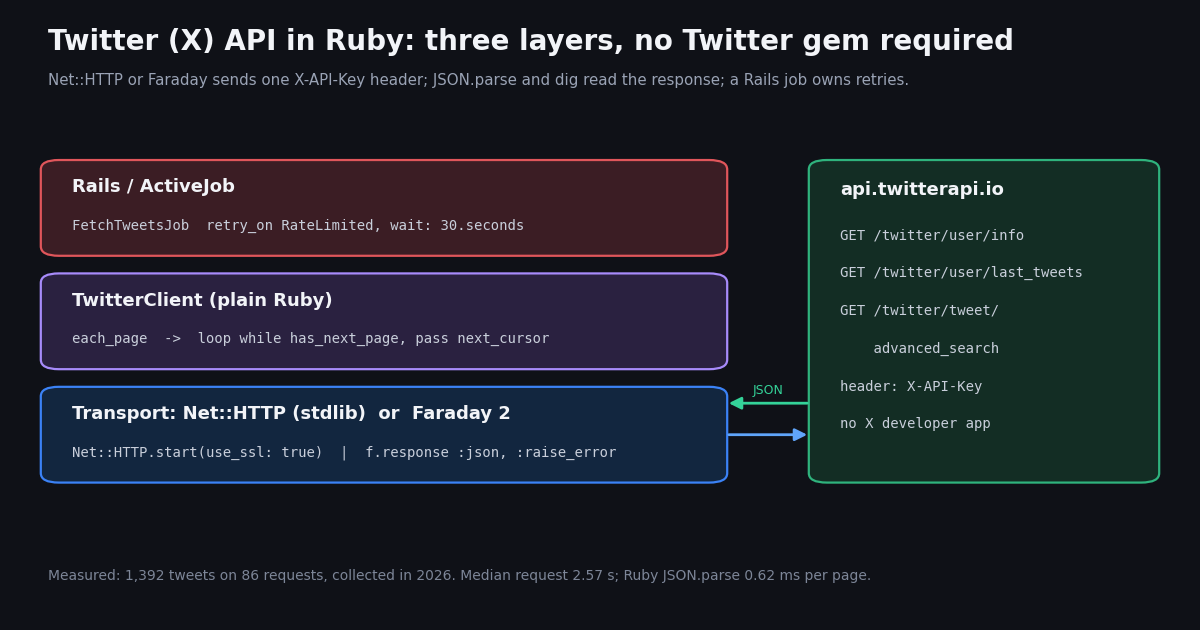
- No gem needed.
Net::HTTP,JSONandURIfrom the standard library are the whole client; Faraday 2 withfaraday-retryis the optional upgrade. - The
twittergem is alive but speaks v1.1. Version 8.3.2 is on RubyGems and the repo is not archived; its README sends new projects to thexgem (1.0.0, Ruby 3.4+). Both need X developer credentials and bill X's rate card. - Latency sets the pace. 86 requests returned 1,392 tweets; median 2.57 s per request, Ruby
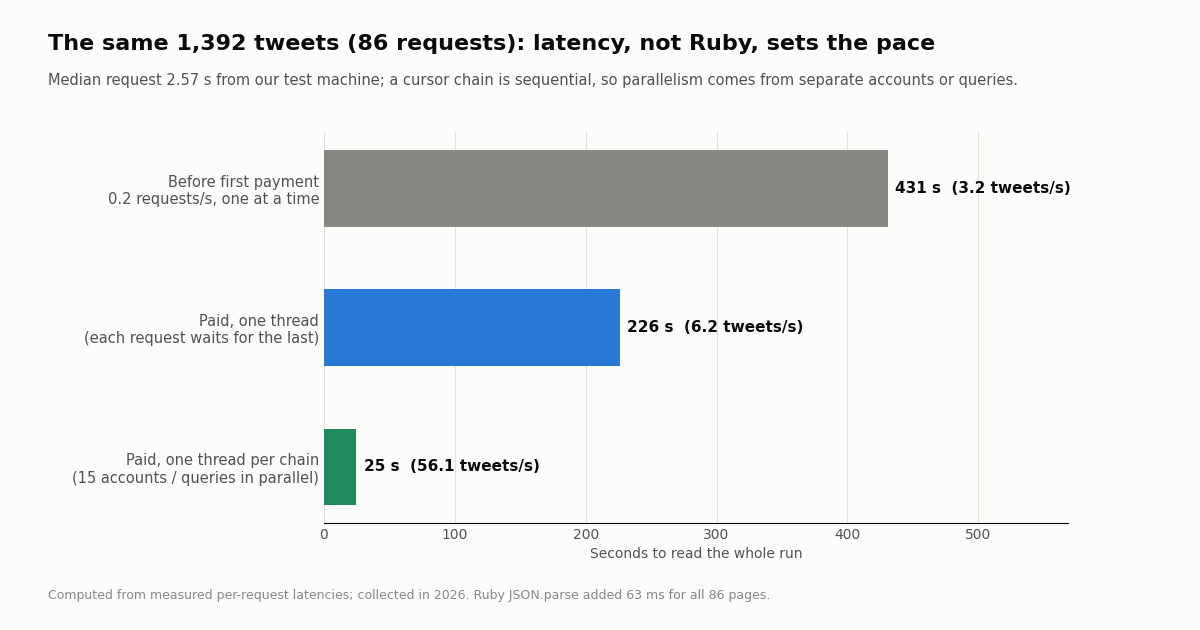
JSON.parse0.62 ms per page (63 ms for all 86 pages). - Parallelize across chains, not pages. One thread took 226 s for the run; one thread per account or query took 25 s.
- Loop on
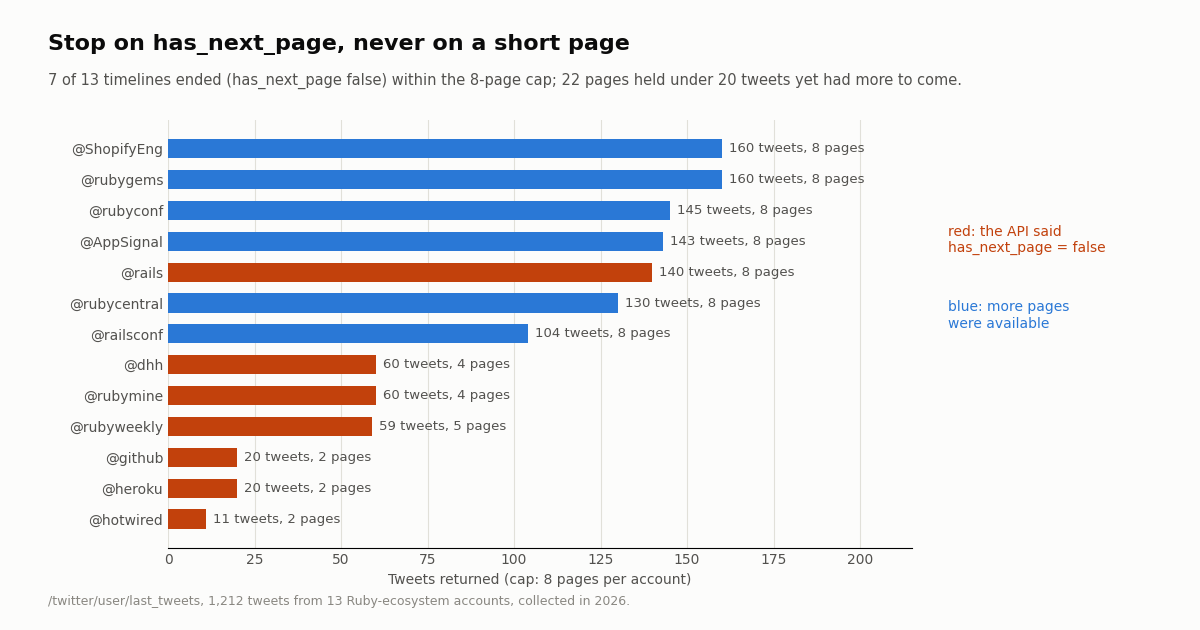
has_next_page. 22 timeline pages held fewer than 20 tweets with more to come, and 7 of 13 timelines ended withhas_next_pagefalse within our 8-page cap. WrapdiginArray():entities.hashtagswas missing on 60.7% of tweets. - Cost: $0.15 per 1,000 tweets returned versus $0.005 per post read ($5 per 1,000) on X's pay-per-usage rate card, about 33x. This run: $0.21.
Search for a Ruby Twitter library and the results are still dominated by the twitter gem's README and tutorials written for it, many of them built around a developer app, four OAuth secrets and X's per-read billing. If what your Ruby service needs is tweets, profiles or search results, you can skip that stack. The data API at TwitterAPI.io is plain HTTPS with JSON, so Ruby's standard library already contains a complete client.
This guide builds that client in order: a Net::HTTP class with pacing, retries and the API's three error styles; cursor paging as a block or an Enumerator; safe field access with dig; the same calls through Faraday 2; and a Rails ActiveJob that upserts tweets on a schedule. Every structural claim was checked against 1,392 real tweets from 13 Ruby-ecosystem accounts and two searches, and the timings and costs below come from that run.
One honest note on method: the only Ruby on the machine that wrote this page is the system Ruby 2.6, and the API key may only be read by our study script. So the HTTP calls were made and timed by that script, Ruby parsed and replayed every recorded response offline (the page's client class ran against all of them through a fake transport), and every Ruby block on this page passes ruby -c. The client was not run against the live API from Ruby. It uses only syntax and standard-library calls that exist from Ruby 2.6 through the current 4.0 release.
0.62 ms vs 2.57 s
Ruby Twitter gems in 2026: what they are and what they talk to
The twitter gem. The long-running community gem is not abandoned: RubyGems lists version 8.3.2 as the latest release, with three releases so far in 2026, a required_ruby_version of 3.3 or later, and over 28 million downloads. Its GitHub repository (sferik/twitter-ruby) is not archived and has recent commits. What changed is its scope. The README's opening line now reads that it "provides a Ruby interface to the X (Twitter) API v1.1", and it tells new projects, or anyone who needs API v2, to use the x gem instead. It authenticates with a consumer key, consumer secret, access token and access token secret from an app in the X developer portal.
The x gem. The same maintainer's newer library, x 1.0.0 on RubyGems, requires Ruby 3.4 or later. It is a meta-gem over four gems (x-core for HTTP and OAuth, x-uploads, x-streams and x-resources) and returns immutable objects from methods such as find_user and search_posts. It is the right tool if you hold X API credentials and want to post as your own app or use X's filtered stream, and every read it makes is billed by X: $0.005 per post read and $0.010 per user read on the pay-per-usage rate card.
What this page builds instead. TwitterAPI.io is a separate REST API over public X data at api.twitterapi.io. A read needs one API key in an X-API-Key header and no X account, and responses are flat JSON with camelCase tweet fields. No SDK exists for it in any language because none is needed. You can keep the x gem for anything that needs X's own OAuth and use the class below for reads.
A Net::HTTP client with pacing, retries and readable errors
The class below is the whole client, about 120 lines, with no gems. Save it as lib/twitter_client.rb. Four design choices carry the weight.
One persistent connection. Net::HTTP.new(...).start opens one TLS connection and reuses it with keep-alive, so the handshake is paid once, not per request. Net::HTTP also retries an idempotent request once by itself if a kept-alive connection was closed underneath it (max_retries defaults to 1). A Net::HTTP session is not thread-safe, so give each thread its own client.
Three error styles, three exceptions. A missing or invalid parameter returns HTTP 400 with the reason in detail; our call without query came back as a 400. A lookup that finds nothing returns HTTP 200 with "status": "error" and the reason in msg: our unknown-user lookup returned exactly user not found with data set to null, never a 404. Too many requests returns 429. The client turns these into BadRequest, NotFound and RateLimited, so callers can rescue precisely, and a Rails job can retry one and discard another.
Pacing before retrying. pace! keeps a monotonic-clock slot behind a Mutex so a client never sends faster than 1 / min_interval requests per second. Set min_interval: 5.0 before your first payment (0.2 requests per second) and 0.05 once paid (20 per second); Scale allows 50, Business 500, and up to 1,000 on request. Retries use fixed exponential steps (2, 4, 8, 16 seconds) and honor Retry-After when the server sends one.
Paths stay literal. Each public method names its endpoint in full (/twitter/user/last_tweets, /twitter/tweet/advanced_search, /twitter/user/info), which keeps a grep of your codebase honest about which endpoints you call and what each costs.
# twitter_client.rb: a TwitterAPI.io client on Ruby's standard library only (net/http, json, uri).
require "net/http"
require "json"
require "uri"

class TwitterClient
  BASE = URI("https://api.twitterapi.io")

  class Error < StandardError; end
  class BadRequest < Error; end     # HTTP 400: missing or invalid parameter, reason in "detail"
  class NotFound < Error; end       # HTTP 200 with "status": "error", reason in "msg" (never a 404)
  class RateLimited < Error         # HTTP 429
    attr_reader :retry_after

    def initialize(retry_after)
      @retry_after = retry_after
      super("rate limited (429), retry after #{retry_after}s")
    end
  end

  # min_interval: 5.0 s before your first payment (0.2 requests/s), 0.05 s once paid (20 requests/s).
  def initialize(api_key: ENV.fetch("TWITTERAPI_IO_KEY"), min_interval: 0.05)
    @api_key = api_key
    @min_interval = min_interval
    @next_slot = monotonic
    @lock = Mutex.new
  end

  def user_info(user_name)
    get("/twitter/user/info", userName: user_name)["data"]
  end

  # Yields one page (an Array of tweet Hashes) at a time, newest first.
  def timeline(user_name, max_pages: 10, &block)
    each_page("/twitter/user/last_tweets", { userName: user_name }, max_pages,
              ->(body) { body.dig("data", "tweets") || [] }, &block)
  end

  def search(query, query_type: "Latest", max_pages: 10, &block)
    each_page("/twitter/tweet/advanced_search", { query: query, queryType: query_type }, max_pages,
              ->(body) { body["tweets"] || [] }, &block)
  end

  def get(path, params = {})
    uri = BASE.dup
    uri.path = path
    uri.query = URI.encode_www_form(params.reject { |_, v| v.nil? || v.to_s.empty? })
    req = Net::HTTP::Get.new(uri)
    req["X-API-Key"] = @api_key
    req["Accept"] = "application/json"
    with_retry do
      pace!
      handle(http.request(req))
    end
  end

  private

  # Loop on has_next_page, never on page size: short pages with more to come are normal.
  def each_page(path, params, max_pages, list)
    return enum_for(:each_page, path, params, max_pages, list) unless block_given?

    cursor = ""
    max_pages.times do
      body = get(path, params.merge(cursor: cursor))
      tweets = list.call(body)
      yield tweets
      cursor = body["next_cursor"].to_s
      break if !body["has_next_page"] || cursor.empty? || tweets.empty?
    end
  end

  def handle(res)
    case res.code.to_i
    when 200
      body = JSON.parse(res.body)
      raise NotFound, body["msg"].to_s if body["status"] == "error"

      body
    when 400
      detail = begin
        JSON.parse(res.body)["detail"]
      rescue JSON::ParserError
        res.body
      end
      raise BadRequest, detail.to_s
    when 429
      raise RateLimited.new((res["Retry-After"] || 2).to_i)
    else
      raise Error, "HTTP #{res.code}: #{res.body.to_s[0, 200]}"
    end
  end

  def with_retry(attempts: 5)
    tries = 0
    begin
      yield
    rescue RateLimited, Net::OpenTimeout, Net::ReadTimeout, Errno::ECONNRESET => e
      tries += 1
      raise if tries >= attempts

      wait = e.is_a?(RateLimited) ? [e.retry_after, 2**tries].max : 2**tries
      sleep(wait)                     # fixed exponential steps: 2, 4, 8, 16 s
      retry
    end
  end

  # One persistent HTTPS connection per client. Use one client per thread.
  def http
    @http ||= Net::HTTP.new(BASE.host, BASE.port).tap do |h|
      h.use_ssl = true
      h.open_timeout = 10
      h.read_timeout = 30
      h.keep_alive_timeout = 30
      h.start
    end
  end

  # Spaces requests so this client never exceeds 1 / min_interval requests per second.
  def pace!
    @lock.synchronize do
      now = monotonic
      sleep(@next_slot - now) if @next_slot > now
      @next_slot = [now, @next_slot].max + @min_interval
    end
  end

  def monotonic
    Process.clock_gettime(Process::CLOCK_MONOTONIC)
  end
endCursor paging with a block or an Enumerator
each_page is the only loop in the client. It starts with an empty cursor, yields each page's tweets, and stops when has_next_page is false, the cursor comes back empty, or a page arrives with no tweets. Without a block it returns an Enumerator (enum_for), so client.timeline("rails").first(2), .lazy.flat_map and .take_while all work and fetch only the pages they consume.
Never stop on a short page. In our run, 22 of 75 timeline pages returned fewer than 20 tweets while has_next_page was still true. TwitterAPI.io's documentation explains one cause: with userName, the timeline endpoint is built on X search and can fall back to the profile timeline, in which case the next cursor starts with tl: and must be passed back unchanged. A loop written as break if tweets.size < 20 would have read a fraction of several timelines.
Depth differs by account. We capped each timeline at 8 pages. 7 of 13 timelines ended within that cap with has_next_page false (six well before it, @rails on its eighth page), and the last page of each was empty. That is the API telling you it has nothing more for that cursor, so the loop stops there instead of paying the per-request minimum again. For a deep history, the documentation suggests splitting a search into since_time: / until_time: windows rather than paging one cursor further.
Deduplicate by id. 6 timeline tweet ids appeared twice across consecutive pages (1,206 distinct of 1,212), and 2 search ids did. A Hash keyed by t["id"], as in the script in the next section, or a unique index in Rails handles it. Ids arrived as JSON strings on 100% of tweets; keep them as Strings.
Read 1,000 tweets and the fields that are often missing
The script below reads 1,000 tweets for a Rails query, deduplicates them, prints the request count, elapsed time, tweets per second and the cost in credits, and then shows the unknown-user path. Set TWITTERAPI_IO_KEY in the environment; the client reads it with ENV.fetch, so a missing key fails loudly at startup instead of sending an empty header.
dig with a default, every time. Hash#dig returns nil when a key is missing, and calling .map on nil raises NoMethodError. The arrays inside entities and extendedEntities were missing far more often than empty in our sample, so wrap every array read in Array() (which turns nil into []) or add || []:
Names to watch. Tweet fields are camelCase (likeCount, createdAt, viewCount, author.userName), but quoted_tweet and retweeted_tweet are snake_case, and follower records from /twitter/user/followers are snake_case throughout (screen_name, followers_count). createdAt looks like Thu Oct 16 12:34:56 +0000 2026; parse it with Time.strptime(s, "%a %b %d %H:%M:%S %z %Y") after require "time".
HTML entities in text. The x gem's README notes that X escapes &, < and > in post text; if you render text outside an HTML context, unescape it with CGI.unescapeHTML first.
# fetch_1000.rb: read 1,000 tweets for a query and print requests, time and cost.
require_relative "twitter_client"

client = TwitterClient.new                       # reads TWITTERAPI_IO_KEY from the environment
query = '("ruby on rails" OR rubyonrails) lang:en -filter:retweets'
seen = {}
requests = 0
credits = 0
started = Process.clock_gettime(Process::CLOCK_MONOTONIC)

client.search(query, max_pages: 80) do |tweets|
  requests += 1
  credits += [15, 15 * tweets.size].max          # 15 credits per tweet returned, 15 minimum per request
  tweets.each { |t| seen[t["id"]] ||= t }         # ids are JSON strings; dedupe across pages
  break if seen.size >= 1000
end

elapsed = Process.clock_gettime(Process::CLOCK_MONOTONIC) - started
returned = seen.size
printf("%d tweets, %d requests, %.1f s, %.1f tweets/s, about $%.4f\n",
       returned, requests, elapsed, returned / elapsed, credits / 100_000.0)

seen.values.first(3).each do |t|
  media = (t.dig("extendedEntities", "media") || []).map { |m| m["type"] }
  tags = (t.dig("entities", "hashtags") || []).map { |h| h["text"] }
  puts "#{t["createdAt"]}  @#{t.dig("author", "userName")}  likes=#{t["likeCount"]}  media=#{media}  tags=#{tags}"
end

begin
  client.user_info("no_such_user_zq81x7")
rescue TwitterClient::NotFound => e
  puts "lookup failed: #{e.message}"             # "user not found", delivered with HTTP 200
endThe same client with Faraday 2 and faraday-retry
If your app already uses Faraday, the client shrinks to a connection block. Current releases on RubyGems are faraday 2.15.1 and faraday-retry 2.4.0. Faraday's default adapter is Net::HTTP, so the network behavior matches the class above.
Middleware order matters. Faraday runs response middleware in reverse order of declaration, so declaring f.response :json after f.response :raise_error means the body is already a Hash when raise_error builds its exception. A 400 then arrives as Faraday::BadRequestError whose response_body["detail"] holds the reason, and a 429 as Faraday::TooManyRequestsError once retries run out.
Retry settings. faraday-retry retries only timeouts by default, twice. Adding retry_statuses: [429, 503] makes it retry those statuses too, and with 429 in the list it honors the Retry-After header. With no jitter option set, the waits are fixed steps of 1, 2, 4 and 8 seconds. The methods: %i[get] line keeps retries on reads only.
What raise_error cannot see. An unknown user is an HTTP 200 with "status": "error", which no status-based middleware will catch. Check body["status"] yourself, as the example does after /twitter/user/info.
# Gemfile: gem "faraday", "~> 2.15"; gem "faraday-retry", "~> 2.4"
require "faraday"
require "faraday/retry"

conn = Faraday.new(
  url: "https://api.twitterapi.io",
  headers: { "X-API-Key" => ENV.fetch("TWITTERAPI_IO_KEY") },
  request: { open_timeout: 10, timeout: 30 }
) do |f|
  # 429 honors Retry-After; waits otherwise grow 1, 2, 4, 8 s (fixed steps)
  f.request :retry, max: 4, interval: 1, backoff_factor: 2,
                    retry_statuses: [429, 503], methods: %i[get]
  f.response :raise_error          # 4xx / 5xx -> Faraday::BadRequestError, Faraday::TooManyRequestsError, ...
  f.response :json                 # declared last, so it parses the body before raise_error sees it
end

def each_search_page(conn, query, max_pages: 10)
  cursor = ""
  max_pages.times do
    body = conn.get("/twitter/tweet/advanced_search", query: query, queryType: "Latest", cursor: cursor).body
    tweets = body["tweets"] || []
    yield tweets
    cursor = body["next_cursor"].to_s
    break if !body["has_next_page"] || cursor.empty? || tweets.empty?
  end
end

begin
  each_search_page(conn, "from:rails", max_pages: 3) do |tweets|
    tweets.each { |t| puts "#{t["id"]}  #{t["likeCount"]}  #{t["text"].to_s[0, 60]}" }
  end
  info = conn.get("/twitter/user/info", userName: "rails").body
  raise info["msg"].to_s if info["status"] == "error"   # unknown users come back as HTTP 200
  puts "#{info.dig("data", "userName")}: #{info.dig("data", "followers")} followers"
rescue Faraday::BadRequestError => e
  puts "bad request: #{e.response_body.is_a?(Hash) ? e.response_body["detail"] : e.response_body}"
rescue Faraday::TooManyRequestsError
  puts "still rate limited after 4 retries; slow down"
endTwitter in Ruby on Rails: an ActiveJob that upserts tweets
In a Rails app the client lives in lib/ or app/services/, the key lives in encrypted credentials (bin/rails credentials:edit, then twitterapi_io: { api_key: ... }), and fetching runs in a background job so a slow page never holds up a web request. The example targets Rails 8.1, the current release line on RubyGems (8.1.4.1).
Retries belong to the job. retry_on defaults to a 3-second wait and 5 attempts; for RateLimited we wait a fixed 30 seconds, and for timeouts we use :polynomially_longer, which the Rails API docs describe as roughly 3, 18 and then 83 seconds. discard_on BadRequest drops a job whose query is malformed, because retrying a 400 only spends requests.
Upsert, do not insert. upsert_all(rows, unique_by: :tweet_id) writes each page in one statement and turns repeated ids into updates. The Rails docs note that unique_by works on PostgreSQL and SQLite, and that timestamps follow the model's record_timestamps setting. The unique index in the migration is what makes the duplicates from the paging section harmless.
Fetch only what is new. The job adds since_id: with the newest stored id to the search query, so a run every 5 minutes reads only fresh tweets and usually needs one page. When nothing new exists, the request returns no tweets and costs the 15-credit minimum ($0.00015); polling every 5 minutes for a month is $1.30 in such empty checks, every 60 seconds $6.48. For many accounts in real time, TwitterAPI.io's push-based stream is the alternative to polling.
Scheduling. Solid Queue, the Active Job backend Rails 8 configures by default, reads recurring tasks from config/recurring.yml with entries like schedule: every 5 minutes. With Sidekiq, use sidekiq-cron or a similar scheduler; the job itself does not change.
Testing without the network. Record a few real pages with the Python script at the end of this page, then replay them through a subclass whose http returns a fake. This is the same replay we ran on every response in our sample: the client paged through 86 recorded pages in 15 chains, returned all 1,392 tweets, and raised NotFound with user not found for the error body.
# db/migrate/20260101000000_create_tweets.rb (use the timestamp Rails generates for you)
class CreateTweets < ActiveRecord::Migration[8.1]
  def change
    create_table :tweets do |t|
      t.string :tweet_id, null: false
      t.string :author_user_name
      t.text :text
      t.integer :like_count, default: 0
      t.bigint :view_count
      t.datetime :posted_at
      t.timestamps
    end
    add_index :tweets, :tweet_id, unique: true
  end
end

# app/jobs/fetch_tweets_job.rb
class FetchTweetsJob < ApplicationJob
  queue_as :default

  retry_on TwitterClient::RateLimited, wait: 30.seconds, attempts: 5
  retry_on Net::OpenTimeout, Net::ReadTimeout, wait: :polynomially_longer, attempts: 5
  discard_on TwitterClient::BadRequest           # a bad query will not fix itself on retry

  # Run every few minutes (Solid Queue recurring task, cron, or sidekiq-cron).
  def perform(query)
    newest = Tweet.order(posted_at: :desc).pick(:tweet_id)
    q = newest ? "#{query} since_id:#{newest}" : query
    client = TwitterClient.new(api_key: Rails.application.credentials.dig(:twitterapi_io, :api_key))

    client.search(q, max_pages: 5) do |tweets|
      rows = tweets.map do |t|
        {
          tweet_id: t["id"],
          author_user_name: t.dig("author", "userName"),
          text: t["text"],
          like_count: t["likeCount"].to_i,
          view_count: t["viewCount"],
          posted_at: Time.strptime(t["createdAt"], "%a %b %d %H:%M:%S %z %Y")
        }
      end
      # unique_by needs PostgreSQL or SQLite; timestamps follow the model's record_timestamps setting
      Tweet.upsert_all(rows, unique_by: :tweet_id) if rows.any?
    end
  end
end

# config/recurring.yml (Solid Queue, the Rails 8 default queue backend)
# production:
#   fetch_rails_tweets:
#     class: FetchTweetsJob
#     args: ['("ruby on rails" OR rubyonrails) lang:en -filter:retweets']
#     schedule: every 5 minutes

# test/twitter_client_test.rb: replay recorded pages through TwitterClient with no network.
require "minitest/autorun"
require "json"
require_relative "../lib/twitter_client"

class FakeHTTP
  Response = Struct.new(:code, :body) do
    def [](_header)
      nil
    end
  end

  def initialize(pages)
    @pages = pages.dup
  end

  def request(_req)
    page = @pages.shift
    body = page ? JSON.generate(page) : '{"status":"error","msg":"user not found","data":null}'
    Response.new("200", body)
  end
end

class ReplayClient < TwitterClient
  def initialize(pages)
    super(api_key: "test", min_interval: 0)
    @fake = FakeHTTP.new(pages)
  end

  private

  def http
    @fake
  end
end

class TwitterClientTest < Minitest::Test
  def test_timeline_pages_until_has_next_page_is_false
    pages = JSON.parse(File.read("test/fixtures/twitterapi/last_tweets_rails.json"))
    seen = ReplayClient.new(pages).timeline("rails", max_pages: pages.size).flat_map { |tweets| tweets }
    assert seen.all? { |t| t["id"].is_a?(String) }
    assert_equal pages.sum { |p| (p.dig("data", "tweets") || []).size }, seen.size
  end

  def test_unknown_user_raises_not_found
    err = assert_raises(TwitterClient::NotFound) { ReplayClient.new([]).user_info("no_such_user") }
    assert_equal "user not found", err.message
  end
endWhat 1,000 tweets cost and how long they take from Ruby
The unique part of this page is the run itself: 86 read requests that returned 1,392 tweets (1,212 from 13 timelines, 180 from two searches), plus two error probes. Each request was timed around the HTTPS call only, excluding the shared queue that spaces our own study scripts.
Ruby is not the bottleneck. Ruby 2.6's JSON.parse took a median of 0.62 ms per page (p90 1.51 ms) and 63 ms for all 86 pages, against 226 s of network time. Newer Rubies ship newer versions of the json default gem; we did not time them. A tweet is about 4.9 KB of JSON, so 1,000 tweets are roughly 4.9 MB to download and parse.
Concurrency is where the time goes. A cursor chain is sequential, because page n+1 needs page n's next_cursor. One thread doing the whole run one request at a time took 226 s (6.2 tweets per second, 162 s per 1,000 tweets). One thread per account or query, 15 threads each with its own client, finishes when the longest chain does: 25 s (56.1 tweets per second), still below the paid 20 requests per second. Before the first payment, at 0.2 requests per second, the same 86 requests need at least 431 s however you thread them.
What it cost. 21,015 credits, $0.21, which is $0.151 per 1,000 tweets including the 9 empty pages billed at the minimum. Reads cost $0.15 per 1,000 tweets returned; 1,000 profiles cost $0.18. On X's pay-per-usage rate card the same 1,392 posts at $0.005 per post read would be $6.96, about 33x more, and that card caps post reads at 3 million per monthly billing cycle. Use the rate limit calculator linked below to size a bigger job.
Your latency will differ. The 2.57 s median was measured from our test machine; a server close to the API will see shorter round trips, and the threading gains shrink as latency drops. The page counts, sizes, field shapes and costs do not depend on location.
Posting from Ruby. Writes are a separate product: one /twitter/user_login_v2 login ($0.10, with a proxy you supply) returns login_cookies, and each post, delete, like, retweet or follow, such as /twitter/create_tweet_v2, is then 60 credits ($0.0006), billed per HTTP 200 call. The call acts as that X account, so X can rate-limit, lock or suspend it; keep a human pace with a fixed delay, expect the session to need a re-login now and then, and remember that X's automation rules apply. No write calls were made for this page.
How we collected this
Question. How long does it take, and what does it cost, for a Ruby client to read about 1,000 tweets from the TwitterAPI.io REST endpoints, and which response shapes must Ruby code handle?
Accounts and queries. /twitter/user/last_tweets for 13 public Ruby-ecosystem organization and public-figure accounts: @rails, @rubygems, @rubyconf, @hotwired, @rubymine, @heroku, @github, @ShopifyEng, @dhh, @rubycentral, @rubyweekly, @AppSignal and @railsconf, up to 8 pages each. Two Latest searches: ("ruby on rails" OR rubyonrails) lang:en -filter:retweets and a gem-related Rails query; they ended after 3 and 8 pages with has_next_page false. Two error probes: an unknown user on /twitter/user/info and a search without query.
Window and sample. The latest posts of each account and the latest matching posts at collection time, collected in 2026: 88 requests in total, 1,392 tweets.
How. Our rate-limited study script made and timed every HTTP call (the API key may only be read by that script), measuring the HTTPS round trip and JSON decode and excluding queue time. The system Ruby 2.6 then parsed every recorded page with JSON.parse and replayed all of them through this page's TwitterClient with a fake transport. Every Ruby block here passes ruby -c; the Ruby client was not run against the live API.
What the sample cannot show. Latency from other regions or with many concurrent clients, timelines deeper than 8 pages, search behavior on busier queries, or how a newer Ruby's JSON parser compares. The wall-time comparison is computed from the measured latencies, not from separately timed runs.
Privacy. Aggregates only. Organization and public-figure accounts are named; search results were reduced to counts and timings, with no ids, text or handles kept. No TwitterAPI.io customer data is involved.
"""record_fixtures.py - save real TwitterAPI.io pages as JSON fixtures for your Ruby tests
(Minitest or RSpec), so TwitterClient's paging and field handling are tested against real responses.

    pip install requests
    export TWITTERAPI_IO_KEY=...        # from the twitterapi.io dashboard
    python record_fixtures.py rails rubygems
"""
import json
import os
import sys
import time
from pathlib import Path

import requests

BASE = "https://api.twitterapi.io"
KEY = os.environ["TWITTERAPI_IO_KEY"]
OUT = Path("test/fixtures/twitterapi")
OUT.mkdir(parents=True, exist_ok=True)
session = requests.Session()
session.headers["X-API-Key"] = KEY


def get(url, params):
    for attempt in range(5):
        r = session.get(url, params=params, timeout=30)
        if r.status_code == 429:
            time.sleep(2 ** attempt)          # fixed exponential steps
            continue
        if r.status_code == 400:
            raise SystemExit(f"bad request: {r.json().get('detail')}")
        r.raise_for_status()
        body = r.json()
        if body.get("status") == "error":     # e.g. unknown user: HTTP 200, text in msg
            raise SystemExit(f"api error: {body.get('msg')}")
        return body
    raise SystemExit("still rate limited after 5 tries")


def record_timeline(user, max_pages=3):
    cursor, pages = "", []
    for _ in range(max_pages):
        body = get(f"{BASE}/twitter/user/last_tweets", {"userName": user, "cursor": cursor})
        pages.append(body)
        tweets = (body.get("data") or {}).get("tweets") or []
        cursor = body.get("next_cursor") or ""
        if not body.get("has_next_page") or not cursor or not tweets:
            break
        time.sleep(0.05)                      # 20 requests/s once paid; use 5 s before your first payment
    path = OUT / f"last_tweets_{user}.json"
    path.write_text(json.dumps(pages, ensure_ascii=False, indent=1))
    n = sum(len((p.get("data") or {}).get("tweets") or []) for p in pages)
    print(f"{user}: {len(pages)} pages, {n} tweets -> {path}")


def record_search(query, max_pages=2):
    cursor, pages = "", []
    for _ in range(max_pages):
        body = get(f"{BASE}/twitter/tweet/advanced_search", {"query": query, "queryType": "Latest", "cursor": cursor})
        pages.append(body)
        cursor = body.get("next_cursor") or ""
        if not body.get("has_next_page") or not cursor or not body.get("tweets"):
            break
    (OUT / "advanced_search.json").write_text(json.dumps(pages, ensure_ascii=False, indent=1))
    print(f"search: {len(pages)} pages, {sum(len(p.get('tweets') or []) for p in pages)} tweets")


if __name__ == "__main__":
    for account in sys.argv[1:] or ["rails"]:
        record_timeline(account)
    record_search('("ruby on rails" OR rubyonrails) lang:en -filter:retweets')
Researching this?Free starter credits cover end-to-end testing — Google sign-in, no card. Get a key.
Questions readers ask
Is the Ruby twitter gem still maintained?
Yes, but for X's API v1.1. RubyGems lists 8.3.2 as the latest release, the GitHub repository is not archived, and the README now points new projects and anyone needing API v2 to the x gem (1.0.0, Ruby 3.4+). Both use X developer credentials and X's billing.
Do I need a gem to call the Twitter API from Ruby?
No. For TwitterAPI.io, net/http, json and uri from the standard library are enough: one GET request with an X-API-Key header per page. Faraday 2 with faraday-retry is a convenient option if your app already uses it.
How do I paginate Twitter API results in Ruby?
Start with an empty cursor, pass back next_cursor on each request, and stop when has_next_page is false or the cursor is empty. Do not stop on a page with fewer than 20 tweets: in our run, 22 timeline pages were short with more to come.
How do I handle rate limits (HTTP 429) in Ruby?
Pace requests below your tier (0.2 per second before the first payment, 20 once paid, 50 on Scale) and on 429 wait for Retry-After or a fixed exponential step, then retry. In Rails, retry_on a RateLimited exception with a fixed wait.
How do I use the Twitter API in Ruby on Rails?
Put the key in encrypted credentials, call the API from an ActiveJob, and store tweets with upsert_all(rows, unique_by: :tweet_id) behind a unique index. Schedule the job with Solid Queue's config/recurring.yml or sidekiq-cron, and add since_id: to the query so each run reads only new tweets.
What does reading tweets from Ruby cost?
The language does not change the price: $0.15 per 1,000 tweets returned and $0.18 per 1,000 profiles, with a 15-credit minimum per request. Our 1,392-tweet run cost $0.21. X's official rate card charges $0.005 per post read, about 33x more.
Can I try it without a credit card?
Yes. New accounts that pass the automatic bot check get free starter credits (no card, one per person or network, expiring after 31 days); the amount is on the pricing page. Before the first payment the limit is 0.2 requests per second. Purchased credits never expire.
Can Ruby post tweets through TwitterAPI.io?
Yes, through an authenticated session: one /twitter/user_login_v2 login ($0.10, with a proxy you supply) returns login_cookies, then each write such as /twitter/create_tweet_v2 costs 60 credits ($0.0006), billed per HTTP 200 call. The call acts as that X account, so X can rate-limit, lock or suspend it; keep a human pace.
Continue
- The twitter gem on RubyGems (8.3.2)
- The x gem (X API v2 for Ruby) on GitHub
- faraday-retry README: retry_statuses and Retry-After
- Rails API: ActiveJob retry_on and discard_on
- X API pricing (pay-per-usage rate card)
- TwitterAPI.io docs: get user last tweets
- X (Twitter) API hub: endpoints, pricing and guides
- Twitter (X) API in Python: the complete guide
- Twitter (X) API in Go with net/http and typed structs
- Twitter (X) API in PHP with Guzzle and Laravel
- Twitter API pagination with next_cursor and has_next_page
- Rate limit calculator for request budgets per QPS tier
- TwitterAPI.io API reference: every endpoint, parameter and response field
- TwitterAPI.io pricing: pay only for the data returned
- 01How to Hyperlink on Twitter (X): What Works, What Doesn't, and What 1,032 Posts Show
- 02How to See Deleted Twitter (X) Messages: What Can and Cannot Come Back
- 03Twitter (X) API to BigQuery: Load Tweets with Python and Query Them in SQL
- 04Twitter (X) Follow API: Follow, Verify and Undo a Follow from Code
- 05rtweet in 2026: Is the R Twitter (X) Package Dead, and What to Use Instead
- 06Twitter (X) API in Rust with reqwest, serde and tokio
- 07Twitter (X) API 1.1 in 2026: What Still Works and Where Each Endpoint Went
- 08Twitter (X) API in Java: a typed client with HttpClient and Jackson
Writing about something you built with TwitterAPI.io? Our community rewards program pays API credits for honest tutorials, build logs and videos.
Stop reading. Start building.
Starter credits cover real testing on real data. Google sign-in, no card, no application queue.
Get an API keyAlready building with TwitterAPI.io? Publish an honest tutorial or build log about it and earn up to $200 a month in API credits.