How to Hyperlink on Twitter (X): What Works, What Doesn't, and What 1,032 Posts Show
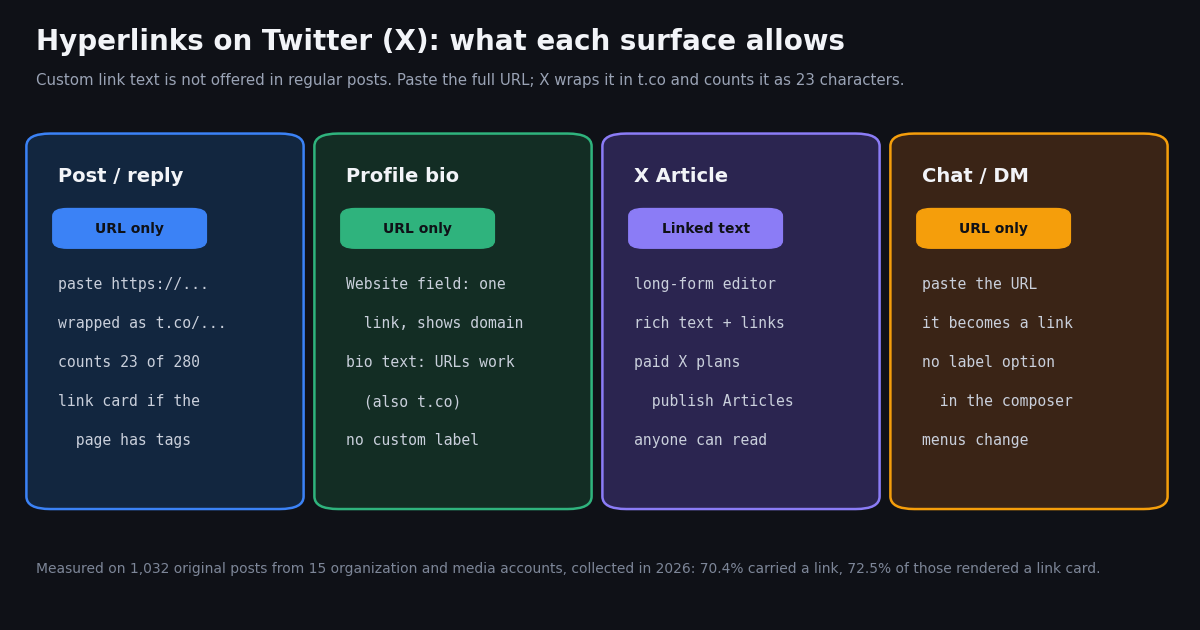
- No anchor text in posts. X has no option to attach a link to a word in a regular post or reply; you paste the URL itself.
- Every URL counts as 23 characters. X wraps links in
t.coand charges 23 of your 280 characters per URL, whether it is 15 or 200 characters long. - Link cards do the visual work. 72.5% of link posts in our sample showed a card built from the linked page's own tags; 513 of 528 cards were the large-image type.
- Linked text exists in X Articles. The long-form Articles editor supports links inside the text; publishing Articles requires a paid X plan.
- Your profile takes two links. The Website field and the bio text both accept URLs, shown as the domain (for example
theverge.com). - Link posts had lower median likes in 6 of 6 accounts we could compare, a correlation, not proof that links are penalized.
If you came here from a word processor, an email client or a blog editor, you expect to highlight a word, press a link button and paste an address behind it. Twitter (X) does not work that way. Posts are plain text with a few automatic conversions: @handles, #hashtags, cashtags and URLs become clickable on their own, and nothing else can be turned into a link.
This guide covers exactly what you can do instead: how to add a link to a post so it looks tidy, how links count toward the character limit, what a link card is and why it sometimes fails to appear, where X does allow a link behind text (Articles), and how to put links in your profile. We also measured how real organization and media accounts use links, so the advice rests on what they actually publish rather than guesses.
70.4%
Can You Hyperlink Text on Twitter (X)? And How to Add a Link Instead
No, not in a normal post, reply or quote. The X composer on the web and in the apps has no link button and no Markdown support, so typing [my site](https://example.com) posts those characters literally. HTML anchor tags are shown as plain text too. The only clickable things X creates in a post are the ones it detects automatically: URLs, @mentions, #hashtags and $cashtags.
What X does with a URL is the closest thing to a hyperlink you get. When you paste https://example.com/some/long/path, X stores it as a t.co link, shows a shortened version of the address to readers, and sends clicks through t.co to the real page. X's help center describes this in its page on posting links (help.x.com/en/using-x/how-to-post-a-link; X's help site blocks automated fetches, so we cite it rather than quote it).
Tools that promise "clickable text" in posts either post a plain URL for you or swap letters for Unicode look-alike characters. Neither creates anchor text: look-alike letters are just styled characters, and the link still has to be a pasted URL.
How to add a link to a post, step by step. The five steps below work the same on the web and in the apps.
Step 1: copy the full address. Copy the URL from your browser's address bar, including https://, so X recognizes the whole address as one link.
Step 2: paste it into the composer. Paste it anywhere in the post. In our sample the link was the last thing in the text in 78.8% of link posts (573 of 727), which is the common newsroom pattern: a headline or one-sentence summary, then the URL.
Step 3: wait for the preview. If the page has card tags, a preview appears in the composer after a moment. The card is what readers tap; the URL text itself is shortened in the post.
Step 4: check the character counter. The URL takes 23 characters regardless of its length, so a long tracking link costs the same as a short one.
Step 5: post, then open it. Tap the card or link once to confirm it goes where you expect. If you linked the wrong page, delete the post and post it again, or use editing if your account has it (our guide on editing a tweet covers when that is available).
There is no separate "insert link" field for posts on the web or in the apps as far as we could verify; X's menus change, so if you see a new option in your app, it is a recent addition.
How Links Count Toward the 280-Character Limit
X's developer documentation states it plainly: "All URLs are wrapped with t.co shortener and count as 23 characters, regardless of the original length" (docs.x.com/fundamentals/counting-characters). The same page notes that posts can contain up to 280 characters and that some characters, such as many emoji and CJK characters, count as 2.
That rule helps more often than you might think. Across the 730 links in our sample, the destination address had a median length of 23.5 characters, a 90th percentile of 86 and a maximum of 227. 50.0% were longer than 23 characters, so X's fixed weight saved those posters space. Short links of under 23 characters do not save anything: they still count as 23.
That is why URL shorteners add little on X today. Many publishers still use branded short domains for their own analytics; in our sample the top link domains included spr.ly, reut.rs, cnn.it, nyti.ms and buff.ly, which are tracking and branding choices, not character savings.
For the full counting rules, including how emoji, mentions and long posts on paid plans count, see our tweet character count guide linked below. The snippet here is a rough estimator you can use in a spreadsheet script or a content tool.
import re

URL = re.compile(r"https?://\S+")
TCO_WEIGHT = 23  # every URL counts 23, short or long (docs.x.com)


def x_length(text):
    """Rough X length: URLs at 23 each, other characters at 1.
    Emoji and CJK count 2 on X; use the official twitter-text library for exact counts."""
    urls = URL.findall(text)
    rest = URL.sub("", text)
    return len(rest) + TCO_WEIGHT * len(urls)


draft = "Our new guide to link cards is live: https://example.com/blog/2026/how-link-cards-work-on-x-and-why"
print(len(draft), "raw characters ->", x_length(draft), "counted by X")
Link Cards: Why Some Links Show a Preview and Others Don't
A link card is the box with an image, a title and the domain that appears under a post. X builds it by reading meta tags on the linked page (the twitter:card family, with Open Graph tags as a fallback, documented at developer.x.com/cards/markup; that page did not load for us this session, so check it directly). The poster does not control the card's text from the composer: it comes from the website.
In our sample, 528 of 1,032 original posts (51.2%) carried a card, and 513 of those were summary_large_image, the wide-image format. Every card in the API response carried a card_url, and 97.3% carried a title, description and domain.
When a card does not appear, the usual reasons are on the website side: no card or Open Graph tags, an image that is missing or blocked, a page that requires login, or a page that blocks X's crawler. Some accounts also post a link together with their own photo or video, in which case the media is shown instead of the card. In our sample 26.1% of link posts also carried media.
If you own the website, adding a twitter:card tag with summary_large_image, a title, a description and an image is the one change with the largest effect on how your links look on X.
Where You Can Put a Link Behind Text: X Articles
X Articles are long-form posts written in a separate editor. X's developer documentation for the Articles endpoints describes them as "long-form posts that support rich text formatting, embedded posts, links, and images" (docs.x.com/x-api/articles/introduction). This is the one place on X where you can select words and attach a link to them, the way you would in a blog editor.
Publishing Articles is limited to paid X plans; X's help page on Articles (help.x.com/en/using-x/articles) lists the eligible plans, and those names have changed over time (X Premium is now sold as The X Subscription in places), so check that page for the current list. Anyone can read an Article.
When an Article is shared to the timeline, the post itself is usually just a t.co link to the Article. X's own @XCreators account publishes its creator guides this way: several of its posts we pulled consisted of nothing but a single t.co URL that opens the Article.
If you need linked text for a newsletter-style piece, a guide or a long announcement, an Article is the honest answer to "how do I hyperlink on X". For short posts, paste the URL.
Links in Your Profile, Replies and Chat
Profile Website field. Your profile has one Website field. X shows the domain to visitors and stores the link as t.co. In the profile data we pulled, @verge, @github and @nytimes each had a Website link stored as t.co and displayed as the bare domain (theverge.com, github.com, nytimes.com). You cannot give it a custom label.
Bio text. URLs typed into the bio also become links. @nytimes, for example, carries a second link inside its bio text, shown as a shortened address. This is how many accounts fit a second link (a newsletter, a shop) without a link-in-bio service.
Replies and pinned posts. A common practice among creators and social media managers is to put the link in the first reply or in a pinned post and keep the main post as plain text or media. Practitioners often say this helps reach; X has not published a rule that confirms or rules that out, and our own engagement numbers below are correlation only. Treat it as a format choice, not a guarantee.
Chat (DMs). In direct messages, now called Chat in parts of the app, the approach is the same: paste the URL. We did not find a documented anchor-text option for messages. Our separate guide on sending DMs covers messaging itself.
What 1,032 Posts From 15 Accounts Show
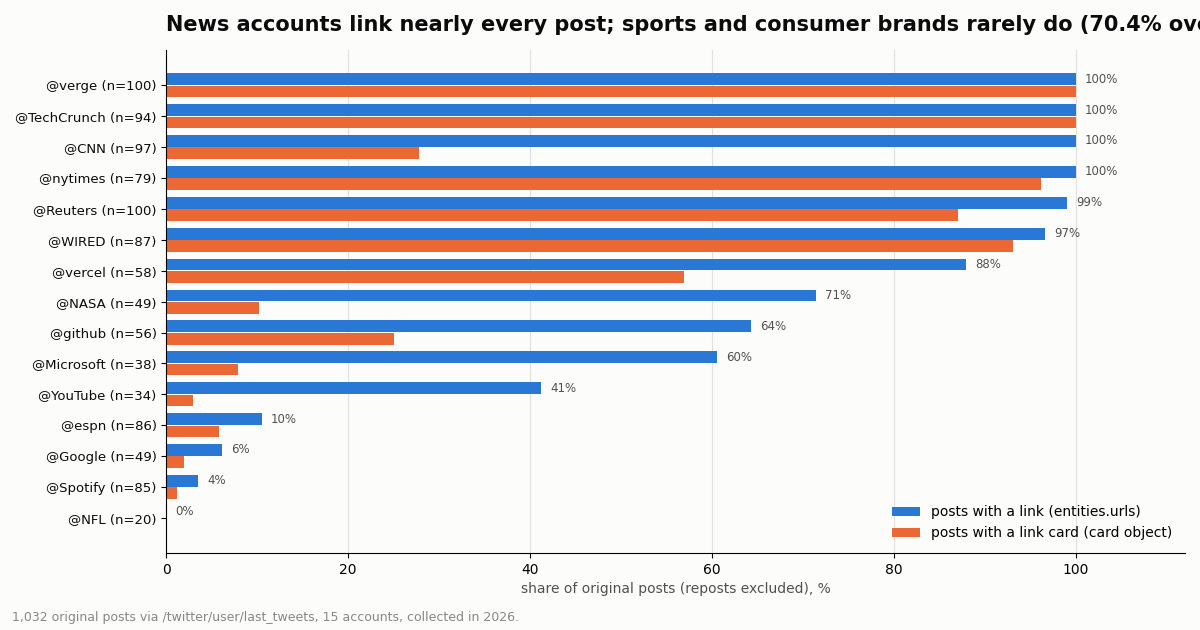
We pulled the latest timeline posts of 15 organization and media accounts and kept the 1,032 original posts (reposts excluded). Overall 70.4% carried at least one link. The spread is the interesting part: news accounts link nearly every post, while sports and consumer brands rarely do.
Two patterns stand out. First, almost every link post carried exactly one link (724 of 727). Second, cards are a newsroom habit: @verge and @TechCrunch showed a card on every post, while @CNN linked every post but showed a card on only 28%, because 72% of its link posts carried its own photo or video instead.
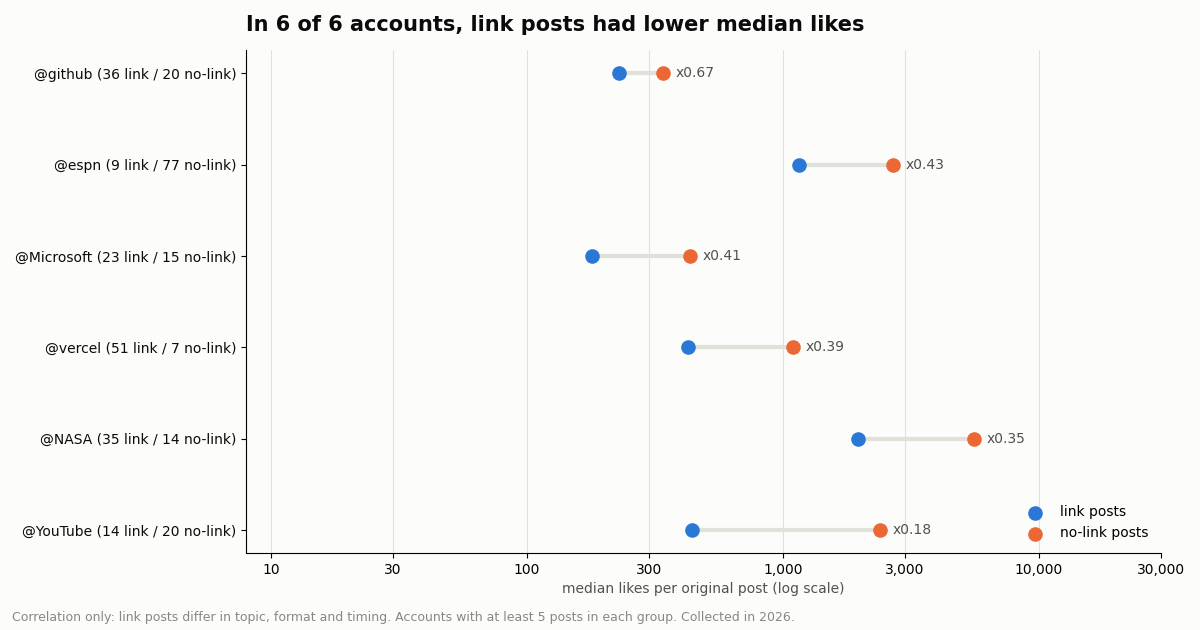
On engagement, link posts had lower median likes than no-link posts in all 6 accounts where both groups had at least five posts, with ratios from 0.18 to 0.67. That is a correlation in a small sample. Link posts are often announcements, articles or promotions, while no-link posts are often media-led moments that people like for other reasons. It does not show that X penalizes links.
Link vs No-Link Engagement, Per Account
Comparing across accounts would mostly measure audience size, so we compared within each account: the median likes of its link posts against the median likes of its posts without a link.
@YouTube showed the widest gap (link posts at 0.18 times the no-link median) and @github the narrowest (0.67 times). Views followed the same direction for five of the six accounts; @espn's link posts had a higher median view count than its no-link posts (438,337 vs 366,362) while still drawing fewer likes.
If you post links often, the practical reading is modest: give the post a reason to engage on its own (a clear claim, an image, a number) rather than relying on the click. If you want to test the link-in-reply format, measure it on your own account over several weeks; the engagement rate calculator linked below helps with the math.
Reading Links Programmatically: What the API Returns
If you build tools around X content, the link data is in each post's entities.urls array. Every one of the 730 link entries in our sample had the same four fields: url (the t.co form that appears in text), expanded_url (the real destination), display_url (the shortened address readers see) and indices (start and end positions in the text). X's own data dictionary uses the same names, plus extra fields such as unwound_url and title on its official API (docs.x.com/x-api/fundamentals/data-dictionary).
Media links are separate: a post with a photo or video ends with a t.co link to the media itself, which lives in extendedEntities.media rather than entities.urls. 92.7% of the 449 media posts in our sample ended with such a link. Strip it before you display or count the text. The card object carries the preview, with keys such as card_url, title, description, domain and the image variants.
On TwitterAPI.io, timeline and search reads cost 15 credits per tweet returned, which is $0.15 per 1,000 tweets, with a 15-credit minimum per request; no X account is needed for reads. The official X API's pay-per-usage rate card (docs.x.com/x-api/getting-started/pricing) lists post reads at $0.005 each, about $5 per 1,000, so roughly 33 times more per 1,000 tweets. The same rate card charges $0.015 to create a post and $0.20 to create a post that contains a URL.
Posting links through our API is possible too: one /twitter/user_login_v2 login ($0.10, with a proxy you supply) returns login_cookies, and each /twitter/create_tweet_v2 call is then 60 credits, $0.0006, billed per HTTP 200 call. The call acts as that account, so X can rate-limit, lock or suspend it; keep a normal human pace, expect to log in again when the session expires, and follow X's automation rules. New accounts that pass the automatic bot check get free starter credits (no card, one per person or network, expiring after 31 days); see the pricing page for the amount.
How We Collected This
Question. How do organization and media accounts put links in their posts on X: how often, in what form, with or without a card, and how do link posts compare with no-link posts on likes?
Accounts. @nytimes, @Reuters, @CNN, @TechCrunch, @verge, @WIRED, @NASA, @github, @vercel, @Microsoft, @Google, @YouTube, @Spotify, @NFL, @espn. All are public organization or media accounts.
Window and sample. The latest timeline posts of each account at collection time (up to 100 per account, fewer for accounts whose timeline endpoint returned fewer pages), collected in 2026: 1,274 posts fetched, 242 reposts excluded, 1,032 original posts analyzed. We also read three profiles (@verge, @github, @nytimes), three search pages of @XCreators posts and one Article to check the Articles and profile claims.
Method and cost. /twitter/user/last_tweets with replies excluded, /twitter/user/info, /twitter/tweet/advanced_search and /twitter/article, read-only: 76 requests, about $0.20 at our per-tweet and per-profile prices.
What the sample cannot show. Fifteen accounts are not the platform. Big publishers post differently from individuals, the engagement comparison covers only six accounts with enough posts in both groups, and likes depend on topic, timing and format, so the gap is a correlation and not evidence of a link penalty. We did not measure clicks, which only the poster can see.
Privacy. Aggregates only, organization and media accounts only; we did not analyze reposted, quoted or mentioned authors. Raw pages were not committed because reposts and quotes contain third-party authors.
import re
import requests

API_KEY = "YOUR_TWITTERAPI_IO_KEY"   # from the dashboard; no X account needed for reads
BASE = "https://api.twitterapi.io"
HEADERS = {"X-API-Key": API_KEY}
TCO_WEIGHT = 23  # X counts every URL as 23 characters (docs.x.com counting-characters)


def fetch_posts(user_name, pages=3):
    """Newest-first timeline posts of one account, following next_cursor."""
    posts, cursor = [], ""
    for _ in range(pages):
        params = {"userName": user_name}
        if cursor:
            params["cursor"] = cursor
        r = requests.get(f"{BASE}/twitter/user/last_tweets", headers=HEADERS, params=params, timeout=30)
        r.raise_for_status()
        body = r.json()
        data = body.get("data") or {}
        posts.extend(data.get("tweets") or [])
        if not body.get("has_next_page"):
            break
        cursor = body.get("next_cursor") or ""
    return posts


def link_report(post):
    """How one post carries its links: t.co form, real target, display text, card."""
    urls = (post.get("entities") or {}).get("urls") or []
    text = (post.get("text") or "").rstrip()
    card = post.get("card") or {}
    rows = []
    for u in urls:
        rows.append({
            "tco": u.get("url"),                    # what sits in the text
            "target": u.get("expanded_url"),        # where the click goes
            "shown_as": u.get("display_url"),       # what the reader sees
            "chars_saved": max(0, len(u.get("expanded_url") or "") - TCO_WEIGHT),
            "is_last_token": text.endswith(u.get("url") or "\x00"),
        })
    return {
        "id": post.get("id"),
        "is_repost": bool(post.get("retweeted_tweet")),
        "links": rows,
        "card_type": card.get("name"),          # e.g. summary_large_image
        "likes": post.get("likeCount", 0),
    }


if __name__ == "__main__":
    reports = [link_report(p) for p in fetch_posts("verge")]
    originals = [r for r in reports if not r["is_repost"]]
    with_links = [r for r in originals if r["links"]]
    with_cards = [r for r in with_links if r["card_type"]]
    print(f"{len(with_links)} of {len(originals)} original posts carry a link")
    print(f"{len(with_cards)} of those render a link card")
    for r in with_links[:5]:
        first = r["links"][0]
        print(first["shown_as"], "->", first["target"], "| card:", r["card_type"])
Researching this?Free starter credits cover end-to-end testing — Google sign-in, no card. Get a key.
Questions readers ask
Can you hyperlink text in a tweet?
No. Regular posts, replies and quotes on X have no anchor-text option, and Markdown or HTML link syntax is posted as plain text. Paste the URL itself; X turns it into a clickable t.co link and usually shows a link card under the post.
How many characters does a link take on Twitter?
23. X's developer documentation says every URL is wrapped in t.co and counts as 23 characters regardless of its original length, so a 200-character tracking link costs the same as a short one.
Why does my link not show a preview card?
The card comes from the linked page's own meta tags. If the page lacks twitter:card or Open Graph tags, blocks crawlers, requires login, or has a missing image, X shows only the shortened URL. Attaching your own photo or video also replaces the card.
Where can I add a link behind words on X?
In X Articles, the long-form editor. X's documentation describes Articles as supporting rich text formatting, embedded posts, links and images. Publishing Articles requires a paid X plan; anyone can read them.
How do I add a clickable link to my Twitter bio?
Use the Website field in Edit profile for your main link, and type a second URL into the bio text if you need one. Both are stored as t.co links and shown as the domain; neither accepts a custom label.
Should I put the link in a reply instead of the post?
Many creators do, on the belief that posts without links travel further. X has not published a rule on this. In our sample link posts had lower median likes in every account we could compare, but that is a correlation in six accounts, not proof. Test it on your own account.
Can I make a link look shorter on Twitter?
X already shortens how a link is displayed, and every URL counts as 23 characters, so a shortener saves no space. Branded short links are still useful for your own click tracking.
Do links work in X Chat or DMs?
Yes, paste the URL and it becomes clickable. We did not find a documented way to attach a link to custom text in messages.
Continue
- X developer docs: counting characters (URLs count as 23, 280 limit)
- X developer docs: Articles support rich text, embedded posts, links and images
- X developer docs: data dictionary (entities.urls fields)
- X API pay-per-usage pricing (post reads, post creation with URL)
- twitter-text: X's open-source character counting libraries
- TwitterAPI.io documentation (last_tweets, user info, article endpoints)
- X post templates and formats for everyday posting
- tweet character count and how X weighs each character
- X Articles API: read the full text of long-form Articles
- how to embed tweets on your website
- tweet metadata fields reference, including entities and cards
- how to send a DM on Twitter (X)
- Twitter engagement rate calculator
- TwitterAPI.io pricing per tweet and per profile
- 01How to See Deleted Twitter (X) Messages: What Can and Cannot Come Back
- 02Twitter (X) API to BigQuery: Load Tweets with Python and Query Them in SQL
- 03Twitter (X) Follow API: Follow, Verify and Undo a Follow from Code
- 04Twitter (X) API in Ruby with Net::HTTP, Faraday and Rails
- 05rtweet in 2026: Is the R Twitter (X) Package Dead, and What to Use Instead
- 06Cloudflare Pay per Crawl: How the HTTP 402 Handshake Works, and What It Means for Twitter (X) Data
- 07Twitter (X) Analytics Tools — A Developer's Honest Roundup
- 08Twitter (X) Posts Not Loading? How to Fix It
Writing about something you built with TwitterAPI.io? Our community rewards program pays API credits for honest tutorials, build logs and videos.
Stop reading. Start building.
Starter credits cover real testing on real data. Google sign-in, no card, no application queue.
Get an API keyAlready building with TwitterAPI.io? Publish an honest tutorial or build log about it and earn up to $200 a month in API credits.