Twitter (X) API to BigQuery: Load Tweets with Python and Query Them in SQL
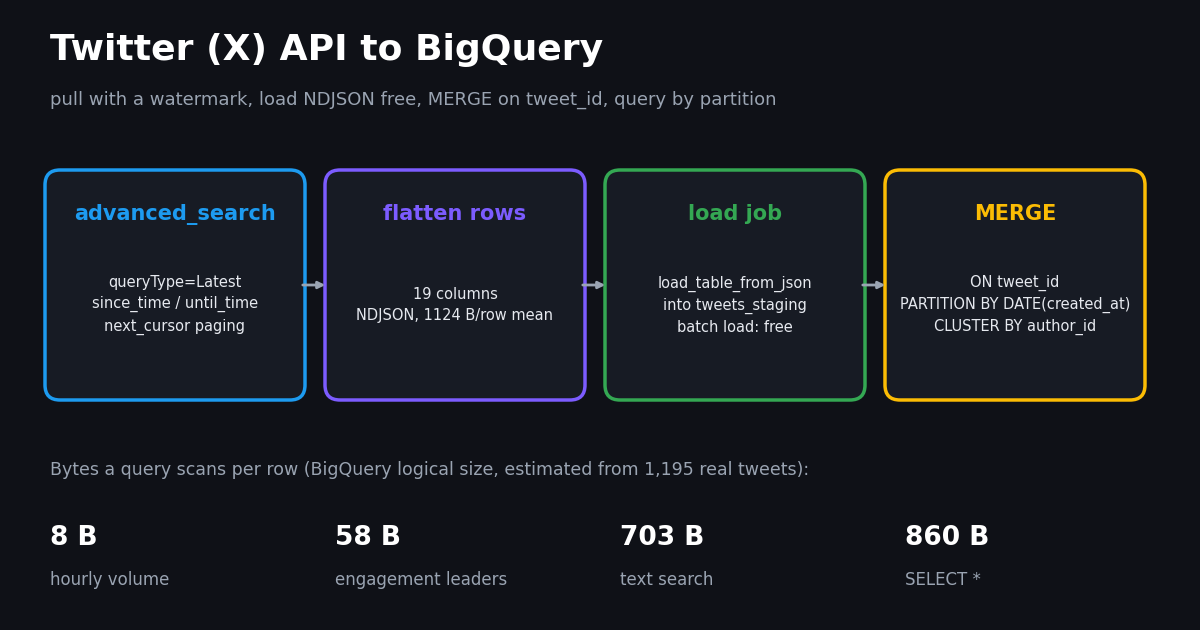
- Route:
/twitter/tweet/advanced_search(Latest) from asince_time:watermark, thenload_table_from_jsonintotweets_staging, thenMERGEontweet_idinto the main table. - Schema: 19 columns,
PARTITION BY DATE(created_at),CLUSTER BY query_tag, author_id,hashtagsasARRAY<STRING>(a REPEATED field in the JSON schema). - Row size (measured): 1,124 bytes of NDJSON and about 860 BigQuery logical bytes per row on 1,195 tweets; keeping the raw JSON pushes it to 5,542.
- BigQuery cost is small: batch loads are free, storage is $0.023 per GiB-month in us-central1 after 10 free GiB, and a year at 100k tweets/day is 29.24 GiB.
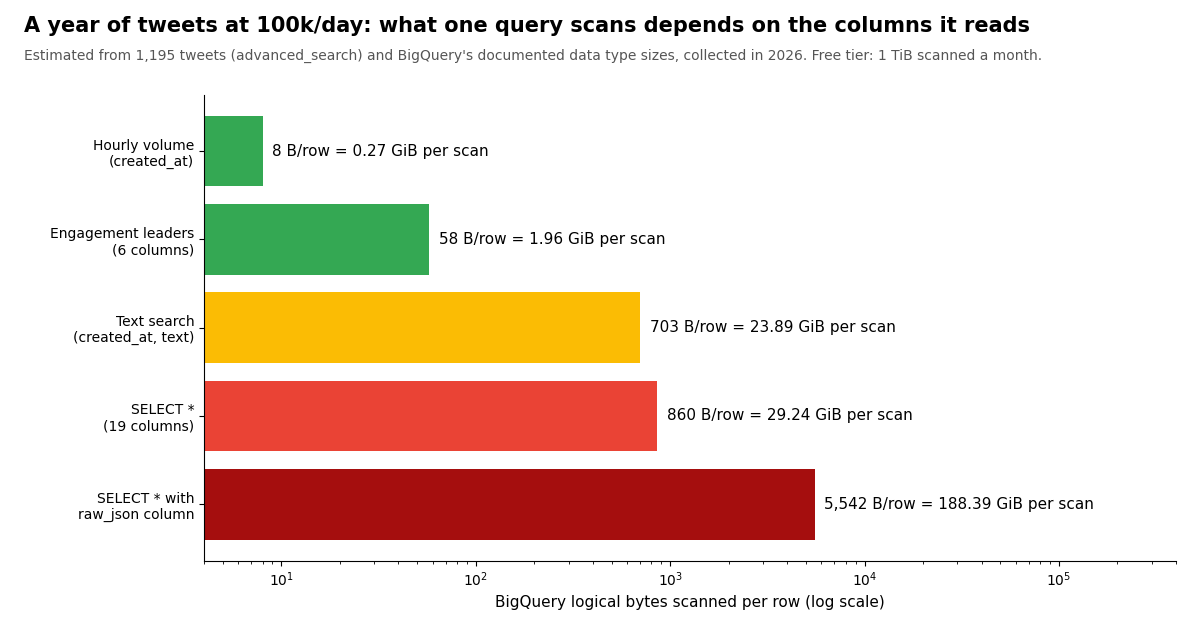
- Scan cost depends on columns: 8 bytes per row for hourly volume, 58 for engagement leaders, 860 for
SELECT *; the first 1 TiB scanned each month is free, then $6.25 per TiB on demand. - Dedup is not optional: 39 of 1,234 rows in our pull were repeats, and re-reading page 1 returned 20 of 20 tweets we already had.
Searching for a Twitter API BigQuery tutorial turns up two kinds of results: older tutorials written for the v1.1 streaming API, which X has since deprecated, and generic BigQuery loading guides that never touch tweets. Neither gives you a job you can schedule today, a table schema that holds up after a year, or a sense of what it costs.
This page is the worked example. We pulled 1,234 real X posts about BigQuery and Google Cloud through /twitter/tweet/advanced_search in 77 requests (collected in 2026), flattened them into the exact BigQuery schema shown below, measured the NDJSON a load job receives and the logical bytes BigQuery would store, ran the SQL examples on those rows, and projected storage, scan and API cost at 1,000, 10,000 and 100,000 tweets a day. Prices are from Google's BigQuery pricing page and X's own rate card, checked this session.
29.24 GiB (about $0.44 a month), from 860 logical bytes per row measured on 1,195 tweets in 77 requests, collected in 2026
The pipeline in one picture: pull, stage, MERGE, query
The pattern that works today is a short batch job you own. It has four steps, and each one exists for a reason.
1. Pull from a watermark. The job asks BigQuery for the newest created_at it already holds for this query, then calls /twitter/tweet/advanced_search with since_time:<watermark> and queryType=Latest, following next_cursor while has_next_page is true. No X developer account or OAuth app is needed; the request carries one X-API-Key header.
2. Flatten. Each tweet becomes one row with fixed types: ids as STRING, counts as INT64, flags as BOOL, timestamps parsed from createdAt ("Thu Oct 16 12:34:56 +0000 2026") into UTC, and hashtags as an array.
3. Stage with a load job. load_table_from_json sends the rows as newline-delimited JSON into tweets_staging with WRITE_TRUNCATE. Google's pricing page lists batch loading as free using the shared slot pool, so this step costs nothing beyond the storage it creates.
4. MERGE on tweet_id. A single MERGE inserts new tweets and refreshes the engagement counters of tweets you already have. Because the main table is partitioned by DATE(created_at), the merge condition also matches on created_at so BigQuery only touches the partitions in the batch.
The hero diagram above shows the same flow, with the per-row bytes each kind of query reads in our sample.
Table schema: DDL, JSON schema, partitioning and clustering
The DDL below creates the dataset, the main table and a staging table with the same columns. Partitioning by DATE(created_at) is the choice that controls cost: every example query filters on a date range, and BigQuery prunes the partitions outside it before counting bytes. Google's partitioning docs allow hourly, daily, monthly or yearly granularity for TIMESTAMP columns and set a system limit of 10,000 partitions per table, which at daily granularity is more than 27 years.
Clustering sorts data inside each partition. BigQuery's docs allow up to four clustering columns; query_tag (which search produced the row) and author_id cover the two filters analysts reach for first. If you only ever keep recent data, set a partition expiration so old days drop off automatically.
hashtags is ARRAY<STRING> in DDL and "mode": "REPEATED" in the JSON schema. Keeping it as an array, not a comma string, is what lets the hashtag query use UNNEST without string splitting. We left the full raw JSON out of the main table on purpose; the cost section shows why.
CREATE SCHEMA IF NOT EXISTS `my-project.x_data`;

CREATE TABLE IF NOT EXISTS `my-project.x_data.tweets` (
  tweet_id         STRING    NOT NULL,
  created_at       TIMESTAMP NOT NULL,
  author_id        STRING,
  author_followers INT64,
  lang             STRING,
  text             STRING,
  like_count       INT64,
  retweet_count    INT64,
  reply_count      INT64,
  quote_count      INT64,
  view_count       INT64,
  bookmark_count   INT64,
  is_reply         BOOL,
  conversation_id  STRING,
  has_media        BOOL,
  url_count        INT64,
  hashtags         ARRAY<STRING>,
  query_tag        STRING,
  ingested_at      TIMESTAMP
)
PARTITION BY DATE(created_at)
CLUSTER BY query_tag, author_id
OPTIONS (description = 'X (Twitter) posts loaded from /twitter/tweet/advanced_search');

-- Same schema for the staging table the load job overwrites on every run.
CREATE TABLE IF NOT EXISTS `my-project.x_data.tweets_staging`
LIKE `my-project.x_data.tweets`;The same schema as a JSON file for bq load and the Python client
If you load with the bq command-line tool or keep schemas in version control, the JSON form is easier to diff. The Python job further down declares the same fields as bigquery.SchemaField objects; keep the two in step, because load_table_from_json requires the keys of each row to match the table schema fields.
Two details from our sample matter here. Every one of our rows came back with a lang value, but on broader queries lang and some counters can be missing, so every column except tweet_id and created_at is NULLABLE. And ids must stay STRING: tweet and author ids are larger than JavaScript's safe integer range, and treating them as numbers in any step before BigQuery can silently change them.
[
  {"name": "tweet_id", "type": "STRING", "mode": "REQUIRED"},
  {"name": "created_at", "type": "TIMESTAMP", "mode": "REQUIRED"},
  {"name": "author_id", "type": "STRING"},
  {"name": "author_followers", "type": "INT64"},
  {"name": "lang", "type": "STRING"},
  {"name": "text", "type": "STRING"},
  {"name": "like_count", "type": "INT64"},
  {"name": "retweet_count", "type": "INT64"},
  {"name": "reply_count", "type": "INT64"},
  {"name": "quote_count", "type": "INT64"},
  {"name": "view_count", "type": "INT64"},
  {"name": "bookmark_count", "type": "INT64"},
  {"name": "is_reply", "type": "BOOL"},
  {"name": "conversation_id", "type": "STRING"},
  {"name": "has_media", "type": "BOOL"},
  {"name": "url_count", "type": "INT64"},
  {"name": "hashtags", "type": "STRING", "mode": "REPEATED"},
  {"name": "query_tag", "type": "STRING"},
  {"name": "ingested_at", "type": "TIMESTAMP"}
]Why MERGE on tweet_id, not a plain append
A search pull is not a clean, ordered stream. In our collection, cursor chains ended after 2 to 10 pages, pages were not always in strict time order, and collection continued by moving until_time to the oldest tweet already loaded. The result: 39 of 1,234 returned rows were repeats of a tweet we already had, and a second read of page 1 returned 20 of 20 tweets that were already in the batch.
An append-only table would count those twice in every chart. MERGE solves it in one statement, and it also keeps engagement counters fresh: when a tweet you loaded an hour ago comes back with more likes, the WHEN MATCHED branch updates it.
The QUALIFY ROW_NUMBER() line in the source is required, not decoration. BigQuery's DML docs state that if a target row joins with more than one source row, the statement generates a runtime error and nothing is written. Deduplicating the staging rows first makes every run safe to repeat.
MERGE `my-project.x_data.tweets` AS t
USING (
  SELECT * FROM `my-project.x_data.tweets_staging`
  -- one source row per tweet_id, or MERGE stops with a runtime error
  QUALIFY ROW_NUMBER() OVER (PARTITION BY tweet_id ORDER BY ingested_at DESC) = 1
) AS s
ON t.tweet_id = s.tweet_id
   AND t.created_at = s.created_at   -- lets BigQuery prune target partitions
WHEN MATCHED THEN UPDATE SET
  like_count = s.like_count, retweet_count = s.retweet_count,
  reply_count = s.reply_count, quote_count = s.quote_count,
  view_count = s.view_count, bookmark_count = s.bookmark_count,
  ingested_at = s.ingested_at
WHEN NOT MATCHED THEN INSERT ROW;What we measured: row size, storage and scan cost from real tweets
We flattened 1,195 unique tweets into the schema above and measured two things: the NDJSON bytes per row that load_table_from_json sends, and the logical bytes BigQuery would bill, computed from Google's documented data type sizes (STRING is 2 bytes plus the UTF-8 length, INT64 and TIMESTAMP are 8, BOOL is 1, an array is the sum of its elements). BigQuery itself was not available in this environment, so storage figures are estimates from those rules.
Text dominates the row: a query that reads created_at and text scans 703 bytes per row, close to the 860 of SELECT *. The numeric columns are cheap. An engagement query over six columns reads 58 bytes per row, and an hourly count reads 8.
On-demand queries are billed by bytes processed in the columns you select, even if you add LIMIT, with a minimum of 10 MB per table referenced. The chart turns the per-row numbers into a year of data at 100,000 tweets a day.
Monthly cost at 1,000, 10,000 and 100,000 tweets a day
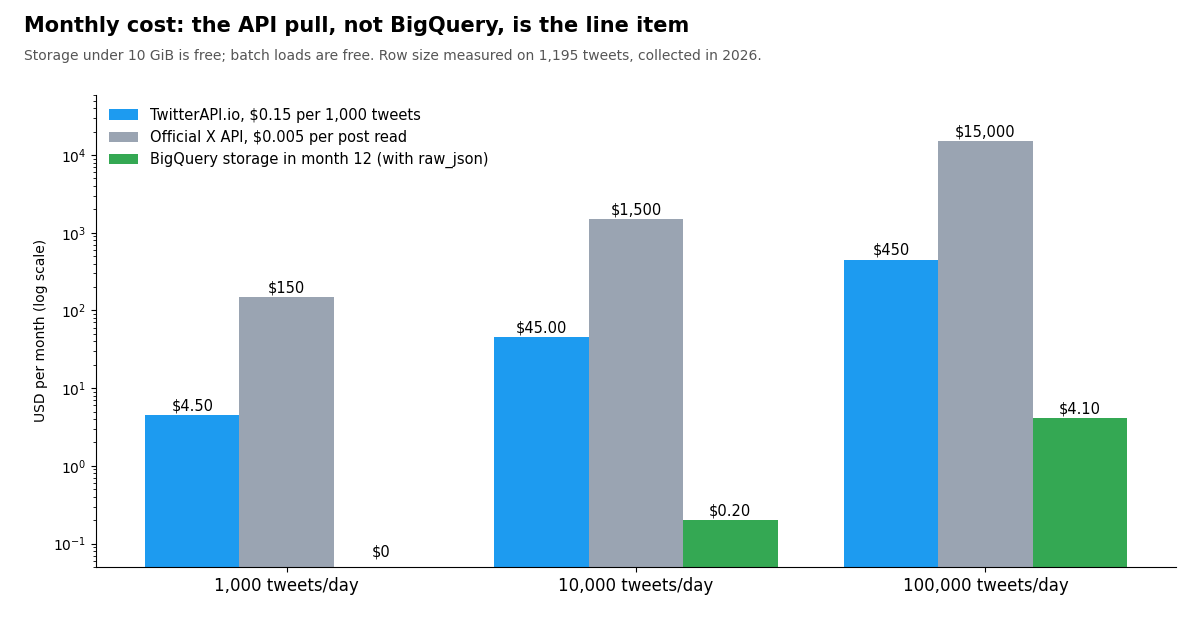
We projected the measured row size forward. Storage uses Google's us-central1 active logical storage rate (the pricing page lists it hourly; its own example bills 1 TiB for a full month at $23.552, which is $0.023 per GiB-month) after the first 10 GiB free. Partitions untouched for 90 days drop to the long-term rate, so these are upper bounds.
Keep the raw JSON in a column and the 100,000-a-day table grows to 188.39 GiB in a year, about $4.10 a month. That is still small, but every SELECT * then scans 5,542 bytes per row instead of 860. If you want the raw payload, put it in a separate table keyed by tweet_id.
Query cost stays inside the free 1 TiB a month for a long time: a full scan of a year at 100,000 tweets a day is 29.24 GiB, so about 35 full scans fit in the free tier, and partition-filtered queries scan a fraction of that. After the free tier, on-demand queries are $6.25 per TiB.
The API pull is the line item. TwitterAPI.io bills 15 credits per tweet returned, which is $0.15 per 1,000 tweets; a request that returns nothing is billed at the 15-credit minimum ($0.00015). The official X API pay-per-usage rate card on docs.x.com lists $0.005 per post read, or $5 per 1,000, about 33 times more per 1,000 tweets, and caps pay-per-usage at 3 million post reads a month with Enterprise above that.
SQL examples: hourly volume, top authors, hashtags, duplicates
These are the four queries teams usually write first. Each one filters on DATE(created_at), which is what keeps it cheap on a partitioned table.
We ran all four on the 1,234 study rows in Python's sqlite3, since neither BigQuery nor DuckDB was available here. The dialect changes are small: TIMESTAMP_TRUNC(created_at, HOUR) became strftime('%Y-%m-%d %H:00', created_at), UNNEST(hashtags) became json_each(hashtags) over a JSON text column, and because sqlite has no QUALIFY, the dedup window function sat in a subquery. The logic and the results carry over.
Engagement is concentrated: a handful of accounts produced 43.3% of it across 923 distinct authors. That is why the top-authors query is useful, and also why you should not read a hashtag count as reach. The hourly-volume query ran too, but our sample read each day backwards from midnight UTC for a few pages, so its hours cluster in the evening; that is a property of how we sampled, not of when people post.
-- 1. Hourly volume for the last 7 days (reads 8 bytes per row: created_at only)
SELECT TIMESTAMP_TRUNC(created_at, HOUR) AS hour, COUNT(*) AS posts
FROM `my-project.x_data.tweets`
WHERE DATE(created_at) >= DATE_SUB(CURRENT_DATE(), INTERVAL 7 DAY)
GROUP BY hour
ORDER BY hour;

-- 2. Top authors by engagement this month
SELECT author_id,
       COUNT(*) AS posts,
       SUM(like_count + retweet_count + reply_count + quote_count) AS engagement
FROM `my-project.x_data.tweets`
WHERE DATE(created_at) >= DATE_TRUNC(CURRENT_DATE(), MONTH)
GROUP BY author_id
ORDER BY engagement DESC
LIMIT 10;

-- 3. Hashtag counts (hashtags is ARRAY<STRING>)
SELECT LOWER(tag) AS hashtag, COUNT(*) AS posts
FROM `my-project.x_data.tweets`, UNNEST(hashtags) AS tag
WHERE DATE(created_at) >= DATE_SUB(CURRENT_DATE(), INTERVAL 30 DAY)
GROUP BY hashtag
ORDER BY posts DESC
LIMIT 20;

-- 4. Find duplicates (should return nothing after MERGE)
SELECT tweet_id, COUNT(*) AS copies
FROM `my-project.x_data.tweets`
WHERE DATE(created_at) >= DATE_SUB(CURRENT_DATE(), INTERVAL 30 DAY)
GROUP BY tweet_id
HAVING COUNT(*) > 1;

-- The same four queries as they ran on the study rows in sqlite3
SELECT strftime('%Y-%m-%d %H:00', created_at) AS hour, COUNT(*) FROM tweets GROUP BY hour;
SELECT author_id, COUNT(*), SUM(like_count + retweet_count + reply_count + quote_count) AS engagement
  FROM tweets GROUP BY author_id ORDER BY engagement DESC LIMIT 10;
SELECT LOWER(j.value) AS tag, COUNT(*) FROM tweets, json_each(tweets.hashtags) AS j
  GROUP BY tag ORDER BY 2 DESC LIMIT 10;
-- dedup: sqlite has no QUALIFY, so the window function sits in a subquery
CREATE TABLE tweets AS SELECT * FROM (
  SELECT *, ROW_NUMBER() OVER (PARTITION BY tweet_id ORDER BY ingested_at DESC) AS rn
FROM tweets_raw) WHERE rn = 1;Streaming instead of batch: insert_rows_json and the Storage Write API
A scheduled batch job is the default because loads are free and MERGE handles dedup. If you need rows within seconds, combine a push source with streaming. TwitterAPI.io can deliver matching tweets to your webhook through filter rules (see the webhooks guide in the links below); the receiver then streams each batch into BigQuery.
Google's pricing page lists streaming inserts at $0.01 per 200 MiB, with each row counted at a 1 KB minimum, and the Storage Write API over gRPC at $0.025 per GiB with the first 2 TiB a month free. At our measured median NDJSON row of about 0.7 KB, the 1 KB minimum applies to the majority of rows, but even 100,000 rows a day stays at cents per month on either path.
Streamed rows can still duplicate on retries. insert_rows_json accepts row_ids, which gives best-effort dedup only, so keep a scheduled MERGE from the stream table into the main table, or dedup in a view with QUALIFY ROW_NUMBER().
# Push route: a webhook receiver that streams each tweet as it arrives.
# insert_rows_json uses the legacy streaming path; row_ids gives best-effort dedup.
from flask import Flask, request
from google.cloud import bigquery
from datetime import datetime, timezone

from x_to_bigquery import to_row   # same flattening as the batch job

app = Flask(__name__)
bq = bigquery.Client()
TABLE = "my-project.x_data.tweets_stream"

@app.post("/x-webhook")
def x_webhook():
    body = request.get_json(force=True) or {}
    now_iso = datetime.now(timezone.utc).isoformat()
    rows = [to_row(t, now_iso) for t in (body.get("tweets") or [])]
    if rows:
        errors = bq.insert_rows_json(TABLE, rows, row_ids=[r["tweet_id"] for r in rows])
        if errors:
            return {"errors": errors}, 500
    return {"ok": True, "rows": len(rows)}
How we collected this
Question. What does a real load of X search results into BigQuery look like in bytes, and what do storage, queries and the pull cost at three volumes?
Queries and endpoint. /twitter/tweet/advanced_search with queryType=Latest, for bigquery lang:en (23 requests, 400 tweets) and (bigquery OR "google cloud" OR gcp) lang:en read one UTC day at a time over about a week (53 requests, 834 tweets), plus one re-read of page 1.
Sample. 77 requests, 1,234 tweets returned, 1,195 unique, 923 distinct authors, collected in 2026. The pull cost $0.19 at $0.15 per 1,000 tweets returned. Search was degraded during collection: cursor chains ended after 2 to 10 pages, so we moved until_time to the oldest tweet loaded and continued, the same watermark logic as the job above.
Method. analyze.py flattens each tweet into the 19-column schema, serializes it as NDJSON to measure load bytes, computes BigQuery logical bytes from Google's data type size table, runs the SQL examples in sqlite3 and projects cost from the published rates. charts.py reads only the results file.
What it cannot show. Storage is estimated from documented type sizes, not measured inside BigQuery; physical (compressed) storage billing would be lower. Two technology topics are not every topic: text length, media share and hashtag use vary by subject and language. Hour-of-day results reflect our sampling windows.
Privacy. Aggregates only. No handles, author ids, texts or URLs are stored in the study files; raw search pages stayed in temporary storage and were deleted after analysis; the top-authors result is reported as engagement numbers without names.
"""x_to_bigquery.py - incremental load of X (Twitter) search results into BigQuery.

Run it on a schedule (Cloud Run job, Cloud Scheduler, cron). Re-runs are safe:
rows land in a staging table with a free batch load job, then MERGE on tweet_id.

pip install requests google-cloud-bigquery
export TWITTERAPI_IO_KEY=...            # from the twitterapi.io dashboard
gcloud auth application-default login   # or a service account on Cloud Run
"""
import os
import time
from datetime import datetime, timezone

import requests
from google.cloud import bigquery

API_KEY = os.environ["TWITTERAPI_IO_KEY"]
BASE = "https://api.twitterapi.io"
DATASET = "my-project.x_data"
QUERY = '(bigquery OR "google cloud" OR gcp) lang:en'
QUERY_TAG = "google_cloud"
FMT = "%a %b %d %H:%M:%S %z %Y"   # createdAt, e.g. "Thu Oct 16 12:34:56 +0000 2026"
MAX_REQUESTS = 200                # hard budget per run

bq = bigquery.Client()

SCHEMA = [
    bigquery.SchemaField("tweet_id", "STRING", mode="REQUIRED"),
    bigquery.SchemaField("created_at", "TIMESTAMP", mode="REQUIRED"),
    bigquery.SchemaField("author_id", "STRING"),
    bigquery.SchemaField("author_followers", "INT64"),
    bigquery.SchemaField("lang", "STRING"),
    bigquery.SchemaField("text", "STRING"),
    bigquery.SchemaField("like_count", "INT64"),
    bigquery.SchemaField("retweet_count", "INT64"),
    bigquery.SchemaField("reply_count", "INT64"),
    bigquery.SchemaField("quote_count", "INT64"),
    bigquery.SchemaField("view_count", "INT64"),
    bigquery.SchemaField("bookmark_count", "INT64"),
    bigquery.SchemaField("is_reply", "BOOL"),
    bigquery.SchemaField("conversation_id", "STRING"),
    bigquery.SchemaField("has_media", "BOOL"),
    bigquery.SchemaField("url_count", "INT64"),
    bigquery.SchemaField("hashtags", "STRING", mode="REPEATED"),
    bigquery.SchemaField("query_tag", "STRING"),
    bigquery.SchemaField("ingested_at", "TIMESTAMP"),
]


def watermark():
    """Newest created_at already loaded for this query, as Unix seconds."""
    sql = f"""SELECT UNIX_SECONDS(MAX(created_at)) AS ts FROM `{DATASET}.tweets`
              WHERE query_tag = @tag AND DATE(created_at) >= DATE_SUB(CURRENT_DATE(), INTERVAL 7 DAY)"""
    cfg = bigquery.QueryJobConfig(query_parameters=[bigquery.ScalarQueryParameter("tag", "STRING", QUERY_TAG)])
    ts = list(bq.query(sql, job_config=cfg).result())[0].ts
    return int(ts) if ts else int(time.time()) - 3600   # first run: last hour


def search_page(q, cursor):
    r = requests.get(
        f"{BASE}/twitter/tweet/advanced_search",
        headers={"X-API-Key": API_KEY},
        params={"query": q, "queryType": "Latest", "cursor": cursor},
        timeout=30,
    )
    r.raise_for_status()
    return r.json()


def fetch_since(since_ts):
    """Page newest to oldest. When a cursor chain ends early, move until_time
    to the oldest tweet seen and start a new chain (the MERGE absorbs overlap)."""
    until_ts = int(time.time())
    requests_used = 0
    while requests_used < MAX_REQUESTS:
        q = f"{QUERY} since_time:{since_ts} until_time:{until_ts}"
        cursor, oldest, got = "", None, 0
        while requests_used < MAX_REQUESTS:
            data = search_page(q, cursor)
            requests_used += 1
            tweets = data.get("tweets") or []
            for t in tweets:
                ts = int(datetime.strptime(t["createdAt"], FMT).timestamp())
                oldest = ts if oldest is None else min(oldest, ts)
                got += 1
                yield t
            if not tweets or not data.get("has_next_page") or not data.get("next_cursor"):
                break
            cursor = data["next_cursor"]
        if got == 0 or oldest is None or oldest <= since_ts or oldest >= until_ts:
            return
        until_ts = oldest


def to_row(t, now_iso):
    ent = t.get("entities") or {}
    media = (t.get("extendedEntities") or {}).get("media") or []
    a = t.get("author") or {}
    created = datetime.strptime(t["createdAt"], FMT).astimezone(timezone.utc)
    return {
        "tweet_id": str(t["id"]),
        "created_at": created.isoformat(),
        "author_id": str(a.get("id") or ""),
        "author_followers": int(a.get("followers") or 0),
        "lang": t.get("lang"),
        "text": t.get("text"),
        "like_count": int(t.get("likeCount") or 0),
        "retweet_count": int(t.get("retweetCount") or 0),
        "reply_count": int(t.get("replyCount") or 0),
        "quote_count": int(t.get("quoteCount") or 0),
        "view_count": int(t.get("viewCount") or 0),
        "bookmark_count": int(t.get("bookmarkCount") or 0),
        "is_reply": bool(t.get("isReply")),
        "conversation_id": str(t.get("conversationId") or ""),
        "has_media": bool(media),
        "url_count": len(ent.get("urls") or []),
        "hashtags": [h.get("text", "") for h in (ent.get("hashtags") or [])],
        "query_tag": QUERY_TAG,
        "ingested_at": now_iso,
    }


MERGE_SQL = f"""
MERGE `{DATASET}.tweets` AS t
USING (
  SELECT * FROM `{DATASET}.tweets_staging`
  QUALIFY ROW_NUMBER() OVER (PARTITION BY tweet_id ORDER BY ingested_at DESC) = 1
) AS s
ON t.tweet_id = s.tweet_id AND t.created_at = s.created_at
WHEN MATCHED THEN UPDATE SET
  like_count = s.like_count, retweet_count = s.retweet_count,
  reply_count = s.reply_count, quote_count = s.quote_count,
  view_count = s.view_count, bookmark_count = s.bookmark_count,
  ingested_at = s.ingested_at
WHEN NOT MATCHED THEN INSERT ROW
"""


def main():
    now_iso = datetime.now(timezone.utc).isoformat()
    since_ts = watermark()
    rows = [to_row(t, now_iso) for t in fetch_since(since_ts)]
    if not rows:
        print("nothing new")
        return
    job_config = bigquery.LoadJobConfig(
        schema=SCHEMA,
        source_format=bigquery.SourceFormat.NEWLINE_DELIMITED_JSON,
        write_disposition=bigquery.WriteDisposition.WRITE_TRUNCATE,
    )
    bq.load_table_from_json(rows, f"{DATASET}.tweets_staging", job_config=job_config).result()
    merge = bq.query(MERGE_SQL)
    merge.result()
    print(f"staged {len(rows)} rows, merge affected {merge.num_dml_affected_rows}")


if __name__ == "__main__":
    main()
Researching this?Free starter credits cover end-to-end testing — Google sign-in, no card. Get a key.
Questions readers ask
Can I query tweets in BigQuery without loading them first?
BigQuery queries tables, so current X posts have to be loaded into one. The job on this page does that on a schedule: it pulls from a watermark, stages the rows with a free batch load and merges them into a partitioned table you can query with plain SQL.
Do I need an X developer account to load tweets into BigQuery?
Not with TwitterAPI.io. Reads need one X-API-Key header and no X account or OAuth app. With the official X API you need an approved developer account, a Project and an App, and you pay $0.005 per post read on the pay-per-usage rate card.
Should I use load_table_from_json or insert_rows_json?
For a scheduled job, load_table_from_json: Google lists batch loading as free on the shared slot pool, and a load into a staging table followed by MERGE gives exact dedup. Use insert_rows_json or the Storage Write API when you need rows within seconds; streaming is billed per volume ($0.01 per 200 MiB with a 1 KB row minimum for streaming inserts, $0.025 per GiB after 2 free TiB a month for the gRPC Storage Write API) and dedup with row_ids is best effort.
How do I avoid duplicate tweets in BigQuery?
MERGE on tweet_id from a staging table, and dedup the staging rows with QUALIFY ROW_NUMBER() OVER (PARTITION BY tweet_id ORDER BY ingested_at DESC) = 1 first, otherwise MERGE fails when one tweet appears twice. In our pull, 39 of 1,234 rows were repeats.
How should I partition and cluster a tweets table?
Partition by DATE(created_at) and always filter on it; cluster by the columns you filter on next, such as query_tag and author_id (BigQuery allows up to four clustering columns). Daily partitions stay well inside the 10,000-partitions-per-table limit.
How much does it cost to store tweets in BigQuery?
Little. Our measured row is about 860 logical bytes, so a year at 100,000 tweets a day is 29.24 GiB, about $0.44 a month of active storage in us-central1 after 10 free GiB. The API pull at that volume is $450 a month on TwitterAPI.io, so the pull dominates.
Should I keep the raw tweet JSON in BigQuery?
Keep it in a separate table if you need it. In our sample the raw payload raised a row from 860 to 5,542 logical bytes, so every SELECT * over the main table would scan about six times more.
Can I try this without a Google Cloud bill?
Yes, for small volumes. Google's pricing page says you can try BigQuery's free tier in the BigQuery sandbox without a credit card, with 10 GiB of storage and 1 TiB of queries a month. On the API side, new TwitterAPI.io accounts get free starter credits (no card, one per person or network, expiring after 31 days) after the automatic bot check; see /pricing for the current amount.
Continue
- Google Cloud: BigQuery pricing (on-demand per TiB, free tier, storage, batch loading, streaming)
- BigQuery docs: GoogleSQL data types, including data type sizes
- BigQuery docs: partitioned tables (granularity, 10,000-partition limit)
- BigQuery docs: DML syntax, MERGE and the one-source-row rule
- google-cloud-bigquery Python client: load_table_from_json and insert_rows_json
- X API pricing: pay-per-usage rate card
- X (Twitter) API overview: endpoints, pricing and limits
- Load tweets into a Databricks Delta table with MERGE
- Twitter (X) data in Snowflake
- What a tweet looks like as JSON, field by field
- Chart X data in Looker Studio
- Twitter (X) webhooks for real-time tweet delivery
- TwitterAPI.io pricing: $0.15 per 1,000 tweets returned
- TwitterAPI.io API reference for advanced_search
- 01How to Hyperlink on Twitter (X): What Works, What Doesn't, and What 1,032 Posts Show
- 02How to See Deleted Twitter (X) Messages: What Can and Cannot Come Back
- 03Twitter (X) Follow API: Follow, Verify and Undo a Follow from Code
- 04Twitter (X) API in Ruby with Net::HTTP, Faraday and Rails
- 05rtweet in 2026: Is the R Twitter (X) Package Dead, and What to Use Instead
- 06Twitter (X) Search Not Working? The October 2026 Search Outage, Other Causes and Fixes
- 07Claude Agent Teams: Setup, Subagents vs Teams, Token Cost, and an X Research Team
- 08How to View a Suspended Twitter (X) Account, and What Still Survives
Writing about something you built with TwitterAPI.io? Our community rewards program pays API credits for honest tutorials, build logs and videos.
Stop reading. Start building.
Starter credits cover real testing on real data. Google sign-in, no card, no application queue.
Get an API keyAlready building with TwitterAPI.io? Publish an honest tutorial or build log about it and earn up to $200 a month in API credits.