Twitter (X) Follow API: Follow, Verify and Undo a Follow from Code
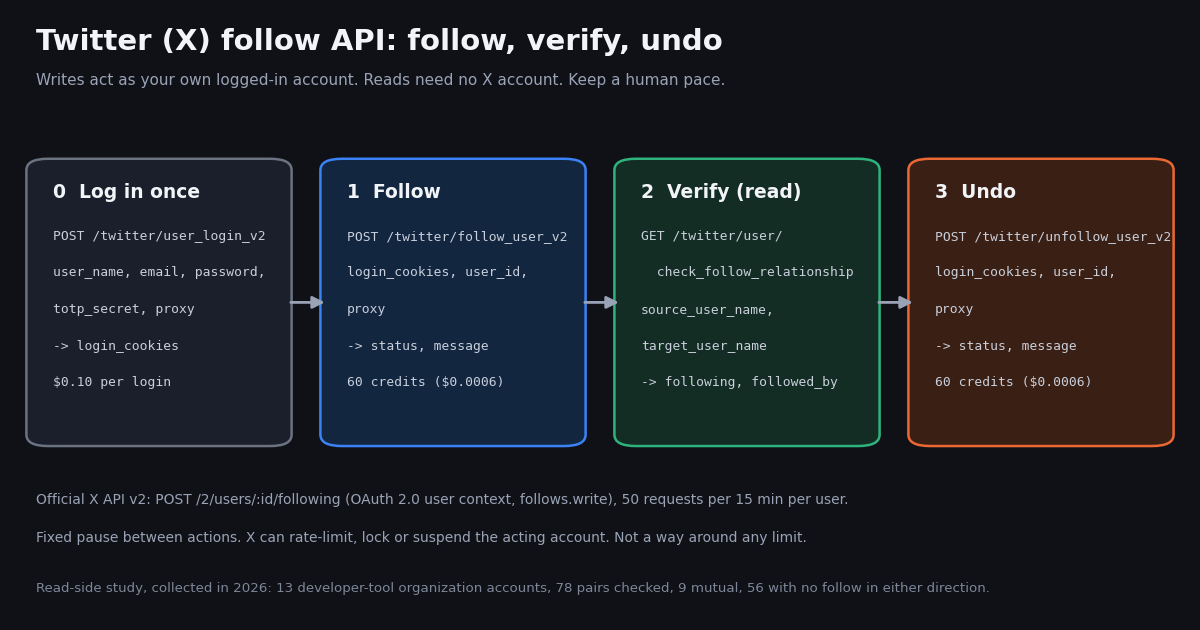
- Official X API:
POST /2/users/:id/followingwith bodytarget_user_id, OAuth 2.0 user context (follows.write), 50 requests per 15 minutes per user per docs.x.com. - TwitterAPI.io:
POST /twitter/follow_user_v2withlogin_cookies,user_idandproxy; 60 credits ($0.0006) per call;/twitter/unfollow_user_v2undoes it. - Session first: one
/twitter/user_login_v2call ($0.10) returnslogin_cookies; the session can need a re-login later. - Verify with a read:
/twitter/user/check_follow_relationshipreturnsfollowingandfollowed_byfor 100 credits ($0.001) per check; no X account needed. - Our study: among 13 developer-tool organization accounts, only 31 of 156 possible follows exist and 56 of 78 pairs follow neither way.
- Pace: a fixed pause between actions, your own account only, stop on the first error. Follow-for-follow and mass follow churn break X's automation rules.
"Twitter follow API" means one of two things: the endpoint that makes an account follow another one, or the endpoints that tell you who follows whom. This page is about the first, the write action, and uses the second to check the result. If you want to export the list of accounts someone follows, or to unfollow in bulk, there are dedicated guides for those linked below; this page does not repeat them.
A follow is never anonymous. Whether you use the official X API or TwitterAPI.io, the request acts as a real X account that you control, so X's rules for that account apply to every call. The sections below give the exact request and response for both APIs, the price of each call, a verification step, a read-only study of how 13 well-known developer-tool accounts follow each other, and the pacing rules that keep a follow script within what X allows.
One note on evidence: no write call was made for this page. The follow and unfollow request fields and the response shape below come from the endpoint pages on docs.twitterapi.io and docs.x.com, read this year, and are shown as documented shapes, not captured responses. The relationship study uses read endpoints only.
56 of 78 (71.8%)
Two follow APIs, side by side
The official X API and TwitterAPI.io both let code follow an account, but they authorize the action differently. X authorizes an app on behalf of a user through OAuth 2.0; TwitterAPI.io acts through a logged-in session of the account itself, identified by login_cookies. The table compares the follow calls as documented on docs.x.com and docs.twitterapi.io.
Which to pick. If you already run an X developer app with OAuth 2.0 and only need a few follows for users who sign in to your app, the official endpoint is the natural fit. If you want to act as your own account from a script, together with the reads (profiles, timelines, search) priced per result, the session route on TwitterAPI.io keeps everything behind one API key. In both cases the follow is attributed to a real account and counts against that account's limits on X.
Reads around the follow. The lookups that usually surround a follow (resolve a handle, read a timeline, check a relationship) need no X account on TwitterAPI.io. Tweet reads are $0.15 per 1,000 tweets returned on our rate card versus $0.005 per post read ($5 per 1,000) on X's pay-per-usage rate card, about 33x apart; profiles are $0.18 per 1,000 versus $0.010 per user read on X. Request rate is 0.2 requests per second before the first payment and 20 once paid; see the pricing page for plans.
Step 1: get a session with user_login_v2
Write endpoints on TwitterAPI.io need a session for the acting account. POST /twitter/user_login_v2 takes user_name, email, password and proxy (all required) plus an optional totp_secret, and returns login_cookies, status and message. The docs list the price as 10,000 credits ($0.10 per call).
Use the 2FA seed. docs.twitterapi.io describes totp_secret as the base32 seed of the authenticator (not a six-digit code) and warns that accounts without 2FA may yield a login_cookies value that gets flagged and cannot post. Turning on authenticator-app 2FA for the account before logging in avoids that.
Bring your own proxy. The proxy field takes the form http://username:password@ip:port. The docs ask for a high-quality residential proxy and advise against free ones. Use one stable proxy per account rather than rotating, so the session looks like the same person on the same connection.
Reuse the cookies. The returned login_cookies works only with the endpoints that carry the _v2 suffix (for example follow_user_v2, create_tweet_v2). Store it like a password and reuse it; logging in before every follow wastes $0.10 each time and creates a pattern of repeated logins. The session can still need a re-login later, for example after a password change or when X ends it. The login and posting guide linked below covers this step in depth.
Step 2: follow an account with follow_user_v2
POST /twitter/follow_user_v2 takes a JSON body with three required strings: login_cookies (from step 1), user_id (the numeric id of the account to follow, not its handle) and proxy. The X-API-Key header authenticates you to TwitterAPI.io. Each call costs 60 credits ($0.0006) and is billed per HTTP 200 call, including a 200 whose status is error because X rejected the follow.
Resolve the handle first. If you only have a handle, call /twitter/user/info?userName=<handle> and read data.id. That read costs 18 credits per profile ($0.18 per 1,000 profiles). An unknown handle returns HTTP 200 with status: "error" and msg: "user not found", so check status rather than the HTTP code.
Read the documented response. A 200 carries status (success or error) and message. Per docs.twitterapi.io, the call returns success when you already follow the user or a follow request is pending, so repeating a follow is harmless but still billed. When X refuses, status is error and message contains X's reason. A 400 carries error (an integer) and message. The example below is the documented shape, not a response we captured: no write call was made for this page.
Protected accounts. Following a protected account creates a follow request rather than a follow. On the official API this shows up as pending_follow: true; on TwitterAPI.io the call returns success and check_follow_relationship keeps reporting following: false until the other side approves.
import os
import requests

BASE = "https://api.twitterapi.io"
HEADERS = {"X-API-Key": os.environ["TWITTERAPI_IO_KEY"]}

r = requests.post(f"{BASE}/twitter/follow_user_v2", headers=HEADERS, timeout=60, json={
    "login_cookies": os.environ["X_LOGIN_COOKIES"],   # from /twitter/user_login_v2
    "user_id": "91985735",                            # numeric id, not the handle
    "proxy": os.environ["X_SESSION_PROXY"],           # http://username:password@ip:port
})
print(r.status_code, r.json())
# Documented 200 shape (docs.twitterapi.io, not a captured response):
# {"status": "success", "message": ""}
# When X rejects the follow: {"status": "error", "message": "<X's reason>"}Step 3: verify the follow with check_follow_relationship
A follow call telling you success means the request was accepted, not that the follow is visible yet. The read endpoint GET /twitter/user/check_follow_relationship confirms it. It takes source_user_name (required) and target_user_name, and returns data.following (the source follows the target) and data.followed_by (the target follows the source), plus status and message. It needs no X account and no session, only your API key, and costs 100 credits ($0.001) per check.
One call, both directions. Because the response carries both booleans, one call per pair is enough to tell mutual, one-way and no relationship apart. That is what the study below relies on: 78 calls covered all 156 directed edges among 13 accounts.
When to check. Check once after a short fixed pause following the follow call, not in a tight loop. If following is still false and the target is not protected, treat it as a failed follow, log the message from the follow call, and stop the run rather than retrying.
No-code option. For a one-off check by hand, the free Twitter follow checker tool linked below runs the same relationship lookup in the browser.
import itertools
import os
import requests

BASE = "https://api.twitterapi.io"
HEADERS = {"X-API-Key": os.environ["TWITTERAPI_IO_KEY"]}
ACCOUNTS = ["vercel", "github", "Docker", "Cloudflare", "supabase", "stripe", "netlify",
            "figma", "MongoDB", "nextjs", "reactjs", "typescript", "nodejs"]

edges = set()
for a, b in itertools.combinations(ACCOUNTS, 2):     # 78 unordered pairs, one call each
    r = requests.get(f"{BASE}/twitter/user/check_follow_relationship", headers=HEADERS,
                     params={"source_user_name": a, "target_user_name": b}, timeout=30)
    body = r.json()
    if body.get("status") != "success":
        print(a, b, body.get("message"))
        continue
    if body["data"]["following"]:
        edges.add((a, b))                             # a follows b
    if body["data"]["followed_by"]:
        edges.add((b, a))                             # b follows a

mutual = sum(1 for a, b in edges if (b, a) in edges) // 2
print(len(edges), "follow edges,", mutual, "mutual pairs")Study: who follows whom among 13 developer-tool accounts
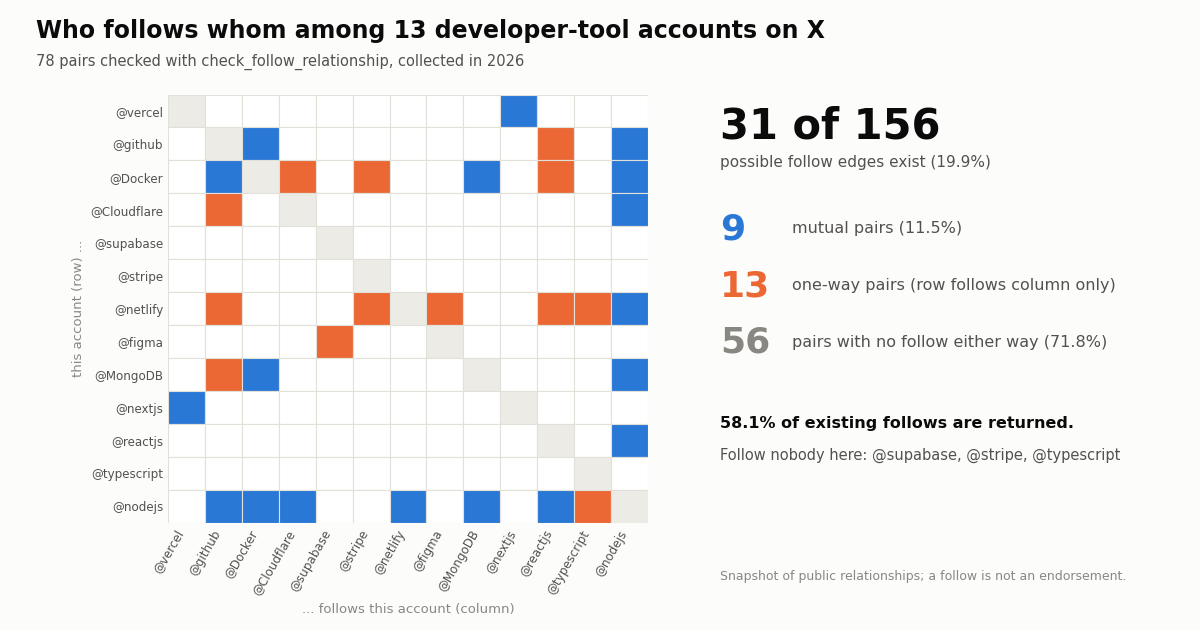
To show the read side at work, we ran check_follow_relationship on every pair among 13 public developer-tool organization accounts: @vercel, @github, @Docker, @Cloudflare, @supabase, @stripe, @netlify, @figma, @MongoDB, @nextjs, @reactjs, @typescript and @nodejs. That is 78 pairs and 156 possible directed follows. All 78 calls returned status: success.
Sparse network. Only 31 of the 156 possible follows exist (19.9%). 56 pairs (71.8%) follow each other in neither direction, 13 pairs are one-way and 9 pairs (11.5%) are mutual.
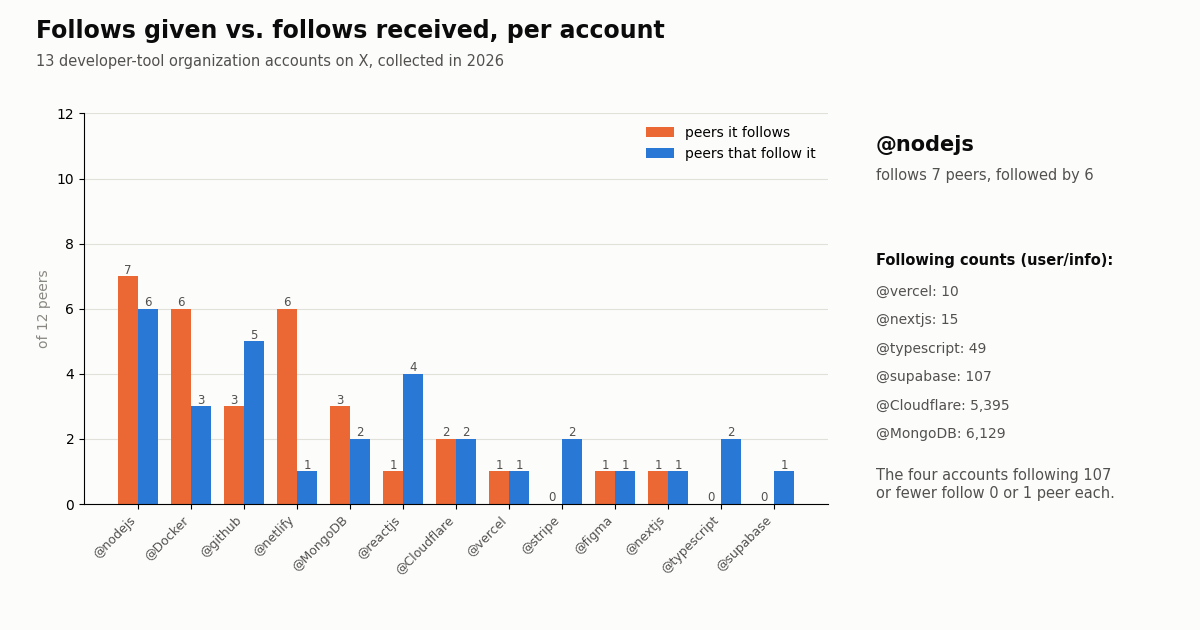
Follows tend to be returned. Of the 31 follows that exist, 58.1% are part of a mutual pair. @nodejs is the hub of this group: it follows 7 peers and is followed by 6, all 6 of those mutual.
Some accounts follow nobody here. @supabase, @stripe and @typescript follow none of the other 12, even though each is followed by at least one of them. Accounts with small following lists (10 for @vercel, 15 for @nextjs, 49 for @typescript, 107 for @supabase) follow no more than one peer each.
Per-account results: follows given and received
The table lists each account's total following count from /twitter/user/info next to the follows it gives to and receives from the other 12 accounts in the group.
What it shows for a follow workflow. A relationship check is cheap and unambiguous, so it makes a good gate before and after any follow: skip the follow if following is already true, and confirm it afterwards. It also shows why follow-back expectations are a poor basis for automation: in this group of peers in the same industry, 56 of 78 pairs have no follow at all, and accounts with short following lists rarely follow anyone back.
Correlation only. This is a snapshot of one small, hand-picked group. It does not show why an account follows another, and a follow is not an endorsement.
The official route: POST /2/users/:id/following
On the official X API v2, POST /2/users/:id/following makes the authenticated user follow another user. The path id is the authenticated user's own numeric id and the JSON body carries target_user_id (a string of 1 to 19 digits; no other properties are allowed). docs.x.com lists OAuth 2.0 Authorization Code with user context and the scopes follows.write, tweet.read and users.read. The 200 response holds data.following and data.pending_follow, the latter true when the target is protected and has to approve.
Rate limit. The rate-limits page on docs.x.com lists 50 requests per 15 minutes per user for both POST /2/users/:id/following and DELETE /2/users/:source_user_id/following/:target_user_id, with no per-app figure. The follows lookups (GET /2/users/:id/following and /followers) are listed at 300 per 15 minutes.
Price. The X pricing page (docs.x.com/x-api/getting-started/pricing) is pay-per-usage and lists no separate line for following an account; the nearest entry is User Interaction: Create at $0.015 per request. Reading followers or following costs $0.010 per resource, a user read $0.010, a post read $0.005, and pay-per-usage is capped at 3 million post reads a month with Enterprise above that. X adds $20 in credits when you save a first eligible card and matches a first auto-recharge up to $50.
The older v1.1 method. Older tutorials use POST friendships/create from the v1.1 API. New code should target the v2 endpoint above, which is what docs.x.com documents today.
# Official X API v2 (docs.x.com): follow as the authenticated user
# Needs an OAuth 2.0 user-context token with follows.write, tweet.read, users.read
curl -X POST "https://api.x.com/2/users/$MY_USER_ID/following" \
  -H "Authorization: Bearer $USER_ACCESS_TOKEN" \
  -H "Content-Type: application/json" \
  -d '{"target_user_id": "91985735"}'
# 200: {"data": {"following": true, "pending_follow": false}}

# Unfollow
curl -X DELETE "https://api.x.com/2/users/$MY_USER_ID/following/91985735" \
-H "Authorization: Bearer $USER_ACCESS_TOKEN"Pacing and X's rules: what a follow script must not do
A follow script is the easiest automation on X to get wrong. X's automation rules (help.x.com/en/rules-and-policies/x-automation) and its following rules (help.x.com/en/using-x/x-follow-limit) restrict automated following: aggressive following, following and then unfollowing in bulk (follow churn), and follow-for-follow schemes are not allowed. The follow-limit page describes a daily technical follow limit plus an overall cap that depends on the account, and states that these technical limits sit on top of separate rules against aggressive following. help.x.com could not be fetched for this page, so the exact wording and numbers are not quoted here; read those pages before you run anything.
The standard pacing line. Only your own account, a normal human pace, X's automation rules apply, and the account can be rate-limited, locked or suspended. A fixed pause between actions is not a way around any limit; it only keeps a small, legitimate job at a human rhythm.
Good for. Following a short list you chose by hand (new team accounts, a partner, the maintainers of a tool you use), following back a specific person from your app, or undoing a follow you made by mistake.
Not for. Following accounts pulled from search results or someone else's follower list, following to get a follow back, or follow and unfollow cycles. Those patterns are what X's rules describe, and they lead to errors such as the 226 "this request looks like it might be automated" response and to locked accounts; both have their own troubleshooting pages linked below.
Stop on the first error. If follow_user_v2 returns status: error, log X's message and stop the run. Retrying the same follow in a loop repeats the behavior X just objected to, and every attempt is billed as an HTTP 200 call.
import os
import time
import requests

BASE = "https://api.twitterapi.io"
HEADERS = {"X-API-Key": os.environ["TWITTERAPI_IO_KEY"]}
PROXY = os.environ["X_SESSION_PROXY"]          # http://username:password@ip:port, your own proxy
PAUSE_SECONDS = 30                              # fixed pause between write actions


def login_once():
    """One login per account; reuse the returned login_cookies until X invalidates them."""
    r = requests.post(f"{BASE}/twitter/user_login_v2", headers=HEADERS, timeout=60, json={
        "user_name": os.environ["X_USER_NAME"],
        "email": os.environ["X_EMAIL"],
        "password": os.environ["X_PASSWORD"],
        "totp_secret": os.environ.get("X_TOTP_SECRET", ""),
        "proxy": PROXY,
    })
    body = r.json()
    if body.get("status") != "success":
        raise RuntimeError(f"login failed: {body.get('message')}")
    return body["login_cookies"]


def user_id_for(handle):
    """Resolve a handle to the numeric id that follow_user_v2 expects (no X account needed)."""
    r = requests.get(f"{BASE}/twitter/user/info", headers=HEADERS,
                     params={"userName": handle}, timeout=30)
    body = r.json()
    if body.get("status") != "success" or not body.get("data"):
        raise LookupError(f"{handle}: {body.get('msg')}")
    return body["data"]["id"]


def follow(cookies, user_id):
    r = requests.post(f"{BASE}/twitter/follow_user_v2", headers=HEADERS, timeout=60,
                      json={"login_cookies": cookies, "user_id": user_id, "proxy": PROXY})
    return r.status_code, r.json()


def unfollow(cookies, user_id):
    r = requests.post(f"{BASE}/twitter/unfollow_user_v2", headers=HEADERS, timeout=60,
                      json={"login_cookies": cookies, "user_id": user_id, "proxy": PROXY})
    return r.status_code, r.json()


def is_following(me, other):
    r = requests.get(f"{BASE}/twitter/user/check_follow_relationship", headers=HEADERS,
                     params={"source_user_name": me, "target_user_name": other}, timeout=30)
    data = r.json().get("data") or {}
    return data.get("following"), data.get("followed_by")


if __name__ == "__main__":
    me = os.environ["X_USER_NAME"]
    targets = ["nodejs", "typescript"]          # a short, hand-picked list you actually want to follow
    cookies = login_once()
    for handle in targets:
        uid = user_id_for(handle)
        code, body = follow(cookies, uid)
        print(handle, code, body.get("status"), body.get("message"))
        if body.get("status") != "success":
            break                               # stop on the first error; do not retry in a loop
        time.sleep(PAUSE_SECONDS)               # fixed pause, then confirm with a read
        print(handle, "following, followed_by =", is_following(me, handle))
How we collected this
Question. How often do well-known developer-tool organization accounts on X follow each other, how many pairs are mutual, and which accounts follow none of their peers? The study demonstrates the verification step of a follow workflow.
Accounts. 13 public organization accounts: @vercel, @github, @Docker, @Cloudflare, @supabase, @stripe, @netlify, @figma, @MongoDB, @nextjs, @reactjs, @typescript, @nodejs.
Method and window. One snapshot, collected in 2026, through our rate-limited read client: /twitter/user/info for each account (13 requests) and /twitter/user/check_follow_relationship for every unordered pair (78 requests), 91 requests in total and $0.080 at list prices. No follow, unfollow or login call was made. Median wall time per check through the shared client was 1.33 s (p90 1.79 s), which includes the client's own rate-limit spacing and is not server latency.
What the sample cannot show. Thirteen accounts are a small, hand-picked group, not a random sample of X. The snapshot says nothing about when a follow happened, why, or how relationships change over time, and it cannot measure the write endpoints, which were documented from docs.twitterapi.io rather than called.
Privacy. Organization accounts only; relationships between the named accounts only; no follower lists and no private individuals. The raw responses, aggregates (results.json) and analysis script live in the repository under data/studies/twitter-follow-api/.
import os
import time
import requests

BASE = "https://api.twitterapi.io"
HEADERS = {"X-API-Key": os.environ["TWITTERAPI_IO_KEY"]}
PROXY = os.environ["X_SESSION_PROXY"]          # http://username:password@ip:port, your own proxy
PAUSE_SECONDS = 30                              # fixed pause between write actions


def login_once():
    """One login per account; reuse the returned login_cookies until X invalidates them."""
    r = requests.post(f"{BASE}/twitter/user_login_v2", headers=HEADERS, timeout=60, json={
        "user_name": os.environ["X_USER_NAME"],
        "email": os.environ["X_EMAIL"],
        "password": os.environ["X_PASSWORD"],
        "totp_secret": os.environ.get("X_TOTP_SECRET", ""),
        "proxy": PROXY,
    })
    body = r.json()
    if body.get("status") != "success":
        raise RuntimeError(f"login failed: {body.get('message')}")
    return body["login_cookies"]


def user_id_for(handle):
    """Resolve a handle to the numeric id that follow_user_v2 expects (no X account needed)."""
    r = requests.get(f"{BASE}/twitter/user/info", headers=HEADERS,
                     params={"userName": handle}, timeout=30)
    body = r.json()
    if body.get("status") != "success" or not body.get("data"):
        raise LookupError(f"{handle}: {body.get('msg')}")
    return body["data"]["id"]


def follow(cookies, user_id):
    r = requests.post(f"{BASE}/twitter/follow_user_v2", headers=HEADERS, timeout=60,
                      json={"login_cookies": cookies, "user_id": user_id, "proxy": PROXY})
    return r.status_code, r.json()


def unfollow(cookies, user_id):
    r = requests.post(f"{BASE}/twitter/unfollow_user_v2", headers=HEADERS, timeout=60,
                      json={"login_cookies": cookies, "user_id": user_id, "proxy": PROXY})
    return r.status_code, r.json()


def is_following(me, other):
    r = requests.get(f"{BASE}/twitter/user/check_follow_relationship", headers=HEADERS,
                     params={"source_user_name": me, "target_user_name": other}, timeout=30)
    data = r.json().get("data") or {}
    return data.get("following"), data.get("followed_by")


if __name__ == "__main__":
    me = os.environ["X_USER_NAME"]
    targets = ["nodejs", "typescript"]          # a short, hand-picked list you actually want to follow
    cookies = login_once()
    for handle in targets:
        uid = user_id_for(handle)
        code, body = follow(cookies, uid)
        print(handle, code, body.get("status"), body.get("message"))
        if body.get("status") != "success":
            break                               # stop on the first error; do not retry in a loop
        time.sleep(PAUSE_SECONDS)               # fixed pause, then confirm with a read
        print(handle, "following, followed_by =", is_following(me, handle))
Researching this?Free starter credits cover end-to-end testing — Google sign-in, no card. Get a key.
Questions readers ask
Is there a Twitter (X) API endpoint to follow a user?
Yes. The official X API v2 has POST /2/users/:id/following with target_user_id in the body and an OAuth 2.0 user-context token with follows.write. TwitterAPI.io has POST /twitter/follow_user_v2, which takes login_cookies, user_id and proxy and costs 60 credits ($0.0006) per call.
How many accounts can I follow through the API?
docs.x.com lists 50 follow requests per 15 minutes per user on the official endpoint. That is a rate limit, not a target: X also applies its own following limits and automation rules to the account (help.x.com/en/using-x/x-follow-limit). Follow a short, hand-picked list at a human pace and stop on the first error.
Do I need a user_id or can I use a handle?
Both follow endpoints take the numeric user id. Resolve a handle with /twitter/user/info?userName=<handle> and read data.id; that read costs 18 credits per profile and needs no X account.
How do I check whether the follow worked?
Call GET /twitter/user/check_follow_relationship with source_user_name (your account) and target_user_name. data.following is true once the follow is in place; data.followed_by tells you whether they follow you. It costs 100 credits ($0.001) per check.
What happens if I follow a protected account?
The follow becomes a request that the account owner must approve. The official API returns pending_follow: true. On TwitterAPI.io the call returns success and the relationship check keeps showing following: false until it is approved.
What happens if I call follow_user_v2 twice?
Per docs.twitterapi.io, the call returns success when you already follow the user or a request is pending, so a repeat is harmless for the relationship. It is still billed as an HTTP 200 call, so check the relationship first instead of repeating follows.
Why did my follow return an error or a 226 message?
When X rejects a follow, status is error and message carries X's reason. A 226 "looks like it might be automated" message or a locked account usually follows fast or repetitive actions. Stop the run, slow down, and see the 226 and locked-account guides linked on this page.
Can I use the follow API for follow-for-follow growth?
No. X's automation rules prohibit automated aggressive following, follow churn and follow-for-follow schemes, and the acting account can be rate-limited, locked or suspended. Use the endpoint for follows you would make by hand.
Continue
- docs.twitterapi.io: follow_user_v2 (login_cookies, user_id, proxy; status and message; 60 credits)
- docs.twitterapi.io: check_follow_relationship (following, followed_by; 100 credits)
- docs.twitterapi.io: user_login_v2 (login_cookies, totp_secret, proxy; $0.10 per call)
- X API docs: Follow user, POST /2/users/:id/following
- X API docs: rate limits (manage follows 50 per 15 min per user)
- X API docs: pay-per-usage pricing
- X API overview: endpoints, pricing and access
- Log in with user_login_v2 and post from code
- Export who an account follows with the API
- Unfollow many accounts with the API, carefully
- Remove followers and bulk unfollow
- Fix the 226 'looks like it might be automated' error
- What to do when an X account is locked
- Free Twitter follow checker
- TwitterAPI.io pricing: pay only for the data returned
- 01How to Hyperlink on Twitter (X): What Works, What Doesn't, and What 1,032 Posts Show
- 02How to See Deleted Twitter (X) Messages: What Can and Cannot Come Back
- 03Twitter (X) API to BigQuery: Load Tweets with Python and Query Them in SQL
- 04Twitter (X) API in Ruby with Net::HTTP, Faraday and Rails
- 05rtweet in 2026: Is the R Twitter (X) Package Dead, and What to Use Instead
- 06Can You Hide Who You Follow on Twitter (X)?
- 07Twitter (X) Enterprise API: What It Includes, Who Needs It, and What It Costs
- 08Twitter (X) Search Operators — Complete API Reference
Writing about something you built with TwitterAPI.io? Our community rewards program pays API credits for honest tutorials, build logs and videos.
Stop reading. Start building.
Starter credits cover real testing on real data. Google sign-in, no card, no application queue.
Get an API keyAlready building with TwitterAPI.io? Publish an honest tutorial or build log about it and earn up to $200 a month in API credits.