Twitter (X) API Pagination Explained: max_id, next_token and Cursors
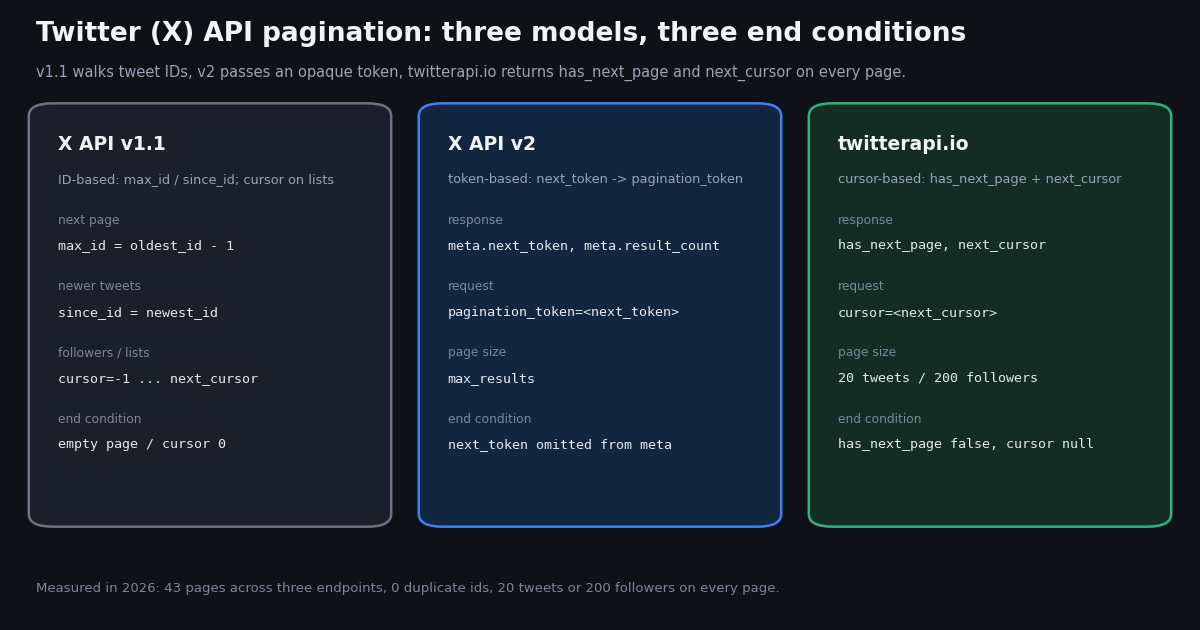
Every X endpoint that returns a list returns a slice of it, and the question behind the search term "twitter api pagination" is always the same: how do I get the next slice, how do I know I have the last one, and how do I avoid counting a tweet twice. The answer has changed with each generation of the API, and most pages that rank for the query answer only one generation. This page answers all three: X API v1.1's max_id and since_id, X API v2's next_token and pagination_token, and the has_next_page and next_cursor fields that twitterapi.io returns on /twitter/user/last_tweets, /twitter/tweet/advanced_search, /twitter/user/followers and every other list endpoint.
Documentation tells you the field names. It rarely tells you what the last page actually looks like, whether page boundaries overlap, how big the cursor gets, or how long each page takes. So we measured: 45 requests in 2026 against three organization accounts (@github, @vercel, @NASA) on the timeline endpoint, a from:github search, a one-week bounded search run to its end, and three pages of @github's followers. The result is a set of numbers you can design a loop around, two loops (Python and JavaScript) that handle the cursor correctly, and a pitfalls list drawn from where those loops go wrong.
One disambiguation before we start: our guide to using Cursor with the Twitter API is about the Cursor code editor, not about pagination cursors. If you arrived here looking for that, follow the link; everything below is about paging through results.
The three pagination models at a glance
X has shipped three different ways to page through a list, and they are still all in use: v1.1 endpoints survive in many libraries and in the collective memory of Stack Overflow, v2 is the official API's current surface, and third-party providers such as twitterapi.io expose their own cursor fields on top of the same data. The parameters differ, the end conditions differ, and the mistakes you can make differ. Here is the map; each model gets its own section below.
The two X-side columns come from X's documentation (docs.x.com/x-api/fundamentals/pagination for v2; the v1.1 parameter wording as reproduced verbatim in Tweepy's API reference, because the original v1.1 guide pages on developer.x.com answered our fetch with HTTP 402 this session). The twitterapi.io column comes from docs.twitterapi.io plus the measurements further down, which is where the parenthetical about null comes from.
X API v1.1: max_id, since_id and the numeric cursor
v1.1 did not have a pagination token for tweets. It relied on the fact that tweet IDs increase over time, so a page boundary can be expressed as an ID. Two parameters do the work, and the definitions matter because one of them is inclusive.
max_id "returns only statuses with an ID less than (that is, older than) or equal to the specified ID." Because it is inclusive, a loop that sets max_id to the oldest ID on the previous page will get that tweet again as the first item of the next page. The standard fix is max_id = oldest_id - 1, which is why every v1.1 pagination snippet subtracts one. Tweet IDs are 64-bit integers; in JavaScript they exceed Number.MAX_SAFE_INTEGER, so use the id_str field and BigInt, or you will subtract one from a rounded number and skip or repeat tweets.
since_id "returns only statuses with an ID greater than (that is, more recent than) the specified ID." It is exclusive, so there is no off-by-one. The idiom for a poller is: remember the highest ID you have processed, pass it as since_id, and walk backwards from the top of the new slice with max_id until the page comes back empty. Items can still arrive out of order if the API's index is a few seconds behind, which is the origin of the "re-read a little overlap and de-duplicate" advice you will see repeated for every generation of the API.
Lists use a cursor, not IDs. Followers, friends and list-member endpoints in v1.1 take a cursor parameter: "Provide a value of -1 to begin paging. Provide values as returned to in the response body's next_cursor and previous_cursor attributes to page back and forth in the list." The cursor is a signed 64-bit integer delivered both as a number and as next_cursor_str; a value of 0 means there is no next page. If that sounds familiar after reading the twitterapi.io section, it should: the followers endpoint we measured returns a 19-digit numeric cursor that looks exactly like this family.
End condition. For max_id paging, the loop ends when a page returns no tweets (or fewer than you asked for, though relying on the count is fragile because v1.1 silently dropped suspended and deleted tweets from a page). For cursored lists, it ends when next_cursor is 0. The code you will find in old Tweepy and twython issues (one twython issue is literally titled "twitter.cursor(twitter.search, since_id=...) return duplicated results") fails in exactly these two places: the inclusive max_id and a loop that trusts the page count.
X API v2: pagination_token and meta.next_token
v2 replaced ID arithmetic with an opaque token, and the official pagination page (docs.x.com/x-api/fundamentals/pagination) is short enough to quote. The request side has two parameters: max_results, "results per page (endpoint-specific default)", and pagination_token, which you "set to next_token or previous_token value" from the previous response. The response side lives in the meta object: next_token ("use to get the next page"), previous_token ("use to go back a page") and result_count.
The end condition is an absence. The documentation's words: "When there are no more results, next_token is omitted." Not null, not an empty string: the key is missing from meta. In Python that is token = body.get("meta", {}).get("next_token") followed by if not token: break; a loop that does body["meta"]["next_token"] raises KeyError on the last page, which is the single most common v2 pagination bug we see in issue trackers.
A note on names. On the request you always send pagination_token. The value you put in it is whatever meta.next_token said. People search for "x api next_token" and then try to send a next_token query parameter, which v2 ignores; the result is page 1 forever. If your loop never terminates and every page has the same newest_id, this is why.
Newer items. The same page says: "For new data, use since_id instead of paginating repeatedly." since_id and until_id exist on v2 timelines and search, and they are exclusive bounds, so the v1.1 off-by-one does not apply. A v2 poller therefore looks like the v1.1 one: keep meta.newest_id, pass it as since_id, page with pagination_token until next_token disappears.
What it costs. The official X API's pay-per-use rate card (docs.x.com/x-api/getting-started/pricing) charges $0.005 per post read, $0.010 per user read and $0.010 per follower or following read, with pay-per-usage "capped at 3 million Post reads per monthly billing cycle" and Enterprise above that. Pagination multiplies that: every page is result_count reads, so a 10-page backfill of 100 tweets a page is 1,000 reads, $5.00. Keep that number in mind for the cost table at the end.
twitterapi.io: cursor in, has_next_page and next_cursor out, on every list endpoint
twitterapi.io uses one pagination contract across its list endpoints, and it is the simplest of the three. The request takes a cursor query parameter whose documented first value is the empty string ("The cursor to paginate through the results. First page is ""." on docs.twitterapi.io); omitting the parameter works the same way, which is what our collection script did. The response carries two top-level fields: has_next_page (boolean, "indicates if there are more results available") and next_cursor (string, "cursor for fetching the next page of results"). You copy next_cursor into cursor and call again.
Where the items are differs by endpoint, where the cursor is does not. On /twitter/user/last_tweets the tweets sit under data.tweets (the pinned tweet separately as data.pin_tweet), and the documentation stresses that has_next_page and next_cursor are "top level, not inside data". On /twitter/tweet/advanced_search the tweets are a top-level tweets array. On /twitter/user/followers (and /twitter/user/followings) the records are a top-level followers (or followings) array in snake_case: id, screen_name, name, followers_count, created_at and so on. We confirmed the top-level keys on the pages we fetched: the timeline response has code, data, has_next_page, msg, next_cursor, status; the search response has only has_next_page, next_cursor, tweets; the followers response has code, followers, has_next_page, msg, next_cursor, status. So a generic page loop can read the two cursor fields the same way everywhere and only the item accessor changes.
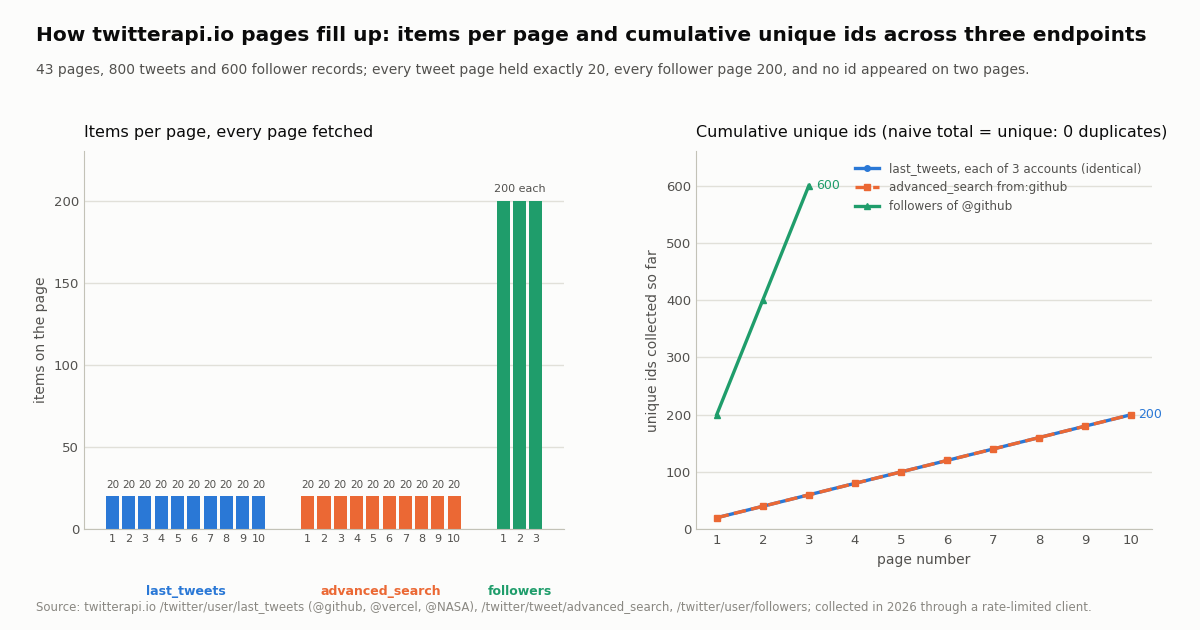
Page sizes. Timelines return "up to 20 tweets" per page, newest first; search returns "up to 20" with the documented caveat that a page is "sometimes less than 20, because we will filter out ads or other not tweets"; followers take a pageSize parameter, "default is 200, min 20, max 200". In our 43 cursored pages every tweet page held exactly 20 and every follower page exactly 200, so the documented maxima are what you get in practice on active accounts.
What a correct loop looks like. The Python function below pages any of the three endpoints, de-duplicates by id, resumes from a saved cursor, and treats has_next_page as the only end signal. It is the loop we used for the measurements, minus the timing. Note the literal endpoint paths: there is no /v1/ or /v2/ prefix on api.twitterapi.io, and the header is X-API-Key.
Rate limits while paging. Accounts that have not made a payment are limited to 0.2 requests a second; paid accounts get 20, Scale 50, Business 500. A page loop is the easiest way to hit the unpaid limit because it fires requests back to back, so the loop below sleeps on HTTP 429 and backs off. Our rate limit exceeded guide covers the X-side 429 as well.
import os
import time

import requests

BASE = "https://api.twitterapi.io"
H = {"X-API-Key": os.environ["TWITTERAPI_IO_API_KEY"]}


def page_loop(url, params, items_of, max_pages=10, cursor="", seen=None):
    """Yield (items, cursor) per page. Stops on has_next_page=false, de-duplicates by id, resumable."""
    seen = set() if seen is None else seen
    for _ in range(max_pages):
        q = dict(params)
        if cursor:
            q["cursor"] = cursor            # the cursor is opaque text: 428 to 1,383 chars on tweet endpoints
        r = requests.get(url, headers=H, params=q, timeout=30)
        if r.status_code == 429:           # 0.2 req/s before the first payment, 20 after
            time.sleep(5)
            continue
        r.raise_for_status()
        body = r.json()
        fresh = [x for x in items_of(body) if x["id"] not in seen]
        seen.update(x["id"] for x in fresh)
        cursor = body.get("next_cursor") or ""
        yield fresh, cursor
        if not body.get("has_next_page"):  # the ONLY end signal; a short page is not the end
            return


# 1. user timeline: tweets live under data.tweets, 20 per page, newest first
for tweets, cur in page_loop(f"{BASE}/twitter/user/last_tweets", {"userName": "github"},
                             lambda b: (b.get("data") or {}).get("tweets") or []):
    print(len(tweets), "tweets, oldest:", tweets[-1]["createdAt"] if tweets else None)

# 2. search: tweets are top-level; bound the window with since_time / until_time (unix seconds)
for tweets, cur in page_loop(f"{BASE}/twitter/tweet/advanced_search",
                             {"query": "from:github since_time:1750000000", "queryType": "Latest"},
                             lambda b: b.get("tweets") or []):
    print(len(tweets), "search results")

# 3. followers: 200 per page (pageSize 20-200), snake_case records, 19-digit numeric cursor
for users, cur in page_loop(f"{BASE}/twitter/user/followers", {"userName": "github", "pageSize": 200},
                            lambda b: b.get("followers") or [], max_pages=3):
print(len(users), "followers, first:", users[0]["screen_name"] if users else None)The same loop in JavaScript (fetch)
The Node version uses the built-in fetch (Node 18+) and the same three rules: cursor goes in the query string through URLSearchParams (which URL-encodes the cursor for you, important because the tweet-endpoint cursor contains _ and - and is over a kilobyte long), items are de-duplicated with a Set of IDs, and the loop ends only on has_next_page === false. It also persists the cursor between pages so a crashed run can resume where it stopped instead of paying for the pages again.
Two JavaScript-specific notes. First, twitterapi.io returns tweet and user IDs as strings, so there is no BigInt problem here; keep them as strings and never coerce to Number. Second, do not build the URL by string concatenation with the raw cursor: an unencoded + or = in a long cursor is the usual cause of a loop that returns page 1 again and again.
// paginate.mjs - Node 18+, no dependencies. TWITTERAPI_IO_API_KEY=... node paginate.mjs
import fs from "node:fs";

const BASE = "https://api.twitterapi.io";
const headers = { "X-API-Key": process.env.TWITTERAPI_IO_API_KEY };
const sleep = (ms) => new Promise((r) => setTimeout(r, ms));

async function* pageLoop(url, params, itemsOf, { maxPages = 10, cursor = "", stateFile } = {}) {
  const seen = new Set();
  if (stateFile && fs.existsSync(stateFile)) cursor = JSON.parse(fs.readFileSync(stateFile, "utf8")).cursor ?? "";
  for (let i = 0; i < maxPages; i++) {
    const q = new URLSearchParams({ ...params, ...(cursor ? { cursor } : {}) }); // URL-encodes the cursor
    const res = await fetch(`${url}?${q}`, { headers });
    if (res.status === 429) { await sleep(5000); i--; continue; }                // back off, retry the same page
    if (!res.ok) throw new Error(`HTTP ${res.status}`);
    const body = await res.json();
    const fresh = itemsOf(body).filter((x) => !seen.has(x.id));
    fresh.forEach((x) => seen.add(x.id));                                        // ids are strings: keep them so
    cursor = body.next_cursor ?? "";
    if (stateFile) fs.writeFileSync(stateFile, JSON.stringify({ cursor }));      // resume point
    yield fresh;
    if (!body.has_next_page) return;                                              // the only end signal
  }
}

// timeline: data.tweets, 20 per page
for await (const tweets of pageLoop(`${BASE}/twitter/user/last_tweets`, { userName: "vercel" },
    (b) => b.data?.tweets ?? [], { stateFile: "vercel-cursor.json" })) {
  console.log(tweets.length, "tweets, oldest", tweets.at(-1)?.createdAt);
}

// search: top-level tweets; bound with since_time / until_time to make a backfill finite
for await (const tweets of pageLoop(`${BASE}/twitter/tweet/advanced_search`,
    { query: "from:NASA since_time:1750000000", queryType: "Latest" }, (b) => b.tweets ?? [])) {
  console.log(tweets.length, "results");
}

// followers: top-level followers[], 200 per page, snake_case fields
for await (const users of pageLoop(`${BASE}/twitter/user/followers`, { userName: "NASA", pageSize: "200" },
    (b) => b.followers ?? [], { maxPages: 3 })) {
  console.log(users.length, "followers, first", users[0]?.screen_name);
}What we measured: items per page, duplicates, ordering and timing
We paged three endpoints with the loop above through a rate-limited client, in 2026: /twitter/user/last_tweets for @github, @vercel and @NASA (10 pages each, replies excluded by the default includeReplies), /twitter/tweet/advanced_search for from:github with queryType=Latest (10 pages), and /twitter/user/followers for @github (3 pages at the default pageSize). That is 43 cursored pages; a further 2 requests ran a one-week bounded search to its end to observe the final page. 45 requests, 815 tweets and 600 follower records, about $0.13 in credits.
Pages are full. Not one of the 40 tweet pages came back short, and all three follower pages were exactly 200. The documentation's "sometimes less than 20" caveat for search did not trigger on an organization account; expect it on keyword queries where ads and non-tweet cards are filtered out of a page after the fact.
Pages do not overlap. Across 1,400 items we found zero IDs that appeared on two pages and zero within a page. That is better than the v1.1 max_id experience, where the inclusive bound guarantees one duplicate per page unless you subtract one. Keep the seen set anyway: it is nearly free, and the moment you re-run a backfill, overlap two since_time: windows, or combine a timeline with a search for the same account, you will have duplicates from the combination even though no single paginated list produced any.
Pages are ordered. Every page's first tweet was no newer than the previous page's last tweet, for all four tweet sequences, so you can stop a backfill the moment a page crosses a date without inspecting the rest of it. Ten pages of 20 reached back 65 days for @NASA, 88 days for @github and 441 days for @vercel on the timeline, and 81 days on the from:github search (shorter than the timeline because the search includes replies).
Timing. Median wall-clock per page was 2.4 to 2.7 seconds as observed through our study client, which launches a process per request and spaces requests under a shared 5 requests-per-second cap; treat it as an upper bound on the server round-trip rather than a benchmark. Sequential paging at that pace fetches 1,000 tweets in about two minutes; a paid account's 20 requests-per-second allowance lets you run several accounts' loops concurrently.
The chart shows the per-page counts on the left and the cumulative unique-ID curve on the right; because there were no duplicates, the naive running total and the unique count are the same line.
The end of the list, and what the cursor looks like
Organization accounts with thousands of posts and millions of followers do not end within ten pages, so to observe the final page we ran /twitter/tweet/advanced_search for from:github with a since: and until: pair spanning one week. It took two requests. The first page returned 15 tweets, fewer than the page size, and still reported has_next_page: true with a 359-character next_cursor. The second page returned tweets: [], has_next_page: false and next_cursor: null. That is the end condition on twitterapi.io, and it has two consequences for your loop.
A short page is not the end. If your loop stops when len(tweets) < 20, it would have stopped after page 1 here, which happened to be correct, but only by luck: the server had not yet confirmed that nothing older existed. Stop on has_next_page, and expect that the confirmation can cost one extra request that returns nothing (billed at the 15-credit minimum, $0.00015).
next_cursor is null at the end, not an empty string. body.get("next_cursor") or "" in Python and body.next_cursor ?? "" in JavaScript handle both; body["next_cursor"] + "" or cursor.length will throw. The field is present on the last page (the response's top-level keys were still has_next_page, next_cursor, tweets), it just holds null.
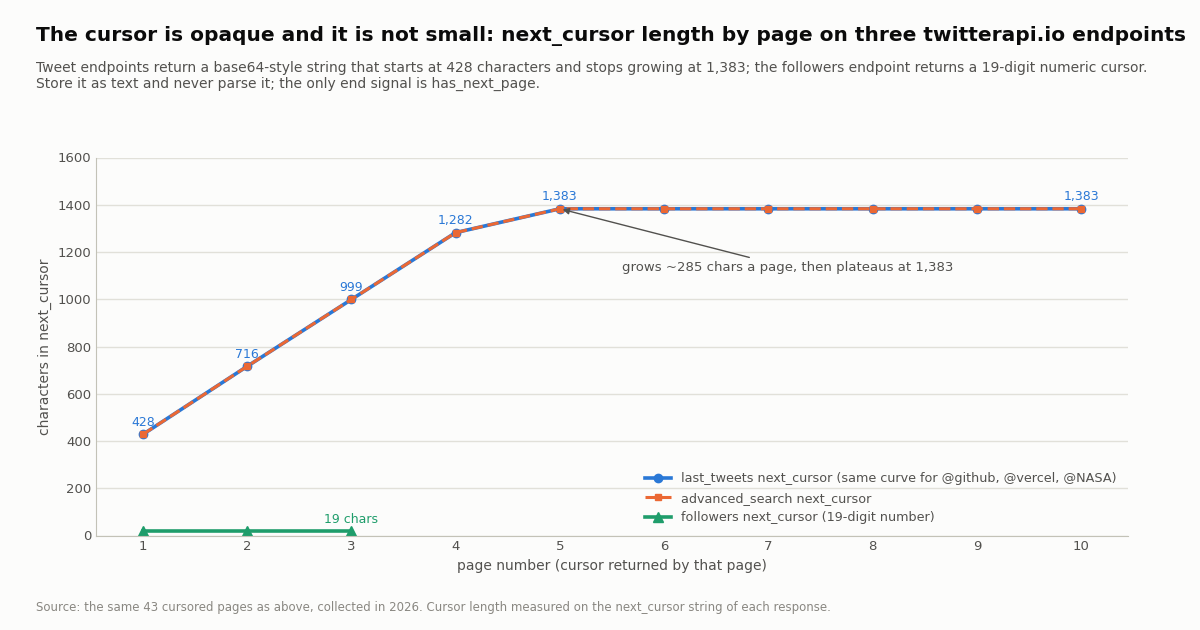
The tweet cursor grows, then plateaus. On both tweet endpoints the cursor was 428 characters after page 1 and grew by roughly 285 characters a page until page 5, after which every cursor was 1,383 characters long and still different from the previous one. The practical reading is that the cursor encodes a bounded amount of position state, not a pointer to a server-side session, which is also why a saved cursor can be resumed later. Size your storage for about 1.5 KB per cursor, send it URL-encoded, and do not try to decode it: the format is unspecified and changed shape across the three endpoints we tested.
The followers cursor is a number, and it is still opaque. It looks like a v1.1 list cursor (19 digits, decreasing from page to page in our sample), and it will tempt you to compare or subtract. Do not: treat it as a string, exactly as the v1.1 documentation told you to use next_cursor_str.
Pitfalls, and what paging 1,000 items costs
Trusting the item count. Covered above, but it is the top cause of silently truncated backfills on every generation of the API: v1.1 dropped deleted tweets from pages, search filters non-tweet cards, and the only reliable signal is the pagination field (next_token omitted, next_cursor of 0, has_next_page: false).
Forgetting the inclusive max_id. v1.1 only. Subtract one, and do it with id_str and BigInt in JavaScript.
Sending the token under the wrong name. v2 only: the response says next_token, the request wants pagination_token. On twitterapi.io the response says next_cursor and the request wants cursor; the names differ on purpose, so write them down once in a helper and never by hand.
Not URL-encoding the cursor. A 1,383-character string with _ and - survives URLSearchParams and requests' params= intact; it does not survive hand-built query strings in every HTTP client. Symptoms: page 1 forever, or HTTP 400.
Paging to the end when you wanted a window. A from: search for an active account has thousands of pages. Bound it with since_time: and until_time: (Unix seconds) in the query and page only that window; split a long range into day-sized windows so each one terminates and can be retried independently. The search by date guide covers the operators.
Duplicates from your own design. No single list produced duplicates in our sample, but two overlapping windows, a timeline plus a search for the same account, or a re-run after a crash will. De-duplicate by id at the storage layer, not only in memory.
Rate limits while paging. A tight loop on an unpaid account (0.2 requests a second) returns 429 after the first few pages. Sleep and retry the same page with the same cursor; the cursor does not expire on a 429. Paid accounts get 20 requests a second, which is 1,000 tweets a second at 20 per page if you parallelize across accounts; see the rate limit calculator for your plan.
Resuming. Persist the last next_cursor together with the IDs you have already stored. On restart, pass it as cursor; the loop continues from the following page. Our JavaScript example writes it to a file after every page; a database row per job is the production version. What you cannot do is resume a since_time: backfill by cursor after changing the query, because the cursor belongs to the query that produced it.
Cost. Pagination is where per-item pricing shows, because every page is a full page of items. twitterapi.io charges 15 credits per tweet returned ($0.15 per 1,000, with a 15-credit minimum per request) and 1 to 3 credits per follower returned depending on the page size (1 credit each at pageSize 200). The official X API's pay-per-use rate card charges $0.005 per post read and $0.010 per follower read. Both, for 1,000 items:
The study itself, 45 requests for 815 tweets and 600 followers, cost about $0.13 in credits. Plans and bonus credits are on the pricing page; new accounts that pass the automatic bot check start with up to $1 of free credits (at most 100,000 credits, one per person or network, expiring after 31 days), which is enough to page about 6,600 tweets.
How we collected this
Question: how does cursor pagination behave on twitterapi.io in practice: items per page, duplicates across pages, the literal end condition, cursor size and opacity, time per page, and the cost of paging 1,000 items against the official X API rate card.
Accounts and queries: /twitter/user/last_tweets for @github, @vercel and @NASA (10 pages each, default includeReplies); /twitter/tweet/advanced_search for from:github with queryType=Latest (10 pages) plus the same query bounded to one week with since: and until:, run until has_next_page was false (2 pages); /twitter/user/followers for @github (3 pages at the default page size).
Window and sample: the most recent items of each list at collection time, in 2026; 45 requests, 815 tweets and 600 follower records, about $0.13 in credits, through a rate-limited read client that launches one process per request (so the timing figures include process start-up and request spacing).
What the sample cannot show: three organization accounts and one from: query are not keyword searches, where the documented "sometimes less than 20" filtering is more likely to produce short pages; we did not reach the end of a timeline or a follower list, only of a bounded search, so the end condition is observed on one endpoint and inferred from the shared contract for the others; and the timing is an upper bound, not a latency benchmark. Cursor contents were measured for length and character class only; we did not attempt to decode them.
Aggregates only. The named accounts are organizations. Follower pages list private individuals, so their raw pages were not kept; only counts, cursor lengths and timings were recorded. The collection and analysis scripts, the results file and the gzip-compressed timeline pages are kept with the study.
"""paginate.py - page any twitterapi.io list endpoint to the end (or to a page budget),
de-duplicate by id, resume from a saved cursor, and report what it cost.

    pip install requests
    export TWITTERAPI_IO_API_KEY=...        # twitterapi.io dashboard
    python paginate.py timeline github 10   # 10 pages of @github's timeline (200 tweets, $0.03)
    python paginate.py search "from:NASA since_time:1750000000" 20
    python paginate.py followers vercel 5   # 5 pages x 200 followers

Contract (same on every list endpoint): send cursor=<next_cursor>; the response has top-level
has_next_page and next_cursor; the list is finished when has_next_page is false, at which point
next_cursor is null and the items array is empty. A short page is NOT the end.
"""
import json
import os
import sys
import time

import requests

BASE = "https://api.twitterapi.io"
H = {"X-API-Key": os.environ["TWITTERAPI_IO_API_KEY"]}
TWEET_CREDITS = 15      # per tweet returned ($0.15 per 1,000); 15-credit minimum per request


def get_page(url, params, cursor):
    q = dict(params)
    if cursor:
        q["cursor"] = cursor                 # opaque text, up to ~1.4 KB; requests URL-encodes it
    for attempt in range(6):
        r = requests.get(url, headers=H, params=q, timeout=30)
        if r.status_code == 429:             # 0.2 req/s before the first payment, 20 after
            time.sleep(2 ** attempt)
            continue
        r.raise_for_status()
        body = r.json()
        if body.get("status") == "error":    # e.g. msg: "user not found" (HTTP 200)
            raise RuntimeError(body.get("msg"))
        return body
    raise RuntimeError("kept getting 429")


def paginate(kind, arg, max_pages, state_file):
    if kind == "timeline":
        url, params = f"{BASE}/twitter/user/last_tweets", {"userName": arg}
        items_of = lambda b: (b.get("data") or {}).get("tweets") or []
    elif kind == "search":
        url, params = f"{BASE}/twitter/tweet/advanced_search", {"query": arg, "queryType": "Latest"}
        items_of = lambda b: b.get("tweets") or []
    elif kind == "followers":
        url, params = f"{BASE}/twitter/user/followers", {"userName": arg, "pageSize": 200}
        items_of = lambda b: b.get("followers") or []
    else:
        sys.exit("kind must be timeline | search | followers")

    state = json.load(open(state_file)) if os.path.exists(state_file) else {"cursor": "", "ids": []}
    seen, cursor, out, pages = set(state["ids"]), state["cursor"], [], 0
    for _ in range(max_pages):
        body = get_page(url, params, cursor)
        pages += 1
        page = items_of(body)
        fresh = [x for x in page if x["id"] not in seen]
        seen.update(x["id"] for x in fresh)
        out.extend(fresh)
        cursor = body.get("next_cursor") or ""           # null on the last page
        json.dump({"cursor": cursor, "ids": sorted(seen)}, open(state_file, "w"))  # resume point
        print(f"page {pages}: {len(page)} items, {len(page) - len(fresh)} already seen, "
              f"has_next_page={body.get('has_next_page')}, cursor_len={len(cursor)}", file=sys.stderr)
        if not body.get("has_next_page"):                 # the only end signal
            print("end of list", file=sys.stderr)
            break
    return out, pages


if __name__ == "__main__":
    kind, arg, n = sys.argv[1], sys.argv[2], int(sys.argv[3])
    items, pages = paginate(kind, arg, n, f"{kind}-{arg[:20].replace(' ', '_')}-cursor.json")
    if kind == "followers":
        print(f"{len(items)} unique followers in {pages} pages (1 credit each at pageSize 200)")
    else:
        credits = max(len(items) * TWEET_CREDITS, 15 * pages)
        print(f"{len(items)} unique tweets in {pages} pages: {credits:,} credits = ${credits / 100000:.4f}"
              f" (official X API rate card: ${len(items) * 0.005:.2f})")
    if items and "createdAt" in items[-1]:
        print("oldest reached:", items[-1]["createdAt"])
    json.dump(items, open(f"{kind}-{arg[:20].replace(' ', '_')}.json", "w"), ensure_ascii=False)
Questions readers ask
How do I paginate the Twitter API?
It depends on the API. X API v1.1: pass max_id set to the oldest tweet ID you have minus one to get older tweets, since_id set to the newest ID to get newer ones; list endpoints use cursor=-1 to start and stop at next_cursor 0. X API v2: send meta.next_token back as pagination_token until next_token is omitted from meta. twitterapi.io: send next_cursor back as cursor until has_next_page is false. In every case de-duplicate by tweet ID.
What is the difference between max_id and since_id?
In X API v1.1, since_id returns only statuses with an ID greater than (more recent than) the given ID and is exclusive; max_id returns statuses with an ID less than or equal to the given ID and is inclusive, so a loop must pass oldest_id minus 1 or it repeats the boundary tweet on every page. since_id walks forward in time for polling; max_id walks backward for backfills.
What is next_token vs pagination_token in the X API v2?
next_token is a response field inside meta; pagination_token is the request parameter you set to that value to get the next page. docs.x.com: when there are no more results, next_token is omitted. Sending a next_token query parameter does nothing, which is why a loop that does so returns the first page forever.
How does cursor pagination work on twitterapi.io?
Every list endpoint (/twitter/user/last_tweets, /twitter/tweet/advanced_search, /twitter/user/followers and others) returns top-level has_next_page and next_cursor. Pass next_cursor as the cursor query parameter on the next call; the first page uses an empty or omitted cursor. Timelines and search return 20 tweets a page, followers up to 200 (pageSize). When has_next_page is false the list is finished; on the final page we observed, next_cursor was null and the tweets array was empty.
What does the last page look like, and can I stop when a page has fewer than 20 tweets?
No. In our bounded search the 15-tweet page still reported has_next_page: true; the following request returned tweets: [], has_next_page: false and next_cursor: null. Stop on the flag. The confirming empty page costs the 15-credit minimum ($0.00015).
Does the twitterapi.io cursor expire, and can I resume from a saved one?
The cursor is an opaque string (428 to 1,383 characters on tweet endpoints, a 19-digit number on followers) that encodes position state, and it survived retries after 429 responses in our runs; persist it after every page and pass it as cursor to continue. We did not test cursors saved for days, so treat very old cursors as best effort and re-bound the query with since_time: and until_time: if a resumed loop returns nothing. A cursor belongs to the query that produced it; changing the query invalidates it.
How much does it cost to page through 1,000 tweets?
On twitterapi.io, 50 pages of 20 tweets at 15 credits per tweet returned is 15,000 credits, $0.15; 1,000 followers at pageSize 200 is 5 pages and 1,000 credits, $0.01. The official X API pay-per-use rate card charges $0.005 per post read ($5.00 per 1,000, about 33x) and $0.010 per follower read ($10.00 per 1,000). New twitterapi.io accounts that pass the bot check get up to $1 of free credits, expiring after 31 days; see /pricing.
Continue
- X API v2 pagination fundamentals: max_results, pagination_token, meta.next_token / previous_token / result_count, next_token omitted at the end
- X API pay-per-use pricing: $0.005 per post read, $0.010 per user and follower read, 3M post reads a month cap
- Tweepy API reference reproducing the X API v1.1 since_id, max_id and cursor parameter definitions
- twitterapi.io: get user last tweets (cursor, includeReplies, data.tweets, top-level has_next_page / next_cursor, 20 per page)
- twitterapi.io: advanced search (query, queryType, cursor; up to 20 per page, sometimes fewer after filtering)
- twitterapi.io: get user followers (cursor, pageSize 20 to 200, followers[], credits per follower)
- X (Twitter) API hub: endpoints, pricing and guides
- Rate limit exceeded on the Twitter (X) API: causes and fixes
- Twitter (X) advanced search API guide: operators and queryType
- Search tweets by date: since_time and until_time windows
- Track Twitter (X) followers with the API
- Twitter (X) rate limit calculator
- twitterapi.io API reference: cursor, has_next_page and next_cursor on every endpoint
- Pay only for the data returned: pricing and plans
- 01How to Get a Grok API Key: Setup, Pricing and Live X Data for the xAI API
- 02The X Developer Portal (X Developer Console) for the Twitter (X) API: Sign-Up, Apps and Keys, Billing, Limits, and When You Do Not Need It
- 03SKILL.md explained: the Agent Skills format, X's own skill, and a Twitter (X) API skill you can install
- 04Twitter (X) Auto Post: Schedule in X, RSS or Sheets to X, and Posting from Code
- 05How to Search and Track Mentions on Twitter (X), Including Someone Else's
- 06Bill Ackman on Twitter — A Tracking Guide for Financial Analysts
- 07Twitter (X) Automation — Complete Guide to API-Driven Workflows
- 08How to Use LangChain with the Twitter (X) API
Stop reading. Start building.
Starter credits cover real testing on real data. Google sign-in, no card, no application queue.
Get an API key