How to See Deleted Twitter (X) Messages: What Can and Cannot Come Back
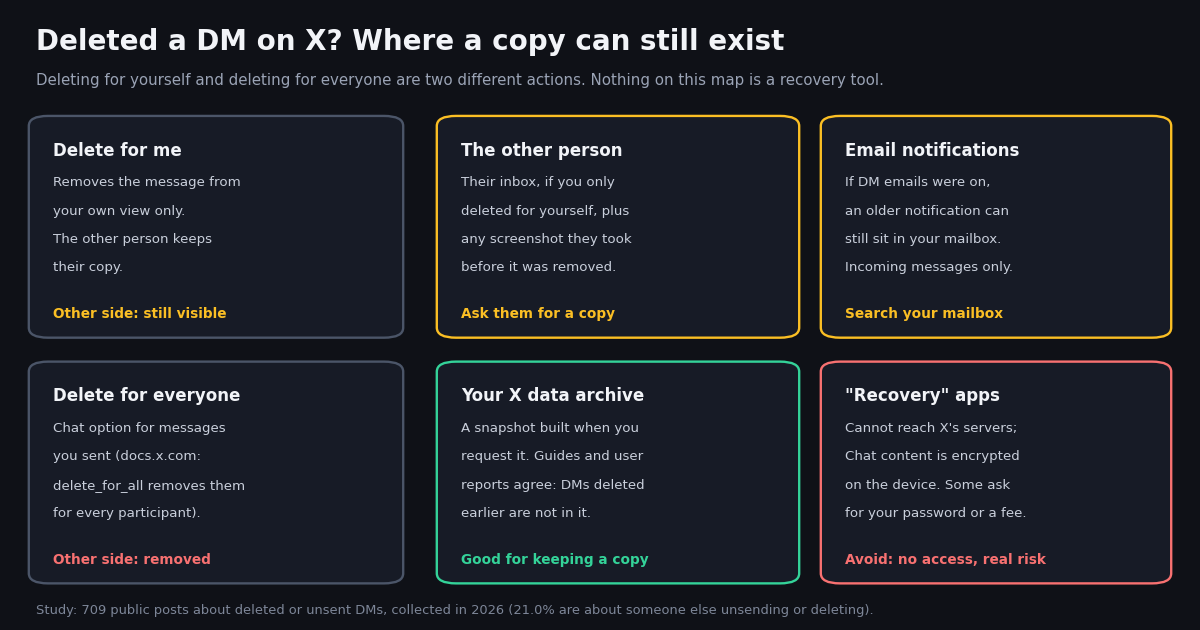
- Inside X, a deleted DM does not come back. There is no trash folder and no recovery request for messages.
- Delete for me vs delete for everyone. X's Chat API documents both:
delete_for_selfhides it from you,delete_for_allremoves a message you sent for every participant. - The other person is the usual copy. If you only deleted it on your side, ask them for the message or a screenshot.
- Email and archives only help if they existed first. An old DM notification email or an archive downloaded before the deletion can hold the text; a fresh archive will not.
- Public posts confirm the confusion. In 709 public posts we coded, 21.0% were about someone else unsending or deleting a message.
- Recovery apps are a dead end. They cannot reach X's servers; many "we recover deleted messages" offers are scams.
Searches for how to see deleted Twitter messages usually come from one of two moments: you deleted a conversation and now need something in it, or someone sent you a DM and unsent it before you read it. Both feel like there should be a hidden setting. There is not, and the guides that promise one are usually selling recovery software.
This guide sticks to what X itself documents and what we could check: the two delete actions in Chat (X's renamed DMs), where a copy of a message can still exist after it is deleted, what an X data archive can and cannot hold, and how to keep your own copy going forward. It also includes a study of public posts about deleted and unsent DMs, collected in 2026, so you can see what people in your situation actually run into.
If you are trying to find deleted tweets (public posts) rather than private messages, that is a different problem with different answers; see the deleted tweet search guide linked at the end.
21.0%
Can you see deleted Twitter messages? The short, honest answer
Not inside X. Once a message is gone from your inbox, the app gives you no way to open it again. X has no recycle bin for DMs, no time window to undo a deletion after the fact, and no help-center form that restores messages. Contacting support does not change that; X's own help page on direct messages (help.x.com/en/using-x/direct-messages) describes deletion as removing the message from your account.
What decides everything is who deleted it, and how. A deletion on your side does not reach the other person's inbox. A sender's delete for everyone in Chat does. Those two cases have opposite answers, so start by working out which one you are in.
Check Archive first. In October 2026 the official @chat account introduced Archive with the line "Hide conversations from your inbox without deleting them." If a conversation vanished after you swiped or tapped something, it may simply be archived. Look in the Chat menu for the archived list before you assume it is gone.
Delete for me vs delete for everyone in X Chat
X's direct messages are now called Chat in much of the app. When @chat launched it in November 2025, the announcement listed "end-to-end encrypted chats and file sharing", the ability to "edit, delete, or make messages disappear", and screenshot blocking with a notice of attempts.
Two delete actions, documented by X. The clearest description of what deleting does is in X's own developer reference for deleting Chat messages (docs.x.com/x-api/chat/delete-chat-messages). The request takes a delete_message_action of either delete_for_all or delete_for_self. The documentation says delete for all "removes a message you sent (or, in groups you administer, any message) for every participant", while delete for self removes it only from your own view. The same page notes that encrypted media attached to a message is deleted with it only on delete for all.
What that means in the app. If you choose the option that removes a message for everyone, the other person loses it too. If you choose the option that only removes it for you, or you delete the whole conversation from your inbox, their copy stays. Menu wording varies between app versions and platforms, so read the confirmation text before you tap.
Only your own messages can be deleted for everyone. The documented exception is group admins, who can remove any message in a group they administer. You cannot delete the other person's messages from their inbox in a one-to-one chat.
Legacy DMs. The older direct-message endpoint in X's API (DELETE /2/dm_events/{event_id}) is documented as deleting a message event "if owned by the authenticated user" and does not describe any effect on the other participant, which matches the long-standing behavior that deleting an old-style DM removed it from your side only.
Disappearing messages are a deletion on a timer. If a chat had disappearing messages turned on, the messages were designed to go away for both sides. There is nothing to recover there by design.
Where a deleted DM can still exist
Since X will not show it again, the only realistic places to find a deleted message are copies that were made before it was deleted. Check these:
The other person's inbox. If you deleted the message or the conversation only on your side, the other participant still has it. Ask them to scroll back and send you a screenshot or paste the text. This is the method rival guides also lead with, and it is the one that works regardless of settings. It fails if they deleted it too, if the sender used delete for everyone, or if their account no longer exists.
Screenshots, yours or theirs. A screenshot taken before the deletion is unaffected by anything that happens in the app later. Note that Chat can block screenshots and notify the sender of attempts, per the launch announcement, so this works less often in newer encrypted chats.
DM email notifications. If your account had email notifications for new direct messages turned on, older notification emails can still contain a preview of an incoming message. Search your mailbox for emails from X around the date of the conversation. This only covers messages you received, not ones you sent, and newer encrypted Chat messages may not include the full text in an email.
An X data archive you downloaded before the deletion. An archive is a snapshot of your account at the moment you requested it. If you saved one last month and the message was deleted this week, the old file can still hold it. See the next section.
Your own exports or notes. Anything you copied out of the conversation yourself, such as forwarding a message to email or a notes app, is a copy X cannot touch.
What does not work. Reinstalling the app, clearing cache, logging out and back in, switching from phone to web, and contacting support do not restore a deleted DM. They change which device shows your inbox, not what the inbox holds.
Does your X data archive include deleted DMs?
X lets you request a full archive of your account data from the account settings (in recent versions: Settings, Your account, Download an archive of your data; menus change, so search the settings for "archive" if the path differs). X's help page on the process is help.x.com/en/managing-your-account/how-to-download-your-x-archive; it blocks automated fetching, so we cite it rather than quote it. X prepares the file and notifies you when it is ready to download.
It includes your direct messages, as they are when you ask. User reports and the guides we reviewed agree that the archive contains your DM history in a file under the data folder, and that a message you deleted before requesting the archive is not in it. One rival guide also reports that images from deleted DMs are removed from the archive's media folder.
So an archive cannot recover a message, but it can preserve one. If a conversation matters, request an archive now and keep the downloaded file somewhere safe. If a message is deleted later, your saved copy still has it.
Encrypted Chat is the open question. X's developer documentation says Chat "message bodies are encrypted on the client; X routes ciphertext and cannot read plaintext content." We could not confirm from a primary source whether, or in what form, end-to-end encrypted Chat conversations appear in the data archive. Check your own archive rather than relying on any guide, including this one.
What we could not test. The ideal check here is to request an archive, delete a message, request a second archive and compare the two. We had no test account for this article, so that comparison was not run; the statements above come from X's documentation and from independent reports, not from our own archive files.
Can you see a message someone unsent before you read it?
This is the question behind a large share of the public posts we studied: you got a notification, opened the chat, and the message was gone.
If they used delete for everyone, no. The message is removed from your inbox as well, and X provides no log of what it said.
The notification can be the only trace. A push notification on your lock screen or a DM email that arrived before the deletion may have shown part of the text. Once you dismiss it, it is gone; X does not keep a notification history of message content.
Apps that promise to show unsent messages are not reading X. Tools that claim to capture deleted messages on other platforms are widely described as saving notifications on an Android phone as they arrive. They cannot fetch anything from X's servers after the fact, and granting notification access to an unknown app hands it everything that appears on your screen.
If it is a safety issue, say so to X. If the unsent message was a threat, harassment or a scam attempt, block and report the account from the conversation. Reports are handled by X, and its help center (help.x.com) explains the reporting options.
Recovery apps, hackers and "we recover deleted messages" offers
Rival articles about this keyword commonly list three or four methods. Some of them hold up; others are a sales funnel for recovery software. Here is how the common claims compare with what X documents.
What the public posts show. In our study, the search for posts about recovering or viewing deleted messages was dominated by other apps and by offers: 39.0% of those 105 posts named another app (WhatsApp, Instagram, Discord, Telegram and others), and 20.0% were recovery services, people offering hacking help, or modified apps that claim to keep deleted messages.
Why they are risky. A service that asks for your X password, a login code, or remote access to your phone can take over your account, and a fee paid for an impossible recovery is gone. None of the tools in this space have a way into X's servers.
What to do instead. Use the copies listed above, change your password if you have already given it to a recovery service, turn on two-factor authentication, and report accounts that offer to "recover your messages" in replies.
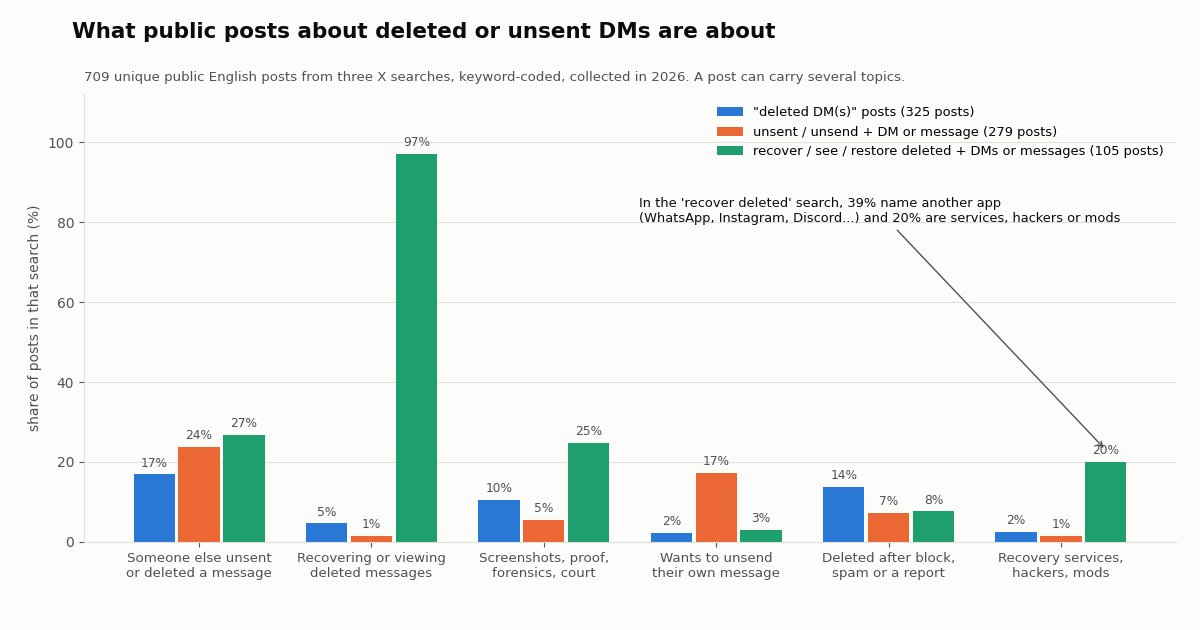
What 709 public posts say about deleted and unsent DMs
To see the problem from the user side, we pulled recent public posts from three X searches: posts that say "deleted DM" or "deleted DMs", posts about unsent or unsending a DM or message, and posts about recovering, restoring or seeing deleted messages. Each post was coded with keyword rules into topics.
The other side is the common story. Across all 709 posts, 21.0% were about someone else unsending or deleting a message, against 8.2% from people who wanted to take back their own. People notice an unsent DM, and they talk about it in public.
Deleting is often housekeeping. In the "deleted DM" search, 13.8% of posts paired the deletion with blocking, spam or a report, as in deleting a phishing message after warning a friend that their account was hacked.
Proof matters. 24.8% of the recovery posts mentioned screenshots, receipts, proof, forensics or court, a reminder that if a conversation might matter later, the time to save it is before anyone deletes it.
Deleted messages coming back. A small group (2.7% of all posts) reported deleted DMs reappearing. X does not document a cause; if a conversation you deleted reappears, check that it was not only archived, then delete it again on each device where you are signed in.
Questions, not answers. 24.4% of the posts were phrased as questions, and only 11.0% named X or Twitter explicitly, so many people are asking about deleted messages in general and on several apps at once.
How to keep a copy of DMs you might need later
Since nothing brings a deleted message back, the useful work happens before the deletion.
Download an archive now, then periodically. A saved archive is the only official export of your DM history. Requesting one every few months for an important account keeps a rolling backup.
Screenshot or copy what matters as it arrives. For agreements, payment details, addresses or anything you may need as evidence, a screenshot or a copy pasted into a note is the simplest safeguard. Remember that Chat can block screenshots in some conversations.
Keep DM email notifications on if you rely on them. They give you a second copy of incoming messages in a place X does not control.
Use Archive instead of Delete for clutter. Archive hides a conversation without deleting it, so you can tidy your inbox without losing anything.
For developers: a running copy of your own conversations. If you build tools for your own account, TwitterAPI.io's GET /twitter/get_dm_history_by_user_id returns the current message history with one user (fields id, sender_id, recipient_id, text, time in milliseconds) for your own logged-in session. A login through /twitter/user_login_v2 costs $0.10 and needs a proxy you supply; the history read is billed per item returned (see the pricing page). The call acts as your account, so X can rate-limit, lock or suspend it: keep a human pace (for example once a day), expect the session to need a re-login, and note that calls are billed per HTTP 200 response. It cannot see anything deleted before your first run; the code below just keeps saving what is there, so later deletions no longer erase your copy. It was written from the documented response shape and was not executed for this article.
"""Keep your own running copy of one X (Twitter) DM conversation.

It cannot bring back anything deleted before the first run. It saves what the
conversation holds now, and on later runs it keeps messages that have since
been deleted, because it never removes rows from your local file.
Not executed for this article (no test account); written from the documented
response shape of /twitter/get_dm_history_by_user_id.
Acts as your own logged-in account: X can rate-limit, lock or suspend it, so
run it at a normal human pace (for example once a day). The session can expire
and need a new login. Calls are billed per HTTP 200 response.
"""
import json
import os
import time
from pathlib import Path

import requests

BASE = "https://api.twitterapi.io"
HEADERS = {"X-API-Key": os.environ["TWITTERAPI_IO_API_KEY"]}
PROXY = os.environ["X_PROXY"]            # a residential proxy you supply
STORE = Path("dm_backup.json")


def login():
    """One login ($0.10) returns login_cookies for the session."""
    r = requests.post(f"{BASE}/twitter/user_login_v2", headers=HEADERS, json={
        "user_name": os.environ["X_USER"],
        "email": os.environ["X_EMAIL"],
        "password": os.environ["X_PASSWORD"],
        "totp_secret": os.environ.get("X_TOTP_SECRET", ""),
        "proxy": PROXY}, timeout=120)
    r.raise_for_status()
    body = r.json()
    if body.get("status") != "success":
        raise RuntimeError(body.get("message"))
    return body["login_cookies"]


def user_id(handle):
    """Public profile lookup; no X account needed for this read."""
    r = requests.get(f"{BASE}/twitter/user/info", headers=HEADERS,
                     params={"userName": handle}, timeout=30)
    r.raise_for_status()
    body = r.json()
    if body.get("status") == "error" or not body.get("data"):
        raise SystemExit(f"{handle}: {body.get('msg')}")
    return body["data"]["id"]


def dm_history(cookies, other_id):
    r = requests.get(f"{BASE}/twitter/get_dm_history_by_user_id", headers=HEADERS,
                     params={"login_cookies": cookies, "user_id": other_id, "proxy": PROXY},
                     timeout=60)
    r.raise_for_status()
    body = r.json()
    if body.get("status") != "success":
        raise RuntimeError(body.get("message"))
    return body.get("messages") or []


def main(handles):
    store = json.loads(STORE.read_text()) if STORE.exists() else {}
    cookies = login()
    for handle in handles:
        other = user_id(handle)
        convo = store.setdefault(handle, {})
        live = {m["id"]: m for m in dm_history(cookies, other)}
        for mid, m in live.items():
            convo[mid] = {"sender_id": m["sender_id"], "recipient_id": m["recipient_id"],
                          "text": m["text"], "time_ms": m["time"], "still_on_x": True}
        for mid, m in convo.items():
            if mid not in live:
                m["still_on_x"] = False      # gone from the live history since an earlier run
        gone = sum(1 for m in convo.values() if not m["still_on_x"])
        print(f"{handle}: {len(live)} live messages, {gone} kept locally after leaving X")
        time.sleep(10)                       # fixed pause between conversations
    STORE.write_text(json.dumps(store, indent=1, ensure_ascii=False))


if __name__ == "__main__":
    main(["your_friend_handle"])
How we collected this
Question. When people post publicly on X about deleted or unsent DMs, what are they trying to do: recover their own, find out what someone else unsent, keep proof, or find a recovery tool?
Searches. Three families of X advanced searches in English, without reposts: posts containing "deleted DM" or "deleted DMs" (Latest and Top), posts about unsent or unsending a DM or message (Latest), and posts about recovering, restoring, retrieving or seeing deleted messages (Latest and Top). We also read the timeline of X's official @chat account for product facts about deleting.
Sample. 709 unique public posts after removing duplicates across searches, from 62 read requests in total. Search pagination ended early on several queries, so the sample is smaller than planned and stretches back further in time than a full day of posts would; treat the shares as a description of this sample, not of all of X. Collected in 2026.
Method. Each post was coded with keyword rules into topics (someone else unsent or deleted, recovering or viewing, wanting to unsend one's own, proof or forensics, block or spam housekeeping, recovery services and mods, deleted messages coming back). A post can carry several topics; about half of the posts matched none of them, usually because "deleted DM" was used in passing.
What it cannot show. Keyword coding misreads sarcasm and jokes, and posts about other apps are included when they used the same words. Public posts say nothing about how often people delete DMs privately, and nothing in this study tests whether any message could be recovered.
Cost. The requests returned 808 billed tweets (empty pages billed at the minimum), $0.12 at TwitterAPI.io's $0.15 per 1,000 tweets. The same 808 post reads on the official X API pay-per-use rate card ($0.005 per post read, docs.x.com/x-api/getting-started/pricing) would be about $4.04, roughly 33x more per 1,000 tweets.
Privacy. Aggregates only. The authors are private individuals, so raw search results were not stored with the article, and the published sample rows carry no IDs, links, text or handles. Only X's own organization accounts are named or quoted.
"""Keep your own running copy of one X (Twitter) DM conversation.

It cannot bring back anything deleted before the first run. It saves what the
conversation holds now, and on later runs it keeps messages that have since
been deleted, because it never removes rows from your local file.
Not executed for this article (no test account); written from the documented
response shape of /twitter/get_dm_history_by_user_id.
Acts as your own logged-in account: X can rate-limit, lock or suspend it, so
run it at a normal human pace (for example once a day). The session can expire
and need a new login. Calls are billed per HTTP 200 response.
"""
import json
import os
import time
from pathlib import Path

import requests

BASE = "https://api.twitterapi.io"
HEADERS = {"X-API-Key": os.environ["TWITTERAPI_IO_API_KEY"]}
PROXY = os.environ["X_PROXY"]            # a residential proxy you supply
STORE = Path("dm_backup.json")


def login():
    """One login ($0.10) returns login_cookies for the session."""
    r = requests.post(f"{BASE}/twitter/user_login_v2", headers=HEADERS, json={
        "user_name": os.environ["X_USER"],
        "email": os.environ["X_EMAIL"],
        "password": os.environ["X_PASSWORD"],
        "totp_secret": os.environ.get("X_TOTP_SECRET", ""),
        "proxy": PROXY}, timeout=120)
    r.raise_for_status()
    body = r.json()
    if body.get("status") != "success":
        raise RuntimeError(body.get("message"))
    return body["login_cookies"]


def user_id(handle):
    """Public profile lookup; no X account needed for this read."""
    r = requests.get(f"{BASE}/twitter/user/info", headers=HEADERS,
                     params={"userName": handle}, timeout=30)
    r.raise_for_status()
    body = r.json()
    if body.get("status") == "error" or not body.get("data"):
        raise SystemExit(f"{handle}: {body.get('msg')}")
    return body["data"]["id"]


def dm_history(cookies, other_id):
    r = requests.get(f"{BASE}/twitter/get_dm_history_by_user_id", headers=HEADERS,
                     params={"login_cookies": cookies, "user_id": other_id, "proxy": PROXY},
                     timeout=60)
    r.raise_for_status()
    body = r.json()
    if body.get("status") != "success":
        raise RuntimeError(body.get("message"))
    return body.get("messages") or []


def main(handles):
    store = json.loads(STORE.read_text()) if STORE.exists() else {}
    cookies = login()
    for handle in handles:
        other = user_id(handle)
        convo = store.setdefault(handle, {})
        live = {m["id"]: m for m in dm_history(cookies, other)}
        for mid, m in live.items():
            convo[mid] = {"sender_id": m["sender_id"], "recipient_id": m["recipient_id"],
                          "text": m["text"], "time_ms": m["time"], "still_on_x": True}
        for mid, m in convo.items():
            if mid not in live:
                m["still_on_x"] = False      # gone from the live history since an earlier run
        gone = sum(1 for m in convo.values() if not m["still_on_x"])
        print(f"{handle}: {len(live)} live messages, {gone} kept locally after leaving X")
        time.sleep(10)                       # fixed pause between conversations
    STORE.write_text(json.dumps(store, indent=1, ensure_ascii=False))


if __name__ == "__main__":
    main(["your_friend_handle"])
Researching this?Free starter credits cover end-to-end testing — Google sign-in, no card. Get a key.
Questions readers ask
Can I see a deleted message on Twitter (X)?
Not inside X. Once a message is gone from your view, the app has no trash folder or restore option. You can only find a copy that existed before the deletion: the other person's inbox (if you deleted it only for yourself), a screenshot, an old DM email notification, or an X data archive you downloaded earlier.
If I delete a DM, does the other person still see it?
If you delete it only for yourself, or delete the whole conversation from your inbox, yes, their copy stays. In Chat, X also documents a delete for everyone action for messages you sent, which removes the message for every participant.
Can I see a message someone unsent on X?
Not if they removed it for everyone. The only traces are a notification or email preview you saw before it was removed, or a screenshot. X does not keep a viewable log of unsent message content.
Does the X data archive include deleted DMs?
No. The archive is a snapshot of your account when you request it, so messages deleted before that are not in it. An archive you downloaded before the deletion can still contain them, which is why saving one periodically is the best backup.
Can X support restore deleted direct messages?
There is no documented process for restoring deleted DMs. Support can help with account access and reports, but not with bringing messages back.
Do apps that recover deleted Twitter messages work?
No. X DMs are stored on X's servers, and Chat content is encrypted on the device, so phone recovery software and paid recovery services have no way to retrieve them. Many such offers are scams that ask for your password, a login code, or a fee.
Why did my deleted DMs come back?
X does not document a cause. Check whether the conversation was only archived rather than deleted, delete it again on each device where you are signed in, and report it to X support if it keeps returning.
How do I save my X DMs so I do not lose them?
Download your X data archive from the account settings and keep the file, screenshot important messages as they arrive, keep DM email notifications on if you rely on them, and use Archive rather than Delete to tidy your inbox.
Continue
- X API docs: Delete Chat messages (delete_for_all vs delete_for_self)
- X API docs: XChat introduction (client-side encryption)
- X Help Center: About direct messages
- X Help Center: How to download your X archive
- @chat: "Say hello to Chat" launch post (November 2025)
- TwitterAPI.io docs: get_dm_history_by_user_id
- How to DM on Twitter (X): Chat, message settings and requests
- Deleted tweet search: finding deleted public posts
- Twitter direct message limit: daily caps and group sizes
- X Chat API: encrypted DMs for developers
- "You can no longer send messages to this person": causes and fixes
- X (Twitter) API guide: data access without the official tiers
- TwitterAPI.io pricing for tweet and DM history reads
- 01How to Hyperlink on Twitter (X): What Works, What Doesn't, and What 1,032 Posts Show
- 02Twitter (X) API to BigQuery: Load Tweets with Python and Query Them in SQL
- 03Twitter (X) Follow API: Follow, Verify and Undo a Follow from Code
- 04Twitter (X) API in Ruby with Net::HTTP, Faraday and Rails
- 05rtweet in 2026: Is the R Twitter (X) Package Dead, and What to Use Instead
- 06How to Search for Deleted Tweets
- 07"You Can No Longer Send Messages to This Person" on Twitter (X): What It Means and What You Can Do
- 08How to Find Deleted Twitter (X) Accounts: What Still Exists and Where to Look
Writing about something you built with TwitterAPI.io? Our community rewards program pays API credits for honest tutorials, build logs and videos.
Stop reading. Start building.
Starter credits cover real testing on real data. Google sign-in, no card, no application queue.
Get an API keyAlready building with TwitterAPI.io? Publish an honest tutorial or build log about it and earn up to $200 a month in API credits.