rtweet in 2026: Is the R Twitter (X) Package Dead, and What to Use Instead
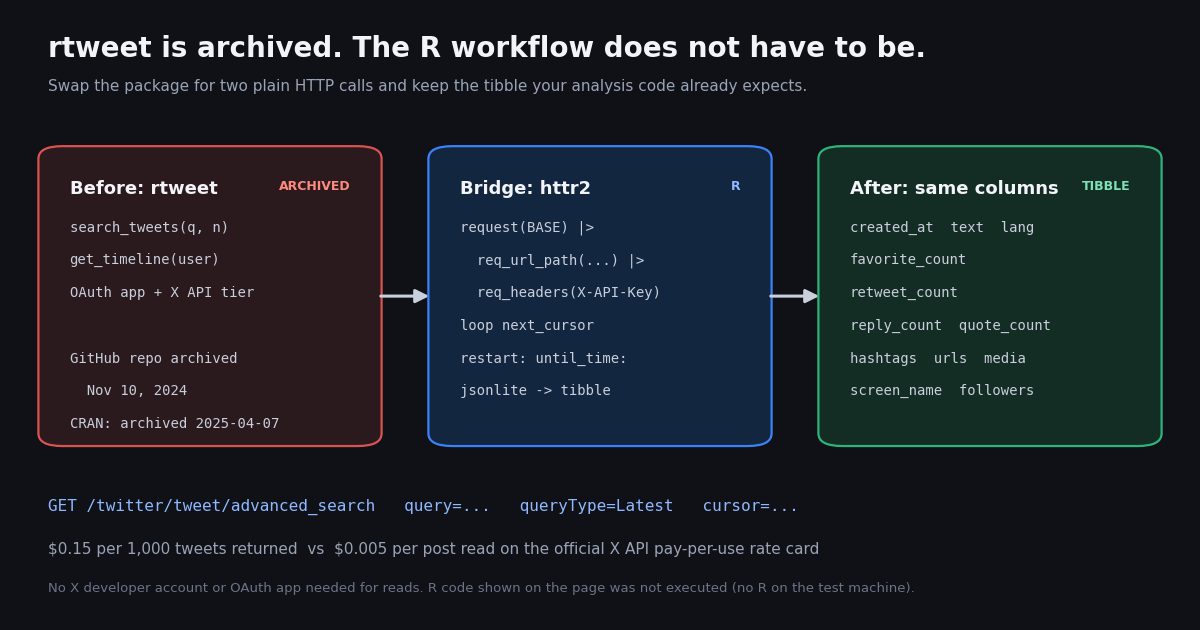
- rtweet is archived. Removed from CRAN on 2025-04-07; GitHub repo archived November 10, 2024 (
ropensci-archive/rtweet, "Project Status: Unsupported"). Last version: 2.0.0, February 2024. - Why old scripts break:
search_tweets(),get_timeline(),stream_tweets()and friends call X's retired v1.1 API; rtweet's own docs list them as deprecated with v2 replacements that need a paid X plan. - Drop-in path:
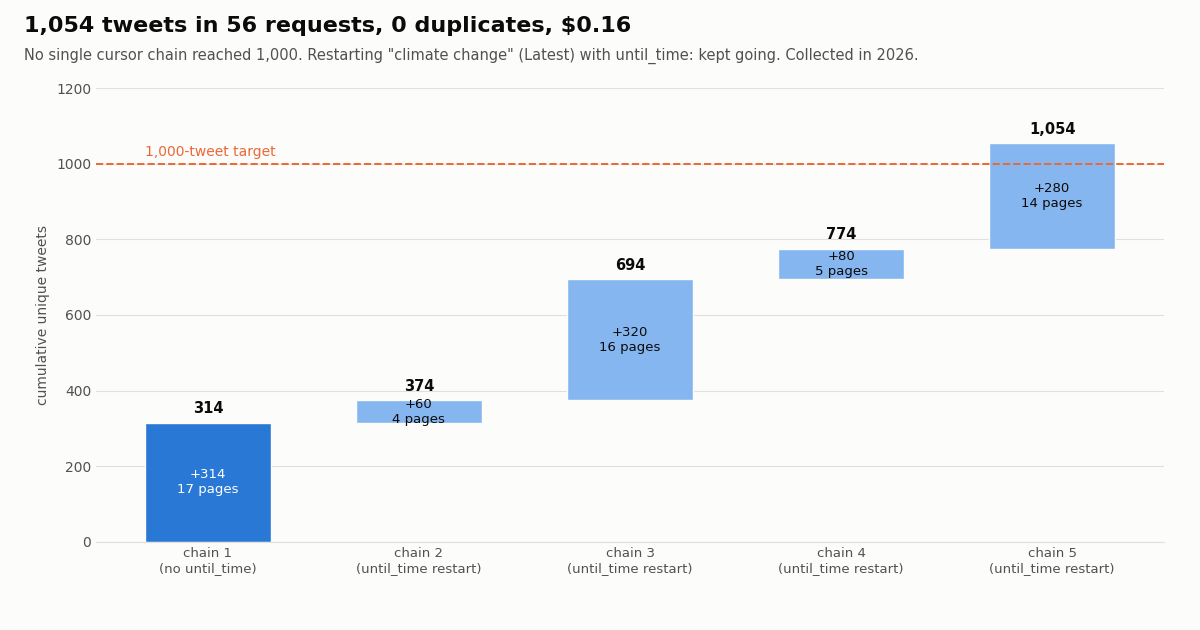
httr2+jsonliteagainst/twitter/tweet/advanced_search(search) and/twitter/user/last_tweets(timelines), headerX-API-Key, mapped to rtweet column names likefavorite_countandscreen_name. - Measured: 1,054 tweets for "climate change" in 56 requests, 19.9 tweets per page, 0 duplicates, $0.16. The official X API rate card would bill $5.27 for the same 1,054 post reads (about 33x).
- Gotcha we hit: no single cursor chain reached 1,000 tweets; restarting the query with
until_time:set to the oldest timestamp seen kept the pull going. The R loop on this page does that for you. - Geo is nearly empty: only 0.3% of tweets carried a
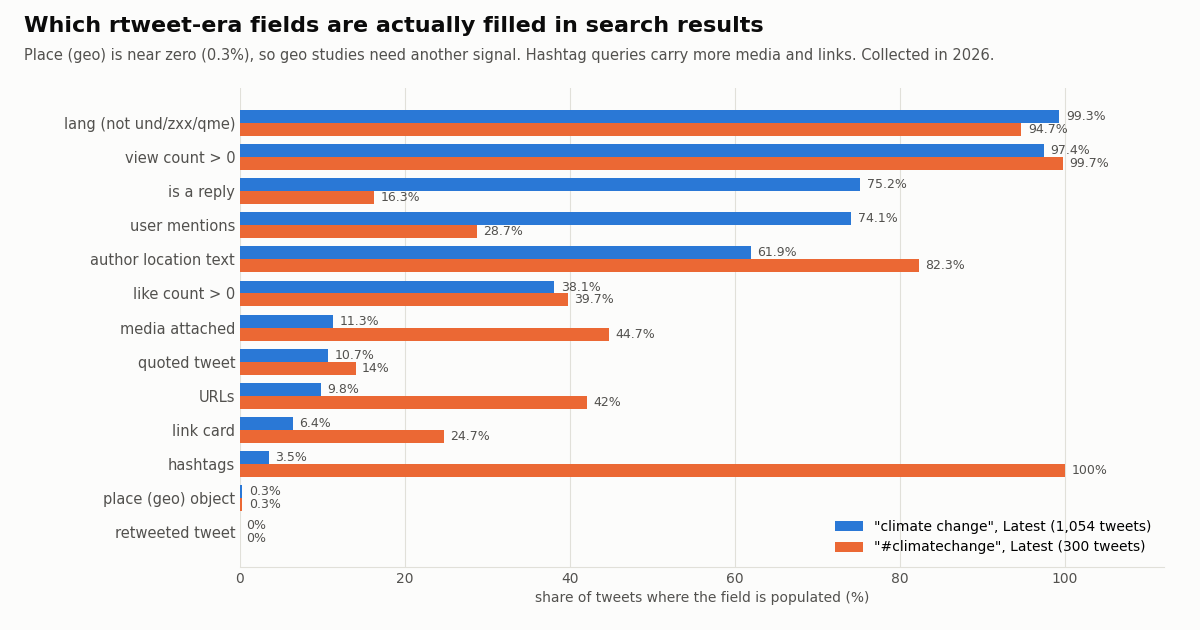
placeobject, so geocoded studies need another signal (61.9% of authors have free-text profilelocation).
For about a decade, rtweet was how social scientists, public-health researchers and data journalists got tweets into R. One call, search_tweets("#rstats", n = 18000), returned a tidy data frame, and an entire generation of papers, theses and teaching notebooks was built on that one call. If you open one of those notebooks today, it fails, and the error messages do not say why.
This page answers the two questions behind the search: what exactly happened to rtweet (verified this session from CRAN, the package's GitHub repository and the package source itself), and how to keep an R workflow alive with the least rewriting. The unique part is a column map from rtweet's tweet and user columns to plain JSON fields, a drop-in search_tweets2() written with httr2, and a measured 1,054-tweet research pull, collected in 2026, that shows what such a loop costs and which fields you can still rely on.
1,054 tweets for $0.16
What happened to rtweet, and why old scripts fail
rtweet was created by Michael W. Kearney, peer-reviewed by rOpenSci, and published in the Journal of Open Source Software. Its later maintainer, Lluis Revilla Sancho, kept it alive through X's API changes, but the package could not outlive the access model it was built on. Here is the sequence, each line checked against a primary source this session.
The README that sat on GitHub before the archive put it bluntly: "This package is no longer updated and no fixes can be expected. A request to Orphan the package on CRAN was sent!" The current README carries the repostatus "Unsupported" badge and says the package can be unarchived only if someone opts to resume maintenance through rOpenSci.
What "archived on CRAN" means in practice. install.packages("rtweet") no longer finds it on current CRAN mirrors. You can still install the last source tarball (rtweet_2.0.0.tar.gz) from the CRAN archive, or from the rOpenSci r-universe, and it may load. Loading is not the problem: every call goes to X's API with your credentials, and that is where things stop.
The functions in nearly every rtweet tutorial, search_tweets(), search_tweets2(), get_timeline(), stream_tweets(), get_followers(), lookup_users(), call X's v1.1 REST and streaming endpoints. rtweet 2.0.0's own help page rtweet-deprecated says it directly: "These functions might not work due to the drop of API v1 in favor of API v2." It then maps each to its replacement, or to "No replacement".
The v2 functions are not a free fix. The old README spelled out the split: with X's free tier you can post (tweet_post()) and read information about yourself (user_self()); searching tweets, followers and bookmarks need a paid plan. On top of that you need an X developer account, a project, an app and an OAuth 2.0 client, which rtweet's client_* and rtweet_oauth2() functions wrapped. Even if you have all of that, the package receives no fixes when X changes a field or an error format.
Symptoms you may see. Authentication errors from auth_setup_default() or auth_sitrep(), HTTP 401 / 403 on any v1.1 call, an empty data frame from search_tweets(), or install.packages() reporting that rtweet is not available for your R version. None of these are fixable from your side, because the endpoints behind them are gone for the majority of accounts.
The column map: rtweet columns to plain JSON fields
This is the part that saves the rewrite. Downstream code (dplyr pipelines, tidytext, ggplot) depends on column names, not on rtweet. If the new loop produces the same names, the rest of your analysis keeps working. The left column is the tweet data frame rtweet 1.x / 2.0 returned from search_tweets() and get_timeline() (read from the package source, R/tweet_object.R and R/user_object.R); the right column is the field in the JSON from /twitter/tweet/advanced_search and /twitter/user/last_tweets.
The user columns that users_data(tweets) used to return come embedded in every tweet as author, so there is no second call to join them.
The drop-in: search_tweets() rewritten with httr2
The full replacement for search_tweets(q, n) is in the code block at the end of the page; this section explains the three design choices so you can adapt it. It uses httr2 (the HTTP package rtweet 2.0 itself depended on), jsonlite under resp_body_json(), and purrr / dplyr / tibble to build the frame.
1. One request function. search_page() sends GET https://api.twitterapi.io/twitter/tweet/advanced_search with three query parameters, query, queryType (Latest or Top, the equivalents of rtweet's type = "recent" and type = "popular") and cursor (an empty string for page one). The key goes in the X-API-Key header. There is no OAuth dance, no app, no token refresh, and no X account is needed for reads. req_retry() retries 429 and 5xx responses with backoff, which replaces rtweet's retryonratelimit.
2. One row function. tweet_row() converts one parsed tweet into a one-row tibble with rtweet's column names, using the map above. List columns (hashtags, urls_expanded_url, mentions_screen_name, media_type) keep the shape tidytext and tidyr::unnest() users expect. Every lookup uses [[ (exact matching) and a null default, because $ on a list partially matches names and a missing field would silently pick up a different one.
3. A pagination loop that does not trust a single cursor chain. Each response carries has_next_page and next_cursor. In our collection, no single chain for a busy query reached 1,000 tweets: chains that ended on their own stopped after 1 to 17 pages with an empty final page. Restarting the same query with until_time:<oldest created_at seen> (the operator takes Unix seconds) continued the pull, with zero duplicate IDs across five chains. The loop tracks IDs anyway and stops when a fresh chain returns nothing new.
Pacing. pause = 0.1 suits a paid account (20 requests per second). Before the first payment the limit is 0.2 requests per second, so set pause = 5. Large pulls are better split by day with since_time: and until_time: than run as one long loop; it makes restarts cheap if your session dies.
What a 1,000-tweet research pull measured
To check the loop against reality, we ran the exact HTTP requests it makes (through our rate-limited study client, since R is not installed on the machine) for a research-style query, "climate change", queryType=Latest, plus a smaller comparison on the hashtag #climatechange. Collected in 2026.
Time. The 56 requests took 176.5 seconds of wall-clock time, 3.15 seconds per page. That number includes waits on a rate-limit lock shared with seven other collection jobs running at the same moment, so a solo run on a paid key spends less time waiting; treat it as an upper bound, not a latency figure.
Volume decides your window. A phrase like "climate change" moves at about 155 tweets an hour, so 1,000 tweets is under seven hours of conversation. The hashtag moves at about 7 an hour, so 300 tweets already span 41 hours. Size n and your since_time: window from a quick one-page probe before committing to a long pull.
Probes worth reporting. A first attempt with #ClimateChange (mixed case) returned zero tweets while lowercase #climatechange returned full pages minutes later, and a queryType=Top request returned zero tweets at collection time. Neither is a rule we could confirm; both are reasons to log empty pages in your own pulls rather than assume a query has no matches.
Cost of the whole study. 80 requests in total, including probes, billed 1,414 tweets plus 9 requests that returned nothing (each at the 15-credit minimum): $0.21.
Which fields you can still rely on
rtweet users built whole methods on certain fields: language filters, geotagged subsets, hashtag co-occurrence networks, retweet cascades. We measured how often each one is actually populated in the 1,054-tweet and 300-tweet samples.
Geo is the big loss. Only 3 of 1,054 tweets for "climate change" carried a place object (0.3%). If your old design filtered search_tweets(geocode = ...) results to geotagged tweets, that subset is now too small to analyze; the profile location string (present for 61.9% of authors) is the realistic fallback, with all its known noise.
Retweets did not appear. Neither query returned any retweeted_tweet object in Latest search, which differs from rtweet's include_rts = TRUE default. If your method counted retweet cascades, use /twitter/tweet/retweeters on the tweets you care about instead.
Engagement is heavy-tailed. The median tweet in the "climate change" sample had 0 likes, 0 retweets and 11 views; the 90th percentile had 4 likes and 214 views. The sample came from 954 distinct authors, 30.9% of them with a paid blue check, median 674.5 followers. Plan your statistics for zero-inflated counts.
get_timeline() and user lookups in R
Timelines are the second pillar of rtweet workflows: a list of organization or public-figure accounts, get_timeline(accounts, n = 3200), and an analysis of what they post. The replacement is /twitter/user/last_tweets with userName, 20 tweets per page, newest first, with an optional includeReplies. Note one shape difference: on this endpoint the tweets sit under data.tweets, not at the top level as in search. The row function from the search example works unchanged on each tweet.
For profiles, /twitter/user/info returns one account under data. An unknown handle comes back as HTTP 200 with status set to "error" and msg set to "user not found", not as a 404, so check status before reading fields. Profiles are billed at $0.18 per 1,000.
Follower networks. get_followers() / get_friends() map to /twitter/user/followers and /twitter/user/followings, about 200 accounts per page in snake_case fields (screen_name, followers_count, ...) that are closer to rtweet's names than the tweet author object is. They are billed at 1 to 3 credits per account returned.
library(httr2)
library(purrr)
library(dplyr)

api_key <- Sys.getenv("TWITTERAPI_IO_KEY")
`%||%` <- function(x, y) if (is.null(x) || length(x) == 0) y else x

# get_timeline(user, n) replacement: /twitter/user/last_tweets, 20 tweets per page, newest first.
get_timeline2 <- function(user, n = 200, include_replies = FALSE) {
  out <- list(); cursor <- ""
  while (length(out) < n) {
    body <- request("https://api.twitterapi.io/twitter/user/last_tweets") |>
      req_headers(`X-API-Key` = api_key) |>
      req_url_query(userName = user, cursor = cursor,
                    includeReplies = tolower(as.character(include_replies))) |>
      req_perform() |>
      resp_body_json(simplifyVector = FALSE)
    out <- c(out, body[["data"]][["tweets"]] %||% list())      # tweets sit under data here
    if (!isTRUE(body[["has_next_page"]])) break
    cursor <- body[["next_cursor"]]
    Sys.sleep(0.1)
  }
  map_dfr(head(out, n), tweet_row)        # tweet_row() from the search example
}

nasa <- get_timeline2("NASA", n = 200)

# users_data() / lookup_users() replacement: one profile per call.
get_user <- function(user) {
  body <- request("https://api.twitterapi.io/twitter/user/info") |>
    req_headers(`X-API-Key` = api_key) |>
    req_url_query(userName = user) |>
    req_perform() |>
    resp_body_json(simplifyVector = FALSE)
  if (!identical(body[["status"]], "success")) {
    stop(body[["msg"]] %||% "unknown error")   # an unknown handle is HTTP 200 with status "error"
  }
  u <- body[["data"]]
  tibble::tibble(
    user_id = u[["id"]], screen_name = u[["userName"]], name = u[["name"]],
    location = u[["location"]] %||% NA_character_, description = u[["description"]] %||% NA_character_,
    followers_count = u[["followers"]], friends_count = u[["following"]],
    statuses_count = u[["statusesCount"]], favourites_count = u[["favouritesCount"]],
    account_created_at = u[["createdAt"]], verified = isTRUE(u[["isBlueVerified"]])
  )
}

purrr::map_dfr(c("NASA", "WHO", "NOAA"), get_user)Cost and access compared with the official X API
Researchers using rtweet's v2 functions today would go through X's own API. Its pay-per-usage rate card (docs.x.com/x-api/getting-started/pricing) lists $0.005 per post read and $0.010 per user read, capped at 3 million post reads per monthly billing cycle with Enterprise above that; new paying users can earn $20 in API credits after a first purchase plus a match of the first auto-recharge up to $50. Recent search (GET /2/tweets/search/recent) covers the last 7 days and returns 10 to 100 posts per call.
On a per-tweet basis that is about 33x ($5 vs $0.15 per 1,000 tweets). Billing on our side is per result: you pay only for the data returned, with a 15-credit minimum on a request that returns nothing ($0.00015). $1 buys 100,000 credits and purchased credits never expire; new accounts that pass the automatic bot check get free starter credits (no card, one per person or network, expiring after 31 days). Monthly plans and the current amounts are on the pricing page.
For a funded study, budget in tweets. A 100,000-tweet corpus is $15.00 at $0.15 per 1,000. A study that polls a query every five minutes for a month, where many checks find nothing new, costs at least $1.30 in empty checks (each at the $0.00015 minimum) plus the tweets it returns.
Research ethics, terms and reproducibility
rtweet's README asked users to work "in strict accordance with Twitter's developer terms", and that advice outlives the package. Whatever source you use, the obligations that come from your ethics board and data-protection law do not change: collect what your protocol needs, store raw text securely, and publish aggregates or tweet IDs rather than full text and handles of private individuals.
Reproducibility. Save the exact query string, queryType, the since_time: / until_time: window and the collection year in your methods section, and keep the raw JSON alongside the tibble (write_json() in the code below). Tweet IDs let other researchers rehydrate the same set with /twitter/tweets later, minus anything deleted in between.
Do not depend on an unmaintained client. The lesson of rtweet is not that R is a poor fit; R is still a strong environment for this work. It is that a thin client you own (under 100 lines of httr2) is easier to keep alive than a large package whose maintainer moved on. If an endpoint changes a field, you change one line in tweet_row().
Other R packages. academictwitteR, the companion package built for the retired Academic Research track, is archived too; its README says "The paid API means open-source development of this package is no longer feasible." Treat any R Twitter package as unmaintained unless its repository shows recent commits.
How we collected this
Question. If an R researcher replaces search_tweets() with plain HTTP calls, what does a 1,000-tweet pull look like in requests, time, cost and field coverage?
Query. "climate change" with queryType=Latest (main sample) and "#climatechange" with queryType=Latest (comparison), on /twitter/tweet/advanced_search, following next_cursor and restarting with until_time: when a chain ended, exactly as the R loop does. Plus three one-page probes and one queryType=Top probe.
Window and size. The newest matching posts at collection time, collected in 2026: 1,054 tweets over 6.8 hours for the phrase, 300 tweets over 41.4 hours for the hashtag. 80 requests, $0.21 in total.
What the sample cannot show. It is two queries in one week of one year. Field shares depend on the query (the hashtag sample has 100% hashtags by construction). Wall-clock time includes waits on a shared rate-limit lock. The R code was not executed: R is not installed on the collection machine, so the measured part is the HTTP calls the R code makes, run through a Python client.
Privacy. The authors are mainly private individuals, so raw pages were kept outside the repository; only aggregates and de-identified rows (no ID, URL, text, author ID or handle) are stored, and no account is named or profiled. The study files (protocol, analysis script and results) are published with the page.
# rtweet-style search in plain R: httr2 + jsonlite + tibble.
# install.packages(c("httr2", "jsonlite", "tibble", "dplyr", "purrr"))
library(httr2)
library(jsonlite)
library(tibble)
library(dplyr)
library(purrr)

api_key <- Sys.getenv("TWITTERAPI_IO_KEY")   # set in ~/.Renviron, never in the script
Sys.setlocale("LC_TIME", "C")                # createdAt uses English month and day names

`%||%` <- function(x, y) if (is.null(x) || length(x) == 0) y else x

# One page (up to 20 tweets) of /twitter/tweet/advanced_search.
search_page <- function(query, cursor = "", query_type = "Latest") {
  request("https://api.twitterapi.io/twitter/tweet/advanced_search") |>
    req_headers(`X-API-Key` = api_key) |>
    req_url_query(query = query, queryType = query_type, cursor = cursor) |>
    req_retry(max_tries = 4,
              is_transient = \(resp) resp_status(resp) %in% c(429, 500, 502, 503, 504)) |>
    req_perform() |>
    resp_body_json(simplifyVector = FALSE)
}

# One tweet object -> one row with rtweet-style column names.
tweet_row <- function(t) {
  ent   <- t[["entities"]] %||% list()
  media <- t[["extendedEntities"]][["media"]] %||% list()
  a     <- t[["author"]] %||% list()
  qt    <- t[["quoted_tweet"]]
  tibble(
    created_at = as.POSIXct(t[["createdAt"]], format = "%a %b %d %H:%M:%S +0000 %Y", tz = "UTC"),
    status_id = t[["id"]],
    text = t[["text"]] %||% NA_character_,
    lang = t[["lang"]] %||% NA_character_,
    reply_to_status_id = t[["inReplyToId"]] %||% NA_character_,
    reply_to_screen_name = t[["inReplyToUsername"]] %||% NA_character_,
    is_quote = !is.null(qt),
    quoted_status_id = if (is.null(qt)) NA_character_ else qt[["id"]],
    is_retweet = !is.null(t[["retweeted_tweet"]]),
    favorite_count = t[["likeCount"]] %||% 0L,
    retweet_count = t[["retweetCount"]] %||% 0L,
    reply_count = t[["replyCount"]] %||% 0L,
    quote_count = t[["quoteCount"]] %||% 0L,
    view_count = t[["viewCount"]] %||% 0L,
    hashtags = list(map_chr(ent[["hashtags"]] %||% list(), \(h) h[["text"]] %||% NA_character_)),
    urls_expanded_url = list(map_chr(ent[["urls"]] %||% list(), \(u) u[["expanded_url"]] %||% NA_character_)),
    mentions_screen_name = list(map_chr(ent[["user_mentions"]] %||% list(), \(m) m[["screen_name"]] %||% NA_character_)),
    media_type = list(map_chr(media, \(m) m[["type"]] %||% NA_character_)),
    place_full_name = t[["place"]][["full_name"]] %||% NA_character_,
    conversation_id = t[["conversationId"]] %||% NA_character_,
    user_id = a[["id"]] %||% NA_character_,
    screen_name = a[["userName"]] %||% NA_character_,
    name = a[["name"]] %||% NA_character_,
    followers_count = a[["followers"]] %||% NA_integer_,
    friends_count = a[["following"]] %||% NA_integer_,
    location = a[["location"]] %||% NA_character_,
    verified = isTRUE(a[["isBlueVerified"]]) || isTRUE(a[["isVerified"]])
  )
}

# search_tweets(q, n) replacement: follow next_cursor, and when a cursor chain
# ends before n, restart the same query with until_time:<oldest created_at seen>.
search_tweets2 <- function(q, n = 1000, query_type = "Latest", pause = 0.1) {
  rows <- list(); seen <- character(0); query <- q; cursor <- ""; chain_new <- 0
  repeat {
    body <- search_page(query, cursor, query_type)
    tweets <- body[["tweets"]] %||% list()
    new <- keep(tweets, \(t) !(t[["id"]] %in% seen))
    if (length(new) > 0) {
      rows[[length(rows) + 1]] <- map_dfr(new, tweet_row)
      seen <- c(seen, map_chr(new, \(t) t[["id"]]))
      chain_new <- chain_new + length(new)
    }
    if (length(seen) >= n) break
    if (isTRUE(body[["has_next_page"]]) && nzchar(body[["next_cursor"]] %||% "")) {
      cursor <- body[["next_cursor"]]
    } else {
      if (chain_new == 0) break                  # a fresh chain found nothing older
      oldest <- min(bind_rows(rows)$created_at)
      query <- paste0(q, " until_time:", as.integer(oldest))
      cursor <- ""; chain_new <- 0
    }
    Sys.sleep(pause)   # 0.1 s is fine once paid (20 req/s); use 5 before the first payment (0.2 req/s)
  }
  bind_rows(rows) |> distinct(status_id, .keep_all = TRUE) |> slice_head(n = n)
}

tw <- search_tweets2("climate change", n = 1000)
nrow(tw)                                   # about 1,000 rows
count(tw, lang, sort = TRUE)
mean(lengths(tw$hashtags) > 0)             # share of tweets with at least one hashtag
saveRDS(tw, "climate_change_tweets.rds")
write_json(tw, "climate_change_tweets.json", POSIXt = "ISO8601")
Researching this?Free starter credits cover end-to-end testing — Google sign-in, no card. Get a key.
Questions readers ask
Is rtweet still on CRAN?
No. CRAN removed rtweet on 2025-04-07, stating that "issues were not corrected despite reminders". The last version, 2.0.0 from February 2024, is still downloadable from the CRAN archive as a source tarball, but it gets no fixes and its classic functions target X's retired v1.1 API.
Why is rtweet not working anymore?
Two reasons stack. The functions many tutorials use (search_tweets(), get_timeline(), stream_tweets()) call X's v1.1 API, which rtweet's own documentation marks as dropped. The v2 replacements (tweet_search_recent(), user_timeline()) need a paid X developer plan plus an OAuth 2.0 app, and the package was archived on GitHub on November 10, 2024, so nothing is fixed when X changes.
What can I use instead of rtweet in R?
There is no maintained drop-in package we could verify. The low-maintenance route is a short httr2 + jsonlite client against a REST endpoint, mapped to rtweet's column names, as on this page. You own the code, so a field change is a one-line fix rather than a wait for a maintainer.
Can I still install rtweet from the archive?
Yes, install.packages() pointed at the archived rtweet_2.0.0.tar.gz (or the rOpenSci r-universe) can still install it on many R versions. It will load, but calls still depend on X API access and credentials, and the classic v1.1 functions will not return data for the majority of accounts.
Does the httr2 code on this page return the same columns as rtweet?
It returns rtweet-style names for the columns researchers use: created_at, status_id, text, lang, favorite_count, retweet_count, reply_count, quote_count, hashtags, urls_expanded_url, mentions_screen_name, media_type, screen_name, followers_count, friends_count, location and verified, plus view_count, which rtweet never had. It does not recreate every column (for example source is empty in the data).
How much does it cost to collect 1,000 tweets for a research project?
$0.15 at 15 credits per tweet returned. Our measured pull of 1,054 tweets for "climate change" cost $0.16 in 56 requests. The same number of post reads on the official X API pay-per-usage rate card ($0.005 per post) would be $5.27.
Can I get geotagged tweets like with search_tweets(geocode = ...)?
Only a tiny share of tweets carry location now: 0.3% of our 1,054-tweet sample had a place object. Geotagged-only designs are no longer viable at useful sample sizes; the author's free-text profile location (61.9% filled) is the usual fallback and needs geocoding.
Do I need an X developer account to use this from R?
Not for reads. The R code sends an X-API-Key header to api.twitterapi.io; no X account, developer project or OAuth app is involved.
Continue
- CRAN: rtweet package page (archived 2025-04-07)
- GitHub: ropensci-archive/rtweet (archived repository, README)
- CRAN archive: rtweet source releases through 2.0.0
- X API pricing (pay-per-usage rate card)
- X API: GET /2/tweets/search/recent
- twitterapi.io docs: advanced_search parameters and pagination
- X API hub: endpoints, pricing and access options
- Twitter (X) API for academic research: access after the Academic track
- Exporting a Twitter (X) dataset for a research project
- snscrape status and what replaced it
- Migrating a Tweepy script in Python
- Cursor pagination on Twitter (X) API endpoints
- Pricing: $0.15 per 1,000 tweets and monthly plans
- 01How to Hyperlink on Twitter (X): What Works, What Doesn't, and What 1,032 Posts Show
- 02How to See Deleted Twitter (X) Messages: What Can and Cannot Come Back
- 03Twitter (X) API to BigQuery: Load Tweets with Python and Query Them in SQL
- 04Twitter (X) Follow API: Follow, Verify and Undo a Follow from Code
- 05Twitter (X) API in Ruby with Net::HTTP, Faraday and Rails
- 06Grok Agent: How to Build an Agent with Grok on Live Twitter (X) Data
- 07Grok Build: Install, Pricing, MCP Setup and an X (Twitter) Data Tool Built With It
- 08Twitter (X) API News: Every Official Change, What It Costs Now, and What It Means for You
Writing about something you built with TwitterAPI.io? Our community rewards program pays API credits for honest tutorials, build logs and videos.
Stop reading. Start building.
Starter credits cover real testing on real data. Google sign-in, no card, no application queue.
Get an API keyAlready building with TwitterAPI.io? Publish an honest tutorial or build log about it and earn up to $200 a month in API credits.