ssstwitter: What the Twitter (X) Video Downloader Does, and Whether It Is Safe
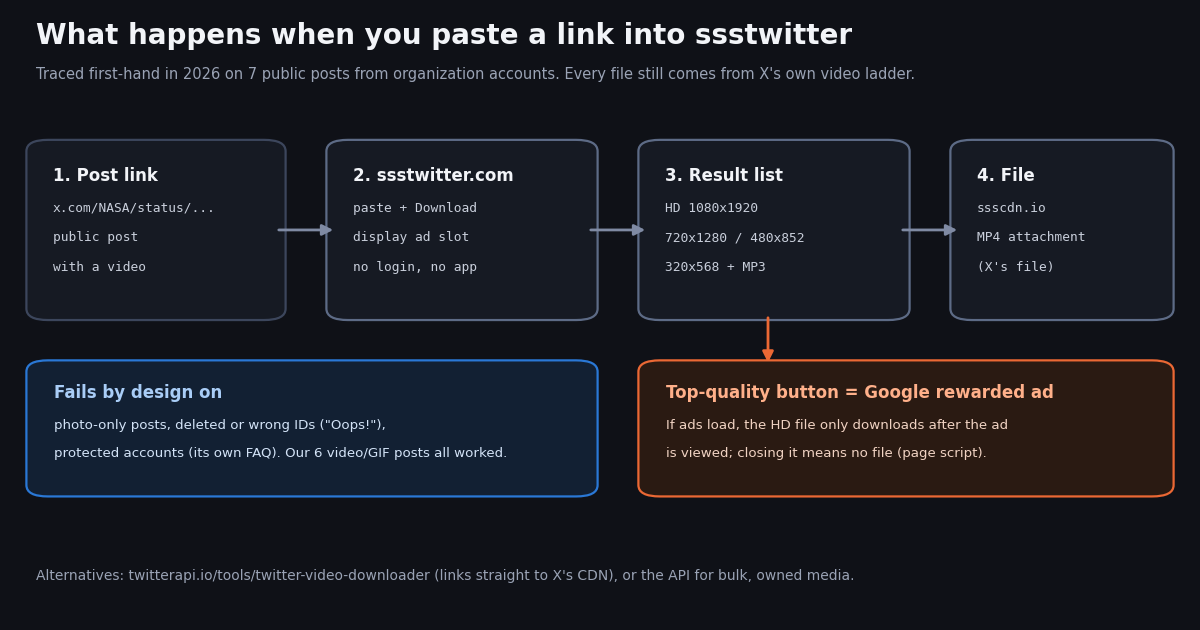
If you searched for ssstwitter, you most likely want to save a video from an X (Twitter) post, or you want to know whether the site is still up and safe to use. This page answers that as a consumer guide: what ssstwitter is, how it behaves when you actually use it, where it fails, and which alternatives exist. It is different from our developer guide to downloading X media in bulk through an API, which covers code, pagination and archiving whole timelines; we link to it at the end for anyone who needs that.
Most pages about ssstwitter are copies of its own marketing text. We tested it ourselves in 2026: we loaded the site, read its About and Privacy pages, submitted 7 public posts from organization accounts (videos, a GIF, a photo-only post and a post ID that does not exist), and read the script that runs on the result page. We also pulled 1,520 recent posts from 10 organization accounts to measure what X really stores for each video, because that is the menu any downloader, ssstwitter included, has to pick from.
One rule before anything else: download only videos you own or have permission to use. X's Terms of Service and copyright policy (help.x.com/en/rules-and-policies/copyright-policy) apply to the content whatever tool you use, and personal offline viewing is not the same thing as re-uploading someone else's work.
What is ssstwitter?
ssstwitter is a web page with one input box. You paste the link of an X post, press Download, and it lists the video files X stores for that post. The site's title calls it a "Twitter Video Downloader - Download Twitter (X) Video in MP4", and its footer says it has been running since 2018. When we loaded it in 2026 it was available in 18 languages, needed no account, and asked you to sign in to nothing.
Who runs it. The About page says "We are a separate team and are not part of the X company" and that "we do not keep any copies of your videos." It names no company or person. The footer links to sister sites for other platforms (ssstik.io for TikTok, reelsvideo.io for Instagram and getmyfb.com for Facebook), so ssstwitter is one tool in a family of ad-supported downloaders rather than a standalone project.
How it makes money. The homepage loads Google's AdSense script and Google Tag Manager, and has a display ad slot. The Privacy Policy says the site itself collects no personal information, uses Google Analytics cookies, and that third-party ad networks "may collect information about you and your online activities" through cookies and web beacons. That is normal for a free ad-funded site, but it is the honest answer to "is it private": the site may not log you, the ad stack can.
What it supports. Public posts that contain a native video or an animated GIF. It offers an "X to MP3" page and a Convert to MP3 button for the audio track. It does not download photos: a photo-only post returned an error in our test. Its own FAQ says private (protected) accounts do not work.
The "sss" trick. The name comes from a shortcut the sister sites popularized: type sss in front of the domain in a post's address so twitter.com/... becomes ssstwitter.com/.... We tried that with a NASA video post. The server answered with a redirect (HTTP 301) to the homepage; the redirect page had the post link filled into the box, but after following the redirect we landed on the homepage with an empty box. In our scripted test you still had to paste the link yourself; a browser with JavaScript may behave differently, which we did not test.
How to use ssstwitter (and the formats you get)
Step 1: copy the post link. On x.com, use Share and then Copy link on the post; in the app, the same Share menu has Copy link. ssstwitter's own example uses the format https://x.com/<handle>/status/<post ID>.
Step 2: paste and press Download. The form sends the link to ssstwitter's server and swaps in a result list a few seconds later. In our test, video results came back in about 1.8 to 4.9 seconds per post.
Step 3: pick a quality. The list mirrors X's own quality ladder. For a NASA vertical video the buttons were "HD 1080x1920", "720x1280", "480x852" and "320x568", exactly the four MP4 versions X lists for that post. For an NBA clip whose best version is 720x900, ssstwitter labeled 720x900 as "HD". The label is relative: "HD" means the best file X has, not a fixed resolution.
MP3. Under the video buttons there is a Convert to MP3 button. It sends the request to a separate host, r.ssstik.top, belonging to the same family of sites. We did not download the MP3 output.
GIFs. X stores every uploaded GIF as a silent looping MP4. For an NBA GIF post, ssstwitter offered one file, "original video", which matches what X stores: both GIFs in our sample had exactly one MP4 version. If you need a real .gif, convert the MP4 afterwards; our guide to saving GIFs from Twitter covers that.
Does ssstwitter still work?
Yes, when we checked it in 2026. The homepage answered HTTP 200 through Cloudflare, and every public video or GIF post we submitted eventually returned links (6 of 6). One NBA video came back as an empty response on the first try and worked on a retry 8 seconds later. Its FAQ mentions a mandatory wait between downloads "to reduce server loading", which is the likely cause; if you see nothing happen, wait a few seconds and press Download again.
When it does not work, the cause is almost always the post, not the site. No native video: photo-only posts, text posts and posts that only link to a YouTube or news page have nothing for it to fetch. The video sits in a quoted post: in our sample, 10 posts had no media of their own but quoted a post that did; paste the quoted post's own link instead. Protected accounts: their posts are visible only to approved followers, and ssstwitter's FAQ says they do not work. Deleted, withheld or mistyped posts: our non-existent ID returned the same "Oops!" message as a photo post, so the error does not tell you which problem you have.
Unavailable media. X marks each video with an availability status. 684 of the 685 videos in our sample were "Available" and 1 was "Unavailable", which is what you see when a rights holder or X has restricted a clip. No downloader can fetch a file X will not serve.
Sensitive or age-restricted posts. X can hide posts marked as sensitive from logged-out viewers. We did not test such a post, so we cannot say how ssstwitter handles one; if a post needs you to be signed in to view it on x.com, expect logged-out tools to fail on it.
Live broadcasts. The homepage claims it can save live streams and broadcasts. We did not test a broadcast, so we make no claim either way.
Is ssstwitter safe?
Based on what we saw, ssstwitter behaves like a typical ad-funded downloader: no login, no account, no forced install, but ads are part of the deal and some details are worth knowing. Here is what we verified and what we did not.
The HD button is a rewarded ad. The best-quality button on the result page has no normal link. We read this from the page code rather than watching an ad play: the script first checks whether Google's ad script can load. If it can, clicking HD starts a Google rewarded ad; if the ad reports "viewed" the file downloads, and if you close it the script stops and nothing downloads. If the ad fails to load, the file downloads without one. Google describes rewarded ads as an ad experience users "voluntarily opt in to" in exchange for a reward, and says people who close one early are asked to confirm they forfeit the reward (support.google.com/admanager/answer/9116812). The lower qualities download directly.
Files come from ssstwitter's host, not X. Every download link pointed to ssscdn.io/ssstwitter/<post ID>/... with an expiring token. Requesting one returned an MP4 as an attachment named ssstwitter.com_<number>.mp4 (6.3 MB for the NASA 720x1280 file). The file IDs match X's own video.twimg.com file names, so the content is X's file; it is simply relayed through ssstwitter's server, even though the homepage says "all videos are directly stored from the Twitter CDN".
Ads and tracking. The homepage loads Google AdSense and Google Tag Manager, and the Privacy Policy says ad networks may track your activity across sites. Our check ran without JavaScript, so we cannot report pop-ups, new tabs or notification prompts in a real browser. Treat any prompt to allow notifications, install an extension, or "update" something as unrelated to downloading a video and decline it.
The app link. The site's header links to an Android app on Google Play (package com.universal.video.downloader). We did not install it and cannot vouch for it. You do not need an app to use the website.
Lookalike domains. ssstwitter.net is a separate site with a similar name, its own ads and an emoji-filled title; ssstwitter.online returned 404 and ssstwitter.co did not connect when we checked. The brand name alone does not tell you who runs a page. Type the domain yourself rather than clicking ads in search results.
Copyright. The tool does not make a download legal. Save videos you made, videos your organization owns, or videos you have permission to use. Re-uploading other people's videos can get your own account reported under X's copyright policy.
What X actually stores for each video (our 2026 study)
A downloader cannot invent quality. It can only hand you the files X stores. To see what that menu looks like, we read 1,520 recent posts from 10 public organization accounts (newsrooms, sports leagues, space agencies and game brands) and counted the media in each, then read the video_info.variants list for each of the 685 videos.
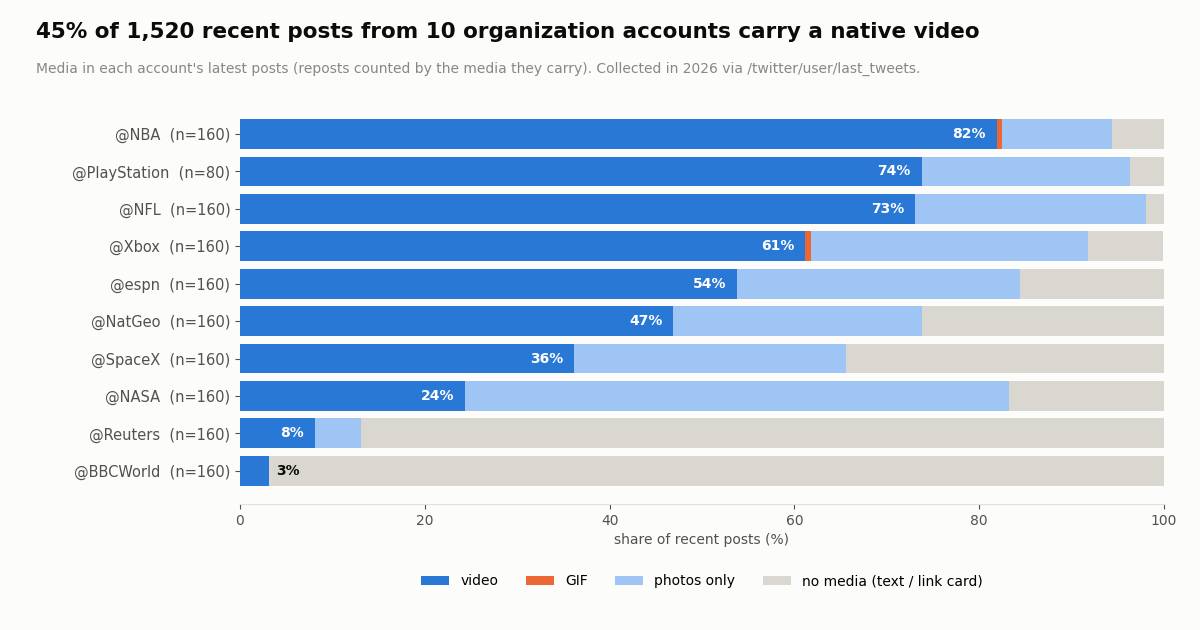
How common video is. 44.8% of the posts carried a native video, 24.1% had photos only, and 31.0% had no media at all (mostly text and link cards). Only 2 posts had a GIF. The spread between accounts is huge: sports and gaming accounts post video most of the time, while the two news brands mostly post links to their own sites.
Quality ladder. Every video listed a streaming (HLS) playlist plus 3 to 5 MP4 files at different sizes; the median was 4 MP4 versions (449 videos had 4, 153 had 3, 83 had 5). That is why ssstwitter shows three or four buttons: one per MP4 file.
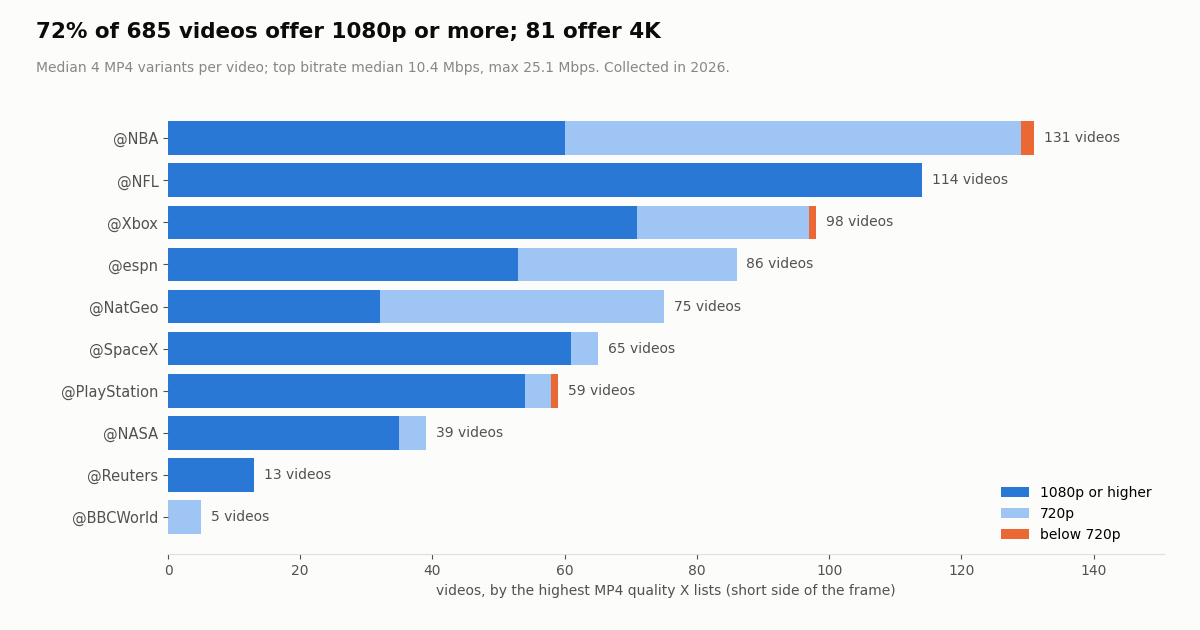
Top quality. 72.0% of videos offered a best version of 1080p or more, 27.4% topped out at 720p, and 0.6% were below 720p. 81 videos offered 4K (2160p), 53 of them from @SpaceX. The best MP4 had a median bitrate of 10.4 Mbps and a maximum of 25.1 Mbps.
Length. The median video ran 23.4 seconds, 90% were under 102 seconds, and the longest was about 28 minutes.
The practical takeaway: if a downloader only offers you 720p for a post, check whether X itself has more. In our sample, 7 out of 10 videos had a 1080p or better file available, so the "HD" button usually matters, and it is exactly the button ssstwitter puts behind its rewarded ad.
Best quality X offers, account by account
The second chart splits the videos by the best MP4 version X lists. NFL, Reuters and SpaceX posted almost nothing below 1080p, while NBA, NatGeo and ESPN mixed in many 720p clips, often short highlights or vertical edits. When ssstwitter (or any tool) shows "HD 720x900", that is not the tool holding back; that is the best file X has for that clip.
For a phone, the 720p file is usually plenty and much smaller. For editing, presentations or archiving your own footage, take the highest version; at a 10 Mbps median bitrate, one minute of 1080p video is roughly 78 MB.
ssstwitter alternatives compared
If ssstwitter is slow, shows you an ad you do not want, or fails on a post, these are the realistic options. "Verified" means we checked it in 2026; anything else is marked.
Our free Twitter video downloader. It is the closest like-for-like swap: paste a post link (x.com, twitter.com, mobile links, fxtwitter, vxtwitter or a bare post ID) and it lists every MP4 quality X stores, GIFs as MP4, and photos at original resolution, with no sign-up. The download links point at X's own servers (video.twimg.com, pbs.twimg.com); we do not copy or keep the files. Anonymous use has a daily per-IP limit, and signing in raises it. An MP3 option is not available yet.
The API route. If you need dozens or hundreds of videos from your own organization account, a web form is the wrong tool. The API returns each post with its extendedEntities.media[].video_info.variants[], so you can pick the best MP4 in code and keep a manifest. The next section has a working script; our bulk media download guide covers HLS-only videos, retries and storage.
Pages that only show a post. If you only want to watch a video without an account, a logged-out x.com post link still opens. Viewer sites are a separate topic; see the sibling guides linked at the end.
Download videos with the API instead
Under the hood, ssstwitter does one thing: it looks up the post, reads the list of video files X has for it, and hands you the links. The same lookup through twitterapi.io is one call to GET /twitter/tweets with tweet_ids (up to 50 IDs per request), with no X account needed. The response carries extendedEntities.media[]; for video and animated_gif items, take the video/mp4 variant with the highest bitrate.
The snippet below does that for one post. The full script at the end of this page walks your own account's timeline with /twitter/user/last_tweets (20 posts per page, follow next_cursor while has_next_page is true) and saves every video at the best quality.
Cost compared with the official X API. twitterapi.io charges 15 credits per post returned, which is $0.15 per 1,000 posts (minimum 15 credits per request). On X's own pay-per-usage rate card (docs.x.com/x-api/getting-started/pricing), a post read is $0.005, or $5 per 1,000 posts, about 33 times more for the same lookups. Our whole study in this article, 1,520 posts in 77 requests, cost $0.23.
New accounts that pass the automatic bot check get up to $1 of free credits (at most 100,000 credits, no card, one per person or network, expiring after 31 days). Purchased credits never expire. Rate limits are 0.2 requests per second before the first payment and 20 once paid; subscriptions and higher tiers are on the pricing page.
import os
import requests

BASE = "https://api.twitterapi.io"
HEADERS = {"X-API-Key": os.environ["TWITTERAPI_IO_KEY"]}


def best_video_url(tweet_id):
    """Return the highest-bitrate MP4 that X lists for one public post, or None."""
    r = requests.get(f"{BASE}/twitter/tweets", params={"tweet_ids": tweet_id},
                     headers=HEADERS, timeout=30)
    r.raise_for_status()
    tweets = r.json().get("tweets", [])
    if not tweets:
        return None  # deleted, protected or mistyped ID
    for m in (tweets[0].get("extendedEntities") or {}).get("media", []):
        if m.get("type") not in ("video", "animated_gif"):
            continue
        mp4 = [v for v in m["video_info"]["variants"] if v.get("content_type") == "video/mp4"]
        if mp4:
            return max(mp4, key=lambda v: v.get("bitrate") or 0)["url"]
    return None


url = best_video_url("2112560723603632217")   # a public @NASA video post
print(url)                                     # https://video-s.twimg.com/... (X's own CDN)
How we collected this
Question. Does ssstwitter work, what does it do with your click, and what video files does X actually store for the posts people try to download?
ssstwitter check. In 2026 we fetched ssstwitter.com, its About, Privacy and MP3 pages with a plain HTTP client (desktop Chrome user agent, no JavaScript), submitted 7 public posts through its form (4 videos, 1 GIF, 1 photo-only post, 1 non-existent post ID; one video twice), requested one download link, and read the inline script on the result page. We also loaded three lookalike domains.
Data study. 1,520 recent posts from 10 public organization accounts: @NASA, @SpaceX, @NBA, @NFL, @espn, @Reuters, @BBCWorld, @NatGeo, @Xbox and @PlayStation, read with /twitter/user/last_tweets (replies excluded, up to 160 posts per account; @PlayStation returned 80). Collected in 2026, 77 requests, $0.23. Media counts use extendedEntities.media[]; the best resolution is parsed from each MP4 variant's URL; reposts are counted by the media they carry.
What it cannot show. Ten organization accounts are not all of X: personal accounts may post less video, at other qualities. Our ssstwitter check ran without a browser, so pop-ups, redirects and prompts that need JavaScript were not observed, and seven posts are a spot check, not an uptime record. We did not test protected, age-restricted or live-broadcast posts.
Privacy. Organization accounts only, aggregates only; no private individuals were analyzed. The study files (protocol, analysis script and results) are kept with the article's source data.
"""Back up every video your own organization account has posted, at the best quality X stores.

Only run this on accounts you own or have permission to archive.
Cost: tweet endpoints are 15 credits per post returned ($0.15 per 1,000 posts).
"""
import os
import pathlib
import requests

BASE = "https://api.twitterapi.io"
HEADERS = {"X-API-Key": os.environ["TWITTERAPI_IO_KEY"]}
ACCOUNT = os.environ.get("X_HANDLE", "NASA")   # your own handle
OUT = pathlib.Path(f"videos_{ACCOUNT}")
OUT.mkdir(exist_ok=True)


def timeline(user, max_pages=10):
    """Yield posts from /twitter/user/last_tweets, newest first, 20 per page."""
    cursor = None
    for _ in range(max_pages):
        params = {"userName": user}
        if cursor:
            params["cursor"] = cursor
        r = requests.get(f"{BASE}/twitter/user/last_tweets", params=params,
                         headers=HEADERS, timeout=30)
        r.raise_for_status()
        body = r.json()
        data = body.get("data") or {}
        yield from data.get("tweets", [])
        if not body.get("has_next_page") or not body.get("next_cursor"):
            break
        cursor = body["next_cursor"]


def best_mp4(media):
    mp4 = [v for v in media["video_info"]["variants"] if v.get("content_type") == "video/mp4"]
    return max(mp4, key=lambda v: v.get("bitrate") or 0) if mp4 else None


saved = 0
for tweet in timeline(ACCOUNT):
    for i, m in enumerate((tweet.get("extendedEntities") or {}).get("media", [])):
        if m.get("type") not in ("video", "animated_gif"):
            continue
        if (m.get("ext_media_availability") or {}).get("status") == "Unavailable":
            continue
        best = best_mp4(m)
        if not best:
            continue
        dest = OUT / f"{tweet['id']}_{i}.mp4"
        if dest.exists():
            continue
        with requests.get(best["url"], stream=True, timeout=60) as f:
            f.raise_for_status()
            with open(dest, "wb") as fh:
                for chunk in f.iter_content(1 << 16):
                    fh.write(chunk)
        saved += 1
        print(f"{dest.name}  {best.get('bitrate', 0) // 1000} kbps  {tweet['createdAt']}")

print(f"saved {saved} files to {OUT}/")
Questions readers ask
Is ssstwitter safe to use?
In our 2026 check it asked for no login, no account and no install, and returned real MP4 files from X's own video ladder. It is ad-funded: the best-quality button triggers a Google rewarded ad when ads load, the Privacy Policy says ad networks may track you across sites, and the header links to an Android app we did not test. Decline any notification, extension or app prompt, type the domain yourself (lookalikes such as ssstwitter.net exist), and download only videos you have the right to use.
Why is ssstwitter not working?
Usually because of the post: it has photos only, the video is inside a quoted post (paste that post's link instead), the account is protected, or the post was deleted or the link is mistyped. ssstwitter shows the same "Oops!" error for all of these. In our test one video returned an empty response once and worked on a retry a few seconds later, so wait briefly and try again before assuming the site is down.
Does ssstwitter download in HD or 1080p?
Yes, if X has an HD file. ssstwitter lists every MP4 version X stores and labels the best one "HD", whatever its size. In our study 72% of organization-account videos had a 1080p or higher version, and the HD button is the one tied to a rewarded ad.
Can ssstwitter download MP3 audio?
It has an X to MP3 page and a Convert to MP3 button under each result, which sends the request to a sister host, r.ssstik.top. We did not download the MP3 output. Our own downloader does not offer MP3 yet; it gives you the MP4, which any audio converter can turn into MP3.
Can ssstwitter save GIFs and images?
GIFs yes, as MP4: X stores every GIF as a looping MP4 and ssstwitter offered that one file. Images no: a photo-only post returned an error. For photos at original size, use our Twitter video downloader, which also lists images.
Can I download videos from private Twitter accounts with ssstwitter?
No. ssstwitter's own FAQ says private (protected) accounts do not work, and no legitimate tool should fetch posts that the account holder has limited to approved followers.
Is ssstwitter.com the same as ssstwitter.net?
No. They are separate sites with different pages, titles and ad setups. ssstwitter.com is the long-running one (its footer says 2018-2026) with sister sites such as ssstik.io; ssstwitter.net is a lookalike we did not test beyond loading its homepage.
Is it legal to download Twitter videos with ssstwitter?
The tool is not the legal question; the video is. Downloading your own videos, your organization's videos or content you have permission to use is fine; re-uploading someone else's video can infringe copyright and break X's rules. X's copyright policy is at help.x.com/en/rules-and-policies/copyright-policy.
Continue
- X API data dictionary: media object types and playback variants (docs.x.com)
- X API pay-per-usage pricing (docs.x.com)
- Google Ad Manager: rewarded ads for web, opt-in and forfeit on close
- X copyright policy (help.x.com)
- twitterapi.io docs: Get Tweets by IDs (/twitter/tweets, up to 50 IDs)
- twitterapi.io docs: Get User Last Tweets
- Twitter (X) API overview: reading posts, media and profiles
- Free Twitter (X) video downloader: every MP4 quality, GIFs and photos
- Download Twitter (X) media in bulk with the API
- Tweeload: what the Twitter downloader does and alternatives
- Twitter web viewers: reading X without an account
- How to save a GIF from Twitter (X)
- Twitter (X) video not playing: causes and fixes
- Download pictures from Twitter (X) at full size
- twitterapi.io pricing: pay only for the data returned
- 01X Radar Explained: Twitter (X) Keyword Monitoring, Tiers, Limits and an API Alternative
- 02Twitter (X) Stalker Tools: What They Can See, What They Can't, and Where the Line Is
- 03Snaplytics Twitter (X) Viewer: What It Is, Whether It Works, and Safer Options
- 04Tweeload: What the Twitter (X) Video Downloader Does, and Whether It Is Safe
- 05Twillot Twitter (X) Viewer: What It Is, Whether It Works, and Is It Safe?
- 06Twitter (X) Hashtag Tracker Tools — Developer's Roundup
- 07Grok Tasks: Schedule Grok to Monitor Twitter (X), and What It Cannot Do
- 08Grok Build: Install, Pricing, MCP Setup and an X (Twitter) Data Tool Built With It
Stop reading. Start building.
Starter credits cover real testing on real data. Google sign-in, no card, no application queue.
Get an API key