Grok Tasks: Schedule Grok to Monitor Twitter (X), and What It Cannot Do
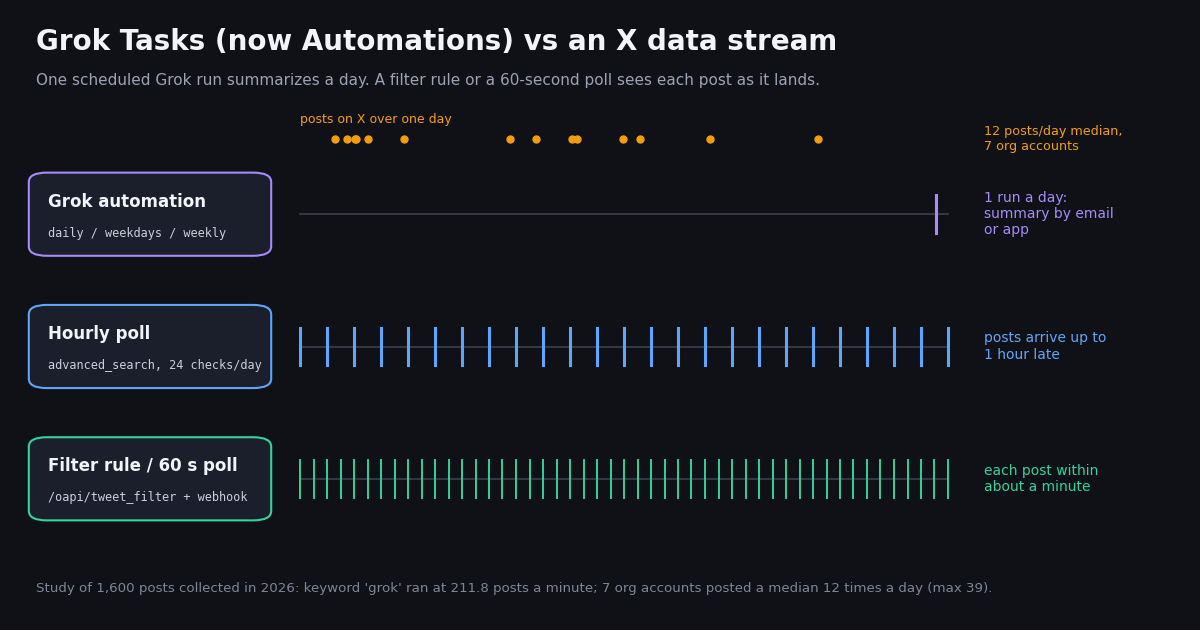
This page is about the scheduling feature inside the Grok app, the one people search for as "Grok Tasks". It is not about building your own agent on the xAI API (that is our Grok agent guide), not about the Grok Build coding CLI, and not about the @grok reply bot on X. Those are different products that share a name; the sibling pages at the end cover each one.
Grok Tasks let you hand Grok a prompt and a schedule. The obvious thing to schedule, since Grok has X search built in (the developer API documents it as the X Search tool), is a watch: "every morning, tell me what these accounts posted" or "alert me when people complain about our product". We checked the live xAI pages for what the feature can do today, then measured, on 1,600 real posts from seven organization accounts and two keyword searches, what a once-a-day run would have to summarize and what it would arrive too late to catch.
One limit up front: we did not run a logged-in Grok automation for this study, so this page does not claim what a run wrote or which posts it skipped. Everything about Grok comes from xAI's own pages; everything about posting volume comes from the data we collected.
What Grok Tasks are in 2026: Automations, the renamed feature
The rename. Requests to grok.com/tasks now redirect to grok.com/automations, a page titled "Automations - Grok" with grok.com/automations as its canonical address. xAI announced Automations on July 16, 2026, on a news page now titled "Automations in Grok | SpaceXSI" (the company's site now carries the SpaceXSI name; Grok remains the product name). The announcement does not use the word "Tasks", so we describe this as the feature that took over the Tasks address rather than quoting a rename notice.
What an automation is. In xAI's words: "Describe the work once, choose when it runs." You write instructions, pick a schedule, and Grok runs them without you opening a chat. Each run is saved as a full conversation in run history, so you can read what Grok did and continue from there.
Schedules. Once, daily, weekdays, weekly, monthly or yearly, at a time you choose in your timezone. Those are the only options the announcement lists. There is no hourly or every-15-minutes cadence among them, which is the single most important fact for anyone hoping to use Grok as a monitor.
Email triggers. Instead of a clock, an automation can fire when a matching email arrives in Gmail or Outlook, filtered by sender, recipient or subject; the email becomes context for the run. Instructions can also reference connected apps with @, and automations can use custom skills.
Delivery. You choose email, app notification, both, or neither, per automation. Controls include Run now, pause, resume, edit and delete. You can create an automation from a chat, from a template, or from the Automations page, on grok.com and in the Grok app for iOS and Android.
How to schedule a Grok task, step by step
1. Open Automations. On grok.com, go to grok.com/automations (or the old Tasks link, which lands there). In the mobile app, open the same section from the menu. You can also ask Grok in a normal chat to turn the current request into an automation.
2. Write the instruction as if Grok will read it cold. Every run starts fresh. Name the accounts or keywords, the time window ("posts from the last 24 hours"), and the output format you want ("a bulleted list with the post link and one-line summary"). Grok's X search works at day granularity in the developer API (from_date and to_date take YYYY-MM-DD), so "since yesterday" is a safer window than "in the last 47 minutes".
3. Pick the schedule. Daily or weekdays for a morning digest, weekly for a roundup. Set the time in your own timezone.
4. Choose how it reports. Email if you want the digest in your inbox, app notification for a quick ping, or neither if you will read run history yourself.
5. Run it once now. Use Run now to see the first output before you trust the schedule, then read the run conversation to check which posts it actually cited.
A good monitoring prompt. "Every weekday at 08:00, search X for posts from @NASA, @SpaceX and @github in the last 24 hours. List each post with its link, posted time and a one-line summary. If an account did not post, say so. Then list the three most-replied posts mentioning our product name." Asking Grok to say when an account did not post makes silent misses visible.
What a Grok task can and cannot do when it watches X
It can summarize a day of posts from a few accounts, explain what a trending keyword is about, pull context from the web alongside X, combine X with your email or calendar through connectors, and deliver a readable digest to your inbox at a fixed time. For a person who wants "the morning briefing", that is exactly right.
It cannot alert you in real time. The finest published schedule is daily (or weekdays). A post published just after a run waits until the next one. In our data the mean wait from post to the next daily check was 8.6 hours for seven organization accounts combined.
It cannot promise completeness. A run is a model answering a prompt: it searches, reads what the search returns, and writes a summary. xAI's developer documentation describes X Search as keyword, semantic, user and thread search chosen by the model, with handle filters capped at 20 accounts per request. Nothing in the consumer feature promises that every matching post is read. For busy keywords that is a hard ceiling, not a nitpick: the keyword grok produced 211.8 posts a minute when we sampled it.
It cannot hand you structured data. The output is prose (or whatever format you ask for) in an email or a conversation. xAI's announcement describes delivery by email or app notification only; it mentions no webhook, JSON export or API for run history, so there are no post IDs to feed into a database or a support workflow.
It cannot run on a tight loop. Even the developer-side scheduler in the Grok Build CLI, /loop, has a 60-second minimum interval, expires loops after 7 days, and allows at most 50 scheduled tasks at once, per the Background Tasks page in xAI's docs. That is a coding-session tool, not a hosted monitor.
What a daily run has to cover: seven organization accounts measured
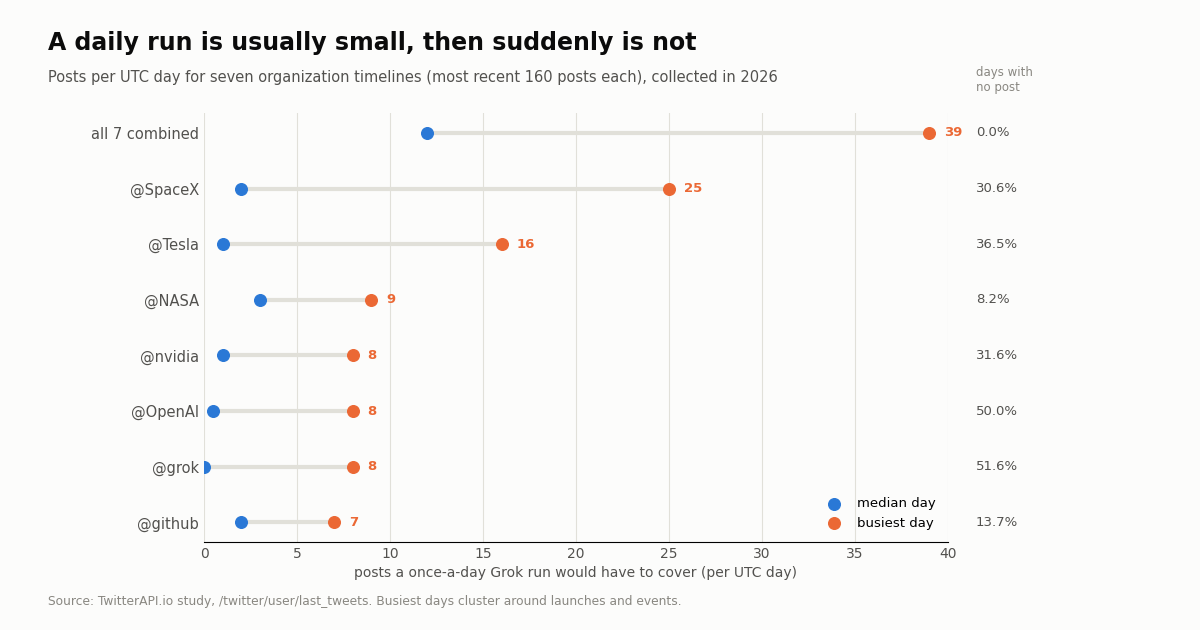
We pulled the most recent 160 posts from seven organization accounts that people commonly want summarized (@NASA, @SpaceX, @github, @nvidia, @Tesla, @OpenAI and @grok) and counted posts per UTC hour and per UTC day. The median account posted 1.7 times a day, and in the median account 93.5% of clock hours had no post at all.
Quiet most days, loud on a few. @SpaceX had a median of 2 posts a day but 25 on its busiest day; @Tesla had a median of 1 and a busiest day of 16. The busiest 10% of days held 42.9% of @SpaceX's posts and 42.9% of @Tesla's. Launch days and product events are exactly the days you most want the full list, and exactly the days a short summary compresses hardest.
Combined, a daily digest is a dozen posts. Watching all seven in one query, the median day had 12 posts and the busiest 39, with no empty days in the overlapping window. A digest of that size is a comfortable job for a Grok automation, which is the honest case for using one.
Keyword monitors are a different scale: "grok" and "grok imagine"
Accounts are small. Keywords are not. We ran two Latest searches with advanced_search: the bare keyword grok, and the phrase "grok imagine", 240 posts each.
grok: 211.8 posts a minute. The 240 most recent posts spanned about a minute. At that rate the keyword produces roughly 304,941 posts a day. This is an extrapolation from one short window, not a measured day, but even a tenth of it is far beyond anything one scheduled summary can read.
"grok imagine": about 1,087 posts a day. The 240 posts spanned 5.3 hours, with 61 posts in the busiest clock hour and no empty hour. An hourly check would have had to handle 52 posts at the 90th percentile; a daily run, about 1,087.
What that means for a Grok task. A daily automation watching a product keyword is a sampling exercise: Grok reads some posts and writes a summary. That is useful for "what is the mood today", not for "did any customer report an outage" or "reply to every mention". For those jobs you need every post, which means an API that pages through all of them.
How late is late? Waiting time by schedule
For every post in the sample we computed how long it would sit before the next check on a fixed grid: one daily run, one check per clock hour, or one every 60 seconds.
The daily figure depends on when the run is scheduled and when the account posts; a run timed just after an account's busy hours shortens it. The hourly and 60-second figures sit near half the interval, as they should for posts that arrive at random within each window.
The API path: filter rules, webhooks and 60-second polling
When the job is "tell me about every matching post, quickly, as data", the tool is an X data API rather than a chat assistant. There are two patterns, and both read X without an X account.
Push: a filter rule and a webhook. POST /oapi/tweet_filter/add_rule takes tag (your label, up to 255 characters), value (the filter, same syntax as search, such as from:NASA OR from:SpaceX, up to 255 characters) and interval_seconds (how often it is checked, 0.05 to 86,400, default 60). A new rule is inactive: call POST /oapi/tweet_filter/update_rule with every field again and is_effect: 1. Matches are POSTed to the webhook URL set in your dashboard; GET /oapi/tweet_filter/get_rules lists active rules.
Pull: poll advanced_search. GET /twitter/tweet/advanced_search with queryType=Latest and a since_time: operator returns new posts in pages of up to 20, with has_next_page and next_cursor. You run the loop, so you control dedupe, retries and storage. The full script is below.
Fixed account lists: Twitter Stream. If you watch a set of accounts rather than keywords, the Twitter Stream product delivers their posts in seconds without you writing the loop.
Pair it with Grok, if you like. Nothing stops you from feeding the collected posts into a Grok model through the xAI API to write the summary. The difference from a Grok automation is that the data step is complete and yours, and the model only writes.
import os
import requests

BASE = "https://api.twitterapi.io"
HEADERS = {"X-API-Key": os.environ["TWITTERAPI_IO_API_KEY"]}

# 1. Create the rule (new rules are inactive)
rule = {"tag": "grok-imagine-watch", "value": '"grok imagine" lang:en', "interval_seconds": 60}
r = requests.post(f"{BASE}/oapi/tweet_filter/add_rule", headers=HEADERS, json=rule, timeout=30)
r.raise_for_status()
rule_id = r.json()["rule_id"]

# 2. Activate it: update_rule needs every field again plus is_effect=1
r = requests.post(f"{BASE}/oapi/tweet_filter/update_rule", headers=HEADERS,
                  json={"rule_id": rule_id, **rule, "is_effect": 1}, timeout=30)
r.raise_for_status()

# 3. List what is active
print(requests.get(f"{BASE}/oapi/tweet_filter/get_rules", headers=HEADERS, timeout=30).json())
What it costs to see every post: TwitterAPI.io vs the official X API
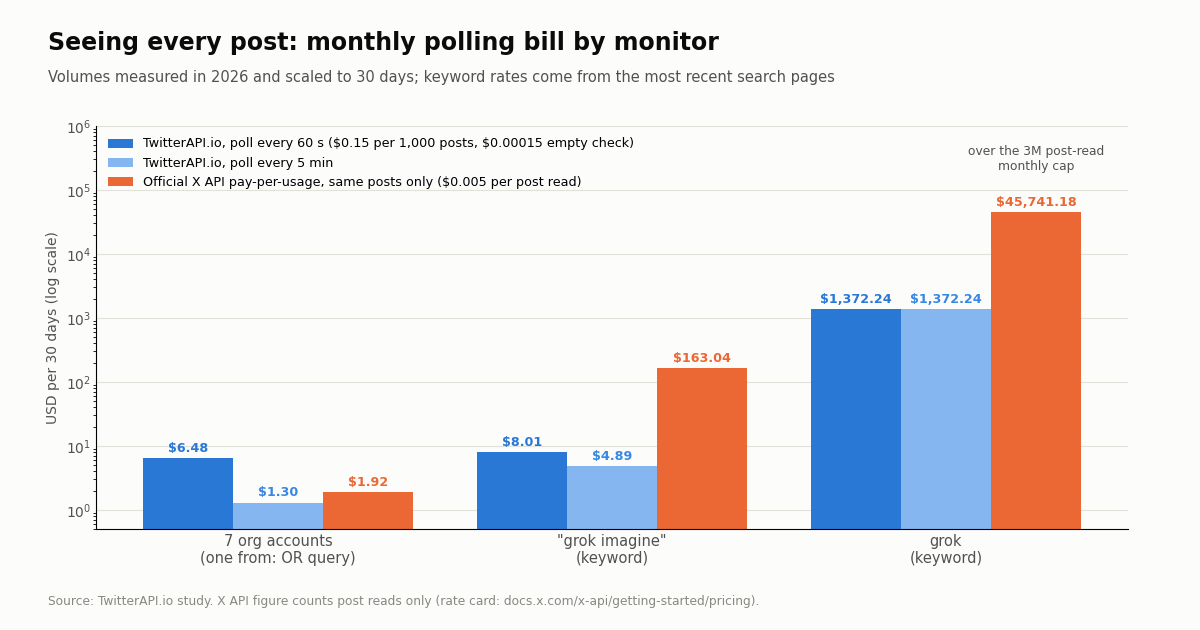
Our rate card bills 15 credits per returned post ($0.15 per 1,000) with a 15-credit minimum per request, so a check that finds nothing costs $0.00015. Polling one query every 60 seconds for a month is 43,200 checks, a $6.48 floor; every 5 minutes is $1.30. The official X API's pay-per-usage rate card (docs.x.com/x-api/getting-started/pricing) charges $0.005 per post read, capped at 3 million post reads a month before Enterprise. Per 1,000 posts that is $5 vs $0.15, about 33 times more. xAI's own X Search tool for developers is billed at $5 per 1,000 posts fetched plus model tokens.
Reading the table honestly. For quiet accounts the X API line is lower, because it counts only the posts read; our line is dominated by the empty-check floor. Poll every 5 minutes, or put all accounts in one from: OR query as above, and the floor drops to $1.30. As soon as a keyword is involved the per-post price dominates: the grok keyword would run past the X API's 3 million monthly cap on its own.
New accounts that pass the automatic bot check get up to $1 of free credits (at most 100,000 credits, no card, one per person or network, expiring after 31 days). Purchased credits never expire. Rate limits are 0.2 requests per second before the first payment and 20 once paid; see the pricing page for subscriptions.
How we collected this
Question. If you ask a scheduled Grok automation to watch X accounts or a keyword once a day, how much does one run have to cover, how late does it see each post, and what would per-minute coverage cost?
Accounts and queries. Timelines of @grok, @NASA, @SpaceX, @Tesla, @OpenAI, @nvidia and @github through /twitter/user/last_tweets (8 pages, 160 posts each). @xai was also requested, but its profile returned as protected with no visible posts, so it is excluded. Keyword searches grok and "grok imagine" through /twitter/tweet/advanced_search with queryType=Latest (12 pages, 240 posts each).
Window and size. The most recent posts at collection time, collected in 2026: 1,600 posts from 82 requests, about $0.24 at our rate card. Per-account windows run from weeks to months; keyword windows from about a minute (grok) to 5.3 hours ("grok imagine"). Monthly figures scale the observed rate to 30 days. The combined seven-account figures use only the period where all seven samples overlap.
What the sample cannot show. What a Grok automation would have written or skipped (we did not run a logged-in automation), deleted or protected posts, posts a search ranks out, and other weeks or months. Keyword rates come from short windows and swing with the news.
Privacy. Aggregates only. Organization accounts are named; authors in the keyword searches are private individuals and are never identified. Raw keyword pages were not kept.
"""grok_tasks_alternative.py - watch X accounts or a keyword every 60 seconds and
print each new post, the job a once-a-day Grok automation summarizes after the fact.

    pip install requests
    export TWITTERAPI_IO_API_KEY=...          # twitterapi.io dashboard
    python grok_tasks_alternative.py          # loops forever; Ctrl+C to stop

Cost: one advanced_search request per pass. A pass that finds nothing costs the
$0.00015 minimum (15 credits); each returned post costs $0.00015.
"""
import os
import time

import requests

BASE = "https://api.twitterapi.io"
HEADERS = {"X-API-Key": os.environ["TWITTERAPI_IO_API_KEY"]}
WATCH = ["NASA", "SpaceX", "github"]      # accounts to watch (keep the query under 512 characters)
KEYWORD = os.environ.get("X_KEYWORD")       # or a keyword, e.g. '"grok imagine" lang:en'
INTERVAL = 60                               # seconds between passes
MAX_PAGES = 5                               # safety cap per pass (20 posts per page)


def build_query(since_time):
    base = KEYWORD or "(" + " OR ".join(f"from:{h}" for h in WATCH) + ")"
    return f"{base} since_time:{since_time}"


def fetch_new(since_time):
    posts, cursor = [], ""
    for _ in range(MAX_PAGES):
        r = requests.get(
            f"{BASE}/twitter/tweet/advanced_search",
            headers=HEADERS,
            params={"query": build_query(since_time), "queryType": "Latest", "cursor": cursor},
            timeout=30,
        )
        r.raise_for_status()
        body = r.json()
        posts += body.get("tweets", [])
        if not body.get("has_next_page"):
            break
        cursor = body.get("next_cursor", "")
    return posts


def main():
    since_time = int(time.time()) - 3600     # first pass: the last hour
    seen = set()
    while True:
        started = int(time.time())
        try:
            new = [t for t in fetch_new(since_time - 120) if t["id"] not in seen]
        except requests.RequestException as exc:
            print("request failed, retrying next pass:", exc)
            time.sleep(INTERVAL)
            continue
        for t in sorted(new, key=lambda t: t["id"]):
            seen.add(t["id"])
            author = t.get("author") or {}
            print(f"[{t['createdAt']}] @{author.get('userName')}: {t['text'][:200]}")
            print(f"    {t['url']}  likes={t.get('likeCount')} views={t.get('viewCount')}")
        since_time = started
        if len(seen) > 5000:
            seen = set(list(seen)[-2000:])
        time.sleep(INTERVAL)


if __name__ == "__main__":
    main()
Questions readers ask
What are Grok Tasks?
Grok Tasks is the scheduled-prompt feature in the Grok app, now called Grok Automations. You write instructions once, choose a schedule (once, daily, weekdays, weekly, monthly or yearly), and Grok runs them and reports back by email, app notification, both or neither. The old grok.com/tasks address redirects to grok.com/automations.
Do Grok Tasks need SuperGrok?
Per xAI's July 16, 2026 announcement, scheduled automations are available to everyone, and email triggers (runs that fire when a matching Gmail or Outlook message arrives) are included with SuperGrok. Plan details change, so check the Automations page in your own account.
Can a Grok task run every hour?
Not among the published options. xAI lists once, daily, weekdays, weekly, monthly and yearly. The developer-side /loop command in the Grok Build CLI accepts intervals down to 60 seconds, but loops expire after 7 days and it runs inside a coding session, not as a hosted monitor.
Can Grok Tasks monitor a Twitter (X) account or keyword?
It can summarize what an account or keyword did since the last run, which works well as a daily digest. It is not a real-time monitor: there is no sub-daily schedule, a run is a summary rather than a complete list, and busy keywords are far too large; the keyword grok ran at 211.8 posts a minute in our sample.
How many Grok automations can I create?
xAI's announcement does not publish a limit for the consumer feature. The separate Grok Build CLI allows at most 50 active scheduled tasks.
How do I get notified when a Grok task finishes?
Each automation has its own delivery setting: email, app notification, both, or neither. Every run is also saved as a conversation in run history.
What should I use instead of Grok Tasks for real-time X alerts?
An X data API. A filter rule (/oapi/tweet_filter/add_rule, then update_rule with is_effect: 1) pushes matching posts to your webhook, or you poll /twitter/tweet/advanced_search every 60 seconds for a $6.48 monthly floor at $0.15 per 1,000 posts returned. You can still pass the collected posts to a Grok model for summaries.
Is the official X API cheaper for monitoring?
For a quiet account polled every minute it can be, since X's pay-per-usage card charges $0.005 per post read and the account posts little. For keywords the per-post price dominates: $5 per 1,000 posts on X vs $0.15 on TwitterAPI.io, and X caps pay-per-usage at 3 million post reads a month.
Continue
- xAI (SpaceXSI): Automations in Grok, schedules, email triggers, delivery and plan notes
- xAI docs: Background Tasks in Grok Build (/loop interval, 7-day expiry, 50 scheduled tasks)
- xAI docs: X Search tool (handle filters, date granularity, $5 per 1k posts)
- twitterapi.io API reference: add a tweet filter rule (tag, value, interval_seconds; new rules inactive)
- twitterapi.io API reference: update a tweet filter rule (is_effect activates it)
- X API pay-per-usage pricing ($0.005 per post read, 3M monthly cap)
- X (Twitter) API overview: endpoints, pricing and limits
- Build a Grok agent on live X data with the xAI API
- Grok Build: the coding CLI and its /loop scheduler
- Grok Bot explained
- Grok connectors: what Grok can read from your apps
- Twitter (X) keyword alerts: a developer guide
- Twitter (X) webhooks: filter rules and the push payload
- Tweet notifications: polling, webhook rule or stream
- Twitter Stream: fixed account lists pushed in seconds
- Pay-per-call pricing and subscriptions
- 01X Radar Explained: Twitter (X) Keyword Monitoring, Tiers, Limits and an API Alternative
- 02TweetDeck (X Pro) Alternatives in 2026: Columns, Monitoring and Scheduling for Twitter (X)
- 03Twitonomy Review: What the Twitter (X) Analytics Tool Still Does, and an API Alternative
- 04llms.txt for API docs, measured on two Twitter (X) API doc sets
- 05Botometer in 2026: What It Scored, Its Status, and a Live Alternative for Twitter (X)
- 06Grok Agent: How to Build an Agent with Grok on Live Twitter (X) Data
- 07Grok Build: Install, Pricing, MCP Setup and an X (Twitter) Data Tool Built With It
- 08Grok Connectors: Add a Custom MCP Connector for Live Twitter (X) Data
Stop reading. Start building.
Starter credits cover real testing on real data. Google sign-in, no card, no application queue.
Get an API key