Twitter (X) in React: Render Tweets with react-tweet, widgets.js or the API
If you typed 'twitter react' looking for the React team's X account (@reactjs), or for a way to react to a post inside the X app, this is not that page. This page is for developers who want X posts rendered inside a React or Next.js application: a pinned tweet on a landing page, a wall of customer posts, a search feed, a timeline. The live search results for the phrase are dominated by react-tweet, Vercel's package, so that is where we start, but it is one of three ways to do the job and it is not the right one for every case.
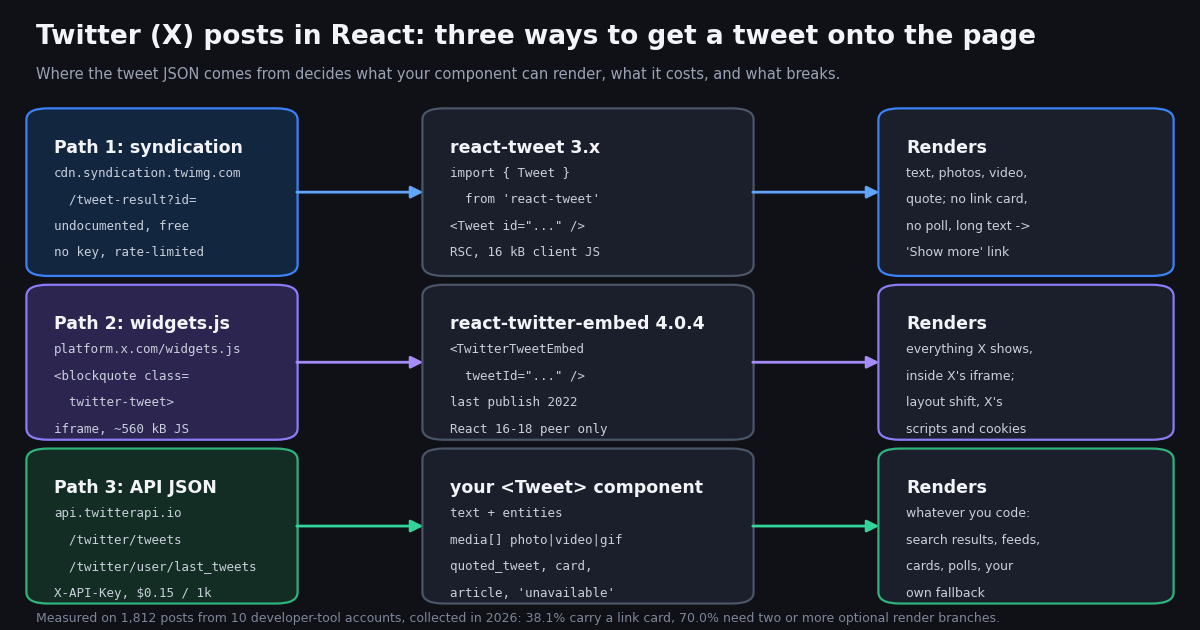
The three paths differ in where the tweet JSON comes from, and that single fact decides everything else: what your component can render, how much client JavaScript ships, what happens when a post is deleted, and what it costs. We verified each library's current version, data source and open bugs from its npm record, GitHub repository and documentation this session, and we measured 1,812 recent posts from 10 developer-tool accounts to find out what a renderer actually has to handle. The complete Next.js code for the API path is below: a server-only data layer, a page, and a <Tweet> component that covers text, photos, video, GIFs, quotes, reposts, link cards, polls, X Articles and an 'unavailable' fallback.
Three ways to put a tweet in a React component
Path 1: react-tweet and the syndication endpoint. Vercel's react-tweet fetches a post from https://cdn.syndication.twimg.com/tweet-result, the same JSON X's own embed widget uses, and renders it as plain HTML and CSS. In the Next.js app router that happens in a server component, so the browser receives markup rather than a script that builds markup. The launch post on vercel.com/blog/introducing-react-tweet puts the client payload at about 16 kB against roughly 560 kB for the native embed, '35x less client-side JavaScript'. No API key is involved. The endpoint is undocumented and rate-limited, which is why the docs insist on a cache.
Path 2: widgets.js inside an iframe. X's documented embed is a <blockquote class="twitter-tweet"> plus the widgets.js loader, which replaces the blockquote with an iframe rendered by X. The docs at docs.x.com/x-for-websites/embedded-posts/overview state that an embedded post 'includes photos, video and cards media', so it is the most faithful rendering, and the only one of the three that runs X's scripts and cookies on your page. The React wrapper most tutorials still name, react-twitter-embed, is a thin layer over this loader and has not been published since 2022.
Path 3: tweet JSON from an API, rendered by your own component. When you need posts you do not know the IDs of in advance (a search, a user's timeline, a list), when you need fields the syndication payload lacks (view counts, link cards, articles), or when a deleted post must degrade gracefully, you fetch the JSON yourself. On api.twitterapi.io that is /twitter/tweets for known IDs (up to 50 per request), /twitter/user/last_tweets for a timeline (20 per page, newest first) and /twitter/tweet/advanced_search for a query, all authenticated with an X-API-Key header and all returning the same per-tweet shape. You write the component once and point it at any of the three.
Client JavaScript figures are the ones Vercel published in the react-tweet launch post; the API path adds none because the data arrives in a server component and the output is HTML.
Path 1: react-tweet in a Next.js app router project
Install with npm install react-tweet (3.3.1 is the latest release on the npm registry, MIT, peer dependency react ^18 || ^19, runtime dependencies swr, clsx and @swc/helpers). The docs at react-tweet.vercel.app/next say 'Next.js 13.2.1 or higher is required'. The smallest possible usage is a server component that returns <Tweet id="..." /> from react-tweet; the component fetches on the server and streams the markup. Theming is a data-theme="light" or "dark" attribute on a parent element, and the CSS variables of .react-tweet-theme can be overridden.
Under the hood (packages/react-tweet/src/api/fetch-tweet.ts in the repository) the package requests cdn.syndication.twimg.com/tweet-result?id=<id>&lang=en&features=...&token=<token>, where the token is computed from the ID: ((Number(id) / 1e15) * Math.PI).toString(36) with zeros and the decimal point stripped. The response is classified three ways: a TweetTombstone typename becomes tombstone: true (protected or withheld), an empty object or HTTP 404 becomes notFound: true, and anything else non-2xx throws a TwitterApiError with the status. getTweet from react-tweet/api collapses this to Tweet | undefined.
Because the endpoint is undocumented and shared with X's own widgets, the docs warn that the public demo route react-tweet.vercel.app/api/tweet/:id is 'prone to rate limiting' and recommend: 'Before going to production, we recommend enabling cache'. In the app router the documented pattern wraps getTweet in unstable_cache with a 24-hour revalidation and renders EmbeddedTweet from the cached data, with TweetNotFound for the not-found case and TweetSkeleton as the Suspense fallback. That is the version below; it is the same code as the docs with error handling made explicit.
The repository shows the current state of the project: 1,885 stars, 49 open issues, a last commit in 2026 (a footer logo update), and releases 3.3.0 and 3.3.1 in 2026 after a 16-month gap from 3.2.2. The package is alive and maintained, but it moves with X's syndication payload, not ahead of it. Open issues worth reading before you adopt it: #212 'Videos are blocked with a 403 error' (mp4 requests to video.twimg.com refused, open since December 2025), #191 'Videos often don't play in Safari', #201 profile images returning 404 after X changed avatar URL suffixes, and #225 on QuotedTweet.self_thread being optional in syndication responses.
// app/post/[id]/page.tsx  -- react-tweet in the Next.js app router, with the cache the docs ask for
import { Suspense } from "react";
import { unstable_cache } from "next/cache";
import { EmbeddedTweet, TweetNotFound, TweetSkeleton } from "react-tweet";
import { getTweet as _getTweet } from "react-tweet/api";

// The docs: "Before going to production, we recommend enabling cache" to avoid syndication rate limits.
const getTweet = unstable_cache(async (id: string) => _getTweet(id), ["tweet"], { revalidate: 3600 * 24 });

async function TweetPage({ id }: { id: string }) {
  try {
    const tweet = await getTweet(id);              // undefined when the post is gone or protected
    return tweet ? <EmbeddedTweet tweet={tweet} /> : <TweetNotFound />;
  } catch (error) {
    return <TweetNotFound error={error} />;        // syndication 4xx/5xx ends here, not in a crash
  }
}

export default async function Page({ params }: { params: Promise<{ id: string }> }) {
  const { id } = await params;
  return (
    <div data-theme="dark">
      <Suspense fallback={<TweetSkeleton />}>
        <TweetPage id={id} />
      </Suspense>
    </div>
  );
}
What react-tweet and widgets.js render, and what they do not
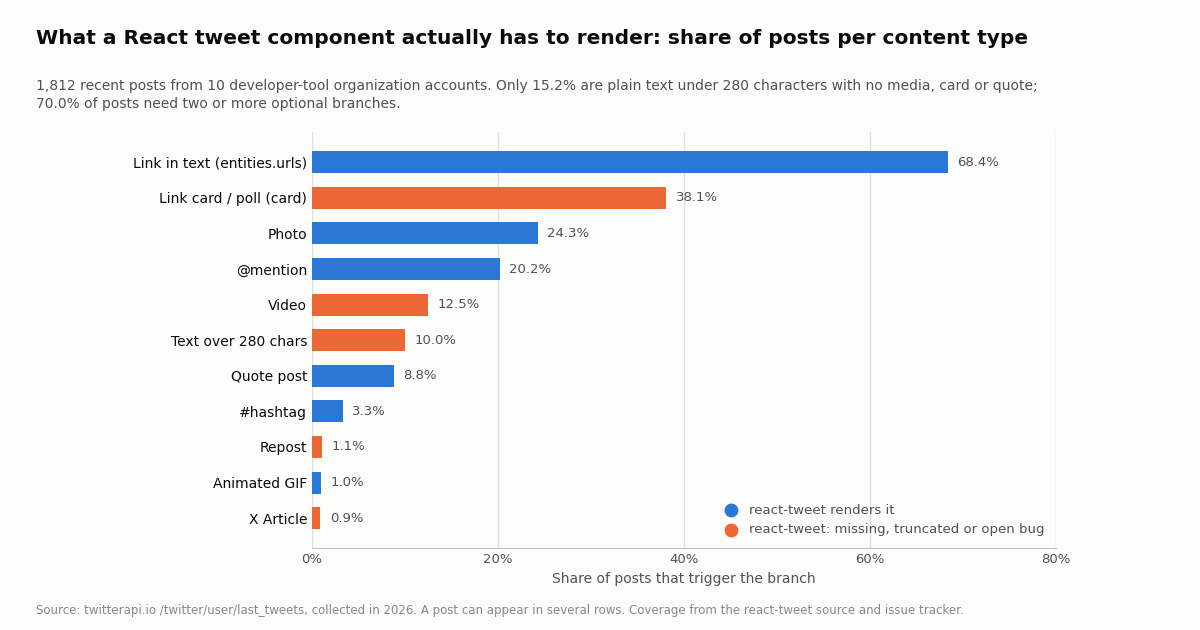
The Tweet interface in src/api/types/tweet.ts tells you exactly what react-tweet can show: text with entities (hashtags, mentions, URLs, symbols), photos and video through mediaDetails, a quoted_tweet, an in_reply_to parent, counts, and a note_tweet marker whose only use is to decide whether to append a 'Show more' link. There is no card field, so link previews and polls never render; there is no article field; there is no repost wrapper. Measured against the 1,812 posts in our sample, that means the component renders text and media for every post but drops the link card on 38.1% of them and shows a truncated body for the 10.0% that run past 280 characters.
Two details in that table matter more than they look. First, polls arrive as cards: among the 691 posts with a card, the name values were summary_large_image (571), summary (90), player (17) and poll4choice_text_only / poll3choice_text_only (9), so a component with a card branch gets polls for free. Second, in this sample a post never carried both native media and a card (691 of 691 cards were on posts with no extendedEntities.media), which is why the component below renders the card only when there is no media.
widgets.js renders all of it because X renders it: the iframe is X's own page. The price is the script weight, X's cookies on your origin, a layout shift while the iframe measures itself, and a blank blockquote (no 'unavailable' state you control) when the post is gone or an ad blocker removes the iframe.
Path 2: react-twitter-embed and widgets.js, and why to skip the wrapper
react-twitter-embed exports TwitterTweetEmbed, TwitterTimelineEmbed, share and follow buttons, and loads X's widget script with the scriptjs package. Its npm record shows the latest version 4.0.4 published on January 30, 2022, a peer dependency range of react ^16 || ^17 || ^18 (React 19 is not listed), and the GitHub repository has 369 stars, 74 open issues and its last code commit on the same January 2022 day as the release. It still downloads about 121,000 times a week, so it is in a lot of codebases, but it is not being maintained, and X has since moved its documented loader URL to https://platform.x.com/widgets.js (the snippet at docs.x.com/x-for-websites/javascript-api/guides/set-up-x-for-websites).
If what you want is X's own embed, you do not need a wrapper at all. The documented factory function twttr.widgets.createTweet(tweetID, targetEl, options) renders an embedded post into any element at runtime and resolves with the iframe element, or undefined when the post cannot be rendered. The client component below loads the script once, calls the factory, and writes its own 'unavailable' text when the promise resolves empty, which is the one thing the blockquote approach cannot do. Keep it in a client component: the script needs document.
Use this path when fidelity to X's rendering matters more than weight, for example a single testimonial tweet in a marketing page where the design team wants it to look exactly like X. Do not use it for a feed: every embed is its own iframe with its own script execution, and the launch numbers above are per page, not per tweet.
// components/widget-tweet.tsx  -- X's own widgets.js, wrapped in a client component (no third-party React package)
"use client";
import { useEffect, useRef } from "react";

declare global {
  interface Window {
    twttr?: { widgets: { createTweet: (id: string, el: HTMLElement, opts?: Record<string, string>) => Promise<HTMLElement | undefined> } };
  }
}

function loadWidgets(): Promise<void> {
  return new Promise((resolve) => {
    if (window.twttr?.widgets) return resolve();
    const existing = document.getElementById("twitter-wjs");
    if (existing) return existing.addEventListener("load", () => resolve());
    const s = document.createElement("script");
    s.id = "twitter-wjs";
    s.src = "https://platform.x.com/widgets.js";   // the loader URL in X's current docs
    s.async = true;
    s.onload = () => resolve();
    document.head.appendChild(s);
  });
}

export function WidgetTweet({ id, theme = "dark" }: { id: string; theme?: "light" | "dark" }) {
  const ref = useRef<HTMLDivElement>(null);
  useEffect(() => {
    let canceled = false;
    loadWidgets().then(async () => {
      if (canceled || !ref.current) return;
      ref.current.replaceChildren();
      const el = await window.twttr!.widgets.createTweet(id, ref.current, { theme, dnt: "true" });
      if (!el && ref.current) ref.current.textContent = "This post is unavailable.";
    });
    return () => { canceled = true; };
  }, [id, theme]);
  return <div ref={ref} className="tweet-widget" />;
}
Path 3: fetch tweet JSON from the API in a server component
The data layer is one file. It reads the key from process.env.TWITTERAPI_IO_KEY (set in .env.local; never a NEXT_PUBLIC_ variable, because every function here runs on the server and the key must stay there), sends it as the X-API-Key header, and exposes three functions with one return type. getTweetsByIds calls /twitter/tweets?tweet_ids=... in chunks of 50, which is the documented ceiling ('Maximum 50 IDs per request, more returns HTTP 400'); posts that are deleted or protected are simply absent from tweets[], so the function returns a Map and the page decides what to do about gaps. getLastTweets follows has_next_page and next_cursor on /twitter/user/last_tweets, where the tweets live under data.tweets. searchTweets reads the top-level tweets[] of /twitter/tweet/advanced_search with queryType Latest or Top.
Caching is where the money is. Each call bills 15 credits per tweet returned (a full 20-post page is $0.003), so the next: { revalidate } option on fetch matters: with revalidate: 3600 on the by-ID fetch, a page that shows two pinned posts to a million visitors costs one call an hour, not a million. For a timeline, 300 seconds is a reasonable default; drop it if you need fresher posts and accept a call every time the cache expires. The field names in the ApiTweet type are exactly what the endpoints return (camelCase on the tweet, author.userName, extendedEntities.media[].type), so there is no mapping layer to maintain.
The page component awaits both fetches in parallel and renders. Nothing here runs in the browser: there is no hook, no useEffect, no client bundle for the tweets. The requestedId prop on the fallback lets the 'unavailable' card still link to x.com/i/status/<id> so a reader can check for themselves.
// lib/twitterapi.ts  -- server-only data layer for api.twitterapi.io
// Set TWITTERAPI_IO_KEY in .env.local (never NEXT_PUBLIC_: the key must stay on the server).
const BASE = "https://api.twitterapi.io";

export type Media = {
  type: "photo" | "video" | "animated_gif";
  media_url_https: string;           // photo URL, or the poster frame for video / GIF
  url?: string;                      // the t.co link that stands in for the media inside `text`
  video_info?: {
    aspect_ratio: [number, number];
    duration_millis?: number;
    variants: { content_type: string; bitrate?: number; url: string }[];
  };
};

export type ApiTweet = {
  id: string;
  url: string;
  text: string;                      // full text, even past 280 characters
  createdAt: string;                 // "Thu Oct 16 12:34:56 +0000 2026"
  lang: string;
  likeCount: number;
  retweetCount: number;
  replyCount: number;
  quoteCount: number;
  viewCount: number;
  displayTextRange?: [number, number];
  entities?: {
    urls?: { url: string; expanded_url: string; display_url: string }[];
    user_mentions?: { screen_name: string; name: string }[];
    hashtags?: { text: string }[];
  };
  extendedEntities?: { media?: Media[] };
  quoted_tweet?: ApiTweet | null;
  retweeted_tweet?: ApiTweet | null;
  card?: { name: string; binding_values: { key: string; value: Record<string, unknown> }[] } | null;
  article?: { title: string; preview_text: string; cover_media_img_url?: string } | null;
  author: { id: string; userName: string; name: string; profilePicture: string; isBlueVerified: boolean };
};

function headers() {
  const key = process.env.TWITTERAPI_IO_KEY;
  if (!key) throw new Error("TWITTERAPI_IO_KEY is not set");
  return { "X-API-Key": key };
}

/** Up to 50 IDs per request (the endpoint returns HTTP 400 above that). Missing or deleted IDs are simply absent. */
export async function getTweetsByIds(ids: string[]): Promise<Map<string, ApiTweet>> {
  const out = new Map<string, ApiTweet>();
  for (let i = 0; i < ids.length; i += 50) {
    const chunk = ids.slice(i, i + 50);
    const res = await fetch(`${BASE}/twitter/tweets?tweet_ids=${chunk.join(",")}`, {
      headers: headers(),
      next: { revalidate: 3600 },    // Next.js data cache: one billed call per hour per chunk
    });
    if (!res.ok) throw new Error(`twitterapi.io responded ${res.status}`);
    const body = (await res.json()) as { tweets?: ApiTweet[]; msg?: string };
    for (const t of body.tweets ?? []) out.set(t.id, t);
  }
  return out;
}

/** Newest-first timeline, 20 posts per page, following next_cursor. */
export async function getLastTweets(userName: string, pages = 1): Promise<ApiTweet[]> {
  const out: ApiTweet[] = [];
  let cursor = "";
  for (let i = 0; i < pages; i++) {
    const url = new URL(`${BASE}/twitter/user/last_tweets`);
    url.searchParams.set("userName", userName);
    if (cursor) url.searchParams.set("cursor", cursor);
    const res = await fetch(url, { headers: headers(), next: { revalidate: 300 } });
    if (!res.ok) throw new Error(`twitterapi.io responded ${res.status}`);
    const body = (await res.json()) as {
      data?: { tweets?: ApiTweet[] };
      has_next_page?: boolean;
      next_cursor?: string;
    };
    out.push(...(body.data?.tweets ?? []));
    if (!body.has_next_page || !body.next_cursor) break;
    cursor = body.next_cursor;
  }
  return out;
}

/** Search results: top-level tweets[] (not data.tweets), same per-tweet shape. */
export async function searchTweets(query: string, queryType: "Latest" | "Top" = "Latest"): Promise<ApiTweet[]> {
  const url = new URL(`${BASE}/twitter/tweet/advanced_search`);
  url.searchParams.set("query", query);
  url.searchParams.set("queryType", queryType);
  const res = await fetch(url, { headers: headers(), next: { revalidate: 300 } });
  if (!res.ok) throw new Error(`twitterapi.io responded ${res.status}`);
  const body = (await res.json()) as { tweets?: ApiTweet[] };
  return body.tweets ?? [];
}
The <Tweet> component: text, media, quotes, cards and the unavailable state
The component handles every branch the study found, in the order X shows them. A repost is unwrapped first (tweet.retweeted_tweet ?? tweet) so the original author's name, text and media render with a small 'reposted' line above; 1.1% of the posts in the sample were reposts, so this is a rare path, but one that renders nonsense if you forget it (the repost's own text starts with RT @user: and is cut at 140 characters). Text rendering splits on t.co links, @mentions and #hashtags: URLs found in entities.urls become anchors with the display_url as label and expanded_url as target, the t.co link that stands in for attached media is removed (it is the url field on each extendedEntities.media[] item), and a t.co link that belongs to a card is removed because the card itself renders below.
Media is a grid of up to four items (11 posts in the sample had more than one, the maximum was 4). Photos use media_url_https. Videos and animated GIFs both arrive with video_info.variants; videos in the sample carried between 2 and 5 mp4 renditions (median 4) plus an HLS playlist, and every one of the 18 GIF items had an mp4 variant, so a GIF is just a muted, looping, autoplaying <video>. bestMp4 picks the highest bitrate at or under 1 Mbit/s to keep pages light. media_url_https doubles as the poster frame, and aspect_ratio sets the box size before the video loads, which is how you avoid the layout shift react-tweet's issue #159 is about.
Cards are a flat list of binding_values keyed by name; the component folds them into an object and reads title, description, vanity_url or domain, and the largest image key present. If card.name starts with poll, it reads choice1_label to choice4_label and the matching _count values and renders percentages instead. X Articles have their own small object (title, preview_text, cover_media_img_url). Quotes recurse: quoted_tweet is a full tweet object, so the same component renders it inside a <blockquote>, and because a quoted post can itself have media or a card, nothing special is needed. Text beyond 280 characters renders in full because the API returns the full text; add a CSS line clamp with a toggle if your design wants the 'Show more' behavior, but that is now your choice rather than the library's.
The fallback is a real component, not a blank: TweetUnavailable says the post may be deleted, protected or suspended and links to X by ID. Because getTweetsByIds returns a Map, the page knows which requested IDs are missing and passes requestedId so the link still works. Everything is a server component; the only 'use client' in this article is the widgets.js wrapper.
// components/tweet.tsx  -- renders one post from the twitterapi.io JSON; a server component (no hooks)
import type { ApiTweet, Media } from "@/lib/twitterapi";
import type { ReactNode } from "react";

export function Tweet({ tweet, requestedId }: { tweet?: ApiTweet | null; requestedId?: string }) {
  if (!tweet) return <TweetUnavailable id={requestedId} />;
  const post = tweet.retweeted_tweet ?? tweet;        // a repost wraps the original
  const media = post.extendedEntities?.media ?? [];
  return (
    <article className="tweet" lang={post.lang}>
      {tweet.retweeted_tweet && <p className="tweet-repost">{tweet.author.name} reposted</p>}
      <header className="tweet-header">
        <img src={post.author.profilePicture} alt="" width={40} height={40} />
        <a href={`https://x.com/${post.author.userName}`} rel="noopener noreferrer" target="_blank">
          <strong>{post.author.name}</strong> <span>@{post.author.userName}</span>
        </a>
        {post.author.isBlueVerified && <span className="tweet-badge" role="img" aria-label="Verified" />}
      </header>
      <p className="tweet-text" dir="auto">{renderText(post)}</p>
      {media.length > 0 && <TweetMedia media={media} />}
      {media.length === 0 && post.card && <LinkCard card={post.card} />}
      {post.article && <ArticleCard article={post.article} />}
      {post.quoted_tweet && (
        <blockquote className="tweet-quote">
          <Tweet tweet={post.quoted_tweet} />
        </blockquote>
      )}
      <footer className="tweet-footer">
        <a href={post.url} rel="noopener noreferrer" target="_blank">
          <time dateTime={new Date(post.createdAt).toISOString()}>{formatDate(post.createdAt)}</time>
        </a>
        <span>{post.replyCount.toLocaleString()} replies</span>
        <span>{post.retweetCount.toLocaleString()} reposts</span>
        <span>{post.likeCount.toLocaleString()} likes</span>
        <span>{post.viewCount.toLocaleString()} views</span>
      </footer>
    </article>
  );
}

/** Link mentions, hashtags and URLs; drop the t.co link that only stands in for attached media. */
function renderText(post: ApiTweet): ReactNode[] {
  const mediaLinks = new Set((post.extendedEntities?.media ?? []).map((m) => m.url).filter(Boolean));
  const urls = new Map((post.entities?.urls ?? []).map((u) => [u.url, u]));
  const parts = post.text.split(/(https?:\/\/t\.co\/\w+|@\w{1,15}|#\w+)/g);
  return parts.map((part, i) => {
    if (!part) return null;
    if (mediaLinks.has(part)) return null;
    const u = urls.get(part);
    if (u) return <a key={i} href={u.expanded_url} rel="noopener noreferrer nofollow" target="_blank">{u.display_url}</a>;
    if (part.startsWith("https://t.co/")) return null;   // a card link already shown by <LinkCard>
    if (part.startsWith("@")) return <a key={i} href={`https://x.com/${part.slice(1)}`}>{part}</a>;
    if (part.startsWith("#")) return <a key={i} href={`https://x.com/hashtag/${part.slice(1)}`}>{part}</a>;
    return <span key={i}>{part}</span>;
  });
}

function TweetMedia({ media }: { media: Media[] }) {
  return (
    <div className={`tweet-media tweet-media-${Math.min(media.length, 4)}`}>
      {media.map((m) =>
        m.type === "photo" ? (
          <img key={m.media_url_https} src={m.media_url_https} alt="" loading="lazy" />
        ) : (
          // video and animated_gif both ship mp4 variants; a GIF is a short looping muted mp4
          <video
            key={m.media_url_https}
            poster={m.media_url_https}
            controls={m.type === "video"}
            autoPlay={m.type === "animated_gif"}
            loop={m.type === "animated_gif"}
            muted
            playsInline
            preload="none"
            style={{ aspectRatio: m.video_info ? `${m.video_info.aspect_ratio[0]} / ${m.video_info.aspect_ratio[1]}` : undefined }}
          >
            {bestMp4(m) && <source src={bestMp4(m)} type="video/mp4" />}
          </video>
        ),
      )}
    </div>
  );
}

/** Highest-bitrate mp4 at or under 1 Mbit/s keeps pages light; fall back to the highest available. */
function bestMp4(m: Media): string | undefined {
  const mp4s = (m.video_info?.variants ?? []).filter((v) => v.content_type === "video/mp4");
  const under = mp4s.filter((v) => (v.bitrate ?? 0) <= 1_000_000).sort((a, b) => (b.bitrate ?? 0) - (a.bitrate ?? 0));
  return (under[0] ?? mp4s.sort((a, b) => (b.bitrate ?? 0) - (a.bitrate ?? 0))[0])?.url;
}

type Card = NonNullable<ApiTweet["card"]>;

function LinkCard({ card }: { card: Card }) {
  const v = Object.fromEntries(card.binding_values.map((b) => [b.key, b.value]));
  const str = (k: string) => (v[k]?.string_value as string | undefined) ?? "";
  const img = (k: string) => (v[k]?.image_value as { url: string } | undefined)?.url;
  if (card.name.startsWith("poll")) {
    const choices = [1, 2, 3, 4]
      .map((n) => ({ label: str(`choice${n}_label`), count: Number(str(`choice${n}_count`) || 0) }))
      .filter((c) => c.label);
    const total = choices.reduce((s, c) => s + c.count, 0) || 1;
    return (
      <ul className="tweet-poll">
        {choices.map((c) => (
          <li key={c.label}>{c.label} <span>{Math.round((100 * c.count) / total)}%</span></li>
        ))}
      </ul>
    );
  }
  const image = img("photo_image_full_size_large") ?? img("summary_photo_image_large") ?? img("thumbnail_image_large");
  const href = str("card_url") || str("url");
  return (
    <a className={`tweet-card tweet-card-${card.name}`} href={href} rel="noopener noreferrer nofollow" target="_blank">
      {image && <img src={image} alt="" loading="lazy" />}
      <div>
        <span className="tweet-card-domain">{str("vanity_url") || str("domain")}</span>
        <strong>{str("title")}</strong>
        <p>{str("description")}</p>
      </div>
    </a>
  );
}

function ArticleCard({ article }: { article: NonNullable<ApiTweet["article"]> }) {
  return (
    <div className="tweet-article">
      {article.cover_media_img_url && <img src={article.cover_media_img_url} alt="" loading="lazy" />}
      <strong>{article.title}</strong>
      <p>{article.preview_text}</p>
    </div>
  );
}

function TweetUnavailable({ id }: { id?: string }) {
  return (
    <div className="tweet tweet-unavailable" role="note">
      <p>This post is unavailable. It may have been deleted, or the account may be protected or suspended.</p>
      {id && <a href={`https://x.com/i/status/${id}`} rel="noopener noreferrer" target="_blank">Open on X</a>}
    </div>
  );
}

function formatDate(createdAt: string) {
  return new Date(createdAt).toLocaleDateString("en-US", { month: "short", day: "numeric", year: "numeric" });
}
What a renderer has to handle: 1,812 posts measured
We pulled the most recent posts of 10 developer-tool organization accounts (@vercel, @reactjs, @nextjs, @github, @nodejs, @typescript, @vite_js, @tailwindcss, @bunjavascript, @deno_land) with /twitter/user/last_tweets, up to 10 pages each, 1,812 posts in total, and counted which optional rendering branches each post exercises. 62.1% had no native media, 24.3% had at least one photo, 12.5% a video and 1.0% an animated GIF. 38.1% carried a card, 8.8% were quote posts, 1.1% reposts, 0.9% had an X Article attached. 68.4% contained a link in the text, 20.2% a mention, 3.3% a hashtag.
Put together: 6.2% of posts needed no optional branch at all, 23.8% needed one, 49.1% two, 17.0% three and 3.9% four or more; 70.0% needed two or more. The strict 'plain post' (no media, no quote, no repost, no card, no article, 280 characters or fewer) was 15.2% of the sample. Every post had the same 30 top-level JSON keys, so the shape is stable; what varies is which of them are null.
The mix is account-specific. @bunjavascript posts screenshots (65.0% photos, 16.5% cards), @vercel and @typescript post links (60.0% and 54.5% cards), @github posts video (37.5%) and long text (33.0% past 280 characters, and 11 of the 16 X Articles in the sample). A component tuned on one account's feed will miss branches on another's.
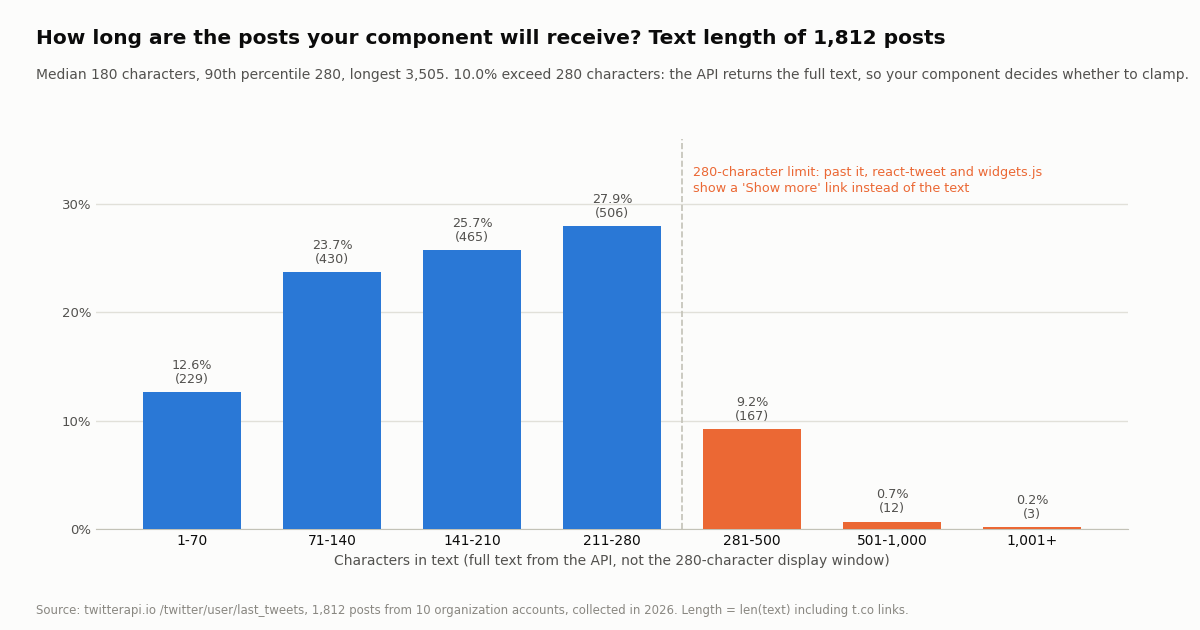
Text length: median 180 characters, 90th percentile 280, longest 3,505. 10.0% of posts exceed 280 characters and the API returns all of it. Separately, displayTextRange ended before the end of text on 41.0% of posts; most of that is the trailing t.co media link that X hides, not long-form text, which is why the component strips media links by extendedEntities.media[].url rather than slicing by range.
What each path costs
react-tweet and widgets.js are free to call; you pay in other currencies. react-tweet's bill is the cache you must run (Vercel's docs suggest Redis or Vercel KV for the pages router, unstable_cache for the app router), the content types it cannot show, and the risk that an undocumented endpoint changes under you. widgets.js costs about 560 kB of script per page, an iframe per tweet, and X's cookies on your origin.
On the API path, every tweet endpoint on twitterapi.io (/twitter/tweets, /twitter/user/last_tweets, /twitter/tweet/advanced_search and the rest) bills 15 credits per tweet returned, which is $0.15 per 1,000 tweets at $1 per 100,000 credits, with a minimum of 15 credits per request so an empty result still costs $0.00015. A full 20-post timeline page is $0.003. The study behind this page returned 1,812 posts across 106 requests and cost $0.27. No X account or developer approval is needed to read; rate limits start at 0.2 requests per second before the first payment and 20 per second once paid. Plans and the exact credit schedule are on the pricing page linked below; new accounts that pass the automatic bot check get $1 of free credits (one per person or network, expiring after 31 days).
The official X API's pay-per-usage rate card at docs.x.com/x-api/getting-started/pricing lists $0.005 per post read and $0.010 per user read, capped at 3 million post reads a month before Enterprise, with $20 of credits on a first card plus a match of the first auto-recharge up to $50. Per 1,000 tweets that is $5.00 against $0.15, roughly 33x. The same 1,812-post study would have been $9.06 in post reads, and it would have required an X developer account and OAuth; the field names differ too (public_metrics, attachments.media_keys with an includes array to join), so the component above would need a mapping layer.
How we collected this
Question. What does a React tweet renderer actually have to handle: how often do recent posts carry photos, video, GIFs, quotes, reposts, link cards, articles, long text, mentions and hashtags, and how many optional branches does a faithful component need?
Accounts and window. Ten organization accounts for developer tools: @vercel, @reactjs, @nextjs, @github, @nodejs, @typescript, @vite_js, @tailwindcss, @bunjavascript and @deno_land. Each handle was confirmed with /twitter/user/info first (two handles from the plan did not exist or were empty accounts and were replaced by the verified ones). We then read each timeline with /twitter/user/last_tweets, newest first, default includeReplies=false, up to 10 pages of 20; two accounts ran out of pages early. The per-account window is simply oldest to newest post in its sample and varies by account. Collected in 2026.
Sample and cost. 1,812 posts, 94 timeline pages plus 12 profile lookups, 106 requests, $0.27 at $0.15 per 1,000 tweets. Every number on this page is computed from the raw JSON by analyze.py and written to results.json; both charts read results.json only.
What the sample cannot show. It is ten accounts in one niche, all organizations; a consumer, news or creator feed will have a different media mix (likely more photos and reposts, fewer link cards). Replies were excluded, so the reply branch (isReply, inReplyToUsername) is 0% here but will appear in any search or includeReplies=true timeline. Coverage columns for react-tweet and widgets.js come from the libraries' source, docs and issue trackers as read this session, not from rendering each post through them.
Privacy. Aggregates only. The accounts named are organizations. Quoted and replied-to authors were counted as a branch, never identified. The de-identified per-post rows in sample.json carry no ID, URL, text, author ID or handle.
"""Fetch tweet JSON from twitterapi.io and write the file a React <Tweet> component renders.

Three sources, one shape: tweets by ID, a user's timeline, a search. Also counts the
rendering branches each post needs, the way the study on this page did.
pip install requests
"""
import json
import os
import time

import requests

BASE = "https://api.twitterapi.io"
HEADERS = {"X-API-Key": os.environ["TWITTERAPI_IO_KEY"]}


def get(url, params):
    for attempt in range(4):
        r = requests.get(url, headers=HEADERS, params=params, timeout=30)
        if r.status_code == 429:
            time.sleep(2 ** attempt)
            continue
        r.raise_for_status()
        return r.json()
    raise RuntimeError("rate limited four times in a row")


def tweets_by_ids(ids):
    """GET /twitter/tweets: up to 50 IDs per request; missing posts are simply absent from tweets[]."""
    out = {}
    for i in range(0, len(ids), 50):
        body = get(f"{BASE}/twitter/tweets", {"tweet_ids": ",".join(ids[i:i + 50])})
        for t in body.get("tweets", []):
            out[t["id"]] = t
    return out


def last_tweets(user_name, pages=1):
    """GET /twitter/user/last_tweets: data.tweets, 20 per page, newest first, cursor pagination."""
    out, cursor = [], ""
    for _ in range(pages):
        params = {"userName": user_name}
        if cursor:
            params["cursor"] = cursor
        body = get(f"{BASE}/twitter/user/last_tweets", params)
        out.extend((body.get("data") or {}).get("tweets", []))
        if not body.get("has_next_page") or not body.get("next_cursor"):
            break
        cursor = body["next_cursor"]
    return out


def search(query, query_type="Latest"):
    """GET /twitter/tweet/advanced_search: top-level tweets[]."""
    body = get(f"{BASE}/twitter/tweet/advanced_search", {"query": query, "queryType": query_type})
    return body.get("tweets", [])


def branches(t):
    """Which optional parts of a <Tweet> component this post exercises."""
    media = {m.get("type") for m in (t.get("extendedEntities") or {}).get("media", [])}
    ents = t.get("entities") or {}
    b = sorted(media)
    if t.get("quoted_tweet"):
        b.append("quoted_tweet")
    if t.get("retweeted_tweet"):
        b.append("retweeted_tweet")
    if t.get("card"):
        b.append("card:" + t["card"].get("name", ""))
    if t.get("article"):
        b.append("article")
    if len(t.get("text", "")) > 280:
        b.append("long_text")
    if ents.get("user_mentions"):
        b.append("mentions")
    if ents.get("urls"):
        b.append("urls")
    return b


if __name__ == "__main__":
    wanted = ["1846987139428634858", "1866332309399781537", "1868244766405870076"]
    by_id = tweets_by_ids(wanted)
    missing = [i for i in wanted if i not in by_id]
    print(f"by id: {len(by_id)} found, {len(missing)} unavailable -> render the fallback for {missing}")

    timeline = last_tweets("vercel", pages=2)
    print(f"timeline: {len(timeline)} posts, cost ${len(timeline) * 0.00015:.4f}")

    results = search("react-tweet OR \"react tweet\" lang:en", "Latest")
    print(f"search: {len(results)} posts on the first page")

    for t in timeline[:5]:
        print(t["id"], t["author"]["userName"], len(t["text"]), "chars ->", branches(t))

    # the renderer reads exactly these fields; everything else is dropped to keep the JSON small
    KEEP = ["id", "url", "text", "createdAt", "lang", "likeCount", "retweetCount", "replyCount",
            "quoteCount", "viewCount", "displayTextRange", "entities", "extendedEntities",
            "quoted_tweet", "retweeted_tweet", "card", "article"]

    def slim(t):
        if not t:
            return None
        s = {k: t.get(k) for k in KEEP}
        s["author"] = {k: t["author"].get(k) for k in ["id", "userName", "name", "profilePicture", "isBlueVerified"]}
        s["quoted_tweet"] = slim(t.get("quoted_tweet"))
        s["retweeted_tweet"] = slim(t.get("retweeted_tweet"))
        return s

    with open("public/tweets.json", "w") as f:
        json.dump({"pinned": [slim(by_id.get(i)) for i in wanted], "timeline": [slim(t) for t in timeline]}, f)
    print("wrote public/tweets.json")
Questions readers ask
Does react-tweet need a Twitter (X) API key?
No. react-tweet reads X's syndication endpoint (cdn.syndication.twimg.com/tweet-result) with a token it derives from the tweet ID, so there is no key, no OAuth and no X developer account. The trade-off is that the endpoint is undocumented and rate-limited, which is why the docs tell you to enable a cache (unstable_cache in the Next.js app router, or Redis / Vercel KV) before going to production.
Why does react-tweet show 'Tweet not found' for a post that exists?
getTweet comes back empty in three cases: the syndication endpoint answered with a TweetTombstone (the account is protected, suspended or the post is withheld), it answered with an empty object or HTTP 404 (deleted or never existed), or your cache stored an earlier miss. A rate-limited response (non-2xx other than 404) throws instead, so if you catch errors and render TweetNotFound you will also see it under load. Check the ID is numeric and under 40 digits; fetchTweet throws 'Invalid tweet id' otherwise.
Does react-tweet render link previews, polls or long posts?
Not fully. Its Tweet type has no card field, so the link preview card and polls (which X delivers as cards named poll2choice_text_only to poll4choice_text_only) never render; in our 1,812-post sample 38.1% of posts carried a card. Text past 280 characters is cut and replaced with a 'Show more' link to X (10.0% of posts). Photos, video, animated GIFs, quote posts and reply context are rendered, though an open issue (#212) reports mp4 video blocked with HTTP 403.
Is react-twitter-embed still maintained, and does it work with React 19?
Its latest version, 4.0.4, was published on npm in January 2022 and the repository's last code commit is from the same day; it has 74 open issues and its peerDependencies list React 16, 17 and 18 only. It still has about 121,000 weekly downloads. If you want X's iframe embed in a current React app, load widgets.js from platform.x.com yourself and call twttr.widgets.createTweet(id, element, options) from a small client component, as shown above; no wrapper package is needed.
How do I render tweets from a search or a user's timeline in React?
react-tweet and widgets.js only render posts whose IDs you already know. For search results or feeds, fetch the JSON on the server: /twitter/tweet/advanced_search?query=...&queryType=Latest returns tweets[] with has_next_page and next_cursor; /twitter/user/last_tweets?userName=... returns data.tweets, 20 per page, newest first. Render each item with the same <Tweet> component used for pinned posts. The API path also gives you view counts, cards and articles, which the syndication payload lacks.
How much does it cost to render tweets from the twitterapi.io API?
Tweet endpoints bill 15 credits per tweet returned: $0.15 per 1,000 tweets, with a 15-credit minimum per request (an empty search costs $0.00015, a full 20-post page $0.003). A cached server component that revalidates hourly makes one billed call an hour regardless of traffic. The 1,812-post study on this page cost $0.27. For comparison, the official X API's pay-per-usage rate card is $0.005 per post read, about 33x more per 1,000.
Can I embed a tweet in Next.js without an iframe?
Yes, two ways. react-tweet renders a post as HTML and CSS in a server component with about 16 kB of client JavaScript (Next.js 13.2.1 or newer). Or fetch the tweet JSON yourself from /twitter/tweets with an X-API-Key header kept in a server-side environment variable and render your own component, which ships no client JavaScript at all and lets you style, clamp and fall back however you want.
What does 'twitter react' mean if not the library?
The phrase also matches the React team's account on X (@reactjs), and in-app ways of reacting to a post. Developers searching it almost always want to render X posts inside a React application, which is what the npm package react-tweet, its docs at react-tweet.vercel.app and this guide cover.
Continue
- vercel/react-tweet on GitHub: fetch-tweet.ts (syndication URL and token), types/tweet.ts (no card field), issues #212, #191, #201, #225, releases 3.3.0 and 3.3.1
- react-tweet docs for Next.js: 'Next.js 13.2.1 or higher is required', unstable_cache pattern, 'we recommend enabling cache', TweetSkeleton / EmbeddedTweet / TweetNotFound
- Vercel: Introducing React Tweet (560 kB vs 16 kB client JavaScript, '35x less')
- X docs: Embedded Posts overview ('includes photos, video and cards media'), createTweet factory function, platform.x.com/widgets.js loader
- X API pricing: $0.005 per post read, $0.010 per user read, 3M post reads a month cap, $20 credits and up to $50 match
- twitterapi.io docs: GET /twitter/tweets, tweet_ids, maximum 50 IDs per request (more returns HTTP 400), X-API-Key
- How to embed tweets on a website: copy-paste, oEmbed and static cards measured
- Vercel AI SDK with the Twitter (X) API: a Next.js and TypeScript walkthrough
- Tweet metadata fields reference: every field in the tweet JSON
- Twitter (X) API with Python: the same endpoints from requests
- Twitter API v2: what changed and the alternatives
- Downloading tweet media in bulk: photo and video variants
- Pay-per-call pricing: 15 credits per tweet, plans and rate limits
- API reference: /twitter/tweets, /twitter/user/last_tweets, /twitter/tweet/advanced_search
- 01X Communities API: How Do You Read Community Posts and Post to a Community?
- 02Twitter (X) Search Not Working? The October 2026 list: Search Outage, Other Causes and Fixes
- 03How Will You Use the Twitter (X) API or Twitter Data? Answering the Developer Sign-Up Question
- 04Twitter (X) Welcome Message: Is the API Still Alive, and How to Send One in 2026
- 05xurl: the X API CLI for Twitter (X) — Install, Auth, Commands and What Each Read Costs
- 06What Is a Twitter Ratio?
- 07OSINT on Twitter (X): What Public Data You Can Pull, and How
- 08Twitter Tools — 47 Worth Knowing, Organized by Job-to-Be-Done
Stop reading. Start building.
Starter credits cover real testing on real data. Google sign-in, no card, no application queue.
Get an API key