The X Developer Portal (X Developer Console) for the Twitter (X) API: Sign-Up, Apps and Keys, Billing, Limits, and When You Do Not Need It
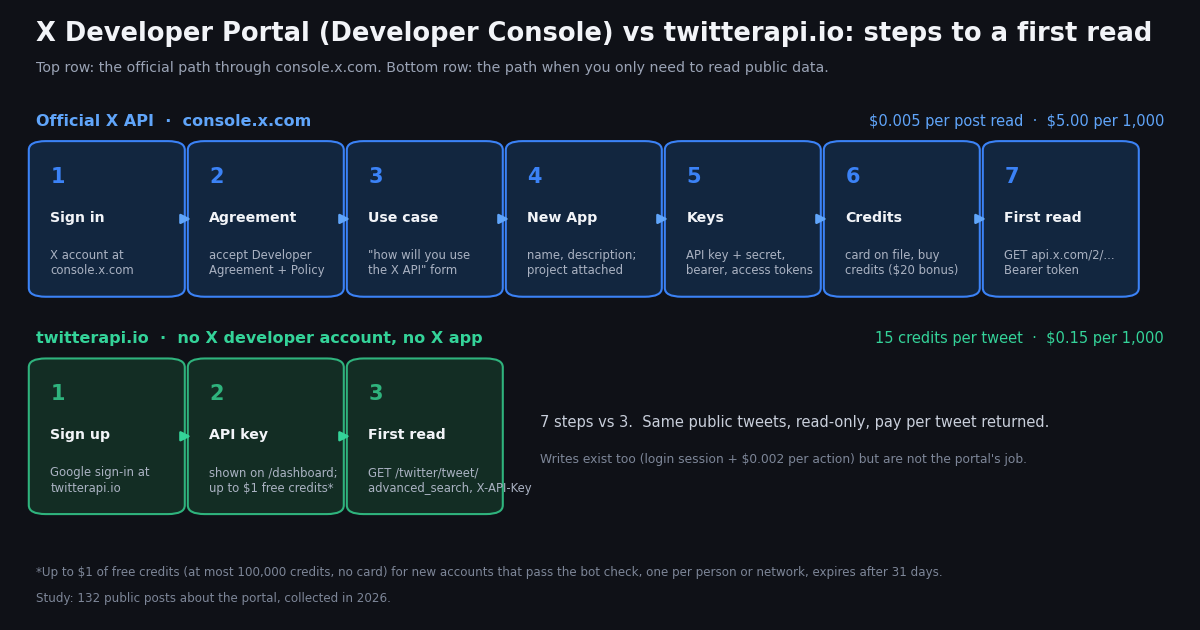
This page is a map of the X Developer Portal as it exists today: what it is called (the docs say Developer Console, the address is console.x.com, the brand around it is the X developer platform), what you do there in which order, what each credential it hands you is for, how the pay-per-use credits and the usage view work, and what the errors people run into mean. We cannot show screenshots, because the console only renders after you sign in with an X account and its layout changes without notice, so every path below is described in words from the official documentation at docs.x.com, with the exact page named so you can check it yourself.
Two neighboring questions are covered elsewhere and only linked here. The use-case form you fill in during sign-up, with six worked answers, is on How will you use the Twitter (X) API?; the first request on either the official API or twitterapi.io, endpoint by endpoint, is in the Twitter (X) developer API getting-started guide. The reference itself is summarized on X API docs, and the command-line client X ships for the portal's credentials on xurl.
What no other walkthrough gives you is evidence about where the portal actually hurts. We pulled the 100 most recent mentions of @XDevelopers, 100 recent posts that mention the developer portal in an X or Twitter context, 100 recent posts that link console.x.com or developer.x.com, and the official account's own last 60 posts including replies, all collected in 2026 through the twitterapi.io API, and classified the 132 developer-context posts with a keyword rule you can read. The topic shares, the share phrased as questions, and how often @XDevelopers replies to anyone shape the troubleshooting section and the closing comparison with the path that skips the portal.
What the X Developer Portal is now: console.x.com, developer.x.com and the Developer Console rename
For most of the API's life the portal was developer.twitter.com, then developer.x.com, a single site that mixed marketing pages, the documentation and the signed-in dashboard where you managed projects, apps and keys. The current documentation separates those three jobs. The reference lives at docs.x.com. The signed-in dashboard is the Developer Console at console.x.com; the docs page docs.x.com/fundamentals/developer-portal carries the title "Developer Console" and the sidebar label of the same name, and the getting-access page tells you to "visit console.x.com and sign in with your X account". developer.x.com still answers, serving the developer marketing site, the community and support entry points, and the older portal URLs that redirect or sign you in. If you have bookmarks to developer.twitter.com/en/portal/dashboard, they end at the console.
The docs page lists what the console does in four groups: create apps to get API credentials; configure authentication, permissions and callback URLs; track API usage in real time, with costs per endpoint and your credit balance; and manage credentials, meaning API keys, access tokens and OAuth credentials. A fifth group, team management with Administrator and Developer roles, is marked Enterprise-only. That is the complete surface: sign-up, apps, keys, usage, billing, and for Enterprise customers, members.
The search names that reach this page are all the same object. "X developer portal", "twitter developer portal" and "X developer account" are the legacy vocabulary; "X developer console", "console x api" and "X API console" follow the rename; "X developer platform" is the brand X uses for the whole program; "X developer dashboard" is the signed-in home. There is no second product behind any of them.
A note on screenshots. Everything in the console sits behind an X login and, since the redesign described in several posts in our sample, behind a layout that changed within the year. Rather than ship images that go stale, each step below names the docs page it comes from and the control the docs name; where the docs are silent and the only evidence is what developers report, the paragraph says so.
Sign-up walkthrough: X account, agreement, use case, project and app
The official getting-access page (docs.x.com/x-api/getting-started/getting-access) describes three stages, and the Developer Console page compresses them into four numbered steps. Combined, in the order you will meet them:
Step 1, sign in. Open console.x.com and sign in with the X account that will own the developer account. Choose this deliberately: the developer account, its apps, its credits and its usage history belong to that X account, and if that account is suspended or flagged, the console goes with it. Several posts in our sample describe exactly that: a sign-in that returns an "account has been flagged" style error for every X account the person tried, or a paid developer account suspended while it still held a credit balance. Use an account you control alone, with a verified email and phone.
Step 2, the agreement. The docs wording is "review and accept the Developer Agreement and Policy". This is the document that governs what you may do with the data; the parts that get applications rejected (resale of raw data, surveillance uses, off-platform matching of individuals) are walked through on the use-case page.
Step 3, the use case. The getting-access page says you "provide basic information about how you'll use the API". In the current flow this is a short free-text statement rather than the long questionnaire of the Elevated-access era; you are describing the app you are about to create. Six sample answers, one per common use, are on the page linked above; do not paste one verbatim, adapt it to what you will build.
Step 4, New App. The console page's own words: "Click New App and provide a name and description. This generates your API credentials." Apps sit inside projects. The docs page about the console does not define projects, but the structure is visible in the console itself and in what developers report: the console creates a default project, every app must be attached to a project, pay-per-use enrollment is a property of the project, and, in one complaint in our sample, projects with zero connected apps had no delete control. If you only ever build one thing, leave the default project alone and create your app inside it; that is also the fix practitioners post for apps that return enrollment errors (more below).
Step 5, copy the credentials. "Copy and securely store your API Key, API Secret, and Access Tokens." Secrets are shown once; if you lose them you regenerate, which invalidates the old ones in every deployment that used them. Put them in a secret manager or an environment file that is not in a repository, and never in a client-side bundle.
Step 6, credits. Nothing is billed until you buy credits, but nothing works until you do either; the pricing page says you "purchase credits upfront in the Developer Console" and credits are deducted per request. The billing section below has the numbers.
Step 7, the first request. The make-your-first-request page assumes "a developer account with app credentials" and uses the bearer token from the console against api.x.com/2/.... A minimal example is in the keys section next; the endpoint-by-endpoint version is the getting-started guide linked in the introduction.
Apps and keys: the four credential types and what each one unlocks
The getting-access page lists four credentials that the console generates for an app. They are not interchangeable, and most "401 from the first call" reports come from using the wrong one.
Permissions. An app's user-context permissions are set in the console (read, read and write, read and write and direct messages). Changing them after the fact does not upgrade tokens that were already issued; you regenerate the access tokens, which is the second most common cause of a 403 on a write that "should" work. One post in our sample attributes a broken integration to exactly this: environment variables were right, but the app's permissions were still read-only.
Callback URLs. The OAuth 2.0 flow refuses a redirect that is not listed character for character in the app's settings, including the scheme and a trailing slash. Register every environment you will test from, http://localhost:3000/callback included.
Which one do you actually need? To read public tweets and profiles, the bearer token and nothing else. To post or read a user's private data, user context, which means OAuth 2.0 with the client ID for anyone else's account, or the pre-generated access tokens for your own. The first case is the one the rest of this page compares with the no-portal route, because that is where the portal's overhead buys you nothing you could not get by sending one header. A per-endpoint map of which credential each official call accepts, and how to validate a token you were handed, is on Twitter (X) access tokens.
The curl below is the smallest official read: ten recent posts matching a query, with the bearer token from the console. The path is X's own /2/ path on api.x.com.
# Official X API: app-only read with the Bearer Token copied from the Developer Console (console.x.com)
export X_BEARER_TOKEN="..."      # App > Keys and tokens > Bearer Token

curl -s -G "https://api.x.com/2/tweets/search/recent" \
  -H "Authorization: Bearer $X_BEARER_TOKEN" \
  --data-urlencode 'query="developer console" (x OR twitter) lang:en -is:retweet' \
  --data-urlencode 'max_results=10' \
  --data-urlencode 'tweet.fields=created_at,public_metrics'

# Each post returned is one "post read" on the pay-per-usage card: $0.005, so this page of 10 is $0.05.
# 401: wrong credential type (bearer vs user token) or a regenerated secret still in use.
# 402: credit balance at zero. 403 with an enrollment message: the app's project is not on pay-per-use.Billing and credits: the pay-per-usage card, the bonuses, the cap and the usage view
The pricing page (docs.x.com/x-api/getting-started/pricing) describes one model for self-serve access: pay-per-usage, no subscription, prepaid credits bought in the console and deducted per request. The former Free, Basic and Pro tiers are not on that page; if a guide you are reading quotes a monthly tier price, it predates the current card. The figures below are the ones that matter for a portal walkthrough; the full table, including DM events, lists, spaces and management actions, is on the pricing page and broken down line by line in our X API cost breakdown.
Two mechanics on that page change how you should budget. Deduplication: the same resource requested twice within a 24-hour UTC window is charged once, which helps a poller that re-reads a boundary but does nothing for a feed of new posts. Auto-recharge: you set a threshold and a top-up amount; the page notes a five-minute cooldown between triggers, so a burst can still drain the balance and return 402s until the next top-up lands. The welcome and match offers add up to $70, which is the figure @XDevelopers itself used in a post in our timeline sample announcing the new pay-per-use terms, consistent with the docs.
The usage view. The console page promises real-time usage with cost per endpoint and the credit balance. That is also where the monthly 3 million post-read ceiling is visible as you approach it. In our sample the usage view appears in complaints twice: a balance that shows $0 while the account should hold a voucher, and a console described as being down a large share of the time by one developer. Treat the usage view as the source of truth for what you were charged, and treat your own request log as the source of truth for what you sent; when they disagree, that is the material for a forum thread.
What is not on the card. Rate limits per endpoint are documented separately in the reference, not priced; a 429 costs nothing but time. Credits do not have a published expiry on the pricing page, and the page says nothing about refunds. The academic and Enterprise routes are forms, not console switches.
Errors, enrollment and where support actually is
The official reference defines HTTP status codes and error classes but not the portal-specific conditions developers trip over, so this section is built from the forum (devcommunity.x.com), from practitioner help pages, and from the error-topic posts in our sample. Each item names its source class.
client-not-enrolled. A long-running forum thread, titled roughly "V2 suddenly getting client-not-enrolled", established that apps must be attached to a project, and that the project is where pricing and enrollment apply. The current version of the same problem is an app that exists but whose project is not on pay-per-use; the response is a 403 with an enrollment message. The fix practitioners post, and one developer in our sample describes word for word, is to create the app inside the default project (or attach it to a project that shows pay-per-use), not to regenerate keys.
402 at zero balance. Third-party help pages quote a CreditsDepleted error whose message says the enrolled account has no credits to fulfill the request. It means exactly that: buy credits or wait for auto-recharge; nothing about the app is wrong. Because of the five-minute auto-recharge cooldown, a burst that empties the balance will produce a run of these.
401 on the first call. Almost always the credential type: a bearer token used where user context is required, or the reverse, or a regenerated secret still in one environment. The table in the keys section is the checklist.
403 on a write that reads fine. The app's permissions were read-only when the access tokens were issued. Change permissions, regenerate the tokens, redeploy.
"Your account has been flagged" or "this X account isn't set up yet" at sign-in. Both appear in our sample. The first blocks the console entirely for an X account the safety systems have marked, and the only route is the account-level appeal, not the developer forum; the second is an X account that has never completed console onboarding, which the message itself tells you to do at console.x.com with the same account.
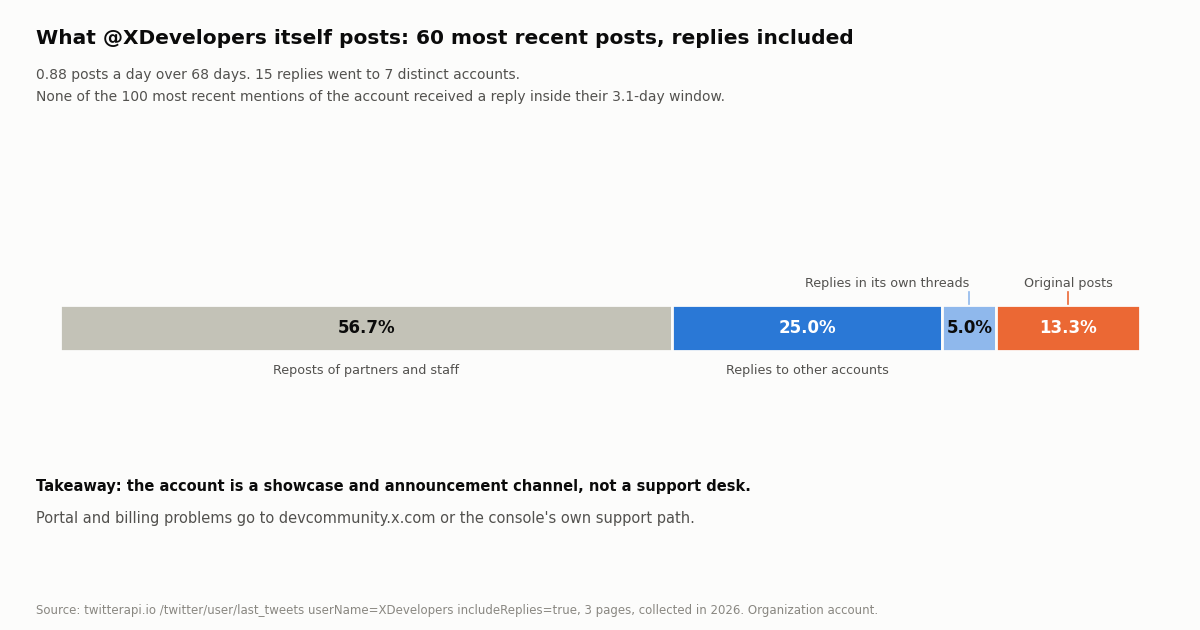
Projects you cannot delete, usage that does not show, a console that will not load. Each is reported in the sample; none has a documented fix. For these the forum is the escalation path, and it is worth knowing what the official account is for before you mention it: in our 60-post sample of @XDevelopers' own timeline, 56.7% of posts were reposts of partners and staff, 25.0% were replies to other accounts (15 replies to 7 distinct handles over 68 days), and none of its 100 most recent mentions received a reply inside their window. It is a showcase channel, not a help desk. Post on devcommunity.x.com with the app ID, the exact error body and a timestamp, and check docs.x.com/status first for platform-wide incidents.
What developers actually post about the portal: 132 posts, counted
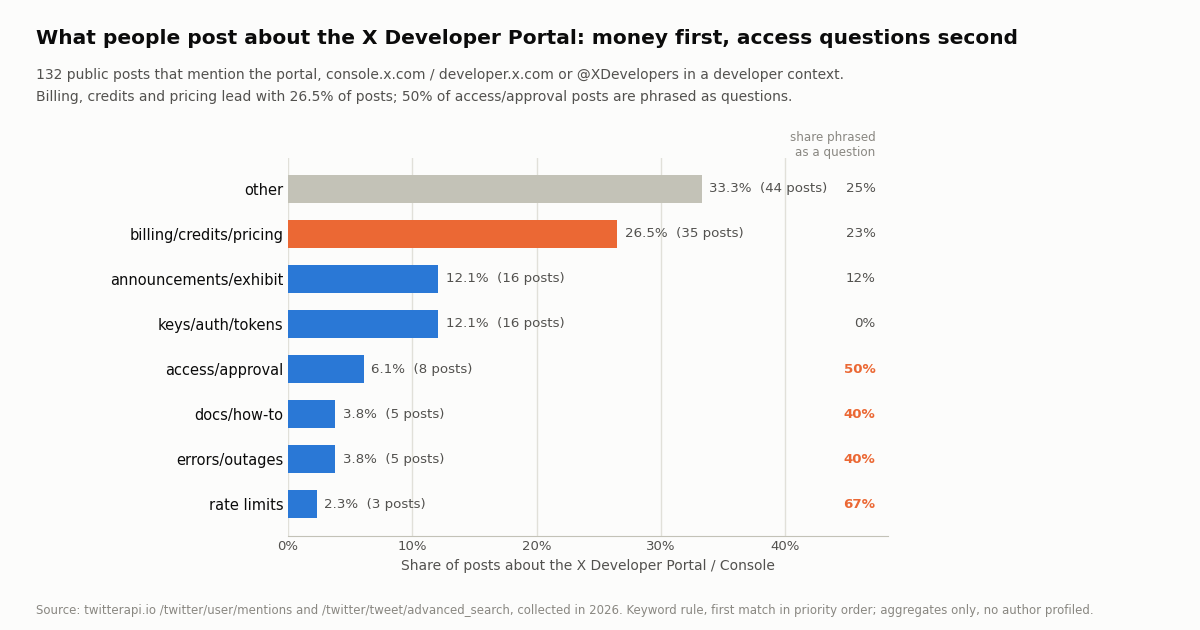
To find out which parts of the portal generate public complaints and questions, we pooled three samples collected in 2026 through the twitterapi.io API: the 100 most recent mentions of @XDevelopers (/twitter/user/mentions, 5 pages, a window of 3.1 days), 100 recent posts matching "developer portal" (x OR twitter) lang:en (/twitter/tweet/advanced_search, Latest, 5 pages, spanning about 347 days), and 100 recent posts matching console.x.com OR developer.x.com lang:en (5 pages, about 314 days). A post counted as developer-context when, after removing @handles, its text or expanded links contained an X developer term or hostname; for the mentions sample any generic developer word (API, console, credits, token, app and so on) also counted. 132 distinct posts passed; each was assigned the first matching topic in a fixed priority order (rate limits, billing, keys and auth, access, errors, docs, announcements, other).
The first finding is about the filter itself. Only 12 of the 100 most recent posts addressed to @XDevelopers concerned the developer platform at all; the rest were Premium and checkmark complaints, Grok threads that tagged every X account in sight, and feature requests for the consumer app. And only 25 of the 100 posts that said "developer portal" near the word X or Twitter meant X's portal; the operator (x OR twitter) is satisfied by the letter x in many unrelated posts, so a quarter of that search was other companies' developer portals. The hostname search was clean: 100 of 100 relevant, which is why 95 of the 132 pooled posts come from it. If you build an alert on this topic, search the hostnames, not the phrase.
Topics. Across the 132 posts, billing, credits and pricing led with 26.5% (35 posts): vouchers that did not appear, balances at zero, the cost of posting, the pay-as-you-go rate against third-party dashboards. Keys, auth and tokens took 12.1% (16), almost all of them how-I-set-it-up posts rather than questions (0% contained a question mark). Product announcements and Developer Exhibit listings took another 12.1% (16): the console redesign, hosted MCP servers, apps listed on X's Exhibit page. Access and approval was 6.1% (8) but half of those were questions, the highest share of any sizable topic: flagged accounts, undeletable projects, apps that could not be attached. Errors and outages (3.8%, 5), docs and how-to (3.8%, 5) and rate limits (2.3%, 3) were small; 33.3% (44) matched no rule and were general commentary that happened to link the console.
Across the pool, 23.5% of posts contained a question mark, 45.5% were replies, 78.0% carried a link (the hostname search guarantees most of those), and 22.7% mentioned @XDevelopers. The pool spans about 345 days at 0.38 relevant posts a day, which is the real public volume of this topic: small, and concentrated on money and on getting in.
What the sample cannot show. It is recent posts, not a random sample of developers; people post when something breaks or launches, so the billing and access shares overstate pain relative to silent successes. The keyword rule is deterministic and public (in analyze.py with the study) but blunt: a post about a crypto token with an X context lands in keys and auth, and a post that says "credits" while complaining about something else lands in billing. The mentions window is 3.1 days, so the reply-rate observation is about that window, not the account's history. No author was profiled and no post is quoted; the examples in the table are paraphrases of the generic question type.
What @XDevelopers itself posts, and whether it answers
The official account is the one place the portal is represented on the platform, so we also pulled its own last 60 posts with replies included (/twitter/user/last_tweets, includeReplies=true, 3 pages, an organization account, so the raw pages are kept with the study). They span 68 days, 0.88 posts a day.
Composition. 34 of 60 (56.7%) were reposts, mostly of X staff and of apps joining the Developer Exhibit; 15 (25.0%) were replies to other accounts, to 7 distinct handles, several of them staff; 3 (5.0%) were replies inside its own threads; 8 (13.3%) were original posts, among them the pay-per-use credits announcement and the Exhibit relaunch. Matching its replies against our 100-mention sample found no reply to any of those mentions by ID, and no reply by the account at all inside the 3.1 days the mentions cover. One mention author appears among the handles the account replied to at some other time.
What that means for you. If the console loses your project or your balance shows zero, a public mention is unlikely to produce an answer; the account's replies go to partners and launch announcements. The forum thread with the error body is the channel that gets read, and the status page tells you whether it is only you. This is also why the troubleshooting section above is built from the forum and from help pages rather than from official replies: there are few to cite.
When you do not need the portal: the no-account path for public reads, side by side
Every step in the walkthrough above exists to establish who you are, which account you act as, and how you pay. For writes and for reading a user's private data that is unavoidable, because the API acts as an X account. For reading public tweets, profiles, followers and search results it is overhead: the data is the same for everyone. That is the case twitterapi.io is built for, and the comparison is simplest as two columns.
The ratio on reads is about 33x per 1,000 posts ($5 against $0.15), and on profiles about 55x ($10 against $0.18). The price is per item returned, so an empty search costs the 15-credit minimum ($0.00015) and a full 20-tweet page $0.003. Plans with bonus credits, and the rate-limit tiers, are on the pricing page. Writes are available too, through a login session (/twitter/user_login_v2, $0.10 with a proxy you supply) and $0.002 per action after that, billed per successful HTTP 200 call; those act as the account you logged in, so X can rate-limit, lock or suspend it, and a human pace matters. They are a different product from the portal's bearer-token reads and are not the subject of this page.
What you give up. The official API returns the /2/ object model with field expansions you may already have code for; twitterapi.io returns its own JSON (tweets[] with id, text, createdAt, likeCount, author.userName and so on). OAuth user context, and therefore anything that requires the user's consent, stays with the portal. If your product logs users in with X, you need an app in the console regardless of where your reads come from; many teams run both, keys for login and twitterapi.io for the volume reads.
The script at the end of this page is the three-step path in full: a key from the dashboard, one search call with pagination over has_next_page and next_cursor, and the fields read exactly as the API returns them.
How we collected this
Question: which parts of the X Developer Portal generate public questions and complaints, what share of those posts are questions, how often the official @XDevelopers account replies, and how many such posts appear per day.
Sources and queries: /twitter/user/mentions with userName=XDevelopers, 5 pages (100 posts, 3.1 days); /twitter/tweet/advanced_search with query="developer portal" (x OR twitter) lang:en, queryType=Latest, 5 pages (100 posts, about 347 days); the same endpoint with query=console.x.com OR developer.x.com lang:en, 5 pages (100 posts, about 314 days); /twitter/user/last_tweets with userName=XDevelopers and includeReplies=true, 3 pages (60 posts, 68 days). 18 requests in total, 360 posts, about $0.05 in API reads, collected in 2026 through a rate-limited, read-only client.
Method: posts were pooled and de-duplicated by ID. Relevance: @handles stripped, then a regular expression for X developer terms (X API, developer console, pay-per-use, Grok Bot, xurl, Developer Exhibit and so on) or an X developer hostname in the text or expanded links; for mentions, any generic developer term also qualified. Topic: first match in the order rate limits, billing/credits/pricing, keys/auth/tokens, access/approval, errors/outages, docs/how-to, announcements/exhibit, else other. Question: the text contains a question mark. Posts per day: distinct posts divided by the days between the oldest and newest post. Reply behavior: isReply and inReplyToUsername on the official account's own posts, matched against the mention IDs and authors.
What the sample cannot show: it is recent public posts, skewed toward people with something to complain about or announce; the keyword rule is blunt and its misclassifications are described above; the mentions window is three days; and nothing here measures how the console performs for the silent majority who signed up and never posted about it.
Privacy: search and mention authors are private individuals, so their raw pages were kept outside the repository and the committed sample.json holds only de-identified rows (source, topic, question flag, reply flag, link flag, hour, text length). @XDevelopers is an official organization account and its raw timeline pages are kept with the study, gzip-compressed. Aggregates only on this page; no post is quoted and no author is named.
"""first_read.py - the no-portal path: read public posts about the X Developer Console from twitterapi.io.

    pip install requests
    export TWITTERAPI_IO_API_KEY=...     # copy it from https://twitterapi.io/dashboard after signing up
    python first_read.py

No X developer account, project, app or OAuth is involved. Price: 15 credits per tweet returned
($0.15 per 1,000; $1 = 100,000 credits), minimum 15 credits per request, so an empty page costs $0.00015
and a full 20-tweet page $0.003. Accounts that have not paid yet are limited to 0.2 requests a second.
"""
import os
import time
from datetime import datetime

import requests

BASE = "https://api.twitterapi.io"
HEADERS = {"X-API-Key": os.environ["TWITTERAPI_IO_API_KEY"]}
QUERY = 'console.x.com OR developer.x.com lang:en'   # the same operators X's search uses
MAX_PAGES = 3                                        # 3 pages = up to 60 tweets = at most $0.009


def search(query, pages=MAX_PAGES, query_type="Latest"):
    """Follow next_cursor while has_next_page is true. Each page is a top-level tweets[] list."""
    tweets, cursor = [], None
    for _ in range(pages):
        params = {"query": query, "queryType": query_type}
        if cursor:
            params["cursor"] = cursor
        r = requests.get(f"{BASE}/twitter/tweet/advanced_search", headers=HEADERS, params=params, timeout=30)
        if r.status_code == 429:            # 0.2 req/s before the first payment, 20 after
            time.sleep(5)
            continue
        r.raise_for_status()
        body = r.json()
        page = body.get("tweets") or []
        tweets.extend(page)
        if not page or not body.get("has_next_page") or not body.get("next_cursor"):
            break
        cursor = body["next_cursor"]
        time.sleep(5)                        # stay under the pre-payment limit; drop this once paid
    return tweets


def created(t):
    # createdAt looks like "Sat Oct 17 18:01:12 +0000 2026", not ISO 8601
    return datetime.strptime(t["createdAt"], "%a %b %d %H:%M:%S %z %Y")


if __name__ == "__main__":
    posts = search(QUERY)
    print(f"{len(posts)} posts, cost about ${max(len(posts), 1) * 15 / 100000:.5f}")
    questions = [t for t in posts if "?" in (t.get("text") or "")]
    print(f"{len(questions)} contain a question mark")
    for t in posts[:10]:
        a = t.get("author") or {}
        print(created(t).strftime("%Y-%m-%d %H:%M"), f"@{a.get('userName', '')}",
              "reply" if t.get("isReply") else "post", t.get("likeCount", 0), "likes |",
              (t.get("text") or "")[:80].replace("\n", " "))

    # The same key reads profiles (18 credits each): status "error" + msg "user not found" for unknown handles, never a 404
    r = requests.get(f"{BASE}/twitter/user/info", headers=HEADERS, params={"userName": "XDevelopers"}, timeout=30)
    r.raise_for_status()
    body = r.json()
    if body.get("status") == "error":
        print("profile:", body.get("msg"))
    else:
        u = body["data"]
        print("profile:", u["userName"], u["followers"], "followers,", u["statusesCount"], "posts")
Questions readers ask
Is the X Developer Portal the same thing as the X Developer Console and console.x.com?
Yes. The official documentation page at docs.x.com/fundamentals/developer-portal is titled Developer Console, the sidebar uses that label, and the getting-access page sends you to console.x.com to sign in. developer.x.com is the developer marketing site and the older portal address; docs.x.com is the reference. Searches for developer portal, developer console, console x api and developer dashboard all mean this one signed-in console.
How do I create an X developer account?
Go to console.x.com, sign in with the X account that should own the developer account, accept the Developer Agreement and Policy, and provide basic information about how you will use the API. Then click New App, give it a name and description, and the console generates your API key, API secret, bearer token and access tokens. Nothing works until you buy credits, which is also done in the console.
Is there still a free tier on the X API?
The current pricing page at docs.x.com/x-api/getting-started/pricing describes pay-per-usage only: prepaid credits, $0.005 per post read, $0.010 per user read, $0.015 per post created. New accounts receive $20 in credits when they save a first eligible card and complete a first purchase, plus a match of their first auto-recharge up to $50. For public reads without any X developer account, twitterapi.io gives new accounts that pass its bot check $1 in credits (100,000), one per person or network, expiring after 31 days.
What does client-not-enrolled mean in the X API?
It is the error developers report when an app is not attached to a project that is enrolled for API access; a long-running devcommunity.x.com thread traced it to the project, which is where pricing and enrollment live. The fix practitioners post is to create or attach the app inside the default project in the Developer Console rather than regenerating keys. A separate 402 response at zero credit balance means you need to buy credits, not change the app.
Why am I getting 401 or 403 from the X API with keys from the portal?
401 is almost always the wrong credential type: a bearer token where user context is required, or the reverse, or a regenerated secret still deployed somewhere. 403 on a write that reads fine means the app's permissions were read-only when the access tokens were issued; change the permission, regenerate the tokens and redeploy. 403 with an enrollment message points at the project, as above.
Does @XDevelopers answer support questions?
Not in our sample. Of its 60 most recent posts, 56.7% were reposts and 25% were replies to 7 distinct accounts, mostly partners and staff, and none of the account's 100 most recent mentions received a reply inside their 3.1-day window. The forum at devcommunity.x.com, with the app ID and the exact error body, is the channel that gets read; docs.x.com/status shows platform-wide incidents.
Do I need the X Developer Portal to read public tweets?
No. The portal exists to establish which X account you act as and how you pay, which matters for writes and private data. For public tweets, profiles, followers and search, twitterapi.io needs only an API key sent in the X-API-Key header: sign up, copy the key from the dashboard, call /twitter/tweet/advanced_search. Reads are 15 credits per tweet returned, $0.15 per 1,000 against $5 per 1,000 on X's pay-per-usage card.
Can I use both the portal and twitterapi.io?
Yes, and many teams do: an app in the Developer Console for Sign in with X and for posting as users, and twitterapi.io for the volume of public reads. The two do not share credentials or billing; the official side uses bearer tokens or OAuth against api.x.com/2, the other a single key against api.twitterapi.io.
Continue
- X docs: Developer Console (title and sidebar label; sign-up steps; apps, credentials, usage, billing, team roles)
- X docs: Getting access (console.x.com sign-in, Developer Agreement and Policy, use-case information, the four credential types)
- X docs: Pricing (pay-per-usage card, $20 welcome credits, auto-recharge match up to $50, 3 million post-read cap, deduplication)
- X docs: Make your first request (bearer token from the Developer Console against api.x.com/2)
- X Developer Community forum (enrollment and console threads; the support channel that is read)
- twitterapi.io API reference: advanced_search, user/info, response fields and pricing
- X (Twitter) API hub: endpoints, pricing and guides
- How will you use the Twitter (X) API? Six answers to the sign-up question
- Twitter (X) developer API getting started: the first request on both paths
- X API docs: the reference, summarized
- xurl: the X API command-line client for portal credentials
- Twitter (X) access tokens: which credential each call needs
- X API cost breakdown: every line of the pay-per-usage card
- Can you use the X API for free?
- Get an API key from the twitterapi.io dashboard
- Pay-per-call pricing and rate-limit tiers
- 01How to Get a Grok API Key: Setup, Pricing and Live X Data for the xAI API
- 02SKILL.md explained: the Agent Skills format, X's own skill, and a Twitter (X) API skill you can install
- 03Twitter (X) Auto Post: Schedule in X, RSS or Sheets to X, and Posting from Code
- 04How to Search and Track Mentions on Twitter (X), Including Someone Else's
- 05Twitter (X) Access Token: The 4 Credential Types, Which Endpoints Need Which, and How to Get and Validate Each
- 06Twitter (X) Firehose API — A Developer's Guide
- 07Twitter (X) Analysis API — A Developer's Guide
- 08Twitter (X) Trends API — A Developer's Tutorial
Stop reading. Start building.
Starter credits cover real testing on real data. Google sign-in, no card, no application queue.
Get an API key