Twitter (X) Access Token: The 4 Credential Types, Which Endpoints Need Which, and How to Get and Validate Each
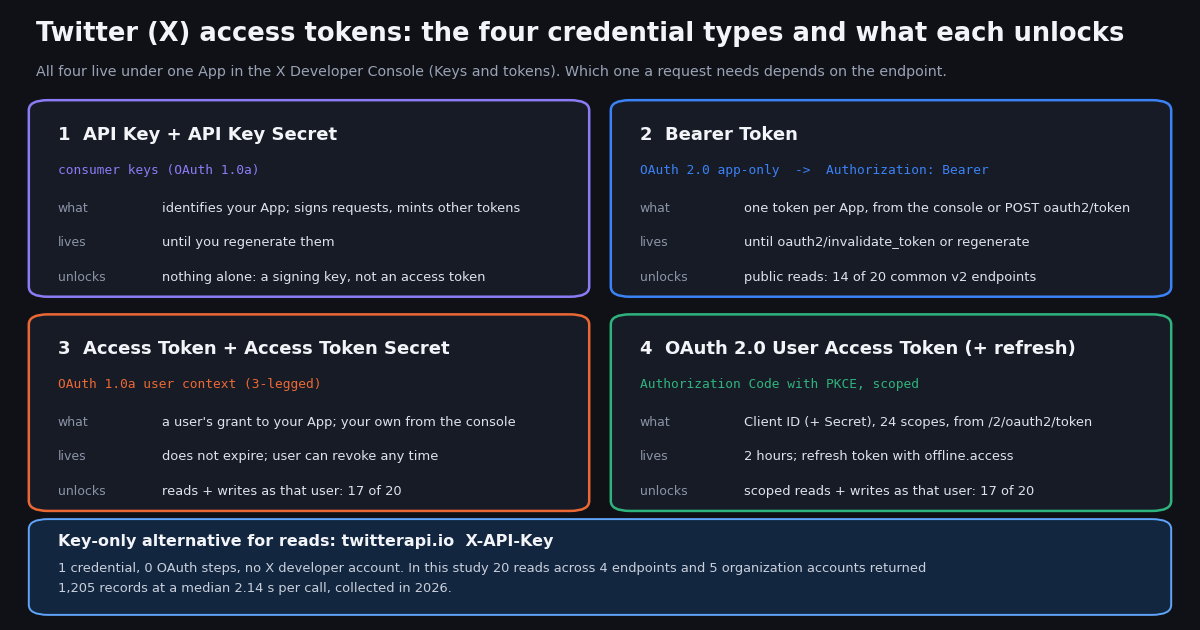
Searches for "twitter access token" land on developer-forum threads from several different years, a couple of gists and a secrets-scanner's reference page, because X's own documentation spreads the answer across a dozen pages. This page is the single explainer: what each of the four credentials is, where it lives in the Developer Console, how long it lasts, which endpoints accept it, how to prove it works, and how to store and rotate it. It is not a PKCE walkthrough; the OAuth 2.0 user-context setup guide does that step by step, and this page links to it rather than repeating it.
Two things make this different from the forum threads. First, a census: we opened docs.x.com's v2 authentication mapping and the per-endpoint reference pages this session and recorded, for 20 of the most commonly called v2 endpoints, which of the three token kinds each accepts, so you can look up your endpoint instead of guessing. Second, a measured look at the escape hatch: for public reads, twitterapi.io needs a single API key and no X developer account, and we timed 20 such reads for five organization accounts to show what the key-only path returns, how fast, and what it costs on both rate cards.
Everything about X's credentials below is quoted from docs.x.com pages read in 2026; the source list at the end has the URLs. Where the documentation is silent (for example, it does not state a lifetime for bearer tokens or refresh tokens), we say so rather than fill the gap.
The four credentials at a glance, and the consumer keys that mint the rest
X's authentication overview lists four methods: OAuth 1.0a User Context, App only, Basic authentication (enterprise APIs only) and OAuth 2.0 Authorization Code Flow with PKCE. The developer-apps page describes the credentials each App holds under its Keys and tokens tab: the API Key and Secret ("Authenticate with OAuth 1.0a. Used to sign requests or generate user tokens."), the Bearer Token ("App-only authentication for public data endpoints."), the Access Token and Secret ("Make requests on behalf of your own account (OAuth 1.0a).") and the Client ID and Secret ("Authenticate with OAuth 2.0. Used for authorization code flow."). The OAuth 2.0 user access token is not stored in the console at all; your code receives it from the token endpoint after a user authorizes.
The consumer keys are not an access token. This is the most common confusion in the forum threads that rank for this query. The API Key and Secret identify your App. On their own they let you do exactly two things: sign an OAuth 1.0a request (always together with a user's Access Token and Secret) and mint the App's bearer token by presenting them as HTTP Basic credentials to POST https://api.x.com/oauth2/token. If a library asks for "consumer key" or "client key", it means these. If a 401 comes back from a call signed with only the consumer keys, nothing is broken; you have simply not supplied a token.
Where to find them (in words; the console changes too often for screenshots to stay honest). Sign in at the X Developer Console, open the Projects and Apps view, pick the App, and open its Keys and tokens tab. The tab has one block per credential type, each with a Regenerate (or Generate) button. Per the developer-apps page, each secret is "only shown once" when generated: copy it into your secret store immediately, because the next time you open the tab you will only be able to regenerate it, which invalidates the old value everywhere it is deployed.
Permission level is set on the App, not the token. Under User authentication settings you choose Read only, Read and write, or Read, write and Direct Messages for OAuth 1.0a, and confidential or public client type for OAuth 2.0. The same page states that "Changing permissions requires users to re-authorize your app to get new tokens with the updated scope." In practice: if you flip an App from read-only to read-and-write, regenerate your own Access Token and Secret and expect every other user's token to need a fresh authorization before writes succeed.
Bearer token: the OAuth 2.0 app-only credential for public reads
The bearer token is what most people mean by "twitter token" when they want to read public posts from a script. X's bearer-token page describes it as "a more secure point of entry for using the X APIs" and gives two ways to get it: copy it from the App's Keys and tokens page, or mint it yourself by sending the consumer keys as Basic auth to POST https://api.x.com/oauth2/token with grant_type=client_credentials. The response is {"token_type":"bearer","access_token":"AAAA..."}. The API reference adds a detail that explains a lot of confused issues: "Only one bearer token may exist outstanding for an application, and repeated requests to this method will yield the same already-existent token until it has been invalidated." So calling the token endpoint again does not rotate the token; POST https://api.x.com/oauth2/invalidate_token (or Regenerate in the console) does.
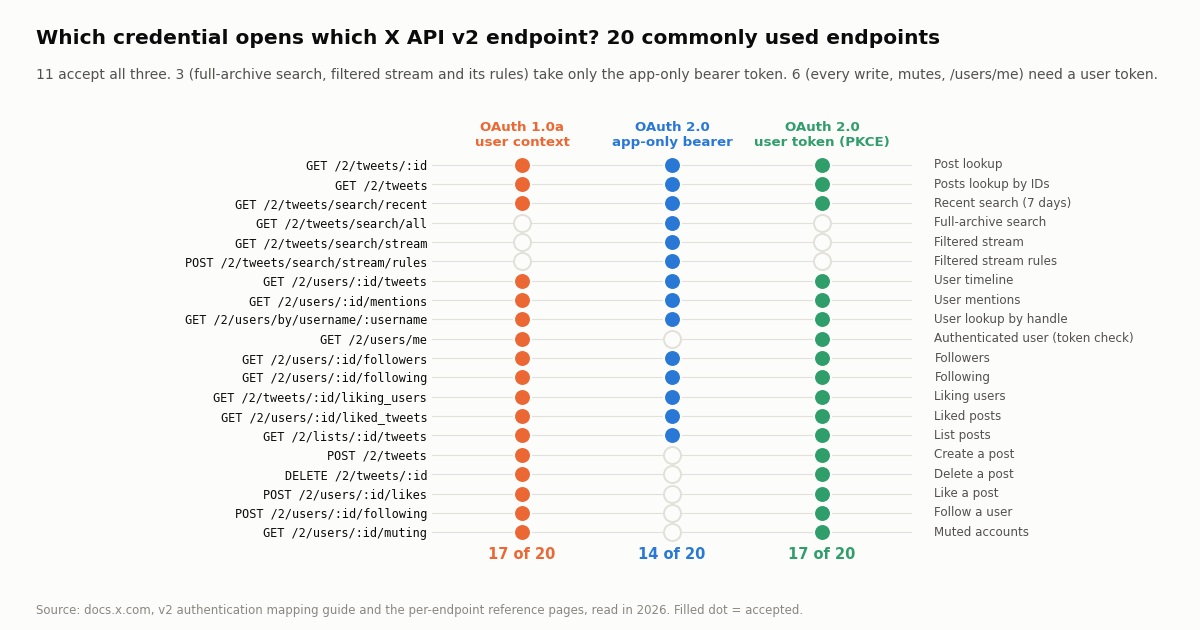
What it can and cannot do. It represents the App, not a person, so it works on endpoints that read public information and fails on anything that needs a user: posting, liking, following, muting, bookmarks, direct messages and GET /2/users/me. The census below counts 14 of 20 common endpoints as accepting it, and three of those (full-archive search, the filtered stream and its rules) accept nothing else. The pricing page's examples all use Authorization: Bearer $BEARER_TOKEN, and the pay-per-usage rate card is what you pay per resource it returns: $0.005 per post read, $0.010 per user read, $0.010 per follower or following read, capped at 3 million post reads a month before Enterprise.
Does it expire? The bearer-token page and the API reference do not state a lifetime; the only documented ways it stops working are invalidation and regeneration. Treat it as long-lived and rotate it on a schedule you choose. The curl session below mints one, uses it on two public reads against X's api.x.com/2/... paths, and revokes it.
# All four calls go to X's own API. Consumer keys come from the App's Keys and tokens tab.
export X_API_KEY="..." X_API_SECRET="..."

# 1. Mint (or re-fetch) the App's bearer token. The same token comes back until it is invalidated.
curl -s -u "$X_API_KEY:$X_API_SECRET" -d "grant_type=client_credentials" https://api.x.com/oauth2/token
# -> {"token_type":"bearer","access_token":"AAAAAAAAAA..."}
export X_BEARER_TOKEN="AAAAAAAAAA..."

# 2. A public read: user lookup by handle (accepts bearer, OAuth 1.0a and OAuth 2.0 user tokens)
curl -s -H "Authorization: Bearer $X_BEARER_TOKEN" \
  "https://api.x.com/2/users/by/username/NASA?user.fields=created_at,description"

# 3. Recent search, 10 posts (default max_results 10, maximum 100); $0.005 per post returned on pay-per-usage
curl -s -H "Authorization: Bearer $X_BEARER_TOKEN" \
  "https://api.x.com/2/tweets/search/recent?query=from%3ANASA&max_results=10"

# 4. Revoke it. The next oauth2/token call mints a fresh one; redeploy anything that held the old value.
curl -s -u "$X_API_KEY:$X_API_SECRET" -d "access_token=$X_BEARER_TOKEN" https://api.x.com/oauth2/invalidate_tokenOAuth 1.0a access token and secret: acting as a user, no expiry
This is the credential the phrase "access token" originally meant on Twitter, and it is still what GET /2/users/me, POST /2/tweets and every other user-context endpoint accept under the name UserToken. It is a pair: the Access Token (oauth_token) and the Access Token Secret (oauth_token_secret), issued to your App for one specific user, and used together with the consumer keys to sign each request with HMAC-SHA1. Per X's OAuth 1.0a guide, these tokens "do not expire but can be revoked by the user at any time"; the authentication FAQ adds that a token is also invalidated if X suspends the App, and that you should "assume a user's access token may become invalid at any time" and re-prompt for authorization when it does.
Your own account's pair is the easy case: in the App's Keys and tokens tab, generate the Access Token and Secret, and they are issued for the account that owns the developer account, at the App's current permission level. That is all a single-account bot or a personal analytics script needs.
Anyone else's pair comes from the 3-legged flow, which the docs lay out as three calls: POST oauth/request_token ("Create a request for a consumer application to obtain a request token."), GET oauth/authorize ("Have the user authenticate, and send the consumer application a request token."; oauth/authenticate is the variant that skips the approval screen for users who already authorized the App), and POST oauth/access_token ("Convert the request token into a usable access token."). The request token and secret are temporary; the result is the user's durable pair, which you store server-side against that user. Revocation from your side is POST oauth/invalidate_token.
Permission level is baked in at issue time. A pair issued while the App was read-only stays read-only even after you raise the App's permissions; regenerate your own pair and have other users re-authorize. This is the usual cause of a 403 on POST /2/tweets from an otherwise working token.
OAuth 2.0 user access token with PKCE: scopes, two hours, refresh tokens
The newest credential is the one X's overview describes as letting you "authenticate on behalf of another account with greater control over an application's scope." It is a plain bearer string, sent as Authorization: Bearer <token> like the app-only token, but it represents a user and a specific set of scopes. The current scope list on docs.x.com has 24 entries: tweet.read, tweet.write, tweet.moderate.write, users.email, users.read, follows.read, follows.write, offline.access, space.read, mute.read, mute.write, like.read, like.write, list.read, list.write, block.read, block.write, bookmark.read, bookmark.write, dm.read, dm.write, media.write, broadcast.read and broadcast.write.
The flow in one paragraph (the full walkthrough with code is in our OAuth 2.0 user-context setup guide, linked below): your App's Client ID (and, for confidential clients, Client Secret) come from Keys and tokens; you send the user to https://x.com/i/oauth2/authorize with response_type=code, client_id, redirect_uri, scope, state, code_challenge and code_challenge_method; the user approves; you exchange the returned code plus your code_verifier at POST https://api.x.com/2/oauth2/token with grant_type=authorization_code. Public clients (browser and mobile) send client_id in the body; confidential clients send the Client ID and Secret as Basic auth.
Lifetime, quoted: "By default, the access token you create through the Authorization Code Flow with PKCE will only stay valid for two hours unless you've used the offline.access scope." With that scope, "an OAuth 2.0 refresh token will be issued", and you exchange it at the same token endpoint with grant_type=refresh_token to get a new access token without prompting the user. The pages we read do not state how long a refresh token itself lives or whether each one is single-use, so design for both: store whatever refresh token the latest response returns, and handle a failed refresh by sending the user back through authorization.
Revocation is POST https://api.x.com/2/oauth2/revoke with token and client_id. Users can also remove the App from their account settings, after which both the access and refresh tokens stop working with a 401.
Which endpoints need which: a census of 20 common X API v2 endpoints
The question behind most "twitter access token" searches is really "which of these do I need for the call I am about to make". X answers it per endpoint: every reference page carries a security block listing some subset of BearerToken (app-only), UserToken (OAuth 1.0a user context) and OAuth2UserToken with its required scopes, and the v2 authentication mapping guide collects the same information in one table. We read both this session and tallied 20 endpoints a typical developer touches first. The chart and table are that tally; the source for each row is the mapping guide, except GET /2/users/me, where the endpoint's own reference page lists only the two user-token schemes (an App has no "me", so the mapping guide's summary row for it is misleading).
Reading the tally. 11 of the 20 accept all three token kinds; these are the public reads (lookups, timelines, recent search, followers, likes, list posts), and for them the bearer token is the simplest choice because it involves no user and never expires on a clock. 3 accept only the bearer token: full-archive search, the filtered stream and the stream-rules endpoint, which is why a user token alone cannot read the stream. 6 accept only user tokens: every write in the list, the muting list, and GET /2/users/me. Across the 20, OAuth 1.0a and OAuth 2.0 user tokens are accepted by exactly the same 17 endpoints, so between those two the choice is about expiry and scoping, not reach. The + in the last column means the scope is required on top of tweet.read users.read.
Rate limits also depend on the credential. The authorization-code page notes that for post and user lookup with OAuth 2.0 the per-App limit was raised "from 300 to 900 requests per 15 minutes"; app-only and user-context calls draw from different buckets, which is one reason production code often holds both a bearer token and a user token and picks per call.
How to validate a token, what 401 and 403 mean, and how to store and rotate
User tokens: call GET /2/users/me. Its reference page lists OAuth2UserToken (scopes users.read, tweet.read) and UserToken as the accepted schemes, and a success returns data.id, data.name and data.username for the account the token represents. It is the one endpoint whose only purpose is to tell you whose token you are holding, which makes it the natural health check after a refresh or at process start. Bearer tokens have no "me", so validate them with the smallest public read you already use, for example GET /2/users/by/username/:username; a 200 proves the token is live.
Reading the failure codes. A 401 (Unauthorized) means X could not authenticate the request at all: an OAuth 2.0 user token older than two hours, a token the user revoked, a bearer token that was regenerated elsewhere, an OAuth 1.0a signature built with the wrong secret, or a malformed header. A 403 (Forbidden) means the token authenticated but is not allowed to do this: an OAuth 1.0a pair issued at a lower permission level than the call needs, an OAuth 2.0 token missing a scope, or an App whose access level does not include the endpoint. The split matters operationally: on 401 refresh or re-authorize, on 403 fix the App's permissions or scopes and re-issue, because retrying the same token will never succeed.
Storage. All four credentials are bearer secrets in the practical sense: whoever holds the string holds the access. Keep them in environment variables or a secret manager, never in source, notebooks, build logs or client-side JavaScript. The console shows each secret once; if you lose it, regenerate rather than hunt. Public-client OAuth 2.0 apps (browser, mobile) should hold only the Client ID, which is why PKCE exists. Store refresh tokens encrypted at rest and replace the stored value with whatever the latest refresh response returns.
Rotation. Bearer: POST oauth2/invalidate_token, then mint again, then redeploy. OAuth 1.0a: Regenerate in the console for your own pair, oauth/invalidate_token for users' pairs. OAuth 2.0: POST /2/oauth2/revoke with token and client_id. Rotate on every suspected exposure (a pasted log, a public repository, a departed teammate) and on a calendar for the long-lived kinds. A secrets scanner in CI catches the most common leak, which is a consumer secret or bearer token committed in a config file.
The Python below is the whole validation story in three functions: check a user token, check a bearer token, refresh an OAuth 2.0 user token.
"""x_token_check.py - validate and refresh X (Twitter) tokens against api.x.com.

    pip install requests
    X_USER_TOKEN=... python x_token_check.py            # OAuth 2.0 user access token
    X_BEARER_TOKEN=... python x_token_check.py          # app-only bearer token
"""
import os
import sys

import requests

X = "https://api.x.com"


def whoami(user_token):
    """GET /2/users/me accepts OAuth 1.0a user context and OAuth 2.0 user tokens, never the app-only bearer."""
    r = requests.get(f"{X}/2/users/me", headers={"Authorization": f"Bearer {user_token}"},
                     params={"user.fields": "created_at"}, timeout=15)
    if r.status_code == 401:
        raise SystemExit("401: expired (OAuth 2.0 user tokens live 2 hours), revoked, or malformed -> refresh or re-authorize")
    if r.status_code == 403:
        raise SystemExit("403: token is valid but the App's permissions or scopes do not cover this call -> fix the App, re-issue")
    r.raise_for_status()
    return r.json()["data"]            # id, name, username (+ created_at)


def check_bearer(bearer):
    """App-only tokens have no 'me'; prove liveness with a public read you already pay for."""
    r = requests.get(f"{X}/2/users/by/username/NASA", headers={"Authorization": f"Bearer {bearer}"}, timeout=15)
    return r.status_code == 200


def refresh(client_id, refresh_token, client_secret=None):
    """Exchange a refresh token (issued only when offline.access was granted) for a new access token."""
    data = {"grant_type": "refresh_token", "refresh_token": refresh_token, "client_id": client_id}
    auth = (client_id, client_secret) if client_secret else None   # confidential clients use Basic auth
    r = requests.post(f"{X}/2/oauth2/token", data=data, auth=auth, timeout=15)
    r.raise_for_status()
    body = r.json()                    # access_token, token_type, scope (+ refresh_token when issued)
    return body["access_token"], body.get("refresh_token", refresh_token)


if __name__ == "__main__":
    if os.environ.get("X_USER_TOKEN"):
        me = whoami(os.environ["X_USER_TOKEN"])
        print(f"user token OK: @{me['username']} (id {me['id']})")
    elif os.environ.get("X_BEARER_TOKEN"):
        print("bearer token OK" if check_bearer(os.environ["X_BEARER_TOKEN"]) else "bearer token rejected")
    else:
sys.exit("set X_USER_TOKEN or X_BEARER_TOKEN")The key-only alternative for reads: one header, measured on 20 calls
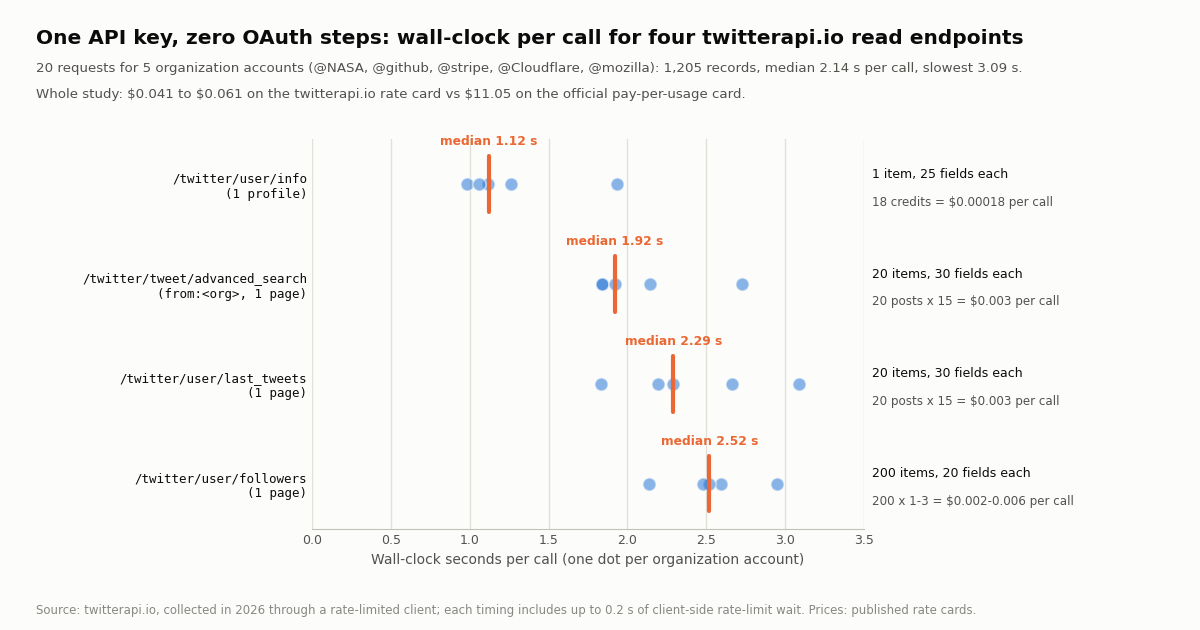
If what you need is public data (profiles, timelines, searches, follower lists) and not actions as a user, none of the four credentials above is required. twitterapi.io authenticates every read with a single API key in an X-API-Key header, created in the dashboard with no X developer account, no App, no OAuth flow and no token expiry to manage. To show what that looks like in practice rather than in a sentence, we made 20 reads for five organization accounts (@NASA, @github, @stripe, @Cloudflare and @mozilla), one call per account on each of four endpoints, and timed each call around the client.
What the numbers say. Every call returned HTTP 200 and the fields the documentation promises: 25 profile fields (id, userName, followers, statusesCount, createdAt, isBlueVerified and so on), 30 fields per post (id, text, createdAt, likeCount, viewCount, author and the rest), 20 per follower record. The slowest single call took 3.09 s and the whole study 41.6 s of wall-clock, including the client-side pause that keeps our collector under its rate cap. The cost column uses the published twitterapi.io rate card: 18 credits per profile ($0.18 per 1,000), 15 credits per post returned ($0.15 per 1,000; a 15-credit minimum applies when a search returns nothing), and 1 to 3 credits per follower returned depending on the page tier, at $1 per 100,000 credits. The last column is the official pay-per-usage card from docs.x.com: $0.005 per post read, $0.010 per user read and $0.010 per follower read, so the same 1,000 follower records that cost $0.01 to $0.03 here cost $10.00 there, and 1,000 posts cost $0.15 here against $5.00, about 33x.
Credential arithmetic. The official bearer path needs an approved developer account, an App, the API Key and Secret, and one token call; the OAuth 1.0a path needs those keys plus a 3-legged exchange per user; the OAuth 2.0 path needs a Client ID, optionally a Client Secret, a PKCE round trip, and a refresh every two hours. The key-only path needs one string and zero round trips, and the endpoints answer with the same shape whether you ask about one account or a thousand. Rate limits on twitterapi.io are per account rather than per token kind: 0.2 requests a second before the first payment and 20 once paid, with higher tiers on the Scale and Business plans. New accounts that pass the automatic bot check get up to $1 of free credits (at most 100,000; one per person or network, expiring after 31 days), enough to repeat this study about 16 times; purchased credits never expire.
Writes are a separate, authenticated product. Posting, liking, following or sending a DM through twitterapi.io runs through a logged-in session: one /twitter/user_login_v2 login ($0.10, with a proxy you supply) returns login_cookies, and each subsequent action such as /twitter/create_tweet_v2 or /twitter/follow_user_v2 is $0.002 per HTTP 200 call. Every such call acts as that account, so X can rate-limit, lock or suspend it; keep a human pace, expect the session to need a fresh login from time to time, and keep the account's own credentials as carefully as any token on this page. For reads, no X account is needed at all.
The runnable script at the end of this page is the key-only path end to end: profile, latest posts with cursor pagination, and a search, all with the one header.
How we collected this
Question: which of X's three token kinds does each commonly used v2 endpoint accept, and what does the key-only alternative return, how fast and at what cost, for the same kinds of reads.
Census method: we read docs.x.com's v2 authentication mapping guide and the reference pages for GET /2/users/me, GET /2/tweets/search/recent, GET /2/users/:id/followers and POST /2/tweets in 2026 and recorded, for 20 endpoints chosen as the ones a developer typically calls first (lookups, search, stream, timelines, followers, likes, lists, the five most common writes, mutes), whether each lists UserToken, BearerToken and OAuth2UserToken, with the scopes for the last. The source URL for each row is stored with the study. The 20 are a selection, not the whole surface: Spaces, bookmarks, direct messages, media upload and compliance endpoints are not counted.
Live sample: 20 requests through a rate-limited, read-only client against twitterapi.io, one per endpoint per account for /twitter/user/info, /twitter/user/last_tweets (1 page), /twitter/tweet/advanced_search (from:<account>, queryType=Latest, 1 page) and /twitter/user/followers (1 page), for @NASA, @github, @stripe, @Cloudflare and @mozilla. Wall-clock was measured around each client call and includes up to 0.2 s of the client's own spacing between requests. Costs are computed from the published rate cards, not read from an invoice.
What the sample cannot show: five accounts and one call per endpoint is a snapshot of latency from one network location, not a service-level figure; the official API's latency was not measured, only its price. Follower page tiers mean the follower cost is a range. The census reflects the documentation on the day it was read; X changes endpoint access levels, and the per-endpoint reference page is always the authority for a specific call.
Privacy: the five accounts are organizations. Follower pages list private individuals, so they were counted and their field names recorded, then discarded; only the organization profiles, timelines and from: search pages are kept, gzip-compressed, with the analysis script, results and the census table in the study folder.
"""one_key_reads.py - the key-only path: profile, latest posts and a search for an X (Twitter)
account with a single credential. No X developer account, App, bearer token or OAuth flow.

    pip install requests
    export TWITTERAPI_IO_API_KEY=...     # twitterapi.io dashboard
    python one_key_reads.py NASA

Cost at the published rate card: 18 credits per profile, 15 credits per post returned
(15-credit minimum per request), $1 = 100,000 credits.
"""
import os
import sys

import requests

BASE = "https://api.twitterapi.io"
HEADERS = {"X-API-Key": os.environ["TWITTERAPI_IO_API_KEY"]}   # the only credential


def profile(handle):
    r = requests.get(f"{BASE}/twitter/user/info", headers=HEADERS, params={"userName": handle}, timeout=30)
    r.raise_for_status()
    body = r.json()
    if body.get("status") == "error":          # unknown handle: HTTP 200 with msg "user not found"
        raise RuntimeError(body.get("msg"))
    return body["data"]                        # id, userName, name, followers, following, statusesCount, createdAt, ...


def latest_posts(handle, pages=2):
    """20 posts per page, newest first; follow next_cursor while has_next_page."""
    posts, cursor = [], None
    for _ in range(pages):
        params = {"userName": handle}
        if cursor:
            params["cursor"] = cursor
        r = requests.get(f"{BASE}/twitter/user/last_tweets", headers=HEADERS, params=params, timeout=30)
        r.raise_for_status()
        body = r.json()
        page = (body.get("data") or {}).get("tweets") or []
        posts.extend(page)
        if not page or not body.get("has_next_page") or not body.get("next_cursor"):
            break
        cursor = body["next_cursor"]
    return posts


def search(query, pages=1):
    """Same operators as X's search box; tweets[] is top-level here."""
    posts, cursor = [], None
    for _ in range(pages):
        params = {"query": query, "queryType": "Latest"}
        if cursor:
            params["cursor"] = cursor
        r = requests.get(f"{BASE}/twitter/tweet/advanced_search", headers=HEADERS, params=params, timeout=30)
        r.raise_for_status()
        body = r.json()
        page = body.get("tweets") or []
        posts.extend(page)
        if not page or not body.get("has_next_page") or not body.get("next_cursor"):
            break
        cursor = body["next_cursor"]
    return posts


if __name__ == "__main__":
    handle = sys.argv[1] if len(sys.argv) > 1 else "NASA"
    p = profile(handle)
    print(f"@{p['userName']}  {p['followers']:,} followers  {p['statusesCount']:,} posts  since {p['createdAt']}")
    for t in latest_posts(handle, pages=1)[:5]:
        print(f"{t['createdAt']}  likes={t['likeCount']}  views={t['viewCount']}  {t['text'][:80]!r}")
    hits = search(f"from:{handle} -filter:replies", pages=1)
print(f"search returned {len(hits)} posts; first author @{hits[0]['author']['userName']}" if hits else "search returned nothing (15-credit minimum)")Questions readers ask
What is the difference between a Twitter API key and an access token?
The API Key and API Key Secret (consumer keys) identify your App; they sign OAuth 1.0a requests and mint the bearer token but open no endpoint by themselves. An access token represents a grant: the bearer token is the App's own grant to read public data, the OAuth 1.0a Access Token and Secret are a user's grant to your App, and the OAuth 2.0 user access token is a scoped, two-hour user grant. Every X API request needs the consumer keys plus a user token, or a bearer-type token on its own.
How do I get a Twitter (X) bearer token?
Open the App in the X Developer Console, go to Keys and tokens, and generate or copy the Bearer Token; or mint it by sending the API Key and Secret as HTTP Basic credentials to POST https://api.x.com/oauth2/token with grant_type=client_credentials. Only one bearer token exists per App at a time, so repeated calls return the same token until you invalidate it with POST oauth2/invalidate_token or regenerate it in the console.
Do Twitter access tokens expire?
It depends on the kind. Per docs.x.com, OAuth 1.0a Access Tokens do not expire but can be revoked by the user at any time, and the App being suspended also invalidates them. OAuth 2.0 user access tokens from the PKCE flow stay valid for two hours; with the offline.access scope you receive a refresh token to get a new one without re-prompting. The documentation states no lifetime for the app-only bearer token; it works until invalidated or regenerated.
How can I check whether my Twitter access token is valid?
For a user token (OAuth 1.0a pair or OAuth 2.0 user token), call GET https://api.x.com/2/users/me; a 200 returns the id, name and username the token represents. For an app-only bearer token, which has no me, call any public read such as GET /2/users/by/username/:username. A 401 means the token is expired, revoked or malformed; a 403 means it authenticated but the App's permission level or scopes do not allow that call.
Which Twitter API endpoints work with just a bearer token?
Public reads. In our census of 20 commonly used v2 endpoints from docs.x.com, 14 accept the bearer token: post and user lookups, recent search, user timelines and mentions, followers and following, liking users and liked posts, list posts, plus full-archive search, the filtered stream and its rules, which accept nothing else. The 6 that reject it are the writes (create and delete post, like, follow), the muting list and GET /2/users/me.
What is the difference between the OAuth 1.0a access token and the OAuth 2.0 user access token?
Both act as a specific user and, in our census, are accepted by exactly the same 17 of 20 endpoints. The OAuth 1.0a pair (token plus secret) signs each request with the consumer keys, carries the App's whole permission level, and never expires on a clock. The OAuth 2.0 token is a plain bearer string with explicit scopes from a list of 24, lasts two hours, and is renewed with a refresh token when offline.access was granted. Pick OAuth 2.0 for anything user-facing where least privilege matters, OAuth 1.0a for a single long-running account you own.
Where should I store Twitter API tokens?
In environment variables or a secret manager, never in source code, notebooks, build logs or browser JavaScript. The X console shows each secret only once at generation, so copy it straight into your secret store; if it leaks, invalidate or regenerate it (oauth2/invalidate_token for the bearer token, oauth/invalidate_token or Regenerate for OAuth 1.0a pairs, /2/oauth2/revoke for OAuth 2.0 tokens) and redeploy. Public-client apps should hold only the Client ID and rely on PKCE.
Do I need any Twitter access token to read public tweets?
On the official API, yes: at least the app-only bearer token, which requires a developer account and an App, billed at $0.005 per post read on pay-per-usage. On twitterapi.io, reads need only an API key in an X-API-Key header and no X account; posts are 15 credits each ($0.15 per 1,000), profiles 18 credits ($0.18 per 1,000), and our 20-call sample returned 1,205 records at a median 2.14 s per call. Writes there run through a separate authenticated login session.
Continue
- X developer docs: Authentication overview (the four methods, where credentials live)
- X developer docs: OAuth 2.0 Authorization Code Flow with PKCE (two-hour access token, offline.access, 24 scopes, confidential vs public clients)
- X developer docs: OAuth 2.0 App-Only bearer tokens (console and oauth2/token generation)
- X developer docs: OAuth 1.0a 3-legged flow (request_token, authorize, access_token; tokens do not expire)
- X developer docs: v2 authentication mapping (endpoint by endpoint, the census source)
- X API reference: GET /2/users/me (OAuth2UserToken users.read tweet.read, UserToken)
- X API pay-per-usage pricing ($0.005 per post read, $0.010 per user and follower read)
- twitterapi.io API reference: X-API-Key authentication, user/info, last_tweets, advanced_search, followers
- X (Twitter) API hub: endpoints, pricing and guides
- OAuth 2.0 user-context setup with PKCE, step by step
- Twitter (X) API with Python: four access paths compared
- X API docs: where each reference page lives
- xurl: the X API CLI and how it handles auth
- Can you use the X API for free?
- Create a twitterapi.io API key
- Pay-per-call pricing
- 01How to Get a Grok API Key: Setup, Pricing and Live X Data for the xAI API
- 02The X Developer Portal (X Developer Console) for the Twitter (X) API: Sign-Up, Apps and Keys, Billing, Limits, and When You Do Not Need It
- 03SKILL.md explained: the Agent Skills format, X's own skill, and a Twitter (X) API skill you can install
- 04Twitter (X) Auto Post: Schedule in X, RSS or Sheets to X, and Posting from Code
- 05How to Search and Track Mentions on Twitter (X), Including Someone Else's
- 06Searching for a Tweet — Operators, Filters, and API
- 07How to Build a Twitter (X) to Discord Bot in 2026
- 08Nitter Is Archived: Which Nitter Alternatives Still Work in 2026?
Stop reading. Start building.
Starter credits cover real testing on real data. Google sign-in, no card, no application queue.
Get an API key