How to Search and Track Mentions on Twitter (X), Including Someone Else's
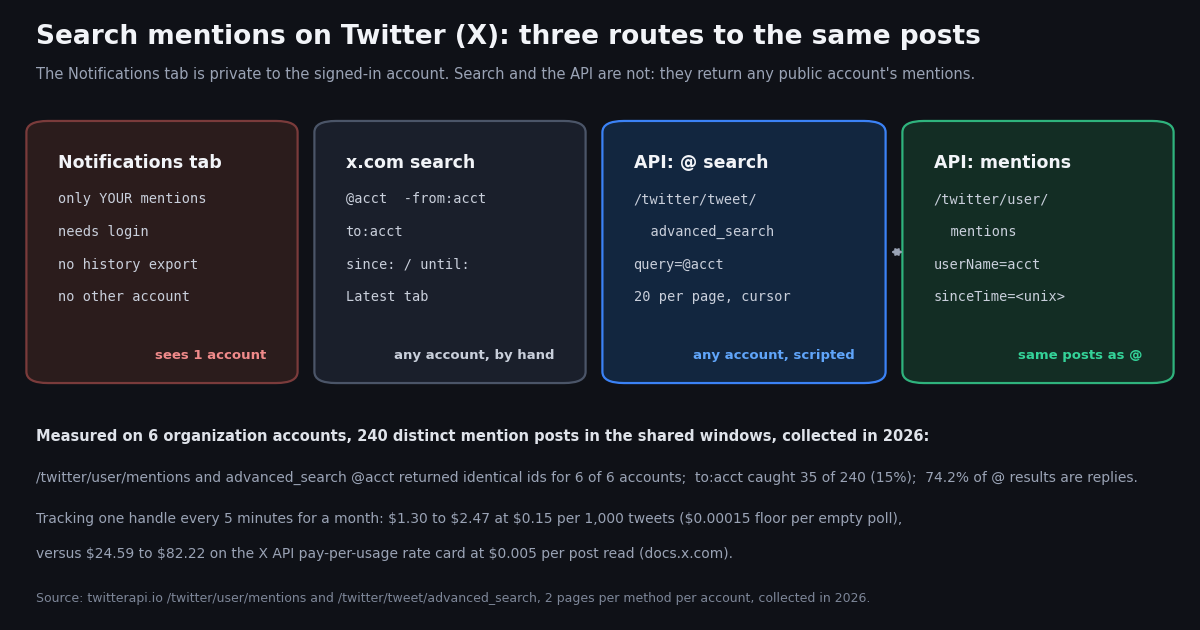
The question behind this keyword is almost always the same one: not "where are my mentions" but "how do I see the mentions of an account I do not control" - a competitor, a brand you are pitching, a public figure, your own second account you are logged out of. X's product answer is incomplete. The bell icon shows the mentions of the account that is signed in, and nothing else, and most guides stop at "use advanced search" without saying which operators still work, what the results actually contain, or how to keep the search running after you close the tab.
This page answers all three. It lists the operators that work today, verified against live results rather than copied from older guides; it shows, with a measured sample from six organization accounts, what an "@handle" result set is really made of (mostly thread replies, not fresh shout-outs); and it gives you a 30-line Python tracker plus the arithmetic for what continuous tracking costs on two rate cards. It does not compare monitoring vendors; our Twitter monitoring tools: build or buy page does that, and the advanced search API guide covers the full operator set beyond mentions.
Why the Notifications tab only shows your own mentions, and what a mention is
On X, a mention is a post whose text contains @handle, and the platform records it in the post's entities.user_mentions list. Three kinds of posts end up carrying a handle: a plain post someone wrote that includes it; a reply to that account, where the client prepends the handle automatically; and a reply anywhere further down a thread the account took part in, because the reply chain keeps prepending every participant. Quote posts are different: a quote of the account's post does not contain the handle in its text unless the author types it, so quotes mostly live outside a mention search. In our sample of 240 distinct mention posts, exactly one was a quote post, and every one of the 240 carried the handle in entities.user_mentions.
The Notifications timeline is a private, per-account feed: it is assembled server-side for the signed-in user from events that concern that user (mentions, replies, likes, follows) and there is no URL that opens it for another handle. That is why none of the "how can I see @mentions for another user" threads in forums end with a Notifications trick; the only routes that read someone else's mentions are search and the API, both of which operate on public posts. Those routes also work logged out and have nothing to do with whose account you own, which is the whole point: a mention search for @Stripe returns the same posts for Stripe's social team and for a developer who has never logged in.
Two limits are worth knowing before you build on this. Protected accounts' posts never appear in search, so a mention written by a protected account is invisible to everyone except that account's approved followers; X's search operators reference on docs.x.com/x-api/posts/search/integrate/operators defines @ as "Matches Posts mentioning a username", and that definition covers public posts only. And deleted posts drop out of search immediately, so a tracker that saw a mention at 10:00 and cannot find it at 10:05 is not broken; the post is gone.
The search operators that work today for any account's mentions
The operators below are the ones you need for mentions. The first column is what you type into the x.com search box; the same string goes into the query parameter of /twitter/tweet/advanced_search, which follows X's advanced-search syntax. The last column says how we checked it: "docs.x.com" means the operator is defined on X's operators reference; "tested" means we ran it against our endpoint this session with @vercel and looked at the returned fields.
The one caveat is dates. On x.com's own advanced-search form (help.x.com/en/using-x/x-advanced-search) dates are entered as since:YYYY-MM-DD and until:YYYY-MM-DD. Our endpoint documents since_time: and until_time: in unix seconds instead and says the since: date form is unsupported. We tested both: the unix form returned twenty posts that all fell inside the requested two days, while the since: / until: date form returned twenty posts dated outside the requested range. If you are copying a query from the x.com search box into code, convert the dates to unix seconds first.
Combine operators with a space for AND, OR for alternatives, and parentheses for grouping; X's query-building guide on docs.x.com/x-api/posts/search/integrate/build-a-query states that a negated operator cannot stand alone, so always pair -from:handle with a positive term such as @handle. Two useful compound searches: @handle -from:handle -filter:replies is the closest thing to "people talking about this account on their own timeline", and (@handle OR "Brand Name") -from:handle catches people who typed the name without the handle, which no mentions endpoint can see.
If you only need to look once, the x.com search box with the Latest tab is enough, and X's own form at x.com/search-advanced builds the same string for you. Everything from the next section on is about doing it repeatedly, for a handle you do not own, in code.
What an @handle result set is really made of: 240 posts from six organization accounts
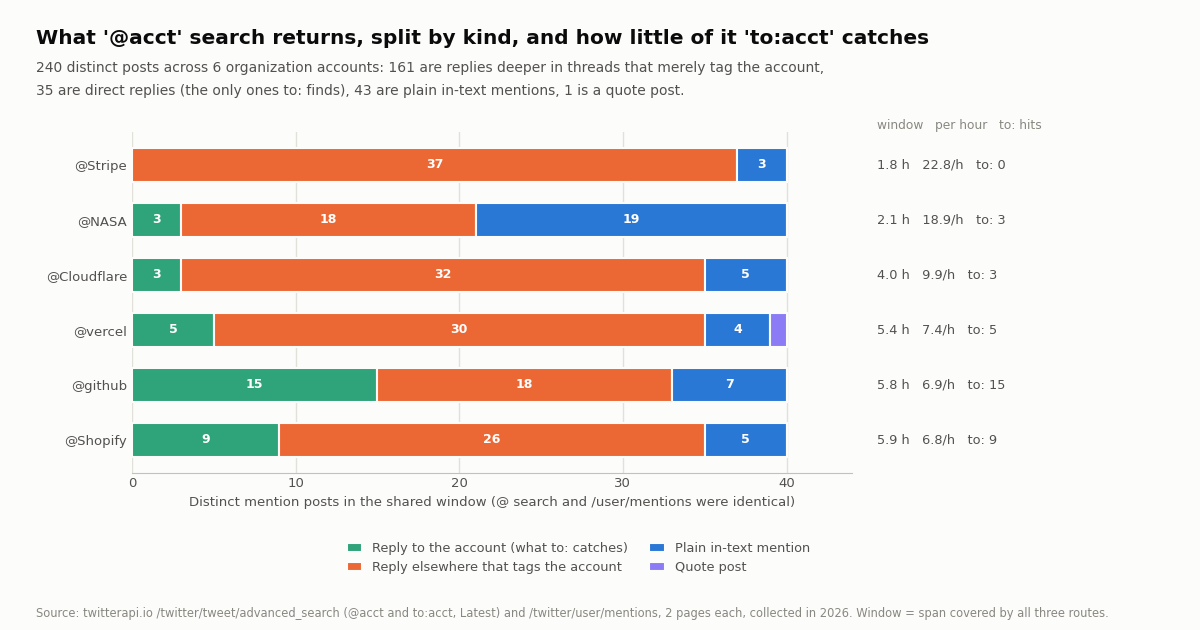
Before building a tracker, it helps to know what it will print. We pulled the two most recent pages of mentions for six organization accounts, @vercel, @github, @Stripe, @Cloudflare, @Shopify and @NASA, through three routes, and classified every post inside the window where all three routes had coverage. The split was lopsided: of 240 distinct posts, 161 (67%) were replies to somebody else in a thread the account had taken part in, carrying the handle only because the reply chain prepends it; 35 (15%) were direct replies to the account; 43 (18%) were plain posts that mention the account on purpose; 1 was a quote post. Overall, 74.2% of @handle search results were replies by the isReply flag.
The per-account picture varies with how the account uses X. @NASA, which answers few replies and gets quoted and tagged in standalone posts, had 19 plain mentions out of 40. @Stripe, whose support conversations happen in long threads, had 37 of 40 posts classified as replies elsewhere in a thread and zero direct replies inside its 105-minute window. @github sat in between with 15 direct replies and 18 thread replies. The rate also varies by an order of magnitude: @Stripe accumulated 22.8 mention posts per hour and @NASA 18.9, while @Shopify, @github and @vercel ran at 6.8 to 7.4 per hour.
The practical rule that falls out of this: filter before you alert. inReplyToUsername == handle isolates direct replies (what a support team wants), isReply == false isolates standalone mentions (what a brand or PR team wants), and quoted_tweet.author.userName == handle isolates quotes, which you will mostly have to fetch with a separate quoted: style query because they rarely carry the handle in text. Printing everything that matches @handle produces a feed where two out of three lines are thread chatter.
How we collected this
Question. For the same handle, how much do the three API routes to "mentions" differ, what kinds of posts make up the result, how fast do mentions arrive, and what would continuous tracking cost on two rate cards?
Accounts and queries. Six organization accounts: @vercel, @github, @Stripe, @Cloudflare, @Shopify, @NASA. For each, two pages (40 posts) from /twitter/user/mentions?userName=handle, two pages from /twitter/tweet/advanced_search?query=@handle&queryType=Latest, and two pages from /twitter/tweet/advanced_search?query=to:handle&queryType=Latest. Five further single-page probes against @vercel tested -from:, filter:replies, -filter:replies, the since: date form and the since_time: unix form.
Window and sample. 41 requests, 820 posts fetched, collected in 2026, at a cost of $0.123 at $0.15 per 1,000 tweets. Per account, the comparison window runs from the oldest post that all three routes covered to the newest post seen, between 1.8 hours (@Stripe) and 5.9 hours (@Shopify); 515 route-posts fell inside those windows, 240 of them distinct. Overlap is measured on post ids. Kinds come from inReplyToUsername, isReply and quoted_tweet.author.userName.
What the sample cannot show. Two pages per route is a snapshot of a few hours on a weekday; mention rates swing with product launches and outages, so the per-hour figures size a budget rather than predict a month. Protected and deleted posts are absent from every route, so we cannot say how many mentions exist that search does not show. The cost projection assumes the measured rate holds for 30 days.
Privacy. The six target accounts are organizations and are named. The people who mentioned them are private individuals: raw API pages were not committed, the published sample holds only de-identified rows (route, kind, reply flag, minutes before window end, language, media flag), and every number on this page is an aggregate.
Three API routes to the same posts: /user/mentions, @ search, to: search
twitterapi.io exposes mentions two ways: a dedicated endpoint, GET /twitter/user/mentions?userName=handle with optional sinceTime and untilTime in unix seconds, and the general GET /twitter/tweet/advanced_search with a mention query. The dedicated endpoint returns exactly 20 posts per page, newest first, with has_next_page and next_cursor; the search endpoint returns up to 20 per page (its docs note that ads and non-post items are filtered out), also with a cursor. Both are billed at 15 credits per post returned, so there is no cost reason to prefer one.
We expected them to differ at the margins. They did not: for 6 of 6 accounts, the set of post ids inside the shared window was identical between /twitter/user/mentions and advanced_search with query=@handle (Jaccard similarity 1.0 for every account, 0 posts unique to either route). The to:handle route was a strict subset in every case, 35 of the 240 distinct posts, and all 35 were also present in the other two routes. That gives a clean decision table.
Two field-level notes from the raw pages. Every to:handle result also carried @handle in text, because X prepends the parent author's handle to replies; so to: adds no posts that @ lacks, it only narrows. And among the to: results, between 9 and 17 per account had inReplyToUsername equal to the handle while isReply was false; treat inReplyToUsername as the authority for "is this a reply to the account" and isReply as the authority for "is this a reply at all".
On the official X API the equivalent calls are GET /2/users/:id/mentions (the user mention timeline) and GET /2/tweets/search/recent with the same @ and to: operators, both billed at $0.005 per post read on the pay-per-usage plan published at docs.x.com/x-api/getting-started/pricing, with time bounds passed as start_time / end_time request parameters rather than query operators. The operator semantics are the same; the difference is price and that the recent-search endpoint covers the last seven days.
A 30-line mention tracker: poll, de-duplicate, print what is new
The tracker below runs forever, asking every five minutes for posts newer than a since_time: that it keeps ten minutes behind the clock. The overlap is deliberate: X search indexing is not perfectly ordered by createdAt, and a post indexed a minute late would be missed by a tight cursor. The seen-ids set absorbs the duplicates that the overlap creates, so each post prints exactly once. State lives in a small JSON file so a restart does not replay the last hour.
Three things to change for your case. Replace the handle on the command line; add -filter:replies to the query if you only want standalone mentions, or switch the query to to:handle if you only want direct replies; and swap the print for a Slack or Discord webhook POST, which is a one-line change (our Twitter to Discord bot page shows the webhook side). If you would rather use the dedicated endpoint, replace the URL with /twitter/user/mentions, pass userName and sinceTime as request parameters, and keep the rest; the response shape is the same tweets[].
Rate limits are not a concern at this cadence: the loop makes one request per poll (two if a burst spills onto a second page), and the account-level limit is 20 requests per second once a payment is on file, 0.2 per second before. The budget is the thing to watch, and the next section works it out.
"""mention_tracker.py - print new mentions of any X (Twitter) handle, polled every 5 minutes.

    pip install requests
    export TWITTERAPI_IO_API_KEY=...        # twitterapi.io dashboard
    python3 mention_tracker.py vercel
"""
import json, os, sys, time
import requests

BASE = "https://api.twitterapi.io"
HEADERS = {"X-API-Key": os.environ["TWITTERAPI_IO_API_KEY"]}
HANDLE = sys.argv[1] if len(sys.argv) > 1 else "vercel"
STATE = f"state_{HANDLE}.json"                  # {"since": unix_seconds, "seen": [ids]}
POLL = 300


def fetch_new(since):
    """Every mention newer than `since` (newest first), following the cursor."""
    out, cursor = [], ""
    while True:
        r = requests.get(f"{BASE}/twitter/tweet/advanced_search", headers=HEADERS, timeout=30,
                         params={"query": f"@{HANDLE} -from:{HANDLE} since_time:{since}",
                                 "queryType": "Latest", "cursor": cursor})
        r.raise_for_status()
        body = r.json()
        out.extend(body.get("tweets") or [])
        if not body.get("has_next_page") or not body.get("next_cursor"):
            return out
        cursor = body["next_cursor"]


state = json.load(open(STATE)) if os.path.exists(STATE) else {"since": int(time.time()) - 3600, "seen": []}
while True:
    seen = set(state["seen"])
    fresh = [t for t in fetch_new(state["since"]) if t["id"] not in seen]
    for t in sorted(fresh, key=lambda t: int(t["id"])):
        kind = "reply" if t.get("isReply") else ("quote" if t.get("quoted_tweet") else "mention")
        print(f'{t["createdAt"]}  {kind:7}  @{t["author"]["userName"]}: {t["text"][:120]!r}  {t["url"]}')
    state["seen"] = (state["seen"] + [t["id"] for t in fresh])[-2000:]
    state["since"] = int(time.time()) - 600       # 10-minute overlap; the seen set removes duplicates
    json.dump(state, open(STATE, "w"))
    time.sleep(POLL)
What continuous tracking costs: one handle, every five minutes, for a month
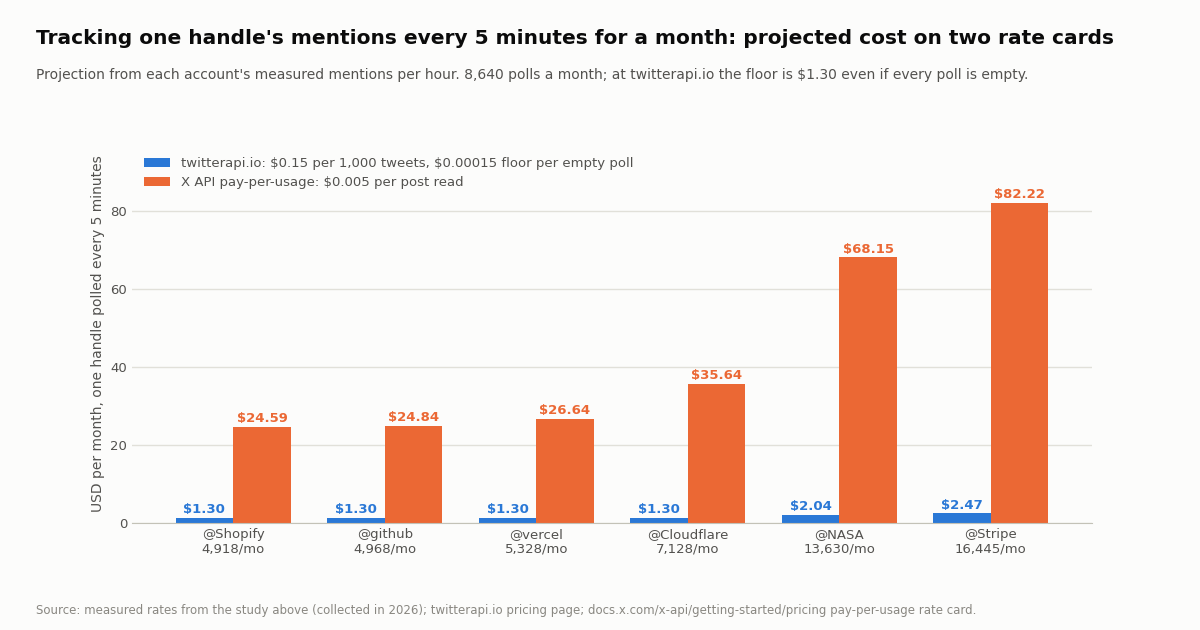
Five-minute polling is 8,640 requests a month. At twitterapi.io, a request that returns posts costs 15 credits per post ($0.15 per 1,000 tweets) and a request that returns nothing costs the 15-credit minimum ($0.00015), so the floor for an account nobody mentions is $1.30 a month and the bill grows with the mention volume. Projecting each account's measured rate over 30 days: @vercel at 5,328 mentions a month, @github at 4,968, @Shopify at 4,918 and @Cloudflare at 7,128 all land at about $1.30, because fewer than one post arrives per poll on average and the per-poll minimum dominates; @NASA at 13,630 projects to $2.04 and @Stripe at 16,445 to $2.47.
The same volumes on the X API pay-per-usage plan, at $0.005 per post read from the rate card on docs.x.com/x-api/getting-started/pricing, project to $24.59 (@Shopify) up to $82.22 (@Stripe); the card also caps pay-per-usage at 3 million post reads per month and offers $20 in credits on a first card plus a match of the first auto-recharge up to $50. Per 1,000 tweets the ratio is $5.00 to $0.15, roughly 33 to 1, and on our side you pay only for the data returned with no X account needed for reads. Neither card charges for the polls that come back empty on the X side, so the X figure is a pure per-post cost.
If you poll every minute instead, the twitterapi.io floor rises to 43,200 requests, $6.48 a month, and the per-post part stays the same; whether that is worth it depends on how fast you need to react, which is the subject of the next section. For dozens of handles, put them in one query with OR (@a OR @b OR @c) so an empty poll is one minimum rather than one per handle; the posts returned cost the same either way.
When to stop polling: filter rules and the Twitter Stream product
A polling loop is the right tool for one to a handful of handles, a five-minute reaction time, and a budget measured in single dollars. It stops being right in three situations. First, latency: if a support team needs to see a complaint within a minute, every-minute polling multiplies the floor by five and still leaves up to sixty seconds of lag. Second, breadth: a watchlist of fifty handles plus brand phrases turns one query into several (X search queries have a practical length limit) and the empty-poll floor multiplies with them. Third, operations: a loop on a laptop dies when the laptop sleeps, and a loop on a server needs a process supervisor and alerting of its own.
For those cases there are two push-style options. A filter rule, registered once through /oapi/tweet_filter/add_rule with the same @handle query, has the service run the search on an interval and POST each match to a URL you host, so your side is a stateless receiver; our guide to monitoring Twitter via the API covers the receiver pattern and when it beats polling. The Twitter Stream monitoring product is the no-code version for account watchlists: the Starter Plan is $29 a month for 6 monitored accounts, and higher plans cover 20 to 2,000 accounts (plan list in the app; prices are on the product page).
A simple decision rule: start with the 30-line tracker, because it costs about a dollar a month and you will learn what the mention stream of your target handle actually looks like. Move to a filter rule when you want it running without a server of your own, and to the monitoring product when the thing you are watching is a list of accounts rather than a search. Our overview of Twitter monitoring for accounts and keywords lays out the three setups side by side without repeating this page.
Common mistakes when searching or tracking mentions
Searching the handle without the @. vercel matches the word anywhere, including domains, bios quoted in text and unrelated uses; @vercel matches the mention entity. Use both only when you deliberately want name mentions, and then as (@vercel OR "Vercel") -from:vercel.
Forgetting -from:handle. An account's own replies mention the people it is replying to, and when it replies inside a thread it started, its own handle appears in the prepended chain. In our @vercel probe, adding -from:vercel removed the account's own posts and left 20 posts by other authors on the first page.
Treating every result as a new conversation. Two thirds of the sampled @handle results were replies deeper in existing threads. Group by conversationId before alerting and you will alert once per thread instead of once per reply.
Using the Top tab for monitoring. queryType=Top ranks by engagement and omits most low-engagement posts; a tracker wants Latest, which is chronological. Top is for a one-off look at what got traction.
Copying since: dates into API code. The date form belongs to the x.com form; on /twitter/tweet/advanced_search use since_time: and until_time: in unix seconds, which is what the tracker above does.
Expecting quotes in a mention search. Quote posts carry the handle only if the author typed it. If quotes matter, run a second query or read quoteCount on the account's own posts and fetch the quotes from there.
"""mentions_report.py - one-shot report of another account's recent mentions, split by kind.

    pip install requests
    export TWITTERAPI_IO_API_KEY=...
    python3 mentions_report.py Stripe 3        # handle, pages (20 posts each)
"""
import os, sys
from collections import Counter
import requests

BASE = "https://api.twitterapi.io"
HEADERS = {"X-API-Key": os.environ["TWITTERAPI_IO_API_KEY"]}
handle = sys.argv[1] if len(sys.argv) > 1 else "Stripe"
pages = int(sys.argv[2]) if len(sys.argv) > 2 else 2


def search(query, pages):
    out, cursor = [], ""
    for _ in range(pages):
        r = requests.get(f"{BASE}/twitter/tweet/advanced_search", headers=HEADERS, timeout=30,
                         params={"query": query, "queryType": "Latest", "cursor": cursor})
        r.raise_for_status()
        body = r.json()
        out.extend(body.get("tweets") or [])
        if not body.get("has_next_page") or not body.get("next_cursor"):
            break
        cursor = body["next_cursor"]
    return out


def kind(t):
    if (t.get("inReplyToUsername") or "").lower() == handle.lower():
        return "direct reply"
    if t.get("isReply"):
        return "thread reply"
    q = (t.get("quoted_tweet") or {}).get("author") or {}
    return "quote" if q.get("userName", "").lower() == handle.lower() else "plain mention"


posts = search(f"@{handle} -from:{handle}", pages)
print(f"{len(posts)} mentions of @{handle}, newest {posts[0]['createdAt'] if posts else '-'}")
for k, n in Counter(kind(t) for t in posts).most_common():
    print(f"  {k:14} {n:4}  ({n / max(len(posts), 1):.0%})")
print("\nStandalone mentions (not replies):")
for t in posts:
    if kind(t) == "plain mention":
        a = t["author"]
        print(f"  {t['createdAt']}  @{a['userName']} ({a['followers']:,} followers)  {t['likeCount']} likes  {t['url']}")
# Dedicated endpoint, same posts in our test: GET /twitter/user/mentions?userName=<handle>&sinceTime=<unix>
Questions readers ask
How do I see someone else's mentions on Twitter (X)?
Search for @theirhandle -from:theirhandle on x.com and open the Latest tab; add to:theirhandle for direct replies only or -filter:replies for standalone posts. Search reads public posts, so it works for any account you do not own and even when logged out. The Notifications tab cannot do this because it is a private timeline for the signed-in account only.
Why does the Notifications tab not show mentions of other accounts?
Notifications is an account-scoped feed that X assembles from events about the signed-in user (mentions, replies, likes, follows). There is no URL or setting that opens it for a different handle. Mentions of other accounts are public posts, so they are reachable through search and through API endpoints such as /twitter/user/mentions or a @handle query on /twitter/tweet/advanced_search.
What is the difference between @handle and to:handle in Twitter search?
@handle matches every post whose text mentions the handle, including replies deep in threads and standalone posts. to:handle matches only direct replies to that account. In our sample of six organization accounts, to: returned 35 of the 240 distinct mention posts (15%) and never a post that @ had missed, so it is a filter, not a different source.
Can I track mentions of a Twitter account automatically?
Yes. Poll GET https://api.twitterapi.io/twitter/tweet/advanced_search?query=@handle -from:handle since_time:<unix>&queryType=Latest (or /twitter/user/mentions?userName=handle&sinceTime=<unix>) on a schedule, keep a set of ids you have already seen, and print or forward the new ones. The 30-line tracker on this page does exactly that every five minutes; a filter rule via /oapi/tweet_filter/add_rule pushes matches to your URL instead if you do not want to run a loop.
How much does it cost to monitor Twitter mentions through an API?
At twitterapi.io, tweets cost 15 credits each ($0.15 per 1,000) with a 15-credit minimum per request ($0.00015), so a five-minute poll for a month is $1.30 if every poll is empty and projected to $1.30 to $2.47 for the six accounts we measured. The official X API pay-per-usage card at docs.x.com charges $0.005 per post read, which projected to $24.59 to $82.22 for the same accounts; per 1,000 tweets that is $5.00 against $0.15, about 33 to 1.
Do since: and until: work for searching mentions?
On the x.com search box and advanced-search form, dates are entered as since:YYYY-MM-DD and until:YYYY-MM-DD. On /twitter/tweet/advanced_search the documented forms are since_time: and until_time: in unix seconds; in our test the unix form returned only posts inside the requested two days while the date form returned posts outside it, so convert dates to unix seconds in code. The official X API v2 search uses start_time and end_time request parameters instead of operators.
Why do most of my mention search results look like replies to other people?
Because X prepends the handles of everyone in a thread to each reply, an account that answered once in a thread is 'mentioned' by every later reply in it. In our sample 67% of @handle results were such thread replies. Filter on isReply and inReplyToUsername, or group by conversationId, to see conversations rather than every reply.
Continue
- X developer docs: search operators reference (@ 'Matches Posts mentioning a username', to: 'Matches Posts in reply to a specific user', from:, is:reply, is:quote, negation)
- X developer docs: building a query (AND / OR / NOT / grouping; negated operators cannot stand alone)
- X API pricing: pay-per-usage $0.005 per post read, $0.010 per user read, 3M post-read monthly cap, $20 credits plus match up to $50
- twitterapi.io docs: GET /twitter/user/mentions (userName, sinceTime, untilTime, cursor; 20 per page, newest first)
- twitterapi.io docs: GET /twitter/tweet/advanced_search (query operators, queryType Latest / Top, since_time / until_time, cursor pagination)
- X Help Center: how to use advanced search (the x.com form that builds @, to:, from:, since: and until: queries)
- X (Twitter) API hub: endpoints, pricing and guides
- Twitter (X) advanced search API guide: the full operator set
- Twitter monitoring for accounts and keywords: three setups compared
- Monitor Twitter (X) via API: polling, filtered stream and webhooks
- Twitter monitoring tools: build or buy
- Forward new posts to Discord through a webhook
- Twitter Stream: no-code account monitoring
- twitterapi.io pricing: $0.15 per 1,000 tweets
- 01How to Get a Grok API Key: Setup, Pricing and Live X Data for the xAI API
- 02The X Developer Portal (X Developer Console) for the Twitter (X) API: Sign-Up, Apps and Keys, Billing, Limits, and When You Do Not Need It
- 03SKILL.md explained: the Agent Skills format, X's own skill, and a Twitter (X) API skill you can install
- 04Twitter (X) Auto Post: Schedule in X, RSS or Sheets to X, and Posting from Code
- 05Twitter (X) Access Token: The 4 Credential Types, Which Endpoints Need Which, and How to Get and Validate Each
- 06Twitter (X) User Search: Find Accounts by Name, Keyword or Bio
- 07How to Search for Deleted Tweets
- 08Searching Twitter by Date
Stop reading. Start building.
Starter credits cover real testing on real data. Google sign-in, no card, no application queue.
Get an API key