Twitter (X) Auto Post: Schedule in X, RSS or Sheets to X, and Posting from Code
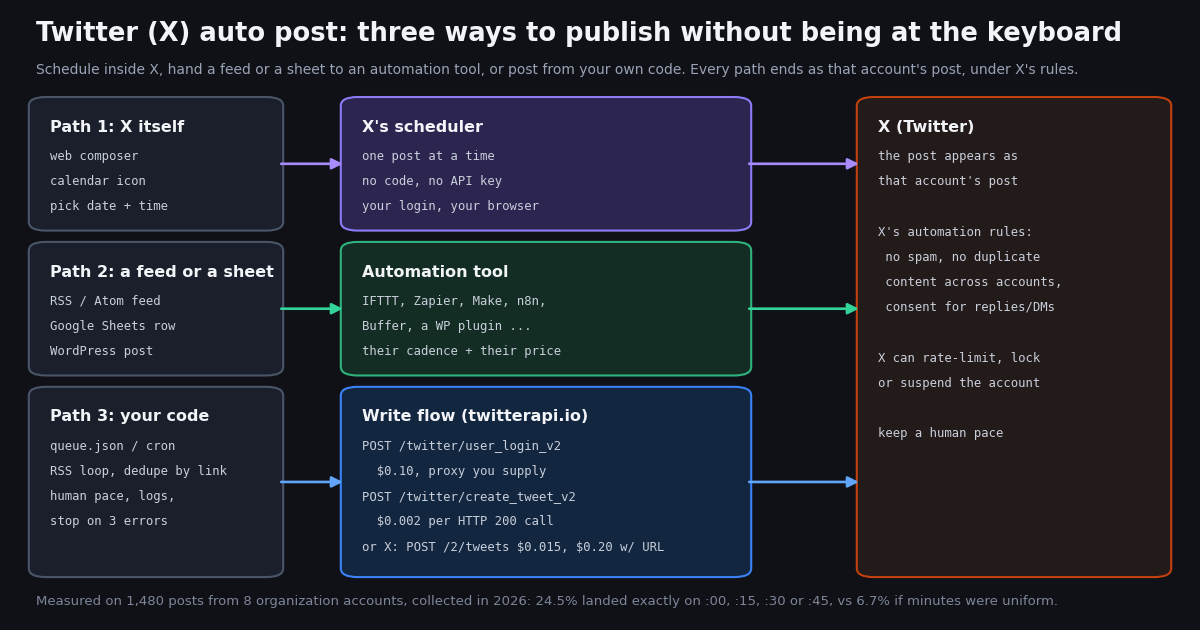
"Twitter auto post" covers three very different things: scheduling a post inside X so it goes out while you sleep, having a tool publish every new blog article or sheet row to your account, and writing a program that posts for you. Most pages that rank for the phrase describe one vendor's dashboard and stop there. This guide walks all three paths, with the actual limits of each, the price of the two write APIs you can post through from code, and the parts of X's automation rules that decide whether your account is still there next month.
The code path gets the most space because it is the one nobody shows properly. You will see the exact request bodies for the official POST /2/tweets and for twitterapi.io's /twitter/user_login_v2 plus /twitter/create_tweet_v2, a runnable Python poster that works through a queue at a human pace and prints the API's error message when a post is refused, and an RSS-to-X loop that remembers which links it already posted. It is not a guide to replying to people automatically (that is our Twitter (X) auto reply page, where consent rules apply), and it does not touch direct messages.
Then the part no other guide has: we pulled the most recent posts from eight organization accounts that visibly run scheduled content (@NASA, @PlayStation, @Xbox, @Shopify, @stripe, @Cloudflare, @nvidia, @github), 1,480 posts in all, and measured the signs of automation: how many posts land exactly on :00, :15, :30 or :45, how many are created in the first seconds of a minute, when in the day they go out, how far apart they are, and whether on-the-clock posts earn different engagement. The numbers tell you what "normal" automated posting looks like, which is the pace to imitate.
Which way to auto post: pick by what you need to control
All three paths end the same way, a post that appears under your handle, and all three are subject to the same X rules. They differ in who runs the schedule, what it costs, and what you can change.
The decision is simpler than it looks. If you have a handful of posts a week and write them yourself, use X's scheduler and stop reading. If your content already lives in a feed or a sheet and you are fine with a vendor's cadence, use a tool. If you need logic (choose what to post, format it, pace it, log it, stop it), write the code. The next three sections take each path in turn; the study at the end shows what the output of all three looks like in the wild.
Path 1: schedule the post inside X
X's own scheduler is the simplest auto post there is. In the web composer at x.com, the toolbar under the text box has a calendar icon; it opens a date and time picker, and the post is published at that moment under your account with no further action from you. X's help center documents the feature at help.x.com/en/using-x/how-to-schedule-a-post; the page could not be fetched by our tooling this session, so we cite it rather than quote it.
What it does well. No API, no keys, no third party holding your credentials, nothing to host, and the post goes out even if your laptop is closed. Scheduled posts are listed in the composer so you can edit or delete them before they publish.
What it does not do. It schedules one post at a time and it is a manual job: no feed, no spreadsheet, no code. Third-party guides commonly report that the scheduler is available in the web composer rather than the native mobile apps and that posts can be scheduled up to 18 months ahead; because X changes which features are gated to which plans, check the composer on your own account rather than trusting any guide, including this one, on availability. If a calendar icon is not there for you, Paths 2 and 3 still are.
Where it fits. A person or a small brand posting a few times a week. The study below shows that even large organization accounts post between 0.6 and 5.5 times a day; at the low end of that range, X's own scheduler is all you need.
Path 2: RSS feed or Google Sheets to X with an automation tool
If the content already exists somewhere, an automation tool can publish it to X whenever a new item appears. The common sources are an RSS or Atom feed (every blog, YouTube channel and podcast has one), a Google Sheet where each row is a post, a WordPress site, or another social account. The tools people use for this, named here in prose only, are IFTTT (an "RSS feed to X" applet), Zapier and Make (a trigger on "new item in feed" or "new spreadsheet row" and an action "create post"), n8n (the same as a self-hosted workflow, with a published spreadsheet-to-post template), Buffer (queue plus RSS import), and WordPress plugins such as XPoster, which post each published article to X through the X API.
How the Sheets variant works. You keep a sheet with columns like text, link, status; the tool watches for a new or changed row, builds the post from the columns, publishes it, and writes back posted and the post ID. The spreadsheet is the queue and the audit log at once, which is why marketing teams like it. Our Google Sheets page covers the opposite direction, pulling X data into a sheet with Apps Script; this page does not re-teach either direction, because the tools' own templates do it in a few clicks.
What to check before you commit. Three things decide whether a recipe is usable: how often it polls the source (many tools check feeds every 15 minutes on paid plans and less often on free ones, which is where the on-the-quarter posting pattern in our study partly comes from), what it does with a link (X's own API charges $0.20 instead of $0.015 for a post that contains a URL, and a tool that posts through the official API carries that cost in its plan), and whether it de-duplicates (a feed that republishes an edited article must not produce a second post).
When to leave the tool behind. The moment you want to choose which items to post, rewrite the text, add a hashtag only sometimes, post at a human-looking interval instead of the tool's tick, or keep your own log, you have outgrown the recipe. The RSS loop below is the same job in about 60 lines of Python, with de-duplication by link, a pace limit, and the API's error message printed when a post is refused. It calls the post_text and login functions from the full script at the end of this page.
"""rss_to_x.py - post each new item from an RSS/Atom feed to X, once, at a human pace.

    pip install feedparser requests
    export TWITTERAPI_IO_API_KEY=... X_USER=... X_EMAIL=... X_PASSWORD=... X_TOTP_SECRET=... X_PROXY=http://user:pass@host:port
    python rss_to_x.py                    # run from cron, e.g. every 30 minutes

The post is published AS the logged-in account. X's automation rules apply (no spam,
no duplicate content across accounts). Each create_tweet_v2 call is $0.002, billed per
HTTP 200 call; the login is $0.10. Keep MAX_PER_RUN small and the gap long.
"""
import json
import os
import random
import time

import feedparser

from auto_post import login, post_text   # the full poster at the end of this page

FEED_URL = os.environ.get("FEED_URL", "https://example.com/blog/feed.xml")
SEEN_FILE = "rss_seen.json"           # links already posted; the de-duplication key
MAX_PER_RUN = 2                        # never flush a backlog in one go
GAP_SECONDS = (900, 1800)              # 15 to 30 minutes between posts
LIMIT = 280                            # longer needs is_note_tweet (Premium) per the docs


def load_seen():
    if os.path.exists(SEEN_FILE):
        with open(SEEN_FILE) as f:
            return set(json.load(f))
    return set()


def save_seen(seen):
    with open(SEEN_FILE, "w") as f:
        json.dump(sorted(seen)[-5000:], f)


def build_text(entry):
    title = (entry.get("title") or "").strip()
    link = (entry.get("link") or "").strip()
    room = LIMIT - 24 - 1              # X counts any URL as 23 characters; keep a margin
    if len(title) > room:
        title = title[: room - 3].rstrip() + "..."
    return f"{title}\n{link}"


def main():
    seen = load_seen()
    feed = feedparser.parse(FEED_URL)
    if feed.bozo and not feed.entries:
        raise SystemExit(f"feed could not be parsed: {feed.bozo_exception}")
    first_run = not seen
    new = [e for e in feed.entries if e.get("link") and e["link"] not in seen]
    if first_run:                      # do not post the whole archive on day one
        seen.update(e["link"] for e in feed.entries)
        save_seen(seen)
        print(f"first run: remembered {len(feed.entries)} existing items, posted nothing")
        return
    new = list(reversed(new))[:MAX_PER_RUN]   # oldest first, capped
    if not new:
        print("nothing new")
        return
    cookies = login()                  # $0.10; cached to disk by auto_post.login
    for i, entry in enumerate(new):
        text = build_text(entry)
        ok, detail = post_text(cookies, text)
        if not ok:
            print(f"stopped: X refused the post: {detail}")   # the API's message, e.g. a locked account
            break
        seen.add(entry["link"])
        save_seen(seen)
        print(f"posted {detail} <- {entry['link']}")
        if i < len(new) - 1:
            time.sleep(random.uniform(*GAP_SECONDS))


if __name__ == "__main__":
main()Path 3: posting from code, the official X API and the twitterapi.io write flow
When you post from code you have two APIs to choose from. They differ in how you authenticate, what each post costs, and who carries the account risk.
The official X API. Creating a post is POST /2/tweets on api.x.com, authenticated as the user with OAuth 2.0 user context (scopes tweet.write, tweet.read, users.read) or an OAuth 1.0a user token, per the docs.x.com reference for creation of a post. The body takes text (required unless media is attached), media.media_ids, reply.in_reply_to_tweet_id, poll and quote_tweet_id; a success is HTTP 201 with data.id and data.text. On the pay-per-usage pricing page the card is $0.015 per post created and $0.200 per request for a post with a URL, with $20 of credits on a first card and a match of the first auto-recharge up to $50. You create a developer app, your users (or you) go through the OAuth consent screen, and the app posts on their behalf. It is the sanctioned route, the one every tool in Path 2 uses, and the one to pick when you are building a product other people log in to.
The twitterapi.io write flow. Writes run through an authenticated session rather than an OAuth app. You call POST /twitter/user_login_v2 once with the account's user_name, email, password, a proxy you supply ("please use high-quality residential proxies and avoid free proxies", in the docs' words; format http://user:pass@host:port) and, strongly recommended, the totp_secret of the account's 2FA (the base32 seed, not a 6-digit code; the docs warn that accounts without 2FA may yield a cookie that gets flagged and cannot post). The response is login_cookies, status and a message; the call costs 10,000 credits, $0.10. Then each POST /twitter/create_tweet_v2 takes login_cookies, tweet_text and proxy, plus optional reply_to_tweet_id, attachment_url (the URL of a post to quote), community_id, media_ids (from /twitter/upload_media_v2) and is_note_tweet for text over 280 characters on a Premium account. It returns tweet_id, status and a message, and costs 200 credits, $0.002 per call. A login_cookies value works only with the _v2 endpoints.
What you must accept when you use the write flow. The call acts as that X account; what it posts is that account's speech, and X can rate-limit, lock or suspend the account if the pattern looks like spam or platform manipulation. Keep a human pace: a few posts an hour at most, random gaps, nothing in the small hours unless the account always posted then. The session can need a re-login (cookies expire, X asks for a verification), so cache the cookies, detect the failure and log in again rather than hammering. Every call that returns HTTP 200 is billed, including a 200 whose body says status: error, so read the body and stop on errors instead of retrying in a loop. And use a residential proxy you control: the proxy is a required field on both calls, not an optional extra. Our Twitter (X) login and post API guide walks through turning on 2FA and copying the TOTP secret step by step; the script at the end of this page is the posting half.
Troubleshooting the write flow. If user_login_v2 returns status: error, the message tells you why; the common causes are a wrong email (X may ask for it even when you log in by handle), a missing or wrong totp_secret on a 2FA account, and a proxy X does not accept. If create_tweet_v2 returns an error after a long run, the session usually needs a fresh login; if it fails immediately after a successful login, the text is the problem (over 280 characters without is_note_tweet, or a duplicate of a recent post, which X rejects). If posts succeed but the account gets a verification prompt, slow down and post less; that is X telling you the pace is wrong.
The section's code below is the smallest useful version: log in (cached to disk), post one text, print tweet_id or the error message. The full queue-driven poster with pacing, a daily cap and re-login is the end-to-end script at the bottom of the page.
"""minimal: log in once, post once. $0.10 for the login, $0.002 for the post (billed per HTTP 200 call)."""
import os
import requests

BASE = "https://api.twitterapi.io"
H = {"X-API-Key": os.environ["TWITTERAPI_IO_API_KEY"]}
PROXY = os.environ["X_PROXY"]            # http://user:pass@host:port, a residential proxy you supply


def login():
    body = {
        "user_name": os.environ["X_USER"],
        "email": os.environ["X_EMAIL"],
        "password": os.environ["X_PASSWORD"],
        "proxy": PROXY,
        "totp_secret": os.environ.get("X_TOTP_SECRET", ""),   # base32 seed of the 2FA app; strongly recommended
    }
    r = requests.post(f"{BASE}/twitter/user_login_v2", headers=H, json=body, timeout=90)
    data = r.json()
    if r.status_code != 200 or data.get("status") != "success":
        raise RuntimeError(f"login failed: {data.get('message') or r.text}")
    return data["login_cookies"]


def post_once(login_cookies, text):
    body = {"login_cookies": login_cookies, "tweet_text": text, "proxy": PROXY}
    r = requests.post(f"{BASE}/twitter/create_tweet_v2", headers=H, json=body, timeout=90)
    data = r.json()
    if r.status_code != 200 or data.get("status") != "success":
        print("post refused:", data.get("message") or r.text)   # a 200 with status error is still billed
        return None
    return data.get("tweet_id")


if __name__ == "__main__":
    cookies = login()
print("posted", post_once(cookies, "Release notes for this week are up. Changelog in the next post."))X's automation rules, honestly: what you may automate and what gets accounts suspended
Automated posting is allowed on X. The X Developer Policy (docs.x.com/developer-terms/policy) says plainly that services that perform write actions, "including posting Posts, following accounts, or sending Direct Messages, must follow the Automation Rules", and the Automation Rules themselves live at help.x.com/en/rules-and-policies/x-automation (a help-center page our tooling cannot fetch; read it in a browser). What is not allowed is also plain, and it is the same list for all three paths on this page.
The lines, quoted from the Developer Policy. "The use of the X API and developer products to create spam, or engage in any form of platform manipulation, is prohibited." "Never perform bulk, aggressive, or spammy actions." "Never post identical or substantially similar content across multiple accounts." "Always get explicit consent before sending people automated replies or Direct Messages" and "immediately respect requests to opt-out of being contacted by you." "If you're operating an API-based bot account you must clearly indicate what the account is and who is responsible for it." And on acting for others: you must get "express and informed consent from people before doing any of the following: Taking any actions on their behalf. This includes (but is not limited to): Posting content to X."
The consequences. The policy states that X "may suspend or permanently revoke your access to the X API and X Content" for violations, and the Automation Rules page, as summarized in search results we could not open directly, says automated activity that violates the X Rules can lead to posts being filtered from search results or to the account being suspended. For the twitterapi.io write flow this lands on the account that logged in: a rate limit, a verification prompt, a lock or a suspension. No API provider can insulate an account from that, and this page will not pretend otherwise.
What this means for an auto poster. Post original content under one account at a frequency a person could sustain, label the account as automated in its bio if a bot runs it, never fan the same text out to several accounts, never automate posts about trending topics to ride them, and never automate replies or DMs to people who did not opt in (replies are a different product with different rules, covered on our auto reply page). The study below is a useful yardstick: the organizations we measured, all of them with large audiences and visible scheduling, post 0.6 to 5.5 times a day with median gaps between 48 minutes and about a day. If your script posts more often than @Xbox, ask why.
What 30 posts a day costs for a month on each rate card
Thirty posts a day is far above anything in our sample (the busiest account, @Xbox, averages 5.5), but it is the kind of volume an RSS aggregator or a multi-feed news account produces, so it is the right stress test. The figures use the official pay-per-usage card from docs.x.com/x-api/getting-started/pricing ($0.015 per post created, $0.200 per request for a post containing a URL) and twitterapi.io's write prices from its endpoint reference ($0.10 per user_login_v2 call, $0.002 per create_tweet_v2 call). Proxy cost is not included; it is yours either way on the twitterapi.io path and does not exist on the official one.
Two things stand out. The URL surcharge on the official card dominates: a link-heavy feed is 13x the text-only price, which is also why the automation tools in Path 2 price their link-posting plans the way they do. And on twitterapi.io the login, not the post, is the cost to manage: cache login_cookies, reuse them until a post fails, and re-login only then. Reads to decide what to post (your own timeline, a search) are separate and need no X account: $0.15 per 1,000 tweets returned, against $5 per 1,000 post reads on the official card, about 33x apart. Plans with bonus credits are on the pricing page; up to $1 of free credits for new accounts that pass the bot check, expiring after 31 days.
What automated posting looks like from the outside: 1,480 posts from 8 organization accounts
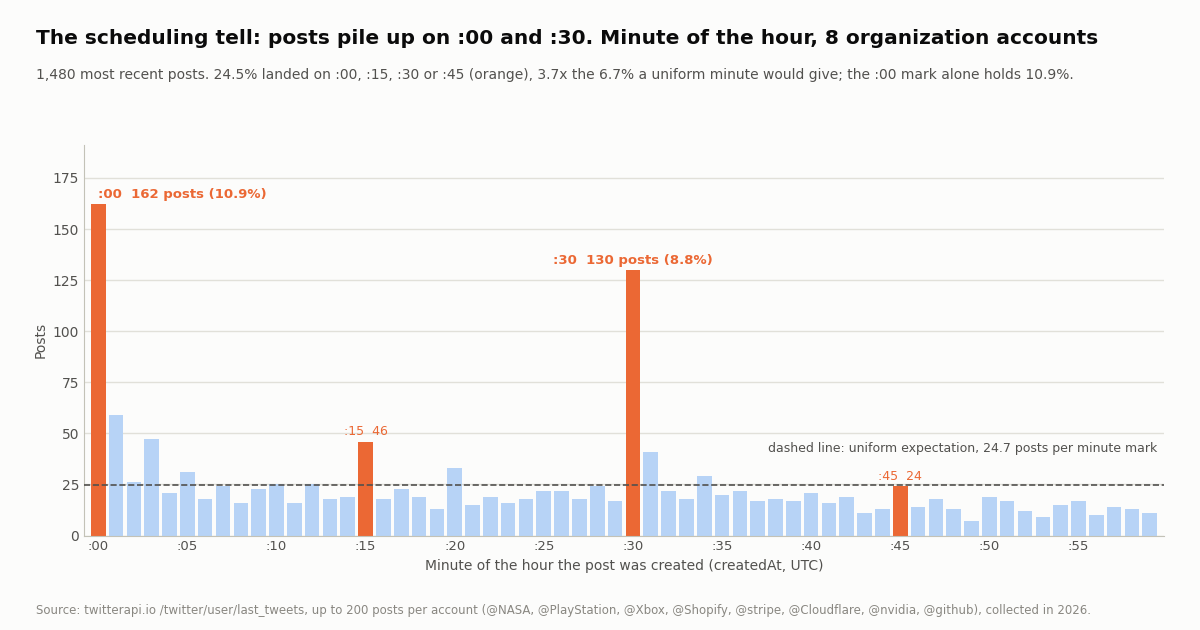
Scheduled posts leave tells. A person typing a post hits send at a random minute; a scheduler fires on the minute it was told, and most people tell it :00 or :30. We pulled up to 200 recent posts (10 pages of /twitter/user/last_tweets, replies excluded) from @NASA, @PlayStation, @Xbox, @Shopify, @stripe, @Cloudflare, @nvidia and @github, 1,480 posts and 75 requests, $0.22 in reads, and looked at the createdAt timestamp of each.
The quarter-hour tell. If the minute of posting were uniform, 4 of 60 minutes, 6.7% of posts, would fall on :00, :15, :30 or :45. In the sample 362 posts did, 24.5%, 3.7x the uniform share. The :00 mark alone holds 162 posts (10.9%) and :30 holds 130 (8.8%); :15 and :45 are only mildly elevated, so these accounts schedule on the hour and half hour far more than on the quarter. The next two most common minutes are :01 (59 posts) and :03 (47), which look like schedulers with a queue delay or people who set a round time and were a minute late.
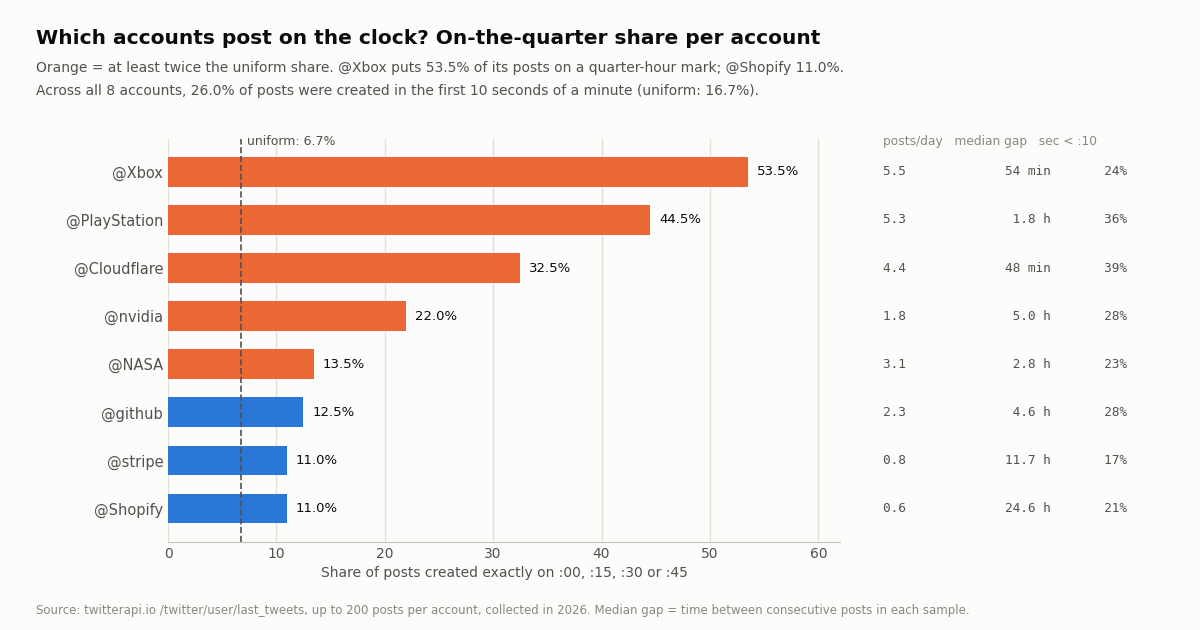
The seconds tell. A scheduler also fires at the top of the minute. 26.0% of posts were created in the first 10 seconds of their minute, against 16.7% if seconds were uniform. @Cloudflare (38.8%) and @PlayStation (35.5%) show it most.
Who schedules. The pattern is far from even across accounts. @Xbox put 53.5% of its posts on a quarter-hour mark and @PlayStation 44.5%; @Cloudflare 32.5% and @nvidia 22.0% are also well above twice the uniform share. @NASA (13.5%), @github (12.5%), @Shopify and @stripe (11.0% each) are only modestly above it, consistent with a mix of scheduled campaign posts and posts typed by a person when something happens.
Reposts are included in the minute analysis because a repost is also a timed action (they are 31.2% of the sample, from 10.0% at @PlayStation to 60.5% at @Xbox, which reposts its studio accounts), and quotes are 8.3%. "Posts a day" is the sample size divided by the days it spans: 36 days for @Xbox, 345 for @Shopify, and only 18 days for @Cloudflare, whose timeline returned 80 posts before the API reported no further page.
When organizations post, and whether on-the-clock posts do better
Hour of day. The posts cluster in the US working day: 34.0% of all 1,480 were created between 16:00 and 18:59 UTC, and the hours from 03:00 to 09:59 UTC held 30 posts in total. Each account keeps 68.5% to 90.0% of its posts inside its own busiest 8-hour block, and the interquartile range of posting hour is 3 to 6 hours. For an auto poster this is the second yardstick after frequency: the accounts people trust post within a daytime window, not around the clock.
Engagement, as an observation. Among original posts (reposts excluded, since their like counts belong to the original), the 270 on-the-quarter posts had a median of 1,259 likes and the 748 off-the-quarter posts a median of 420. That is not evidence that posting on the hour helps. The accounts that schedule most (@Xbox, @PlayStation) are also the ones with the largest audiences in the sample, and their scheduled posts are the campaign content (trailers, launches) that gets the most likes regardless of the minute. Treat the gap as "scheduled posts tend to be the planned, high-production ones", nothing more.
What to copy into your own poster. A daytime window in the audience's time zone, a frequency between one and five posts a day, round-minute scheduling if you like (it is what the big accounts do and it is not hidden), a link on about a third to a half of posts and media on about half, and a mix in which reposts and quotes of related accounts are normal. The script below has all of those as settings.
How we collected this
Question: what does automated posting look like from the outside: what share of posts land exactly on :00, :15, :30 or :45 versus the 6.7% a uniform minute would give, how many are created in the first seconds of a minute, when in the day organizations post, how far apart their posts are, how many carry links or media, and whether on-the-quarter posts show different median likes.
Accounts: 8 public organization accounts known to run scheduled content: @NASA, @PlayStation, @Xbox, @Shopify, @stripe, @Cloudflare, @nvidia and @github.
Method: /twitter/user/last_tweets with the default includeReplies (replies excluded), up to 10 pages of 20 per account, newest first: 75 requests, 1,480 posts ($0.22 at 15 credits per tweet returned), collected in 2026 through a rate-limited, read-only client. For each post we read createdAt (minute, second, UTC hour), entities.urls, extendedEntities.media, quoted_tweet, retweeted_tweet and likeCount. Per account we computed posts per day (sample size over the days spanned), the median and 90th-percentile gap between consecutive posts, the on-the-quarter and on-the-half shares, the share created in the first 10 seconds of a minute, the busiest UTC hour and the share of posts inside the busiest 8-hour block. Across accounts we built the 60-bin minute histogram and compared median likes of on-the-quarter and off-the-quarter original posts.
What the sample cannot show: it is a snapshot of up to 200 posts per account, so posts per day is a long-run average for the quieter accounts (345 days for @Shopify) and a few weeks for the busier ones; @Cloudflare returned only 80 posts. The quarter-hour share is a tell, not proof: a person can post at :00, and a scheduler can be set to :07. Reposts' timestamps are the repost time. The engagement comparison is confounded by which accounts schedule and what they schedule, and we report it as an observation only. Eight large organizations do not represent individuals, news accounts or small brands, whose pace and timing differ.
Aggregates only. The accounts named are organizations; no individual's posts were analyzed, and no reposted or quoted author was profiled. The analysis script, results and the gzip-compressed raw pages for these organization accounts are kept with the study.
"""auto_post.py - work through a queue of posts for ONE X (Twitter) account at a human pace.

    pip install requests
    export TWITTERAPI_IO_API_KEY=...            # twitterapi.io dashboard
    export X_USER=... X_EMAIL=... X_PASSWORD=... X_TOTP_SECRET=...   # the account that will post
    export X_PROXY=http://user:pass@host:port    # a residential proxy you supply (required by both calls)
    python auto_post.py                          # one pass: run from cron every 10-15 minutes

queue.json: [{"text": "...", "at": "YYYY-MM-DDTHH:MM:SS+00:00"}, ...]   ("at" optional ISO 8601: post when due)

Costs: /twitter/user_login_v2 $0.10 per call (cached in cookies.json and reused until a post fails);
/twitter/create_tweet_v2 $0.002 per call. Both are billed per HTTP 200 call, including a 200 whose
body says status "error". The post is published AS this account: X can rate-limit, lock or suspend
it, so the pacing below is deliberately slow. Follow X's Automation Rules (help.x.com) and the
Developer Policy (docs.x.com): original content, one account, labeled bot, no replies/DMs to
people who did not opt in.
"""
import json
import os
import random
import sys
import time
from datetime import datetime, timezone

import requests

BASE = "https://api.twitterapi.io"
H = {"X-API-Key": os.environ["TWITTERAPI_IO_API_KEY"]}
PROXY = os.environ["X_PROXY"]
QUEUE_FILE = "queue.json"
COOKIE_FILE = "cookies.json"
LOG_FILE = "posted.jsonl"
MAX_PER_RUN = 1              # one post per cron tick; the tick is the pace
MAX_PER_DAY = 12             # the busiest organization account in our study averaged 5.5 a day
MIN_GAP_SECONDS = 20 * 60    # never two posts closer than 20 minutes
JITTER_SECONDS = (0, 240)    # do not fire on the exact second cron starts
QUIET_HOURS_UTC = range(3, 10)   # the quiet window in the study; skip it unless the account never did
MAX_CONSECUTIVE_ERRORS = 3


def _message(data, r):
    return data.get("message") or r.text[:200]


def login(force=False):
    """Return login_cookies, from cache unless force. Each real login is $0.10."""
    if not force and os.path.exists(COOKIE_FILE):
        with open(COOKIE_FILE) as f:
            return json.load(f)["login_cookies"]
    body = {
        "user_name": os.environ["X_USER"],
        "email": os.environ["X_EMAIL"],
        "password": os.environ["X_PASSWORD"],
        "proxy": PROXY,
        "totp_secret": os.environ.get("X_TOTP_SECRET", ""),   # base32 seed; the docs strongly recommend 2FA
    }
    r = requests.post(f"{BASE}/twitter/user_login_v2", headers=H, json=body, timeout=90)
    data = r.json() if r.headers.get("content-type", "").startswith("application/json") else {}
    if r.status_code != 200 or data.get("status") != "success":
        raise RuntimeError(f"login failed (HTTP {r.status_code}): {_message(data, r)}")
    with open(COOKIE_FILE, "w") as f:
        json.dump({"login_cookies": data["login_cookies"], "at": time.time()}, f)
    return data["login_cookies"]


def post_text(login_cookies, text, media_ids=None):
    """One create_tweet_v2 call. Returns (True, tweet_id) or (False, error message)."""
    body = {"login_cookies": login_cookies, "tweet_text": text, "proxy": PROXY}
    if media_ids:
        body["media_ids"] = media_ids          # from /twitter/upload_media_v2
    r = requests.post(f"{BASE}/twitter/create_tweet_v2", headers=H, json=body, timeout=90)
    data = r.json() if r.headers.get("content-type", "").startswith("application/json") else {}
    if r.status_code != 200 or data.get("status") != "success":
        return False, f"HTTP {r.status_code}: {_message(data, r)}"
    return True, data.get("tweet_id")


def load_queue():
    with open(QUEUE_FILE) as f:
        return json.load(f)


def save_queue(items):
    with open(QUEUE_FILE, "w") as f:
        json.dump(items, f, indent=1)


def history():
    if not os.path.exists(LOG_FILE):
        return []
    with open(LOG_FILE) as f:
        return [json.loads(line) for line in f if line.strip()]


def due(item, now):
    if not item.get("at"):
        return True
    return datetime.fromisoformat(item["at"]) <= now


def main():
    now = datetime.now(timezone.utc)
    if now.hour in QUIET_HOURS_UTC:
        print("quiet hours, nothing posted")
        return
    past = history()
    today = [p for p in past if p["ok"] and p["t"] > time.time() - 86400]
    if len(today) >= MAX_PER_DAY:
        print(f"daily cap {MAX_PER_DAY} reached")
        return
    last_ok = max((p["t"] for p in past if p["ok"]), default=0)
    if time.time() - last_ok < MIN_GAP_SECONDS:
        print("too soon after the last post")
        return
    errors = [p for p in past[-MAX_CONSECUTIVE_ERRORS:] if not p["ok"]]
    if len(errors) >= MAX_CONSECUTIVE_ERRORS:
        sys.exit("stopped: the last posts all failed; read posted.jsonl and fix the cause before running again")

    queue = load_queue()
    ready = [i for i in queue if due(i, now)][:MAX_PER_RUN]
    if not ready:
        print("queue empty or nothing due")
        return
    time.sleep(random.uniform(*JITTER_SECONDS))
    cookies = login()
    for item in ready:
        ok, detail = post_text(cookies, item["text"])
        if not ok and "HTTP 200" in detail:           # the session is the usual cause: log in once more, then stop
            cookies = login(force=True)
            ok, detail = post_text(cookies, item["text"])
        with open(LOG_FILE, "a") as f:
            f.write(json.dumps({"t": time.time(), "ok": ok, "detail": detail, "text": item["text"][:80]}) + "\n")
        if ok:
            queue.remove(item)
            save_queue(queue)
            print("posted", detail)
        else:
            print("post refused:", detail)   # X's reason, via the API's message; do not retry in a loop
            break


if __name__ == "__main__":
    main()
Questions readers ask
Can you auto post on Twitter (X) without a third-party tool?
Yes. The web composer on x.com has a calendar icon that schedules a post for a later date and time under your own account, with no API, key or tool; X documents it at help.x.com/en/using-x/how-to-schedule-a-post. It is one post at a time and manual, so a feed or a spreadsheet needs Path 2 (an automation tool) or Path 3 (code).
Is auto posting against X's rules?
No, automated posting is allowed. The X Developer Policy requires write services to follow the Automation Rules: no spam or platform manipulation, no bulk or aggressive actions, never identical or substantially similar content across multiple accounts, a clearly labeled bot account, and explicit consent before automated replies or DMs. Violations can lead to filtered posts, a locked or suspended account, and revoked API access.
How do I auto post to Twitter from Python?
On the official X API, authenticate as the user with OAuth (scopes tweet.write, tweet.read, users.read) and call POST /2/tweets with a text field; $0.015 per post, $0.20 if it contains a URL. On twitterapi.io, call POST /twitter/user_login_v2 once with user_name, email, password, a residential proxy you supply and the account's totp_secret ($0.10) to get login_cookies, then POST /twitter/create_tweet_v2 with login_cookies, tweet_text and proxy ($0.002 per call). The script on this page does the second flow with pacing, a daily cap and re-login.
How much does automated posting cost?
For 30 posts a day over a month (900 posts): $13.50 on the official X API pay-per-usage card if the posts are text-only, $180 if every post contains a URL ($0.20 each); on twitterapi.io $1.80 in create_tweet_v2 calls plus $0.10 per login, so $1.90 with one login or $4.80 with a login every day, plus your own proxy. Every HTTP 200 call is billed, including one whose body reports an error.
Why does the twitterapi.io write flow need a proxy and a 2FA secret?
Both user_login_v2 and create_tweet_v2 take a required proxy field, and the docs ask for a high-quality residential proxy rather than a free one, because the session is the account's own login and X sees the proxy's address. The totp_secret is optional but strongly recommended: the docs warn that accounts without 2FA may yield a login cookie that gets flagged and cannot post. It is the base32 seed from the authenticator setup, not a 6-digit code.
How often can an auto poster post before X reacts?
X does not publish a number for this, and the honest answer is: at the pace a person would. In our sample, eight large organization accounts with visible scheduling post 0.6 to 5.5 times a day, with median gaps between 48 minutes and about a day, inside a daytime window. The script on this page defaults to one post per run, at least 20 minutes apart, 12 a day at most, and stops after three consecutive errors, because repeated refused posts are the account telling you to slow down.
Can I tell whether an account's posts are scheduled?
Not with certainty, but there are tells. In our study 24.5% of posts from 8 organization accounts were created exactly on :00, :15, :30 or :45 (6.7% would be uniform), and 26.0% in the first 10 seconds of a minute (16.7% uniform). An account whose posts cluster on round minutes and round seconds is very likely using a scheduler or an API; one whose minutes look uniform is probably posting by hand. Pull its timeline with /twitter/user/last_tweets and check the createdAt minutes.
What is the difference between this page and your auto reply or automation guides?
This page is about publishing original posts automatically. The auto reply page covers responding to incoming mentions, where X requires consent and opt-out handling. The automation guide is the broad map of API-driven workflows, reads and writes together. The Google Sheets page pulls X data into a sheet with Apps Script, the opposite direction from the Sheets-to-X recipe named here. The scheduler page compares SaaS schedulers with the DIY route.
Continue
- twitterapi.io API reference: POST /twitter/user_login_v2 (user_name, email, password, proxy, totp_secret; login_cookies; $0.10 per call)
- twitterapi.io API reference: POST /twitter/create_tweet_v2 (login_cookies, tweet_text, proxy, media_ids, reply_to_tweet_id, attachment_url, is_note_tweet; $0.002 per call)
- X API pay-per-usage pricing: $0.015 per post created, $0.200 per request for a post with a URL, $0.005 per post read
- X API reference: POST /2/tweets (OAuth user context, body fields, 201 response)
- X Developer Policy: write actions must follow the Automation Rules; spam, duplicate content across accounts, consent and enforcement
- X Help Center: Automation rules (cited; the page blocks automated fetching)
- X Help Center: how to schedule a post in the web composer (cited; the page blocks automated fetching)
- X (Twitter) API hub: endpoints, pricing and guides
- Twitter (X) auto reply: what the rules allow and how to build one
- Twitter (X) automation: the complete guide to API-driven workflows
- Twitter scheduler: SaaS tools vs the DIY API route
- Login to Twitter (X) and post with the API: 2FA and proxy setup
- Twitter (X) data into Google Sheets with Apps Script
- What Twitter (X) bots are and how they work
- Pay-per-call pricing, including write calls
- twitterapi.io API reference
- 01How to Get a Grok API Key: Setup, Pricing and Live X Data for the xAI API
- 02The X Developer Portal (X Developer Console) for the Twitter (X) API: Sign-Up, Apps and Keys, Billing, Limits, and When You Do Not Need It
- 03SKILL.md explained: the Agent Skills format, X's own skill, and a Twitter (X) API skill you can install
- 04How to Search and Track Mentions on Twitter (X), Including Someone Else's
- 05Twitter (X) Access Token: The 4 Credential Types, Which Endpoints Need Which, and How to Get and Validate Each
- 06X Post Templates That Actually Work
- 07Twitter (X) Templates — Bulk Post via API
- 08Twitter (X) Auto Reply: What the Rules Allow and How to Build One
Stop reading. Start building.
Starter credits cover real testing on real data. Google sign-in, no card, no application queue.
Get an API key