Grok Voice Agent API: How to Call It and Feed It Live Twitter (X) Data
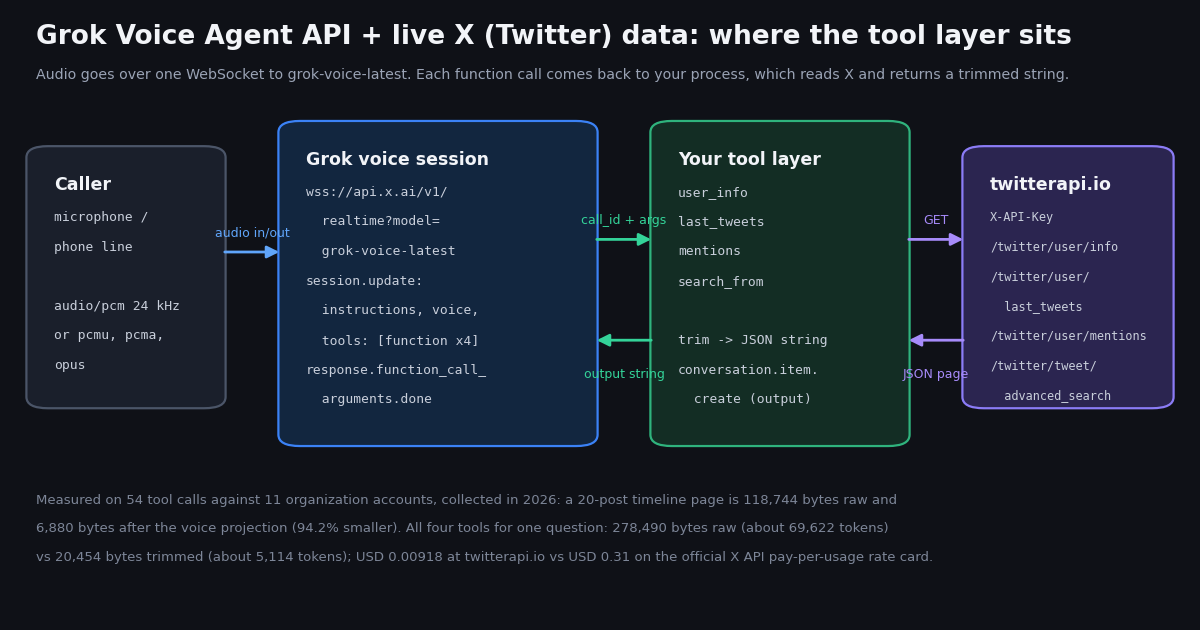
Three things get called "the Grok voice agent" in search results: the consumer voice mode in the Grok apps and Tesla cars, the developer API that exposes the same stack, and third-party builders that wrap it. This page is about the developer API, read from docs.x.ai this session, and about the half of a voice agent the docs leave to you: the tools. A voice agent that can answer "what did NASA post today?" or "how many followers does Stripe have?" needs a function that reads X and returns something short enough to be spoken within a few seconds.
We do not hold an xAI API key, so nothing here claims to have run the Voice API end to end; the WebSocket code follows the documented event names and is labeled as such. What we did run is the tool side, 54 times, against 11 organization accounts, measuring how big each tool result is before and after trimming, how long each call takes, and what it costs on two rate cards. Those numbers are the part of this guide you cannot get from the docs.
A note on names. The docs site and the announcement both use the Grok brand for the models; the site header reads "SpaceXSI", the structured data names the publisher "SpaceX Super Intelligence", and the copyright line in the news page footer reads "SpaceXAI LLC". The @xai account on X is protected and its bio says "Now at @SpaceXAI". We write xAI for the company below because that is how the announcement is bylined, and model and endpoint names are quoted exactly as the docs print them.
What the Grok Voice Agent API is, from the docs
On docs.x.ai the product is filed under Voice as "Speech to Speech" and the announcement on x.ai/news/grok-voice-agent-api calls it the Grok Voice Agent API. Both describe the same thing: a real-time, full-duplex speech model you talk to over a WebSocket, with no separate speech-to-text and text-to-speech hops in your code. The docs overview lists three voice products side by side: Speech to Speech (grok-voice-latest, the realtime WebSocket endpoint on api.x.ai), Speech to Text (grok-voice-transcribe-2.0, a REST endpoint) and Text to Speech (REST). This page covers the first.
Model names. grok-voice-latest is the alias to use; the models page resolves it to grok-voice-3.0 and marks grok-voice-2.0 deprecated. The announcement does not print a model id at all, which is why some search results guess; the ids above are from the docs model table.
Protocol. One WebSocket: wss://api.x.ai/v1/realtime?model=grok-voice-latest, authenticated with Authorization: Bearer <XAI_API_KEY> from a server, or with an ephemeral token when a browser or phone connects directly. The first message you send is session.update, which carries instructions (the system prompt), voice, turn_detection (server_vad for automatic end-of-speech, null for push-to-talk), input and output audio formats, and the tools array. The docs list the PCM rates 8000, 16000, 22050, 24000, 32000, 44100 and 48000 Hz, with 24000 as the default, plus audio/pcmu and audio/pcma for telephony and audio/opus.
Pricing, as printed on the Speech to Speech pricing page. Audio is $0.08 per minute or $4.80 per hour. Text input is $0.004 per conversation.item.create event, with the page's own exception that function_call_output items, the tool results the server asked for, are not billed. Sessions using server_vad are billed for the session duration; push-to-talk sessions are billed only for audio sent and received. The December 2025 announcement quoted a flat $0.05 per minute and compared it against a $0.10 per minute blended estimate for a competitor, so the price has moved once already; read the pricing page, not a blog, before you budget.
Limits. Concurrent sessions: 10 per team. Maximum session duration: 120 minutes. Region: us-east-1. The announcement claims an average time to first audio under one second; we did not measure it and quote it as their number.
Voices. The announcement names Ara, Eve and Leo; the docs use eve in examples and point to a voices roster endpoint under the text-to-speech API that also covers custom voice ids.
Built-in tools. The tools array accepts function (your own, with a JSON schema), web_search, x_search (described as searching X for posts and information, with handle and date filtering), file_search over uploaded collections, and mcp for remote Model Context Protocol servers. The existence of x_search matters for this page and we come back to it at the end: it is the model looking things up for itself, and it is not the same as your code receiving structured X data it can log, cache, filter or act on.
Transports. The docs overview and the announcement name LiveKit (an official plugin), and the overview also mentions Pipecat, Twilio and Voximplant integrations for phone and WebRTC audio. We did not find a "Voice Agent Builder" on the docs pages or the announcement we fetched, although some search results use that phrase; if you need a no-code builder, verify it on x.ai directly rather than from this page.
How a function call flows through a voice turn
The event flow is the one thing to get exactly right, because a mistake here produces an agent that goes silent rather than one that errors. The docs describe it in four steps, and the names below are quoted from the Speech to Speech page.
1. Declare. Put each tool in session.update under tools with "type": "function", a name, a description the model reads to decide when to call it, and a parameters JSON schema. The message below declares the four X tools from this page; the instructions string also tells the model how to speak numbers and how many posts to read, which is where most of the "voice context" work happens.
2. Receive the call. When the model decides it needs data it emits response.function_call_arguments.done carrying name, call_id and arguments (a JSON string). If it needs several tools for one question it emits several of these before any audio.
3. Answer every call. For each call_id, send conversation.item.create with an item of type function_call_output, the same call_id, and output, which must be a string; serialize JSON into it. The docs are explicit that with parallel calls you resolve all of them and send every function_call_output before the next step.
4. Ask for the spoken answer. Send response.create. The model reads the tool outputs and streams response.output_audio.delta events back. The pricing page notes that the function_call_output items are not charged as text input, so returning four tool results costs nothing beyond the audio minutes of the turn.
Two documented extras are useful for a tool-heavy agent. conversation.item.create with an item of type force_message makes the agent say a given text verbatim; the docs give compliance disclosures and IVR prompts as the use case, and a short "let me check" before a slow fetch is the same mechanism. And reasoning.effort can be set to none, which matters when the tool output is already the answer and you want it spoken, not reasoned about.
{
  "type": "session.update",
  "session": {
    "instructions": "You answer spoken questions about public X (Twitter) accounts. Call a tool before stating any number. Read at most three posts aloud, newest first, and round large counts (2.7 million, not 2,721,659). If a tool returns protected or an error, say so and stop.",
    "voice": "eve",
    "turn_detection": {"type": "server_vad"},
    "audio": {"input": {"format": {"type": "audio/pcm", "rate": 24000}},
              "output": {"format": {"type": "audio/pcm", "rate": 24000}}},
    "tools": [
      {"type": "function", "name": "user_info",
       "description": "Profile of a public X account: follower count, bio, account age.",
       "parameters": {"type": "object", "properties": {"handle": {"type": "string", "description": "X username without the @"}}, "required": ["handle"]}},
      {"type": "function", "name": "last_tweets",
       "description": "The newest posts by an X account, newest first.",
       "parameters": {"type": "object", "properties": {"handle": {"type": "string"}, "limit": {"type": "integer", "description": "1 to 5"}}, "required": ["handle"]}},
      {"type": "function", "name": "mentions",
       "description": "The newest posts by other people that mention an X account.",
       "parameters": {"type": "object", "properties": {"handle": {"type": "string"}, "limit": {"type": "integer"}}, "required": ["handle"]}},
      {"type": "function", "name": "search_from",
       "description": "Posts by one X account that contain given words.",
       "parameters": {"type": "object", "properties": {"handle": {"type": "string"}, "query": {"type": "string"}, "limit": {"type": "integer"}}, "required": ["handle", "query"]}}
    ]
  }
}The tool layer: four X reads a Grok voice agent can call
Each tool is one HTTP GET against api.twitterapi.io with an X-API-Key header; no X developer account, app review or user login is involved for reads. The four cover what people actually ask a voice assistant about an account: who they are (user_info), what they posted (last_tweets), what people say to them (mentions), and whether they said something specific (search_from, an advanced_search with a from: operator). All four return a compact JSON string, because that is what function_call_output.output must be.
The response shapes differ per endpoint and the code reads them exactly: /twitter/user/info returns data{...} with followers, statusesCount, isBlueVerified and so on, and answers an unknown handle with HTTP 200, status: "error" and data: null, never a 404, so the tool checks status rather than the HTTP code. /twitter/user/last_tweets returns data.tweets[], 20 per page newest first, with has_next_page and next_cursor; /twitter/user/mentions and /twitter/tweet/advanced_search return a top-level tweets[]. Tweet objects carry likeCount, retweetCount, replyCount, viewCount and a nested author; there is no public_metrics.
The limit argument defaults to 5 and the schema tells the model to stay between 1 and 5. A page still returns 20 posts and is billed for 20 (15 credits each, $0.003 for a full page), so the limit is about what the model hears, not what you pay; the next section is about why five is already generous for speech.
A protected account is a real case: @xai returned a profile with protected: true and an empty timeline during our run. The tool turns that into a tiny object with a note the model can read aloud, instead of an empty list the model might narrate as "they have not posted". The empty search_from result for the same handle shows the other edge: an empty page is billed at the 15-credit minimum ($0.00015), not zero.
"""xtools.py - the X (Twitter) tool layer a Grok voice agent calls.

Four functions, one twitterapi.io endpoint each. Every function returns a compact JSON
STRING (the Voice API requires function_call_output.output to be a string) trimmed to
the fields a spoken answer needs. No X account is needed for these reads.

    pip install requests
    export TWITTERAPI_IO_API_KEY=...   # twitterapi.io dashboard
    python3 xtools.py github           # prints what each tool would hand to Grok
"""
import json
import os
import sys
import time

import requests

BASE = "https://api.twitterapi.io"
HEADERS = {"X-API-Key": os.environ["TWITTERAPI_IO_API_KEY"]}

PROFILE_KEEP = ["userName", "name", "followers", "following", "statusesCount",
                "description", "isBlueVerified", "createdAt"]
TWEET_KEEP = ["text", "createdAt", "likeCount", "replyCount", "retweetCount",
              "viewCount", "isReply"]


def dumps(obj):
    return json.dumps(obj, ensure_ascii=False, separators=(",", ":"))


def _trim_tweet(t, with_author=False):
    out = {k: t.get(k) for k in TWEET_KEEP}
    if with_author:
        out["author"] = (t.get("author") or {}).get("userName")
    return out


def user_info(handle):
    """Profile: followers, bio, account age. 18 credits ($0.00018)."""
    r = requests.get(f"{BASE}/twitter/user/info", headers=HEADERS,
                     params={"userName": handle}, timeout=20)
    r.raise_for_status()
    body = r.json()
    if body.get("status") == "error" or not body.get("data"):
        return dumps({"error": body.get("msg", "user not found"), "handle": handle})
    d = body["data"]
    if d.get("protected"):
        return dumps({"handle": d.get("userName"), "name": d.get("name"),
                      "protected": True, "note": "posts are not public"})
    return dumps({k: d.get(k) for k in PROFILE_KEEP})


def last_tweets(handle, limit=5):
    """Newest posts, 20 per page, newest first. 15 credits per post returned."""
    r = requests.get(f"{BASE}/twitter/user/last_tweets", headers=HEADERS,
                     params={"userName": handle}, timeout=20)
    r.raise_for_status()
    tweets = (r.json().get("data") or {}).get("tweets") or []
    return dumps([_trim_tweet(t) for t in tweets[:limit]])


def mentions(handle, limit=5):
    """Newest posts that mention the account. 15 credits per post returned."""
    r = requests.get(f"{BASE}/twitter/user/mentions", headers=HEADERS,
                     params={"userName": handle}, timeout=20)
    r.raise_for_status()
    tweets = r.json().get("tweets") or []
    return dumps([_trim_tweet(t, with_author=True) for t in tweets[:limit]])


def search_from(handle, query, limit=5):
    """Posts by the account matching words. 15 credits per post returned, 15 minimum."""
    q = f"from:{handle} {query}".strip()
    r = requests.get(f"{BASE}/twitter/tweet/advanced_search", headers=HEADERS,
                     params={"query": q, "queryType": "Latest"}, timeout=20)
    r.raise_for_status()
    tweets = r.json().get("tweets") or []
    return dumps([_trim_tweet(t) for t in tweets[:limit]])


# name -> callable, used by the voice loop to dispatch function calls
TOOLS = {"user_info": user_info, "last_tweets": last_tweets,
         "mentions": mentions, "search_from": search_from}

if __name__ == "__main__":
    h = sys.argv[1] if len(sys.argv) > 1 else "github"
    for name, fn in TOOLS.items():
        t0 = time.perf_counter()
        out = fn(h, "api") if name == "search_from" else fn(h)
        ms = round((time.perf_counter() - t0) * 1000)
        print(f"{name}: {len(out.encode())} bytes, {ms} ms\n{out[:400]}\n")
What each tool returns, and what we dropped so the answer stays speakable
A raw tweet from /twitter/user/last_tweets has about 30 keys. The first GitHub post in our sample was 4,183 bytes on its own: the text, then an author object with the account's full profile repeated on every post, entities with URL expansions and mention offsets, extendedEntities.media, a link card, quoted_tweet and retweeted_tweet sub-objects when present, and two URL forms. Twenty of those make the 118,744-byte page we measured. None of it is wrong; almost none of it can be spoken.
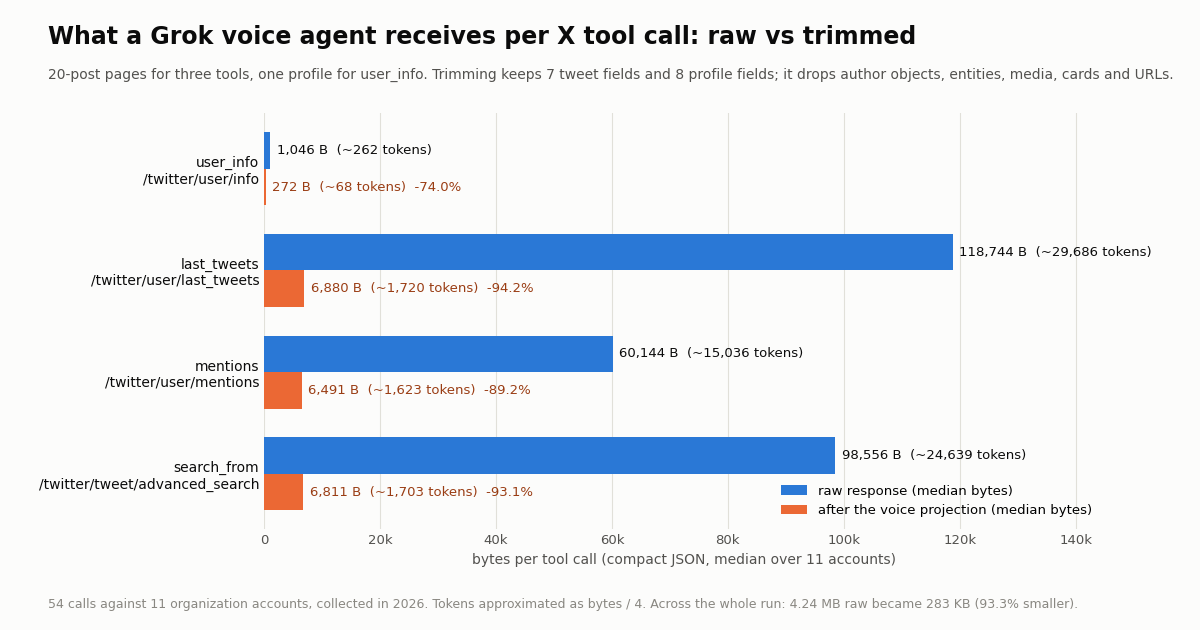
The projection keeps seven tweet fields: text, createdAt, likeCount, replyCount, retweetCount, viewCount and isReply. For mentions it adds the author's userName, because "who said it" is the answer there. For profiles it keeps userName, name, followers, following, statusesCount, description, isBlueVerified and createdAt. Measured over the whole run, trimmed posts average 344 bytes each against 5,937 raw; trimmed profiles are 272 bytes against 1,046.
Dropped on purpose, and why. author on timeline posts (it is the same account twenty times; the agent already knows who it asked about). entities and extendedEntities (offsets and media URLs cannot be spoken; say "with a video" from extendedEntities.media[].type only if you want that, and we did not). url and twitterUrl (a voice agent cannot read a link; if you need it for a follow-up text message, keep id and rebuild the URL later). card, quoted_tweet, retweeted_tweet (useful for a screen, noise for an ear; keep retweeted_tweet.author.userName if "they reposted X" matters to you). bookmarkCount, quoteCount, lang, conversationId, inReplyToId and the rest of the threading fields. From profiles: profilePicture, coverPicture, pinnedTweetIds, entities, favouritesCount, mediaCount, canDm, isAutomated, location and url.
How much can be spoken anyway. The 400 timeline posts in the sample have a median text length of 27 words (181 characters), p90 about 47 words. At a conversational 150 words per minute the median post takes about 10.8 seconds to read aloud, so a 30-second answer fits roughly 2 full posts plus a sentence of framing. That is the argument for limit defaulting to 5 and the instructions saying "at most three": the model summarizes the rest, and anything past five posts is tokens the agent reads and nobody hears.
Numbers for the ear. Leave the integers exact in the JSON (the model rounds well when told to) and put the rounding rule in instructions: "2.7 million followers", not "two million seven hundred twenty-one thousand". The same goes for createdAt: keep the raw timestamp and let the model say "posted this morning"; converting to relative time in the tool bakes in a timezone the caller may not share.
# user_info("github") -> 272 bytes (the raw /twitter/user/info body is 1,046 bytes)
{"userName":"github","name":"GitHub","followers":2721659,"following":334,"statusesCount":10987,"description":"The AI-powered developer platform to build, scale, and deliver secure software.","isBlueVerified":true,"createdAt":"2008-02-11T04:41:50.000000Z"}

# last_tweets("github", limit=1) -> one trimmed post, 344 bytes on average
# (the same post raw: 30 keys, 4,183 bytes - author object, entities, media, card, URLs)
[{"text":"Your workflows have changed with AI. How about your setup?\n\nPhysical controls are back. Take the new Logitech MX Keypad, now directly integrated with the GitHub Copilot app. ...","createdAt":"<Www Mmm dd HH:MM:SS +0000 yyyy>","likeCount":182,"replyCount":24,"retweetCount":16,"viewCount":30693,"isReply":false}]

# user_info("xai") -> a protected account: no posts are public, so the agent should say so
{"handle":"xai","name":"xAI","protected":true,"note":"posts are not public"}

# search_from("xai", "api") -> an empty page still costs the 15-credit minimum ($0.00015)
[]Measured: payload per tool, raw vs trimmed (54 calls, 11 organization accounts)
We ran the four tools against GitHub, NASA, Vercel, Shopify, Stripe, Cloudflare, NVIDIA, OpenAI Developers, Docker, AWS and the protected @xai account: one profile call, up to two timeline pages, one mentions page and one from: search page each, 54 requests in total, 820 posts and 11 profiles returned. Every response was serialized with compact JSON separators before counting bytes, both raw and after the projection above, so the comparison is like for like. Tokens are approximated as bytes divided by four, the usual rule of thumb for English JSON; your tokenizer will differ, the ratio will not.
Three things stand out. First, the timeline page is the heaviest by a wide margin at about 29,686 tokens raw, because every post repeats the full author profile and organization accounts attach cards and media to most posts; a mentions page is lighter (60,144 bytes) because replies from individuals carry fewer attachments. Second, after trimming the three tweet tools converge to about 6,900 bytes for 20 posts, roughly 1,720 tokens, which is the size of a long paragraph; with limit=5 a tool result is a quarter of that. Third, the whole run shrank from 4.24 MB to 283 KB, 93.3% less, which is the difference between a tool layer that could be pasted into a voice turn and one that could not.
Why this matters for a voice model specifically: a chat model reading 69,622 tokens of tool output is slow and expensive but works; a speech model that has to start talking within a second is a different constraint, and the xAI docs' own advice on tool output is to avoid excessive verbosity to protect latency. The projection is how you follow that advice without losing the fields the answer depends on.
Measured: latency and cost per tool, on two rate cards
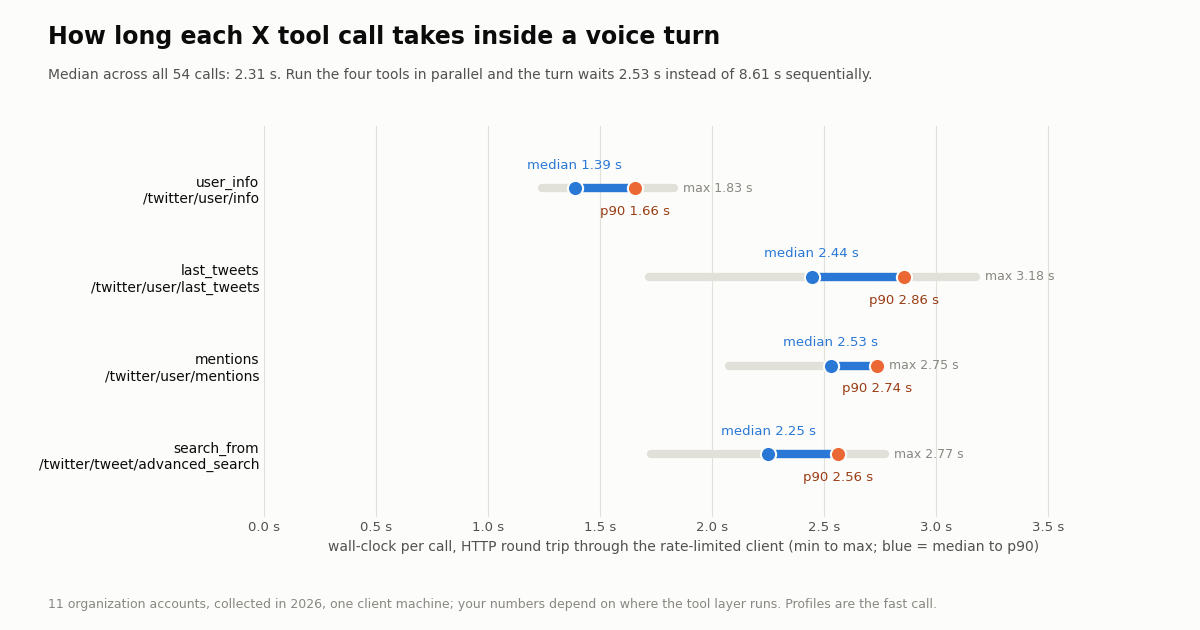
Wall-clock was measured around each call in the rate-limited client we use for page studies, after the limiter had granted the slot, so the number is the HTTP round trip plus serialization from one machine. The median over all 54 calls was 2.31 s, p90 2.77 s, slowest 3.18 s. Profile reads are the quick ones; 20-post pages take about a second more. Your tool layer will see different absolute numbers depending on where it runs, which is why the table shows the spread and not a single figure.
Cost. twitterapi.io bills 15 credits per tweet returned ($0.15 per 1,000 tweets, 15-credit minimum per request, $1 = 100,000 credits) and 18 credits per profile ($0.18 per 1,000). The official X API pay-per-usage rate card on docs.x.com/x-api/getting-started/pricing lists $0.005 per post read and $0.010 per user read, which is $5 per 1,000 posts against $0.15, about 33 times more per 1,000 tweets. A spoken question that fires all four tools therefore costs about $0.00918 here and $0.31 there; the whole 54-call study cost $0.1253 (12,528 credits) and would have been $4.21 at X's per-read prices. Note that trimming does not change what you pay: a page is 20 posts whether you keep 5 or 20, so set limit for the model's sake and pay per page.
Putting the voice minute next to it. At the docs' $0.08 per minute, a 2.53-second wait for four parallel tool calls is about $0.0034 of audio time with server_vad billing, which is in the same range as the $0.00918 the X reads cost. Sequential calls would make the wait 8.61 s, long enough that a caller assumes the line dropped, so dispatch tool calls concurrently (the loop below uses a thread per call) and consider a force_message acknowledgment before the fetch.
Rate limits on the tool side. A new twitterapi.io account is limited to 0.2 requests per second until the first payment; paid accounts get 20 requests per second, 50 on Scale and 500 on Business. Four parallel tool calls per turn, several callers at once, is a paid-tier pattern; at 0.2 requests per second the four calls serialize into 20 seconds and the agent is unusable. The sign-up credit ($1, 100,000 credits, no card, for new accounts that pass the automatic bot check, one per person or network, expiring after 31 days) covers development comfortably: the entire study here used an eighth of it.
Wiring the tools into the WebSocket loop
The loop below is the smallest process that connects to grok-voice-latest, sends the session.update from earlier (saved as session.json), dispatches each function call to xtools.py in a worker thread, returns every function_call_output for the turn, and then sends response.create. Audio capture and playback are deliberately absent: the docs show those per transport, and LiveKit's plugin, Pipecat, Twilio and Voximplant each handle the microphone and speaker differently. Plug response.output_audio.delta into whichever player you use.
To repeat the caveat from the top: we have not run this against the Voice API, because we do not hold an xAI key. The event names are copied from the docs page fetched for this guide, and the tool side is tested; before shipping, diff the event names against the current docs, because real-time APIs rename events between versions more often than REST APIs rename fields.
Where the parallel-call rule bites. The model may emit two or three response.function_call_arguments.done events for a single question ("how big is Stripe and what did they post?" wants user_info and last_tweets). The loop collects them into pending, waits for the turn's response.done, resolves all outputs, sends every function_call_output, and only then one response.create. Sending response.create after the first output, which is the natural mistake, produces an answer that ignores the second tool.
Keep the output a string. json.dumps of a list or object is correct; passing the Python object is not, and the failure is silent in some clients. The tool functions already return strings for this reason.
Errors into speech, not into logs. A requests timeout or a 429 from the tool side should become a short JSON like {"error": "X data is slow right now"} returned as the output, so the agent says that instead of stalling. The sample raises on HTTP errors to keep it readable; wrap run_tool in a try/except in production.
"""voice_agent.py - the WebSocket side, following the Speech to Speech docs on docs.x.ai.

This loop implements the documented event flow (session.update -> response.function_call_arguments.done
-> conversation.item.create function_call_output -> response.create). Audio capture and playback are
left to your transport (LiveKit, Pipecat, Twilio or a raw microphone loop); the docs show those.
We have NOT run this against the Voice API ourselves - we do not hold an xAI key - so treat it as a
map of the documented messages, and check the docs page for the current event names before shipping.

    pip install websockets
    export XAI_API_KEY=...
"""
import asyncio
import json
import os

import websockets

from xtools import TOOLS

URL = "wss://api.x.ai/v1/realtime?model=grok-voice-latest"
SESSION = json.load(open("session.json"))   # the session.update message shown above


def run_tool(name, args):
    fn = TOOLS[name]
    if name == "search_from":
        return fn(args["handle"], args.get("query", ""), int(args.get("limit", 5)))
    if name == "user_info":
        return fn(args["handle"])
    return fn(args["handle"], int(args.get("limit", 5)))


async def main():
    headers = {"Authorization": f"Bearer {os.environ['XAI_API_KEY']}"}
    async with websockets.connect(URL, additional_headers=headers, max_size=None) as ws:
        await ws.send(json.dumps(SESSION))
        pending = []                       # parallel calls arrive before any audio
        async for raw in ws:
            ev = json.loads(raw)
            kind = ev.get("type", "")
            if kind == "response.function_call_arguments.done":
                args = json.loads(ev.get("arguments") or "{}")
                # run the X read in a thread so audio events keep flowing
                task = asyncio.get_running_loop().run_in_executor(None, run_tool, ev["name"], args)
                pending.append((ev["call_id"], task))
            elif kind == "response.done" and pending:
                # all tool calls for this turn are known: resolve them, answer, then ask for audio
                for call_id, task in pending:
                    output = await task              # a JSON string from xtools.py
                    await ws.send(json.dumps({"type": "conversation.item.create",
                                              "item": {"type": "function_call_output",
                                                       "call_id": call_id, "output": output}}))
                pending.clear()
                await ws.send(json.dumps({"type": "response.create"}))
            elif kind == "response.output_audio.delta":
                pass                               # hand ev["delta"] (base64 audio) to your player
            elif kind == "error":
                print("voice api error:", ev)


if __name__ == "__main__":
    asyncio.run(main())
x_search, your own tools, or both
The Voice API ships a built-in x_search tool, and the honest question is why you would write your own. Use x_search when the agent should look things up on X the way a person would, with no code on your side and no requirement to see what it found. Write function tools, like the four above, when any of these holds.
You need the numbers, not a paraphrase. A follower count, a view count or the exact text of the latest post comes back as structured JSON your process sees, logs and can compare with yesterday's. That is what makes "Stripe gained about 2,000 followers since last week" possible: the agent cannot remember, your database can.
You need to act on the result. Texting the caller a link to the post, opening a ticket when a mention is negative, or caching the timeline so the second caller in a minute costs nothing, all need the data in your hands. A built-in search result lives inside the model's turn.
You need predictable cost and scope. A function call is one endpoint, one page, one price. You decide whether a question is worth a 20-post page ($0.003) or a profile ($0.00018), and the instructions decide how often the model asks.
You need accounts, not topics. last_tweets and mentions are account-shaped; a search tool is query-shaped. For "what is NVIDIA saying about its new chip?" use search_from with a from: operator; for "what is everyone saying about the chip?" an advanced_search without from: is the right tool and its authors are private individuals, so keep that one for aggregates in a voice answer rather than reading strangers' posts aloud.
Both can coexist in one tools array: declare x_search for open-ended questions and the four functions for account questions, and tell the model in instructions which to prefer for which. If you do, log which the model chose for a week; in our experience with chat agents, the model's own search gets picked for questions you would rather have deterministic, and a sentence in the instructions fixes it.
If you are building the same agent on another stack, the tool layer transfers unchanged: it is plain functions returning strings, which is also what the OpenAI Agents SDK and the Vercel AI SDK want, and what an MCP server exposes to Claude.
How we collected this
Question. When a Grok voice agent calls X data tools during a spoken turn, how large is each tool result raw and trimmed, how long does each call take, and what does each call cost on twitterapi.io and on the official X API rate card?
Accounts and calls. Eleven organization accounts: GitHub, NASA, Vercel, Shopify, Stripe, Cloudflare, NVIDIA, OpenAI Developers, Docker, AWS and @xai, which turned out to be protected and stays in the sample as the edge case; AWS was added so that ten accounts had open timelines. Per account: one /twitter/user/info, up to two pages of /twitter/user/last_tweets, one page of /twitter/user/mentions and one page of /twitter/tweet/advanced_search with from:<account> and queryType=Latest. 54 requests, 820 posts and 11 profiles returned, 12,528 credits ($0.1253), collected in 2026.
Measurement. Every response body was re-serialized with compact JSON separators and counted in UTF-8 bytes, once raw and once after the projection described above; tokens are bytes divided by four. Wall-clock was taken around the client call after the rate limiter granted a slot, so it includes the HTTP round trip and not process start-up. Costs apply the published prices to the items each call returned; the X API figures use the pay-per-usage rate card ($0.005 per post read, $0.010 per user read) and are what the same reads would cost there, not something we ran.
What the sample cannot show. Latency from one machine in one network says nothing about yours; treat the spread as the finding, not the median. Eleven large organization accounts post with cards and media more than individuals do, so raw tweet sizes for a small account will be lower and the reduction percentage somewhat smaller. We did not run the Voice API, so nothing here measures Grok's time to first audio, its tokenization of tool output, or how it reads JSON aloud; the speakability numbers use a 150 words per minute reading rate, not a measurement of the model's voice.
Privacy. Timeline and search pages belong to organization accounts and are kept with the study. Mention pages are written by private individuals: they were measured for size, count and timing and then discarded; no mention text, author or id is stored, and no individual is named on this page.
"""xtools.py - the X (Twitter) tool layer a Grok voice agent calls.

Four functions, one twitterapi.io endpoint each. Every function returns a compact JSON
STRING (the Voice API requires function_call_output.output to be a string) trimmed to
the fields a spoken answer needs. No X account is needed for these reads.

    pip install requests
    export TWITTERAPI_IO_API_KEY=...   # twitterapi.io dashboard
    python3 xtools.py github           # prints what each tool would hand to Grok
"""
import json
import os
import sys
import time

import requests

BASE = "https://api.twitterapi.io"
HEADERS = {"X-API-Key": os.environ["TWITTERAPI_IO_API_KEY"]}

PROFILE_KEEP = ["userName", "name", "followers", "following", "statusesCount",
                "description", "isBlueVerified", "createdAt"]
TWEET_KEEP = ["text", "createdAt", "likeCount", "replyCount", "retweetCount",
              "viewCount", "isReply"]


def dumps(obj):
    return json.dumps(obj, ensure_ascii=False, separators=(",", ":"))


def _trim_tweet(t, with_author=False):
    out = {k: t.get(k) for k in TWEET_KEEP}
    if with_author:
        out["author"] = (t.get("author") or {}).get("userName")
    return out


def user_info(handle):
    """Profile: followers, bio, account age. 18 credits ($0.00018)."""
    r = requests.get(f"{BASE}/twitter/user/info", headers=HEADERS,
                     params={"userName": handle}, timeout=20)
    r.raise_for_status()
    body = r.json()
    if body.get("status") == "error" or not body.get("data"):
        return dumps({"error": body.get("msg", "user not found"), "handle": handle})
    d = body["data"]
    if d.get("protected"):
        return dumps({"handle": d.get("userName"), "name": d.get("name"),
                      "protected": True, "note": "posts are not public"})
    return dumps({k: d.get(k) for k in PROFILE_KEEP})


def last_tweets(handle, limit=5):
    """Newest posts, 20 per page, newest first. 15 credits per post returned."""
    r = requests.get(f"{BASE}/twitter/user/last_tweets", headers=HEADERS,
                     params={"userName": handle}, timeout=20)
    r.raise_for_status()
    tweets = (r.json().get("data") or {}).get("tweets") or []
    return dumps([_trim_tweet(t) for t in tweets[:limit]])


def mentions(handle, limit=5):
    """Newest posts that mention the account. 15 credits per post returned."""
    r = requests.get(f"{BASE}/twitter/user/mentions", headers=HEADERS,
                     params={"userName": handle}, timeout=20)
    r.raise_for_status()
    tweets = r.json().get("tweets") or []
    return dumps([_trim_tweet(t, with_author=True) for t in tweets[:limit]])


def search_from(handle, query, limit=5):
    """Posts by the account matching words. 15 credits per post returned, 15 minimum."""
    q = f"from:{handle} {query}".strip()
    r = requests.get(f"{BASE}/twitter/tweet/advanced_search", headers=HEADERS,
                     params={"query": q, "queryType": "Latest"}, timeout=20)
    r.raise_for_status()
    tweets = r.json().get("tweets") or []
    return dumps([_trim_tweet(t) for t in tweets[:limit]])


# name -> callable, used by the voice loop to dispatch function calls
TOOLS = {"user_info": user_info, "last_tweets": last_tweets,
         "mentions": mentions, "search_from": search_from}

if __name__ == "__main__":
    h = sys.argv[1] if len(sys.argv) > 1 else "github"
    for name, fn in TOOLS.items():
        t0 = time.perf_counter()
        out = fn(h, "api") if name == "search_from" else fn(h)
        ms = round((time.perf_counter() - t0) * 1000)
        print(f"{name}: {len(out.encode())} bytes, {ms} ms\n{out[:400]}\n")
Questions readers ask
What is the Grok Voice Agent API?
It is xAI's real-time speech-to-speech API, filed on docs.x.ai as the Speech to Speech API. Your app opens a WebSocket to wss://api.x.ai/v1/realtime?model=grok-voice-latest, streams audio both ways, and can declare tools (your own functions, web_search, x_search, file_search, remote MCP) in a session.update message. The announcement at x.ai/news/grok-voice-agent-api describes the same product under the Voice Agent API name.
How much does the Grok voice API cost per minute?
The Speech to Speech pricing page on docs.x.ai lists $0.08 per minute of audio ($4.80 per hour) plus $0.004 per text conversation.item.create event, with function_call_output items (tool results) exempt from the text charge. The December 2025 launch announcement quoted $0.05 per minute, so the price has changed once; check the docs page before budgeting.
Which model name do I use for Grok voice?
grok-voice-latest, which the models page resolves to grok-voice-3.0. grok-voice-2.0 is listed as deprecated. Speech-to-text uses a different model, grok-voice-transcribe-2.0, through a separate REST endpoint.
Does the Grok Voice Agent API support function calling?
Yes. Declare tools with type function and a JSON schema in session.update. The model emits response.function_call_arguments.done with a call_id and arguments; you send back conversation.item.create with an item of type function_call_output whose output is a string, then response.create. For parallel calls, return every output before the single response.create.
How do I give a Grok voice agent live Twitter (X) data?
Write function tools that read X and return a short JSON string. The four on this page call twitterapi.io's /twitter/user/info, /twitter/user/last_tweets, /twitter/user/mentions and /twitter/tweet/advanced_search (with a from: operator), with no X account needed for reads, and trim each result to seven tweet fields or eight profile fields so a 20-post page shrinks from about 119 KB to about 7 KB.
How much X data should a voice agent read aloud?
Less than you think. In our sample the median post is 27 words, about 11 seconds at a conversational 150 words per minute, so a 30-second answer holds about two full posts plus framing. Set the tool's limit to 5 or fewer and tell the model in instructions to read at most three and summarize the rest.
What does one spoken question that uses all four X tools cost?
About $0.00918 at twitterapi.io prices (18 credits for the profile, 15 credits per post for three 20-post pages) against $0.31 on the official X API pay-per-usage rate card at $0.005 per post read and $0.010 per user read. Trimming the result does not change the price; a page is billed as 20 posts whether the model hears 5 or 20.
Is xAI now SpaceX, and does that change the API?
The docs site header reads SpaceXSI, its structured data names the publisher SpaceX Super Intelligence, and the copyright line in the news page footer reads SpaceXAI LLC, while the X account @xai is protected with the bio "Now at @SpaceXAI". The endpoints, model ids and pricing are still published under api.x.ai and docs.x.ai, and the announcement is bylined xAI, so the code on this page is unaffected; we quote names exactly as the docs print them.
Continue
- xAI docs: Speech to Speech (WebSocket URL, session.update fields, function calling event flow, built-in tools, audio formats)
- xAI docs: Speech to Speech pricing and rate limits ($0.08 per minute, $0.004 per text event, function_call_output exempt, 10 sessions, 120 minutes, us-east-1)
- xAI docs: Voice overview (grok-voice-latest on the realtime WebSocket endpoint, STT and TTS models, LiveKit, Pipecat, Twilio and Voximplant integrations)
- xAI announcement: Grok Voice Agent API (December 2025; $0.05 per minute at launch; voices Ara, Eve, Leo; LiveKit plugin)
- X Developer Platform: X API pricing, pay-per-usage rate card ($0.005 per post read, $0.010 per user read)
- twitterapi.io API reference: /twitter/user/info, /twitter/user/last_tweets, /twitter/user/mentions, /twitter/tweet/advanced_search
- X (Twitter) API hub: endpoints, pricing and guides
- OpenAI Agents SDK with the Twitter (X) API: the same tools as @function_tool
- Claude with the Twitter (X) API: MCP setup guide
- Vercel AI SDK with the Twitter (X) API: tools in TypeScript
- Build an AI Twitter (X) bot with an LLM in Python
- What a Twitter (X) chatbot is and how to build one
- Pay-per-call pricing: 15 credits per tweet, 18 per profile
- twitterapi.io API reference
- Grok agent guide
- 01How to Get a Grok API Key: Setup, Pricing and Live X Data for the xAI API
- 02The X Developer Portal (X Developer Console) for the Twitter (X) API: Sign-Up, Apps and Keys, Billing, Limits, and When You Do Not Need It
- 03SKILL.md explained: the Agent Skills format, X's own skill, and a Twitter (X) API skill you can install
- 04Twitter (X) Auto Post: Schedule in X, RSS or Sheets to X, and Posting from Code
- 05How to Search and Track Mentions on Twitter (X), Including Someone Else's
- 06Grok Agent: How to Build an Agent with Grok on Live Twitter (X) Data
- 07Bulk Unlike + Unretweet on X API — Complete Guide
- 08How to Track Kanye West's Tweets Using the Twitter (X) API
Stop reading. Start building.
Starter credits cover real testing on real data. Google sign-in, no card, no application queue.
Get an API key