Birdclaw (X/Twitter archive tool): what it stores and how to feed it any account
The word birdclaw has a dictionary sense, the foot of a bird, and a GitHub project that now draws most of the search traffic. This page is about the project: steipete/birdclaw, whose About line reads "Stores all your tweets nicely claw-able for agents." The claw is the OpenClaw agent framework by the same author; the bird is X. The project exists because an agent with a long memory of what you said on X is useful, and X itself gives you no searchable export beyond the zip you can request from your settings.
Most write-ups of birdclaw stop at the install command. The questions people actually arrive with are narrower: what is in the archive it imports, does it need an X login, is the bird command it used to lean on still available, and can it archive somebody else's account. The last one has a clear answer (no, not without logging in as yourself and letting X see automated traffic from your session), and that answer is where this page spends its second half, because the same local SQLite + FTS5 archive can be built for any public account from a read API that never touches an X login.
Every setup step below was checked this session against the birdclaw README, the xurl repository, X's pay-per-use price list on docs.x.com and the twitterapi.io endpoint reference. Where a fact is volatile (prices, the status of bird, the archive layout), the source is named inline and listed at the end.
What birdclaw is, and what it is not
Birdclaw is a TypeScript CLI plus a small web app, published under MIT by Peter Steinberger and explicitly "not affiliated with X Corp" (README). Its tagline is "Your Twitter history, with a longer memory." At the time of writing the repository shows about 1.7k stars, 156 forks and just over 700 commits. The npm and Homebrew builds "retain the public Node.js >=26.5.1 <27 contract", so an older Node will refuse to run it.
The README's own description of the storage model is the clearest statement of what the tool does: "SQLite is the canonical store. Archive imports and live transports converge on the same tables, and FTS5 powers local tweet and DM search." Everything lives under ~/.birdclaw unless BIRDCLAW_HOME points elsewhere, and a backup surface writes "deterministic JSONL shards that round-trip through Git", which is how people version their archive in a private repo. The stored object types are tweets, DMs, likes, bookmarks, profiles, media and follow edges.
The quick start needs no credentials and no network: birdclaw init --demo seeds sample tweets, DMs, profiles and links, birdclaw search tweets "local-first" --limit 3 --json queries them, and birdclaw serve opens the web app at http://localhost:3000. The real workflow replaces the demo with birdclaw import archive ~/Downloads/twitter-archive.zip --json, after which birdclaw sync timeline --limit 100 --refresh --json and birdclaw sync bookmarks --mode auto --limit 100 --refresh --json can top the store up with live data, and birdclaw mcp exposes it to an agent.
What it is not. It is not an X API client in its own right; the README is explicit that "archive and local search work without an X login" and that "live sync delegates to xurl or an existing private bird installation and only runs when requested". It is not a tool for archiving other people's accounts: the import reads your own data export, and the live transports act as whoever is logged in. And it is not a hosted service; nothing leaves your machine unless you deliberately expose the MCP endpoint, which "remains off until its token and public URL are configured" (README). An environment variable, BIRDCLAW_DISABLE_LIVE_WRITES=1, turns off every write path globally for people who want a strictly read-only install.
# Install (README, github.com/steipete/birdclaw)
brew install steipete/tap/birdclaw     # or: npm install -g birdclaw   (Node >=26.5.1 <27)

# Try it with no credentials and no network
birdclaw init --demo
birdclaw search tweets "local-first" --limit 3 --json
birdclaw serve                          # web app at http://localhost:3000

# The real thing: your own X data export
birdclaw import archive ~/Downloads/twitter-archive.zip --json

# Optional live top-ups (need xurl with official X API credentials, or a private bird install)
birdclaw sync timeline --limit 100 --refresh --json
birdclaw sync bookmarks --mode auto --limit 100 --refresh --json

# Data lives here unless BIRDCLAW_HOME says otherwise
ls ~/.birdclaw
The three ways birdclaw gets data: archive import, xurl, or bird cookies
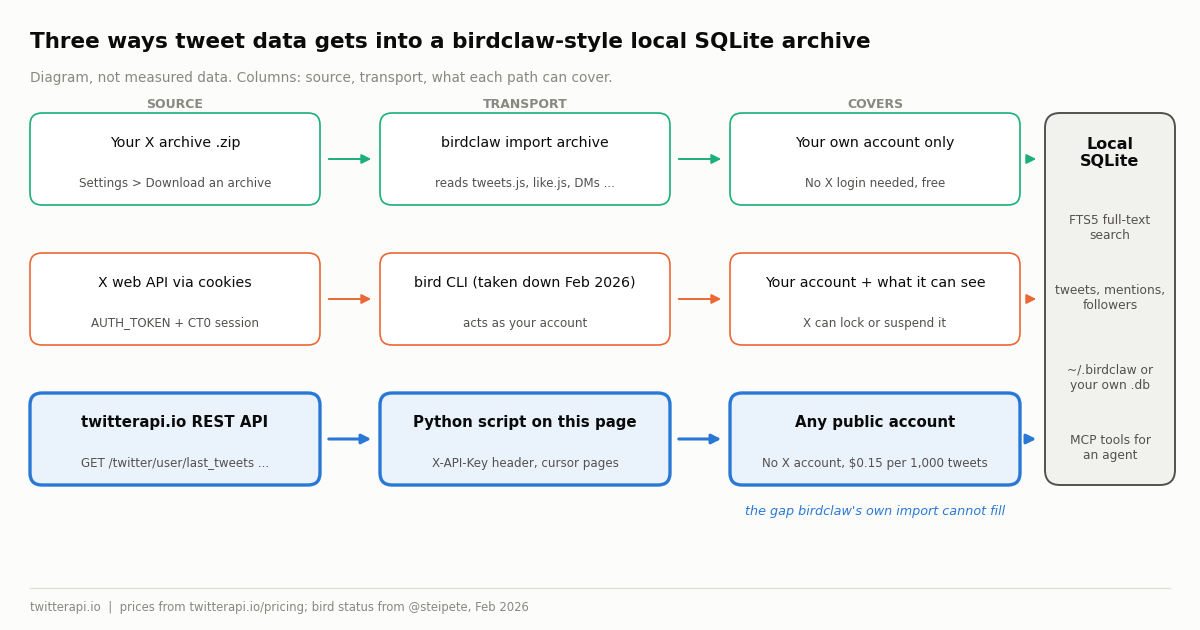
Every row in the birdclaw database arrives by one of three transports, and the one you use decides which accounts you can cover, whether an X login is involved, what it costs and what it puts at risk. The fourth row is the route this page adds for accounts that are not yours.
The xurl row deserves a precise description because birdclaw depends on it. xurl is X's own command-line tool, maintained by the xdevplatform organisation under MIT, "for interacting with the X (formerly Twitter) API, supporting both OAuth 1.0a and OAuth 2.0 authentication" (github.com/xdevplatform/xurl). Setup is xurl auth apps add my-app --client-id ... --client-secret ... followed by xurl auth oauth2 --app my-app, and from then on xurl /2/users/me or any other v2 path runs against your developer app. It is the correct, supported way to read your own bookmarks and timeline, and it is billed at the official pay-per-use rates whenever it reads posts.
The cookie row is the one to be careful with. The README notes that native web access "handles DM requests using AUTH_TOKEN and CT0 session cookies" and that neither that path nor xurl needs a browser process. A session cookie is your identity: whatever a tool does with it, X sees your account doing it, and scripted traffic from a user session is the kind X's terms prohibit and the kind that gets accounts locked. Treat the cookie path as "my account, my risk", never as a way to read someone else's history.
What the X archive zip contains and what birdclaw indexes from it
You request the export on X under Settings and privacy, Your account, Download an archive of your data; X asks for your password and a verification code, then prepares the file and notifies you in-app and by email when it is ready, which is usually within about a day and longer for large accounts. The download link is valid for a limited time, so save the zip somewhere birdclaw can reach it (X Help Center, help.x.com/en/managing-your-account/how-to-download-your-x-archive). X renames settings entries from time to time, so confirm the exact menu labels in your own settings screen.
Inside the zip there is a Your archive.html viewer, an assets/ folder for that viewer, and a data/ folder that holds the actual content. Each data file is a JavaScript assignment rather than plain JSON, in the form window.YTD.tweets.part0 = [ ... ]; strip the left-hand side and you have a JSON array. The files that matter for a search archive are tweets.js (every post you wrote, with engagement counts and entities), like.js (posts you liked, with their text), direct-messages.js (every conversation, with timestamps and participants), follower.js and following.js (the follow graph as account IDs), account.js and profile.js (your handle, creation date and bio) and a media folder for attached images and video. Birdclaw's importer maps those into its tweets, DMs, likes, bookmarks, profiles, media and follow-edge tables and builds the FTS5 index over tweet and DM text.
Two limits follow from the format. First, the archive is a snapshot: a post you write tomorrow is not in it, which is why birdclaw has sync commands at all. Second, and more important for anyone reading this page with another account in mind, there is no archive request for a handle you do not control. X prepares the export for the logged-in account only. If the history you want is somebody else's public timeline, the zip cannot help, and the next two sections are about what can.
Why bird was taken down, and what X's pay-per-use read price means
bird was Steinberger's earlier command-line client for X. It authenticated with browser session cookies and spoke to the same GraphQL endpoints the x.com web app uses, which is why it needed no developer app and no payment. On 8 February 2026 he posted: "Since lots of people asked, I had to take down bird - it used the Twitter Web API and X now pushes pay-per-use." (x.com/steipete/status/2020295295406358798). The birdclaw README still accepts "an existing private bird installation" as a live transport for people who kept a copy, but there is nothing to install from the public repository, and the behaviour that made it convenient, a logged-in session driven by a script, is the behaviour X's systems flag. The same author's X account was itself temporarily blocked for what X labelled suspicious activity and restored a few hours later, as reported by mezha.net.
The "pay-per-use" the post refers to is X's current developer pricing. The docs.x.com pricing page lists "Posts: Read" at $0.005 per resource, "User: Read" at $0.010 per resource and "Post: Create" at $0.015 per request, with no subscription and a ceiling of 3 million post reads per monthly billing cycle before an Enterprise contract (docs.x.com/x-api/getting-started/pricing, verified 2026). That is the rate birdclaw sync pays through xurl, and it is the rate any other official-API client pays: reading one account's 3,000-post history is 3,000 x $0.005 = $15.00, plus $0.010 for the profile, plus the developer-portal setup before the first call.
Set beside the alternative this page uses, the official rate is the expensive route for reads. Twitterapi.io bills 15 credits per tweet returned on timeline, mentions and search endpoints, $0.15 per 1,000 tweets, with a 15-credit minimum per request; $5.00 per 1,000 official post reads against $0.15 per 1,000 is a ratio of about 33x. The official API buys you X's own support and the documented v2 operator set, and it is the right choice when you need to act as a user with their consent. For the one job this page is about, reading a public account's history into a local database, the ratio is the whole story, and the next section shows the code.
Build a birdclaw-style SQLite + FTS5 archive for any public account with twitterapi.io
The script at the end of this page reproduces the part of birdclaw that matters for an agent, a local SQLite file with an FTS5 index over tweet text, for any public handle, from four read endpoints on https://api.twitterapi.io. Every call is a GET with your key in the X-API-Key header; there is no OAuth step, no X account and no cookie. The mapping from the archive files birdclaw expects to the endpoint that returns the same thing for someone else's account:
Three response-shape details decide whether a port of birdclaw's importer works first time. /twitter/user/last_tweets is the odd one out: it nests the list at data.tweets while has_next_page and next_cursor stay at the top level, and it wraps errors as status: "error" with the reason in msg rather than an HTTP 404. /twitter/user/mentions and /twitter/user/followers put their lists (tweets, followers) at the top level next to the cursor. Tweet objects use likeCount, retweetCount, replyCount, viewCount, createdAt (classic format, Tue Dec 10 07:00:30 +0000 2024) and author.userName; follower objects use snake_case. /twitter/user/info returns the profile under data and, for a deleted or suspended handle, status: "error" and msg: "user not found" with data null, again never a 404.
The schema below is the minimum that gives you birdclaw-style search: three ordinary tables and one FTS5 virtual table that indexes tweets.text as an external-content table, kept in step by an insert trigger. Because the trigger fires only on a real insert and the script uses INSERT OR IGNORE, re-running it is incremental: posts already archived cost nothing to skip in the database, and the run report tells you how many pages were already known so you can stop paging early on the next run.
-- The archive the script builds. One FTS5 index over tweet text, like birdclaw's.
CREATE TABLE profiles (id TEXT PRIMARY KEY, user_name TEXT, name TEXT, created_at TEXT,
  followers INTEGER, following INTEGER, statuses_count INTEGER, description TEXT,
  location TEXT, protected INTEGER);
CREATE TABLE tweets (id TEXT PRIMARY KEY, author TEXT, created_at TEXT, text TEXT,
  likes INTEGER, retweets INTEGER, replies INTEGER, views INTEGER, is_reply INTEGER,
  in_reply_to_id TEXT, kind TEXT);                   -- kind: 'timeline' or 'mention'
CREATE TABLE followers (user_id TEXT, follower_id TEXT, screen_name TEXT,
  followers_count INTEGER, created_at TEXT, PRIMARY KEY (user_id, follower_id));
CREATE VIRTUAL TABLE tweets_fts USING fts5(text, content='tweets', content_rowid='rowid');
CREATE TRIGGER tweets_ai AFTER INSERT ON tweets BEGIN
  INSERT INTO tweets_fts(rowid, text) VALUES (new.rowid, new.text);
END;

-- Birdclaw-style queries once it is filled
SELECT t.created_at, t.likes, t.text FROM tweets_fts
  JOIN tweets t ON t.rowid = tweets_fts.rowid
 WHERE tweets_fts MATCH 'launch OR landing' ORDER BY t.likes DESC LIMIT 10;
SELECT author, COUNT(*) FROM tweets WHERE kind = 'mention' GROUP BY author ORDER BY 2 DESC LIMIT 10;
Cost worked example: 3,000 tweets for $0.45, or $15 at the official rate
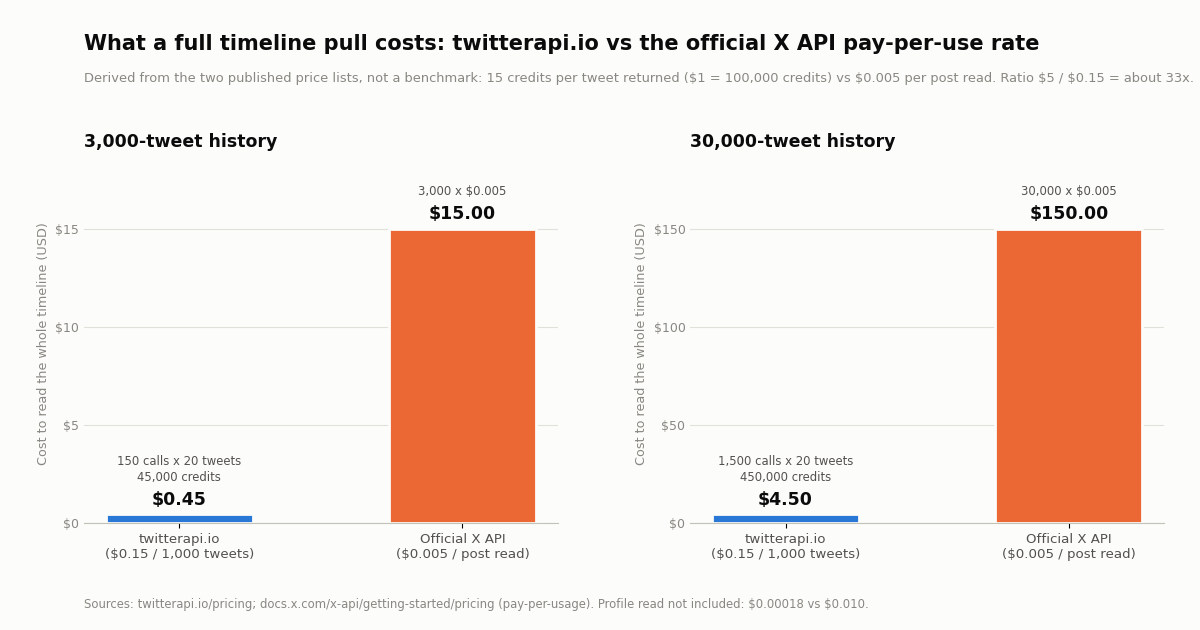
The arithmetic is short enough to check by hand. Timeline pages return up to 20 posts, so a 3,000-post history is 3,000 / 20 = 150 calls to /twitter/user/last_tweets. Twitterapi.io bills 15 credits per tweet returned, so 3,000 x 15 = 45,000 credits, and at $1 per 100,000 credits that is $0.45. The profile row adds 18 credits ($0.00018); a page of 20 mentions adds 300 credits ($0.003); a 200-follower page adds between 200 and 600 credits ($0.002 to $0.006), since followers bill 1 to 3 credits per user returned. The same 3,000 post reads at the official pay-per-use rate are 3,000 x $0.005 = $15.00, plus $0.010 for the user read (docs.x.com pricing, verified 2026).
Scale it by ten and nothing changes except the zeros: a 30,000-post account is 1,500 calls, 450,000 credits, $4.50 on twitterapi.io against $150.00 officially. The chart below plots both cases; it is derived from the two published price lists, not a measurement, and the 33x ratio ($5.00 / $0.15 per 1,000 posts) holds at every size because both prices are linear in the number of posts.
Time matters as much as money for a full-history pull. Before your first payment the account is limited to 0.2 requests per second, so 150 calls take about 13 minutes at the script's default 5.1-second pace; once paid the limit rises to 20 requests per second and the same pull is under a minute even at a polite pace (50 on Scale, 500 on Business). The $1 of free credits a new account receives on sign-up, 100,000 credits for accounts that pass the automatic bot check, one per person or network, expiring after 31 days, is enough for two full 3,000-post histories with change, which is a reasonable way to test the script before deciding whether the archive is worth keeping.
Pointing an agent at the data: birdclaw's local MCP versus the hosted twitterapi.io MCP
Birdclaw's reason to exist is the agent on the other end, and it ships its own Model Context Protocol server for that: birdclaw mcp exposes "read-only cached tweet search and thread tools behind a dedicated token", and the endpoint stays off until that token and a public URL are configured (README). The tools answer from the local SQLite store, so an OpenClaw or Claude session that needs "what did I say about X in 2023" gets it with no network call and no spend. What they cannot do is answer about a timeline that is not in the store, and they cannot see anything newer than the last import or sync.
For live reads of any public account, twitterapi.io hosts an MCP server at https://mcp.twitterapi.io/mcp (Streamable HTTP, API key in the X-API-Key header) and publishes a stdio package, @kaitoinfra/twitterapi-io-mcp-server, run with npx -y @kaitoinfra/twitterapi-io-mcp-server and the key in TWITTERAPI_IO_API_KEY. Both expose the same 12 tools: search_tweets, get_user_info, get_user_about, get_user_followers, get_user_followings, get_user_last_tweets, get_user_mentions, get_tweets_by_ids, get_tweet_replies, get_tweet_quotes, get_tweet_retweeters and a trends tool. get_user_last_tweets and get_user_mentions are the same reads the script in this page makes, billed the same way, which means an agent can either query live or query the archive you built, whichever is cheaper for the question.
A practical pattern is to run the archive script on a schedule (it is incremental, so a daily run pulls only the first page or two) and give the agent both servers: the local one for history and the hosted one for live questions. The configuration for Claude Code is a single command; the stdio form below suits OpenClaw and any other MCP host that spawns local processes. The full setup for Claude, including the Claude.ai connector form, is on the Claude guide linked below.
# Claude Code: hosted twitterapi.io MCP server (12 read tools, no X account)
claude mcp add --transport http twitterapi https://mcp.twitterapi.io/mcp \
  --header "X-API-Key: YOUR_TWITTERAPI_IO_KEY"

# Any MCP host that spawns stdio servers (OpenClaw, Cursor, Claude Desktop):
# {
#   "mcpServers": {
#     "twitterapi": {
#       "command": "npx",
#       "args": ["-y", "@kaitoinfra/twitterapi-io-mcp-server"],
#       "env": { "TWITTERAPI_IO_API_KEY": "YOUR_TWITTERAPI_IO_KEY" }
#     }
#   }
# }

# Birdclaw's own MCP for the local archive: off until a token and public URL are configured
birdclaw mcp
Limits and etiquette: rate limits, batching, public accounts only
Rate limits and pacing. Twitterapi.io allows 0.2 requests per second before the first payment, 20 after it, 50 on the Scale plan and 500 on Business, with up to 1,000 on request. The script's PACE_SECONDS default of 5.1 keeps an unpaid key inside the first limit; set it to 0.05 once you have paid. A full history is a one-off: pull it once, store it, and let later runs stop as soon as a page comes back entirely known, which the run report makes visible. Do not re-pull 150 pages every night to find three new posts.
Public accounts only, and protected accounts are off limits. /twitter/user/info returns protected: true for accounts that have locked their posts, and the script exits there, because no read endpoint returns a protected account's timeline and nothing on this page is about getting around that. Deleted posts are gone too: the API returns what X currently serves, so an archive built today will not contain a post deleted yesterday, and the only copy of a deleted post is one you captured earlier. If you need that, the deleted-tweet and history-export guides linked below cover scheduled capture.
Do not share session cookies. The cookie path birdclaw inherited from bird works by copying AUTH_TOKEN and CT0 out of your browser. Anyone holding those values is you, as far as X is concerned, until the session is revoked. Never paste them into a hosted tool, never commit them, and expect X to lock an account whose session suddenly starts issuing scripted traffic; that risk is the reason the author withdrew the tool. Reads through twitterapi.io carry none of it, because there is no X session involved.
Respect the platform and the people in the data. X's terms govern access to its service, and data-protection law applies to personal data whether or not it was public. Keep the archive to the accounts and fields your question needs, note the source and time of each pull (the script stores createdAt as served; add a fetched_at column if provenance matters to you), and delete what you no longer use. A searchable archive makes a question cheap to ask; it does not make every question appropriate.
"""Birdclaw-style local archive (SQLite + FTS5) for ANY public X account, built from four
twitterapi.io read endpoints. No X login, no session cookies, no archive zip.

1. /twitter/user/info         -> one profile row            (18 credits = $0.00018)
2. /twitter/user/last_tweets  -> the timeline, newest first, 20 per page via cursor
3. /twitter/user/mentions     -> posts that @-mention the account, 20 per page via cursor
4. /twitter/user/followers    -> follow edges, up to 200 per page via cursor

Pricing (twitterapi.io/pricing): 15 credits per tweet returned, 1 to 3 credits per follower
returned, $1 = 100,000 credits. A 3,000-tweet history = 150 pages x 20 = 45,000 credits = $0.45.
Needs TWITTERAPI_IO_KEY in the environment (key from twitterapi.io/dashboard).
Reads only: nothing is posted, liked or followed, and no X account of yours is involved.

Usage: python archive.py <handle> [tweet_pages] [mention_pages] [follower_pages]
"""
import os
import sqlite3
import sys
import time

import requests

HANDLE = sys.argv[1] if len(sys.argv) > 1 else "NASA"
TWEET_PAGES = int(sys.argv[2]) if len(sys.argv) > 2 else 5        # 5 pages = up to 100 posts
MENTION_PAGES = int(sys.argv[3]) if len(sys.argv) > 3 else 2      # 2 pages = up to 40 mentions
FOLLOWER_PAGES = int(sys.argv[4]) if len(sys.argv) > 4 else 1     # 1 page = up to 200 followers
PACE = float(os.environ.get("PACE_SECONDS", "5.1"))  # 0.2 req/s before the first payment; 0.05 once paid (20 req/s)
DB = os.environ.get("ARCHIVE_DB", f"{HANDLE.lower()}.sqlite")
HEADERS = {"X-API-Key": os.environ["TWITTERAPI_IO_KEY"]}

SCHEMA = """
CREATE TABLE IF NOT EXISTS profiles (
  id TEXT PRIMARY KEY, user_name TEXT, name TEXT, created_at TEXT, followers INTEGER,
  following INTEGER, statuses_count INTEGER, description TEXT, location TEXT, protected INTEGER);
CREATE TABLE IF NOT EXISTS tweets (
  id TEXT PRIMARY KEY, author TEXT, created_at TEXT, text TEXT, likes INTEGER, retweets INTEGER,
  replies INTEGER, views INTEGER, is_reply INTEGER, in_reply_to_id TEXT, kind TEXT);
CREATE TABLE IF NOT EXISTS followers (
  user_id TEXT, follower_id TEXT, screen_name TEXT, followers_count INTEGER, created_at TEXT,
  PRIMARY KEY (user_id, follower_id));
CREATE VIRTUAL TABLE IF NOT EXISTS tweets_fts USING fts5(text, content='tweets', content_rowid='rowid');
CREATE TRIGGER IF NOT EXISTS tweets_ai AFTER INSERT ON tweets BEGIN
  INSERT INTO tweets_fts(rowid, text) VALUES (new.rowid, new.text);
END;
"""


def get(path, params):
    """One GET. HTTP errors raise; wrapped endpoints (user/info, last_tweets) also report
    failures as status == "error" with the reason in msg, and never as an HTTP 404."""
    r = requests.get("https://api.twitterapi.io" + path, params=params, headers=HEADERS, timeout=30)
    r.raise_for_status()
    body = r.json()
    if body.get("status") == "error":
        raise SystemExit(f"{path}: {body.get('msg')}")
    time.sleep(PACE)
    return body


def paged(path, params, list_key, pages, nested=False):
    """Walk cursor pages. Lists and cursors are top-level (tweets / followers, has_next_page,
    next_cursor) except /twitter/user/last_tweets, which nests the list at data.tweets."""
    cursor = ""
    for _ in range(pages):
        body = get(path, {**params, "cursor": cursor})
        items = ((body.get("data") or {}).get(list_key) if nested else body.get(list_key)) or []
        yield from items
        if not body.get("has_next_page") or not body.get("next_cursor"):
            break
        cursor = body["next_cursor"]


def store_tweet(con, t, kind, fallback_author):
    author = (t.get("author") or {}).get("userName") or fallback_author
    cur = con.execute(
        "INSERT OR IGNORE INTO tweets VALUES (?,?,?,?,?,?,?,?,?,?,?)",
        (t["id"], author, t.get("createdAt"), t.get("text"), t.get("likeCount"), t.get("retweetCount"),
         t.get("replyCount"), t.get("viewCount"), int(bool(t.get("isReply"))), t.get("inReplyToId"), kind))
    return cur.rowcount  # 1 = new row, 0 = already archived (re-runs are incremental)


con = sqlite3.connect(DB)
con.executescript(SCHEMA)

# 1. Profile: camelCase fields under data; protected accounts are not public and are skipped
u = get("/twitter/user/info", {"userName": HANDLE}).get("data") or {}
if not u:
    raise SystemExit(f"@{HANDLE}: no profile returned")
if u.get("protected"):
    raise SystemExit(f"@{HANDLE} is protected: its posts are not public and no read endpoint returns them")
con.execute("INSERT OR REPLACE INTO profiles VALUES (?,?,?,?,?,?,?,?,?,?)",
            (u["id"], u["userName"], u.get("name"), u.get("createdAt"), u.get("followers"), u.get("following"),
             u.get("statusesCount"), u.get("description"), u.get("location"), int(bool(u.get("protected")))))
print(f"@{u['userName']}  id {u['id']}  posts {u.get('statusesCount'):,}  followers {u.get('followers'):,}")

# 2. Timeline: data.tweets, newest first, includeReplies keeps the account's replies in the archive
new_tl = seen_tl = 0
for t in paged("/twitter/user/last_tweets", {"userName": HANDLE, "includeReplies": "true"},
               "tweets", TWEET_PAGES, nested=True):
    if store_tweet(con, t, "timeline", u["userName"]):
        new_tl += 1
    else:
        seen_tl += 1

# 3. Mentions: top-level tweets, exactly 20 per page, author.userName is the person mentioning
new_m = 0
for t in paged("/twitter/user/mentions", {"userName": HANDLE}, "tweets", MENTION_PAGES):
    new_m += store_tweet(con, t, "mention", "")

# 4. Followers: snake_case profiles (screen_name, followers_count, created_at), newest first
new_f = 0
for f in paged("/twitter/user/followers", {"userName": HANDLE, "pageSize": 200}, "followers", FOLLOWER_PAGES):
    cur = con.execute("INSERT OR IGNORE INTO followers VALUES (?,?,?,?,?)",
                      (u["id"], f["id"], f.get("screen_name"), f.get("followers_count"), f.get("created_at")))
    new_f += cur.rowcount
con.commit()

credits = 18 + 15 * (new_tl + seen_tl + new_m) + 3 * new_f   # upper bound: followers bill 1 to 3 credits each
print(f"archived {new_tl} new timeline posts ({seen_tl} already stored), {new_m} mentions, {new_f} followers -> {DB}")
print(f"about {credits:,} credits = ${credits / 100000:.4f} at most for this run")

# 5. The birdclaw-style part: FTS5 full-text search over everything stored so far
query = os.environ.get("QUERY", "launch")
rows = con.execute(
    "SELECT t.kind, t.author, t.created_at, t.likes, substr(t.text, 1, 80) "
    "FROM tweets_fts JOIN tweets t ON t.rowid = tweets_fts.rowid "
    "WHERE tweets_fts MATCH ? ORDER BY t.likes DESC LIMIT 5", (query,)).fetchall()
print(f"\nFTS5 search for {query!r}: top {len(rows)} by likes")
for kind, author, created, likes, text in rows:
    print(f"  [{kind}] @{author} {created} likes={likes}  {text!r}")
Questions readers ask
Is birdclaw free?
Yes. Birdclaw is open source under the MIT licence (github.com/steipete/birdclaw) and runs entirely on your machine; installing it with Homebrew or npm costs nothing and the archive import and local search need no account. Costs appear only if you use its live sync, which goes through xurl and X's pay-per-use API at $0.005 per post read.
Does birdclaw need an X login?
Not for its core job. The README states that archive and local search work without an X login. You log in once on x.com to request your data export; after that, importing the zip, searching it, serving the web app and running the MCP server are all offline. Only the optional live sync needs credentials, either official API credentials through xurl or a logged-in session from a private bird install.
Can birdclaw archive another account's tweets?
Not through its archive import, which only reads the export X prepares for your own account, and not safely through cookies, which act as your account and expose it to being locked. To build the same local SQLite + FTS5 archive for any public account, use a read API that needs no X login: the script on this page pulls the profile, timeline, mentions and followers from twitterapi.io at 15 credits per tweet, about $0.45 for a 3,000-post history.
Is the bird CLI still available?
No. Its author posted on 8 February 2026 that he had to take bird down because it used the Twitter web API and X now pushes pay-per-use access. Birdclaw still accepts an existing private bird installation as a live transport for people who kept one, but there is no public download, and the cookie-based access it relied on acts as your own account with the risk that X locks or suspends it.
What does the X archive zip include?
A Your archive.html viewer, an assets folder and a data folder whose files are JavaScript assignments in the form window.YTD.tweets.part0 = [...]. The useful ones are tweets.js (your posts), like.js (posts you liked), direct-messages.js (your DM conversations), follower.js and following.js (the follow graph), account.js and profile.js (handle, creation date, bio) and a media folder. X prepares the file after a password and verification check and the download link is valid for a limited time (help.x.com).
Can I search my DMs with birdclaw?
Yes. The README says FTS5 powers local tweet and DM search, and direct-messages.js from your archive is imported into the same SQLite store, so the web app and the CLI search cover your conversations. DMs are only ever your own: no public API, including twitterapi.io's read endpoints, returns another account's direct messages.
How much does it cost to archive a public account's full timeline with twitterapi.io?
15 credits per tweet returned, $0.15 per 1,000 tweets, with $1 buying 100,000 credits. A 3,000-post history is 150 pages of 20, 45,000 credits, $0.45; a 30,000-post history is $4.50. The profile read is 18 credits and each follower returned is 1 to 3 credits. The official X API pay-per-use rate for the same 3,000 post reads is $15.00 at $0.005 each (docs.x.com pricing).
Does birdclaw work with OpenClaw or Claude?
That is what it is built for: birdclaw mcp exposes read-only cached tweet search and thread tools behind a token, and any MCP host, OpenClaw included, can call them against the local archive. For live reads of accounts that are not in the archive, add the hosted twitterapi.io MCP server at https://mcp.twitterapi.io/mcp or the npx @kaitoinfra/twitterapi-io-mcp-server stdio package, which expose get_user_last_tweets, get_user_mentions, search_tweets and nine other read tools.
Continue
- steipete/birdclaw on GitHub: README, install, commands, storage model, MCP and live-sync transports (MIT)
- Peter Steinberger on X, February 2026: "I had to take down bird - it used the Twitter Web API and X now pushes pay-per-use"
- xdevplatform/xurl: X's official command-line API client (OAuth 1.0a / 2.0, developer-portal credentials)
- X API pay-per-use pricing (the official, pricier route): $0.005 per post read, $0.010 per user read, 3M post reads a month cap
- X Help Center: how to download your X archive (own account only)
- twitterapi.io reference: GET /twitter/user/last_tweets (data.tweets, cursor pagination)
- Twitter (X) MCP server: the 12 hosted read tools for Claude, Cursor and OpenClaw
- How to connect Claude to live Twitter (X) data through MCP
- Twitter (X) archive search: finding old tweets through the API
- Exporting a Twitter (X) account's history with the API
- Downloading tweets by API: pagination and storage patterns
- OSINT on Twitter (X): the public data points behind every endpoint used here
- twitterapi.io pay-per-call pricing: 15 credits per tweet, $1 = 100,000 credits
- Get an API key from the dashboard
- 01Twint (Twitter scraper): why it stopped working and how to migrate
- 02Twitter (X) profiler: how to profile an account in 2026
- 03What Is a Twitter (X) Chatbot, and How Do You Build One in 2026?
- 04How to Use Google Gemini with the Twitter (X) API
- 05OSINT on Twitter (X): What Public Data You Can Pull, and How
- 06Twitter Streaming API
- 07Twitter (X) Hashtag Popularity Tracker — API Guide
- 08How to See Comments (Replies) on X, Including the Ones It Hides
Stop reading. Start building.
Starter credits cover real testing on real data. Google sign-in, no card, no application queue.
Get an API key