Apify Pricing in 2026: Plans, Compute Units and What Twitter (X) Data Really Costs
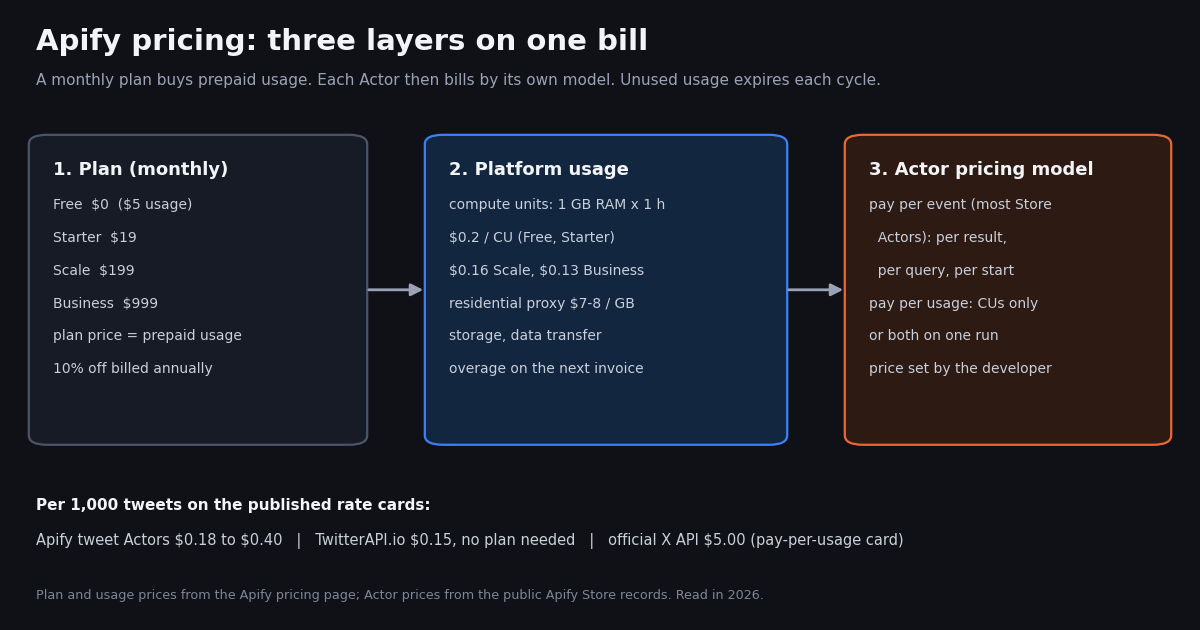
- Four plans: Free $0 ($5 usage), Starter $19/month, Scale $199/month, Business $999/month; annual billing saves 10%. The plan price is prepaid usage, and unused usage does not roll over.
- Compute units: 1 CU = 1 GB RAM for 1 hour; $0.2 per CU on Free and Starter, $0.16 on Scale, $0.13 on Business. Residential proxy is $8, $8, $7.5 and $7 per GB by plan.
- Store Actors set their own price: pay per event (per result, per query, per start), pay per usage (CUs only) or both. Higher plans unlock Bronze, Silver and Gold Store discounts on Actors that support them.
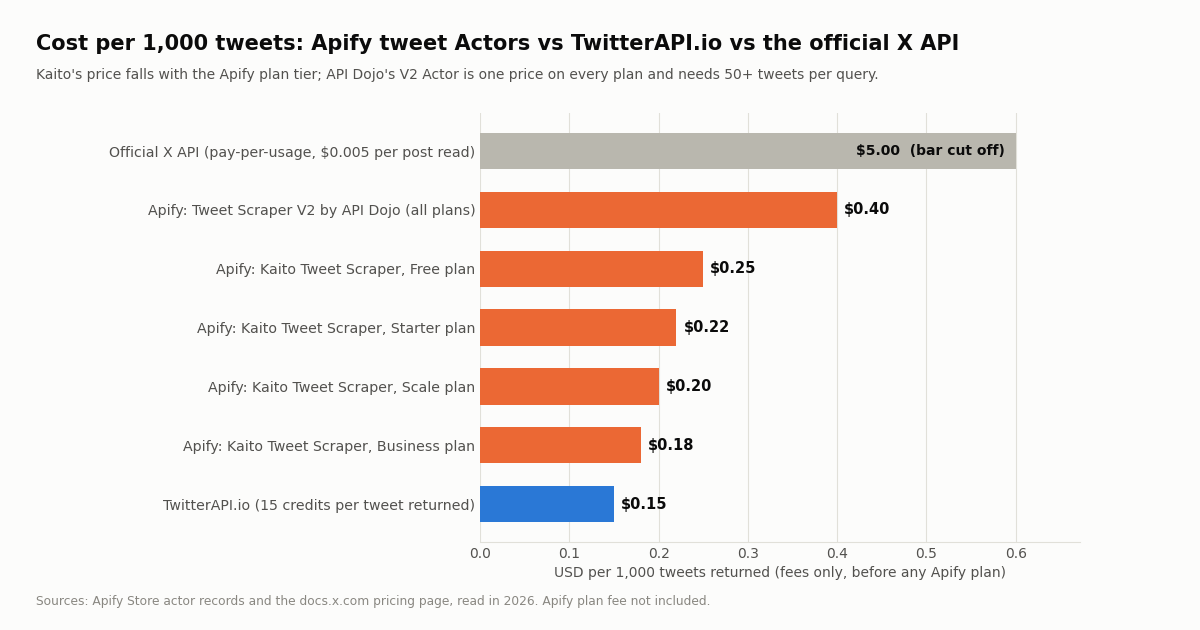
- X (Twitter) Actors we priced: $0.40 per 1,000 tweets (API Dojo Tweet Scraper V2, 50-tweet minimum per query) and $0.25 to $0.18 per 1,000 by plan (the Kaito T listing). A per-query Actor charges $0.016 per search plus items.
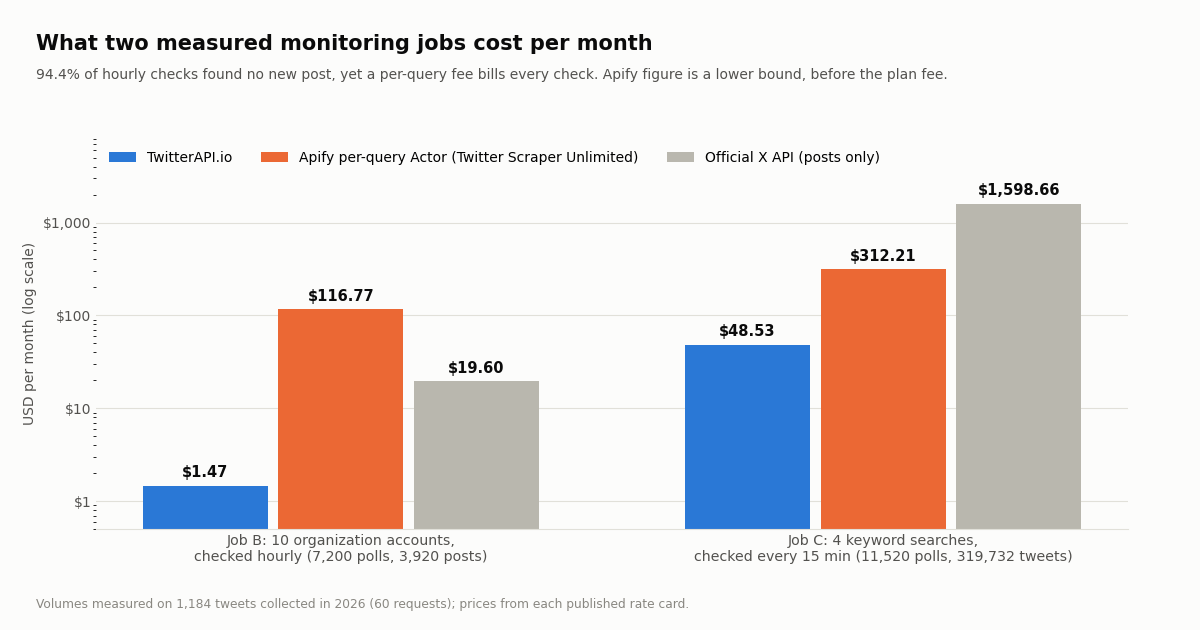
- Measured: 94.4% of hourly checks of 10 organization accounts came back empty; per-query fees bill each one anyway. Job cost: $1.47 on TwitterAPI.io vs at least $116.77 on a per-query Actor.
- Bulk pulls: 100,000 tweets cost $15 on TwitterAPI.io (15 credits per tweet returned, no plan), $18 to $40 in Apify Actor fees, and $500 on the official X API pay-per-usage card ($0.005 per post read).
People search "apify pricing" for two reasons: to understand what the plans and compute units mean before signing up, and to find out what a specific job will cost once it runs. The pricing page answers the first question well. The second one is harder, because on Apify the developer of each Actor sets its price, and the same scrape can be billed per result, per query, per compute unit, or a mix.
This page does both. It lays out Apify's plans, compute units, proxies and Store pricing models from Apify's own pricing page (read this session, apify.com/pricing), then takes the most common paid use on the platform, X (Twitter) data, and prices it from first-hand Actor records and a real-data study of how many tweets monitoring jobs actually produce. For a head-to-head product comparison of Apify and TwitterAPI.io see our compare page, and for Apify Twitter scraper alternatives see the alternatives guide; this page stays on the bill.
Every number about volumes comes from our study (1,184 tweets from 10 organization timelines and 4 keyword searches, collected in 2026 with 60 requests). Every price is quoted with its rate card. Where a price is not published, we say so instead of guessing.
94.4% (of 10,627 hourly windows, collected in 2026). With a $0.016 per-query Apify Actor that job costs at least $116.77/month; at $0.15 per 1,000 tweets returned on TwitterAPI.io it is $1.47.
Apify plans in 2026: Free, Starter, Scale, Business
Apify sells four self-serve plans and a custom Enterprise tier. The monthly fee is not a seat license: it is prepaid platform usage that every Actor run, proxy request and storage operation draws down. Per the pricing page, Starter covers the first $19 of usage each month and the rest is pay as you go, "up to a usage limit you set (at most $100 on Starter)".
Unused usage expires. Apify's FAQ is explicit: "unused usage credits are not rolled over to the next billing cycle, and they expire at the end of the billing cycle." If a $199 Scale plan only consumes $60 of runs in a month, the other $139 is gone. That makes the plan choice a forecasting problem: pick the lowest plan that covers your typical month, and let overage handle spikes.
What happens at the limit. On a paid plan, usage beyond the prepaid amount is added to the next invoice until it reaches the usage limit configured in Billing. On the Free plan, access is blocked until the next monthly cycle. The Free plan needs no credit card, includes up to 16 GB of RAM and 5 concurrent runs, and its Apify Proxy can only be used inside the platform.
Discounts and the Creator plan. Apify lists 50% off Starter, Scale and Business for students, a personalized discount for nonprofits, and 30% off Scale for startups. A separate Creator plan for people who build and publish Actors costs $1/month and comes with a one-time $500 of platform usage for the first six months, limited to universal Actors in the Store.
Compute units, proxies and the other usage meters
A compute unit (CU) is Apify's meter for running code: 1 CU = 1 GB of RAM running for one hour. An Actor configured with 4 GB of memory that runs for 15 minutes uses 1 CU. The CU price drops with the plan:
Proxies are a separate meter. Residential proxy traffic costs $8 per GB on Free and Starter, $7.5 on Scale and $7 on Business. Datacenter proxy includes 5, 30, 200 or 500 IPs by plan, then $1, $0.8 or $0.6 per extra IP. SERP proxy is $2.5 per 1,000 SERPs on Free and Starter, $2 on Scale and $1.7 on Business, and the Unblocker is $1.5, $1.25 or $1 per 1,000 requests.
Storage, data transfer and add-ons. Storage operations and data transfer are also billed as platform usage; the summary pricing page points to a detailed breakdown for those rates rather than listing them, and it notes that reading from or writing to a run's dataset after the run finishes also counts as usage. Add-ons: extra concurrent runs at $5 per run, extra Actor RAM at $1 per GB, and personal training at $150 per hour.
Why CU math is hard to predict. The same Actor can use very different CU amounts depending on memory setting, run length, retries and how hard the target site pushes back. Apify's own advice is to "perform a test run" and read the usage chart. For pay-per-usage Actors that is the only reliable estimate.
Store Actor pricing: pay per event, pay per usage, or both
Most of what people run on Apify is not their own code but a Store Actor written by Apify or a community developer. Per Apify's pricing FAQ, every Store Actor uses one of two models, and the Actor page says which:
Pay per event. The developer sets fixed prices for events they define: starting the Actor, running a query, returning a result. Most pay-per-event Actors include the platform usage in the event price, so you see no CU charge. Apify's own example is its Instagram Scraper at $2.30 per 1,000 results, so 10,000 results cost $23.
Pay per usage. The developer charges nothing on top; you pay the compute units, proxy, storage and data transfer the run consumes. Apify's example is its Website Content Crawler.
Both. Some pay-per-event Actors also bill platform usage. Apify's example is the Google Trends Scraper at $1 per 1,000 results plus the run's usage, so 20,000 results cost $20 plus usage.
Store discounts by plan. Starter, Scale and Business unlock Bronze, Silver and Gold Apify Store discounts. These apply only to Actors whose developer opted in, and the size of the discount is whatever that developer set per tier, so the same plan can make one Actor cheaper and leave another unchanged. The public Actor records we read list a separate price per tier (Free, Bronze, Silver, Gold, plus Platinum and Diamond for larger contracts).
Rental Actors. Older Store listings used a flat monthly rental; today's pricing page describes only the two models above, so check the Actor page for the model it uses before budgeting.
What X (Twitter) Actors on Apify charge, read first-hand
Twitter (X) scrapers are among the most used Actors in the Store, so they are a good test of how Store pricing plays out. We read the pricing records of three tweet Actors straight from Apify's public Actor API (the pricingInfos field of each Actor record on api.apify.com) and their README pages. All three are pay per event; none bills compute units on top.
Tweet Scraper V2 (apify.com/apidojo/tweet-scraper) charges $0.0004 per tweet on every plan tier, so Store discounts do not change it. Its README sets two conditions that matter for budgeting: "Each query must return at least 50 tweets", and free-plan users are limited to 5 runs per month of 10 items each, with no API access. Smaller jobs, single tweets and conversation threads are routed to the developer's other Actor.
Twitter Scraper Unlimited (apify.com/apidojo/twitter-scraper-lite) is that other Actor. It bills $0.016 per search, profile or list query ("includes first ~40 results" per its event description), $0.05 per single tweet URL, and per-item prices that rise with the number of queries per run: $0.0004 for runs of up to 5 queries, $0.0008 for 6 to 10, $0.0012 for 11 to 30, up to $0.002 in tier five. Its record sets a $0.02 minimum for a run's maximum charge.
Kaito T's Tweet Scraper (apify.com/kaitoeasyapi) charges $0.25 per 1,000 tweets on Free, $0.22 on Starter, $0.20 on Scale and $0.18 on Business. Its README says it is powered by TwitterAPI.io, so it is the same data source as the direct API, resold inside Apify's billing. The README also states a minimum charge for each call even when nothing is found, without stating the amount, so a cost model can only price its per-tweet part.
What this means. The per-tweet rate on Apify tweet Actors runs from $0.18 to $0.40 per 1,000, before the plan fee. The bigger variable is structural: a 50-tweet minimum, a per-query fee, or a per-call minimum each change the bill for small, frequent jobs far more than the per-tweet rate does.
Our study: how many tweets real monitoring jobs produce
Per-tweet prices only become a bill once you know the volume. Most X jobs on Apify are monitoring jobs (watch these accounts, track this keyword), so we measured how many tweets such jobs actually return. We pulled recent timelines of 10 organization accounts and the latest matches for 4 keyword searches, then counted posts per day, matches per hour, and how many polling windows would contain nothing new.
Organization accounts post rarely. The median account in the sample posts 2.8 times a day. Only @NBA posted more than 10 times a day (104.29), and its sample covers less than a day, so treat that rate as a peak. Across all 10,627 hourly windows we measured, 94.4% held no new post, and 100.0% held fewer than 50, the minimum Tweet Scraper V2 requires per query.
Keywords split in two. Niche terms such as "apify" (2.1 matches an hour) and "web scraping" (1.9) leave about two in three 15-minute checks empty. Consumer brands such as "playstation" (197.5 an hour) and "nvidia" (242.6) fill every window. Across all 15-minute windows measured, 99.5% returned fewer than 50 matches.
Three jobs priced on every rate card
We priced three jobs from the measured volumes over a 30-day month. TwitterAPI.io is billed at 15 credits per tweet returned, with a 15-credit minimum ($0.00015) when a request finds nothing; polling uses /twitter/tweet/advanced_search with a since_time: filter so only new tweets come back. The Apify per-query figure is a lower bound: the $0.016 query fee plus the lowest per-item price, before the plan fee. The official X API figure counts post reads only ($0.005 each on the pay-per-usage card).
Job A, a one-off bulk pull of 100,000 tweets. No polling, so only the per-tweet rate matters.
Job B, 10 organization accounts checked every hour (7,200 checks, 3,920 posts a month).
Job C, 4 keyword searches checked every 15 minutes (11,520 checks, 319,732 tweets a month, almost all from the two consumer-brand terms).
Plan headroom matters too. Apify's pricing page caps Starter's pay-as-you-go at a usage limit of at most $100, so a per-query monitoring job in the $117 to $312 range needs Scale ($199/month) or a higher limit, and on Scale the plan fee is spent first. TwitterAPI.io has no plan requirement for this: prepaid credits are spent per tweet returned and purchased credits never expire.
# Monthly bill for a polling job on each rate card (USD).
def monthly_cost(polls, tweets, empty_share):
    return {
        "twitterapi_io": tweets * 0.00015 + polls * empty_share * 0.00015,
        "apify_per_query_actor_min": polls * 0.016 + tweets * 0.0004,
        "apify_per_tweet_actor_starter": tweets * 0.00022,   # plus any per-run minimum
        "official_x_api_posts_only": tweets * 0.005,
    }

# Job B from our study: 10 organization accounts, one check per account per hour
print(monthly_cost(polls=10 * 24 * 30, tweets=3920, empty_share=0.944))
When Apify is the better buy, and when it is not
Apify fits when X is one source among many. If the same pipeline also scrapes Instagram, Google Maps, e-commerce listings or arbitrary websites, one Apify account, one billing model and one scheduler can be worth more than a few dollars of difference on the X part. The Store's breadth and the built-in scheduling, datasets and integrations are the product.
Apify fits large one-off pulls on an Actor you already trust. For a bulk pull the per-tweet rate dominates and the gap narrows to cents per 1,000 tweets (Job A: $18 to $40 on Apify against $15 on TwitterAPI.io for 100,000 tweets).
A direct API fits frequent, small checks. Monitoring is mostly empty checks. In our study 94.4% of hourly account checks found nothing, and any per-query fee or per-run minimum bills each of them. A direct API that charges per tweet returned, with a small minimum for an empty result, keeps the idle cost near zero: one check every 60 seconds for a month is 43,200 checks, $6.48 at the 15-credit minimum.
A direct API fits when you need low latency or many endpoints. An Actor run has start-up time and returns a dataset; a REST call returns JSON in the response. TwitterAPI.io also exposes profiles (18 credits per user, $0.18 per 1,000), followers and followings (1 to 3 credits per user returned), replies, quotes, lists and thread context as separate endpoints, plus write actions through an authenticated session.
The official X API fits when you need X's contract. It is X's own route, under X's developer terms, and its pay-per-usage card is $0.005 per post read and $0.010 per user read, capped at 3 million post reads a month before Enterprise. $0.005 per post read is $5 per 1,000 posts, about 33x the $0.15 per 1,000 tweets returned on TwitterAPI.io.
Running the same job on TwitterAPI.io
The polling pattern that kept Job B at about a dollar and a half is simple: one search per check, filtered to tweets newer than the last check, so an idle check returns an empty list. The script below runs one pass, prints new tweets, and keeps a running total of what the same passes would cost on each rate card, so you can measure your own job before choosing a platform.
Pricing it uses. 15 credits per tweet returned ($0.15 per 1,000 tweets), a 15-credit minimum ($0.00015) when the search returns nothing, $1 = 100,000 credits. No X account is needed for reads. New accounts that pass the automatic bot check get up to $1 of free credits (at most 100,000 credits, no card, one per person or network, expiring after 31 days); purchased credits never expire.
Rate limits. 0.2 requests per second before the first payment, 20 once paid, 50 on Scale, 500 on Business and up to 1,000 on request. Monthly subscriptions (Starter $29, Builder $99, Pro $199, Scale $499, Business $1,499) are optional; the details are on the pricing page.
Reading the response. /twitter/tweet/advanced_search returns tweets[] at the top level with has_next_page and next_cursor. Each tweet carries id, url, text, createdAt, likeCount, retweetCount, replyCount, viewCount and an author object with userName and followers. The query accepts the same operators as X search (from:, lang:, min_faves:, -filter:replies) plus since_time: and until_time: as Unix timestamps.
"""apify_vs_direct.py - measure what an X (Twitter) monitoring job really costs.

Polls one search with since_time, counts what comes back, and prices the same
pass on three published rate cards. Run it from cron at the interval you plan.

    pip install requests
    export TWITTERAPI_IO_API_KEY=...
    python apify_vs_direct.py "from:NASA OR from:SpaceX"
"""
import json
import os
import sys
import time

import requests

BASE = "https://api.twitterapi.io"
KEY = os.environ["TWITTERAPI_IO_API_KEY"]
STATE = "poll-state.json"

# Published rate cards, USD (see the article for the sources)
TWAPI_PER_TWEET = 0.00015      # 15 credits per tweet returned
TWAPI_MIN = 0.00015            # 15-credit minimum when a request returns nothing
APIFY_LITE_QUERY = 0.016       # per query event on a per-query Apify Actor
APIFY_LITE_ITEM = 0.0004       # per dataset item, lowest tier
X_PER_POST = 0.005             # official X API pay-per-usage, per post read


def load_state():
    if os.path.exists(STATE):
        return json.load(open(STATE))
    return {"since_time": int(time.time()) - 3600, "passes": 0, "tweets": 0, "empty": 0}


def poll(query, since_time, max_pages=5):
    tweets, cursor = [], None
    for _ in range(max_pages):
        params = {"query": f"{query} since_time:{since_time}", "queryType": "Latest"}
        if cursor:
            params["cursor"] = cursor
        r = requests.get(f"{BASE}/twitter/tweet/advanced_search",
                         headers={"X-API-Key": KEY}, params=params, timeout=30)
        r.raise_for_status()
        body = r.json()
        tweets.extend(body.get("tweets", []))
        if not body.get("has_next_page") or not body.get("next_cursor"):
            break
        cursor = body["next_cursor"]
    return tweets


def main():
    query = sys.argv[1] if len(sys.argv) > 1 else "from:NASA OR from:SpaceX"
    st = load_state()
    started = int(time.time())
    found = poll(query, st["since_time"])
    st["since_time"] = started
    st["passes"] += 1
    st["tweets"] += len(found)
    st["empty"] += 0 if found else 1
    json.dump(st, open(STATE, "w"))

    for t in found:
        print(t["createdAt"], t["author"]["userName"], t["likeCount"], t["url"])

    twapi = st["tweets"] * TWAPI_PER_TWEET + st["empty"] * TWAPI_MIN
    apify = st["passes"] * APIFY_LITE_QUERY + st["tweets"] * APIFY_LITE_ITEM
    x_api = st["tweets"] * X_PER_POST
    print(f"passes={st['passes']} tweets={st['tweets']} empty={st['empty']}")
    print(f"TwitterAPI.io so far:            ${twapi:.4f}")
    print(f"Per-query Apify Actor (at least): ${apify:.4f}  (plus the Apify plan)")
    print(f"Official X API (posts only):     ${x_api:.4f}")


if __name__ == "__main__":
    main()
How we collected this
Question. What does a real X (Twitter) data job cost on Apify versus TwitterAPI.io and the official X API, once you know how many tweets the job actually produces?
Accounts and queries. Timelines of 10 organization accounts (@NASA, @nvidia, @OpenAI, @github, @vercel, @PlayStation, @Xbox, @SpaceX, @NBA, @Spotify), up to 80 recent posts each via /twitter/user/last_tweets, and the latest 100 matches for 4 searches ("apify", "web scraping", "playstation", "nvidia") via /twitter/tweet/advanced_search with queryType=Latest.
Window and sample. The most recent posts at collection time; each account's or term's window runs from its oldest to its newest tweet in the sample. 1,184 tweets in 60 requests, collected in 2026; the collection itself cost about $0.18.
Prices. Apify plan, usage and proxy prices from Apify's pricing page; Actor prices from the public Apify Actor API records and README pages, read the same session. No Apify Actor was run, so Apify platform overhead, retries and per-call minimums that are not published are not in the figures, which is why we call them lower bounds or per-tweet parts.
What the sample cannot show. Monthly volumes are projections from short windows (@NBA's sample spans less than a day, the two brand searches less than an hour), so busy days, launches and live events will run higher. Polling costs assume one check per window; real jobs that re-read overlap or paginate more will cost a little more on every rate card.
Privacy. Aggregates only. Organization accounts are named; keyword-search results include private individuals, so those pages were kept out of the repository and only per-term counts are reported.
"""apify_vs_direct.py - measure what an X (Twitter) monitoring job really costs.

Polls one search with since_time, counts what comes back, and prices the same
pass on three published rate cards. Run it from cron at the interval you plan.

    pip install requests
    export TWITTERAPI_IO_API_KEY=...
    python apify_vs_direct.py "from:NASA OR from:SpaceX"
"""
import json
import os
import sys
import time

import requests

BASE = "https://api.twitterapi.io"
KEY = os.environ["TWITTERAPI_IO_API_KEY"]
STATE = "poll-state.json"

# Published rate cards, USD (see the article for the sources)
TWAPI_PER_TWEET = 0.00015      # 15 credits per tweet returned
TWAPI_MIN = 0.00015            # 15-credit minimum when a request returns nothing
APIFY_LITE_QUERY = 0.016       # per query event on a per-query Apify Actor
APIFY_LITE_ITEM = 0.0004       # per dataset item, lowest tier
X_PER_POST = 0.005             # official X API pay-per-usage, per post read


def load_state():
    if os.path.exists(STATE):
        return json.load(open(STATE))
    return {"since_time": int(time.time()) - 3600, "passes": 0, "tweets": 0, "empty": 0}


def poll(query, since_time, max_pages=5):
    tweets, cursor = [], None
    for _ in range(max_pages):
        params = {"query": f"{query} since_time:{since_time}", "queryType": "Latest"}
        if cursor:
            params["cursor"] = cursor
        r = requests.get(f"{BASE}/twitter/tweet/advanced_search",
                         headers={"X-API-Key": KEY}, params=params, timeout=30)
        r.raise_for_status()
        body = r.json()
        tweets.extend(body.get("tweets", []))
        if not body.get("has_next_page") or not body.get("next_cursor"):
            break
        cursor = body["next_cursor"]
    return tweets


def main():
    query = sys.argv[1] if len(sys.argv) > 1 else "from:NASA OR from:SpaceX"
    st = load_state()
    started = int(time.time())
    found = poll(query, st["since_time"])
    st["since_time"] = started
    st["passes"] += 1
    st["tweets"] += len(found)
    st["empty"] += 0 if found else 1
    json.dump(st, open(STATE, "w"))

    for t in found:
        print(t["createdAt"], t["author"]["userName"], t["likeCount"], t["url"])

    twapi = st["tweets"] * TWAPI_PER_TWEET + st["empty"] * TWAPI_MIN
    apify = st["passes"] * APIFY_LITE_QUERY + st["tweets"] * APIFY_LITE_ITEM
    x_api = st["tweets"] * X_PER_POST
    print(f"passes={st['passes']} tweets={st['tweets']} empty={st['empty']}")
    print(f"TwitterAPI.io so far:            ${twapi:.4f}")
    print(f"Per-query Apify Actor (at least): ${apify:.4f}  (plus the Apify plan)")
    print(f"Official X API (posts only):     ${x_api:.4f}")


if __name__ == "__main__":
    main()
Researching this?Free starter credits cover end-to-end testing — Google sign-in, no card. Get a key.
Questions readers ask
How much does Apify cost per month?
Apify has a Free plan ($0, with $5 of monthly usage), Starter at $19/month, Scale at $199/month and Business at $999/month, each 10% less when billed annually, plus custom Enterprise. The plan price is prepaid usage that Actor runs and proxies draw down; usage beyond it is billed as overage on paid plans, and unused usage expires at the end of the cycle.
What is a compute unit on Apify?
One compute unit (CU) is 1 GB of RAM running for one hour. It costs $0.2 on Free and Starter, $0.16 on Scale and $0.13 on Business. Pay-per-usage Actors and your own Actors bill CUs; most pay-per-event Store Actors include platform usage in their event price instead.
Is Apify free?
There is a Free plan with $5 of usage a month, no credit card, up to 16 GB of RAM and 5 concurrent runs. When the $5 is used up, access is blocked until the next monthly cycle. Some Store Actors restrict free users further; Tweet Scraper V2, for example, limits them to 5 runs a month of 10 items each, with no API access.
What is the difference between pay per event and pay per usage on Apify?
Pay per event means the Actor's developer charges fixed prices for defined events, such as each result or each query, usually with platform usage included. Pay per usage means the developer adds nothing and you pay the compute units, proxy, storage and data transfer the run consumes. Some Actors charge both.
Do unused Apify credits roll over?
No. Apify's FAQ says unused usage credits are not rolled over and expire at the end of the billing cycle. Only on a downgrade is unused platform usage rolled over to the new plan.
How much does it cost to scrape Twitter (X) with Apify?
The tweet Actors we priced charge $0.18 to $0.40 per 1,000 tweets, depending on the Actor and your plan, and some add per-query fees ($0.016 per search on Twitter Scraper Unlimited) or minimums (50 tweets per query on Tweet Scraper V2). For 100,000 tweets that is $18 to $40 in Actor fees, before the plan. The same volume is $15 on TwitterAPI.io and $500 on the official X API pay-per-usage card.
Is Apify or a direct Twitter API cheaper for monitoring accounts?
For frequent checks a direct API that bills per tweet returned usually costs less, because most checks find nothing. In our study 94.4% of hourly checks of 10 organization accounts were empty: $1.47/month on TwitterAPI.io versus at least $116.77/month on a per-query Apify Actor.
Does Apify offer discounts?
Per its pricing page, students get 50% off Starter, Scale and Business, startups get 30% off Scale, and nonprofits get a personalized discount. Higher plans also unlock Bronze, Silver and Gold Store discounts on Actors whose developers opted in.
Continue
- X API pricing: pay-per-usage, $0.005 per post read, 3M post reads monthly cap
- TwitterAPI.io pricing: credits, per-tweet and per-profile rates, subscriptions
- TwitterAPI.io API reference: advanced_search (query, queryType, cursor, up to 20 tweets per page)
- TwitterAPI.io documentation: authentication with X-API-Key and endpoint index
- TwitterAPI.io docs index for agents (endpoint list and page sizes)
- Twitter (X) advanced search operators reference (from:, since_time:, min_faves:)
- X (Twitter) API hub: endpoints, pricing and guides
- TwitterAPI.io vs Apify: head-to-head comparison
- Apify Twitter scraper alternatives compared
- Twitter scraper comparison: tools and costs
- Third-party Twitter APIs: how the options differ
- Scraping Twitter (X) without the official API
- TwitterAPI.io pay-per-use pricing
- 01Warp Pricing in 2026: Plans, Dollar Usage, Add-ons and the Real Monthly Bill
- 02Roo Code vs Cline in 2026: After the Shutdown, Which One to Run
- 03What Is x402? How the HTTP 402 Payment Protocol Works, With a Real 402 Offer Decoded
- 04Windsurf (now Devin Desktop) vs Cursor in 2026: plans, agents, MCP and what X users say
- 05Gemini CLI vs Claude Code in 2026: Access, Quotas, MCP and Pricing for Twitter (X) Data Agents
- 06Replit pricing in 2026: plans, credits, effort-based Agent costs, and what an app that reads Twitter (X) data really costs
- 07Lovable pricing in 2026: plans, credits, and what an app that pulls Twitter (X) data really costs
- 08n8n Pricing in 2026: Plans, Executions and the Twitter (X) Data Cost
Writing about something you built with TwitterAPI.io? Our community rewards program pays API credits for honest tutorials, build logs and videos.
Stop reading. Start building.
Starter credits cover real testing on real data. Google sign-in, no card, no application queue.
Get an API keyAlready building with TwitterAPI.io? Publish an honest tutorial or build log about it and earn up to $200 a month in API credits.