Gemini CLI vs Claude Code in 2026: Access, Quotas, MCP and Pricing for Twitter (X) Data Agents
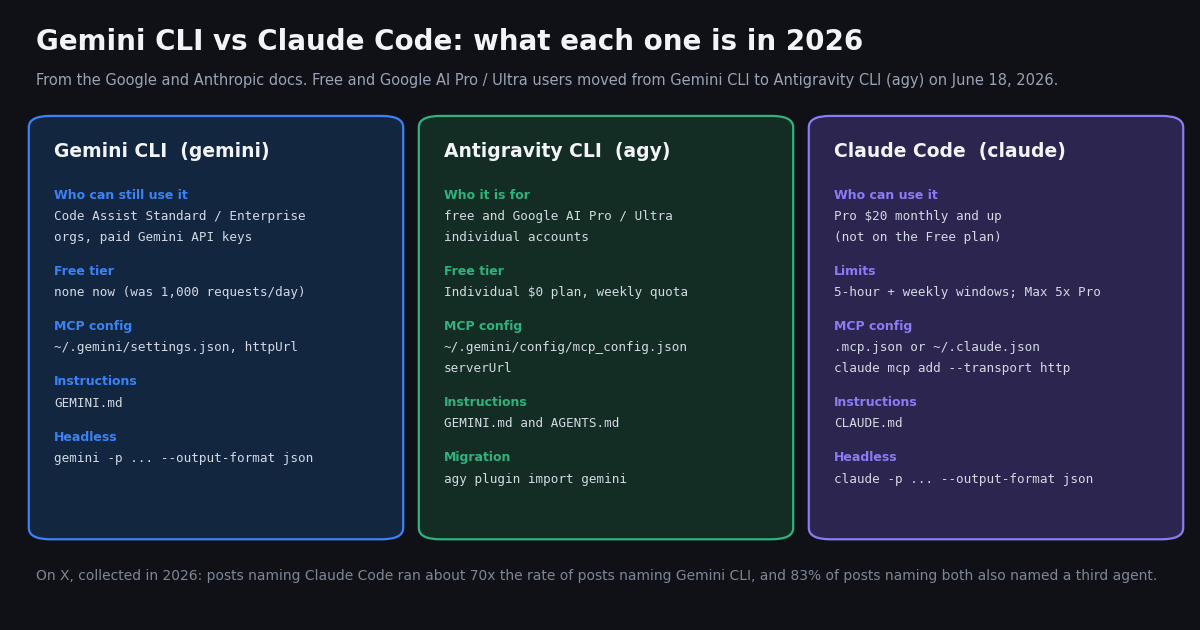
- Gemini CLI changed audience: since June 18, 2026, free and Google AI Pro / Ultra users get Antigravity CLI (
agy); Gemini CLI stays for Code Assist Standard / Enterprise orgs and paid Gemini API keys. - Quotas (Google's page): Code Assist Standard 1,500 and Enterprise 2,000 requests per user per day in Gemini CLI; the unpaid API-key tier lists 250 a day, Flash only. Antigravity's Individual plan is $0/month with basic weekly rate limits.
- Claude Code is paid-only: Pro $20 monthly ($17/month annual), Max $100 monthly (5x Pro), Ultra $200 monthly (10x Pro weekly); limits reset in 5-hour and weekly windows.
- MCP: Gemini CLI uses
httpUrl+headersin~/.gemini/settings.json; Antigravity usesserverUrlin~/.gemini/config/mcp_config.json; Claude Code usesclaude mcp add --transport httpor.mcp.json. - On X: 500 posts naming both tools averaged 2.8 an hour; 79% also named Codex and 43% Cursor. The
@geminicliaccount's newest post was 142 days old at collection. - X data bill for either agent: TwitterAPI.io charges $0.15 per 1,000 tweets returned; the official X API pay-per-use rate card lists $0.005 per post read ($5 per 1,000), about 33x more.
Most "Gemini CLI vs Claude Code" articles were written when Gemini CLI's selling point was a free Google login with 1,000 requests a day. That premise ended on June 18, 2026, when Google's developer blog post (published May 19, 2026) took effect: Gemini CLI and the Code Assist IDE extensions stopped serving free individual users and Google AI Pro / Ultra subscribers, who now use Antigravity CLI. This page compares what is true now, from the vendors' own docs, and names the replacement plainly wherever it matters.
This page is about the Google-versus-Anthropic terminal agent choice. For OpenAI's agent against Claude Code, see our Codex vs Claude Code comparison; for Claude plan limits in depth, see the Claude Code pricing guide, both linked below. Here we cover access and quotas, instruction files, MCP setup for the same X (Twitter) data server, headless runs, the cost of feeding either agent live X data, and a real-data study of how people on X talk about the two tools.
83%
Gemini CLI vs Claude Code at a glance, and which one to pick
The table puts the two agents, plus Gemini CLI's successor for individuals, on one grid. Every row comes from a page we fetched while writing this comparison; plan prices are written exactly as each vendor shows them.
You are an individual and want to spend nothing on the agent. Gemini CLI is not an option on a free Google login any more. Use Antigravity CLI on its $0 Individual plan, add the MCP server with serverUrl, and expect weekly rate limits rather than a daily request count.
Your company already pays for Gemini Code Assist Standard or Enterprise. Gemini CLI remains supported for you with 1,500 or 2,000 requests per user per day, it is open source, and gemini -p with --output-format json covers scheduled jobs. Claude Code would be an additional paid seat.
You already pay for Claude Pro or higher. Claude Code is included, its headless mode documents structured output and cost reporting, and .mcp.json lets a team share the same X data server config through version control.
You want both. The configs above are small enough to keep side by side in one repository: GEMINI.md and CLAUDE.md pointing at one shared instructions file, and the same MCP URL in .gemini/settings.json or .agents/mcp_config.json and .mcp.json. The X data bill is identical either way, because it depends on tweets returned, not on the agent.
What we did not do. Neither vendor publishes a like-for-like benchmark of the two agents, and we did not run one. This page compares documented features, plans and limits, then measures the public conversation on X, which is the part we can count.
What happened to Gemini CLI on June 18, 2026
Google announced the change in a developer blog post on May 19, 2026 titled "An important update: transitioning Gemini CLI to Antigravity CLI" (developers.googleblog.com/an-important-update-transitioning-gemini-cli-to-antigravity-cli). From June 18, 2026, Gemini CLI and the Gemini Code Assist IDE extensions stopped serving requests for Google AI Pro and Ultra subscribers and for free users of Gemini Code Assist for individuals. Gemini Code Assist for GitHub stopped accepting new installations on GitHub organizations from the same date.
Who kept access. The same post says organizations with a Gemini Code Assist Standard or Enterprise license keep their access unchanged, organizations using Code Assist for GitHub through Google Cloud keep access, and Gemini CLI stays available through paid Gemini and Gemini Enterprise Agent Platform API keys. The Gemini CLI quota page now opens with the line "Unpaid tier and Google One users: Gemini CLI was replaced by Antigravity CLI on June 18th, 2026."
The project is not archived. The google-gemini/gemini-cli repository on GitHub is still public under Apache-2.0, still installs with npm install -g @google/gemini-cli, and still lists weekly preview and stable release channels. Its README now states "No free tier or Google AI plans" and points individuals to Antigravity CLI. Google's quota page also says Gemini CLI has not been optimized for Gemini 4 Argon and recommends Antigravity for that model.
What carried over. Google's post says Antigravity CLI keeps Agent Skills, Hooks, Subagents and Extensions (now as Antigravity plugins), without 1:1 feature parity at launch. The migration doc at antigravity.google/docs/cli/gcli-migration adds the practical details: the command is agy, GEMINI.md and AGENTS.md files are still read, workspace skills move from .gemini/skills/ to .agents/skills/, and agy plugin import gemini converts old extensions into plugins.
Why this matters for the comparison. Almost every older Gemini CLI vs Claude Code article leads with "Gemini CLI is free, Claude Code is not." For an individual today the free option is Antigravity CLI, which our Antigravity vs Cursor page covers in detail, including its MCP file format.
Quotas and plans: what each one costs and how far it goes
Google's Gemini CLI quota page (geminicli.com/docs/resources/quota-and-pricing) lists a maximum number of requests per user per day for each access method. Requests are also limited per user per minute and depend on service availability at times of high demand; the page gives no per-minute figure.
The same page still lists Code Assist for individuals (1,000 a day), Google AI Pro (1,500) and Google AI Ultra (2,000), but those are the groups Google moved to Antigravity CLI, so treat those rows as historical. Antigravity's own pricing page (antigravity.google/pricing) lists the Individual plan at $0/month with basic weekly rate limits, unlimited Tab completions and unlimited Command requests; Google AI Pro and Ultra get "More rate limits" and "Even more rate limits" with a flexible AI credit pool, and Business plans through Google Cloud start at $30 USD per seat per month, or pay-as-you-go with a $0 seat fee.
Claude Code has no free tier. Anthropic's pricing page (claude.com/pricing) lists:
How to read the two models. Google meters Gemini CLI in requests per day per seat; Anthropic meters Claude Code in usage windows that refresh every five hours and every week, scaled by plan. A request count and a usage window are not convertible into each other, so we do not compute a "requests per dollar" figure for either. For the full Claude Code limit mechanics, and API-key billing as an alternative to a plan, see our Claude Code pricing guide.
Instruction files and MCP: connecting the same X data server to each agent
Instruction files first. Both agents read a markdown file in the project root before they act. Gemini CLI and Antigravity CLI read GEMINI.md in the workspace and a global ~/.gemini/GEMINI.md; the Antigravity migration doc says both, and AGENTS.md, are still read by agy, so a team moving over keeps its files as they are. Claude Code reads CLAUDE.md. If a repository already carries a GEMINI.md, the simplest way to keep one source of truth is a short CLAUDE.md that points at a shared file.
What to put in it for an X data agent. Name the environment variable that holds the X data key (TWITTERAPI_IO_API_KEY), tell the agent to page with next_cursor and stop when has_next_page is false, and set a page cap per run. Those three lines prevent the two most common surprises: a key pasted into a chat transcript and an unbounded pagination loop.
All three tools speak the Model Context Protocol, so one remote server works in each. We use the TwitterAPI.io hosted MCP server at https://mcp.twitterapi.io/mcp, which takes your API key as a Bearer token; the snippets below are the exact field names from each vendor's MCP docs.
Gemini CLI. Add an mcpServers entry to ~/.gemini/settings.json (user) or .gemini/settings.json (project). For a streamable HTTP server the key is httpUrl (plain url means SSE), with headers, an optional timeout in milliseconds (default 600,000) and trust, which skips tool confirmations when true. Environment variables expand as $VAR or ${VAR}. The one-line equivalent is gemini mcp add --transport http --header "Authorization: Bearer ..." twitterapi https://mcp.twitterapi.io/mcp.
Antigravity CLI. MCP servers move out of settings.json into standalone files: ~/.gemini/config/mcp_config.json (global) and .agents/mcp_config.json (workspace). Remote servers use serverUrl instead of url or httpUrl. If you are migrating, agy plugin import gemini moves MCP definitions from old extensions for you, but servers declared inline in settings.json need copying by hand with the key renamed.
Claude Code. Run claude mcp add --transport http --scope user twitterapi-io https://mcp.twitterapi.io/mcp --header "Authorization: Bearer ..." once, or commit a project .mcp.json. Local scope is the default and is stored in ~/.claude.json under that project's path; user scope is also in ~/.claude.json; project scope is the shared .mcp.json, where ${VAR} and ${VAR:-default} expand in url and headers. Claude Code warns when one MCP tool result passes 10,000 tokens and caps it at 25,000 by default (MAX_MCP_OUTPUT_TOKENS raises it), so ask for a page or two of tweets at a time.
Check that it loaded. In Gemini CLI and Claude Code, /mcp inside a session lists connected servers and their tools. A 401 from the server almost always means the header is missing the Bearer prefix or the environment variable did not expand.
// Gemini CLI: ~/.gemini/settings.json
{
  "mcpServers": {
    "twitterapi": {
      "httpUrl": "https://mcp.twitterapi.io/mcp",
      "headers": { "Authorization": "Bearer ${TWITTERAPI_IO_API_KEY}" },
      "timeout": 30000
    }
  }
}

// Antigravity CLI: ~/.gemini/config/mcp_config.json  (serverUrl, not httpUrl)
{
  "mcpServers": {
    "twitterapi": {
      "serverUrl": "https://mcp.twitterapi.io/mcp",
      "headers": { "Authorization": "Bearer YOUR_TWITTERAPI_IO_KEY" }
    }
  }
}

// Claude Code: .mcp.json in the project root (shared with the team)
{
  "mcpServers": {
    "twitterapi": {
      "type": "http",
      "url": "https://mcp.twitterapi.io/mcp",
      "headers": { "Authorization": "Bearer ${TWITTERAPI_IO_API_KEY}" }
    }
  }
}Headless and scripted runs: gemini -p vs claude -p
A terminal agent is most useful for X data when it runs on a schedule without you watching: a morning digest of what an account posted, a check for new mentions of a launch, a weekly topic summary.
Gemini CLI runs headless when it is started outside a TTY or with -p / --prompt. --output-format json returns one object with response, stats and an optional error; a streaming JSON mode returns newline-delimited events. That is enough to wrap it in cron or CI, as long as your access method is one that still works (an org license or a paid API key).
Claude Code runs headless with -p (or --print). --output-format takes text, json or stream-json; the JSON payload includes total_cost_usd so a script can track spend, and --json-schema returns a validated structured_output field. --allowedTools pre-approves specific tools, for example Bash(python x_report.py). Anthropic recommends --bare for scripts: it skips auto-discovery of hooks, skills, plugins, MCP servers and CLAUDE.md, and it needs ANTHROPIC_API_KEY because bare mode does not use your subscription login. In bare mode only MCP servers you pass with --mcp-config connect.
A practical pattern for both. Put the X data fetch in a small Python script (the one at the end of this page), let the agent run it, and ask the agent only to summarize the output. The script controls pages and cost; the agent does the reading. This also keeps the X data bill independent of which agent you choose.
What it costs to give either agent live X (Twitter) data
Neither agent can read X on its own. Whichever you choose, the X data comes from an API, and that bill is separate from the agent plan.
TwitterAPI.io (pay only for the data returned). Tweet endpoints such as /twitter/tweet/advanced_search and /twitter/user/last_tweets cost 15 credits per tweet returned, which is $0.15 per 1,000 tweets. Each request has a 15-credit minimum, so a search that finds nothing costs $0.00015 and a full 20-tweet page costs $0.003. Profiles from /twitter/user/info cost 18 credits each, $0.18 per 1,000. No X account is needed for reads. New accounts that pass the automatic bot check get up to $1 of free credits (at most 100,000 credits, no card, one per person or network, expiring after 31 days); purchased credits never expire.
Official X API. The pay-per-usage rate card at docs.x.com/x-api/getting-started/pricing lists $0.005 per post read ($5 per 1,000), $0.010 per user read and $0.010 per follower or following read, capped at 3 million post reads a month before Enterprise. Per 1,000 tweets that is $5 against $0.15, about 33x.
Our own study as an example. The X study on this page returned 977 tweets plus 3 profile lookups. At TwitterAPI.io rates that is about $0.15; the same 977 post reads on the X pay-per-usage rate card would be about $4.88 before the profile reads.
Polling cost floor. A scheduled agent that checks a search every 60 seconds and finds nothing costs 43,200 checks a month, $6.48; every 5 minutes it is $1.30. For an agent digest that runs a few times a day, the X data line is usually smaller than the agent plan.
Rate limits. Accounts run at 0.2 requests per second before the first payment and 20 per second once paid (50 on Scale, 500 on Business, up to 1,000 on request). Subscription plans run from Starter $29 to Business $1,499 a month; see the pricing page for what each includes.
What X posts comparing Gemini CLI and Claude Code actually talk about
We pulled the most recent 500 X posts that contain both "gemini cli" and "claude code" (reposts excluded), plus 200 recent posts naming Gemini CLI and 120 naming Claude Code, all collected in 2026. Topic tags come from simple keyword rules in our analysis script, so they measure what posts mention, not what they conclude.
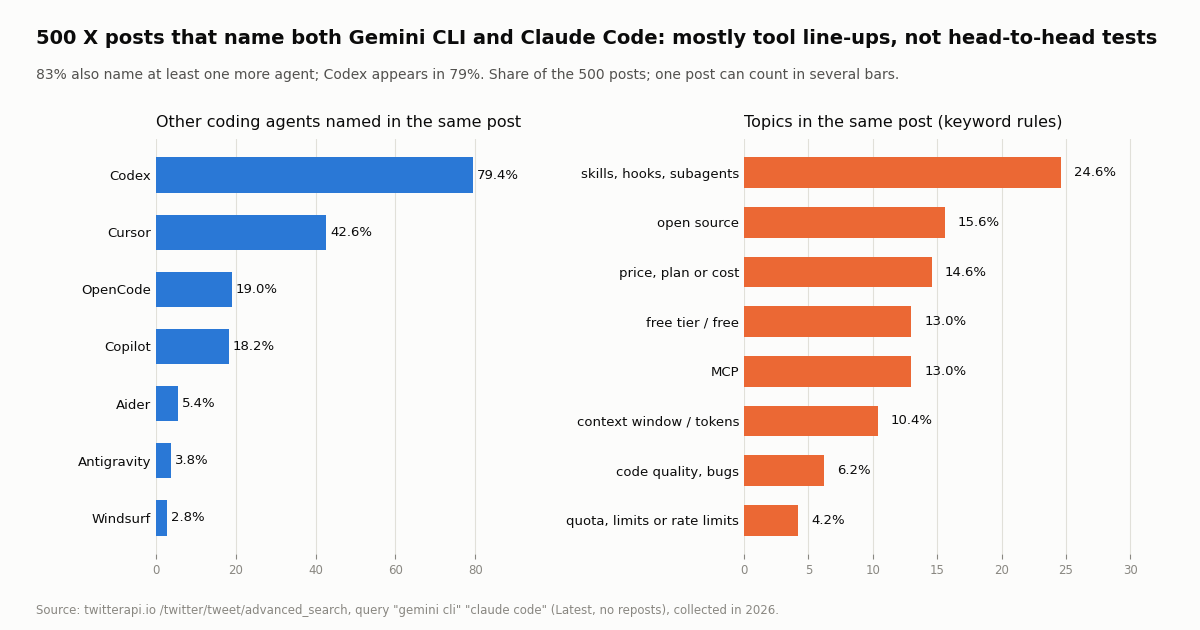
These are line-up posts, not duels. 83.2% of the posts naming both tools also named at least one more coding agent. Codex appeared in 79.4%, Cursor in 42.6%, OpenCode in 19.0% and Copilot in 18.2%. Antigravity appeared in only 3.8%, which suggests that much of the X conversation still uses the old product name.
Shared extension formats are the top topic. Skills, hooks and subagents came up in 24.6% of the posts naming both, well ahead of price (14.6%) or quotas (4.2%). Many of these posts announce a skill, plugin or config that works across several agents, which matches the documented overlap: both agents read a markdown instructions file and both load MCP servers.
Engagement is thin and skewed. The median post naming both tools got 2 likes and 235 views; the 90th percentile reached 53.2 likes and 5,381.3 views, and 25.8% got no likes at all. 87.4% came from accounts with a blue check, and 57.4% carried a link, mostly to repositories or write-ups.
Language mix. 55.2% of the posts naming both were in English and 25.6% in Chinese, and 4.4% in Japanese. Posts naming Claude Code had a larger Japanese share (23.3%).
Within Gemini CLI's own conversation, 58% of recent posts naming Gemini CLI also named Claude Code, and 9.5% mentioned Antigravity. Gemini CLI is now discussed mostly as one entry in a list next to Claude Code.
How busy each conversation is, and what the official accounts post
Volume. Posts naming both tools arrived at about 2.8 an hour across a 181.1-hour window. Posts naming Gemini CLI ran at 3.5 an hour over 57.4 hours. Posts naming Claude Code ran at about 245.2 an hour, so 120 posts covered only 29 minutes. That makes Claude Code's conversation roughly 70x larger by posting rate, with the caveat that the Claude Code window is short and reflects one point in the day.
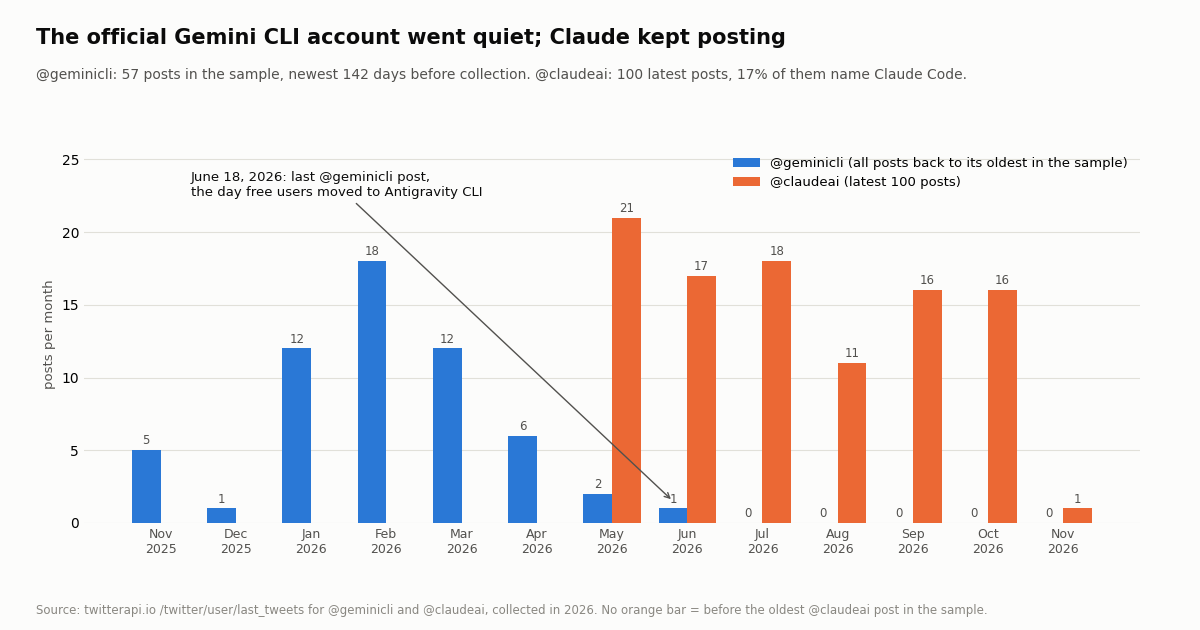
The official Gemini CLI account stopped. @geminicli (about 51,600 followers) returned 57 posts in total; the newest was dated June 18, 2026, the day of the transition, which was 142 days before our collection. Its posting peaked early in the year and fell to 2 posts in May and 1 in June. When it did post, the median post drew 761 likes and 67,153 views, and 24.6% of posts were about skills, hooks or subagents.
Claude Code news comes from the main Claude account. The @claude_code handle describes itself as a community account, so we used the main @claudeai account (about 2.0 million followers) posted 0.54 times a day across its latest 100 posts; 17% of them named Claude Code, and the median post drew 11,556.5 likes and 2,124,293.5 views.
What this means for you. If you want to follow product news, Claude Code's comes through @claudeai and Anthropic's docs; Gemini CLI's now comes through its GitHub releases and the Antigravity channels rather than the @geminicli account.
How we collected this
Question. When people on X mention Gemini CLI and Claude Code together, what else do they mention, how much engagement do those posts get, how busy is each tool's conversation, and what do the official accounts post?
Queries and accounts. /twitter/tweet/advanced_search with queryType Latest for "gemini cli" "claude code" -filter:retweets (500 posts), "gemini cli" -filter:retweets (200) and "claude code" -filter:retweets (120); /twitter/user/last_tweets for @geminicli (57 posts, its full history in the endpoint's window) and @claudeai (100), plus three profile lookups. 53 requests, 977 tweets, about $0.15 of credits, collected in 2026.
Method. Topic and tool tags are case-insensitive keyword rules (for example \bcodex\b, mcp, free tier) in the published analyze.py; posts per hour = posts divided by the hours between the oldest and newest post in each sample.
What the sample cannot show. It is the most recent slice of each query at one point in time, not a full history; keyword rules miss sarcasm and paraphrase; the Claude Code sample spans under an hour, so its hourly rate depends on the time of day; and X search returns what X indexes, not every post.
Privacy. Aggregates only. Search results come from private individuals, so raw search pages were not kept in the repository and the published sample has no ids, URLs, text or handles. Only the organization accounts @geminicli and @claudeai are named.
"""compare_agents_on_x.py - the X data job either agent can run headless.

Counts how often recent X posts name a set of coding agents next to each other.
    pip install requests
    export TWITTERAPI_IO_API_KEY=...        # twitterapi.io dashboard
    python compare_agents_on_x.py
    # then:  gemini -p "Run python compare_agents_on_x.py and summarize it" --output-format json
    #   or:  claude -p "Run python compare_agents_on_x.py and summarize it" --allowedTools "Bash(python compare_agents_on_x.py)"

Cost: 15 credits per tweet returned ($0.15 per 1,000 tweets); a full 20-tweet page is $0.003,
so MAX_PAGES = 10 costs at most $0.03.
"""
import os
import re
from collections import Counter

import requests

BASE = "https://api.twitterapi.io"
HEADERS = {"X-API-Key": os.environ["TWITTERAPI_IO_API_KEY"]}
QUERY = '"gemini cli" "claude code" -filter:retweets'
MAX_PAGES = 10
AGENTS = ["codex", "cursor", "opencode", "copilot", "antigravity", "aider", "cline", "kiro"]


def fetch(query, max_pages):
    tweets, cursor = [], ""
    for _ in range(max_pages):
        params = {"query": query, "queryType": "Latest", "cursor": cursor}
        r = requests.get(f"{BASE}/twitter/tweet/advanced_search", headers=HEADERS, params=params, timeout=30)
        r.raise_for_status()
        body = r.json()
        tweets.extend(body.get("tweets", []))
        if not body.get("has_next_page") or not body.get("next_cursor"):
            break
        cursor = body["next_cursor"]
    return tweets


def main():
    tweets = fetch(QUERY, MAX_PAGES)
    if not tweets:
        print("No posts found.")
        return
    named = Counter()
    for t in tweets:
        text = (t.get("text") or "").lower()
        for a in AGENTS:
            if re.search(rf"\b{a}\b", text):
                named[a] += 1
    likes = sorted(t.get("likeCount", 0) for t in tweets)
    print(f"{len(tweets)} posts, newest {tweets[0]['createdAt']}, oldest {tweets[-1]['createdAt']}")
    print(f"median likes: {likes[len(likes) // 2]}")
    for a, c in named.most_common():
        print(f"  also names {a}: {c} ({100 * c / len(tweets):.1f}%)")
    top = max(tweets, key=lambda t: t.get("likeCount", 0))
    print(f"most liked: {top.get('likeCount', 0)} likes, {top.get('viewCount', 0)} views, {top['url']}")


if __name__ == "__main__":
    main()
Researching this?Free starter credits cover end-to-end testing — Google sign-in, no card. Get a key.
Questions readers ask
Is Gemini CLI still free?
Not for individuals. Since June 18, 2026, free users of Gemini Code Assist for individuals and Google AI Pro / Ultra subscribers are served by Antigravity CLI instead, and the Gemini CLI README states "No free tier or Google AI plans." Gemini CLI still works with Code Assist Standard or Enterprise licenses and with paid Gemini API keys. Antigravity CLI's Individual plan is $0/month with basic weekly rate limits.
Is Gemini CLI discontinued?
No. The google-gemini/gemini-cli repository is still public under Apache-2.0 and still ships preview and stable releases. What changed is who it serves: organizations with Code Assist Standard or Enterprise and paid API key users keep access; individuals moved to Antigravity CLI.
Is Claude Code better than Gemini CLI?
Neither vendor publishes a like-for-like benchmark of the two agents, and we did not run one. They overlap in documented features: a markdown instructions file, remote MCP servers with a Bearer header, and headless runs with JSON output. The deciding factors are access (Claude Code needs a paid Claude plan; Gemini CLI needs an org license or paid API key) and which model family you prefer.
Can I use Claude Code for free?
No. Anthropic's pricing page lists Claude Code as not included on the Free plan. The lowest plan that includes it is Pro at $20 monthly or $17/month billed annually ($200 up front). You can also run Claude Code with an API key and pay API rates instead of a plan.
How many requests a day does Gemini CLI allow?
Google's quota page lists 1,500 requests per user per day on Gemini Code Assist Standard and 2,000 on Enterprise and Workspace AI Ultra, plus 250 a day (Flash only) on an unpaid Gemini API key. Pay-as-you-go API keys and Vertex AI vary. Requests are also limited per minute, without a published figure.
What is the difference between Gemini CLI and Antigravity CLI?
Antigravity CLI (agy) is Google's replacement terminal agent for individual accounts. Google says it keeps Agent Skills, Hooks, Subagents and Extensions (as plugins) without 1:1 parity at launch. MCP servers move to ~/.gemini/config/mcp_config.json with serverUrl, workspace skills move to .agents/skills/, and GEMINI.md is still read.
Can Gemini CLI or Claude Code read Twitter (X)?
Not on their own. Add an X data MCP server or let the agent run a script against an X data API. With TwitterAPI.io, reads cost $0.15 per 1,000 tweets returned and need no X account; the official X API pay-per-usage rate card lists $0.005 per post read, $5 per 1,000.
Gemini CLI vs Codex: how does that compare?
Codex is OpenAI's terminal agent, and in our X sample it was named in 79% of the posts that named both Gemini CLI and Claude Code, so many people compare all three. Our Codex vs Claude Code page covers Codex's plans, AGENTS.md and codex exec in detail.
Continue
- Google for Developers blog: transitioning Gemini CLI to Antigravity CLI (who keeps access after June 18, 2026)
- Gemini CLI docs: quotas and pricing (requests per user per day by access method)
- google-gemini/gemini-cli on GitHub (Apache-2.0, install command, access notice)
- Antigravity docs: migrating from Gemini CLI (agy, mcp_config.json, serverUrl, skills paths)
- Claude Code docs: MCP (claude mcp add, scopes, .mcp.json, output token limits)
- Claude plans and pricing (Free, Pro, Max, Ultra, Team, Enterprise)
- X (Twitter) API guide: endpoints, pricing and access options
- Codex vs Claude Code: setup, MCP, headless runs and pricing
- Claude Code pricing and usage limits explained
- Antigravity vs Cursor: plans and MCP setup
- How to use Gemini with the Twitter (X) API
- How to use Claude with the Twitter (X) API
- TwitterAPI.io MCP server for AI agents
- TwitterAPI.io pricing: pay per tweet returned
- 01Warp Pricing in 2026: Plans, Dollar Usage, Add-ons and the Real Monthly Bill
- 02Roo Code vs Cline in 2026: After the Shutdown, Which One to Run
- 03What Is x402? How the HTTP 402 Payment Protocol Works, With a Real 402 Offer Decoded
- 04Windsurf (now Devin Desktop) vs Cursor in 2026: plans, agents, MCP and what X users say
- 05Manus Pricing in 2026: Plans, Credits per Task, and What People on Twitter (X) Say It Costs
- 06Claude Code hooks: every event, the settings.json shape, and tested recipes (plus an X data budget guard)
- 07OpenCode vs Claude Code: config, plugins, models and one Twitter (X) MCP server in both
- 08Claude Code Pricing in 2026: Plans, Usage Limits and the Real Cost of an Always-On Agent
Writing about something you built with TwitterAPI.io? Our community rewards program pays API credits for honest tutorials, build logs and videos.
Stop reading. Start building.
Starter credits cover real testing on real data. Google sign-in, no card, no application queue.
Get an API keyAlready building with TwitterAPI.io? Publish an honest tutorial or build log about it and earn up to $200 a month in API credits.