Twitter (X) profiler: how to profile an account in 2026
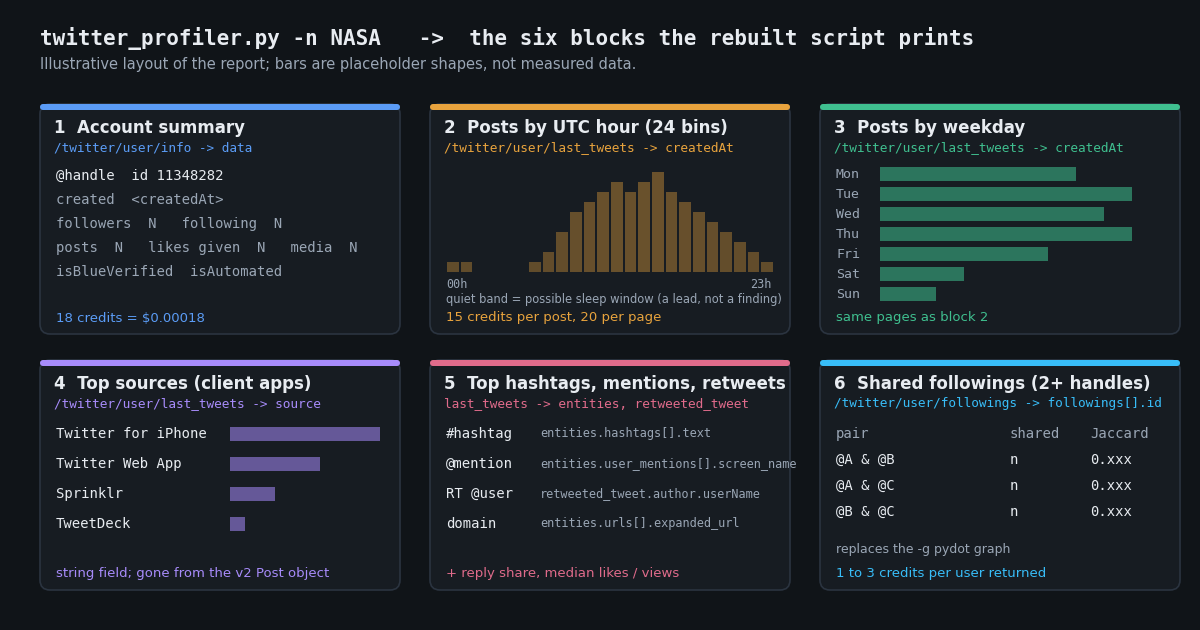
Search for "twitter profiler" and the top results split into two groups: the GitHub repository eldraco/twitter_profiler and its upstream x0rz/tweets_analyzer, and a row of hosted "profile analyzer" pages such as foller.me (foller.me) that show a word cloud and a posting-time chart for one handle at a time. The GitHub scripts are the ones people actually mean by the phrase, because they print a report you can diff across accounts and keep in a case file. They also no longer run, for reasons that have nothing to do with the code quality: the Twitter API v1.1 endpoints they call, the secrets.py consumer keys they expect, and the utc_offset field they used to shift the hour histogram all belong to an API X has since put behind paid v2 access. This page is the rebuild: the same report, block by block, on endpoints that return the data today.
Scope, so the page does not overlap with its sibling: the OSINT on Twitter (X) guide on this site covers the investigative questions (creation date and account age, the Snowflake timestamp inside a post ID, location signals, what survives deletion) and already shows an illustrative posting-hour histogram. This page is the metrics report: activity by hour and weekday, client sources, hashtags, mentions, retweeted users, reply share, median engagement, and the shared-followings overlap that was the original tool's -g graph. For who an account is, read the OSINT guide; for what an account does, read on. The two scripts share a createdAt parser and nothing else.
Everything below is read-only public data. The script needs one X-API-Key header, no X login, no OAuth app approval, and no proxy. Endpoint paths, field names and prices are quoted from docs.twitterapi.io and the twitterapi.io pricing page; the official X API figures are from docs.x.com, and the facts about the old script are from its README, requirements.txt and source as published on GitHub.
What twitter_profiler printed, and why the script no longer runs
The README of eldraco/twitter_profiler describes it in one sentence: "Twitter Profiler is a tool to download data about users in Twitter and analyze it in a simple manner." The feature list that follows is the specification this page rebuilds: "Average tweet activity, by hour and by day of the week", "Timezone and language set for the Twitter interface", "Sources used (mobile application, web browser, ...)", geolocations, "Most used hashtags, most retweeted users and most mentioned users", and "Friends analysis based on most frequent timezones/languages". Its one addition over the upstream x0rz/tweets_analyzer (about 3,000 stars, same GPLv3 licence) is the comparison question the README poses, "Which users are followed simultaneously by the accounts xx,yy,zz,aa,bb?", answered by the -g / --graphusers flag, which writes a shared-friends graph as graph.png and graph.dot through pydot, with -m setting the minimum number of shared connections a node needs to appear (default 2).
The usage line is twitter_profiler.py -n <screen_name> [options], with comma-separated names for several accounts, -l / --limit for the number of posts to download (default 1,000), -o / --offline to re-run on cached data and -x / --redocache to clear a corrupted cache. Setup starts with "First, update your API keys in the secrets.py file. To get API keys go to https://apps.twitter.com/", and the README asks for Python 2.7+ with tweepy, ascii_graph, tqdm and numpy. The requirements.txt pins them: tweepy==3.5.0, ascii_graph==1.2.0, tqdm==4.11.2, numpy==1.12.0. Tweepy 3.5.0 dates from November 2015 (Tweepy changelog); Tweepy 4.0.0 in September 2021 dropped Python 2 and renamed API.friends to API.get_friends and API.friends_ids to API.get_friend_ids, so even the import line is two breaking releases behind.
Inside the script the data comes from four Tweepy calls, each a thin wrapper on a Twitter API v1.1 endpoint: tweepy.Cursor(api.user_timeline, screen_name=..., tweet_mode='full') on GET statuses/user_timeline, api.get_user(screen_name) on GET users/show, api.friends_ids on GET friends/ids and api.followers_ids on GET followers/ids. The report sections it prints, in order, are [+] User, a created-on and ID block, [+] Top Languages from Tweets, [+] Top Sources from Tweets, [+] Top Places from Tweets, [+] Top HashTags from Tweets, [+] Top Domains from Tweets, [+] Top Mentioned Users from Tweets, [+] Top Most retweeted users from Tweets, an ASCII "Daily activity distribution (per hour)", a "Weekly activity distribution (per day)", and then language and time-zone statistics over the friends and followers it fetched.
Three things broke it, in order of severity. First, access: in August 2023 X announced it would "retire legacy v2 access tiers including Essential and Elevated" within 30 days and that "we are deprecating some of our v1.1 endpoints and asking you to migrate to the v2 equivalents" (quoted by TechCrunch from X's developer announcement); docs.x.com now files v1.1 under "Legacy: limited support, minimal updates" and tells developers to "Use X API v2 for all new projects". The v1.1 timeline the script paginated, /1.1/statuses/user_timeline.json, is listed on docs.x.com as replaced by /2/users/:id/tweets, with a different response format that is "not backward-compatible with v1.1 formats" and a maximum of 100 posts per request instead of 200. Second, fields: the v2 Post data dictionary on docs.x.com lists attachments, author_id, created_at, entities, geo, lang, public_metrics, referenced_tweets and the rest, but no source, so the "Top Sources" block has nothing to count on the official API. The hour histogram was shifted by tweet.user.utc_offset, and X's v1.1 user-object reference has listed utc_offset and time_zone as deprecated fields set to null since 2018, which is why the script grew a manual --utc-offset flag. Third, money: the official pay-per-usage rate card is $0.005 per post read and $0.010 per user read (docs.x.com pricing, verified 2026), so the script's default of 1,000 posts per handle would cost $5.00 per account before the friends and followers lookups.
None of that is a criticism of the code. The design, one profile read, a few hundred posts, a followings list, and counters over the fields, is exactly right, and it transfers onto any API that returns those fields. The rest of this page is that transfer.
Feature map: every twitter_profiler block, the endpoint that replaces it, and the cost
Each row is one block of the original report, the twitterapi.io endpoint and field that produce it now, and what that read costs at list price (100,000 credits = $1; endpoint paths are relative to https://api.twitterapi.io, every call is a GET with the X-API-Key header). Blocks the original built on fields X no longer serves are marked and given the nearest substitute.
Two observations about the table. Everything in the original except the interface time zone comes back from fields that exist today, and the fields that matter most for profiling, source and createdAt, are on every post in a timeline page, so the whole report after the summary line is built from one paginated endpoint. The followings list is the only part that costs more than a cent per handle, and only when you ask for it.
Step 1: the account summary from /twitter/user/info
GET /twitter/user/info?userName=<handle> returns the profile inside data with camelCase keys: id, userName, name, createdAt (classic format, for example Thu Dec 13 08:41:26 +0000 2007), followers, following, statusesCount, favouritesCount, mediaCount, location, description, isBlueVerified, isVerified, protected, isAutomated, automatedBy and pinnedTweetIds (docs.twitterapi.io, verified 2026). That is the [+] User block plus three counters the old script did not have: likes given (favouritesCount), media posts (mediaCount) and the automation label (isAutomated), which is X's own declaration that an account is a bot rather than an inference.
Two behaviours matter for a script that loops over a list of handles. The endpoint never returns HTTP 404: a missing, renamed or suspended handle comes back as HTTP 200 with status: "error", msg: "user not found" and data: null, so check status and data, not the HTTP code. And id is the permanent identifier; userName changes when the owner renames. Store the ID with every report so two reports taken a month apart can be matched after a rename. Profiles are billed at 18 credits each, $0.18 per 1,000, so refreshing the summary line for a watch-list of 500 handles costs $0.09.
The ratio statusesCount divided by account age in days is the only lifetime number the script prints; everything else is computed over the sample pulled in step 2, which is deliberate. A twelve-year-old account's lifetime average says little about what it does this quarter.
import os, requests

HEADERS = {"X-API-Key": os.environ["TWITTERAPI_IO_KEY"]}

r = requests.get("https://api.twitterapi.io/twitter/user/info",
                 params={"userName": "NASA"}, headers=HEADERS, timeout=30)
r.raise_for_status()
body = r.json()
if body.get("status") == "error" or not body.get("data"):
    raise SystemExit(body.get("msg"))      # "user not found": renamed, suspended or deleted; never a 404
u = body["data"]
print(u["id"], u["userName"], u["createdAt"], u["followers"], u["following"],
      u["statusesCount"], u["favouritesCount"], u["mediaCount"], u["isAutomated"])
Step 2: 200 posts from /twitter/user/last_tweets, binned by UTC hour, weekday and source
GET /twitter/user/last_tweets takes userName (or userId, which the docs recommend as faster and more stable), cursor (empty string for the first page) and includeReplies (default false; set it to true, because reply share is part of the profile). Each page returns up to 20 posts sorted by creation date, newest first. The list is nested at data.tweets, and has_next_page and next_cursor sit at the top level of the body, which is the one place in the API where the list and its cursor live at different depths; the script reads body["data"]["tweets"] and body["has_next_page"]. Ten pages give 200 posts, which is enough for a 24-bin histogram to have a visible shape; the original defaulted to 1,000, and PAGES=50 gets you there at five times the cost.
Each post carries id, createdAt, text, source, lang, isReply, inReplyToUsername, likeCount, retweetCount, replyCount, quoteCount, viewCount, bookmarkCount, entities, retweeted_tweet, quoted_tweet, place and an author object with userName (twitterapi.io response shapes, verified 2026). createdAt is the classic format with a +0000 offset on every post, so datetime.strptime(value, "%a %b %d %H:%M:%S %z %Y") gives an aware UTC datetime and .hour and .weekday() are the two bins. The old script shifted every timestamp by the user's utc_offset; that field is gone, so the histogram here is in UTC and says so in its heading. If you know the account's zone, shift once with astimezone() before binning rather than guessing an offset.
source is the client application as a plain string, documented with the example Twitter for iPhone, so Counter(t["source"] for t in tweets) is the whole "Top Sources" block. The original had to strip an HTML anchor from the v1.1 source field; there is nothing to strip here. Sources are the single most useful profiling signal in the report: a personal account posting from one phone app, a brand posting from a scheduling tool, and an account mixing a web client with an automation tool read differently at a glance, and a change in the dominant source over time is a lead worth checking.
The script adds three numbers the original did not print, all from fields already on the page: the reply share (isReply), the retweet share (retweeted_tweet is non-null), and the median likeCount, viewCount and replyCount over original posts only. Medians rather than means because one viral post would otherwise define the account. For a proper rate, divide by followers from step 1 or use the engagement-rate calculator linked below, which applies the same inputs.
from collections import Counter
from datetime import datetime

TWEET_DATE = "%a %b %d %H:%M:%S %z %Y"     # e.g. Tue Dec 10 07:00:30 +0000 2024

def timeline(handle, pages=10):
    out, cursor = [], ""
    for _ in range(pages):
        r = requests.get("https://api.twitterapi.io/twitter/user/last_tweets",
                         params={"userName": handle, "cursor": cursor, "includeReplies": "true"},
                         headers=HEADERS, timeout=30)
        r.raise_for_status()
        body = r.json()
        if body.get("status") == "error":
            raise SystemExit(body.get("msg"))
        page = (body.get("data") or {}).get("tweets") or []   # list is nested under data
        out.extend(page)
        if not body.get("has_next_page") or not page:         # cursor fields are top-level
            break
        cursor = body["next_cursor"]
    return out

tweets = timeline("NASA")
when = [datetime.strptime(t["createdAt"], TWEET_DATE) for t in tweets]
by_hour = Counter(d.hour for d in when)          # UTC: every createdAt carries +0000
by_day = Counter(d.strftime("%a") for d in when)
by_source = Counter(t.get("source") or "unknown" for t in tweets)
print(by_hour.most_common(3), by_day.most_common(3), by_source.most_common(3))
Step 3: hashtags, mentions, retweeted users, domains and languages from the post entities
The four "Top ..." blocks after Sources are all counters over sub-objects of the same posts. entities.hashtags is a list of {"text", "indices"}; entities.user_mentions is a list of {"screen_name", "name", "id_str"}; entities.urls is a list of {"url", "expanded_url", "display_url", "indices"} (twitterapi.io OpenAPI schema for the tweet object, verified 2026). Lower-case hashtags before counting, because #Space and #space are the same tag to X's search but different keys to a Counter. For domains, take urlparse(expanded_url).netloc and strip a leading www.; t.co never appears because expanded_url is already the destination.
Retweets are posts where retweeted_tweet is a full tweet object rather than null, and the retweeted account is retweeted_tweet.author.userName. That is the whole "Top Most retweeted users" block, and it is a cleaner signal than mentions: a mention can be a reply to a critic, a retweet is an endorsement of sorts. Quote posts are the same shape under quoted_tweet and are worth a separate counter if the account quotes a lot. lang is X's per-post language classification, which replaces the old "language set for the Twitter interface"; it is a property of the text, not of the account's settings, and a mixed account will show two or three codes with the shares next to them.
place is present only when the author attached a location to the post, which few accounts do, so the "Top Places" block is usually empty and the script falls back to the profile location string from step 1. The OSINT guide linked below explains the other location signals, including the account-based-in label from /twitter/user_about; this page does not repeat that material.
For an account you are profiling because of who talks to it rather than what it says, GET /twitter/user/mentions?userName=<handle> returns the posts that mention it, 20 per page with the same tweet shape and top-level tweets, has_next_page and next_cursor, and takes sinceTime and untilTime in Unix seconds. Run the same counters over that list and you get the inbound profile: who mentions the account, from which client, at which hours. It is billed like any other tweet endpoint, 15 credits per post returned.
Step 4: shared followings for two or more handles (the -g graph as a Jaccard table)
The original's -g flag drew a directed graph from each profiled account to the friends it shares with the others, coloured nodes by how many of the profiled accounts follow them, and dropped nodes below the -m threshold. A graph image is pleasant for three accounts and unreadable for ten; the rebuild prints the same information as two tables. GET /twitter/user/followings?userName=<handle>&pageSize=200&cursor= returns the accounts a handle follows, newest follow first, as a top-level followings list with snake_case profiles (id, screen_name, name, followers_count, friends_count, statuses_count, created_at, location, description, protected, verified) and has_next_page / next_cursor at the top level. pageSize accepts 20 to 200 and defaults to 200 (docs.twitterapi.io, verified 2026). Followings and followers are billed at 1 to 3 credits per user returned, so one 200-user page is $0.002 to $0.006.
Key every set on id, not screen_name; a shared account that renamed between two runs would otherwise count as two. For each pair of handles the script prints the shared count and the Jaccard index (the shared count divided by the size of the union of the two sets), which normalises for list size so that two accounts following 50 people each and two following 5,000 each are comparable. Then it intersects all the sets and lists the accounts every handle follows, ranked by followers_count, which is the -m threshold at its strictest. The -m 2 behaviour, accounts followed by at least two of the handles, is one Counter over the union.
One page per handle covers the 200 most recent follows, which is what a profiling run usually wants (what the account has turned its attention to lately). For the full list, raise FOLLOWING_PAGES; an account following 3,000 people needs 15 pages, about $0.03 to $0.09. Followings order and the first-page bias are the same facts the follower-tracking guide linked below builds its snapshot pattern on, and that guide is the place to go if you want the overlap recomputed every week rather than once.
def followings(handle, pages=1):
    out, cursor = {}, ""
    for _ in range(pages):
        r = requests.get("https://api.twitterapi.io/twitter/user/followings",
                         params={"userName": handle, "cursor": cursor, "pageSize": 200},
                         headers=HEADERS, timeout=30)
        r.raise_for_status()
        body = r.json()
        for u in body.get("followings") or []:
            out[str(u["id"])] = u              # permanent ID, not the handle
        if not body.get("has_next_page"):
            break
        cursor = body["next_cursor"]
    return out

sets = {h: followings(h) for h in ["NASA", "ESA", "JAXA_en"]}
for a in sets:
    for b in sets:
        if a < b:
            inter = set(sets[a]) & set(sets[b])
            union = set(sets[a]) | set(sets[b])
            print(f"@{a} & @{b}: {len(inter)} shared, Jaccard {len(inter) / max(len(union), 1):.3f}")
What profiling an account costs: twitterapi.io vs the official X API
The arithmetic for one handle at the script's defaults, using the twitterapi.io pricing page (100,000 credits = $1) and the official X API pay-per-usage rate card on docs.x.com ($0.010 per user read, $0.005 per post read, capped at 3 million post reads a month; both verified 2026). The official figures are a rate card, not a measurement: an approved developer account, a Project and App and OAuth keys are prerequisites before the first call.
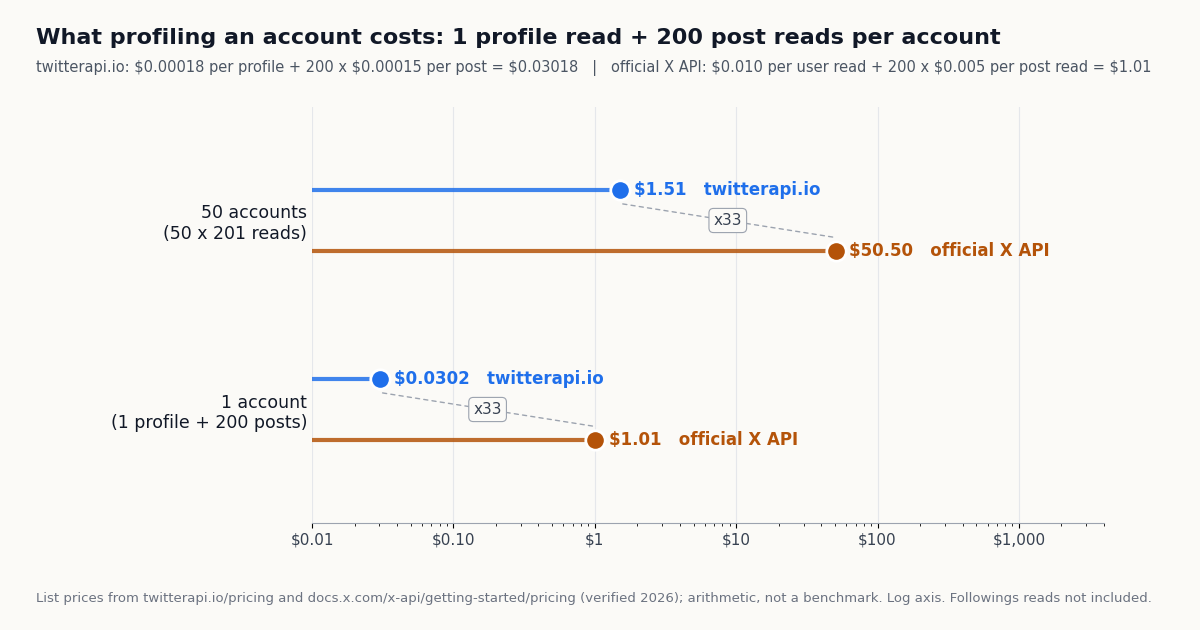
Profile: 1 x 18 credits = $0.00018 here; 1 user read x $0.010 = $0.010 there.
200 posts (10 pages of 20): 200 x 15 credits = 3,000 credits = $0.03 here; 200 post reads x $0.005 = $1.00 there.
One 200-account followings page: 200 to 600 credits = $0.002 to $0.006 here. The official rate card prices "User: Read" at $0.010 per resource; if a following lookup returning 200 user objects bills as 200 user reads, which is how the card is worded, that page is $2.00 there.
Total for 1 user + 200 posts: $0.03018 on twitterapi.io against $1.01 at the official rates, a ratio of $1.01 / $0.03018 = about 33. Add the followings page and the rebuild is about $0.032 to $0.036 per account.
The chart below plots the one-account and 50-account rows on a log axis, because a linear axis would hide the small bar. The original script's 1,000-post default is five times the posts column: $0.15 per account here, $5.00 there, same ratio. Subscriptions (Starter $29, Builder $99, Pro $199, Scale $499, Business $1,499 a month) change the rate limit and the included credits, not the per-read price; the pricing page linked below has the current table.
Reading the report: what the blocks mean and what they do not
Hour and weekday histograms. A band of near-empty hours is commonly read by practitioners as the account's sleep window and therefore a rough time zone; a flat 24-hour profile with no gap is commonly read as scheduling, multiple operators or automation. Both readings are leads, not findings: a shift worker, a scheduling tool with a queue, and a two-person brand account all produce shapes that overlap with those, so calibrate the inference on accounts whose zone and staffing you already know before relying on it. The histogram is in UTC; the original's offset shift is gone with the utc_offset field.
Sources. The source string is X's label for the client that created the post. A single dominant mobile app on a personal account, a scheduling tool on a brand account, and an unfamiliar name on a new account are each a sentence in the profile, and a change in the dominant source between two runs is the kind of thing worth a second look. Treat the exact strings as data to keep, not to interpret from memory: tools rename, and X's own clients have carried several names.
Hashtags, mentions and retweets. These are what the account talks about and to whom. The retweeted-users counter is the closest the report gets to an alignment signal; the mentioned-users counter mixes allies, critics and customer-service replies, so read it next to the reply share. Hashtag counts over 200 posts are small numbers; a tag used eight times is a theme, a tag used once is noise.
Shared followings. A high Jaccard between two handles means they attend to the same accounts; it does not mean they are run by the same person, and for two accounts in the same industry a high overlap is the expected case. The accounts-followed-by-all table is more informative than the pair table when you profile five or more handles, because it names the common attention rather than scoring it.
What the report cannot tell you. Deleted posts are not in the timeline; a protected account returns nothing; isAutomated is X's label and an account can be automated without it. None of the numbers identifies a person. For creation-date, rename, ID and location questions, and for the ethics and legal boundaries of looking at accounts at all, the OSINT guide linked below is the companion to this one. The two scripts can be run on the same handle in the same minute for a few cents between them.
"""Twitter (X) profiler: the report eldraco/twitter_profiler printed, rebuilt on twitterapi.io
read endpoints. No X login, no OAuth app; the only secret is TWITTERAPI_IO_KEY.

    python twitter_profiler.py NASA                 # one handle
    python twitter_profiler.py NASA,ESA,JAXA_en     # 2+ handles: adds the shared-followings table
    PAGES=5 python twitter_profiler.py NASA         # timeline pages per handle (20 posts each; default 10)

Per handle it prints: account summary, posts by UTC hour (24 bins) and by weekday, top sources
(client apps), top hashtags, top mentioned users, top retweeted users, reply share, median likes
and views. With two or more handles it also prints the shared followings and the Jaccard overlap.

Endpoints and cost (twitterapi.io pricing, 100,000 credits = $1):
  /twitter/user/info        18 credits per profile              -> $0.00018
  /twitter/user/last_tweets 15 credits per post, 20 per page    -> 10 pages = 200 posts = $0.03
  /twitter/user/followings  1 to 3 credits per user returned    -> one 200-user page = $0.002 to $0.006
One handle at the defaults is therefore about $0.032 to $0.036.
"""
import os
import sys
from collections import Counter
from datetime import datetime
from statistics import median

import requests

HANDLES = [h.strip().lstrip("@") for h in (sys.argv[1] if len(sys.argv) > 1 else "NASA").split(",") if h.strip()]
PAGES = int(os.environ.get("PAGES", "10"))          # 20 posts per page
FOLLOWING_PAGES = int(os.environ.get("FOLLOWING_PAGES", "1"))   # 200 accounts per page
HEADERS = {"X-API-Key": os.environ["TWITTERAPI_IO_KEY"]}
TWEET_DATE = "%a %b %d %H:%M:%S %z %Y"              # createdAt on posts: Tue Dec 10 07:00:30 +0000 2024
WEEKDAYS = ["Mon", "Tue", "Wed", "Thu", "Fri", "Sat", "Sun"]


def get(path, params):
    """HTTP errors raise. Wrapped endpoints also report failures as status == "error" with the
    reason in msg (user/info never returns 404 for a missing user), so check both."""
    r = requests.get("https://api.twitterapi.io" + path, params=params, headers=HEADERS, timeout=30)
    r.raise_for_status()
    body = r.json()
    if body.get("status") == "error":
        raise SystemExit(f"{path} {params.get('userName')}: {body.get('msg')}")
    return body


def fetch_profile(handle):
    body = get("/twitter/user/info", {"userName": handle})
    return body.get("data") or {}


def fetch_timeline(handle, pages):
    """/twitter/user/last_tweets nests the list at data.tweets; has_next_page / next_cursor are top-level."""
    out, cursor = [], ""
    for _ in range(pages):
        body = get("/twitter/user/last_tweets", {"userName": handle, "cursor": cursor, "includeReplies": "true"})
        page = (body.get("data") or {}).get("tweets") or body.get("tweets") or []
        out.extend(page)
        if not body.get("has_next_page") or not page:
            break
        cursor = body["next_cursor"]
    return out


def fetch_followings(handle, pages):
    """/twitter/user/followings is a top-level list, newest follow first, snake_case profiles."""
    out, cursor = {}, ""
    for _ in range(pages):
        body = get("/twitter/user/followings", {"userName": handle, "cursor": cursor, "pageSize": 200})
        for u in body.get("followings") or []:
            out[str(u["id"])] = u            # key on the permanent user ID, not the handle
        if not body.get("has_next_page"):
            break
        cursor = body["next_cursor"]
    return out


def bar(n, scale, width=40):
    return "#" * int(round(width * n / scale)) if scale else ""


def top(counter, n=10, label="count"):
    total = sum(counter.values()) or 1
    for key, c in counter.most_common(n):
        print(f"  {key!s:<34} {c:>5}  {100 * c / total:5.1f}%")


def report(handle, user, tweets):
    print("=" * 72)
    print(f"[+] @{user.get('userName', handle)}  ({user.get('name')})  id {user.get('id')}")
    print(f"[+] created {user.get('createdAt')}  location {user.get('location')!r}")
    print(f"[+] followers {user.get('followers', 0):,}  following {user.get('following', 0):,}  "
          f"posts {user.get('statusesCount', 0):,}  likes given {user.get('favouritesCount', 0):,}  "
          f"media {user.get('mediaCount', 0):,}")
    print(f"[+] blue verified {user.get('isBlueVerified')}  automated {user.get('isAutomated')}  "
          f"bio {(user.get('description') or '')[:90]!r}")
    if not tweets:
        print("[-] no posts returned (protected, empty or suspended account)")
        return

    when = [datetime.strptime(t["createdAt"], TWEET_DATE) for t in tweets if t.get("createdAt")]
    print(f"\n[+] {len(tweets)} posts from {min(when):%Y-%m-%d} to {max(when):%Y-%m-%d} "
          f"(newest first; UTC, since every createdAt carries +0000)")

    hours = Counter(d.hour for d in when)
    print("\n[+] Daily activity distribution (per UTC hour)")
    peak = max(hours.values())
    for h in range(24):
        print(f"  {h:02d}:00 {hours.get(h, 0):>4} {bar(hours.get(h, 0), peak)}")

    days = Counter(d.weekday() for d in when)
    print("\n[+] Weekly activity distribution (per day)")
    peak = max(days.values())
    for i, name in enumerate(WEEKDAYS):
        print(f"  {name} {days.get(i, 0):>4} {bar(days.get(i, 0), peak)}")

    print("\n[+] Top sources (client apps)")
    top(Counter(t.get("source") or "unknown" for t in tweets))

    print("\n[+] Top languages (X's lang classification per post)")
    top(Counter(t.get("lang") or "und" for t in tweets), n=5)

    print("\n[+] Top hashtags")
    top(Counter("#" + h["text"].lower() for t in tweets
                for h in (t.get("entities") or {}).get("hashtags") or []))

    print("\n[+] Top mentioned users")
    top(Counter("@" + m["screen_name"] for t in tweets
                for m in (t.get("entities") or {}).get("user_mentions") or []))

    print("\n[+] Top retweeted users")
    top(Counter("@" + (t["retweeted_tweet"].get("author") or {}).get("userName", "?")
                for t in tweets if t.get("retweeted_tweet")))

    replies = sum(1 for t in tweets if t.get("isReply"))
    retweets = sum(1 for t in tweets if t.get("retweeted_tweet"))
    originals = [t for t in tweets if not t.get("isReply") and not t.get("retweeted_tweet")]
    print(f"\n[+] Mix: {100 * replies / len(tweets):.0f}% replies, {100 * retweets / len(tweets):.0f}% retweets, "
          f"{100 * len(originals) / len(tweets):.0f}% original posts")
    if originals:
        print(f"[+] Median original post: {median(t.get('likeCount') or 0 for t in originals):,.0f} likes, "
              f"{median(t.get('viewCount') or 0 for t in originals):,.0f} views, "
              f"{median(t.get('replyCount') or 0 for t in originals):,.0f} replies")
    print(f"[+] Posts per day over the sample: {len(tweets) / max((max(when) - min(when)).days, 1):.1f}")


def shared_followings(handle_sets):
    handles = list(handle_sets)
    print("=" * 72)
    print("[+] Shared followings (the old -g graph, as a table)")
    print(f"  {'pair':<30} {'shared':>6} {'Jaccard':>8}")
    for i, a in enumerate(handles):
        for b in handles[i + 1:]:
            sa, sb = set(handle_sets[a]), set(handle_sets[b])
            inter, union = len(sa & sb), len(sa | sb) or 1
            print(f"  @{a} & @{b:<{26 - len(a)}} {inter:>6} {inter / union:>8.3f}")
    everyone = set.intersection(*(set(s) for s in handle_sets.values()))
    print(f"\n[+] {len(everyone)} accounts followed by all {len(handles)} handles (from the pages fetched):")
    merged = {k: v for s in handle_sets.values() for k, v in s.items()}
    for uid in sorted(everyone, key=lambda k: -(merged[k].get("followers_count") or 0))[:20]:
        u = merged[uid]
        print(f"  @{u['screen_name']:<20} followers {u.get('followers_count') or 0:>12,}  joined {u.get('created_at')}")


if __name__ == "__main__":
    followings = {}
    for handle in HANDLES:
        user = fetch_profile(handle)
        tweets = fetch_timeline(handle, PAGES)
        report(handle, user, tweets)
        if len(HANDLES) > 1:
            followings[handle] = fetch_followings(handle, FOLLOWING_PAGES)
    if len(HANDLES) > 1:
        shared_followings(followings)
    reads = len(HANDLES)
    print(f"\n[+] Cost at list prices: {reads} profile(s) x $0.00018 + up to {reads * PAGES * 20} posts x $0.00015"
          f"{' + followings at 1-3 credits per user' if len(HANDLES) > 1 else ''}")
Questions readers ask
What is a Twitter profiler?
A Twitter (X) profiler is a script that takes an account handle and prints a behavioural report: posting activity by hour and weekday, the client apps the account posts from, its most-used hashtags, most-mentioned and most-retweeted accounts, and, for several handles, the accounts they all follow. The name comes from eldraco/twitter_profiler on GitHub, a GPLv3 fork of x0rz/tweets_analyzer, which printed exactly that report from the Twitter API v1.1.
Does eldraco/twitter_profiler still work in 2026?
Not as published. It requires Python 2.7+ and pins tweepy==3.5.0 (November 2015), reads consumer keys from a secrets.py file, and calls the v1.1 statuses/user_timeline, users/show, friends/ids and followers/ids endpoints. X retired the legacy access tiers and began deprecating v1.1 endpoints in favour of v2 in August 2023, docs.x.com now labels v1.1 as legacy with limited support, and Tweepy 4.0.0 dropped Python 2 and renamed the friends methods. The script's design transfers directly onto current read endpoints, which is what the code on this page does.
How do I profile a Twitter (X) account without the official X API?
Three read calls on twitterapi.io with one X-API-Key header and no X login: GET /twitter/user/info for the summary (18 credits), GET /twitter/user/last_tweets with includeReplies=true paginated by cursor for the posts (15 credits per post, 20 per page, list nested at data.tweets), and GET /twitter/user/followings with pageSize=200 for the follow list (1 to 3 credits per user). Bin createdAt by hour and weekday, count source, entities.hashtags, entities.user_mentions and retweeted_tweet.author.userName, and intersect the followings sets across handles. The script at the end of this page does all of it.
Can I still see which app an account posts from (the tweet source)?
Yes, on twitterapi.io: every post from /twitter/user/last_tweets, /twitter/user/mentions and /twitter/tweet/advanced_search carries a source string such as Twitter for iPhone, so a Counter over that field reproduces the Top Sources block of the original profiler. The v2 Post field list on docs.x.com does not include a source field, so this block is one the official API cannot supply.
How do I find the accounts two Twitter (X) users both follow?
Fetch each account's followings with GET /twitter/user/followings?userName=<handle>&pageSize=200 (newest follow first, cursor-paginated, snake_case profiles), store them in a dict keyed on the permanent user id, and intersect the key sets. Print the shared count and the Jaccard index (shared divided by the size of the union) for each pair, and for more than two handles intersect all sets to get the accounts every handle follows. That table is what the original tool's -g graph showed.
What does profiling a Twitter (X) account cost?
At twitterapi.io list prices, one profile ($0.00018) plus 200 posts (3,000 credits, $0.03) plus one 200-account followings page ($0.002 to $0.006) is about $0.032 to $0.036 per account; 50 accounts at 1 profile + 200 posts each are $1.51. The official X API pay-per-usage rate card on docs.x.com ($0.010 per user read, $0.005 per post read) makes the same 201 reads $1.01 per account and $50.50 for 50, about 33 times more, after developer-app approval.
Can the profiler tell me an account's time zone?
Not directly. The original read time_zone and utc_offset from the v1.1 user object, and X has listed both as deprecated fields set to null since 2018. What remains is the UTC hour histogram: a band of near-empty hours is commonly read by practitioners as a sleep window and so a rough zone, but scheduled posting, shift work and multi-operator accounts produce similar shapes, so calibrate the reading against accounts whose zone you already know.
How is this different from the OSINT on Twitter (X) guide?
The OSINT guide answers investigative questions about who an account is: creation date and age, the user ID that survives renames, the Snowflake timestamp inside a post ID, location signals and what survives deletion. This page answers what an account does: activity timing, client sources, hashtags, mentions, retweets, reply share, median engagement and shared followings, the report the twitter_profiler tool printed. Run both scripts on the same handle for a complete picture.
Continue
- eldraco/twitter_profiler on GitHub: README feature list, usage flags, Python 2.7+ and tweepy==3.5.0 requirement, GPLv3
- X API pay-per-usage pricing (the official, pricier route): $0.005 per post read, $0.010 per user read, 3M post reads a month cap
- X docs: v1.1 statuses/user_timeline replaced by v2 /2/users/:id/tweets, format not backward-compatible, max 100 per request
- X docs: v1.1 is Legacy with limited support and minimal updates; use v2 for all new projects
- Tweepy changelog: 3.5.0 (November 2015); 4.0.0 (September 2021) dropped Python 2 and renamed API.friends to API.get_friends
- twitterapi.io docs: /twitter/user/last_tweets parameters, 20 posts per page, createdAt and source examples
- Twitter (X) API overview: every read endpoint on one map
- OSINT on Twitter (X): account age, user ID, Snowflake timestamps and location signals
- Twitter (X) profile analytics API guide: pulling user metrics three ways
- Twitter (X) follower tracking via API: snapshot and change-event patterns
- Twitter (X) user search: find accounts by name, keyword or bio
- Free Twitter (X) account age and join-date checker
- Free Twitter (X) engagement rate calculator
- twitterapi.io pay-per-call pricing
- Get an API key from the dashboard
- 01Twint (Twitter scraper): why it stopped working and how to migrate
- 02Birdclaw (X/Twitter archive tool): what it stores and how to feed it any account
- 03What Is a Twitter (X) Chatbot, and How Do You Build One in 2026?
- 04How to Use Google Gemini with the Twitter (X) API
- 05OSINT on Twitter (X): What Public Data You Can Pull, and How
- 06Twitter (X) Webhooks — A Real-Time API Guide
- 07Twitter API for Trending Topics
- 08What Is fxtwitter (FixupX) and How Do You Use It in Discord?
Stop reading. Start building.
Starter credits cover real testing on real data. Google sign-in, no card, no application queue.
Get an API key