Twint (Twitter scraper): why it stopped working and how to migrate
People still search for twint because for about five years it was the answer to "how do I get tweets without the Twitter API". Its README promised "Can fetch almost all Tweets (Twitter API limits to last 3200 Tweets only); Fast initial setup; Can be used anonymously and without Twitter sign up; No rate limitations", and for research, OSINT and thesis work that was true enough: twint -u handle --since 2019-01-01 -o out.csv --csv and you had a spreadsheet. Those tutorials, notebooks and Stack Overflow answers are still indexed, so the install still happens, and the first run still fails.
This page is the migration guide those tutorials now need. It is not a general survey of scraping options; that lives in the hub page on scraping Twitter without the official API, linked below. It is specifically about twint: what it was, why it stopped, and how each flag and twint.Config() attribute maps onto a request against https://api.twitterapi.io with an X-API-Key header. The wrapper at the end keeps twint's function shape and CSV columns so the rest of your pipeline does not have to change.
Everything quoted about twint comes from the archived repository, its wiki and its PyPI page as read this year; the price and response-shape facts come from docs.twitterapi.io and docs.x.com. Where the honest answer is "this does not migrate", the page says so.
What twint was, and why people still search for it
twint (Twitter Intelligence Tool) was a Python package by Cody Zacharias, described on PyPI as "An advanced Twitter scraping tool written in Python that allows for scraping Tweets from Twitter profiles without using Twitter's API." It worked by requesting the same HTML and JSON that Twitter's logged-out web search and profile pages loaded, parsing the results, and writing them to a file, a SQLite database, Pandas or Elasticsearch. It needed no developer account, no OAuth app and no login, which is exactly what made it popular with students, journalists and OSINT analysts who could not get or afford API access.
The interface had two halves. The CLI: twint -u username, twint -s pineapple, twint -u username --since 2015-12-20, twint -u username -o file.csv --csv, twint -u username --database tweets.db, twint -u username --followers, twint -u username --following, twint -u username --favorites (all from the README's examples). And the module: c = twint.Config(), then c.Username, c.Search, c.Since, c.Until, c.Limit, c.Store_csv, c.Output, c.Lang, c.Near, c.Geo, c.Min_likes, c.Min_retweets, c.Database and so on, followed by twint.run.Search(c), twint.run.Followers(c) or twint.run.Following(c). The wiki's Configuration page lists 62 attributes; most jobs used six.
The repository's own scale shows why the queries persist: 16.4k stars, 2.7k forks, 845 commits, a Python 3.6 to 3.8 badge, and thousands of downstream notebooks that pip install twint in the first cell. The search volume for "twint" is people re-running those notebooks and getting an error, which is the next section.
Why twint stopped working: the guest token, the noData error, and the archive
twint never used an API key. To read search results it first fetched a guest token from Twitter's public HTML, then called the internal JSON endpoints the web app used, with that token. Both halves of that flow were X's to change, and both changed.
The guest token went first. Issue #1433, [ERROR] twint.token.RefreshTokenException: Could not find the Guest token in HTML, was opened on March 3, 2023; a commenter in the thread wrote that "from 28 feb 2023 it always return Raising Exception Could not find the Guest token in HTML". The suggested workaround was to install the development branch and replace token.py with a patched version from a gist. That is the state the project was in when the owner archived it on March 30, 2023.
The feed endpoints went next. The error most people quote, CRITICAL:root:twint.run:Twint:Feed:noData, is older than the archive: the same string appears in issue titles from #587 (February 2020, noDataExpecting) through #896 (noData'items_html'), #992, #1023, #1130, #1217, #1257, #1287, #1311 (noData'globalObjects') to #1434, opened on March 23, 2023, where a maintainer's reply was "maybe twitter modified something". Each of those was one response field twint parsed disappearing from Twitter's front end; each time, a patch followed. After the archive there was nobody to patch it.
Then X closed the door for logged-out clients. On June 30, 2023 X began requiring a login to view posts at all; the July 5, 2023 TechCrunch report quotes Elon Musk's reason, "We were getting data pillaged so much that it was degrading service for normal users!", and the read limits that came with it (1,000 posts a day for unverified accounts, 10,000 for verified). The login wall on single posts was lifted days later, but the logged-out search and timeline JSON that twint scraped did not come back: the endpoints twint called no longer respond for a client without an authenticated session, which is why every fork that only patches the token step still ends in noData.
So the diagnosis for a twint not working search is short. It is not your Python version, your proxy or your pip cache. The last PyPI release is 2.1.20 from April 2020; the GitHub master branch is read-only; the data source is gone. The rest of this page is what to do about it.
What to use instead: a patched fork, a cookie-based library, or an API
Three routes exist. The right one depends on how much of twint's "no account, no API" promise you need to keep, and how much of your week you want to spend keeping it running.
twscrape and Twikit are the closest in spirit to twint, and they are worth naming plainly: they work by acting as logged-in accounts, so the account risk that twint never had is now yours, and the maintenance burden that killed twint (a parser chasing X's front end) is still there, just moved into a better-maintained library. If your twint job was a one-off thesis pull, that may be fine. If it was a scheduled job, the arithmetic in the cost section usually says to pay for the read instead.
The rest of this guide assumes the hosted-API route, because it is the one that maps onto twint's flags without you operating accounts. The official X API is the other no-maintenance option; it is included in the tables so you can see what it charges for the same reads.
The migration table: every twint flag and Config attribute, mapped to an endpoint
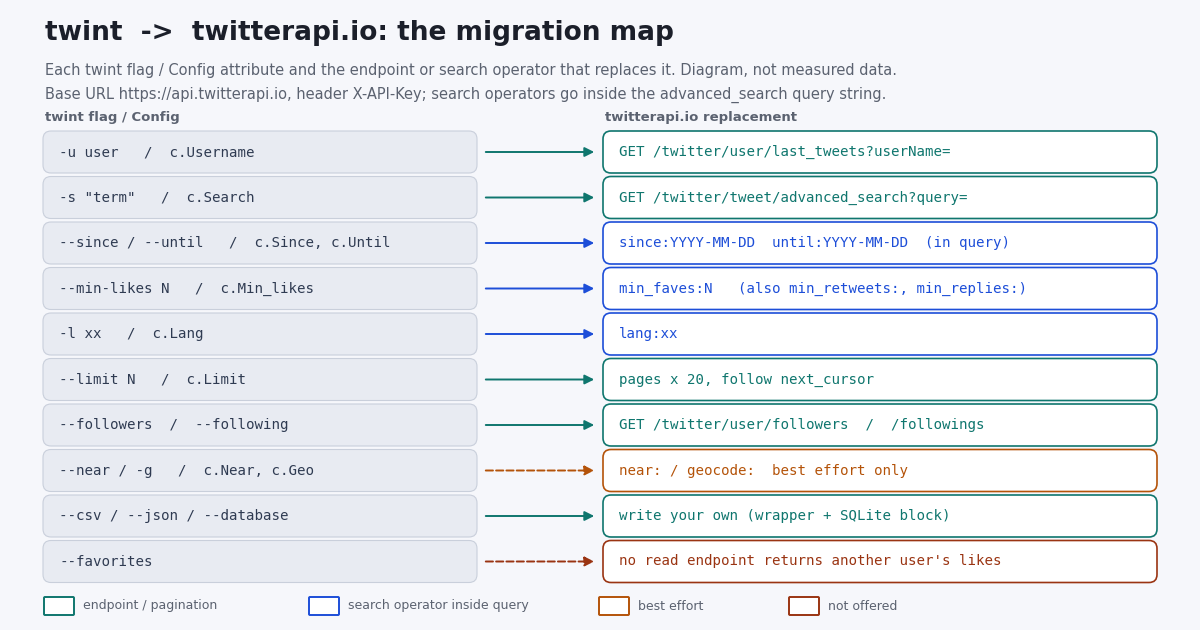
Each row is one twint CLI flag (from the README and the wiki's Basic usage page) with its twint.Config() attribute, and the request that replaces it. Endpoint paths are relative to https://api.twitterapi.io, all are GET with the X-API-Key header, and the response shapes are the ones in docs.twitterapi.io: advanced_search returns a top-level tweets array with has_next_page and next_cursor; last_tweets nests the list at data.tweets with the same two pagination fields at the top level; followers and followings return followers[] / followings[] plus the same pagination pair.
Three details to carry into the code. First, until: is exclusive, so --since 2024-01-01 --until 2024-02-01 in twint becomes since:2024-01-01 until:2024-02-01 and returns January. Second, advanced_search pages are "up to 20" posts because ads and non-tweet cards are filtered out, so do not assume exactly 20 per page when counting toward --limit. Third, X search operators work inside query only on advanced_search; last_tweets takes no operators, which is why the -u user --since combination moves to from:<user> since: on search.
Search operators for the twint -s migration: since, until, lang, min_faves
advanced_search takes the same grammar as the X search box, which is also the grammar twint assembled behind its flags. The parameters are query (the operator string), queryType (Latest or Top, default Latest) and cursor (empty string for page one). Billing is 15 credits per post returned, so a full page of 20 is $0.003 and an empty page is the 15-credit minimum, $0.00015.
Date windows. since:YYYY-MM-DD until:YYYY-MM-DD are UTC and the until date is exclusive. twint users often chained --since with a time (--since "2015-12-20 20:30:15" is in the README); here the dated form with a time suffix is explicitly unsupported, so use since_time:<unix> and until_time:<unix> for anything finer than a day. The guide on searching tweets by date (linked below) covers the gotchas, including what happens when since: is in the future.
Author and audience. from:<user> replaces -u on a search, to:<user> replaces --to, and @user finds mentions. Combining them is where twint's -u user -s term lands: from:user term.
Engagement floor. min_faves:N, min_retweets:N and min_replies:N replace --min-likes, --min-retweets and --min-replies. They are also the cost lever: because you pay per post returned, a floor that halves the result set halves the bill. The search operators reference linked below shows which operators our customers actually use, with shares.
Language and content class. lang:en for -l en; -filter:retweets and -filter:replies for -fr; filter:links, filter:images, filter:videos, filter:media for twint's --links, --images, --videos, --media. twint's --verified has no tested equivalent in our operator list, so treat it as unmigrated.
Location. twint's --near and -g built near: and geocode: into the query. Those operators are not in X's current operator reference and are honoured at best on a geotag-only index, so a near: query can come back empty while the same query without it fills a page. The search-by-location guide walks through the four location signals that still work (post Place, profile location string, the account-based-in label, place names in text) and the control-query check that tells you an operator was ignored.
Keep the whole string under 512 characters, which X's operator reference gives as the self-serve query limit: in practice about 20 from: clauses OR-ed together, which is how a twint loop over a list of handles collapses into one query.
Followers, following and favorites: what migrates and what does not
twint -u user --followers and --following printed usernames, or full profiles with --user-full. The replacements return full profiles by default: GET /twitter/user/followers?userName=<user>&cursor=&pageSize=200 and GET /twitter/user/followings?userName=<user>&cursor=&pageSize=200. pageSize is 20 to 200 (default 200); each page carries has_next_page and next_cursor; and each user object is snake_case with id, screen_name, name, followers_count, friends_count, statuses_count, created_at, location, description, protected, verified. Note the casing difference from /twitter/user/info, which uses userName and createdAt.
Billing is 1 to 3 credits per user returned, tiered by page size: 1 credit per user when you ask for the full 200, more per user on smaller pages, with a 60-credit minimum per call (docs.twitterapi.io, followers endpoint). Request 200 at a time and a 10,000-follower list is 50 calls and about $0.10. The official X API prices the same read at $0.010 per follower or following returned (docs.x.com pricing), so that list is $100 there.
--favorites does not migrate. twint scraped the public likes tab, which X removed from other users' profiles in 2024; no read endpoint on twitterapi.io returns another account's likes, and none is listed in the endpoint manifest. The write side has /twitter/like_tweet_v2 for liking as your own logged-in account, which is a different product and is not what --favorites did. If a pipeline depended on likes, the honest replacement is engagement counts on the posts themselves (likeCount on every tweet object), not a likes list per user.
The followers code is short enough to show in full. It keeps twint's newest-first order and writes the columns twint's --user-full output had.
"""twint -u username --followers --user-full  ->  /twitter/user/followers (newest first).
Swap the URL for /twitter/user/followings for twint --following. Each page returns up to
200 profiles in snake_case (screen_name, followers_count, created_at); 1 credit per user
at pageSize=200, so a full page is $0.002."""
import csv
import os

import requests

HEADERS = {"X-API-Key": os.environ["TWITTERAPI_IO_KEY"]}


def twint_followers(username, limit=1000):
    out, cursor = [], ""
    while len(out) < limit:
        r = requests.get("https://api.twitterapi.io/twitter/user/followers",
                         params={"userName": username, "cursor": cursor, "pageSize": 200},
                         headers=HEADERS, timeout=30)
        r.raise_for_status()
        body = r.json()
        if body.get("status") == "error":
            raise SystemExit(f"followers: {body.get('msg')}")
        users = body.get("followers") or []
        out.extend({"id": u["id"], "username": u["screen_name"], "name": u.get("name"),
                    "followers": u.get("followers_count"), "following": u.get("friends_count"),
                    "tweets": u.get("statuses_count"), "join_date": u.get("created_at"),
                    "bio": u.get("description"), "location": u.get("location")} for u in users)
        if not users or not body.get("has_next_page"):
            break
        cursor = body["next_cursor"]
    return out[:limit]


rows = twint_followers("NASA", limit=400)
with open("nasa_followers.csv", "w", newline="", encoding="utf-8") as f:
    w = csv.DictWriter(f, fieldnames=list(rows[0].keys()) if rows else ["id"])
    w.writeheader()
    w.writerows(rows)
print(len(rows), "followers -> nasa_followers.csv")
The twint-compatible wrapper: twint_search() and twint_user() with CSV, JSON and SQLite
The main code block at the end of this page is a drop-in for the two twint entry points most pipelines used. twint_search(query, since, until, limit) is twint -s with --since, --until, --limit and -pt; twint_user(username, limit) is twint -u. Both paginate with next_cursor, both stop at limit or when has_next_page is false, and both return a list of dicts with twint's column names: id, date, username, tweet, replies_count, retweets_count, likes_count, link. Those map from the API's id, createdAt, author.userName, text, replyCount, retweetCount, likeCount and url.
Two mapping notes. createdAt on tweet objects is the classic format Tue Dec 10 07:00:30 +0000 2024, always with a +0000 offset, so the wrapper parses it with %a %b %d %H:%M:%S %z %Y and prints YYYY-MM-DD HH:MM:SS in UTC, which is what twint's date and time columns held. And last_tweets wraps errors as status: "error" with the reason in msg while advanced_search has no wrapper (the page is just tweets, has_next_page, next_cursor), so the paginator checks both shapes.
--database tweets.db becomes the block below: a SQLite table keyed on the post ID with INSERT OR REPLACE, so re-running a window is idempotent, which is what --resume was for. twint's own table had many more columns; add the ones you used (viewCount, quoteCount, bookmarkCount, lang, isReply, conversationId are all on each tweet object) and keep the rest out.
"""twint --database tweets.db equivalent: a minimal SQLite store for the rows the wrapper
returns. INSERT OR REPLACE keyed on the post id makes re-runs idempotent, which is what
twint's --resume was for. The schema is deliberately small; twint's own tweets table had
many more columns."""
import sqlite3

SCHEMA = """CREATE TABLE IF NOT EXISTS tweets (
    id TEXT PRIMARY KEY, date TEXT, username TEXT, tweet TEXT,
    replies_count INTEGER, retweets_count INTEGER, likes_count INTEGER, link TEXT)"""


def store_sqlite(rows, path="tweets.db"):
    con = sqlite3.connect(path)
    con.execute(SCHEMA)
    con.executemany(
        "INSERT OR REPLACE INTO tweets VALUES "
        "(:id, :date, :username, :tweet, :replies_count, :retweets_count, :likes_count, :link)",
        rows)
    con.commit()
    n = con.execute("SELECT COUNT(*) FROM tweets").fetchone()[0]
    con.close()
    return n


# rows = twint_search("pineapple", since="2026-01-01", limit=200)
# print(store_sqlite(rows), "rows in tweets.db")
Cost: twint was free, so what does the API job cost, and what would the official X API charge?
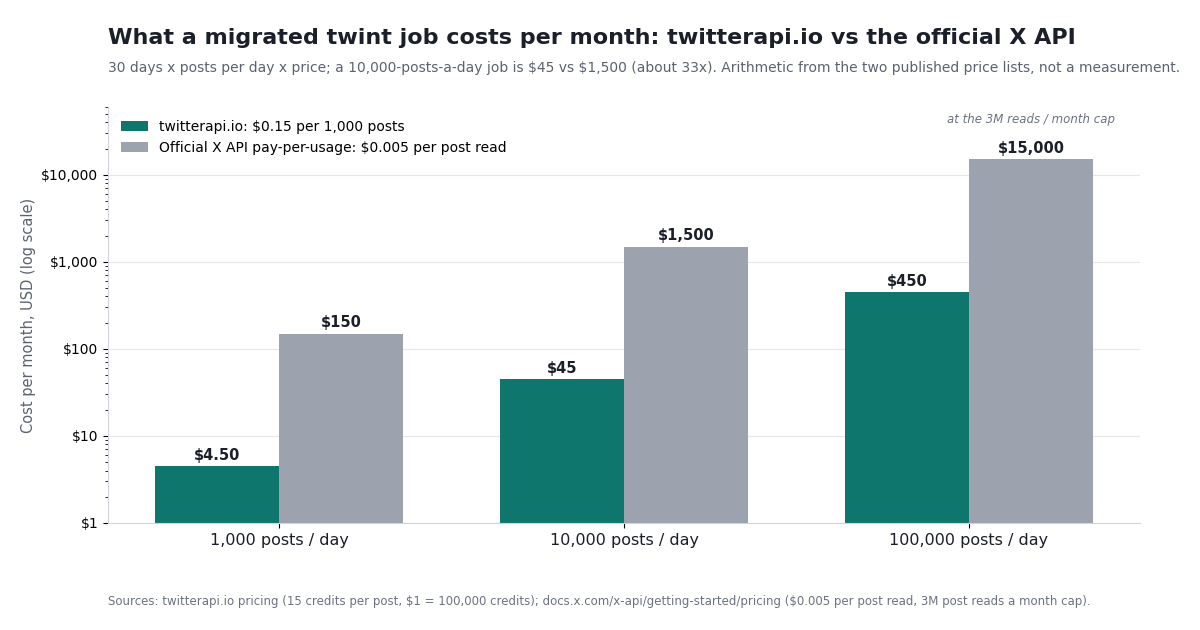
twint cost nothing in money and a great deal in time: proxies or Tor when Twitter throttled an IP, a parser patch every few months, and in the end a total loss. The replacement is metered, so here is the meter. Prices are from the twitterapi.io pricing page and the official X API pay-per-usage page; the ratios are arithmetic, not a benchmark.
The worked example in the direct answer is the middle row: a twint job that pulled 10,000 posts a day is 10,000 x 15 = 150,000 credits = $1.50 a day at $1 per 100,000 credits, or $45 over 30 days. The official route for the same reads is 10,000 x $0.005 = $50 a day, $1,500 a month. New accounts that pass the automatic bot check get $1 of free credits (100,000 credits, no card; one per person or network; the credits expire after 31 days), which covers about 6,600 posts, enough to run the wrapper against your old twint query and compare the CSVs before paying anything. Subscriptions start at Starter $29 a month; the pricing page has the tiers.
One rule that changes how you write the loop: because billing is per post returned, a search that returns nothing costs only the 15-credit minimum, so narrow windows are cheap. A daily from:user since:<yesterday> pull on a quiet account costs $0.00015 on the days it finds nothing, and the full $0.003 only on a day it fills a page.
"""twint-compatible wrapper over twitterapi.io (reads only, no X login).

twint_search(query, since, until, limit)  <-  twint -s "term" --since --until --limit  /  c.Search
twint_user(username, limit)               <-  twint -u username --limit            /  c.Username

Both paginate with next_cursor, map every post to twint's familiar CSV columns
(id, date, username, tweet, replies_count, retweets_count, likes_count, link)
and write CSV or line-delimited JSON, like twint --csv / --json.

Needs TWITTERAPI_IO_KEY in the environment (key from twitterapi.io/dashboard).
Cost: 15 credits per post returned = $0.15 per 1,000 posts; a full 20-post page is $0.003,
and a page that returns nothing is billed the 15-credit minimum ($0.00015).
"""
import csv
import json
import os
import sys
from datetime import datetime

import requests

HEADERS = {"X-API-Key": os.environ["TWITTERAPI_IO_KEY"]}
CREATED_AT = "%a %b %d %H:%M:%S %z %Y"      # e.g. "Tue Dec 10 07:00:30 +0000 2024", always +0000
COLUMNS = ["id", "date", "username", "tweet", "replies_count",
           "retweets_count", "likes_count", "link"]


def to_twint_row(t):
    """Map one twitterapi.io tweet object onto twint's CSV columns."""
    created = datetime.strptime(t["createdAt"], CREATED_AT)
    return {
        "id": t["id"],
        "date": created.strftime("%Y-%m-%d %H:%M:%S"),          # UTC, like twint's date + time
        "username": (t.get("author") or {}).get("userName"),
        "tweet": t.get("text", ""),
        "replies_count": t.get("replyCount", 0),
        "retweets_count": t.get("retweetCount", 0),
        "likes_count": t.get("likeCount", 0),
        "link": t.get("url") or t.get("twitterUrl"),
    }


def _paginate(url, params, limit):
    """Follow next_cursor until `limit` rows or has_next_page is false.
    advanced_search puts `tweets` at the top level; last_tweets nests them in data.tweets
    and wraps errors as status == "error" with the reason in msg."""
    rows, cursor = [], ""
    while len(rows) < limit:
        r = requests.get(url, params={**params, "cursor": cursor}, headers=HEADERS, timeout=30)
        r.raise_for_status()
        body = r.json()
        if body.get("status") == "error":
            raise SystemExit(f"{url}: {body.get('msg')}")
        tweets = body.get("tweets")
        if tweets is None:
            tweets = (body.get("data") or {}).get("tweets") or []
        rows.extend(to_twint_row(t) for t in tweets)
        if not tweets or not body.get("has_next_page"):
            break
        cursor = body["next_cursor"]
    return rows[:limit]


def twint_search(query, since=None, until=None, limit=500, popular=False):
    """twint -s "query" [--since YYYY-MM-DD] [--until YYYY-MM-DD] [--limit N] [-pt]
    since:/until: are UTC and the until date is exclusive; use since_time:/until_time:
    with Unix seconds for finer bounds (the _HH:MM:SS_UTC suffix is not supported)."""
    q = query
    if since:
        q += f" since:{since}"
    if until:
        q += f" until:{until}"
    return _paginate("https://api.twitterapi.io/twitter/tweet/advanced_search",
                     {"query": q, "queryType": "Top" if popular else "Latest"}, limit)


def twint_user(username, limit=500, include_replies=False):
    """twint -u username [--limit N]. Newest first, 20 per page, retweets included
    (each carries a retweeted_tweet object). Pass userId= instead of userName= in
    production: the docs recommend it as more stable."""
    return _paginate("https://api.twitterapi.io/twitter/user/last_tweets",
                     {"userName": username, "includeReplies": str(include_replies).lower()}, limit)


def store_csv(rows, path):                      # twint -o file.csv --csv
    with open(path, "w", newline="", encoding="utf-8") as f:
        w = csv.DictWriter(f, fieldnames=COLUMNS)
        w.writeheader()
        w.writerows(rows)


def store_json(rows, path):                     # twint -o file.json --json (one object per line)
    with open(path, "w", encoding="utf-8") as f:
        for row in rows:
            f.write(json.dumps(row, ensure_ascii=False) + "\n")


if __name__ == "__main__":
    # twint -s pineapple --since 2026-01-01 --limit 100 -o pineapple.csv --csv
    rows = twint_search("pineapple -filter:retweets", since="2026-01-01", limit=100)
    store_csv(rows, "pineapple.csv")
    print(f"search: {len(rows)} posts -> pineapple.csv (about ${len(rows) * 15 / 100_000:.4f})")

    # twint -u NASA --limit 100 -o nasa.json --json
    handle = sys.argv[1] if len(sys.argv) > 1 else "NASA"
    rows = twint_user(handle, limit=100)
    store_json(rows, f"{handle}.json")
    if rows:
        print(f"user: {len(rows)} posts, newest {rows[0]['date']}, oldest {rows[-1]['date']} -> {handle}.json")
Questions readers ask
Is twint still working in 2026?
No. The twintproject/twint repository was archived by its owner on March 30, 2023 and is read-only, the last PyPI release (2.1.20) is from April 2020, and the logged-out guest endpoints it scraped stopped responding in early 2023. Runs end in RefreshTokenException: Could not find the Guest token in HTML or CRITICAL:root:twint.run:Twint:Feed:noData. Patching token.py does not bring the data source back.
Why does twint show CRITICAL:root:twint.run:Twint:Feed:noData?
That line means a field twint expected in Twitter's response (globalObjects, items_html, tweet) was not there. It appears in repository issues from #587 in 2020 to #1434 in March 2023, each time after a front-end change, and each time a patch followed until the project was archived. Since mid-2023 the endpoints behind it no longer answer logged-out clients at all, so the error is permanent.
What is twint2, and is there an official successor?
There is no official successor from the twintproject organisation; the main repository is archived. What people call twint2 or a twint fork is one of the community forks on GitHub that swap the token logic or point at a Nitter instance, and those hit the same wall. The maintained options are cookie-based libraries such as twscrape or Twikit, which act as logged-in X accounts you supply (with the account risk that implies), or a hosted read API like the one mapped on this page.
Is using twint, or scraping Twitter (X), legal and safe?
Reading public posts is generally lawful in many jurisdictions, but X's Terms of Service and its automation rules (help.x.com/en/rules-and-policies/x-automation) govern how you access the platform, and data protection law applies to personal data regardless of how public it was. The practical safety difference is where the risk sits: twint and cookie-based libraries act as a client X did not authorise, and with cookie libraries the accounts you supply can be rate-limited, locked or suspended. A hosted read API needs no X account on your side. Collect the minimum your question needs either way.
Can I get a user's liked tweets like twint --favorites?
Not through a read endpoint here. twint scraped the public likes tab, which X removed from other users' profiles in 2024, and twitterapi.io has no endpoint that returns another account's likes. The engagement counts on each post (likeCount, retweetCount, replyCount, viewCount) are returned on every tweet object, which covers the usual analysis need.
How do I get more than 3,200 tweets from one user?
twint's README noted that timeline scrolling capped out around 3,200 posts. On twitterapi.io, GET /twitter/user/last_tweets is cursor-based: keep passing next_cursor until has_next_page is false; the docs do not state a fixed cap. For older history, or for a bounded window, use GET /twitter/tweet/advanced_search with from:<user> since:YYYY-MM-DD until:YYYY-MM-DD and walk the windows; search reaches whatever X's index serves for that query.
How do I search tweets by date, like twint --since and --until?
Put the operators inside the query string on GET /twitter/tweet/advanced_search: term since:2024-01-01 until:2024-02-01. Dates are UTC and until: is exclusive. For a time of day use since_time: and until_time: with Unix seconds; the since:2021-12-31_23:59:59_UTC form is not supported. last_tweets takes no operators, so a dated pull on one account is from:<user> since: until: on search.
Do I need an X account or a developer app to replace twint with an API?
Not for reads. twitterapi.io reads need only an API key from the dashboard and an X-API-Key header; there is no OAuth app, no X login and no approval step. The official X API needs a developer account, an approved app and a card on file, and charges $0.005 per post read against $0.15 per 1,000 posts here.
Continue
- twintproject/twint on GitHub (archived March 30, 2023, read-only): README, CLI examples, Module Example, the ~3,200-tweet scrolling note
- twint issue #1433: RefreshTokenException: Could not find the Guest token in HTML (March 2023), the failure that preceded the archive
- twint on PyPI: version 2.1.20, released April 2020, Python >= 3.6, author Cody Zacharias
- TechCrunch, July 2023: the June 30, 2023 login requirement, Musk's scraping rationale and the daily read limits
- X API pay-per-usage pricing (the official, pricier route): $0.005 per post read, $0.010 per user read, 3M post reads a month cap
- twitterapi.io advanced_search reference: query, queryType, cursor, up to 20 posts per page, since_time/until_time note
- How to scrape Twitter (X) without the official API: the full landscape
- Twitter (X) search operators: the complete API reference
- How to search tweets by date via API (since: and until:)
- Twitter (X) search by location: which signals still work
- Tweepy vs TwitterAPI.io: the Python migration guide
- OSINT on Twitter (X): public data points and the endpoints behind them
- Twitter (X) scraping guide: methods, limits and costs
- twitterapi.io pay-per-call pricing
- Get an API key from the dashboard
- 01Twitter (X) profiler: how to profile an account in 2026
- 02Birdclaw (X/Twitter archive tool): what it stores and how to feed it any account
- 03What Is a Twitter (X) Chatbot, and How Do You Build One in 2026?
- 04How to Use Google Gemini with the Twitter (X) API
- 05OSINT on Twitter (X): What Public Data You Can Pull, and How
- 06How to Search Tweets by Date via API — A Developer's Guide
- 07How to Use Cursor with the Twitter (X) API
- 08Twitter (X) Analytics Free — What's Actually $0 in 2026?
Stop reading. Start building.
Starter credits cover real testing on real data. Google sign-in, no card, no application queue.
Get an API key