Grok Build: Install, Pricing, MCP Setup and an X (Twitter) Data Tool Built With It
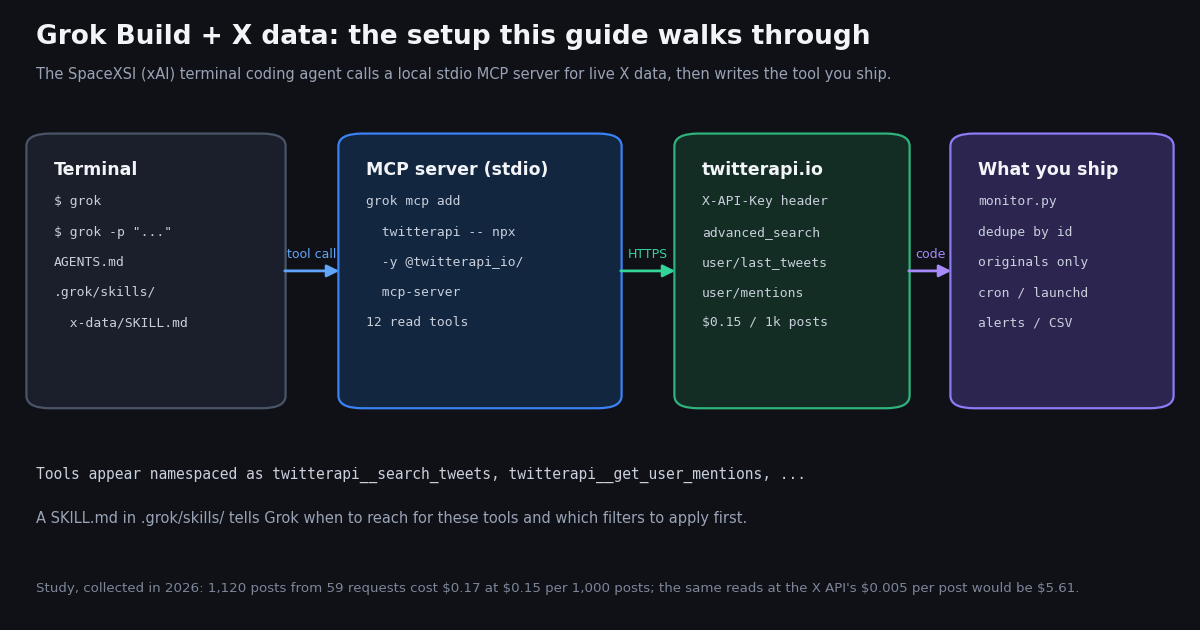
This page is about Grok Build, the coding agent you install and use in a terminal. It is not about building your own agent on the Grok API: that is a different job, covered in our Grok agent guide, where your program sends grok-4.7 a list of tools and runs the loop itself. Here, the agent already exists; you point it at a repository, give it tools through MCP, and let it write code. We cover what Grok Build is, how to install and sign it in, what it costs, how to connect it to live X (Twitter) data with an MCP server, a Grok skill file that teaches it how to use that data well, and a worked build: a mention and keyword monitor written against the twitterapi.io API.
Every command on this page comes from the Grok Build docs at docs.x.ai/build, read for this guide; we did not run a Grok Build session ourselves, so nothing here is a transcript of one, and we say where a fact could not be checked (plan access is the main one). The numbers come from a study we ran, collected in 2026: the recent timelines of eight AI and developer-tool organization accounts plus a live search for the phrase "grok build", read through the same API the monitor uses, so you can see what an X tool written by a coding agent actually has to handle.
One naming note. The docs.x.ai pages now carry the company name SpaceXSI (the page title reads "SpaceXSI Docs", and the docs index describes itself as "Official SpaceXSI (xAI) developer documentation"). Grok is still the product name, the API still lives at api.x.ai, and the installer still comes from x.ai/cli.
What Grok Build is, how it differs from grok-cli, and how to install it
Grok Build. The overview page at docs.x.ai/build/overview calls it "a powerful and extensible coding agent" with three ways in: an interactive, mouse-aware full-screen TUI; headless mode for scripts and bots; and the Agent Client Protocol (ACP), which lets other apps and editors drive it over JSON-RPC on stdin and stdout. It edits files, runs commands, plans, spawns subagents, works in git worktrees, and loads MCP servers, skills, plugins and hooks. The docs list plan mode, permissions, a sandbox, sessions, background tasks, an agent dashboard and a status line as features.
grok-cli (superagent-ai). Search results for "grok cli" also surface github.com/superagent-ai/grok-cli, described in its README as "an open-source coding agent for the Grok API". It is MIT-licensed, written in TypeScript on Bun, installs from a script in that repo or with bun add -g grok-dev, and needs a Grok API key. Its README is explicit that it is community-built and "not affiliated with, endorsed by, or sponsored by" the company behind Grok. At our check it had 3,497 GitHub stars and its last push was in July 2026.
Why the distinction matters in practice. Both projects install a command called grok. If you have used the community tool before, check which binary is first on your PATH (which grok) after installing Grok Build: the official CLI keeps its settings under ~/.grok/ and offers grok version and grok update, while the community tool has its own grok update and grok uninstall. Uninstall one or rename it before you debug anything else.
macOS, Linux and WSL. Run the one-line installer from the docs, then open a new shell so the updated PATH is picked up. Windows (PowerShell). Run irm https://x.ai/cli/install.ps1 | iex. Both are shown in the code block below. Settings live in ~/.grok/config.toml (on Windows %USERPROFILE%\.grok\config.toml); set GROK_HOME to move that directory.
First launch. cd into a project and type grok. On first launch it opens a browser to sign you in. The CLI reference adds grok login (sign in again), grok logout (clear cached credentials) and grok login --device-auth, which uses the RFC 8628 device-code flow for SSH sessions, containers and cloud dev boxes.
API key instead of a browser. Export XAI_API_KEY before starting grok, which is the path for CI and headless scripts. The enterprise page spells out the precedence when several credentials exist: a key set on the model in config, then the model's env_key, then the active session token, then XAI_API_KEY. It also documents an auth_provider_command hook and direct OIDC sign-in against a corporate identity provider such as Entra ID or Okta.
Check what it found. grok inspect prints what Grok discovered for the current directory: config sources, instruction files, skills, plugins, hooks and MCP servers, with where each came from. Run it after every config change; it is the fastest way to see why a server or skill is not loading. grok models lists the models available to you, and /model <name> switches inside the TUI. The settings reference shows default = "grok-build" as the recommended model for coding and agent sessions.
Keep it current, or pin it. grok update --check reports new versions, and --version <V>, --stable or --alpha choose a build. For scripts and CI, the headless docs recommend --no-auto-update, or auto_update = false under [cli] in the config file.
# macOS / Linux / WSL
curl -fsSL https://x.ai/cli/install.sh | bash

# Windows PowerShell
irm https://x.ai/cli/install.ps1 | iex

# first run: opens a browser to sign in
cd your-project
grok

# no browser (SSH, container): device code or an API key
grok login --device-auth
export XAI_API_KEY="xai-..."

# what did it load here? which models can I use?
grok inspect
grok models

# one-shot, scriptable
grok --no-auto-update -p "Explain this repo" --output-format jsonGrok Build pricing and plan access: what the docs say, and what they don't
API pricing, verified. The models page at docs.x.ai/developers/models lists grok-build-0.1 with a 256k context window at $1.00 per million input tokens, $0.20 per million cached input tokens and $2.00 per million output tokens for prompts under 200k tokens, doubling to $2.00, $0.40 and $4.00 at 200k and above. For comparison, grok-4.7 on the same page is $2.00, $0.50 and $6.00 with a 500k context. If you run Grok Build on an API key, those token rates are what you pay, and you can bind a key to a model in the config file.
Subscriptions, verified. The pricing page of The X Subscription, the plan that now bundles Grok, Cursor and X, lists Free ($0), Plus ($8 a month), Premium ($30), Super ($100) and Ultra ($200), with included usage rising from "Limited" to 50x. Paid seats get a weekly usage pool shared across eligible first-party Grok and Cursor usage, and extra usage is bought as top-up credits. The same page says existing SuperGrok, Cursor and X Premium plans continue and switching is optional. Inside the TUI, /usage shows credit usage and opens billing.
Not verified: which plan unlocks Grok Build. None of the docs.x.ai pages we read names the subscription tier that includes Grok Build, and x.ai/pricing refused our fetch. Third-party install guides say access needs a paid Grok plan (they name SuperGrok or X Premium+), but we could not confirm that on a primary source, so treat it as unconfirmed and check the plan table on x.ai/pricing when you sign in. The safe statement is this: the installer itself is free, sign-in is where access is checked, and the API-key route is billed at the token rates above.
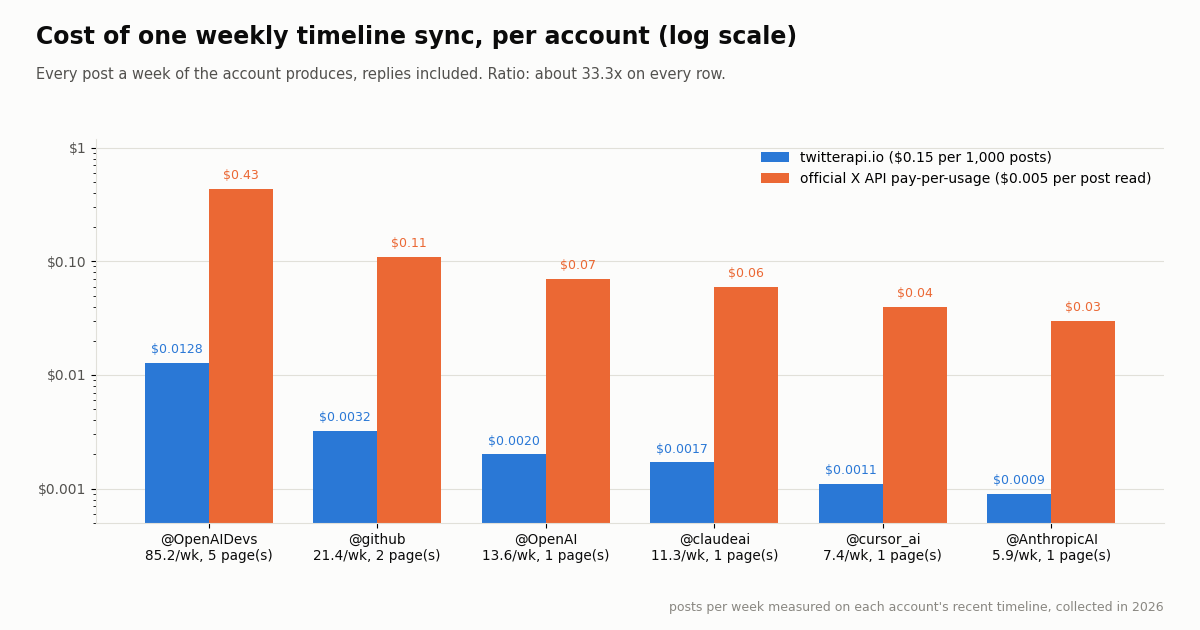
The other half of the bill. Grok Build's own cost is model tokens. Any data your tools fetch is billed by the data provider. For X data through the MCP server in this guide, that is $0.15 per 1,000 posts returned (15 credits per post, with a 15-credit minimum per request) and $0.18 per 1,000 profiles. The official X API's pay-per-usage rate card on docs.x.com charges $0.005 per post read and $0.010 per user read, so the same 1,000 posts cost $5 there, about 33x more.
Connect Grok Build to live X data with an MCP server
Grok Build loads MCP servers and exposes their tools next to its built-in ones, "namespaced as <server>__<tool>" in the words of the MCP page. Local stdio servers are added with grok mcp add <name> -- <command>, where everything after -- is the command that starts the server. Remote servers use --transport http <name> <url>, with OAuth handled in the browser or a static header via the repeatable --header flag.
The X data server. @twitterapi_io/mcp-server (version 0.2.0 on npm at our check, MIT, source at github.com/kaitoInfra/twitterapi-io-mcp-server) is a stdio server that reads TWITTERAPI_IO_API_KEY from its environment and exposes 12 tools mapped to API endpoints: search_tweets, get_user_info, get_user_about, get_user_followers, get_user_followings, get_user_last_tweets, get_user_mentions, get_tweets_by_ids, get_tweet_replies, get_tweet_quotes, get_tweet_retweeters and get_trends. Reads need no X account. Inside Grok Build they become twitterapi__search_tweets, twitterapi__get_user_mentions and so on.
Pass the key without pasting it. The MCP page documents the env table and ${VAR} expansion in ~/.grok/config.toml, so the key can stay in your shell environment. The page does not document an --env flag on grok mcp add, so we use the config file for the key (shown below). Add --scope project to write .grok/config.toml in the repo instead, so the server ships with the project; Grok reads each .grok/config.toml from the current directory up to the git root.
Cold starts. The docs warn that npx servers that download a package on first launch may need a higher startup_timeout_sec (default 30). If a server does not show up, run grok mcp doctor twitterapi, then read ~/.grok/logs/mcp/twitterapi.stderr.log, where Grok captures the server's stderr. In the TUI, /mcps opens the MCP tab: Space toggles a server, r refreshes after a config edit.
Already set up for Claude Code or Cursor? Grok also loads MCP configs from ~/.claude.json, .cursor/mcp.json and project .mcp.json files, merged below config.toml. If you added the server to Claude Code earlier, grok inspect should already list it, with its origin. Disable that import with [compat.claude] mcps = false if you want only Grok's own config.
Writes are separate. The MCP server covers reads. Posting, replying, liking or following goes through the API's write endpoints: one /twitter/user_login_v2 login ($0.10, with a proxy you supply) returns login_cookies, then each action such as /twitter/create_tweet_v2 or /twitter/follow_user_v2 is $0.002, billed per HTTP 200 call. Each call acts as that account, so X can rate-limit, lock or suspend it; keep a human pace, and expect to log in again when a session expires. Do not hand a coding agent --always-approve on a tool that posts.
# 1) add the server (stdio; everything after -- is the server command)
grok mcp add twitterapi -- npx -y @twitterapi_io/mcp-server

# 2) give it the key: edit ~/.grok/config.toml so the entry reads
#
#   [mcp_servers.twitterapi]
#   command = "npx"
#   args = ["-y", "@twitterapi_io/mcp-server"]
#   env = { TWITTERAPI_IO_API_KEY = "${TWITTERAPI_IO_API_KEY}" }
#   startup_timeout_sec = 90     # first npx download can be slow

export TWITTERAPI_IO_API_KEY="your_key_here"

# 3) check it
grok mcp list
grok mcp doctor twitterapi
grok inspect

# 4) use it headlessly
grok -p "Use twitterapi__search_tweets to find the 20 latest posts with the phrase grok build; summarize the complaints"A Grok skill that reads X data
MCP gives Grok Build the tools; a skill tells it how to use them. The skills page defines a skill as a folder with a SKILL.md (YAML frontmatter plus markdown instructions) and optional scripts. Grok looks in ./.grok/skills/ (walking up to the repo root), ~/.grok/skills/, enabled plugins, extra paths in config, and, for compatibility, ~/.agents/skills/ and Claude Code's skill folders. User-invocable skills also become slash commands, so the file below shows up as /x-data.
Frontmatter that matters. name and description decide when the model reaches for the skill; when-to-use adds trigger phrases; argument-hint fills slash-command autocomplete; user-invocable defaults to true (only the literal true counts; yes is false); disable-model-invocation: true makes it slash-command only. The docs say Grok accepts model, effort, license and compatibility but does not apply them, and that allowed-tools neither grants nor restricts tools, so use permissions (--allow, --deny) for that.
Why these rules. Each rule in the skill below comes from the study further down: replies are the bulk of what a timeline returns, so the skill drops them by default; one search with operators replaces many timeline calls; a page cap keeps an exploratory question from paging through a firehose; and the since_time:<unix seconds> operator is what the API docs show for time windows, while they warn that the since:YYYY-MM-DD_... form is not supported.
Same file, other agents. Because Grok reads Claude Code skills and the ~/.agents/skills/ folder too, one skill folder can serve several coding agents on the same machine. Plugins can bundle the skill with the MCP server entry, and marketplaces (configured under [[marketplace.sources]]) distribute plugins; grok plugin validate checks one before you publish it.
---
name: x-data
description: Read live X (Twitter) posts, mentions and profiles through the twitterapi MCP server. Use when the task needs what people are posting on X right now, a user's recent posts, or who mentioned an account.
when-to-use: "search X", "what are people saying about", "mentions of @", "recent tweets from", "X sentiment", "monitor a keyword on Twitter"
argument-hint: <query or @handle>
metadata:
  author: your-team
  short-description: Live X data via twitterapi.io MCP
---

# X data via twitterapi.io

Tools come from the MCP server named `twitterapi` (added with `grok mcp add`), so they appear as
`twitterapi__search_tweets`, `twitterapi__get_user_last_tweets`, `twitterapi__get_user_mentions`,
`twitterapi__get_user_info` and friends.

## Rules
1. Prefer one `twitterapi__search_tweets` call with operators over many timeline calls:
   quoted phrases, `from:handle`, `OR`, `lang:en`, and `since_time:<unix seconds>` for "since last run".
   Do not use `since:YYYY-MM-DD_HH:MM:SS_UTC`; the API docs say it is not supported.
2. Stop after 3 pages (60 posts) unless the user asks for more, and say how many pages you read.
3. Drop replies (`isReply`) and reposts (`retweeted_tweet`) unless the user wants conversation;
   on busy accounts they are most of the payload.
4. Quote numbers from the response fields (`likeCount`, `viewCount`, `author.followers`), never estimate them.
5. Cost note for the user: $0.15 per 1,000 posts returned, with a 15-credit minimum per request.
6. When writing code instead of answering, call `https://api.twitterapi.io` with the `X-API-Key` header,
   follow `has_next_page` / `next_cursor`, and keep a seen-ids set.
Worked build: have Grok Build write an X mention and keyword monitor
With the server and skill in place, the build is a prompt. A good one names the endpoint, the fields and the failure cases, because a coding agent fills gaps with guesses. The one we would use, in an empty folder with an AGENTS.md that says "Python 3, requests only, no frameworks": "Write xmon.py: a CLI that takes an advanced-search query, calls GET https://api.twitterapi.io/twitter/tweet/advanced_search with queryType=Latest and an X-API-Key header, appends since_time:<unix> from a state file, follows has_next_page and next_cursor for at most 5 pages, keeps a bounded seen-ids set, can drop replies and reposts, and prints author, followers, likes, views, text and URL. First call twitterapi__search_tweets once to look at a real response and use those field names."
What to check in the code it writes. The response is top-level tweets[] with has_next_page and next_cursor; tweet fields are camelCase (likeCount, viewCount, isReply, createdAt), and a repost carries retweeted_tweet. Code written from memory of the official X API's v2 responses would look for public_metrics and data[], which do not exist here, so make sure it read a live response first (that is what the MCP call in the prompt is for). Look for a page cap, a 429 branch, and a state file that is written only after a successful run.
Run it headlessly. grok -p accepts the same prompt, --output-format json returns one JSON object at the end, and --max-turns bounds the run. The CLI reference lists --always-approve (alias --yolo) to skip approval prompts; for a build that only writes one file in a fresh folder that is reasonable, for anything that touches a real repository or credentials it is not. --sandbox <profile> and --allow / --deny rules are the safer middle ground.
The result to compare against. The full Python example at the end of this page is a reference implementation of the same spec, written by hand (not a Grok Build transcript), so you can diff what the agent produces against it. Schedule it every few minutes with cron or launchd. When a run finds nothing, it costs the 15-credit minimum, $0.00015; checking every 5 minutes for a month is about $1.30 in empty checks, and every 60 seconds about $6.48, plus $0.15 per 1,000 posts it actually returns.
mkdir xmon && cd xmon
printf 'Python 3, requests only, no frameworks. Read a live response before writing parsers.\n' > AGENTS.md

grok -p "Write xmon.py: a CLI that takes an advanced-search query, calls GET https://api.twitterapi.io/twitter/tweet/advanced_search with queryType=Latest and an X-API-Key header, appends since_time:<unix> from a state file, follows has_next_page/next_cursor for at most 5 pages, keeps a bounded seen-ids set, has --originals-only, and prints author, followers, likes, views, text, url. First call twitterapi__search_tweets once and use the real field names." \
  --max-turns 30 --output-format json > build-log.json

export TWITTERAPI_IO_API_KEY="your_key_here"
python3 xmon.py '"grok build"'

# every 5 minutes
# */5 * * * * cd ~/xmon && python3 xmon.py 'from:github OR from:cursor_ai' --originals-only >> feed.logStudy: what an X tool built with Grok Build would actually read
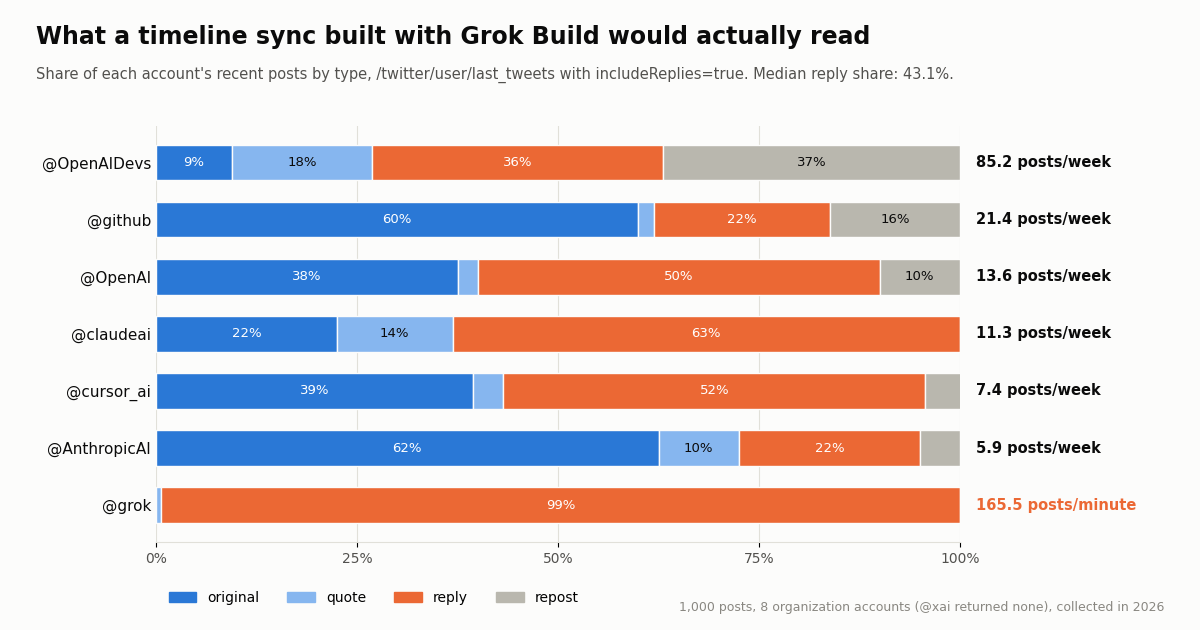
A coding agent writes the request; it cannot know what the data looks like at volume. So we measured it. We read the recent timelines of eight AI and developer-tool organization accounts with replies included (what a "sync this account" tool reads when it asks for replies), plus a live Latest search for the phrase "grok build". 1,120 posts came back from 59 requests, collected in 2026.
Replies dominate. Across the six accounts with a measurable weekly rate, the median share of replies is 43.1%. For @claudeai it is 63.1%, for @cursor_ai 52.5%, for @OpenAI 50%. Most of those are the account replying to itself in a thread: 100% of @OpenAI's replies and 94.3% of @github's. @OpenAIDevs is the exception, with 36.9% reposts and only 31% of its replies in its own threads.
Replies get a fraction of the reach. The median @OpenAI original drew 2,490,330 views against 262,622 for a reply; for @github, 79,342 against 8,757. A monitor that alerts on everything is mostly alerting on thread continuations.
One account is a firehose. @grok, the account that answers people who tag it, returned 160 posts spanning about 1 minute: 165.5 posts a minute, 99.4% replies, median 0 views per reply. Syncing that timeline would read about 9,931 posts an hour, $1.49 an hour at $0.15 per 1,000 posts and $49.66 at the X API's $0.005 per post. A tool for @grok should search for what you care about, not mirror the account.
Edge cases are real. The @xai handle returned an empty timeline: tweets was an empty list and has_next_page false, and the profile lookup reported it as protected with 0 posts. @AnthropicAI's timeline ended after 40 posts with an empty third page. A generated tool has to treat an empty page as a normal answer, not a crash.
The keyword side. The Latest search for "grok build" returned 120 posts covering 8.7 hours, about 13.8 an hour or roughly 331 a day. 62.5% were replies, 12.5% carried a link, 89.2% of authors had a blue check, and the median author had 1,267 followers (47.5% had under 1,000). Reading all of it would cost about $0.05 a day here and $1.65 at the X API rate card. It is a manageable feed, and most of it is conversation, not announcements.
What the study means for the tool you ask Grok Build to write
Filter at the source, then on the client. Use a search with from: operators and a since_time: window for the accounts you follow, instead of paging every timeline, and drop isReply and retweeted_tweet items unless conversation is the point. For the six accounts above, keeping originals and quotes cuts the feed to between 3.2 and 22.9 posts a week each.
Cap pages per run. A five-page cap means one run can never read more than 100 posts ($0.015), even if a query or an account like @grok turns into a firehose. Log the page count so you notice when a cap is being hit.
Keep state outside the agent. The since_time cursor and the seen-ids set belong in a file or a database the script owns, not in the agent's memory. Grok Build's sessions and its experimental cross-session memory are for the coding conversation; the monitor has to run without them.
Weekly sync costs are small; the ratio is not. Every row in the table costs well under two cents a week here. The difference shows up at volume: the whole study, 1,120 posts, cost $0.17, against $5.61 for the same reads at $0.005 per post on the official X API's pay-per-usage card, which also caps that plan at 3 million post reads a month before Enterprise pricing.
Rate limits. Before the first payment the API allows 0.2 requests a second, which is fine for a cron monitor but too slow for a backfill; once you have paid it is 20 a second (50 on Scale, 500 on Business). Build the 429 branch anyway; an agent that writes a tight retry loop will find it.
Grok Build vs Claude Code vs Codex: verified facts only
Search data shows people comparing these three directly. We kept the table to facts we could read in each tool's own docs or repository during this research; benchmark claims and "which is smarter" are left out because none of the three publishes a like-for-like number we could verify.
Where Grok Build stands out on paper. The compatibility layer is the notable part: the skills page says Grok reads Claude Code marketplaces, plugins, skills, MCPs, agents, hooks and instruction files with no setup, grok import pulls in Claude Code sessions, and Claude Code flag names such as --allowedTools and --dangerously-skip-permissions are accepted as aliases. Trying it on a repository already set up for Claude Code is close to free in effort.
Licenses. The Codex repository on GitHub is Apache-2.0, and the community grok-cli is MIT. We did not find a license statement for Grok Build or Claude Code in the docs pages we read, so we leave that cell out rather than guess.
For X data, the setup is the same everywhere. All three take the same stdio server: swap the first word of the mcp add command. Our Claude and Codex guides walk through those two in detail.
How we collected this
Question. What would an X data tool written by a coding agent (a timeline sync or a keyword monitor) actually read for AI and developer-tool organization accounts, and what would one weekly sync cost?
Accounts and query. Timelines of @xai, @grok, @OpenAI, @AnthropicAI, @cursor_ai, @github, @OpenAIDevs and @claudeai through /twitter/user/last_tweets with includeReplies=true, up to 8 pages (about 160 posts) each, newest first; and /twitter/tweet/advanced_search for the phrase "grok build" with queryType=Latest, 6 pages.
Window and sample. Each account's most recent posts at collection time, so the window differs per account (from about 1 minute for @grok to about 151 days for @cursor_ai). 1,000 timeline posts and 120 search posts, 1,120 in total, from 59 requests including one profile lookup; collected in 2026. Study cost: $0.17.
What the sample cannot show. Posts per week comes from one recent stretch per account and moves with launches and holidays. The @grok rate is one minute of activity and should not be extrapolated to a day. Search results reflect what the search index returned for one phrase over a few hours. We did not run Grok Build itself; every Grok Build behavior on this page is documented behavior from docs.x.ai, not a session we recorded.
Privacy. Only organization accounts are named, and only their raw pages are kept. Search authors are private individuals: their posts were reduced to aggregates (shares, medians, follower buckets), with no IDs, handles, URLs or text stored.
#!/usr/bin/env python3
"""xmon.py - a small X (Twitter) mention / keyword monitor, the kind of tool this guide has Grok Build write.

Usage:
  export TWITTERAPI_IO_API_KEY=...        # from your twitterapi.io dashboard
  python3 xmon.py '"grok build"'           # any advanced-search query
  python3 xmon.py 'from:github OR from:cursor_ai' --originals-only
Run it from cron or launchd; it remembers what it already printed in xmon-state.json.
"""
import argparse
import json
import os
import sys
import time

import requests

BASE = "https://api.twitterapi.io"
STATE = "xmon-state.json"
MAX_PAGES = 5            # hard cap per run: at most 100 posts, $0.015
LOOKBACK_S = 3600        # first run looks back one hour


def load_state():
    if os.path.exists(STATE):
        with open(STATE) as f:
            return json.load(f)
    return {"since": int(time.time()) - LOOKBACK_S, "seen": []}


def save_state(state):
    state["seen"] = state["seen"][-2000:]        # bounded memory
    with open(STATE, "w") as f:
        json.dump(state, f)


def kind(t):
    if t.get("retweeted_tweet"):
        return "repost"
    if t.get("quoted_tweet"):
        return "quote"
    if t.get("isReply"):
        return "reply"
    return "original"


def search(session, query, since):
    """Yield posts newer than `since` (unix seconds), following next_cursor up to MAX_PAGES."""
    cursor = ""
    for _ in range(MAX_PAGES):
        params = {"query": f"{query} since_time:{since}", "queryType": "Latest"}
        if cursor:
            params["cursor"] = cursor
        r = session.get(f"{BASE}/twitter/tweet/advanced_search", params=params, timeout=30)
        if r.status_code == 429:                  # slow down, try again next run
            print("rate limited, stopping this run", file=sys.stderr)
            return
        r.raise_for_status()
        body = r.json()
        for t in body.get("tweets", []):
            yield t
        if not body.get("has_next_page"):
            return
        cursor = body.get("next_cursor") or ""


def main():
    ap = argparse.ArgumentParser()
    ap.add_argument("query")
    ap.add_argument("--originals-only", action="store_true", help="drop replies and reposts")
    args = ap.parse_args()

    key = os.environ.get("TWITTERAPI_IO_API_KEY")
    if not key:
        sys.exit("set TWITTERAPI_IO_API_KEY")
    session = requests.Session()
    session.headers["X-API-Key"] = key

    state = load_state()
    seen = set(state["seen"])
    started = int(time.time())
    fresh = []
    for t in search(session, args.query, state["since"]):
        if t["id"] in seen:
            continue
        if args.originals_only and kind(t) in ("reply", "repost"):
            continue
        seen.add(t["id"])
        fresh.append(t)

    for t in sorted(fresh, key=lambda t: t["id"]):
        a = t.get("author") or {}
        print(f"[{kind(t)}] @{a.get('userName')} ({a.get('followers', 0):,} followers) "
              f"likes={t.get('likeCount', 0)} views={t.get('viewCount', 0)}")
        print("   " + (t.get("text") or "").replace("\n", " ")[:200])
        print("   " + (t.get("url") or ""))

    state["since"] = started - 60                 # small overlap; the seen set removes duplicates
    state["seen"] = list(seen)
    save_state(state)
    print(f"{len(fresh)} new post(s)", file=sys.stderr)


if __name__ == "__main__":
    main()
Questions readers ask
What is Grok Build?
Grok Build is the coding agent from SpaceXSI (xAI) that runs in your terminal. You install it with curl -fsSL https://x.ai/cli/install.sh | bash, start it with grok in a project, and use it interactively, headlessly with grok -p, or through the Agent Client Protocol with grok agent stdio. It supports MCP servers, skills, plugins, hooks, subagents, plan mode and git worktrees.
Is Grok Build the same as grok-cli on GitHub?
No. superagent-ai/grok-cli is a community, MIT-licensed coding agent for the Grok API; its README says it is not affiliated with the company behind Grok. Grok Build is the official agent from docs.x.ai/build. Both install a command named grok, so check which grok if behavior looks unfamiliar.
How much does Grok Build cost?
On an API key you pay model tokens: grok-build-0.1 is listed at $1.00 per million input tokens and $2.00 per million output tokens under 200k prompt tokens, with a 256k context. The consumer plans are now The X Subscription (Free, then Plus $8, Premium $30, Super $100 and Ultra $200, billed monthly). The docs we read do not say which tier includes Grok Build; check x.ai/pricing when you sign in.
Can I use Grok Build without a browser?
Yes. Use grok login --device-auth for a device-code sign-in over SSH or in a container, or export XAI_API_KEY before running grok. For scripts, run grok -p "..." with --output-format json or streaming-json, and add --no-auto-update so it does not check for updates mid-pipeline.
How do I add an MCP server to Grok Build?
For a local server: grok mcp add <name> -- <command>, for example grok mcp add twitterapi -- npx -y @twitterapi_io/mcp-server. For a remote one: grok mcp add --transport http <name> <url>. Put secrets in ~/.grok/config.toml with an env table and ${VAR} expansion. grok mcp doctor diagnoses problems, and tools appear as <server>__<tool>.
Does Grok Build work with my Claude Code setup?
Its docs say yes: Grok reads Claude Code marketplaces, plugins, skills, MCP servers, agents, hooks and CLAUDE.md files alongside .grok/, loads MCP configs from ~/.claude.json, can import Claude Code sessions with grok import, and accepts several Claude Code flag names as aliases.
How do I give Grok Build access to Twitter (X) data?
Add an X data MCP server and a skill. With @twitterapi_io/mcp-server you get 12 tools (search, timelines, mentions, profiles, followers, replies, quotes, retweeters, trends) billed at $0.15 per 1,000 posts returned, with no X account needed for reads. New accounts that pass the automatic bot check get up to $1 of free credits (at most 100,000 credits, no card, one per person or network, expiring after 31 days).
What are Grok skills?
Folders with a SKILL.md file (YAML frontmatter plus instructions) and optional scripts that Grok Build loads from .grok/skills/, ~/.grok/skills/, plugins and ~/.agents/skills/. User-invocable skills become slash commands such as /x-data. Plugins bundle skills with MCP servers and hooks, and marketplaces distribute plugins.
Continue
- Grok Build docs: install, sign-in, headless mode, custom models
- Grok Build docs: MCP servers (grok mcp add, config.toml, compatibility, troubleshooting)
- Grok Build docs: skills, plugins, marketplaces and Claude Code compatibility
- xAI API models and pricing (grok-build-0.1, grok-4.7)
- twitterapi.io MCP server (npm @twitterapi_io/mcp-server): 12 X data tools
- X API pay-per-usage pricing ($0.005 per post read), the official and pricier route
- X (Twitter) API guide: endpoints, pricing and limits
- Build your own Grok agent on the xAI API with live X data
- How to get a Grok API key (XAI_API_KEY)
- Use Claude and Claude Code with the Twitter (X) API
- Codex with Twitter (X) data: MCP setup and a worked build
- Grok Bot: AI teammates and X data
- Grok Tasks: scheduled prompts that watch X
- Grok connectors and custom MCP servers
- Twitter (X) MCP server for AI agents
- Search mentions on Twitter (X) by API
- twitterapi.io pricing: pay only for the data returned
- 01X Radar Explained: Twitter (X) Keyword Monitoring, Tiers, Limits and an API Alternative
- 02TweetDeck (X Pro) Alternatives in 2026: Columns, Monitoring and Scheduling for Twitter (X)
- 03Twitonomy Review: What the Twitter (X) Analytics Tool Still Does, and an API Alternative
- 04llms.txt for API docs, measured on two Twitter (X) API doc sets
- 05Botometer in 2026: What It Scored, Its Status, and a Live Alternative for Twitter (X)
- 06Grok Agent: How to Build an Agent with Grok on Live Twitter (X) Data
- 07Grok Tasks: Schedule Grok to Monitor Twitter (X), and What It Cannot Do
- 08How to Get a Grok API Key: Setup, Pricing and Live X Data for the xAI API
Stop reading. Start building.
Starter credits cover real testing on real data. Google sign-in, no card, no application queue.
Get an API key