Custom GPT retirement: what migrates, and how to rebuild a Twitter (X) Action as an MCP connector
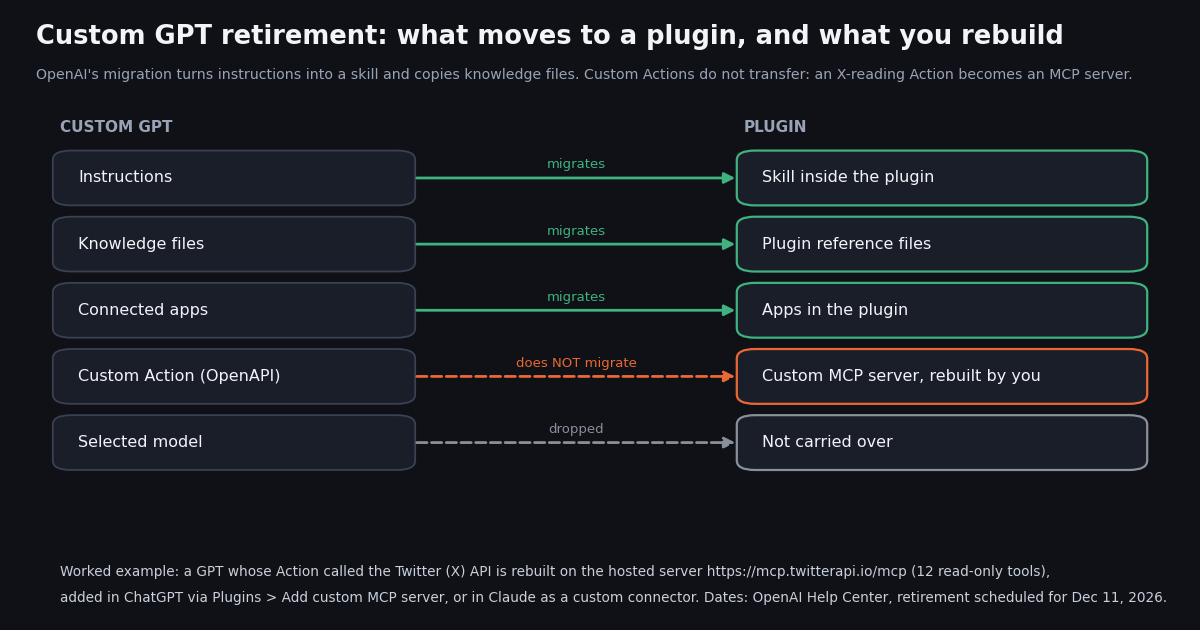
This page is about the retirement itself: the dates, what the migration to plugins keeps and drops, and how to replace a GPT's custom Action once GPTs are gone. If you want to connect ChatGPT to X data from scratch, our guide to connecting ChatGPT to the Twitter (X) API compares the routes, and the ChatGPT MCP guide walks through adding any MCP server step by step. Here we start from a GPT you already built, and the worked example is the most common integration we see: a GPT whose Action calls an X (Twitter) data API.
Every date and rule below comes from OpenAI's Help Center article on custom GPT retirement and migration, read this session, plus OpenAI's plugin, custom MCP and Actions documentation. Where OpenAI says something is "planned" or a "target", we say so too. The two charts come from our own study of X data, collected in 2026: what a Twitter-reading Action actually receives, and what people on X say about the retirement.
When are custom GPTs retiring? The dates OpenAI has published
OpenAI's Help Center states that custom GPTs are scheduled to retire on Dec 11, 2026. At the applicable retirement date "custom GPTs and their GPT pages become inaccessible." Until then existing GPTs keep working, and conversations you already had with them stay accessible afterwards without any action on your part. The change affects all ChatGPT plans, but migration access may arrive at different times for different accounts, so the in-product notice for your account or workspace is the final word.
The Enterprise section of the same article lists the milestones below and notes that "the dates are subject to change".
Where the GPT was created decides the timeline. If you use several accounts or workspaces, the dates and permissions of the account where the GPT was built apply, even when you open it from another account. A public GPT made in an affected Enterprise workspace follows the Enterprise transition for everyone who uses it.
Creating versus retiring are separate. OpenAI says restrictions on creating or publishing GPTs are separate from the retirement of existing GPTs, so a creation freeze does not mean your GPT has stopped. It means the clock to migrate is running.
What migrates to a plugin, and what does not
Migration starts from My GPTs: select Migrate to plugin on the GPT, review the details and follow the steps. It uses the GPT's latest published version; drafts and unpublished edits do not transfer, although publishing does not require sharing publicly. The plugin starts private and is not installed for anyone automatically.
The original becomes read-only. After migration the GPT keeps working until retirement but you can no longer edit it, and its creator cannot delete it. Make every essential edit and publish it before you press the button.
So what is a plugin in 2026? OpenAI's "Plugins in ChatGPT" article describes a plugin as a bundle of skills (reusable instructions), connected apps (which link external accounts and actions), app templates for administrators, and extensions such as sidebar views and file viewers. Plugins work in ChatGPT Chat, Work and Codex; you create one by installing Plugin Creator and chatting with @plugin-creator.
Who can migrate. Only the GPT's creator, or in Enterprise a workspace admin, can migrate it. Having permission to use someone else's GPT does not let you migrate it, and it does not automatically give you access to the creator's replacement plugin.
Why custom Actions are the part you rebuild, and why a raw X Action rarely fit
An Action was an OpenAPI schema plus an auth setting that let a GPT call any HTTPS API. OpenAI's retirement FAQ is blunt about them: "GPT custom actions do not transfer through the migration workflow. Features that depend on them will not work in the plugin until you set up a replacement." It adds that rebuilding the connection "may require a custom MCP server and technical setup" and that a rebuilt integration "should not be assumed to provide every capability of the original action."
The replacement OpenAI points to is the Model Context Protocol. In the current Plugins experience you add a custom MCP server directly from Plugins and save it as a plugin; OpenAI's custom MCP article says you no longer need to switch on Developer Mode first, you acknowledge a risk warning per server instead. A GPT that called a third-party API through an Action therefore has two realistic futures: an existing app or MCP server for that service, or one you host yourself.
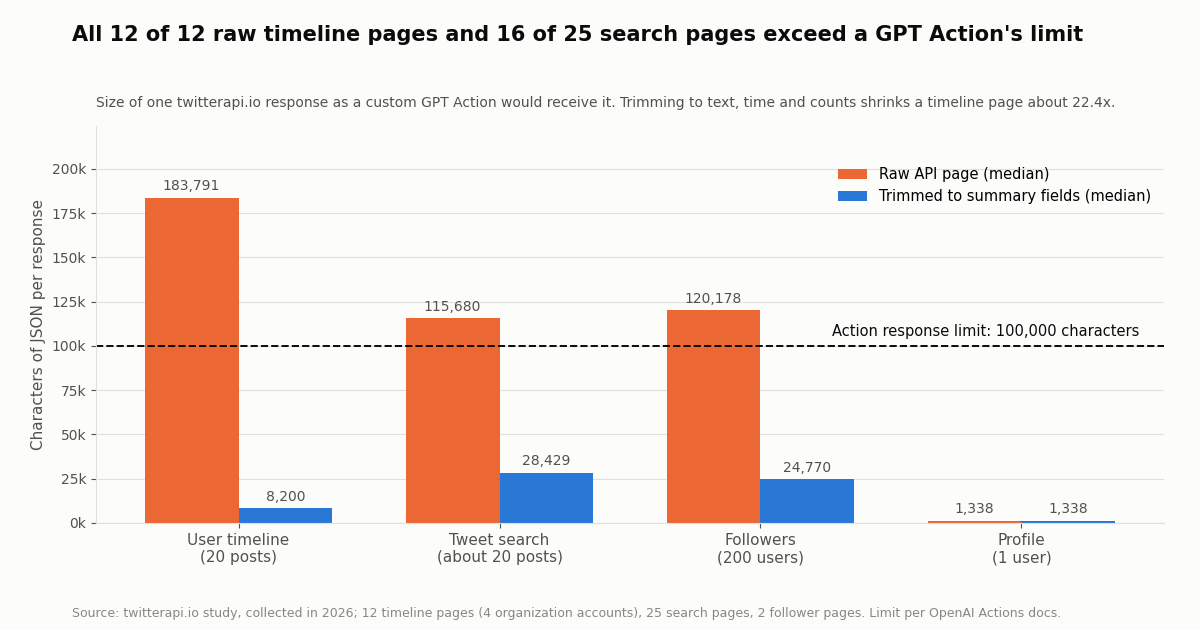
Actions also had limits that a migration is a good moment to escape. OpenAI's Actions production notes list a 45-second round trip, 300 characters for each endpoint description, and request and response payloads under 100,000 characters each. That last limit matters for X data, as the next chart shows.
We measured the JSON a GPT Action receives when it calls the raw endpoints. A page of 20 posts from /twitter/user/last_tweets came to a median of 183,791 characters (range 138,004 to 253,819) across 12 pages from @OpenAI, @OpenAIDevs, @XDevelopers and @AnthropicAI. That is about 9,190 characters per post once quoted posts, entities, media and the full author object are included, so only about 10 raw posts fit under the limit.
What trimming does. Keeping only text, time and the four counts shrinks a timeline page from 183,791 to 8,200 characters, about 22.4x smaller. A GPT that called the raw endpoint either needed a small proxy that did this, or it was getting cut-off responses. If your Action pointed straight at an X data API and answers felt incomplete, this is a likely reason.
What it means for the rebuild. Whatever you move to, decide what the model actually needs per post. An MCP tool returns its result into the conversation the same way, so a lean result is still worth having; the code at the end of this page measures your own accounts and queries so you can choose.
Before: the Twitter-reading GPT Action
This is the shape of a typical X-reading Action: an OpenAPI schema with two read operations and an API key sent in the X-API-Key header. In the GPT editor it sat under Configure > Actions, with authentication set to API Key, auth type Custom, header name X-API-Key.
What carries over from this GPT. The instructions you wrote around it ("summarize the last day of posts from these accounts, group by topic") become a skill in the migrated plugin, and any PDF or CSV you attached as knowledge becomes a reference file. The schema below does not carry over; after migration, the skill has instructions but no way to fetch posts until you connect a replacement.
What it costs today. Each call bills the same as any direct twitterapi.io call: 15 credits per post returned, which is $0.15 per 1,000 posts, with a 15-credit minimum per request. The Action itself added nothing, and so does the MCP replacement.
openapi: 3.1.0
info:
  title: X (Twitter) reader for a custom GPT
  version: 1.0.0
servers:
  - url: https://api.twitterapi.io
paths:
  /twitter/tweet/advanced_search:
    get:
      operationId: searchTweets
      summary: Search recent posts on X with Twitter search operators
      parameters:
        - { name: query, in: query, required: true, schema: { type: string } }
        - { name: queryType, in: query, required: true, schema: { type: string, enum: [Latest, Top] } }
        - { name: cursor, in: query, required: false, schema: { type: string } }
      responses:
        "200": { description: "tweets[], has_next_page, next_cursor" }
  /twitter/user/last_tweets:
    get:
      operationId: getUserLastTweets
      summary: Latest posts from one X account, newest first
      parameters:
        - { name: userName, in: query, required: true, schema: { type: string } }
        - { name: cursor, in: query, required: false, schema: { type: string } }
      responses:
        "200": { description: "data.tweets[], has_next_page, next_cursor" }
components:
  schemas: {}
  securitySchemes:
    apiKey: { type: apiKey, in: header, name: X-API-Key }
security:
- apiKey: []After: the same job as an MCP connector in ChatGPT
twitterapi.io runs a hosted MCP server at https://mcp.twitterapi.io/mcp. Its initialize response, checked this session, describes "read-only access to Twitter/X data via 12 tools" and its tools/list returns these 12. Each maps to an operation you may have had in your Action schema:
The other seven are get_user_about, get_user_followers, get_user_followings, get_tweet_replies, get_tweet_quotes, get_tweet_retweeters and get_trends.
Add it in ChatGPT. OpenAI's custom MCP article gives the current path: Plugins, the plus button, Add custom MCP server, a name, the HTTPS endpoint URL under Connection, an authentication method, the risk acknowledgement, then Create as a plugin and review the discovered tools. Install the plugin, open a new chat, type @ and pick it.
Authentication. An unauthenticated call returns HTTP 401 with a WWW-Authenticate header pointing to the server's OAuth metadata, scope twitter.read. Choose OAuth and you sign in to twitterapi.io and approve; the authorization server issues refresh tokens, which OpenAI's article says you need to avoid re-authenticating after the first token expires. The server's own instructions also accept your twitterapi.io API key as a Bearer token, for clients that take a fixed header.
The article does not mention Free or Plus. Because every tool on this server is read-only, a read/fetch-only connection loses nothing. Our ChatGPT MCP guide records an earlier test where a free personal account could add a server too; check your own Plugins page rather than assuming from the plan name.
Joining it with the migrated skill. OpenAI says custom MCP servers and plugin MCP servers can be used in the same conversation, so the quickest path is to keep the migrated plugin (your instructions) and the new X-data plugin side by side and mention both. If you want one bundle, ask @plugin-creator to update the migrated plugin and include the app.
# AFTER, option A: ChatGPT (web) -> Plugins -> + -> Add custom MCP server
#   Name:            X data (twitterapi.io)
#   Connection URL:  https://mcp.twitterapi.io/mcp
#   Authentication:  OAuth (the server publishes its OAuth metadata)
#   Tick "I understand and want to continue" -> Create as a plugin
#   New chat -> type @ -> pick the plugin -> ask your usual GPT prompt

# AFTER, option B: Claude Code, one command (API key in a header)
claude mcp add --transport http twitterapi https://mcp.twitterapi.io/mcp \
  --header "Authorization: Bearer YOUR_TWITTERAPI_IO_KEY"
claude mcp list

# AFTER, option C: Claude (web / desktop) -> add a custom connector (Pro / Max; Team and
#   Enterprise: an Owner adds it first). URL: https://mcp.twitterapi.io/mcp, then sign in and approve

# Check what the server exposes before you rely on it (no key needed for these two):
curl -s https://mcp.twitterapi.io/mcp -H 'content-type: application/json' \
  -H 'accept: application/json, text/event-stream' \
-d '{"jsonrpc":"2.0","id":1,"method":"tools/list"}' | head -c 400Or move the GPT to Claude
"Migrate custom GPT to Claude" is a common follow-up search, and the pieces map cleanly. Your GPT's instructions become a Claude Project's instructions or an Agent Skill (a SKILL.md file; see our SKILL.md guide for the format), knowledge files become project files, and the Action becomes a remote MCP server added as a custom connector.
Claude web and desktop. Anthropic's custom connector article says Pro and Max users add a remote MCP server themselves, while on Team and Enterprise an Owner adds it for the organization first. Claude connects from Anthropic's cloud, so the server must be reachable on the public internet, which a hosted server already is. Connection usually runs through OAuth; the article notes some connectors use an API key or other fixed credential instead. Enable the connector per conversation from the + menu.
Claude Code. Anthropic's Claude Code docs recommend HTTP for remote servers: claude mcp add --transport http <name> <url>, with --header for an API key or token. With our server either Authorization: Bearer <key> or X-API-Key: <key> is read as a twitterapi.io API key; we confirmed this session that both headers reach the key check.
Google users face a similar question with Gems; our guide to using Gemini with the Twitter (X) API covers the Gems-to-skills path and the same hosted server in Gemini CLI.
What people on X are saying about the custom GPT retirement
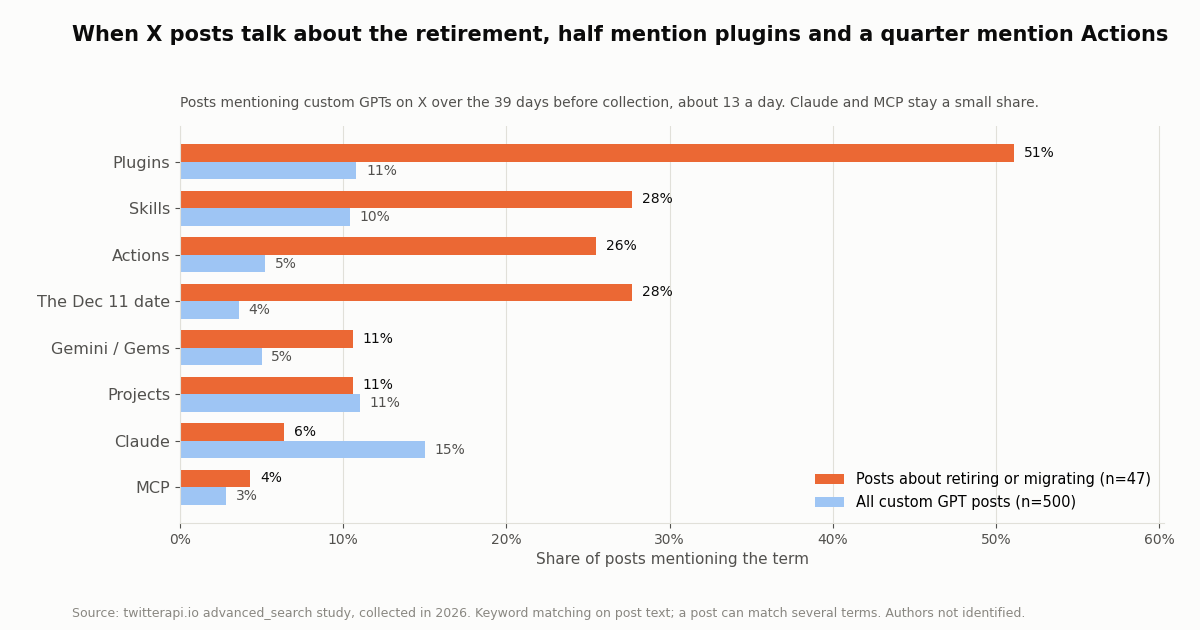
We pulled every post we could find on X mentioning "custom GPT" or "custom GPTs" over the 39 days before collection: 500 posts, about 13 a day, 86% in English. Of those, 47 talk about retiring, sunsetting or migrating. The most recent week held 150 posts, the most of the six weeks we covered.
Actions are a named worry. About a quarter (26%) of the retirement posts mention Actions, matching OpenAI's warning that they do not transfer. MCP, the documented replacement, appears in only 4%, which suggests many builders have not yet looked at what the rebuild involves.
Claude is the comparison, not the plan. Claude shows up in 15% of all custom GPT posts, mostly side-by-side comparisons, but in only 6% of the retirement posts. The narrower retirement-and-plugins query we also ran returned 386 posts going back to 2023, of which 106 fall in the last 60 days.
OpenAI's own accounts talk plugins, not GPTs. A search of @OpenAI, @OpenAIDevs and @ChatGPTapp for GPTs or plugins returned 60 posts from @OpenAI and @OpenAIDevs; 56 mention plugins and 0 mention custom GPTs. The retirement is communicated through the Help Center and in-product notices, not on X.
What the rebuilt connector costs, against the official X API
Moving from an Action to MCP does not change the data bill. Every tool call on the twitterapi.io MCP server is billed in credits exactly like a direct API call, and you pay only for the data returned. OpenAI or Anthropic usage is billed separately by them, as before.
Per 1,000 posts that is about 33x apart: $0.15 against $5.00 on X's published pay-per-usage rate card at docs.x.com/x-api/getting-started/pricing, which X says has no subscriptions and lets you set a spending limit. The official API also needs an X developer account and app; twitterapi.io reads need no X account.
New twitterapi.io accounts that pass the automatic bot check get up to $1 of free credits (at most 100,000 credits, no card, one per person or network, expiring after 31 days), enough to test the rebuilt connector with your GPT's usual prompts. Before the first payment the rate limit is 0.2 requests per second, which is fine for a chat assistant; paid accounts get 20. See the pricing page for plans.
Writes. The MCP server is read-only. If your old GPT posted to X through an Action, that part has to be rebuilt in your own code: one /twitter/user_login_v2 login ($0.10, with a proxy you supply) returns login_cookies, then each post through /twitter/create_tweet_v2 costs $0.0006, billed per HTTP 200 call. The call acts as that account, so X can rate-limit, lock or suspend it; keep a human pace and expect to log in again when the session expires.
How we collected this
Question. Would the X data a custom GPT Action pulls fit through an Action's documented 100,000-character response limit, and what do people on X say about the custom GPT retirement?
Accounts and queries. Timelines of four organization accounts (@OpenAI, @OpenAIDevs, @XDevelopers, @AnthropicAI; @ChatGPTapp returned "user not found"), their profiles, one page pair of an organization's followers measured for size only, an advanced_search for "custom gpt" OR "custom gpts" (Latest), a narrower retirement-and-plugins query, and a search of OpenAI's official accounts.
Window and size. Collected in 2026. The topic sample covers the 39 days before collection (500 posts); the payload sample is 12 timeline pages (240 posts), 25 search pages and 2 follower pages. 70 API requests in total, under $0.20 in credits.
Method. Characters are the length of the response body serialized as JSON, which is what an Action receives. "Trimmed" keeps text, created time and the like, repost, reply and view counts. Terms were matched on post text with simple patterns, so a post can count for several terms, and sarcasm or unrelated uses of "plugin" are not filtered out.
What it cannot show. We did not run a GPT or the ChatGPT connector ourselves in this study, so we did not measure how the MCP server shapes or truncates tool results; we measured the raw REST responses an Action would get. The X search reflects what our search index returned, not every post on X.
Privacy. Aggregates only. Organization accounts are named; private authors are never named, quoted or profiled, and their raw pages were not kept with the study.
"""gpt_action_payload_check.py - before you retire a custom GPT that reads X (Twitter) data,
measure what its Action actually received, and what a slimmer tool result would look like.

OpenAI documents a 100,000-character limit on Action request and response payloads
(platform.openai.com/docs/actions/production). A raw twitterapi.io page can be larger.

    pip install requests
    export TWITTERAPI_IO_API_KEY=...   # twitterapi.io dashboard
    python gpt_action_payload_check.py OpenAIDevs "custom gpt plugin"
"""
import json
import os
import sys

import requests

BASE = "https://api.twitterapi.io"
HEADERS = {"X-API-Key": os.environ["TWITTERAPI_IO_API_KEY"]}
ACTION_LIMIT = 100_000


def chars(obj):
    return len(json.dumps(obj, ensure_ascii=False))


def slim(t):
    """The fields a summarizing assistant needs; everything else stays on the server."""
    return {
        "text": t.get("text"),
        "createdAt": t.get("createdAt"),
        "likeCount": t.get("likeCount"),
        "retweetCount": t.get("retweetCount"),
        "replyCount": t.get("replyCount"),
        "viewCount": t.get("viewCount"),
        "url": t.get("url"),
    }


def user_pages(user_name, pages=2):
    """GET /twitter/user/last_tweets -> data.tweets[], has_next_page, next_cursor (20 per page)."""
    cursor = ""
    for _ in range(pages):
        r = requests.get(f"{BASE}/twitter/user/last_tweets",
                         params={"userName": user_name, "cursor": cursor},
                         headers=HEADERS, timeout=30)
        r.raise_for_status()
        body = r.json()
        yield body, (body.get("data") or {}).get("tweets", [])
        if not body.get("has_next_page"):
            break
        cursor = body.get("next_cursor", "")


def search_pages(query, pages=2):
    """GET /twitter/tweet/advanced_search -> top-level tweets[], has_next_page, next_cursor."""
    cursor = ""
    for _ in range(pages):
        r = requests.get(f"{BASE}/twitter/tweet/advanced_search",
                         params={"query": query, "queryType": "Latest", "cursor": cursor},
                         headers=HEADERS, timeout=30)
        r.raise_for_status()
        body = r.json()
        yield body, body.get("tweets", [])
        if not body.get("has_next_page"):
            break
        cursor = body.get("next_cursor", "")


def report(label, gen):
    for i, (body, tweets) in enumerate(gen, 1):
        raw, small = chars(body), chars({"tweets": [slim(t) for t in tweets]})
        flag = "OVER the Action limit" if raw > ACTION_LIMIT else "fits"
        print(f"{label} page {i}: {len(tweets)} posts, raw {raw:,} chars ({flag}), slim {small:,} chars")


if __name__ == "__main__":
    account = sys.argv[1] if len(sys.argv) > 1 else "OpenAIDevs"
    query = sys.argv[2] if len(sys.argv) > 2 else "custom gpt plugin"
    report(f"@{account} timeline", user_pages(account))
    report(f"search '{query}'", search_pages(query))
    # Each post returned costs 15 credits ($0.15 per 1,000 posts); this run reads at most 80 posts.
Questions readers ask
When exactly are custom GPTs being retired?
OpenAI's Help Center gives Dec 11, 2026 as the standard scheduled retirement, when custom GPTs and their GPT pages become inaccessible. Enterprise workspaces with a qualified, approved deferral retire on Feb 11, 2027. OpenAI says the dates are subject to change and that your in-product notice is the timeline that applies to you.
Will I lose my conversations with custom GPTs?
No. OpenAI says existing conversations with custom GPTs remain accessible after retirement and you do not need to do anything to preserve them. What goes away is the ability to run the GPT.
Do custom GPT Actions migrate to plugins?
No. OpenAI states that GPT custom actions do not transfer through the migration workflow, and features that depend on them stop working in the plugin until you set up a replacement. Rebuilding usually means an existing app for that service or a custom MCP server.
Can I still create a new custom GPT?
For affected Enterprise workspaces, OpenAI lists Oct 26, 2026 as the planned end of new custom GPT creation; edits to existing, unmigrated GPTs remain possible. Restrictions on creating GPTs are separate from the retirement of existing ones, so check the notice in your own account.
How do I move a custom GPT to Claude?
Copy the instructions into a Claude Project or an Agent Skill, upload the knowledge files to the project, and replace any Action with a remote MCP server added as a custom connector (Pro and Max add it themselves; on Team and Enterprise an Owner adds it first). For X data, the hosted twitterapi.io MCP server works in Claude and in Claude Code.
What is the difference between a custom GPT and a plugin?
A custom GPT bundled instructions, knowledge files, a chosen model and optional Actions into one chatbot. A plugin in 2026 bundles skills, connected apps, app templates and extensions, works across ChatGPT Chat, Work and Codex, and is selected with @ or automatically when a skill's description matches the request.
Do I need Developer mode to add an MCP server to ChatGPT now?
Not in the current Plugins experience. OpenAI's custom MCP article says you add a custom MCP server from Plugins without turning on Developer Mode first, acknowledging a risk warning for each server instead. Account and workspace policies still decide whether you see the option.
Can the rebuilt X connector post tweets like my old Action did?
Not through the hosted MCP server, which is read-only. Posting runs through twitterapi.io's write endpoints from your own code: a $0.10 login with a proxy you supply, then $0.0006 per post, acting as that account, so keep a human pace and expect X to rate-limit or lock an account that posts too fast.
Continue
- OpenAI Help Center: Custom GPT retirement and migration FAQ
- OpenAI Help Center: Plugins in ChatGPT
- OpenAI Help Center: Connecting custom MCP servers in ChatGPT
- OpenAI docs: GPT Actions in production (payload and timeout limits)
- Anthropic: Get started with custom connectors using remote MCP
- X API pay-per-usage pricing (official)
- X (Twitter) API hub: endpoints, auth and limits
- Connect ChatGPT to the Twitter (X) API: MCP, Actions and function calling
- How to add an MCP server to ChatGPT, step by step
- Use Claude with the Twitter (X) API through MCP
- Gemini with the Twitter (X) API, including Gems to skills
- SKILL.md explained: the Agent Skills format
- OpenAI Agents SDK with Twitter (X) data
- The twitterapi.io MCP server: URL, tools and setup
- twitterapi.io pricing and plans
- 01X API 403 Forbidden: Every Cause on the Twitter (X) API and How to Fix Each One
- 02How to Use ZCode with the Twitter (X) API: MCP Server and Skills Setup
- 03Pi Coding Agent + Twitter (X): Add Live X Search to Pi
- 04DeepSeek Harness and Twitter (X): Add an X MCP Server, Skill or Plugin to dsh
- 05X (Twitter) Bookmarks + AI: Export Them, Then Let a Model Sort and Search Them
- 06Apify Twitter (X) Scraper — A Developer's Alternative Comparison
- 07How to Save a GIF from Twitter (X): Desktop, iPhone, Android and Bulk
- 08Twitter (X) Follower Tracking via API — A Developer Guide
Stop reading. Start building.
Starter credits cover real testing on real data. Google sign-in, no card, no application queue.
Get an API keyAlready building with TwitterAPI.io? Publish an honest tutorial or build log about it and earn up to $200 a month in API credits.