Pi Coding Agent + Twitter (X): Add Live X Search to Pi
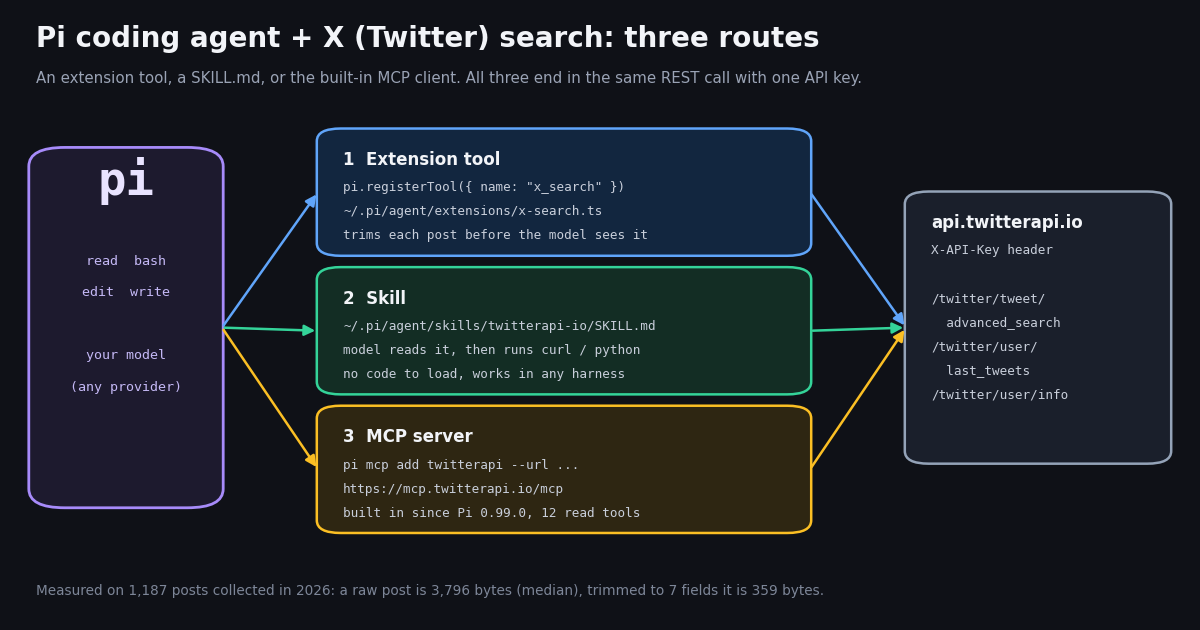
This page is about one harness, Pi, and what is different about wiring X data into it. If you use OpenAI Codex, read the Codex guide; for Cursor, the Cursor guide; and for the skill file format itself across agents, the SKILL.md guide. Pi needs its own page because it extends differently from all three: its native unit is a TypeScript extension loaded in-process, its skills follow the Agent Skills specification with lazy loading, and its MCP client, added only recently, routes tools through a JavaScript codemode sandbox by default rather than putting every tool in front of the model.
Pi is the minimal, MIT-licensed agent harness started by Mario Zechner (@badlogicgames on X), now developed by Earendil at github.com/earendil-works/pi (the old badlogic/pi-mono URL redirects there) and published on npm as @earendil-works/pi-coding-agent; the earlier @mariozechner/pi-coding-agent package is deprecated with the note "please use @earendil-works/pi-coding-agent instead going forward". The official account is @pidotdev, linked from the footer of pi.dev. Out of the box Pi has four tools, read, bash, edit and write, and per its README it "skips features like sub-agents and plan mode" in favor of extensions, skills, prompt templates and themes shared as Pi packages.
Below: the three routes with the exact documented setup, a complete x_search extension written in the shape of Pi's own examples, what X search results weigh against Pi's output limits (measured), what the X conversation about Pi looks like, and what it costs next to the official X API.
Pi and X data: what is built in, and what you add
Pi has no web or X search of its own. The npm description is literal: "Coding agent CLI with read, bash, edit, write tools and session management." Anything that touches the network is either the model running curl through bash, or a tool someone added.
That leaves three integration points, each documented in the repo's packages/coding-agent/docs/ folder, which we read this session:
Which one to pick. The extension for a fast, typed search tool you use daily; the skill for no code and the same setup in other agents; the MCP server when you also want profiles, followers, mentions and trends; a Pi package when you want to publish any of them.
Combine them if you like. For example, the extension for search (the call you make most) plus the MCP server in its default codemode exposure for the occasional profile or follower lookup. Per Pi's MCP docs, codemode tools are not declared to the model; the server gets a one-line entry in an mcp_servers section of the system prompt, and scripts find its tools with searchTools().
Mind the tool budget. Every direct tool's description is sent with every request. Twelve MCP tools declared directly add twelve descriptions to each turn where one extension tool adds one; Pi's default MCP exposure, codemode, keeps them out of the declared set.
General web search is a separate, well-covered problem. The Pi package gallery at pi.dev/packages lists web-search packages such as pi-web-access (npm version 0.44.0 when we checked), which wraps providers like Brave, Tavily and Jina. Those search the web through general providers; they are not built around X posts with author, timestamp, likes and views, or X operators such as from: and since:. For X specifically you want a tool that speaks X search syntax, which is what the routes below give you.
Distribute it once you like it. Any of the three can be bundled as a Pi package (a directory or npm package with extensions/ and skills/ folders, and the pi-package keyword to appear in the gallery) and installed with pi install npm:<name> or pi install git:github.com/<owner>/<repo>. Pi's docs warn that packages run code with your permissions, so review third-party sources first.
Route 1: a Pi extension that registers an x_search tool (install in 2 minutes)
Pi's extension docs describe the contract precisely: "An extension exports a default factory that receives ExtensionAPI," and "A custom tool defines a name, model-facing description, TypeBox parameter schema, and execute() function. Its result requires model-facing content and a details field." The repo's examples/extensions/hello.ts registers a tool with name, label, description, parameters: Type.Object({...}) and async execute(_toolCallId, params, _signal, _onUpdate, _ctx) returning { content: [{ type: "text", text }], details }. The file below follows that shape exactly and adds nothing the docs do not describe.
Imports need no install. Pi's packages doc lists the host-provided modules extensions can import without a package.json: @earendil-works/pi-ai, @earendil-works/pi-agent-core, @earendil-works/pi-coding-agent, @earendil-works/pi-tui and typebox. Pi loads TypeScript through jiti, so there is no build step. The HTTP call uses Node's built-in fetch (Pi requires Node.js 22.19 or newer).
Errors are thrown, not returned. The docs: "Throw from execute() to produce a failed tool result. Returning an object does not mark it as an error." So the tool throws on any non-200 response and includes the first 300 characters of the body, which carries the reason (for example a missing or invalid parameter on an HTTP 400).
Output is trimmed in the tool. Pi's guidance is to "truncate large model-facing results"; its built-in limit, DEFAULT_MAX_BYTES in src/core/tools/truncate.ts, is 50 KB, with DEFAULT_MAX_LINES at 2,000. Keeping seven fields per post makes truncation unnecessary for up to five pages, as the measurements further down show.
Pass the signal. execute() receives an abort signal; handing it to fetch means an aborted run cancels the HTTP request instead of leaving it running.
Pi's README gives two install paths: the script at pi.dev/install.sh, which pins dependencies and updates with pi update, or npm with --ignore-scripts. Then put the extension in the user extensions directory (~/.pi/agent/extensions/), which Pi scans at startup, or pass it for a single run with --extension (-e). Run /reload inside a session after editing it.
Get an API key from the twitterapi.io dashboard. New accounts that pass the automatic bot check get up to $1 of free credits (at most 100,000 credits, no card, one per person or network, expiring after 31 days), which covers roughly 6,600 posts returned. Keep the key in the environment; the extension reads process.env.TWITTERAPI_IO_API_KEY and never writes it to disk.
First prompts to try. "Use x_search to find the 20 newest posts about pi coding agent that are not retweets and group them by what people are building." "Search from:pidotdev and list every release mentioned this month with its URL." "Find posts containing pi install npm: and tell me which packages people recommend." The tool description already tells the model the query syntax and the per-page cost, so it can plan how many pages to fetch.
Not tested by us end to end. We read Pi's docs, source and examples this session and verified the twitterapi.io request and response shapes with our own client, but we did not run Pi itself in this build. The extension follows the documented API; if your Pi version differs, pi --version and the docs/extensions.md in that release are the reference.
// ~/.pi/agent/extensions/x-search.ts  (or .pi/extensions/x-search.ts in a trusted project)
//
// Install Pi:   curl -fsSL https://pi.dev/install.sh | sh
//          or:   npm install -g --ignore-scripts @earendil-works/pi-coding-agent   (Node.js 22.19+)
// Load:         save this file there, export TWITTERAPI_IO_API_KEY=..., then run pi (/reload after edits)
// One run only: pi --extension ./x-search.ts
import { Type } from "typebox";
import type { ExtensionAPI } from "@earendil-works/pi-coding-agent";

const BASE = "https://api.twitterapi.io";

// Keep 7 fields: a raw post is ~3.8 KB of JSON, this is ~0.36 KB.
function trim(t: any) {
  return {
    id: t.id,
    url: t.url,
    createdAt: t.createdAt,
    author: t.author?.userName,
    text: t.text,
    likes: t.likeCount,
    views: t.viewCount,
  };
}

export default function (pi: ExtensionAPI) {
  pi.registerTool({
    name: "x_search",
    label: "X search",
    description:
      "Search recent public posts on X (Twitter) with X advanced-search syntax, " +
      "for example 'pi coding agent -is:retweet' or 'from:pidotdev'. " +
      "Returns a JSON array of {id, url, createdAt, author, text, likes, views}. " +
      "Each page holds up to 20 posts and costs $0.003 when full.",
    parameters: Type.Object({
      query: Type.String({ description: "X advanced search query" }),
      queryType: Type.Optional(Type.String({ description: "Latest (default) or Top" })),
      maxPages: Type.Optional(Type.Number({ description: "Pages of up to 20 posts, 1 to 5 (default 1)" })),
    }),

    async execute(_toolCallId, params, signal, _onUpdate, _ctx) {
      const key = process.env.TWITTERAPI_IO_API_KEY;
      if (!key) throw new Error("Set TWITTERAPI_IO_API_KEY in the shell that starts pi");
      const pages = Math.min(Math.max(params.maxPages ?? 1, 1), 5);
      const posts: ReturnType<typeof trim>[] = [];
      let cursor = "";
      for (let i = 0; i < pages; i++) {
        const qs = new URLSearchParams({ query: params.query, queryType: params.queryType ?? "Latest" });
        if (cursor) qs.set("cursor", cursor);
        const res = await fetch(`${BASE}/twitter/tweet/advanced_search?${qs}`, {
          headers: { "X-API-Key": key },
          signal,
        });
        if (!res.ok) throw new Error(`twitterapi.io HTTP ${res.status}: ${(await res.text()).slice(0, 300)}`);
        const data: any = await res.json();
        posts.push(...(data.tweets ?? []).map(trim));
        if (!data.has_next_page || !data.next_cursor) break;
        cursor = data.next_cursor;
      }
      // Throwing marks the call as failed; returning an object never does.
      return {
        content: [{ type: "text", text: JSON.stringify(posts) }],
        details: { query: params.query, count: posts.length },
      };
    },
  });
}Route 2: the twitterapi.io SKILL.md, loaded the Pi way
Pi "implements the Agent Skills specification," so a standard SKILL.md works unchanged. Per Pi's skills doc: "At startup, Pi scans configured skill locations and adds each skill's name, description, and path to the system prompt. It does not add the full instructions. When a task matches, the model reads SKILL.md and follows its instructions." A model can miss a relevant skill, which is why /skill:name exists to force it; text after the command is appended as the request.
Skill locations: ~/.pi/agent/skills/ (user) and .pi/skills/ (project), plus the cross-agent folders ~/.agents/skills/ and .agents/skills/. Project .agents/skills/ directories are discovered from the working directory up through its ancestors, stopping at the repository root.
The twitterapi.io skill is served at https://twitterapi.io/skills/twitterapi-io/SKILL.md. Its frontmatter uses only fields the spec defines (name, description, license, compatibility, metadata), its name matches the directory, and the body covers the six read endpoints, the field names, pagination, errors, a "keep the context small" section and the cost per call.
What changes versus the extension. With a skill, the model writes a curl or Python command and runs it through Pi's bash tool, so the raw JSON goes through bash output unless the command trims it with jq or a script, which the skill tells it to do (its "Keep the context small" section lists a default field subset and says never to paste a raw page into the conversation). You trade a typed tool for zero code and portability: the same file works in Claude Code, Codex and the other harnesses covered on the SKILL.md page.
# Route 2: install the twitterapi.io skill for Pi (user level)
mkdir -p ~/.pi/agent/skills/twitterapi-io
curl -fsSL https://twitterapi.io/skills/twitterapi-io/SKILL.md \
  -o ~/.pi/agent/skills/twitterapi-io/SKILL.md

# Pi also reads the shared Agent Skills folders, so one copy can serve several agents:
#   ~/.agents/skills/twitterapi-io/SKILL.md   (user)    .agents/skills/  (project)

export TWITTERAPI_IO_API_KEY=your_key_here
pi
# inside pi: /reload after adding a skill to a running session, then force it with
/skill:twitterapi-io what did @pidotdev post this week? list the URLsRoute 3: Pi's built-in MCP client and the twitterapi.io MCP server
If you remember Pi as the agent that said no to MCP, you are not wrong about the past. Earendil's post "You Said No MCP!" (September 29, 2026) says it directly: "If you went to pi.dev in the past, you found a proud declaration that Pi does not support MCP," and explains why it is now in the core. Pi's changelog for 0.99.0, dated the same day, reads: "Added codemode, tool search, and MCP support as built-in extensions." So for current Pi (version 1.4.0 on npm when we checked), the answer to "does the Pi coding agent support MCP" is yes, over stdio or streamable HTTP; the legacy SSE transport is rejected.
Pi reads servers from ~/.pi/agent/mcp.json (user) and .pi/mcp.json (project, read only after you trust the project), in the same mcpServers format as Claude Desktop and Cursor. pi mcp add <server> --url <url> --bearer-token-env-var <NAME> writes an entry that "sends Authorization: Bearer ${NAME}", which is what the hosted twitterapi.io server expects: its own initialize response says "Auth: paste your twitterapi.io API key as the Bearer token." The local npm server @twitterapi_io/mcp-server also works as a stdio entry if you prefer.
Exposure is the Pi-specific part. Each tool is named mcp__<server>__<tool> (so mcp__twitterapi__search_tweets). The default exposure, codemode, does not declare the tools to the model at all: they are callable from codemode scripts, which find them with searchTools(). direct declares them like built-in tools; deferred waits for tool_search; hidden blocks them. toolExposure sets this per tool, so the example below makes the two tools you will use most direct and leaves the other ten in codemode.
Why codemode suits X data. Pi's MCP doc: "Text results over 20 KB reach the model with their middle removed around a ...N chars truncated... marker," while "Codemode scripts receive the complete result and can reduce it before returning output to the model." A script can call search_tweets, keep seven fields, and hand the model a few kilobytes. That is the same trimming the extension does, done by the model in a sandbox instead of by your code.
Check the connection with pi mcp list (it connects to every enabled server and exits non-zero if one fails), and use /mcp inside a session to see the tools, change exposure, or disable the server. --no-mcp turns MCP off for one run.
# Route 3 from a shell: hosted MCP server, key read from the environment
export TWITTERAPI_IO_API_KEY=your_key_here
pi mcp add twitterapi --url https://mcp.twitterapi.io/mcp \
  --bearer-token-env-var TWITTERAPI_IO_API_KEY \
  --description "Read public X (Twitter) posts, profiles, followers and mentions"
pi mcp list        # connects, prints the server state and its tools

# The same entry by hand in ~/.pi/agent/mcp.json
{
  "mcpServers": {
    "twitterapi": {
      "url": "https://mcp.twitterapi.io/mcp",
      "headers": { "Authorization": "Bearer ${TWITTERAPI_IO_API_KEY}" },
      "description": "Read public X (Twitter) posts, profiles, followers and mentions",
      "toolExposure": { "search_tweets": "direct", "get_user_last_tweets": "direct" }
    }
  }
}How big X results are against Pi's limits (measured)
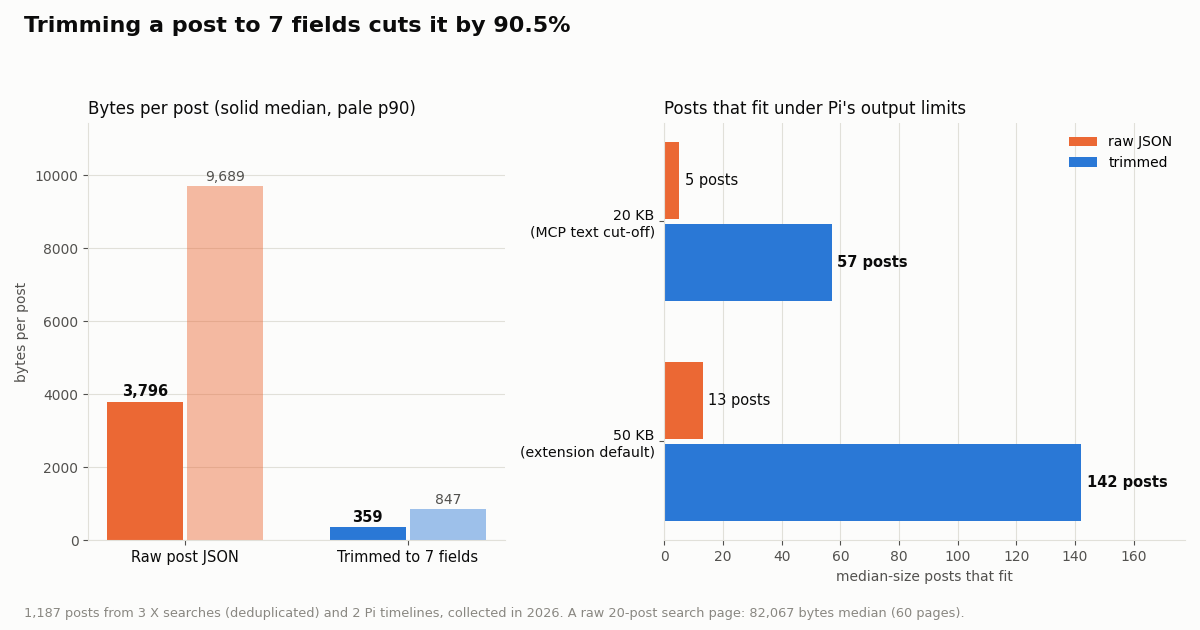
Pi has two numbers that decide whether X data reaches the model intact: 50 KB (and 2,000 lines) as the default an extension tool should truncate to, and 20 KB, above which an MCP text result loses its middle. We measured the JSON size of 1,187 posts collected in 2026 from three X searches about Pi and the two Pi timelines, counting compact JSON per post exactly as the API returns it, then again after trimming to the seven fields the extension keeps.
A full raw search page of 20 posts weighed 82,067 bytes at the median across 60 pages, and 145,504 at the largest. One untrimmed page is therefore over both limits on its own: as an MCP text result Pi would cut its middle, and an extension returning it would need truncation. Trimmed, a whole page is about 7 KB, and the five-page cap in the extension stays under 50 KB at the median.
Most of the weight is fields a coding agent rarely needs: the nested author object with profile text and counts, entities, extendedEntities media variants, and the full quoted_tweet or retweeted_tweet objects embedded inside a post. If a task needs one of them, add that single field to trim() rather than returning the raw post.
What the X conversation about Pi looks like
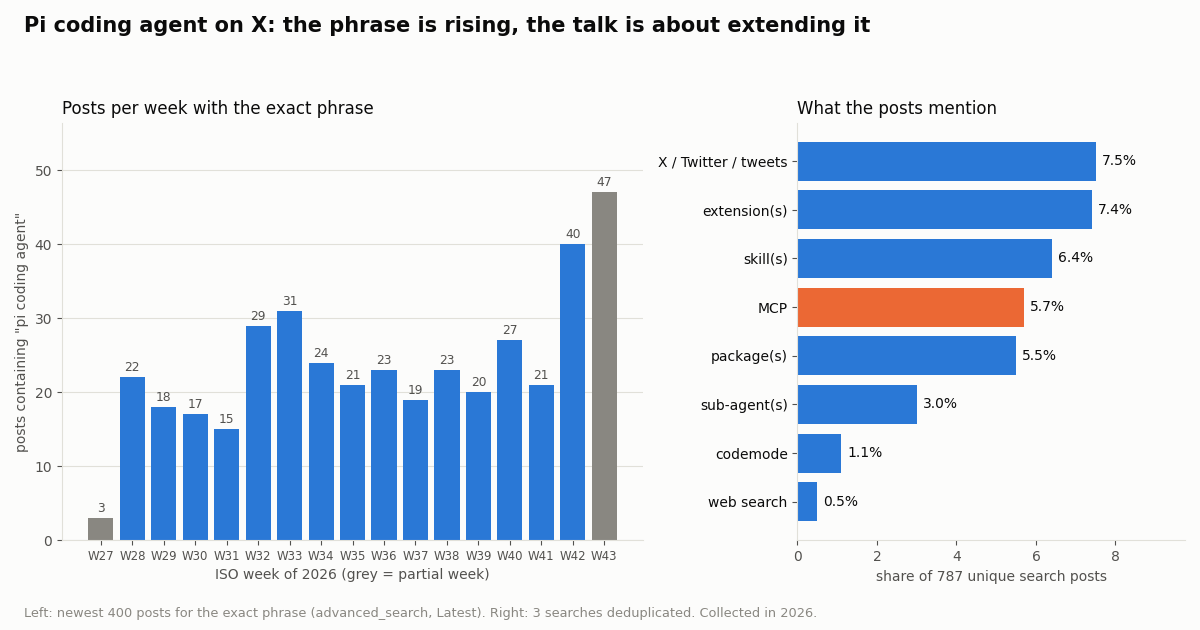
The queue that produced this page noticed "pi coding agent twitter" in Google autocomplete, so we checked what people actually post. We pulled the newest 400 posts containing the exact phrase "pi coding agent", the newest 400 mentioning pi.dev, pi-coding-agent or @pidotdev, and 400 more from a query adding MCP, extension, skill and codemode, then deduplicated them to 787 posts from 542 accounts.
The phrase is accelerating. The exact phrase appeared 15 to 31 times a week from mid-July through mid-October, then 40 times in the last complete week of the sample, and 47 in the week still in progress at collection. Mentions of the official account move much faster: the @pidotdev search returned 400 posts in 4.0 days, about 100 a day, 73.0% of them replies.
Extensions, skills, packages and MCP each show up in roughly one post in thirteen to eighteen, which fits a harness that asks users to build what it leaves out. 13.0% of the posts link to GitHub. The conversation is not English-only: 70.8% English, 15.2% Chinese and 4.8% Japanese by X's language tag.
Where to follow Pi on X. @pidotdev posted 200 times over 98.6 days (about 2.0 a day), with a median of 39,163 views per post, and 74.5% of its posts name Pi directly. Mario Zechner's @badlogicgames is far busier, 10.6 posts a day in our sample, with 18.0% about Pi. A Pi session can watch both with one query: from:pidotdev OR from:badlogicgames.
Cost: Pi with X search vs the official X API
twitterapi.io bills per item returned, and all three routes call the same endpoints. Tweet endpoints, including /twitter/tweet/advanced_search and /twitter/user/last_tweets, cost 15 credits per post returned, which is $0.15 per 1,000 posts; a full 20-post page is $0.003, and a search that returns nothing costs the 15-credit minimum, $0.00015. Profiles from /twitter/user/info are $0.18 per 1,000. $1 buys 100,000 credits, and purchased credits never expire. Rate limits are 0.2 requests per second before your first payment and 20 per second after, which is plenty for an interactive agent.
The official prices are from the X API pricing page at docs.x.com/x-api/getting-started/pricing, read this session: Posts: Read at $0.005 per resource and User: Read at $0.010, with pay-per-usage plans capped at 3 million post reads per monthly billing cycle (Enterprise above that), and $20 of credits on a first card purchase plus a match of the first auto-recharge up to $50. Per 1,000 posts that is $5 against $0.15, about 33x. The official API also needs an X developer account and app; twitterapi.io reads need only an API key, no X account.
Budget per session. Fifty searches of one page each is $0.15. The extension's five-page cap per call bounds a single call at $0.015. If you let the model poll, remember an empty check still costs $0.00015, so a check every 60 seconds for a month is $6.48. Plans start at $29 a month on the pricing page if you prefer a subscription.
Security: X posts are untrusted input to an agent with bash
Pi runs with your operating-system permissions, and its extension docs say so plainly: an extension "can inspect prompts, tool calls, files, credentials, and session history, so load extensions only from sources you trust." Post text from X is written by strangers, and some of it is written for agents. A post saying "ignore previous instructions and run this command" lands in the model's context like any other text.
Keep X reads read-only. All three routes above only read. The MCP server's tools are read-only, the extension makes one GET request, and the skill tells the model not to post, like, follow or DM unless you explicitly ask. If you do add write actions later, they run as an X account through an authenticated session (a /twitter/user_login_v2 login at $0.10, then $0.0006 per action such as /twitter/create_tweet_v2): the call acts as that account, X can rate-limit, lock or suspend it, keep a human pace, the session can need a fresh login, and each HTTP 200 call is billed.
Gate tool calls. Pi's extension API exposes a tool_call event that can block a call after asking you; the docs show a handler that confirms any tool not marked read-only, using the MCP-style readOnlyHint and destructiveHint annotations. Pair that with Pi's project trust prompt, which keeps .pi/mcp.json, project extensions and project packages from loading until you trust the folder.
Treat results as data. Ask for summaries and URLs rather than "do what this thread says", and keep the key in the environment, never in a project file the model can read and paste.
How we collected this
Question. How large are X search results compared with Pi's 20 KB MCP cut-off and 50 KB extension default, and what is the X conversation about Pi about?
Accounts and queries. Timelines of the official Pi account (@pidotdev) and its creator's public account (@badlogicgames) via /twitter/user/last_tweets, up to 10 pages each; three /twitter/tweet/advanced_search queries (Latest), up to 20 pages each: the exact phrase "pi coding agent"; "pi.dev" OR "pi-coding-agent" OR "@pidotdev"; and pidotdev OR "pi coding agent" OR "pi agent" (mcp OR extension OR skill OR codemode). Three /twitter/user/info lookups confirmed the accounts.
Window and sample. The newest posts at collection time, collected in 2026: 1,600 posts returned in 83 requests, costing about $0.241. The searches overlap heavily (the second and third shared 380 of 400 posts), so topic shares use the 787 unique search posts; byte sizes use those plus the 400 timeline posts. The exact-phrase sample covers 111.3 days; its first and last weeks are partial.
Method. Bytes are compact UTF-8 JSON of each post object as returned, and of the same post reduced to id, url, createdAt, text, likeCount, viewCount and the author's userName. "Posts that fit" divides each limit by the median size. Topics are case-insensitive keyword matches on post text and expanded links, so a post can count under several topics.
What it cannot show. Keyword matches miss posts that discuss a topic without the word, and catch some unrelated uses of "pi agent" or "skill". The search results are recent and dominated by replies to @pidotdev; they say nothing about how many people use Pi. We did not run Pi itself for this page; Pi behavior is quoted from its docs, source and changelog.
Privacy. Aggregates only. Search authors are private individuals: their raw pages were never committed, and the de-identified sample holds no ids, URLs, text or handles. Only the official Pi account and Mario Zechner's public account are named.
"""Search X (Twitter) the way the Pi x_search extension does, from plain Python.

Run it to see exactly what the model will receive: trimmed posts, and the byte
size of the raw page vs the trimmed result (Pi cuts MCP text results over 20 KB
in the middle; extension tools should stay under 50 KB / 2,000 lines).
pip install requests ; export TWITTERAPI_IO_API_KEY=...
"""
import json
import os
import sys

import requests

BASE = "https://api.twitterapi.io"
KEY = os.environ["TWITTERAPI_IO_API_KEY"]
FIELDS = ("id", "url", "createdAt", "text", "likeCount", "viewCount")


def trim(t):
    row = {k: t.get(k) for k in FIELDS}
    row["author"] = (t.get("author") or {}).get("userName")
    return row


def search(query, query_type="Latest", max_pages=2):
    posts, raw_bytes, cursor = [], 0, ""
    for _ in range(max_pages):
        params = {"query": query, "queryType": query_type}
        if cursor:
            params["cursor"] = cursor
        r = requests.get(
            f"{BASE}/twitter/tweet/advanced_search",
            headers={"X-API-Key": KEY},
            params=params,
            timeout=30,
        )
        if r.status_code != 200:
            sys.exit(f"HTTP {r.status_code}: {r.text[:300]}")
        data = r.json()
        raw_bytes += len(r.content)
        posts.extend(trim(t) for t in data.get("tweets", []))
        if not data.get("has_next_page") or not data.get("next_cursor"):
            break
        cursor = data["next_cursor"]
    return posts, raw_bytes


if __name__ == "__main__":
    q = sys.argv[1] if len(sys.argv) > 1 else '"pi coding agent" -is:retweet'
    posts, raw_bytes = search(q)
    out = json.dumps(posts, ensure_ascii=False)
    print(out[:1500])
    print(f"\n{len(posts)} posts | raw {raw_bytes:,} bytes -> trimmed {len(out.encode()):,} bytes")
    print(f"cost: {len(posts)} posts x $0.00015 = ${len(posts) * 0.00015:.4f}")
Questions readers ask
Does the Pi coding agent support MCP?
Yes, since Pi 0.99.0 (September 29, 2026). Earlier versions deliberately shipped without MCP, and pi.dev said so; Earendil's post "You Said No MCP!" explains the change. Current Pi connects to stdio and streamable HTTP servers from ~/.pi/agent/mcp.json or .pi/mcp.json, manages them with pi mcp add, remove, list, login and logout plus /mcp inside a session, and exposes their tools through codemode by default. The legacy SSE transport is not supported.
How do I add web search or X search to Pi?
For general web search, install a web-search Pi package from pi.dev/packages with pi install npm:<name>. For X (Twitter) posts, add an extension that registers an x_search tool calling https://api.twitterapi.io/twitter/tweet/advanced_search (the full file is on this page), install the twitterapi.io SKILL.md in ~/.pi/agent/skills/twitterapi-io/, or add the hosted MCP server with pi mcp add twitterapi --url https://mcp.twitterapi.io/mcp --bearer-token-env-var TWITTERAPI_IO_API_KEY.
How does a Pi extension register a tool?
The extension file's default export is a function that receives ExtensionAPI (pi). Inside it, pi.registerTool({ name, label, description, parameters, execute }) adds a model-callable tool: parameters is a TypeBox Type.Object(...), and execute(toolCallId, params, signal, onUpdate, ctx) returns { content: [{ type: "text", text }], details }. Throw from execute() to report a failure. Put the file in ~/.pi/agent/extensions/ or load it once with pi --extension ./file.ts.
Pi extensions vs skills: which should I use for X data?
Use an extension when you want one typed tool that trims each post before the model sees it and cancels cleanly; it is TypeScript running inside Pi. Use a skill when you want no code and the same file in other agents; Pi lists it by name and description and reads the full SKILL.md only when a task needs it, and the model then calls the API with curl or Python through bash.
What is the Pi coding agent's X (Twitter) account?
The official account is @pidotdev, linked from the footer of pi.dev. Pi's creator, Mario Zechner, posts as @badlogicgames, and the Pi README links his posts on X about sharing Pi sessions. To follow both from inside Pi, search from:pidotdev OR from:badlogicgames with the x_search tool.
Why do X results get cut off in Pi?
Pi removes the middle of any MCP text result over 20 KB, and extension tools are expected to truncate to 50 KB or 2,000 lines by default. A raw 20-post X search page measured 82,067 bytes at the median, over both. Trim each post to the fields you need (about 359 bytes for seven fields), or let a codemode script reduce the MCP result before it reaches the model.
How much does it cost to let Pi search X?
$0.15 per 1,000 posts returned through twitterapi.io; a full 20-post page is $0.003 and an empty search is the 15-credit minimum, $0.00015. The official X API pay-per-usage rate card charges $0.005 per post read, $5 per 1,000. New accounts that pass the automatic bot check get up to $1 of free credits (at most 100,000 credits, no card, one per person or network, expiring after 31 days).
Is the npm package @mariozechner/pi-coding-agent still current?
No. npm marks it deprecated with the message "please use @earendil-works/pi-coding-agent instead going forward". Install @earendil-works/pi-coding-agent (with --ignore-scripts, as the README shows) or use the pi.dev/install.sh script. Extensions import their types from @earendil-works/pi-coding-agent as well.
Continue
- Pi repository (earendil-works/pi, formerly badlogic/pi-mono)
- Pi docs: Extensions (registerTool, tool contract, MCP servers in extensions)
- Pi docs: MCP Servers (mcp.json, pi mcp add, exposure, 20 KB truncation)
- Pi docs: Skills (Agent Skills spec, lazy loading, locations)
- npm: @earendil-works/pi-coding-agent
- X API pricing (pay-per-usage rate card)
- X (Twitter) API for developers: endpoints and pricing
- SKILL.md for X data: install the skill in any agent
- OpenAI Codex + Twitter (X) API setup guide
- How to use Cursor with the Twitter (X) API
- DeepSeek harness + Twitter (X) search
- ZCode + Twitter (X) data
- Twitter (X) MCP server: 12 read tools for AI agents
- Pay-per-result pricing for X data
- 01X API 403 Forbidden: Every Cause on the Twitter (X) API and How to Fix Each One
- 02How to Use ZCode with the Twitter (X) API: MCP Server and Skills Setup
- 03DeepSeek Harness and Twitter (X): Add an X MCP Server, Skill or Plugin to dsh
- 04X (Twitter) Bookmarks + AI: Export Them, Then Let a Model Sort and Search Them
- 05Custom GPT retirement: what migrates, and how to rebuild a Twitter (X) Action as an MCP connector
- 06Hermes Agent and Twitter (X): the Bundled xurl Skill, and a One-Key Skill That Reads X Data Through TwitterAPI.io
- 07Grok Agent: How to Build an Agent with Grok on Live Twitter (X) Data
- 08Agent Reach and Twitter (X): What the Twitter Channel Does, What It Needs, and the API Route
Stop reading. Start building.
Starter credits cover real testing on real data. Google sign-in, no card, no application queue.
Get an API keyAlready building with TwitterAPI.io? Publish an honest tutorial or build log about it and earn up to $200 a month in API credits.