DeepSeek Harness and Twitter (X): Add an X MCP Server, Skill or Plugin to dsh
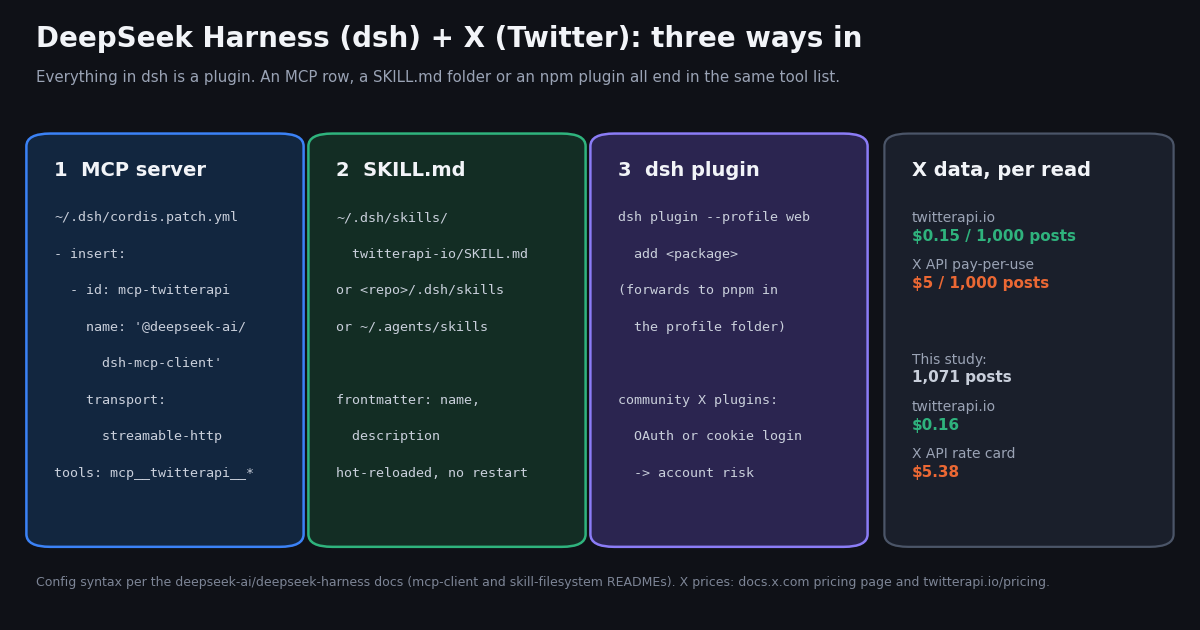
This page covers DeepSeek Harness (dsh), DeepSeek's open-source agent app. It does not cover DeepSeek's chat models or API: if you want free DeepSeek API access for your own code, our free DeepSeek API guide covers that. The question here is narrower. How do you give the harness itself live X (Twitter) data, through an MCP server, a skill or a plugin, and what does each route cost and risk?
We verified every config path and key below in the deepseek-ai/deepseek-harness repository: the mcp-client and skill-filesystem package READMEs, the CLI help and the user guides, plus npm view @deepseek-ai/dsh. We could not install dsh in this review, so the YAML is quoted from the docs, not from a session we ran ourselves. The twitterapi.io side is first-hand: we called initialize and tools/list on the hosted MCP server while writing.
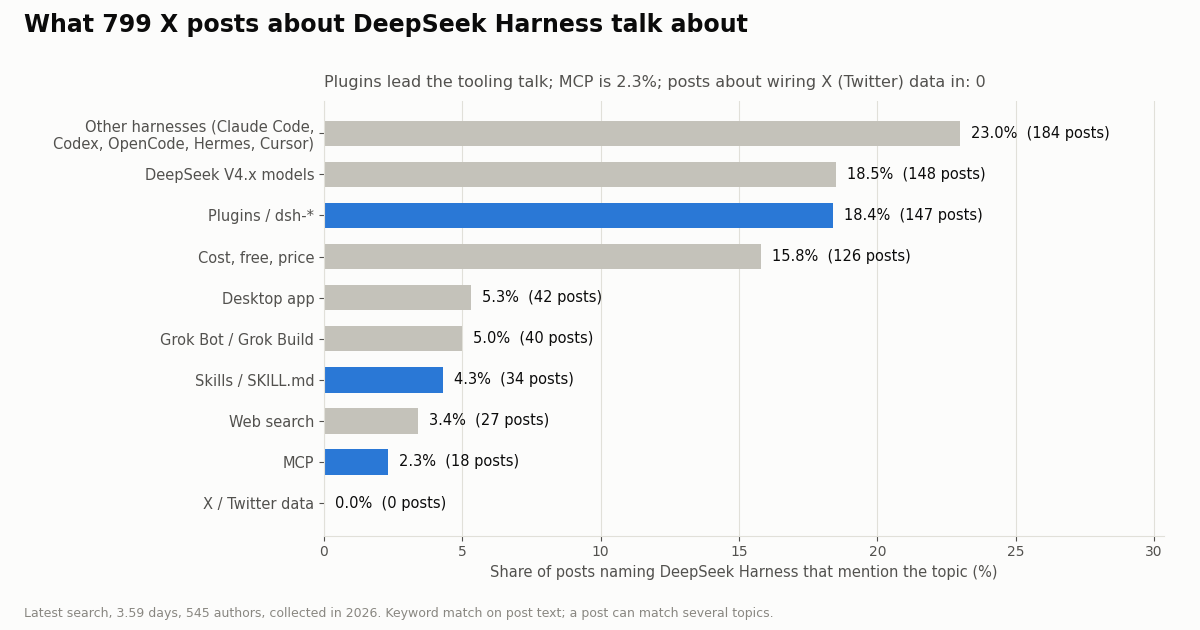
We also measured how dsh users talk on X. We read 799 recent posts that name the harness and the public timelines of @deepseek_ai and @DeepSeekHarness, all collected in 2026. Plugins come up often. MCP comes up rarely. Wiring X data into the harness doesn't come up at all, which is the gap this page fills.
What DeepSeek Harness is, verified from the repo and npm
The project. github.com/deepseek-ai/deepseek-harness describes itself as "DeepSeek Harness: Everything is a Plugin." It is MIT-licensed and had over 260,000 stars when we checked. The README calls dsh "an open-source agent harness developed by DeepSeek AI". It is built on Cordis, a plugin framework, and "is in developer preview and iterating rapidly", with the warning "THERE WILL BE COMPATIBILITY-BREAKING CHANGES". Treat every path on this page as current for the 0.2.x line, and recheck it after you upgrade.
The package. npm view @deepseek-ai/dsh returned 0.2.1-rc.2 as latest, 0.2.1-rc.3 as next and an alpha tag. The bin is dsh, and the package's own description is "profile launch, plugin management, and configuration inspection". The quickest start is npx @deepseek-ai/dsh web, which by default serves the web UI at http://127.0.0.1:3080.
The launch timeline, from the official accounts. @deepseek_ai announced "DeepSeek Harness v0.1 is now available in Developer Preview" on August 13, 2026. The post said models, tools, skills, sessions, sandboxes, filesystems, loops, orchestration and UI "are ALL implemented as plugins". Desktop builds for macOS and Windows followed on September 30, 2026 (@DeepSeekHarness), and @deepseek_ai repeated the news on October 2, 2026, adding that Linux users can get dsh from npm. On October 17, 2026, @deepseek_ai said DeepSeek-V4.1-Flash-1017 is "Optimized for @DeepSeekHarness" and asked users to upgrade to "DeepSeek Harness v0.2.1-rc.1 or later".
Why this matters for X data. dsh has no built-in X (Twitter) tool. Every outside capability comes in through the same plugin system. For X data, the three practical doors are the MCP client plugin, the skill provider and an installed plugin package. The repository's SAFETY.md is blunt about all three: the project "can execute model-generated code and commands, load third-party plugins, and access the network, processes, credentials, and files made available to it." Whatever you connect inherits that trust.
Route 1: add an X (Twitter) MCP server to DeepSeek Harness
Where MCP config lives. dsh has no mcp.json. MCP servers are rows for the @deepseek-ai/dsh-mcp-client plugin inside a Cordis patch file. The project's MCP guide names two persistent layers: $DSH_HOME/cordis.patch.yml for every profile on the machine, and $DSH_HOME/profiles/<name>/cordis.patch.yml for one profile. $DSH_HOME defaults to ~/.dsh. For a one-off test, dsh web --patch <file> applies a patch file for a single run. The guide warns: "Do not copy over an existing file: it may already contain unrelated user patches." Merge your row into the file.
The row. Each server is one entry with name: '@deepseek-ai/dsh-mcp-client' and a config block. The two required fields are transport (stdio or streamable-http) and serverName, which must match [A-Za-z0-9_-]{1,32} and be unique in its scope. A remote server takes url and optional headers. A local one takes command, args, env and cwd. Secrets come from the environment through the !!js YAML tag. The package README's own example builds the Authorization header with a !!js template string over process.env.MCP_TOKEN, and the block below uses the same pattern.
The twitterapi.io server. We run a hosted Streamable HTTP server at https://mcp.twitterapi.io/mcp. Its initialize reply says "Auth: paste your twitterapi.io API key as the Bearer token". Called without a key, it answers "Missing Authorization: Bearer <api_key> (or X-API-Key: <api_key> header)", so either header works. tools/list returned 12 tools: search_tweets, get_user_info, get_user_about, get_user_followers, get_user_followings, get_user_last_tweets, get_user_mentions, get_tweets_by_ids, get_tweet_replies, get_tweet_quotes, get_tweet_retweeters and get_trends. The same tools ship on npm as @twitterapi_io/mcp-server (0.2.0) for a local stdio process.
The stdio gotcha. dsh scrubs the environment it hands to stdio MCP children. Per the mcp-client README, ambient variables whose names match KEY|PASSWORD|SECRET|TOKEN (case-insensitive), and all DSH_* variables, are dropped before the configured env is merged on top. TWITTERAPI_IO_API_KEY contains KEY, so a local server will start without it unless your row passes it explicitly, as the commented stdio block below does. The HTTP route avoids this because the header is built inside the dsh process.
What the model sees. After startup, each tool is named mcp__<serverName>__<tool>, so with serverName: twitterapi the agent calls mcp__twitterapi__search_tweets, the same naming Claude Code and Codex use. The server's instructions text is added to the system prompt as literal text. Each call has a 60-second default timeout (toolCallTimeoutMs). If the server drops, dsh reconnects with a delay that doubles from 500 ms up to 30 s, and removes the server's tools after 10 straight failures. A failed first connection still lets dsh start, but no tools from that server appear. Set failOnStartupError: true while you debug.
Check it. dsh --profile web --dump-config prints the composed profile tree, so you can confirm your row is there before you boot. Then start dsh and ask something that needs fresh data, for example "what did @DeepSeekHarness post this week". The model should call mcp__twitterapi__get_user_last_tweets with userName set to the handle.
# ~/.dsh/cordis.patch.yml  -> every profile on this machine
# (or ~/.dsh/profiles/web/cordis.patch.yml -> the web profile only)
# MERGE this into the file if it exists; do not overwrite other patches.
- insert:
    - id: mcp-twitterapi
      name: '@deepseek-ai/dsh-mcp-client'
      config:
        serverName: twitterapi
        transport: streamable-http
        url: https://mcp.twitterapi.io/mcp
        headers:
          Authorization: !!js '`Bearer ${process.env.TWITTERAPI_IO_API_KEY}`'
        toolCallTimeoutMs: 60000

    # ...or the same 12 tools as a local stdio process from npm (Node required).
    # dsh strips ambient variables whose names contain KEY/SECRET/TOKEN/PASSWORD
    # from stdio children, so the key must be passed explicitly in env.
    # - id: mcp-twitterapi-local
    #   name: '@deepseek-ai/dsh-mcp-client'
    #   config:
    #     serverName: twitterapi_local
    #     transport: stdio
    #     command: npx
    #     args: ['-y', '@twitterapi_io/mcp-server@0.2.0']
    #     env:
    #       TWITTERAPI_IO_API_KEY: !!js process.env.TWITTERAPI_IO_API_KEY

# In the shell that launches dsh:
#   export TWITTERAPI_IO_API_KEY=your_twitterapi_io_key
#   dsh --profile web --dump-config | grep -A10 mcp-twitterapi   # check the row composed
#   dsh web                                                    # tools appear as mcp__twitterapi__*
# One-off test without touching your patch files:
# dsh web --patch ./twitterapi-mcp.cordis.ymlRoute 2: a SKILL.md skill for X reads in dsh
Where dsh looks for skills. The @deepseek-ai/dsh-skill-filesystem README lists five default roots, scanned in this order: <projectRoot>/.dsh/skills (rank 100), <projectRoot>/.agents/skills (200), any customSkillDirs (300), <dshHome>/skills (400, so ~/.dsh/skills by default) and <agentsHome>/skills (500, ~/.agents/skills by default). The project root is the nearest folder above the working directory that contains .git. A skill is a folder with a SKILL.md, or a flat <name>.md file, at the top level of a root. Nested **/SKILL.md files are "deliberately not discovered".
The frontmatter dsh reads. name and description are required. whenToUse, metadata, disable-model-invocation and user-invocable are optional. Only a bad value for the two boolean keys gets a skill dropped (with a warning). The README doesn't list other keys as errors. The provider watches its roots, so "new, renamed, or deleted skills reach agents without a restart", and every load re-reads the file, so edits take effect on the next use.
Our skill. twitterapi.io publishes an Agent Skills file at https://twitterapi.io/skills/twitterapi-io/SKILL.md. Its frontmatter has name, description, license, compatibility and metadata. The body covers the six reads (profile, timeline, search, mentions, followers, posts by ID), what each costs, pagination, errors and how to keep responses small. Because dsh also scans ~/.agents/skills, one copy there serves dsh and any other harness that reads that shared root. We did not load it inside a running dsh, so test it before you rely on it.
Skill or MCP? The MCP tools return full post objects, which costs model tokens on a big digest. A skill can tell the model to call a small script that trims each post to the fields a summary needs. The x_read.py at the end of this page prints nine fields per post plus a credits line. Use MCP for quick, exploratory questions and the skill plus script for repeatable jobs.
# User-level skill root (dsh scans <dshHome>/skills; dshHome = $DSH_HOME or ~/.dsh)
mkdir -p ~/.dsh/skills/twitterapi-io
curl -fsSL https://twitterapi.io/skills/twitterapi-io/SKILL.md \
  -o ~/.dsh/skills/twitterapi-io/SKILL.md

# Or per repository, so the skill travels with the project:
#   <repo>/.dsh/skills/twitterapi-io/SKILL.md
# Or the shared agent root other harnesses also read:
#   ~/.agents/skills/twitterapi-io/SKILL.md

# Optional helper the skill can call (the full file is the code example on this page)
mkdir -p ~/.dsh/skills/twitterapi-io/scripts
# save x_read.py as ~/.dsh/skills/twitterapi-io/scripts/x_read.py
python3 -m pip install requests
export TWITTERAPI_IO_API_KEY=your_twitterapi_io_key

# No restart: the skill provider watches its roots. Then ask in dsh:
#   "Use the twitterapi-io skill: what are people on X saying about DeepSeek Harness plugins today?"
Route 3: dsh plugins, and the community X plugins that exist today
How plugin install works. dsh plugin --help says the command manages "a profile's plugins by forwarding the remaining arguments to pnpm in the profile directory". So dsh plugin --profile web add <package> is a pnpm install into that profile, and --profile is required. One community README notes that installing into the wrong profile raises no error; the tools just never appear. pnpm must be on your PATH. The web UI also has a Plugins page. Its Discover tab comes from an experimental "Custom plugin indexes" bundle that you switch on yourself, and "DSH ships no index source": you add index URLs, and the guide calls them "third-party content".
What exists for X. We searched the dsh-plugin GitHub topic for X-related repositories. Three stand out. GooDAnDReaDY/dsh-grok-xsearch (github.com/GooDAnDReaDY/dsh-grok-xsearch) runs X search, author profiling, trends and fact checks through "authenticated SuperGrok OAuth sessions with the xAI Responses API". opencamel/dsh-x-archive (github.com/opencamel/dsh-x-archive) archives single X post URLs as Markdown through a third-party service at x.2100laike.com. akash-digitavision/dsh-agent-reach (github.com/akash-digitavision/dsh-agent-reach) registers an Agent Reach skill whose README says its Twitter channel needs "cookies/login", with cookies kept in ~/.agent-reach/.
Account risk, stated plainly. A plugin that logs in with your X cookies acts as your X account. X can rate-limit, lock or suspend that account, and the cookies are a full session credential: anyone or anything that can read the file can act as you. A plugin running inside dsh can read whatever files dsh can read, which is why the project's SAFETY.md says to review plugins before running them. The SuperGrok route ties your searches to an xAI subscription and OAuth tokens, not to your X login. The archive route sends every URL you read to a third party. We did not test any of the three. Their READMEs are the source for each claim above.
If the agent must post. Reads through twitterapi.io need no X account. Writes are a different product. One /twitter/user_login_v2 call ($0.10, with a proxy you supply) returns login_cookies. Each post, delete, like, retweet, follow or unfollow after that (/twitter/create_tweet_v2, /twitter/follow_user_v2 and so on) costs $0.0006, billed per HTTP 200 call. Every write still acts as that account, X can rate-limit, lock or suspend it, the session can need a fresh login, and an agent should keep a human pace. Put writes behind an explicit confirmation step in your skill.
# dsh forwards everything after the profile to pnpm, run in that profile's folder
dsh plugin --help
dsh plugin --profile web add <package>       # npm name, or a git spec pnpm accepts
dsh plugin --profile web remove <package>
dsh --profile web --dump-config              # see what the composed profile mounts

# Community X-related plugins found under the dsh-plugin GitHub topic (not endorsed, review first):
#   GooDAnDReaDY/dsh-grok-xsearch      -> X search through a SuperGrok OAuth session (xAI Responses API)
#   opencamel/dsh-x-archive            -> archives single X post URLs through a third-party archive service
# akash-digitavision/dsh-agent-reach -> Agent Reach CLI skill; its Twitter channel needs your X cookiesWhat dsh users post about on X: 799 posts measured
We pulled the most recent 799 posts (reposts excluded) matching "deepseek harness" OR DeepSeekHarness OR "dsh plugin" in Latest order. They come from 545 accounts over 3.59 days, about 223 posts a day. The language mix is broad: English 46.3%, Chinese 33.7%, Japanese 11.6%. 36.9% are replies, and 52.2% come from accounts with fewer than 1,000 followers. The typical post is small: median 1 like and 136 views.
Plugins are the conversation. 18.4% of posts mention plugins or a dsh-* package. Plugin posts get a median 305 views, against 136 for the stream overall. Skills posts get more still, a median 494 views on 34 posts. MCP comes up in only 2.3% of posts.
The tooling subset. We merged the stream with a second search, "deepseek harness" (mcp OR skill OR skills OR plugin OR plugins), and kept the 255 unique posts that mention MCP, skills or plugins. Within those, 77.3% mention plugins, 23.9% skills and 11.8% MCP, and 23.5% compare dsh with another harness. None of them is about getting X (Twitter) data into the agent. Posts that mention Grok are about Grok Bot or Grok Build as rival agents, not X data. We counted them separately (5.0% of the stream).
How DeepSeek itself posts about the harness
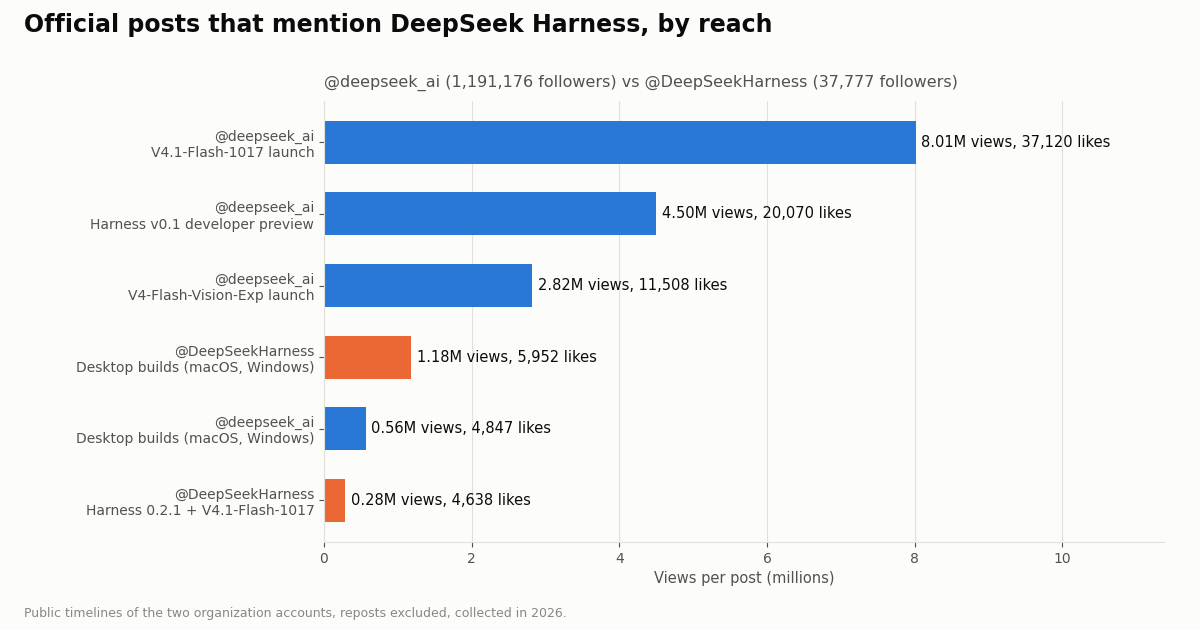
@deepseek_ai has 1,191,176 followers. @DeepSeekHarness was created in 2026 and has 37,777. In the 2026 part of @deepseek_ai's public timeline, 4 of 13 original posts mention the harness. Two are the harness announcements (v0.1 and desktop). The other two are model launches that name a harness release: V4-Flash-Vision-Exp with Harness 0.1.1, and V4.1-Flash-1017 "optimized for" the harness. @DeepSeekHarness posted only two originals in our sample, the desktop release and the 0.2.1 release.
What it tells a builder. Harness news reaches people through the model account. The v0.1 announcement got 4,499,536 views on @deepseek_ai, while the harness account's own 0.2.1 release got 279,156. To track dsh releases (and the breaking changes the README warns about), watch both timelines: from:deepseek_ai OR from:DeepSeekHarness in an advanced search does that in one query, at 15 credits per post returned.
What X data costs inside dsh, on each rate card
dsh itself is free and MIT-licensed. You pay separately for the model provider you configure and for the X data. The X data side, per the published rate cards:
Why that ratio. The official X API pay-per-use page (docs.x.com/x-api/getting-started/pricing) lists $0.005 per post read and $0.010 per user read or follower/following read. Pay-per-use is capped at 3 million post reads per billing cycle, with Enterprise above that. New paying customers get $20 in credits after saving a card and making a first purchase, plus a match of the first auto-recharge up to $50. twitterapi.io charges 15 credits per post returned, which is $0.15 per 1,000. Across 1,000 posts that is $5 against $0.15, about 33 times less.
What our study cost. This page's data, 1,071 posts and 2 profiles over 58 requests, cost $0.16 on twitterapi.io. The same reads would have cost $5.38 on the X pay-per-use card. A dsh agent that runs a 2-page search 20 times a day reads up to 800 posts, which is $0.12 a day on twitterapi.io.
Getting started. New accounts that pass the automatic bot check get up to $1 of free credits (at most 100,000 credits, no card, one per person or network, expiring after 31 days). Purchased credits never expire. Before your first payment the limit is 0.2 requests per second, so a dsh agent that loops fast will hit HTTP 429. After the first payment it rises to 20 per second (50 on Scale). The script on this page waits and retries on 429.
Troubleshooting DeepSeek Harness with an X MCP server or skill
No mcp__twitterapi__* tools appear. Run dsh --profile web --dump-config and look for your row. If it's missing, the patch went into the wrong file or the wrong profile (profiles/web vs profiles/tui). If the row is there, the first connection probably failed. dsh starts anyway and logs an error, so set failOnStartupError: true to make the failure visible.
401-style error from the MCP server. The text "Missing Authorization: Bearer <api_key>" means the header was empty. The !!js expression reads process.env of the dsh process, so export TWITTERAPI_IO_API_KEY in the shell that runs dsh web, then restart. For a stdio row, pass the key in env explicitly, because the ambient copy is scrubbed.
Two rows, one name. Two entries with the same serverName in one scope make the second fail with an error. Use twitterapi and twitterapi_local if you keep both.
The skill doesn't show up. Check that it sits at the top level of a root (~/.dsh/skills/twitterapi-io/SKILL.md, not one folder deeper) and that the frontmatter has name and description. A value like disable-model-invocation: maybe drops the skill with a warning.
A plugin installed but its tools are missing. dsh plugin installs per profile, so install into the profile you actually launch. Also check that pnpm is on PATH, because the command forwards to it.
Searches come back empty but cost credits. An empty search costs the 15-credit minimum ($0.00015). Check the operators: from: takes a handle without the @, and since: and until: take dates. Try queryType=Top for low-volume terms.
How we collected this
Question. What do people building with DeepSeek Harness post about on X? How much of it is about adding tools (MCP, skills, plugins), and does any of it cover X (Twitter) data? How do the two official accounts post about the harness?
Accounts and queries. Two Latest advanced searches: "deepseek harness" OR DeepSeekHarness OR "dsh plugin" (40 pages) and "deepseek harness" (mcp OR skill OR skills OR plugin OR plugins) (10 pages). Plus the public timelines and profiles of the organization accounts @deepseek_ai and @DeepSeekHarness.
Window and sample. The most recent matching posts at collection time, collected in 2026: 799 posts from the first search over 3.59 days, 255 unique tooling posts across both searches, and 66 original @deepseek_ai timeline posts. 58 requests in total.
Method. Topics come from case-insensitive keyword matches on post text, in English, Chinese and Japanese terms (patterns are in the study's analyze.py). A post can match several topics. Reposts are excluded, and duplicates across the two searches are merged by post ID.
What the sample cannot show. A few days of Latest results is a snapshot, not a trend. Keyword matching misses posts that describe a plugin without naming it and counts some passing mentions. Engagement medians reflect who happened to post that week. Search results also don't include posts from protected accounts.
Privacy. Aggregates only. Only the two organization accounts are named. Search pages stayed out of the repository, and the published sample rows have no IDs, URLs, text or handles.
#!/usr/bin/env python3
"""x_read.py - small X (Twitter) reader for a DeepSeek Harness skill.

Usage (dsh runs it through its bash tool):
  python3 x_read.py search 'deepseek harness lang:en -filter:replies' --pages 2
  python3 x_read.py timeline DeepSeekHarness
  python3 x_read.py profile deepseek_ai
Prints one compact JSON line per post, then a summary with requests and credits.
"""
import argparse, json, os, sys, time
import requests

BASE = "https://api.twitterapi.io"
KEY = os.environ.get("TWITTERAPI_IO_API_KEY")
if not KEY:
    sys.exit("set TWITTERAPI_IO_API_KEY in the shell that starts dsh")
HEADERS = {"X-API-Key": KEY}
stats = {"requests": 0, "posts": 0, "profiles": 0}


def get(url, params):
    for attempt in range(5):
        r = requests.get(url, headers=HEADERS, params=params, timeout=30)
        stats["requests"] += 1
        if r.status_code == 429:          # 0.2 req/s before the first payment, 20 after
            time.sleep(5 * (attempt + 1))
            continue
        r.raise_for_status()
        return r.json()
    sys.exit("rate limited: slow down or add credits")


def slim(t):
    a = t.get("author") or {}
    return {
        "url": t.get("url"), "author": a.get("userName"), "followers": a.get("followers"),
        "createdAt": t.get("createdAt"), "likes": t.get("likeCount"), "reposts": t.get("retweetCount"),
        "replies": t.get("replyCount"), "views": t.get("viewCount"), "text": t.get("text"),
    }


def search(query, query_type, pages):
    cursor = ""
    for _ in range(pages):
        body = get(f"{BASE}/twitter/tweet/advanced_search",
                   {"query": query, "queryType": query_type, "cursor": cursor})
        for t in body.get("tweets", []):
            stats["posts"] += 1
            print(json.dumps(slim(t), ensure_ascii=False))
        if not body.get("has_next_page"):
            break
        cursor = body.get("next_cursor", "")


def timeline(user, pages, replies):
    cursor = ""
    for _ in range(pages):
        body = get(f"{BASE}/twitter/user/last_tweets",
                   {"userName": user, "includeReplies": str(replies).lower(), "cursor": cursor})
        data = body.get("data") or {}
        for t in data.get("tweets", []):
            stats["posts"] += 1
            print(json.dumps(slim(t), ensure_ascii=False))
        if not body.get("has_next_page"):
            break
        cursor = body.get("next_cursor", "")


def profile(user):
    body = get(f"{BASE}/twitter/user/info", {"userName": user})
    if body.get("status") == "error":     # unknown user: HTTP 200 with msg, data null
        sys.exit(body.get("msg"))
    d = body["data"]
    stats["profiles"] += 1
    keep = ("userName", "name", "description", "followers", "following", "statusesCount", "createdAt", "isBlueVerified")
    print(json.dumps({k: d.get(k) for k in keep}, ensure_ascii=False))


if __name__ == "__main__":
    p = argparse.ArgumentParser()
    p.add_argument("cmd", choices=["search", "timeline", "profile"])
    p.add_argument("arg")
    p.add_argument("--type", default="Latest", choices=["Latest", "Top"])
    p.add_argument("--pages", type=int, default=1)
    p.add_argument("--replies", action="store_true")
    a = p.parse_args()
    if a.cmd == "search":
        search(a.arg, a.type, min(a.pages, 10))
    elif a.cmd == "timeline":
        timeline(a.arg, min(a.pages, 10), a.replies)
    else:
        profile(a.arg)
    # 15 credits per post returned (15-credit minimum per request), 18 per profile; $1 = 100,000 credits
    credits = max(stats["posts"] * 15, stats["requests"] * 15) if a.cmd != "profile" else 18
    print(json.dumps({"summary": stats, "credits": credits, "usd": round(credits / 100000, 5)}))
Questions readers ask
Does DeepSeek Harness support MCP?
Yes. dsh ships an MCP client plugin, @deepseek-ai/dsh-mcp-client. Each configured row connects to one MCP server over stdio (a local program) or streamable-http (a hosted URL). The server's tools show up to the model as mcp__<serverName>__<tool>. No server is enabled by default.
How do I add an MCP server to DeepSeek Harness?
Merge an - insert: row into ~/.dsh/cordis.patch.yml (every profile) or ~/.dsh/profiles/<name>/cordis.patch.yml (one profile). The row needs name: '@deepseek-ai/dsh-mcp-client', plus serverName, transport and either url/headers or command/args/env under config. For a one-off test, run dsh web --patch <file>. Restart dsh to load the row.
Where do DeepSeek Harness skills go?
In <repo>/.dsh/skills, <repo>/.agents/skills, ~/.dsh/skills or ~/.agents/skills, or a custom directory you configure. Each skill is a folder with a SKILL.md, or a flat <name>.md, at the top level of a root. The frontmatter needs name and description. dsh watches these folders, so new skills appear without a restart.
How do I install a dsh plugin?
Run dsh plugin --profile web add <package>. The command forwards to pnpm in that profile's folder, so pnpm must be on your PATH and --profile is required. The web UI's Plugins page can also browse plugin indexes once you switch on the experimental Custom plugin indexes bundle and add an index URL. DeepSeek ships no index of its own.
Is there an official X (Twitter) plugin for DeepSeek Harness?
Not from DeepSeek. Community plugins under the dsh-plugin GitHub topic include GooDAnDReaDY/dsh-grok-xsearch (SuperGrok OAuth), opencamel/dsh-x-archive (a third-party archive service) and akash-digitavision/dsh-agent-reach (whose Twitter channel uses your X cookies). Any MCP server works through the built-in MCP client, including twitterapi.io's hosted server at https://mcp.twitterapi.io/mcp.
Is a cookie-login X plugin safe to use with dsh?
It acts as your X account, so X can rate-limit, lock or suspend that account. The cookies are a full session credential, and any plugin dsh loads can read the files dsh can read. dsh's own SAFETY.md says to review plugins before running them and to use least privilege. If you only need reads, an API key with no X login keeps your account out of the loop.
What does X data cost in a DeepSeek Harness agent?
Through twitterapi.io, $0.15 per 1,000 posts returned and $0.18 per 1,000 profiles, with a 15-credit ($0.00015) minimum per request. The official X API pay-per-use rate card lists $0.005 per post read ($5 per 1,000) and $0.010 per user read. dsh itself is free and MIT-licensed. Model usage is billed by whichever provider you configure.
Why does my local MCP server start without its API key in dsh?
dsh strips ambient environment variables whose names contain KEY, PASSWORD, SECRET or TOKEN (and all DSH_* variables) before it launches a stdio MCP child. Pass the key explicitly in the row's env, for example TWITTERAPI_IO_API_KEY: !!js process.env.TWITTERAPI_IO_API_KEY.
Continue
- deepseek-ai/deepseek-harness on GitHub: README, SAFETY.md, CLI help (dsh, dsh plugin)
- dsh-mcp-client README: transports, config fields, tool naming, env scrubbing, reconnect
- dsh-skill-filesystem README: skill roots, SKILL.md frontmatter, hot reload
- DeepSeek Harness guide: MCP overlays, --patch and cordis.patch.yml layers
- npm: @deepseek-ai/dsh (dsh CLI, latest 0.2.1-rc.2 at review)
- X API pricing: pay-per-use rates, 3M post-read cap, credit offers
- X (Twitter) API overview: endpoints, auth and pricing
- Hermes Agent and X: MCP server in config.yaml or a SKILL.md skill
- Codex and X data: MCP server plus a capped Python script
- SKILL.md explained: the Agent Skills file format
- Agent Reach's Twitter channel: what it needs and the API route
- Cursor with the Twitter (X) API: MCP setup and prompts
- Free DeepSeek API guide: building apps on DeepSeek models
- Pi coding agent and X (Twitter) data
- ZCode and X (Twitter) data
- twitterapi.io pricing: per-post and per-profile credits
- 01X API 403 Forbidden: Every Cause on the Twitter (X) API and How to Fix Each One
- 02How to Use ZCode with the Twitter (X) API: MCP Server and Skills Setup
- 03Pi Coding Agent + Twitter (X): Add Live X Search to Pi
- 04X (Twitter) Bookmarks + AI: Export Them, Then Let a Model Sort and Search Them
- 05Custom GPT retirement: what migrates, and how to rebuild a Twitter (X) Action as an MCP connector
- 06Twitter Monitoring Tools — Build or Buy
- 07TweetBeaver is gone: every TweetBeaver function and how to get the same data today
- 08Twitter (X) Viewer API — A Developer's Read-Only Guide
Stop reading. Start building.
Starter credits cover real testing on real data. Google sign-in, no card, no application queue.
Get an API keyAlready building with TwitterAPI.io? Publish an honest tutorial or build log about it and earn up to $200 a month in API credits.