Grok Agent: How to Build an Agent with Grok on Live Twitter (X) Data
If you searched for "grok agent" you were probably shown three unrelated things: a story about Grok 4.20's agents that argue with each other, a product page for "Grok Bot" that logs into your inbox and CRM, and a developer doc about function calling. They share a word, not a design. The first section sorts them out, with what xAI's own documentation says each one is, so you can stop reading early if the thing you wanted is a setting in the Grok app.
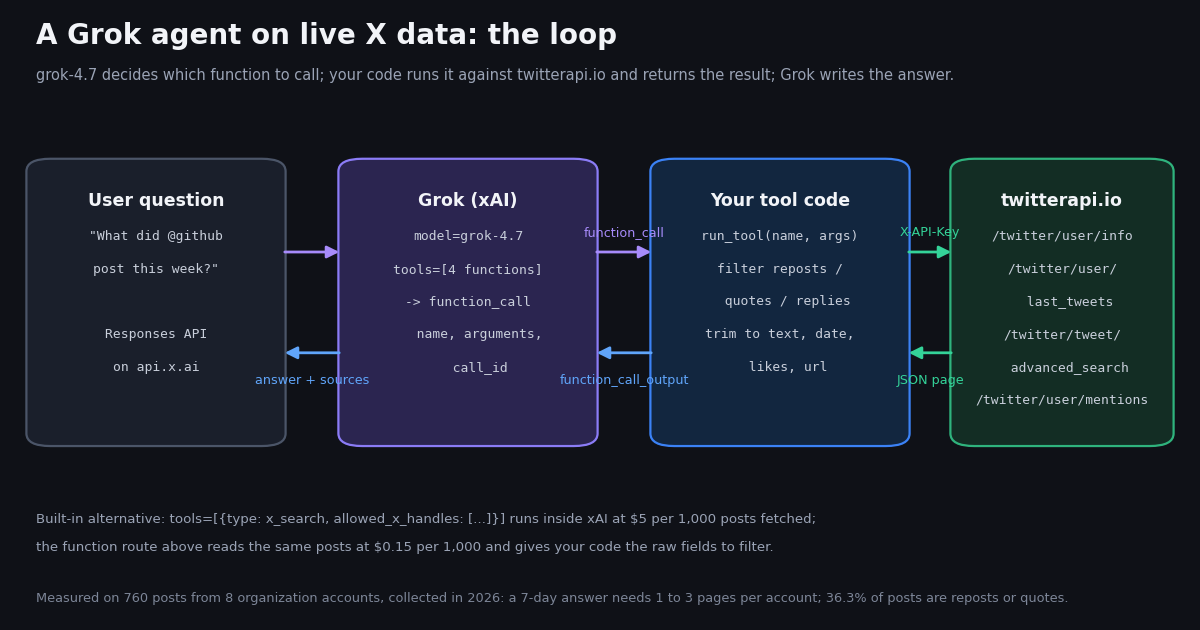
The rest is a build tutorial for the third meaning: an agent you own, running on the xAI API, whose tools are live X (Twitter) data. It uses the Responses API and the OpenAI Python SDK pointed at api.x.ai, defines four function tools in the exact schema docs.x.ai documents, and backs those tools with four twitterapi.io endpoints that need only an API key, no X developer account. The whole loop is one file at the end of the page, complete and runnable with an xAI key; we did not run Grok ourselves for this article, and we say so in the method section. What we did run, end to end, is the tool side.
Because an agent is only as good as what its tools hand back, we measured that part on real data: for 8 public organization accounts (@github, @vercel, @OpenAIDevs, @nvidia, @NASA, @stripe, @Cloudflare, @Docker) we pulled up to 100 recent posts each in 2026 and counted how many pages a "what did they post this week" question actually needs, how much of a timeline is reposts and quotes the agent should not quote as the account's own words, how long the texts are, and what one answer costs on twitterapi.io, on xAI's built-in x_search, and on the official X API rate card. Those numbers set the page size, the filter and the token budget in the code. This page is a sibling of our OpenAI Agents SDK guide: same tool family, different model.
What people mean by "Grok agent" (and which one this page builds)
Agents inside Grok: the multi-agent model. xAI's docs describe "Realtime Multi-agent Research" as a model variant, grok-4.20-multi-agent, that launches several agents to discuss a query while a leader agent synthesizes the final answer. Two setups exist, 4 agents and 16 agents, selected through the reasoning-effort parameter (low or medium effort runs 4, high or xhigh runs 16). All tokens used by the leader and the sub-agents are billed. The limitation that matters for builders is stated plainly in the same doc: client-side tools (function calling) and custom tools are not supported by the multi-agent variant; it works with the built-in tools (web_search, x_search) and remote MCP tools. So if you want your own tools, this is not the model to pick.
Agents inside Grok: Grok Build. Grok Build is xAI's coding agent, installed with a one-line script and started by typing grok in a project directory; it runs as an interactive terminal UI, headlessly (grok -p "...") or through the Agent Client Protocol inside other editors. It authenticates through the browser or an XAI_API_KEY, defaults to grok-4.7, and supports MCP servers. Press coverage of its launch in May 2026 called it xAI's first coding agent. It is an agent you use, not one you build.
"Grok Bot" and the agent-platform pages. Several high-ranking results for this keyword describe a hosted product where a user runs several specialized agents, each with its own cloud computer and memory, that log into services such as email or a CRM and act on the user's behalf. We could not verify its feature list on an xAI primary source this session, so we describe it only as what those pages claim. It is a product category, not an API.
Your own agent on the xAI API. This is what the rest of the page is about: a program that sends grok-4.7 a question plus a list of tools, executes the tool calls the model asks for, feeds the results back, and returns the model's answer. The tools can be functions you implement (this page), xAI's built-in server-side tools (web_search, x_search, code execution, collections search), or any remote MCP server reachable over Streamable HTTP or SSE. The table summarizes the four meanings.
The xAI function-calling contract, as documented
Everything below was read from docs.x.ai/developers/tools/function-calling this session; the raw text is kept with the study. The API is OpenAI-compatible: you create an OpenAI client with base_url="https://api.x.ai/v1" and your XAI_API_KEY, and call client.responses.create(...), the Responses API endpoint on api.x.ai. Chat Completions also works, but the Grok 4.7 page lists the Responses API as the model's API and the examples use it, so this tutorial does too.
Tool definitions. Each tool is {"type": "function", "name": ..., "description": ..., "parameters": {...}}. name and parameters are required; description is optional but the doc notes a clear one helps the model decide when to call it. The parameters root must be a JSON Schema object (or a oneOf / anyOf whose branches are all objects); a scalar or array root is rejected with a 400 that names the tool. Up to 350 tools per request.
The round trip. When the model wants data it returns an output item with type: "function_call", a name, an arguments string (JSON) and a call_id. You run the function and send a new request whose input is a list of {"type": "function_call_output", "call_id": ..., "output": "<string>"} items, with previous_response_id set to the previous response's id and the same tools list. The model either calls more tools or returns a message item whose content[0].text is the answer. With streaming, a function call arrives whole in a single chunk.
Parallel calls and tool choice. Parallel function calling is on by default, so one response may contain several function_call items; the doc says to process all of them before continuing, which is why the loop on this page collects every call in a response and sends all outputs back in one request. parallel_tool_calls: false disables it. tool_choice accepts "auto" (default), "required", "none", or a specific function.
Mixing with built-in tools. The same tools array can hold {"type": "web_search"}, {"type": "x_search"} and your functions; built-in tools run on xAI's servers automatically, custom functions pause and return to you. That is the choice the next section is about.
Two Grok 4.7 details for agent loops. The model page recommends setting prompt_cache_key on the Responses API so a conversation's requests land on the same server and cache hits are reliable, and notes that grok-4.7 responses include reasoning.encrypted_content which you pass back unchanged in multi-turn flows; with previous_response_id the server keeps that state for you. grok-4.7 has a 500,000-token context window and is priced at $2.00 per million input tokens and $6.00 per million output tokens below 200,000 prompt tokens ($0.50 cached), per docs.x.ai/developers/pricing.
[
  {
    "type": "function",
    "name": "get_user",
    "description": "Profile of one X (Twitter) account: name, bio, followers, following, total posts, created date, verified flags. Call this first when the user names an account, to confirm the handle exists.",
    "parameters": {
      "type": "object",
      "properties": {"username": {"type": "string", "description": "Handle without the @"}},
      "required": ["username"]
    }
  },
  {
    "type": "function",
    "name": "get_recent_posts",
    "description": "The account's most recent posts, newest first, excluding replies. Each item has id, created_at, kind (original|repost|quote), text, likes, reposts, views, url. Reposts carry the original author in reposted_from. Use days to limit the window (1 = last 24 h, 7 = this week); the tool stops paging when it passes that age.",
    "parameters": {
      "type": "object",
      "properties": {
        "username": {"type": "string"},
        "days": {"type": "integer", "minimum": 1, "maximum": 30, "default": 7},
        "include_reposts": {"type": "boolean", "default": false, "description": "Keep reposts of other accounts. Default drops them because they are not the account's own words."}
      },
      "required": ["username"]
    }
  },
  {
    "type": "function",
    "name": "search_posts",
    "description": "Search X posts with X advanced-search syntax: from:handle, keywords, \"exact phrase\", lang:en, since_time:<unix>, min_faves:N, -filter:replies. Returns up to 20 newest (Latest) or most engaged (Top) matches with author handle, created_at, text, likes, url.",
    "parameters": {
      "type": "object",
      "properties": {
        "query": {"type": "string"},
        "mode": {"type": "string", "enum": ["Latest", "Top"], "default": "Latest"}
      },
      "required": ["query"]
    }
  },
  {
    "type": "function",
    "name": "get_mentions",
    "description": "The newest posts by other accounts that mention @username (what people are saying to or about the account). Returns up to 20 with author handle, created_at, text, likes, url.",
    "parameters": {
      "type": "object",
      "properties": {"username": {"type": "string"}},
      "required": ["username"]
    }
  }
]x_search, your own tools, or an MCP server: three ways to give Grok X data
Built-in x_search. Add {"type": "x_search"} to tools and Grok searches X itself, reads the posts it fetches and answers with citations; each call shows up in the output as a custom_tool_call item. The doc lists six options: allowed_x_handles and excluded_x_handles (arrays of up to 20 handles without the @, not combinable), from_date and to_date (YYYY-MM-DD, from 00:00 UTC on the start date up to but not including the end date), and enable_image_understanding / enable_video_understanding. Pricing on docs.x.ai/developers/pricing: $5 per 1,000 posts fetched and $10 per 1,000 user profiles fetched, billed per item rather than per call, including parent and quoted posts; the response reports x_posts_fetched and x_users_fetched in usage.server_side_tool_usage_details. The doc's own cost advice is to narrow handles and dates and cap search turns with max_turns. You get an answer and citations; you do not get the post objects, so you cannot apply your own filters, store the data, or compute anything the model did not.
Your own function tools (this page). The model asks, your code calls twitterapi.io, you return exactly the fields you want the model to see. Reads cost 15 credits per tweet returned ($0.15 per 1,000; a full 20-post page is $0.003; the minimum per request is 15 credits, so an empty search is $0.00015) and 18 credits per profile ($0.18 per 1,000). You can drop reposts before the model sees them, cap the window at 7 days, keep the raw JSON for a database, and run the same tools from any other model or framework. The trade-off is that you host the loop.
A remote MCP server. xAI's Responses API also accepts {"type": "mcp", "server_url": ..., "server_label": ..., "allowed_tools": [...], "authorization": ...}; xAI connects to the server and calls its tools for the model, with no per-invocation fee (tokens only). Only Streamable HTTP and SSE transports are supported, and the require_approval and connector_id parameters are not. Without allowed_tools, every tool the server exposes is injected into the model's context, so the doc recommends listing the ones you need. The twitterapi.io MCP server on our MCP server page ships as an npm package that runs over stdio (npx -y @twitterapi_io/mcp-server). Grok Build accepts exactly that shape: its docs register a local stdio server with grok mcp add <name> -- npx -y <package> and an HTTP one with grok mcp add --transport http <name> <url>, and expose the tools as <server>__<tool>. To use the same server as a remote MCP tool from the xAI API you would put it behind an HTTP transport you host.
For the question this page uses as its example, the difference is concrete: "what did @github post this week" fetched 14 posts in our sample, which is $0.07 through x_search and $0.003 as one twitterapi.io page. The next section measures why the raw fields matter as much as the price.
What an X-data agent has to read: 760 posts from 8 organization accounts
A tool that returns "recent posts" has to decide how far back to page and what to drop. To ground both decisions we pulled up to 5 pages of /twitter/user/last_tweets (20 posts each, replies excluded by the default call) for 8 public organization accounts in 2026: 39 requests, 760 posts, $0.114 in reads. Recency windows were measured backwards from each account's newest post.
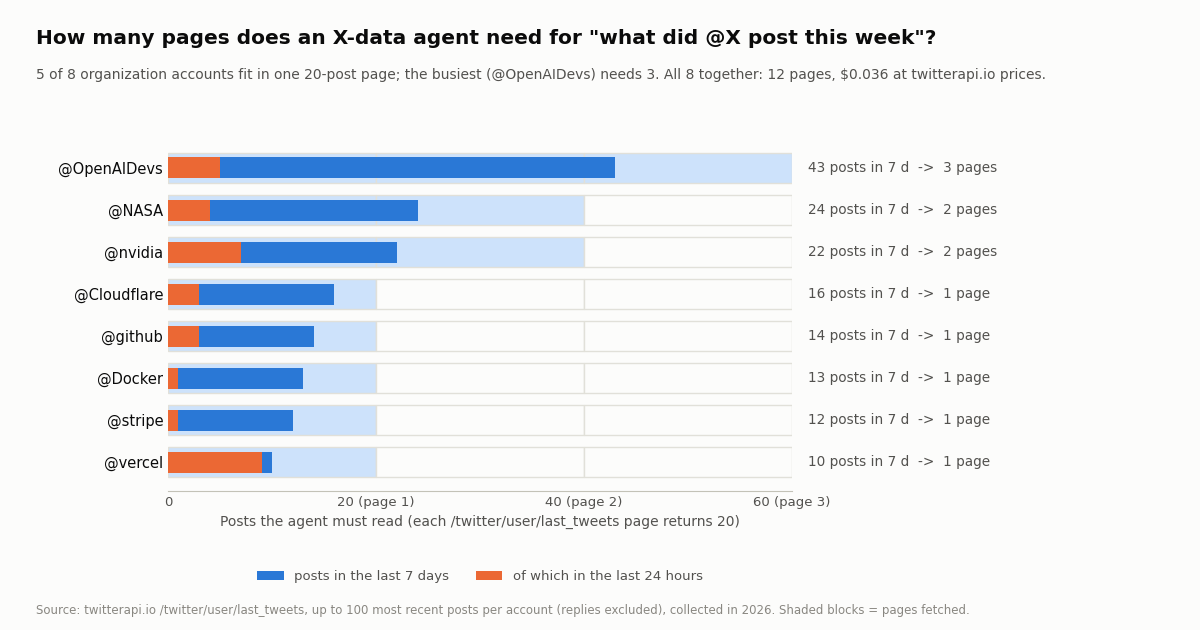
How many pages a "this week" answer needs. Across the 8 accounts, the last 7 days held 154 posts, between 10 (@vercel) and 43 (@OpenAIDevs). Five accounts fit in a single 20-post page; @NASA (24) and @nvidia (22) need 2; @OpenAIDevs needs 3. All 8 together: 12 pages, $0.036. The last 24 hours held 33 posts across all 8, never more than 9 for one account, so a "today" question is always one page. A 30-day question is where paging starts to matter: 500 posts, 27 pages, and for 3 of the 8 accounts (@github, @OpenAIDevs, @Cloudflare) 100 posts did not reach back 30 days. The tool on this page therefore pages until it passes the requested age or runs out of pages, with a hard cap of 5 pages.
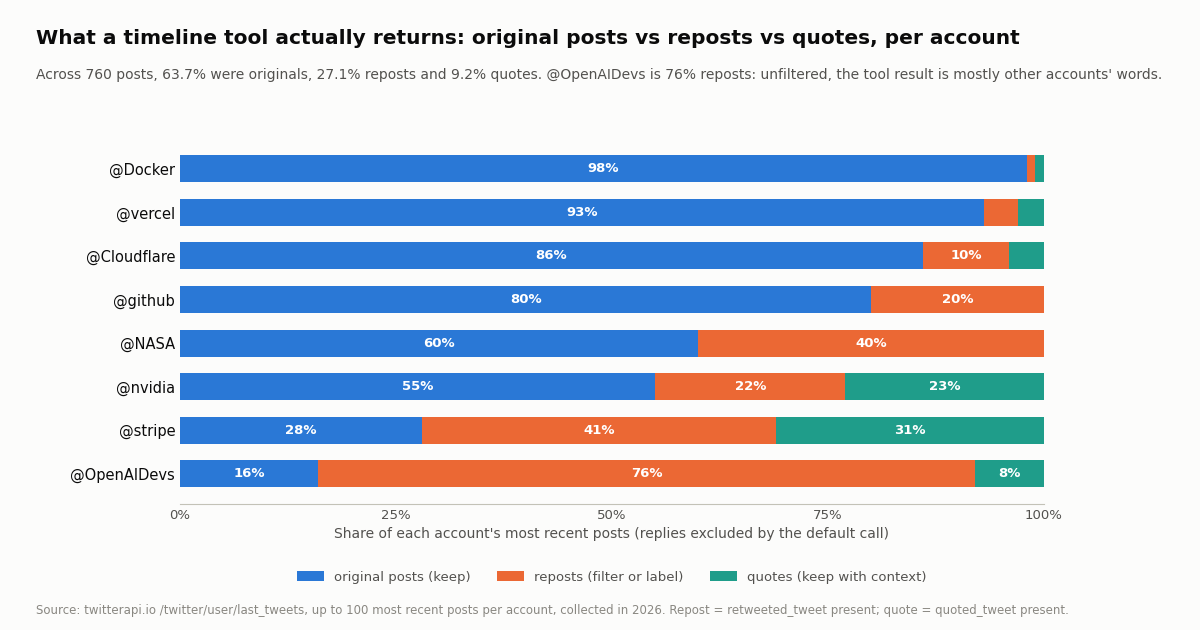
How much of a timeline is noise. 63.7% of the 760 posts were the account's own original posts, 27.1% were reposts of other accounts and 9.2% were quotes; replies were 0% because the default call excludes them. The spread is wide: @Docker (98% original), @vercel (93%) and @Cloudflare (86%) are almost all their own words, while @OpenAIDevs was 76% reposts and @stripe 41% reposts plus 31% quotes. An agent that returns a repost's text as what @OpenAIDevs "posted" is wrong three times out of four. The tool labels each item original, repost or quote, drops reposts by default, and for quotes includes the quoted author so the model can attribute correctly.
How much text that is. Median post length was 202 characters (per account 140 to 298; the longest 1,197). 51.3% of posts carried at least one link and 42.9% had media. Feeding the full 7-day text of all 8 accounts to the model is roughly 7,900 tokens at four characters per token; originals only, about 5,700. At grok-4.7's $2.00 per million input tokens that is under two cents either way, which is the point: with your own tools the X data, not the model, is the cost you control, and both are small.
Posts a day is the sample size divided by the days it spans, so it is a long-run average for the quieter accounts (@vercel's 100 posts span 282 days, yet 9 of its 10 posts in the last 7 days landed in the last 24 hours, a launch-day burst). Pages = ceil(posts / 20), minimum 1.
Cost per answer: twitterapi.io tools vs x_search vs the official X API
The three rate cards price different units, so the fair comparison is per answer. twitterapi.io bills 15 credits per tweet returned ($1 = 100,000 credits), so a full 20-post page is $0.003 and the minimum for any request is 15 credits ($0.00015). xAI's built-in x_search bills $5 per 1,000 posts fetched ($0.005 a post) plus the model's tokens. The official X API pay-per-usage rate card at docs.x.com/x-api/getting-started/pricing is $0.005 per post read and $0.010 per user read, capped at 3 million post reads a month with Enterprise above that; new accounts get $20 in credits and a match of the first auto-recharge up to $50. Per 1,000 posts that is $5 against $0.15, about 33x.
Add the model on top of any row: the 7-day text of all 8 accounts is roughly 7,900 input tokens, about $0.016 at grok-4.7's $2.00 per million, plus the output. The x_search column assumes it fetched the same posts; in practice the model decides how many posts to fetch and may read more (quoted and parent posts count too, per the pricing page) or fewer. The official-API column also needs a developer account before the first call. twitterapi.io reads need no X account. Subscription plans with bonus credits are on /pricing; new accounts that pass the automatic bot check get up to $1 of free credits (one per person or network, expiring after 31 days), enough for about 330 full pages.
Step 1: the four tools, backed by twitterapi.io
Each tool is a small function that calls one twitterapi.io endpoint with the X-API-Key header, trims the response to what the model needs, and returns a JSON-serializable dict. Trimming matters twice: fewer tokens, and fewer irrelevant fields for the model to misread. Field names below are the API's own.
get_user -> /twitter/user/info?userName=<handle>. The body is {status, msg, data}; an unknown handle comes back as HTTP 200 with status: "error", msg: "user not found" and data: null, never a 404, so the tool checks status and returns an error object the model can read and explain. From data it keeps name, userName, description, followers, following, statusesCount, createdAt, isBlueVerified, isVerified and isAutomated.
get_recent_posts -> /twitter/user/last_tweets?userName=<handle>. Returns data.tweets[] (20 per page, newest first), has_next_page and next_cursor. The tool pages while the oldest post on the page is newer than the requested days and has_next_page is true, capped at 5 pages (100 posts, $0.015). Each post is classified: retweeted_tweet present means repost (the tool keeps the original author's handle in reposted_from and uses the original's text, since a repost's own text is cut short), quoted_tweet present means quote (the quoted author goes in quoting), isReply would mean reply but the default call excludes them. Reposts are dropped unless include_reposts is true. createdAt is "Sat Oct 17 17:50:19 +0000 2026"-style and is converted to ISO for the model.
search_posts -> /twitter/tweet/advanced_search?query=<q>&queryType=Latest|Top. Top-level tweets[], same tweet shape, with author.userName. The tool passes the query through unchanged and keeps one page (20 posts, $0.003; an empty result costs the 15-credit minimum). The description teaches the model the operators it needs (from:, since_time:, lang:, min_faves:, -filter:replies); that description is doing real work, because the model writes the query.
get_mentions -> /twitter/user/mentions?userName=<handle>. Top-level tweets[], newest first. One page, same trimming. This is the tool that answers "what are people saying to @X", which a timeline tool cannot.
Errors as data. Every tool catches HTTP errors and returns {"error": "..."} instead of raising; the model will tell the user the account was not found or the search returned nothing. twitterapi.io returns 429 when you exceed your rate tier (0.2 requests per second before the first payment, 20 once paid), so a backoff on 429 is in the client. All four paths exist in the public OpenAPI spec at docs.twitterapi.io.
Step 2: the agent loop (Responses API, parallel calls, a turn cap)
The loop in the full script at the end of the page is about 40 lines and follows the documented round trip exactly. First request: client.responses.create(model="grok-4.7", instructions=SYSTEM, input=[{"role": "user", "content": question}], tools=TOOLS). Then, while the response contains function_call items: run every one of them (parallel calls are on by default, so there may be several), build an input list of {"type": "function_call_output", "call_id", "output"} items, and call responses.create again with previous_response_id=response.id and the same tools. When a response contains no function calls, the message item's content[0].text (or the convenience response.output_text) is the answer.
A turn cap. MAX_TURNS = 6 stops a model that keeps calling tools; six round trips is more than any question on this page needs (profile, timeline, mentions, done). Without a cap, a tool that returns an error the model does not understand can loop.
The system prompt does the attribution work. It tells the model that kind: repost items are other accounts' words, that quotes should be attributed to both accounts, to prefer get_recent_posts with days=7 for "this week" and days=1 for "today", to call get_user first when a handle is given so a typo is caught before paging, and to cite post URLs. That is where the measurements above turn into behavior: the model is told what the data looks like.
prompt_cache_key. The Grok 4.7 page recommends setting it so a conversation's requests hit the same cache; the script sets one per conversation. It is an optimization, not a requirement.
What we did and did not run. We ran all four tool functions against twitterapi.io in 2026 (that is the study), and we ran the loop's control flow against the documented response shapes. We did not have an xAI API key for this article, so the transcript below is not a recorded Grok run; it is what the loop prints when the tool side returns the data above. Treat it as a format illustration.
Swapping the model. Because the tool contract is OpenAI-style JSON Schema, the same four tools run unchanged in our OpenAI Agents SDK guide, the Claude MCP guide and the LangChain guide. Only the loop differs.
$ XAI_API_KEY=... TWITTERAPI_IO_API_KEY=... python grok_x_agent.py "What did @github post this week? Skip reposts."
[turn 1] function_call get_user {"username": "github"}
[turn 1] function_call get_recent_posts {"username": "github", "days": 7, "include_reposts": false}
[tool] get_user: ok (1 request, 18 credits)
[tool] get_recent_posts: 1 page, 20 posts read, 14 within 7 days, 3 reposts dropped -> 11 returned (1 request, 300 credits)
[turn 2] message

<model answer: a dated list of the 11 original posts with likes and URLs, grouped by topic>

[usage] 2 twitterapi.io requests, 318 credits = $0.00318 in X dataTroubleshooting a Grok agent on X data
400 that names a tool. The parameters root is not an object (for example you passed an array schema). Wrap it: {"type": "object", "properties": {...}}.
The model answers without calling any tool. tool_choice is "auto" by default; for a data question set tool_choice="required" on the first turn, or sharpen the descriptions. The multi-agent model (grok-4.20-multi-agent) ignores function tools entirely; use grok-4.7.
Several function_call items in one response. That is parallel calling. Run all of them and send all function_call_output items in one request; sending one at a time with the same previous_response_id leaves calls unanswered.
user not found for a real account. /twitter/user/info returns HTTP 200 with status: "error" for unknown handles; check the handle without the @, and remember handles change. The tool returns the message so the model can ask the user.
The answer quotes posts the account did not write. Reposts were 27.1% of the sample and 76% for one account. Make sure include_reposts defaults to false and that the system prompt explains kind.
"This week" is incomplete for a busy account. One page is 20 posts; @OpenAIDevs needed 3 pages for 7 days. The tool pages until it passes the requested age; check that has_next_page and next_cursor are being followed and that the 5-page cap is not too low for your accounts.
429 from twitterapi.io. Accounts that have never paid are limited to 0.2 requests per second; a parallel call to get_user and get_recent_posts at once can trip it. The client retries with a backoff; once a payment is made the limit is 20 requests per second.
Costs higher than expected with x_search. It bills per post fetched, including parent and quoted posts, and the model decides how many to fetch. Narrow allowed_x_handles and the date range, cap max_turns, and read x_posts_fetched in the usage block; or move the fetch into your own tool where a page is a fixed $0.003.
How we collected this
Question: what does an agent whose tools are X timeline endpoints actually have to read to answer a typical question: how many 20-post pages a 24-hour, 7-day and 30-day window needs per account, what share of a timeline is reposts, quotes or replies, how long the texts are, how many carry links or media, and what one answer costs on twitterapi.io, on xAI's built-in x_search and on the official X API rate card.
Accounts: 8 public organization accounts: @github, @vercel, @OpenAIDevs, @nvidia, @NASA, @stripe, @Cloudflare and @Docker.
Method: /twitter/user/last_tweets with the default includeReplies (replies excluded), up to 5 pages of 20 per account, newest first, through a rate-limited read-only client: 39 requests (one account ran out of pages at 4), 760 posts, collected in 2026. Recency windows were measured backwards from each account's newest post. A post with retweeted_tweet is a repost, with quoted_tweet a quote, with isReply a reply, otherwise original. Pages needed = ceil(posts in window / 20), minimum 1. Token estimates use four characters per token. Prices: twitterapi.io 15 credits per tweet and 18 per profile; xAI x_search $5 per 1,000 posts fetched; official X API $0.005 per post read, all read from the respective pricing pages this session.
What the sample cannot show: 100 posts per account is a snapshot taken at one moment, so posts per day is a long-run average for the quieter accounts and the 30-day window was only partly covered for three accounts. Organization accounts repost and quote differently from individuals or news accounts; a personal timeline will usually have a higher reply share, which the default call hides. We did not run Grok itself, so nothing here measures how often the model chooses each tool or how many x_search fetches it would make; the x_search cost column assumes it fetched the same posts the function tool did.
Aggregates only. The accounts named are organizations; no individual's posts were analyzed. The analysis script, results and the gzip-compressed raw pages for these organization accounts are kept with the study.
"""grok_x_agent.py - a Grok (xAI) agent whose tools are live X (Twitter) data from twitterapi.io.

    pip install openai requests
    export XAI_API_KEY=...               # console.x.ai
    export TWITTERAPI_IO_API_KEY=...     # twitterapi.io dashboard (no X developer account needed)
    python grok_x_agent.py "What did @github post this week? Skip reposts."

API shape per docs.x.ai/developers/tools/function-calling: Responses API, tools of type "function",
model returns function_call items (name, arguments, call_id), you answer with function_call_output
items + previous_response_id. Parallel calls are on by default, so every call in a response is run.
X-data cost: 15 credits per post returned ($0.003 per 20-post page), 18 credits per profile.
"""
import json
import os
import sys
import time
import uuid
from datetime import datetime, timedelta, timezone

import requests
from openai import OpenAI

XAI = OpenAI(api_key=os.environ["XAI_API_KEY"], base_url="https://api.x.ai/v1")
MODEL = "grok-4.7"
BASE = "https://api.twitterapi.io"
H = {"X-API-Key": os.environ["TWITTERAPI_IO_API_KEY"]}
MAX_TURNS = 6          # tool round trips per question
MAX_PAGES = 5          # per get_recent_posts call: 100 posts, $0.015
SPENT = {"requests": 0, "credits": 0}


# ----------------------------------------------------------------- twitterapi.io side (the tools)
def get(url, params):
    """GET with a backoff on 429 (0.2 req/s before the first payment, 20 after)."""
    for attempt in range(4):
        r = requests.get(url, headers=H, params=params, timeout=30)
        if r.status_code == 429:
            time.sleep(2 ** attempt)
            continue
        r.raise_for_status()
        SPENT["requests"] += 1
        return r.json()
    raise RuntimeError("twitterapi.io kept returning 429")


def parse_time(s):
    # createdAt looks like "Sat Oct 17 17:50:19 +0000 2026"
    return datetime.strptime(s, "%a %b %d %H:%M:%S %z %Y")


def trim(t):
    """Keep only what the model needs; label reposts and quotes so it attributes correctly."""
    rt, qt = t.get("retweeted_tweet"), t.get("quoted_tweet")
    kind = "repost" if rt else "quote" if qt else "reply" if t.get("isReply") else "original"
    src = rt or t                                   # a repost's own text is cut short; use the original's
    out = {
        "id": t["id"], "kind": kind, "author": (t.get("author") or {}).get("userName"),
        "created_at": parse_time(t["createdAt"]).isoformat(), "text": src.get("text"),
        "likes": src.get("likeCount"), "reposts": src.get("retweetCount"), "views": src.get("viewCount"),
        "url": t.get("url") or t.get("twitterUrl"),
    }
    if rt:
        out["reposted_from"] = (rt.get("author") or {}).get("userName")
    if qt:
        out["quoting"] = {"author": (qt.get("author") or {}).get("userName"), "text": qt.get("text")}
    return out


def get_user(username):
    body = get(f"{BASE}/twitter/user/info", {"userName": username})
    if body.get("status") == "error" or not body.get("data"):     # unknown handle: HTTP 200, data null
        return {"error": body.get("msg", "user not found"), "username": username}
    SPENT["credits"] += 18
    d = body["data"]
    keep = ["name", "userName", "description", "followers", "following", "statusesCount",
            "createdAt", "isBlueVerified", "isVerified", "isAutomated", "location", "url"]
    return {k: d.get(k) for k in keep}


def get_recent_posts(username, days=7, include_reposts=False):
    cutoff = datetime.now(timezone.utc) - timedelta(days=days)
    posts, cursor, pages, read = [], None, 0, 0
    while pages < MAX_PAGES:
        params = {"userName": username}
        if cursor:
            params["cursor"] = cursor
        body = get(f"{BASE}/twitter/user/last_tweets", params)
        page = (body.get("data") or {}).get("tweets") or []
        pages += 1
        read += len(page)
        SPENT["credits"] += max(15, 15 * len(page))
        for t in page:
            if parse_time(t["createdAt"]) < cutoff:
                break
            posts.append(t)
        if not page or parse_time(page[-1]["createdAt"]) < cutoff:
            break                                    # the page already passed the window
        if not body.get("has_next_page") or not body.get("next_cursor"):
            break
        cursor = body["next_cursor"]
    items = [trim(t) for t in posts]
    dropped = sum(1 for i in items if i["kind"] == "repost")
    if not include_reposts:
        items = [i for i in items if i["kind"] != "repost"]
    print(f"[tool] get_recent_posts: {pages} page(s), {read} posts read, {len(posts)} within {days} d, "
          f"{dropped} reposts {'kept' if include_reposts else 'dropped'} -> {len(items)} returned", file=sys.stderr)
    return {"username": username, "days": days, "pages_fetched": pages, "posts": items}


def search_posts(query, mode="Latest"):
    body = get(f"{BASE}/twitter/tweet/advanced_search", {"query": query, "queryType": mode})
    tweets = body.get("tweets") or []
    SPENT["credits"] += max(15, 15 * len(tweets))
    return {"query": query, "mode": mode, "posts": [trim(t) for t in tweets], "has_more": bool(body.get("has_next_page"))}


def get_mentions(username):
    body = get(f"{BASE}/twitter/user/mentions", {"userName": username})
    tweets = body.get("tweets") or []
    SPENT["credits"] += max(15, 15 * len(tweets))
    return {"username": username, "mentions": [trim(t) for t in tweets]}


TOOL_FUNCS = {"get_user": get_user, "get_recent_posts": get_recent_posts,
              "search_posts": search_posts, "get_mentions": get_mentions}

# The four tool schemas (same JSON as shown earlier on the page). Root of parameters must be an object.
TOOLS = [
    {"type": "function", "name": "get_user",
     "description": "Profile of one X (Twitter) account: name, bio, followers, following, total posts, created date, verified flags. Call this first when the user names an account, to confirm the handle exists.",
     "parameters": {"type": "object", "properties": {"username": {"type": "string", "description": "Handle without the @"}}, "required": ["username"]}},
    {"type": "function", "name": "get_recent_posts",
     "description": "The account's most recent posts, newest first, excluding replies. Each item has id, created_at, kind (original|repost|quote), text, likes, reposts, views, url; reposts carry reposted_from. days=1 means the last 24 h, days=7 this week; the tool stops paging past that age.",
     "parameters": {"type": "object", "properties": {
         "username": {"type": "string"},
         "days": {"type": "integer", "minimum": 1, "maximum": 30, "default": 7},
         "include_reposts": {"type": "boolean", "default": False, "description": "Keep reposts of other accounts (not the account's own words)."}},
         "required": ["username"]}},
    {"type": "function", "name": "search_posts",
     "description": "Search X posts with advanced-search syntax: from:handle, keywords, \"exact phrase\", lang:en, since_time:<unix>, min_faves:N, -filter:replies. Up to 20 newest (Latest) or most engaged (Top) matches.",
     "parameters": {"type": "object", "properties": {"query": {"type": "string"}, "mode": {"type": "string", "enum": ["Latest", "Top"], "default": "Latest"}}, "required": ["query"]}},
    {"type": "function", "name": "get_mentions",
     "description": "The newest posts by other accounts that mention @username (what people are saying to or about the account). Up to 20.",
     "parameters": {"type": "object", "properties": {"username": {"type": "string"}}, "required": ["username"]}},
]

SYSTEM = (
    "You answer questions about X (Twitter) accounts and topics using the tools. "
    "When the user names an account, call get_user first to confirm the handle. "
    "For 'this week' use get_recent_posts with days=7, for 'today' days=1. "
    "Items with kind=repost are other accounts' words, not the account's own; quotes have both an author and a quoted author, attribute both. "
    "Give dates, like counts and the post URL for anything you cite. If a tool returns an error, say so plainly."
)


# ----------------------------------------------------------------- xAI side (the loop)
def run_tool(name, arguments):
    fn = TOOL_FUNCS.get(name)
    if not fn:
        return {"error": f"unknown tool {name}"}
    try:
        return fn(**json.loads(arguments or "{}"))
    except Exception as e:                      # errors go back as data the model can explain
        return {"error": str(e)}


def ask(question):
    cache_key = f"x-agent-{uuid.uuid4()}"        # docs.x.ai recommends a per-conversation prompt_cache_key
    response = XAI.responses.create(model=MODEL, instructions=SYSTEM,
                                    input=[{"role": "user", "content": question}],
                                    tools=TOOLS, prompt_cache_key=cache_key)
    for turn in range(1, MAX_TURNS + 1):
        calls = [item for item in response.output if item.type == "function_call"]
        if not calls:
            break
        outputs = []
        for call in calls:                         # parallel calls: run every one, answer all at once
            print(f"[turn {turn}] function_call {call.name} {call.arguments}", file=sys.stderr)
            result = run_tool(call.name, call.arguments)
            outputs.append({"type": "function_call_output", "call_id": call.call_id, "output": json.dumps(result)})
        response = XAI.responses.create(model=MODEL, input=outputs, tools=TOOLS,
                                        previous_response_id=response.id, prompt_cache_key=cache_key)
    text = getattr(response, "output_text", None) or "".join(
        c.text for item in response.output if item.type == "message" for c in item.content if getattr(c, "text", None))
    return text


if __name__ == "__main__":
    q = " ".join(sys.argv[1:]) or "What did @github post this week? Skip reposts."
    print(ask(q))
    print(f"[usage] {SPENT['requests']} twitterapi.io requests, {SPENT['credits']} credits = "
          f"${SPENT['credits'] / 100000:.5f} in X data", file=sys.stderr)
Questions readers ask
What is a Grok agent?
It depends who is asking. In xAI's API, grok-4.20-multi-agent is a model that runs 4 or 16 cooperating agents behind one request; Grok Build is xAI's terminal coding agent; and any program you write that gives grok-4.7 tools (function calling, built-in web_search / x_search, or a remote MCP server) and loops over its tool calls is a Grok agent you own. "Grok Bot" pages describe a hosted multi-agent assistant product. This page builds the third kind, with X data as the tools.
Does Grok support function calling and tool use?
Yes. Per docs.x.ai, grok-4.7 accepts tools of type "function" with a name, description and JSON Schema parameters (object root, up to 350 tools), returns function_call items with a call_id, and takes function_call_output items back with previous_response_id. Parallel calls are on by default and tool_choice can be auto, required, none or a named function. The multi-agent variant does not support function calling.
Does Grok support MCP?
Yes, as a remote MCP tool: add {"type": "mcp", "server_url": ..., "server_label": ...} to the tools array of a Responses API request and xAI connects to the server for the model. Only Streamable HTTP and SSE transports are supported, require_approval and connector_id are not, and MCP invocations are not charged beyond tokens. Grok Build also takes MCP servers, local stdio ones included (grok mcp add <name> -- npx -y <package>), which is how you would plug in the twitterapi.io MCP npm package; for the API's remote tool you host it behind an HTTP transport.
Should I use x_search or my own tools for X data?
x_search is the fastest to switch on: {"type": "x_search"} with allowed_x_handles (up to 20) and from_date / to_date, billed at $5 per 1,000 posts fetched and $10 per 1,000 profiles, and you get an answer with citations but not the posts. Your own function tools on twitterapi.io read posts at 15 credits each ($0.15 per 1,000), return the raw fields so you can drop reposts (27.1% of our sample) and keep the data, and run unchanged from other models. For one 20-post page the difference is $0.003 versus about $0.07 to $0.10.
How many API calls does "what did @X post this week" take?
Usually one. In our 2026 sample of 8 organization accounts, 5 fit their last 7 days in a single 20-post page of /twitter/user/last_tweets; @NASA and @nvidia needed 2 and @OpenAIDevs 3 (43 posts). A "today" question was always one page (at most 9 posts in 24 hours). The tool on this page pages until it passes the requested age, capped at 5 pages.
What does a Grok agent on X data cost per question?
Two parts. X data on twitterapi.io: $0.003 per 20-post page and $0.00018 per profile, so a profile plus one timeline page is about $0.0032. Grok: grok-4.7 is $2.00 per million input and $6.00 per million output tokens (docs.x.ai pricing); the 7-day text of all 8 sample accounts is roughly 7,900 input tokens, under two cents. The same posts through x_search or the official X API pay-per-use rate ($0.005 per post read) cost $0.07 for 14 posts and $0.215 for 43.
Can I use grok-4.20-multi-agent with these tools?
No. xAI's multi-agent documentation states that client-side tools (function calling) and custom tools are not supported by that model variant; it works with the built-in tools and remote MCP tools. If you want the multi-agent model and X data, use x_search, or expose the tools through a remote MCP server you host.
Do I need an X developer account for the tools?
No. Reads on twitterapi.io need only an API key in the X-API-Key header; there is no X app, OAuth or developer tier, and new accounts that pass the automatic bot check get up to $1 of free credits (one per person or network, expiring after 31 days). The official X API alternative requires a developer account and bills $0.005 per post read.
Continue
- xAI docs: Function Calling (tool schema, function_call / function_call_output, previous_response_id, parallel calls, tool_choice, 350-tool limit)
- xAI docs: X Search tool (allowed_x_handles / excluded_x_handles up to 20, from_date / to_date, usage counts)
- xAI docs: Remote MCP Tools (server_url, server_label, allowed_tools, Streamable HTTP / SSE only)
- xAI docs: Pricing (grok-4.7 token rates; x_search $5 per 1k posts, $10 per 1k profiles; MCP token-based)
- xAI docs: Realtime Multi-agent Research (grok-4.20-multi-agent, 4 or 16 agents, no client-side tools)
- xAI docs: Grok Build overview (CLI coding agent, headless mode, XAI_API_KEY)
- X API pay-per-usage pricing ($0.005 per post read, $0.010 per user read, 3M post-read cap)
- twitterapi.io API reference: user info, last_tweets, advanced_search, mentions and response fields
- X (Twitter) API hub: endpoints, pricing and guides
- OpenAI Agents SDK with the Twitter (X) API: the same tool family on a different model
- Claude + Twitter (X) API: MCP setup guide
- The twitterapi.io MCP server (npm, stdio)
- ChatGPT MCP: how to add an MCP server
- LangChain agent on Twitter (X) data
- Official X API cost breakdown
- Pay-per-call pricing and plans
- Grok Voice Agent API guide
- 01How to Get a Grok API Key: Setup, Pricing and Live X Data for the xAI API
- 02The X Developer Portal (X Developer Console) for the Twitter (X) API: Sign-Up, Apps and Keys, Billing, Limits, and When You Do Not Need It
- 03SKILL.md explained: the Agent Skills format, X's own skill, and a Twitter (X) API skill you can install
- 04Twitter (X) Auto Post: Schedule in X, RSS or Sheets to X, and Posting from Code
- 05How to Search and Track Mentions on Twitter (X), Including Someone Else's
- 06Grok Voice Agent API: How to Call It and Feed It Live Twitter (X) Data
- 07Twitter (X) API News: Every Official Change, What It Costs Now, and What It Means for You
- 08What Are Twitter (X) Bots and How Do They Work in 2026?
Stop reading. Start building.
Starter credits cover real testing on real data. Google sign-in, no card, no application queue.
Get an API key