How to Unroll a Twitter Thread (Bot, App, or Your Own Script)
For years "unroll" meant one thing: reply @threadreaderapp unroll and a bot handed you the whole thread as a readable page. That workflow got fragile when X ended free API access in early 2023 and priced the paid tiers far above what free bots could absorb; several unroll and utility bots were cut off or went dark that spring, and the ones that survived did so by paying. Searching "unroll twitter thread" today returns a mix of the surviving bot, a crop of web unroller sites, and browser extensions, each with a different idea of what you get back.
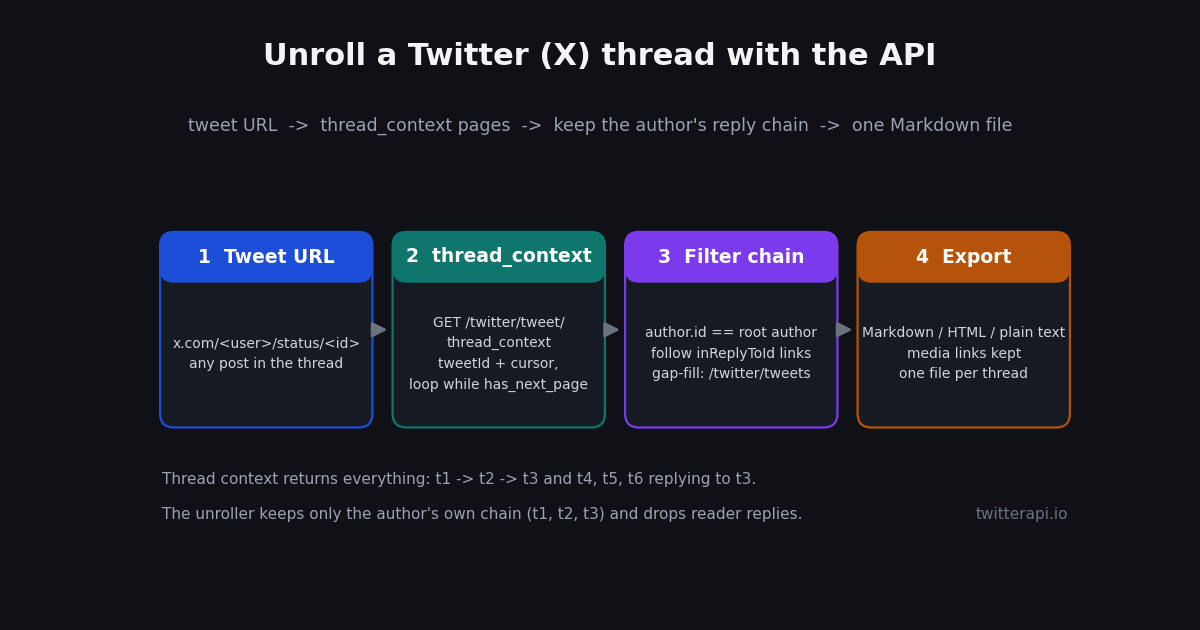
This page covers all of that quickly for readers who just want the thread in one place, then spends most of its length on the option none of the top results explain: building your own unroller on a read-only API. A single endpoint returns the full conversation around any post; a dozen lines of filtering turn that into the author's thread in order; and you choose the output, whether Markdown for your notes, HTML for a newsletter, or plain text for a corpus. Everything runs with an API key from the twitterapi.io dashboard and no X account at all.
One scope note. There is a sibling page on this site, the tutorial on how to make a Twitter thread via API, which is about posting a thread with in_reply_to chaining. This page is the opposite direction: reading and saving threads other people wrote. If you want to publish, go there; if you want to unroll, keep reading.
What happened to the unroll bots
Thread Reader App's @threadreaderapp bot is the one most people mean by "unroll", and it is still running in 2026. Its help page describes the same mechanic as always: reply from any post of the thread mentioning the account with the keyword unroll, or quote the post with the same mention. The same page is candid about the limits. It says the service pays for X API access at $5,000 a month, that it sometimes has to skip replying to threads that already had many unroll requests or when it exceeds the X API's monthly cap, and that older posts can fail with a message that X does not allow them to be retrieved (threadreaderapp.com/help, read in 2026). A Premium tier at $3 a month or $30 a year adds PDF archiving, author alerts, and ad-free pages; plain unrolling stays free.
The reason the bot became unreliable is the 2023 API change. X announced in February 2023 that free API access would end, and in April 2023 a wave of utility bots, Thread Reader among the names reported, lost or had to renegotiate access (waxy.org, April 2023, summarising The Verge's report). Smaller unroll bots that could not justify the paid tiers simply stopped answering, so treat any list of unroll bots older than that as historical.
What replaced the bots is a set of web unrollers: sites where you paste the thread URL and read it on their page, sometimes with PDF or Markdown export. They avoid the public-reply problem, but you are reading on a third party's page with its ads and its idea of formatting, and most unroll one thread at a time by hand. Browser extensions take a third path and reformat the thread inside x.com itself, which means they need you logged in and break whenever the site markup changes.
None of these is wrong for one thread. The gap shows up when you want the thread as a file you own, with reader replies stripped and media links preserved, or when you want fifty threads at once. That is the case for a script.
Read a thread in the X app without any tool
If you only want to read, X's own client already unrolls threads in a limited sense. Open the first post of the thread and the author's connected posts render in order beneath it, joined by a vertical line; from a timeline, tapping a thread post or the link that shows the rest of the thread takes you to that view. X's help page on creating a thread describes the connected-posts presentation from the author's side (help.x.com, create a thread).
Where this falls short is predictable. There is no export: nothing to copy as a whole, no file, no search across threads. Reader replies and the author's replies to readers are interleaved below the chain, so on a long thread you scroll through a conversation rather than an article. If the author deleted one post, the view often breaks at the gap and the later posts appear as orphaned replies. And it needs an account to see more than the first few posts. For reading one thread once, it is fine; for anything else, you want one of the methods in the table below.
A practical tip that works in the app: if a thread post reached you out of order, open it and scroll up. The conversation view loads the ancestors, so you reach the first post without a tool, and from there the chain reads top to bottom.
Four ways to unroll a thread, compared
The honest comparison. Costs for the API route use the twitterapi.io pricing page, checked in 2026: $0.15 per 1,000 posts returned, with a minimum of 15 credits ($0.00015) per call, and 1 credit = $0.00001.
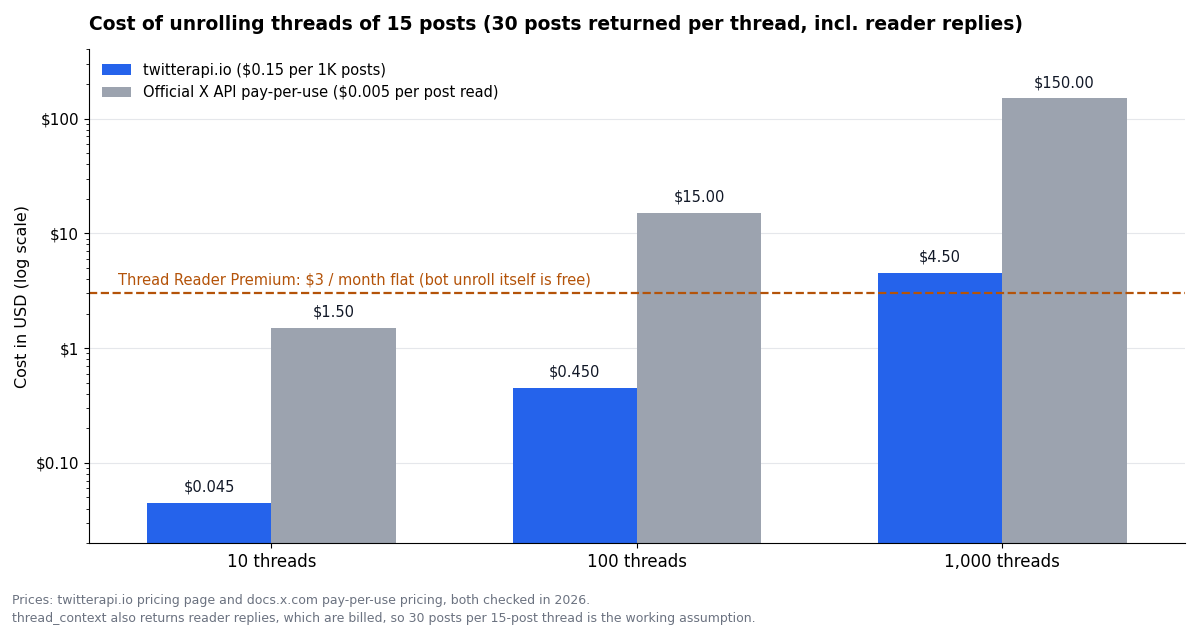
The per-thread cost deserves a note. thread_context returns the whole conversation, so a 15-post thread with 15 reader replies comes back as 30 posts and is billed as 30; the rest of this page uses that 30-post thread as the working assumption. If you only need the chain and the thread has thousands of replies, stop paginating once a page contains none of the author's posts, which keeps the bill near the author's own count.
How thread_context works
GET /twitter/tweet/thread_context takes one required parameter, tweetId, and one optional, cursor, which is an empty string for the first page. The post ID can be any post in the thread, not only the first. The docs explain the shape with an example: a thread of t1, t2 replying to t1, t3 replying to t2, and t4, t5, t6 all replying to t3. Ask for t3 and you get all six back, ancestors and descendants alike (docs.twitterapi.io, thread_context). That is the property the unroller relies on: you never need to find the first post yourself.
The response has a replies array of post objects, a has_next_page boolean, and a next_cursor string for the next page, plus status and message. Each post carries id, text, createdAt, url, an author object with id, userName, and name, and the two fields that make unrolling possible: inReplyToId, the post it replies to, and inReplyToUserId, who wrote that parent. There is also conversationId, the ID of the first post, and isReply. The documentation warns that has_next_page can be true even when no further data exists, so cap your page loop and stop on an empty page.
Billing follows the post count: $0.15 per 1,000 posts returned, 15 credits minimum per call (twitterapi.io pricing, 2026). The script below prints what one page looks like, with each post's author and parent, which is the quickest way to see the thread structure before you filter it.
"""One call to thread_context: see the whole conversation a post belongs to."""
import os
import requests

HEADERS = {"X-API-Key": os.environ["TWITTERAPI_IO_KEY"]}
BASE = "https://api.twitterapi.io"

r = requests.get(
    f"{BASE}/twitter/tweet/thread_context",
    params={"tweetId": "1846987139428634858", "cursor": ""},   # any post in the thread works
    headers=HEADERS,
    timeout=30,
)
r.raise_for_status()
data = r.json()
for t in data.get("replies") or []:
    who = t["author"]["userName"]
    print(f'{t["id"]}  @{who:<16} replies_to={t.get("inReplyToId")}  {t["text"][:60]!r}')
print("more pages:", data.get("has_next_page"), "cursor:", (data.get("next_cursor") or "")[:12])
Keep only the author's chain
A thread is the author's self-reply chain: each post replies to the author's previous post. Everything else in the conversation is noise for unrolling purposes, including, and this trips people up, the author's own replies to readers. Those have the right author but their parent belongs to someone else, so the filter has to check both: the post's author is the thread author, and inReplyToId points at the previous post in the chain.
The algorithm has two moves. Climb first: from whatever post the user pasted, follow inReplyToId upward while the parent is also by the author, which lands you on the first post of the thread even if the URL pointed at post 7 of 12. Then descend: from the current post, pick the author's reply to it, append, and repeat until there is none. If the author replied to their own post twice, which happens when someone starts a sub-thread or corrects a typo, take the earliest; snowflake IDs sort by time, so min on the integer ID works without parsing dates.
Gaps are the other real-world problem. If the author deleted a post mid-thread, thread_context may not return it, but the next post still carries its ID in inReplyToId. That is where GET /twitter/tweets comes in: pass the missing IDs as a comma-separated tweet_ids value and splice whatever comes back into the chain. If nothing comes back, the post is gone, and the honest output is a numbered gap rather than a silently shorter thread. The full CLI at the end of the page does this; the function below is the core filter on its own.
"""Keep only the author's own reply chain, in order, from a dict of posts keyed by id."""


def author_chain(posts, start_id):
    root = posts[start_id]
    author_id = root["author"]["id"]
    # 1. climb to the first post of the thread while the parent is also the author's
    while root.get("inReplyToId") in posts and root.get("inReplyToUserId") == author_id:
        root = posts[root["inReplyToId"]]
    # 2. descend: at each step take the author's earliest reply to the current post
    chain, seen = [root], {root["id"]}
    while True:
        kids = [
            t for t in posts.values()
            if t.get("inReplyToId") == chain[-1]["id"]
            and t["author"]["id"] == author_id
            and t["id"] not in seen
        ]
        if not kids:
            return chain
        nxt = min(kids, key=lambda t: int(t["id"]))   # snowflake ids sort by time
        chain.append(nxt)
        seen.add(nxt["id"])


# posts = {t["id"]: t for t in every_page_of_thread_context}
# chain = author_chain(posts, "1846987139428634858")
# print(len(chain), "posts in the author's thread")
Export to Markdown, HTML, or plain text with media
Once you have the chain, output is a formatting choice. These are the post fields the three formats use and how each one is rendered in the CLI.
Two details matter for clean files. First, the text field contains shortened t.co links; the expanded targets live in entities.urls with expanded_url, and replacing them makes the saved thread readable offline. Second, videos appear in extendedEntities.media with a type other than photo and a thumbnail in media_url_https; the playable file sits in the entry's video variants, so decide whether a thumbnail link is enough for your use. For a newsletter or notes it usually is; for an archive, pick the highest-bitrate variant.
Markdown is the default in the CLI because it round-trips into almost everything: Obsidian, Notion, a static site, or a prompt. HTML is there for pasting into an email tool. Plain text is for corpora, where you want one thread per file and nothing but the words and the media URLs.
What unrolling costs at volume
The arithmetic, using the 30-posts-per-thread assumption from the comparison table and prices checked in 2026: twitterapi.io $0.15 per 1,000 posts ($0.00015 each, 15 credits minimum per call); official X API pay-per-use $0.005 per post read, capped at 3 million post reads per monthly billing cycle, with no subscription tiers (docs.x.com, verified 2026); Thread Reader Premium $3 a month flat, bot unrolls free.
The ratio between the two API columns is 33x (0.005 / 0.00015 = 33.3), the same gap as for any post read, and the official route also needs a developer account and app approval before the first call. The official API does have one advantage worth stating: it de-duplicates reads of the same post within a 24-hour window (docs.x.com, 2026), so re-unrolling a thread you fetched this morning is free there, while on twitterapi.io it is billed again. Cache your results locally and that difference disappears.
For a human unrolling a thread now and then, the bot or a web unroller costs nothing and wins. The script starts to pay off at a few dozen threads, or the first time you want them as files you control.
Batch: unroll every thread an account has written
The script takes one URL, so batching is a loop, but the interesting part is building the list of thread roots. Two routes work. The simplest is GET /twitter/user/last_tweets with userName (and includeReplies left off), paginated with cursor: every post in the result that has replyCount above zero is a candidate, and running thread_context on it tells you in one page whether the author continued it. That costs a page per candidate, so filter first: a thread opener is normally followed by the author's own reply soon after, and a post with no self-reply is not a thread.
The more precise route is search. GET /twitter/tweet/advanced_search with query set to from:handle filter:self_threads and queryType Latest returns posts that are part of the author's own threads; the operator is widely documented in community lists of X search operators rather than in X's official reference, so test it on an account you know before relying on it, and see the search operators guide on this site for the full operator table. Collect the conversationId of each result, de-duplicate, and you have one root per thread.
Pacing and hygiene for a batch of a few hundred threads: run sequentially or with a small pool, skip any conversationId you already have a file for, store the raw replies pages as JSON next to the Markdown so you can re-render later without paying again, and log the (thread_id, posts_returned, posts_kept) triple per thread. The last number is the one that tells you a thread lost a post to deletion, which is exactly the thread you want to look at by hand.
"""unroll.py: save a Twitter (X) thread as Markdown.
Usage: python3 unroll.py https://x.com/<user>/status/<id> [--format md|html|txt] [--out thread.md]
Needs TWITTERAPI_IO_KEY in the environment. Works with any post in the thread, not only the first.
"""
import argparse
import html
import os
import re
import requests
BASE = "https://api.twitterapi.io"
HEADERS = {"X-API-Key": os.environ["TWITTERAPI_IO_KEY"]}
def tweet_id_from_url(url):
m = re.search(r"/status/(\d+)", url)
if not m:
raise SystemExit(f"no /status/<id> in {url}")
return m.group(1)
def get_tweets(ids):
"""Gap filler: fetch specific posts by ID (comma-separated)."""
r = requests.get(f"{BASE}/twitter/tweets", params={"tweet_ids": ",".join(ids)}, headers=HEADERS, timeout=30)
r.raise_for_status()
return r.json().get("tweets") or []
def thread_context(tweet_id):
"""Walk every page of the conversation around tweet_id."""
posts, cursor, pages = {}, "", 0
while True:
r = requests.get(
f"{BASE}/twitter/tweet/thread_context",
params={"tweetId": tweet_id, "cursor": cursor},
headers=HEADERS,
timeout=30,
)
r.raise_for_status()
data = r.json()
for t in data.get("replies") or []:
posts[t["id"]] = t
pages += 1
cursor = data.get("next_cursor") or ""
if not data.get("has_next_page") or not cursor or pages >= 20:
return posts # page cap guards against has_next_page=true with no data
def author_chain(posts, start_id):
"""Keep only the author's self-reply chain, in posting order."""
root = posts.get(start_id) or get_tweets([start_id])[0]
posts.setdefault(root["id"], root)
author_id = root["author"]["id"]
# Walk up to the first post of the thread, filling gaps with /twitter/tweets.
while root.get("inReplyToId") and root.get("inReplyToUserId") == author_id:
parent_id = root["inReplyToId"]
if parent_id not in posts:
fetched = get_tweets([parent_id])
if not fetched:
break # deleted or unavailable parent: start from here
posts[parent_id] = fetched[0]
root = posts[parent_id]
chain, seen = [root], {root["id"]}
while True:
children = [
t for t in posts.values()
if t.get("inReplyToId") == chain[-1]["id"] and t["author"]["id"] == author_id and t["id"] not in seen
]
if not children:
return chain
nxt = min(children, key=lambda t: int(t["id"])) # earliest self-reply continues the thread
chain.append(nxt)
seen.add(nxt["id"])
def media_links(t):
out = []
for m in ((t.get("extendedEntities") or {}).get("media") or []):
out.append(m.get("media_url_https") or m.get("url"))
return [u for u in out if u]
def render(chain, fmt):
head = chain[0]
name, user = head["author"].get("name", ""), head["author"].get("userName", "")
if fmt == "txt":
body = "\n\n".join(f"{i}/ {t['text']}" + "".join(f"\n{u}" for u in media_links(t)) for i, t in enumerate(chain, 1))
return f"{name} (@{user})\n{head.get('url')}\n\n{body}\n"
if fmt == "html":
items = "".join(
f"<p>{html.escape(t['text'])}</p>" + "".join(f'<img src="{u}" alt="">' for u in media_links(t))
for t in chain
)
return f"<article><h1>{html.escape(name)} (@{user})</h1><p><a href=\"{head.get('url')}\">Original thread</a></p>{items}</article>\n"
parts = [f"# Thread by {name} (@{user})", "", f"Source: {head.get('url')}", ""]
for i, t in enumerate(chain, 1):
parts.append(f"**{i}/{len(chain)}** {t['text']}")
parts.extend(f"" for u in media_links(t))
parts.append("")
return "\n".join(parts)
if __name__ == "__main__":
ap = argparse.ArgumentParser()
ap.add_argument("url")
ap.add_argument("--format", choices=["md", "html", "txt"], default="md")
ap.add_argument("--out")
args = ap.parse_args()
tid = tweet_id_from_url(args.url)
posts = thread_context(tid)
chain = author_chain(posts, tid)
text = render(chain, args.format)
out = args.out or f"thread-{chain[0]['id']}.{args.format}"
with open(out, "w", encoding="utf-8") as f:
f.write(text)
print(f"{len(chain)} posts by @{chain[0]['author'].get('userName')} -> {out} ({len(posts)} posts returned by thread_context)")
Questions readers ask
Does @threadreaderapp unroll still work?
Yes, in 2026 the Thread Reader App bot still answers replies that mention it with the word unroll, but its help page says it sometimes skips replying when it exceeds the monthly cap of the X API it pays for, or when a thread has already had many unroll requests. Pasting the thread URL into threadreaderapp.com avoids the wait.
How do I unroll a Twitter thread without replying publicly?
Paste the thread URL into a web unroller such as threadreaderapp.com, or run the script on this page, which reads the thread through twitterapi.io with no X account and leaves nothing visible on the thread.
How do I read a Twitter thread in order in the X app?
Open the first post of the thread and the author's connected posts render in order beneath it. If you landed on a middle post, open it and scroll up: the conversation view loads the earlier posts, and from the first one the chain reads top to bottom.
Which endpoint returns a whole Twitter thread?
On twitterapi.io, GET /twitter/tweet/thread_context with a tweetId returns every post in the conversation around that post, ancestors and replies, paginated with cursor. Filter the result to posts by the thread author whose inReplyToId points at the previous post to get the thread itself.
How do I keep only the author's posts and drop the replies?
Keep a post when its author.id equals the thread author's ID and its inReplyToId is the ID of the previous post in the chain. That second check also removes the author's replies to readers. Start from the first post, which you reach by following inReplyToId upward while the parent is also the author's.
How much does it cost to unroll a thread with the API?
At $0.15 per 1,000 posts returned, a 15-post thread that comes back with about 30 posts including reader replies costs around $0.0045 on twitterapi.io, with a 15-credit ($0.00015) minimum per call. The official X API charges $0.005 per post read on its pay-per-use model (docs.x.com, verified 2026), about 33 times more per post.
Can I save the unrolled thread as Markdown or PDF?
The script writes Markdown by default and HTML or plain text with a flag, with the media links kept. For PDF, open the HTML output in a browser and print to PDF, or use Thread Reader App's Premium tier, which adds PDF archiving for $3 a month.
Continue
- twitterapi.io docs: Get Tweet Thread Context (tweetId, cursor, replies, has_next_page, next_cursor)
- twitterapi.io docs: Get Tweets by IDs (tweet_ids), used for gap filling
- twitterapi.io pricing: $0.15 per 1K posts, 15-credit minimum per call
- X API pay-per-use pricing (docs.x.com): $0.005 per post read, 3M monthly read cap, the official and more expensive route
- Thread Reader App help: how the unroll bot works and when it skips replies
- waxy.org (April 2023): Twitter cuts off Cheap Bots Done Quick, Substack, Feedbin, Thread Reader and others from the API
- Twitter (X) API overview: the hub for reading X data
- How to make a Twitter (X) thread via API: the posting side
- Tweet metadata fields reference: inReplyToId, conversationId, entities
- Twitter (X) search operators for the API, including from: and filter:
- Twitter (X) API with Python: the complete guide
- twitterapi.io vs the official X API: price and access compared
- fxtwitter and link-fixing embeds for X posts
- twitterapi.io pay-per-call pricing
- Get an API key in the twitterapi.io dashboard
Stop reading. Start building.
Starter credits cover real testing on real data. Google sign-in, no card, no application queue.
Get an API key