Kimi Code and Twitter (X): Accounts, and How to Add an X MCP Server
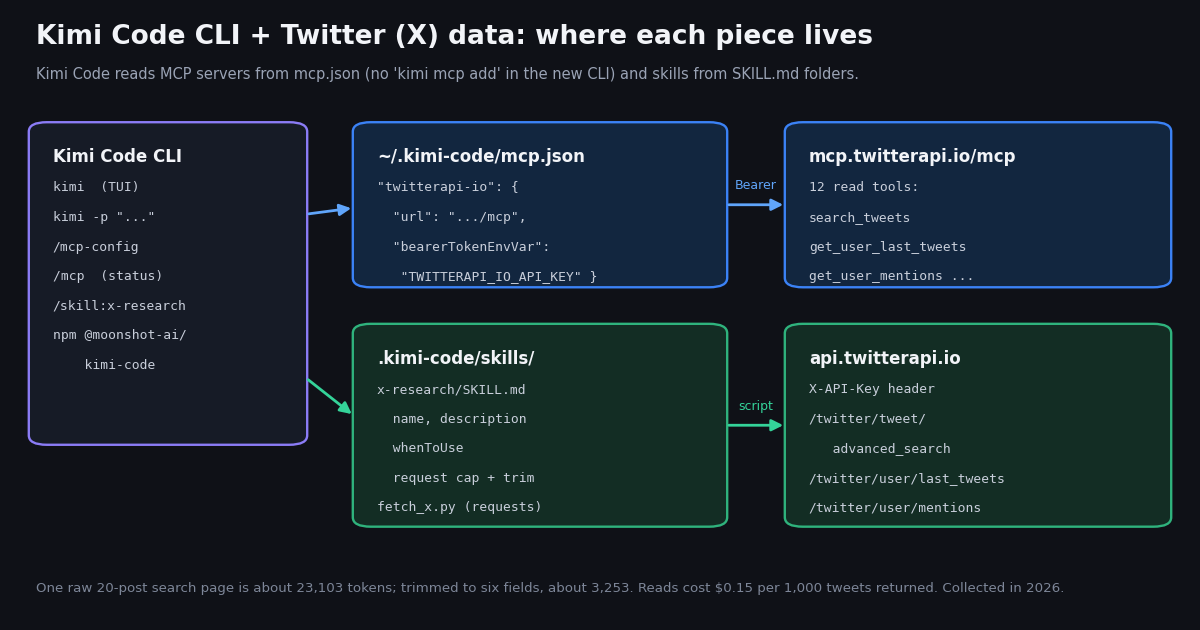
People type "kimi code twitter" for two reasons. Some want the account: where Moonshot AI posts Kimi Code news and changelogs on X. Most of the related searches ("kimi code mcp", "kimi code add mcp", "kimi code mcp config") come from developers who want Kimi Code to read X: search posts, pull an account's timeline, check mentions, inside the terminal agent they already use. This guide answers the first question in one paragraph and spends the rest on the second.
Everything about Kimi Code below was checked against Moonshot AI's own documentation (moonshotai.github.io/kimi-code) and repositories for this guide, because the product changed shape this year: the Python kimi-cli that many tutorials still describe is archived, and the TypeScript Kimi Code CLI that replaced it configures MCP differently. If you followed an older guide and kimi mcp add returns an error, the section on the old commands explains why.
We also measured what the setup will deal with. We pulled 940 posts in 2026: 400 recent posts that mention "kimi code", the most-engaged posts for the same query, 200 posts that pair "kimi code" with MCP, and the timelines of @Kimi_Moonshot and @KimiDevs. That tells you what the conversation is about, how much of it a week produces, and how many tokens one page of it costs inside Kimi Code's context.
Kimi Code on X: the official accounts and what they post
The short answer. Kimi Code has no account of its own name on X. Its news comes from two Moonshot AI accounts, and they do different jobs. @KimiDevs, display name "Kimi Developers", describes itself as "The official Kimi account for developers building with Kimi Code and the Kimi API." @Kimi_Moonshot, display name "Kimi.ai" and labeled as a Business account by X, is the main brand account that announces models and products.
Follow @KimiDevs for the CLI. In the 42 most recent posts on its timeline, 8 own posts are titled as a Kimi Code changelog (for example the CLI releases that added global MCP timeouts, the deprecation of kimi server in favor of kimi web, and the Kimi Code Desktop changelog). That makes it the closest thing to a release feed you can watch, and the timeline endpoint shown later turns it into one.
@Kimi_Moonshot is where the big launches land. Its posts that name Kimi Code are mostly model announcements, from "Introducing Kimi Code, an open-source coding agent" on January 27, 2026 to the K2.6, K2.7 Code, K3 and K3.1 Pro releases. Those posts reach far more people: a median of 8,884 likes and about 1,634,617 views, against 997 likes for its other own posts. Launch posts are the account's biggest posts in any case, so read that as "Kimi Code news rides on model launches", not as a Kimi Code effect.
One history note that explains a lot of confusion. The January 2026 launch post described Kimi Code as Python-based under the Apache 2.0 license. The CLI that Moonshot ships today is different: github.com/MoonshotAI/kimi-code is MIT-licensed, the getting-started guide says "The CLI is written in TypeScript, distributed via npm, and runs on Node.js", and the Python MoonshotAI/kimi-cli repository now opens with "This project has been archived and is no longer maintained." Anything you read about Kimi Code MCP setup depends on which of the two it was written for.
Which Kimi Code you have, and how to install the current CLI
Check this first, because the MCP steps differ. Run kimi --version. The current Kimi Code CLI was at version 2.5.0 on npm (@moonshot-ai/kimi-code) when we checked for this guide, and its data lives in ~/.kimi-code/. The archived Python CLI kept its data in ~/.kimi/. The archived README also warns about a naming trap: the kimi-code package on PyPI is "a legacy alias of kimi-cli, not the new Kimi Code CLI". If you installed with pip or uv tool, you have the old one.
Install. Moonshot recommends the script, which downloads the latest release, verifies the checksum and puts kimi on your PATH without needing Node.js: curl -fsSL https://code.kimi.com/kimi-code/install.sh | bash on macOS and Linux, irm https://code.kimi.com/kimi-code/install.ps1 | iex in PowerShell. With Node.js 22.19.0 or later, npm install -g @moonshot-ai/kimi-code works too. On Windows the docs ask for Git for Windows first, because Kimi Code uses its bundled Git Bash as the shell.
Log in. Run kimi in a project folder and type /login. You choose between Kimi Code (OAuth), a device-code flow tied to your Kimi membership, and a Kimi Platform API key from platform.kimi.com or platform.kimi.ai. Other providers (Anthropic, OpenAI, Google) go in ~/.kimi-code/config.toml. None of this touches X: the model and the X data source are configured separately.
Coming from the old CLI. On first launch the new CLI detects ~/.kimi/ and offers to migrate config, MCP servers, input history and sessions (kimi migrate does it on demand). The archived README is explicit that "Login credentials, MCP authorizations, and Kimi CLI plugins are not migrated", so plan to re-check the X server's key after migrating.
# 1. Install Kimi Code CLI (the TypeScript CLI from MoonshotAI/kimi-code)
curl -fsSL https://code.kimi.com/kimi-code/install.sh | bash
# or: npm install -g @moonshot-ai/kimi-code     (Node.js 22.19.0 or later)
kimi --version

# 2. Put your twitterapi.io key in the environment Kimi Code starts from
export TWITTERAPI_IO_API_KEY="paste-your-key"      # from twitterapi.io/dashboard
# (add the line to ~/.zshrc or ~/.bashrc so new shells have it)

# 3. Register the hosted X MCP server for every project (user level)
mkdir -p ~/.kimi-code
cat > ~/.kimi-code/mcp.json <<'EOF'
{
  "mcpServers": {
    "twitterapi-io": {
      "url": "https://mcp.twitterapi.io/mcp",
      "bearerTokenEnvVar": "TWITTERAPI_IO_API_KEY"
    }
  }
}
EOF
# (if the file already exists, add the "twitterapi-io" entry inside "mcpServers" instead)

# 4. Start Kimi Code, log in once, check the server
kimi
#   /login        -> Kimi Code (OAuth) or a Kimi Platform API key
#   /mcp          -> twitterapi-io should show as connected, with 12 tools
# Then ask: "Search X for the 20 latest posts about Kimi Code and summarize them" Add the X (Twitter) MCP server to Kimi Code: mcp.json, step by step
Kimi Code's MCP documentation is short on this point and worth quoting: "MCP server configuration is written in mcp.json, at two levels", the user level ~/.kimi-code/mcp.json (shared across projects) and the project level .kimi-code/mcp.json ("effective only for the current repository"). When both define the same name, the project entry wins. config.toml does not hold server definitions; its [mcp] table only sets global timeouts and reconnect delays.
Step 1, a key. Sign up at twitterapi.io/dashboard and copy your API key. New accounts that pass the automatic bot check get up to $1 of free credits (at most 100,000 credits, no card, one per person or network, expiring after 31 days). Put the key in an environment variable, TWITTERAPI_IO_API_KEY, in the shell profile Kimi Code starts from.
Step 2, the entry. Add a server named twitterapi-io with the hosted URL and bearerTokenEnvVar. Kimi Code documents bearerTokenEnvVar as the "Name of an environment variable that contains a bearer token" for HTTP and SSE servers, which is exactly what the twitterapi.io server asks for: its initialize response says "Auth: paste your twitterapi.io API key as the Bearer token." The key never lands in the JSON file, so a project-level mcp.json can be committed safely. Kimi Code's docs do not describe ${VAR} expansion inside headers, so do not copy the ${env:...} header form from a Cursor guide; use bearerTokenEnvVar.
Step 3, check it. Start kimi and run /mcp. The server should be listed as connected with 12 tools: search_tweets, get_user_info, get_user_about, get_user_followers, get_user_followings, get_user_last_tweets, get_user_mentions, get_tweets_by_ids, get_tweet_replies, get_tweet_quotes, get_tweet_retweeters and get_trends (the list our tools/list probe returned for this guide, in 11,341 bytes of JSON). Then ask in plain words: "Search X for the latest posts about Kimi Code and summarize the top complaints."
Optional fields that matter for X data. enabledTools keeps the tool list short (the example below exposes five), which saves context on every turn. toolTimeoutMs raises the per-call timeout for large follower pulls. enabled: false switches the server off without deleting it. deferred: true loads the tools on demand, but it is marked experimental and needs the tool-select flag plus a model that declares the capability.
Two behaviors that trip people up. A server added by editing mcp.json mid-session "is not registered in already-open sessions; it only joins sessions created later", so start a new session (/new) after editing. And a project-level mcp.json only takes effect after you choose "Trust this folder" at the startup prompt, which lists each project server's transport and URL for review.
{
  "mcpServers": {
    "twitterapi-io": {
      "url": "https://mcp.twitterapi.io/mcp",
      "bearerTokenEnvVar": "TWITTERAPI_IO_API_KEY",
      "toolTimeoutMs": 60000,
      "enabledTools": [
        "search_tweets",
        "get_user_info",
        "get_user_last_tweets",
        "get_user_mentions",
        "get_tweet_replies"
      ]
    }
  }
}"kimi mcp add" no longer exists: the new commands, permissions and headless runs
Search for "kimi code add mcp" and you will find commands like kimi mcp add --transport http context7 https://mcp.context7.com/mcp --header "...". Those are real, but they are from the archived Python Kimi CLI's README. The current kimi command reference lists the subcommands login, acp, web, doctor, export, migrate, import-sessions, upgrade, provider and a few more, and no mcp. The same goes for the old --mcp-config-file flag: it is not in the current option table.
/mcp-config is a built-in skill, not a form. It lets you "interactively add, edit, or delete servers without manually editing the JSON file". In practice you can type /mcp-config add an HTTP server named twitterapi-io at https://mcp.twitterapi.io/mcp that reads its bearer token from TWITTERAPI_IO_API_KEY and review the JSON it writes. Check the result with /mcp.
Already set up in Claude Code or Codex? The built-in /import-from-cc-codex command imports "Claude Code and Codex instructions, skills, and MCP settings into Kimi Code". If you followed our Claude or Codex guide, that is the fastest route; afterwards open ~/.kimi-code/mcp.json and confirm the key is referenced through bearerTokenEnvVar rather than pasted into a header.
For editors. Kimi Code also runs as an ACP agent (kimi acp), which editors start as a subprocess. The MCP servers it uses are still the ones in mcp.json, so one entry covers the terminal and the IDE.
Kimi Code names MCP tools mcp__<server>__<tool>, so the X search tool is mcp__twitterapi-io__search_tweets. Calls that match no permission rule ask for approval, and "Approve for this session" allows the rest of that kind. All 12 tools on this server only read, so a permanent allow rule for mcp__twitterapi-io__* is reasonable. Kimi Code's own security note asks you to avoid allowing mcp__* for every server at once; scope the rule to this one.
Permission modes. Kimi Code has three: the default asks for approval, --yolo (Ask When Needed) runs routine actions automatically, and --auto (Never Ask) decides everything. The docs warn that in Ask When Needed mode "MCP tool calls are automatically approved". With a read-only server that is low risk, but remember that post text is data written by strangers: a post can contain instructions aimed at an agent, so do not combine X tools with write-capable tools under --auto without reviewing what runs.
Scripts and CI. kimi -p "..." runs one prompt without the TUI, under the auto policy, with static deny rules still enforced. Headless runs cannot show the trust prompt, so a server declared in the project's .kimi-code/mcp.json stays disabled unless the folder is already trusted or you set KIMI_CODE_TRUST_WORKSPACE=1 for that process. A server in the user-level ~/.kimi-code/mcp.json is not gated that way.
Timeouts. The default MCP connection timeout is 30,000 ms. Per-server startupTimeoutMs / toolTimeoutMs win over the KIMI_MCP_STARTUP_TIMEOUT_MS / KIMI_MCP_TOOL_TIMEOUT_MS environment variables, which win over [mcp] in config.toml. A hosted server that drops reconnects on its own with exponential backoff; a server whose static credentials are rejected is marked failed and not retried, which is what you will see with a wrong or missing key.
# ~/.kimi-code/config.toml
# Let the read-only X tools run without an approval prompt each time
[[permission.rules]]
decision = "allow"
pattern = "mcp__twitterapi-io__*"

# Optional: raise the global MCP tool timeout (milliseconds)
[mcp]
tool_timeout_ms = 60000

# Headless, in a project whose .kimi-code/mcp.json declares the server:
#   KIMI_CODE_TRUST_WORKSPACE=1 kimi -p "Summarize what X said about our repo this week"
# (project-level MCP servers stay disabled in -p runs unless the folder is trusted)The skill route: a SKILL.md that fetches and trims X data
Kimi Code supports Agent Skills: "a Markdown document with YAML frontmatter" that the model loads when its description and whenToUse match the task, or that you call with /skill:<name>. For X data a skill has one advantage over MCP: it can tell Kimi Code to run a script that trims the JSON before the model reads it, which matters because of the context numbers in the next section.
Where Kimi Code looks. User level: ~/.kimi-code/skills/ (it moves with KIMI_CODE_HOME) and the shared ~/.agents/skills/. Project level, from the nearest folder containing .git: .kimi-code/skills/ and .agents/skills/. More specific scopes win (Project, then User, then directories in extra_skill_dirs, then built-in skills). A skill folder holds SKILL.md plus supporting files, which the body can reference through ${KIMI_SKILL_DIR}.
What Kimi Code requires. In a directory-form SKILL.md, name and description "must" both be present or parsing fails. The twitterapi.io skill published at twitterapi.io/skills/twitterapi-io/SKILL.md has both, so it installs as-is; Kimi Code's docs list name, description, type, whenToUse, disableModelInvocation and arguments as its fields, and do not say how other fields (the published file also carries license, compatibility and metadata) are treated, so if /skill:twitterapi-io does not appear, check the startup log. Our SKILL.md explainer covers the format across agents.
Make the skill call a script. Add a fetch_x.py (the full example at the end of this guide) next to SKILL.md and tell the body: run python3 ${KIMI_SKILL_DIR}/fetch_x.py '<query>' <pages>, read only its output, never print TWITTERAPI_IO_API_KEY, and stop at five pages per task. The script calls /twitter/tweet/advanced_search with an X-API-Key header, follows next_cursor while has_next_page is true, and keeps six fields per post.
MCP or skill? Use MCP when you ask one-off questions in the TUI ("who is this account, what did they post today"). Use the skill and script when the task is a repeatable job, a bigger pull, or a headless kimi -p run whose output feeds a file. They can coexist: the skill can also tell Kimi Code which MCP tool to call for which question.
# Install the twitterapi.io skill where Kimi Code looks for skills
mkdir -p ~/.kimi-code/skills/twitterapi-io
curl -fsSL https://twitterapi.io/skills/twitterapi-io/SKILL.md \
  -o ~/.kimi-code/skills/twitterapi-io/SKILL.md
# shared with other agents instead: ~/.agents/skills/twitterapi-io/SKILL.md
# per repository:                   .kimi-code/skills/ or .agents/skills/

# Start a new session (or let the file watcher reload) and call it:
# /skill:twitterapi-io latest 40 posts mentioning "kimi code", trimmed, as a tableWhat one page of X data costs in Kimi Code's context
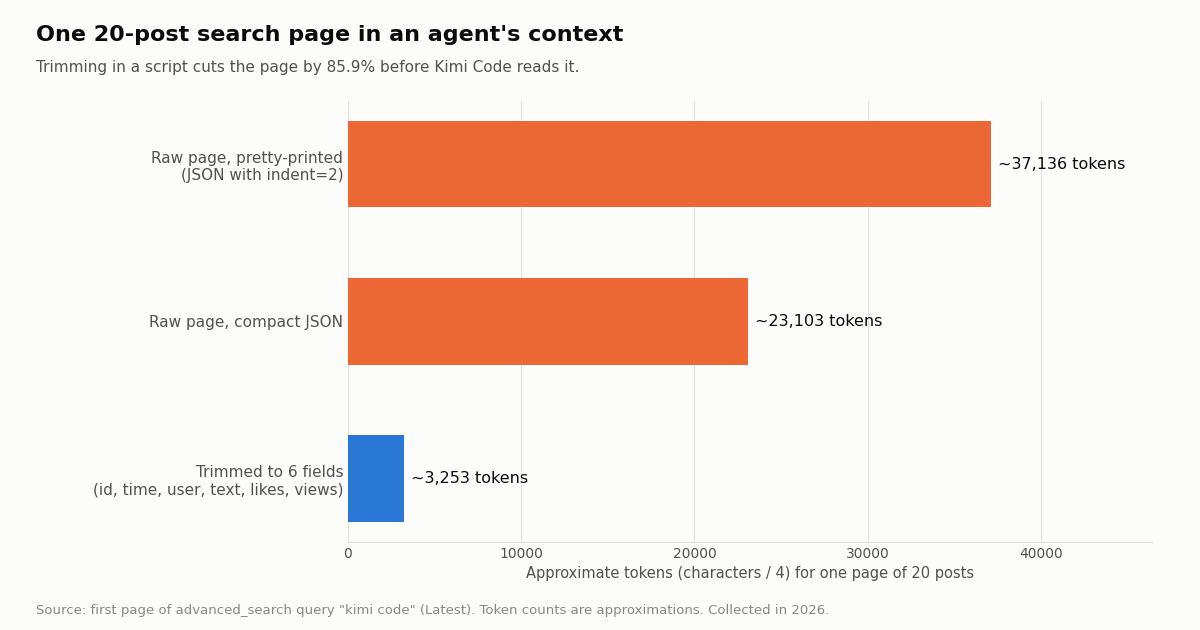
An X search returns rich JSON: every post carries its author's full profile, entities, media and nested quoted posts. We measured the first page of our "kimi code" Latest search, 20 posts. As compact JSON it is 92,413 characters, about 23,103 tokens at four characters per token; pretty-printed with an indent of two it is about 37,136 tokens. Keeping six fields (id, time, user, text, likes, views) brings it to about 3,253 tokens, 85.9% less.
Why that matters in Kimi Code specifically. Kimi Code's changelog for version 2.4.1 says a single file read by the agent now returns "at most 100,000 characters or about 25,000 tokens". A raw page saved to disk and read back is near that limit already; three of them are not. The MCP docs add that large tool output is saved to a file with a pointer the agent can page through, so nothing is lost, but every page the model actually reads costs context. Ask for 20 posts and a summary, not 200 posts.
The four-characters rule is an approximation. Real tokenizers differ, and in this sample more than a third of the posts were in Chinese or Japanese, which tokenizes differently from English. Treat the numbers as relative: trimming removes most of the page whatever the tokenizer.
What X says about Kimi Code: 400 recent posts measured
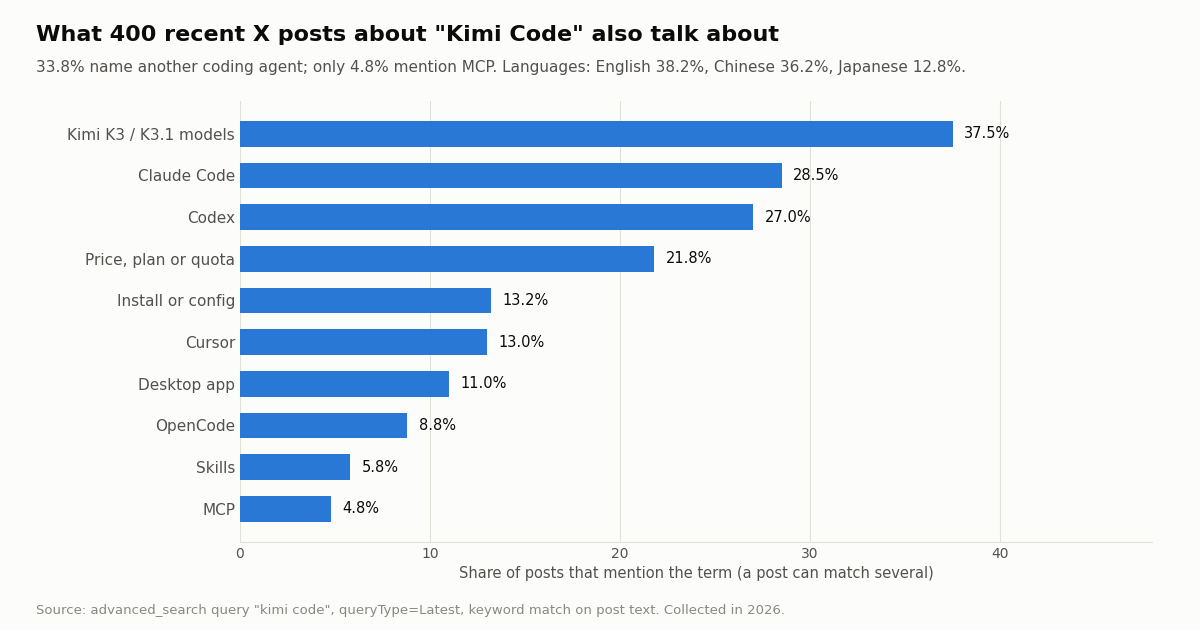
To see what a Kimi Code X agent would actually read, we pulled the recent posts that contain "kimi code". The Latest search returned 400 posts from 300 distinct accounts over 18.86 days, about 21.2 a day, before it reported no further page. 62.0% were original posts, 16.8% quotes and 21.2% replies. The language mix is the first surprise: English 38.2%, Chinese 36.2%, Japanese 12.8%. A summary prompt should say which language to answer in.
Kimi Code is discussed as one agent among several. 33.8% of the recent posts name at least one other coding agent: Claude Code in 28.5%, Codex in 27.0%, Cursor in 13.0%, OpenCode in 8.8%. Many are lists of supported agents or harness comparisons. The single biggest topic is the model: 37.5% mention K3 or K3.1, which matches the launch on @Kimi_Moonshot. Price, plan and quota talk is next at 21.8%.
MCP is a small slice, and it travels with Claude Code and skills. Only 4.8% of the recent posts mention MCP. The dedicated "kimi code" mcp search found 200 posts over 147.07 days (with more pages left), and within those, Claude Code appears in 31.5%, skills in 23.5% and install or config words in 29.0%. Only 64.0% contain "mcp" as a standalone word in the text, most likely because the search also matches it in forms our word-boundary rule skips, such as inside links or longer tokens. None of the 200 talk about X or Twitter data, which is the gap this guide fills.
Reach is concentrated. The median original post in the Latest sample got 4 likes and 596 views; the 98 posts the Top search ranks highest have a median of 322.5 likes and 47,070 views, and 71.4% of them are in English. If you want what most people saw, use queryType=Top; if you want what is new, use Latest.
What the X data costs, compared with the official X API
Tweet reads through twitterapi.io cost 15 credits per tweet returned, which is $0.15 per 1,000 tweets ($1 = 100,000 credits), with a minimum of 15 credits per request, so a search that finds nothing costs $0.00015 and a full 20-post page costs $0.003. Profiles are $0.18 per 1,000. The MCP server authenticates with the same twitterapi.io key, so the reads it makes draw on the same credit balance as REST calls.
A week of Kimi Code chatter. At the 21.2 posts a day we measured, a week is about 148 posts, or 8 search pages: about $0.022 through twitterapi.io. On X's own pay-per-usage rate card (docs.x.com/x-api/getting-started/pricing), a post read costs $0.005, so the same 148 posts would be about $0.74.
Per 1,000 posts that is $5 against $0.15, about 33x. The official API also caps pay-per-usage at 3 million post reads a month (Enterprise above that) and needs an X developer account; twitterapi.io reads need only the API key, and you pay only for the data returned. Before the first payment the rate limit is 0.2 requests per second, which is fine for an agent asking questions; it rises to 20 once you have paid. Plans and limits are on our pricing page.
Polling for a release feed. If Kimi Code (or a cron job) checks @KimiDevs for new changelog posts, most checks find nothing. An empty check costs the $0.00015 minimum: every 5 minutes for a month is about $1.30, every 60 seconds is $6.48. @KimiDevs posted 42 times in the 141.9 days our sample covers, so a daily or hourly check is plenty.
Can Kimi Code post to X too? The MCP server only reads. Writes are a separate product: one /twitter/user_login_v2 login ($0.10, with a proxy you supply) returns login_cookies, and each post, like, follow or retweet through endpoints such as /twitter/create_tweet_v2 is then 60 credits ($0.0006), billed per HTTP 200 call. Those calls act as that account, so X can rate-limit, lock or suspend it; keep a human pace and expect the session to need a re-login now and then.
How we collected this
Question. What does X say about Kimi Code, what do the official Kimi accounts post about it, and how large is one page of that data inside an agent's context?
Accounts and queries. Profiles and recent timelines of the organization accounts @Kimi_Moonshot (200 posts) and @KimiDevs (42 posts, all its timeline returned). Searches through /twitter/tweet/advanced_search: "kimi code" with queryType=Latest (400 posts, until the API reported no next page), the same query with queryType=Top (98 posts, 5 pages), and "kimi code" mcp Latest (200 posts, 10 pages).
Window and size. The most recent posts at collection time, collected in 2026: 940 posts and 2 profiles in 52 requests, which cost $0.1414 at the prices above. Topics were found by matching keyword lists on lower-cased post text (the lists are in the study's analyze.py); a post can match several, and broad words such as "plan" or "limit" make the price share an upper bound. Tokens are characters divided by four.
What the sample cannot show. It is a snapshot of one stretch of conversation, shaped by the K3.1 launch, not a trend. Keyword matching misses posts that discuss Kimi Code without the exact words and counts some that use them in passing. Engagement medians compare posts, not causes. We did not test Kimi Code itself making the MCP calls; the configuration steps come from Moonshot's documentation and our own probe of the MCP server's initialize and tools/list responses.
Privacy. Aggregates only. The only accounts named are the two Moonshot AI organization accounts. Search results from individual users were analyzed in memory and kept out of the published data; the published sample holds de-identified rows (no ids, links, text or handles).
"""fetch_x.py: the script a Kimi Code skill (or you) can run instead of MCP.

Pulls recent X posts for a query from twitterapi.io, trims each post to six fields,
and prints compact JSON for the agent to read. Stops at MAX_PAGES so a loop cannot
run up the bill.

    pip install requests
    export TWITTERAPI_IO_API_KEY=...      # from twitterapi.io/dashboard
    python3 fetch_x.py '"kimi code" mcp' 3
"""
import json
import os
import sys

import requests

BASE = "https://api.twitterapi.io"
KEY = os.environ["TWITTERAPI_IO_API_KEY"]          # never hard-code or print it
MAX_PAGES = 5                                      # hard cap: 5 pages = at most 100 posts


def search(query, pages):
    session = requests.Session()
    session.headers["X-API-Key"] = KEY
    cursor, out = "", []
    for _ in range(min(pages, MAX_PAGES)):
        resp = session.get(
            f"{BASE}/twitter/tweet/advanced_search",
            params={"query": query, "queryType": "Latest", "cursor": cursor},
            timeout=30,
        )
        resp.raise_for_status()
        body = resp.json()
        for t in body.get("tweets", []):
            out.append({
                "id": t["id"],
                "createdAt": t["createdAt"],              # "Thu Oct 16 12:34:56 +0000 2026", not ISO 8601
                "user": t["author"]["userName"],
                "text": t["text"],
                "likes": t.get("likeCount", 0),
                "views": t.get("viewCount", 0),
            })
        if not body.get("has_next_page"):
            break
        cursor = body.get("next_cursor", "")
    return out


def profile(user_name):
    resp = requests.get(
        f"{BASE}/twitter/user/info",
        params={"userName": user_name},
        headers={"X-API-Key": KEY},
        timeout=30,
    )
    resp.raise_for_status()
    body = resp.json()
    if body.get("status") == "error":              # unknown user: HTTP 200 with msg, data null
        return {"error": body.get("msg")}
    d = body["data"]
    return {"userName": d["userName"], "name": d["name"], "followers": d["followers"]}


if __name__ == "__main__":
    q = sys.argv[1] if len(sys.argv) > 1 else '"kimi code"'
    pages = int(sys.argv[2]) if len(sys.argv) > 2 else 2
    posts = search(q, pages)
    print(json.dumps({
        "account": profile("KimiDevs"),
        "query": q,
        "posts": posts,
        "approx_cost_usd": round(len(posts) * 0.00015, 5),   # 15 credits per tweet returned
    }, ensure_ascii=False))
Questions readers ask
What is the Kimi Code Twitter (X) account?
There is no account named after Kimi Code. Moonshot AI posts Kimi Code news from @KimiDevs ("Kimi Developers", 70,243 followers, changelogs and features for developers) and @Kimi_Moonshot (Kimi.ai, 390,942 followers, model and product launches). Follow @KimiDevs if you use the CLI.
Where is the Kimi Code MCP config file?
~/.kimi-code/mcp.json for servers you want in every project (or $KIMI_CODE_HOME/mcp.json if you moved the data folder), and .kimi-code/mcp.json inside a repository for project servers. The project entry wins when both use the same name, and project servers only load after you trust the folder. config.toml holds only global MCP timeouts, not servers.
How do I add an MCP server in Kimi Code? kimi mcp add does not work.
kimi mcp add belonged to the archived Python Kimi CLI. In the current Kimi Code CLI, add an entry under mcpServers in mcp.json (a url for HTTP servers, command and args for stdio servers), or run /mcp-config in the TUI and describe the server. /mcp shows connection status, and /mcp-config login <server-name> handles OAuth.
How do I pass an API key or Bearer token to an MCP server in Kimi Code?
For HTTP and SSE servers, use headers for static headers or bearerTokenEnvVar with the name of an environment variable that holds the token. For the twitterapi.io server, "bearerTokenEnvVar": "TWITTERAPI_IO_API_KEY" sends the key as Authorization: Bearer <key> and keeps it out of the file. For stdio servers, pass variables through env.
Can I reuse my Claude Code or Codex MCP servers in Kimi Code?
Yes. The built-in /import-from-cc-codex command imports Claude Code and Codex instructions, skills and MCP settings into Kimi Code. Afterwards check ~/.kimi-code/mcp.json and run /mcp to confirm each server connects.
Does Kimi Code support SKILL.md skills?
Yes. Kimi Code reads skills from ~/.kimi-code/skills/, ~/.agents/skills/, and the project's .kimi-code/skills/ or .agents/skills/. A directory-form SKILL.md needs name and description in its frontmatter; you call it with /skill:<name> or let the model pick it from the description.
Do I need an X developer account to give Kimi Code Twitter data?
No. The twitterapi.io MCP server and REST API need only a twitterapi.io API key. Reads cost $0.15 per 1,000 tweets returned, against $0.005 per post read on X's pay-per-usage rate card. New accounts that pass the automatic bot check get up to $1 of free credits (at most 100,000 credits, no card, one per person or network, expiring after 31 days).
Why does my project's MCP server not load in kimi -p?
Headless runs cannot show the workspace trust prompt, so servers in a project-level .kimi-code/mcp.json stay disabled unless the folder was trusted before. Set KIMI_CODE_TRUST_WORKSPACE=1 for that process, or declare the server in the user-level ~/.kimi-code/mcp.json instead.
Continue
- Kimi Code docs: Model Context Protocol (mcp.json locations, fields, bearerTokenEnvVar, /mcp-config, trust, tool naming)
- Kimi Code docs: Agent Skills (SKILL.md format, skill locations, /skill:name)
- Kimi Code docs: Getting started (install script, npm package, /login, ~/.kimi-code)
- MoonshotAI/kimi-code on GitHub (Kimi Code CLI, MIT)
- MoonshotAI/kimi-cli on GitHub (archived Python CLI, legacy kimi mcp commands, migration notes)
- X API pricing (pay-per-usage rates)
- Twitter (X) API overview for developers
- How to use Claude and Claude Code with the Twitter (X) API
- OpenAI Codex with the Twitter (X) API: config.toml and AGENTS.md
- How to use Cursor with the Twitter (X) API
- SKILL.md explained: the Agent Skills format and the twitterapi.io skill
- What an MCP server is, measured on the hosted X server
- twitterapi.io pricing and rate limits
- twitterapi.io API documentation
- 01What Is Qoder? Plans, Credits, MCP Setup and Twitter (X) Data in Qoder
- 02Cursor vs GitHub Copilot: Plans, Agent Mode, MCP and a Twitter (X) Data Setup in Both
- 03Claude Code hooks: every event, the settings.json shape, and tested recipes (plus an X data budget guard)
- 04Google Antigravity Pricing: Free Tier, Pro and Ultra Quotas, and What X Users Report
- 05OpenRouter Alternatives in 2026: LiteLLM, Vercel AI Gateway, Requesty, Portkey and Direct APIs Compared, With What Developers on Twitter (X) Say
- 06OpenCode vs Claude Code: config, plugins, models and one Twitter (X) MCP server in both
- 07Claude Code Pricing in 2026: Plans, Usage Limits and the Real Cost of an Always-On Agent
- 08Cursor vs Claude Code: Plans, MCP Setup and Headless Runs Compared for Twitter (X) Data Work
Stop reading. Start building.
Starter credits cover real testing on real data. Google sign-in, no card, no application queue.
Get an API keyAlready building with TwitterAPI.io? Publish an honest tutorial or build log about it and earn up to $200 a month in API credits.