Twitter (X) "Oops, Something Went Wrong" and "Try Reloading": What Each Message Means and the Fix
This page decodes the error messages themselves: "Something went wrong. Try reloading.", "Oops, something went wrong", "Cannot retrieve posts at this time" and their relatives. If your timeline is blank or images will not load with no message at all, our guide to Twitter (X) posts not loading covers that branch; search that returns nothing has its own page on Twitter search not working, and a single post that says it is unavailable is covered by the content-is-not-available guide.
Most fix lists treat every X error as the same four steps. They are not the same error. We downloaded the x.com web client and read where each message is triggered, then searched X itself for people quoting each string to see which device and screen they name and how the volume moves during an outage X documented. The checklist below follows from both.
One honest limit up front: X does not publish how often each cause happens. The order of fixes here is our judgement from how the client handles errors and from the posts we measured, and it is labeled as such.
Start here: match the exact words on your screen
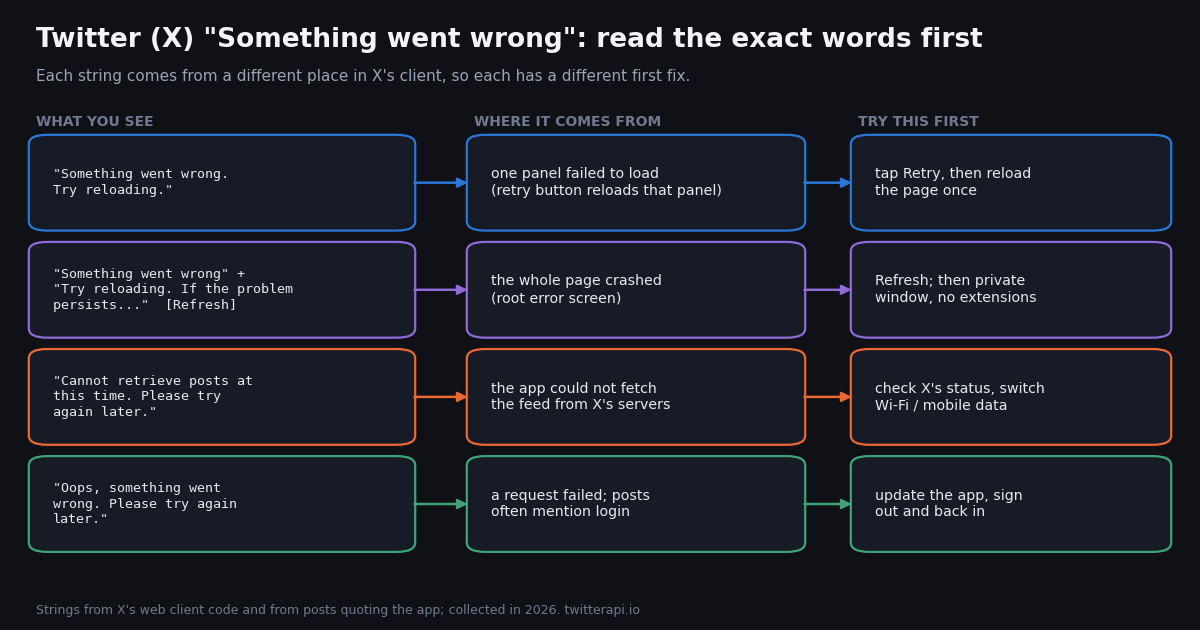
X uses several near-identical messages, and the small differences tell you where to look. Match the sense rather than the punctuation; app versions and languages vary the wording slightly.
Two related strings point somewhere else entirely. "Sorry, you are rate limited. Please wait a few moments then try again." and a page titled "Rate limit exceeded" mean X capped how much your account can read; see our page on Twitter rate limit exceeded. "X is over capacity. Please wait a few moments then try again." is X saying its own servers are overloaded. Neither is fixed by clearing anything.
"It isn't your fault." The current x.com code uses "Something went wrong - but don't fret, it's not your fault" as the title of the screen shown when a creator subscription (Super Follows) payment fails, and people also quote "it's not your fault" from older web error screens. Treat it like the full-screen crash above.
"Some settings failed to load." This one is rare: a search for the exact phrase on X returned only 20 posts in total, the oldest from 2018. The wording points at a failed settings request rather than at your posts; treat it like the other failures: retry, then sign out and back in.
What X's own code says "Something went wrong" means
We downloaded the JavaScript that x.com serves to a browser in 2026 and searched it for the error strings. Three findings matter for anyone trying to fix the message.
"Try reloading" is a panel-level retry. "Something went wrong. Try reloading." is rendered by a small error component whose Retry button resets the failed data query and asks again. It does not reload the whole page, so a page refresh is a different, stronger step worth trying second.
The full-screen version is a crash screen. "Something went wrong" plus "Try reloading. If the problem persists, please try again later." and a Refresh button is the root error screen, shown when the page throws while rendering. The code logs it to X's crash reporting. A crash like that usually comes from a broken or half-loaded script, which is why a private window, a different browser or clearing site data helps.
"Something went wrong. Please try again." is the default branch. When an action fails, the client checks the error code. Rate limits get "Sorry, you are rate limited", over-capacity gets "X is over capacity", deleted posts get "Sorry, that post has been deleted", and permission problems get "Your account may not be allowed to perform this action". Only an error none of those cover falls through to "Something went wrong. Please try again." For mute and block there are variants that already contain the advice: "Something went wrong. Try blocking that user again in a minute."
The practical reading: "Something went wrong" tells you a request failed and nothing about why. If X knew it was a rate limit, a suspension or a deleted post, it would say so. That is why the first two steps are always to retry and to check whether X itself is having a problem.
Is it X or is it you? The two-minute check
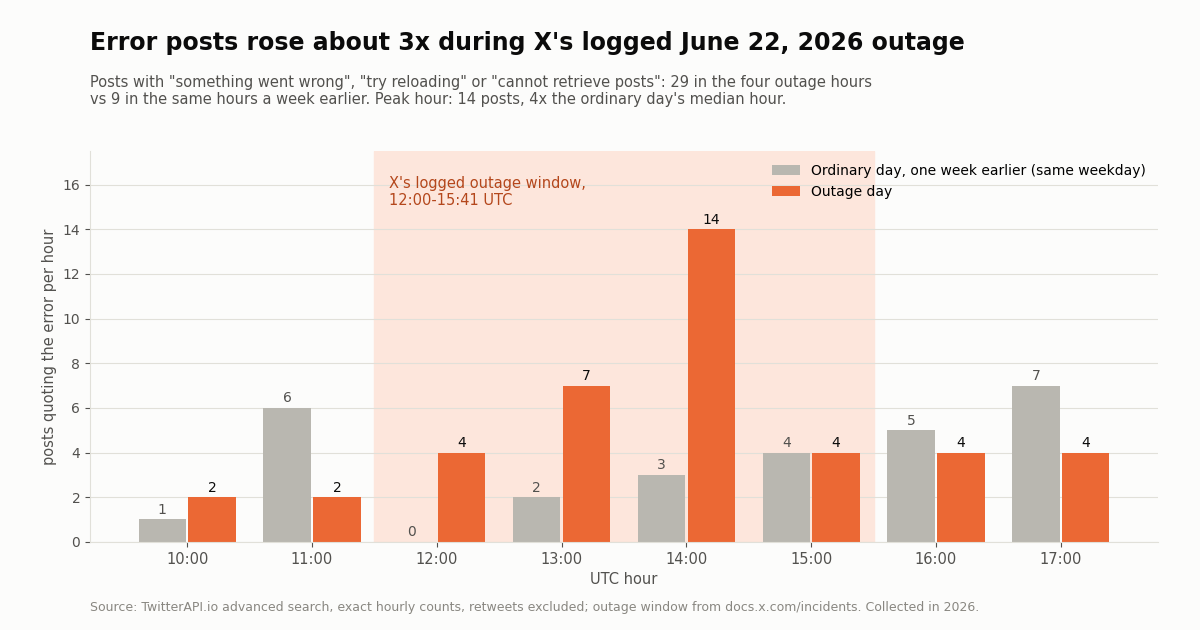
X does not run a public consumer status page. What it does publish is an incident log for its developer platform at docs.x.com/incidents, and that log records site-wide outages too. In 2026 it lists "Service-wide outage - Intermittent errors" on January 22 and January 24, two "X site-wide outage: API endpoint degradation" entries on February 16, and another on June 22, 2026 from 12:00 to 15:41 UTC.
We used that June 22 outage to see what an outage looks like from the outside. Posts on X quoting "something went wrong", "try reloading" or "cannot retrieve posts" ran 29 in the four outage hours against 9 in the same four hours one week earlier, and the worst hour held 14 posts, 4x the ordinary day's median hour. A rise, but a small one in absolute numbers: most people who hit the error do not post about it.
Check 1: a second device or network. Open X on your phone over mobile data while the laptop is on Wi-Fi. If both fail, it is X or your account; if one works, it is that device, browser or network.
Check 2: logged out. Open a public profile such as x.com/XDevelopers in a private window. If it loads logged out but your logged-in session errors, suspect your session or your account, not X.
Check 3: other people, right now. Search X for the exact error text sorted by Latest. Several fresh posts within the last few minutes point at X. Our page on whether X is down walks through the outage signals in more detail.
If X is down, nothing on your side fixes it. The June 22 entry lasted under four hours, and the February 16 entries about one and one and a half hours each.
The fix checklist, in the order causes usually turn up
Work down the list and stop when the error goes away. The order is our judgement: quickest and most likely first, based on how X's client handles errors and on the posts we measured. X publishes no cause statistics.
1. Retry once, then reload. The Retry button re-asks for one panel; a reload (Ctrl+Shift+R on Windows and Linux, Cmd+Shift+R on a Mac) fetches the page and scripts again. Most one-off failures end here.
2. Check whether X is down. Use the three checks above. If others report the same error at the same time, wait; an outage is the one cause where every other step is wasted effort.
3. Rule out blockers and tracking protection (web). Open x.com in a private window with extensions disabled. If it works there, allow-list x.com, twimg.com and t.co in your ad or script blocker. A public Firefox compatibility report shows x.com landing on the "Something went wrong" screen at a ?failedScript=main address, where the browser's banner pointed at Enhanced Tracking Protection in Strict mode as a known cause.
4. Clear X's site data, or sign out and back in. A stale session or a corrupted local cache keeps failing every request while the page looks normal. In Chrome, open the site-information icon left of the address, then Site settings, and delete the stored data. In the app: sign out, sign in. This also issues a fresh session.
5. Update the app or the browser. An old app build can fall behind changes on X's side. On iPhone use the App Store's Updates list; on Android, Google Play, Manage apps. If an update is not available, delete and reinstall the app.
6. Change the network path. Turn off a VPN or proxy, leave a captive-portal Wi-Fi (hotel, airport) or switch between Wi-Fi and mobile data. A network that blocks some X hosts lets the page shell load and then fails the data requests, which is exactly what "Try reloading" looks like.
7. Check the clock. Set date and time to automatic. A device clock far off can break secure connections and session checks.
8. Check your account. If everything works logged out and only your account errors, look for a lock or a restriction notice in your email and at the top of the app. A shadowban check tells you whether your posts are being hidden from others. Rate limits come with their own message, covered on our rate-limit page.
On the X app: "Cannot retrieve posts" and "Oops, something went wrong"
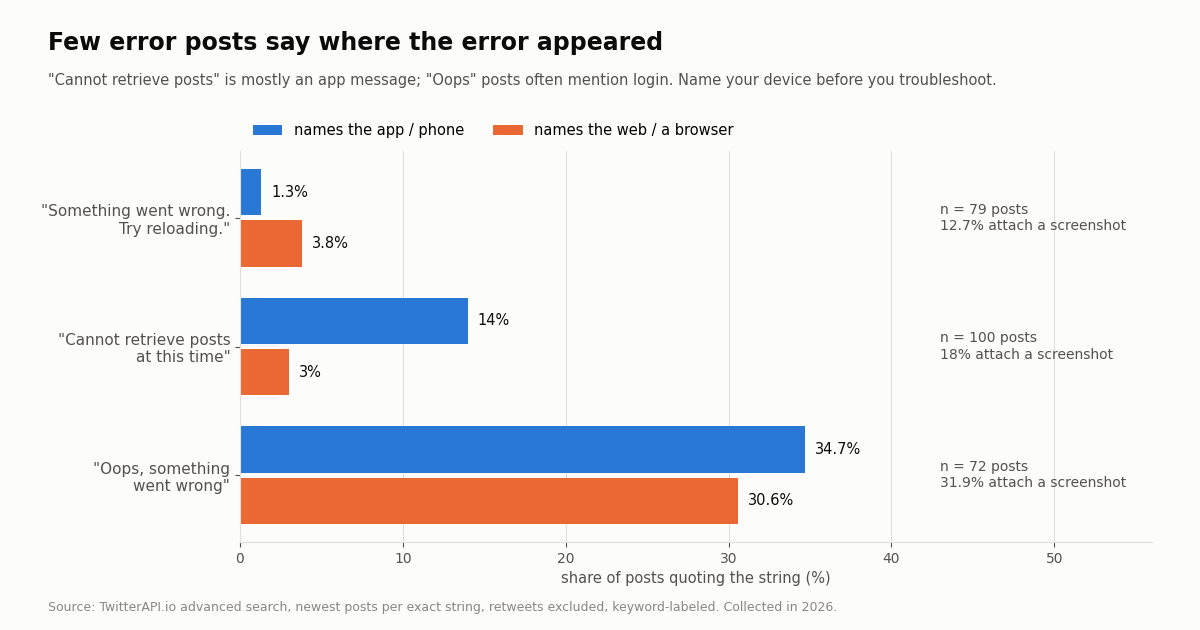
"Cannot retrieve posts at this time. Please try again later." is mostly an app message. Among 100 posts quoting it, 14% mention the app or a phone and 3% a browser. It means the feed request failed, so the network and outage checks come first.
"Oops, something went wrong" behaves differently. Of 72 posts quoting it about X, 25% mention logging in, more than any other screen, and the posts are spread over several years (14 of them from 2026), which fits an older app string that still appears around sign-in.
iPhone, in order. Close the app from the app switcher and reopen it. Toggle Airplane Mode for ten seconds. Update X from the App Store. Settings, General, Date and Time, Set Automatically. Sign out of X and back in. Delete and reinstall the app; your posts and settings live on X's servers, not on the phone.
Android, in order. Force stop the app (long-press the icon, App info, Force stop). Clear the app's cache in App info, Storage; leave Clear data for later, because it signs you out. Update from Google Play. Turn off Data Saver and any VPN. Reinstall if nothing else works.
Login loops. If "Oops, something went wrong" appears only when you sign in, try signing in on x.com in a browser. If the browser works, the app install is the problem; reinstall it. If both fail, the problem is on X's side or with the account; wait and retry later rather than retrying sign-in over and over. If the app instead tells you to use the official X app to sign in, that is a different message with its own page.
On x.com in a browser: "Try reloading" and "don't fret"
On the web the most useful single test is a private window. It starts with no extensions (in most browsers) and no stored cookies, so it separates "X is broken" from "my browser profile is broken" in one step.
Works in a private window. An extension or stored site data is the cause. Turn extensions back on one at a time, starting with ad blockers, script blockers and privacy tools. Or keep them and allow x.com, twimg.com and t.co.
Fails in a private window too. Try a second browser. If that works, reset the first browser's site data for x.com and update it. If every browser fails on the same network, test another network before blaming X.
"don't fret, let's give it another shot". People quoting this screen often mention Firefox's tracking protection, and the public compatibility report mentioned above shows the same ?failedScript=main address. In Firefox, click the shield icon in the address bar and turn Enhanced Tracking Protection off for x.com, then reload. That report was closed as "works for me", so treat it as one known trigger, not the only one.
Only one panel fails. If the timeline loads but notifications, a profile or the right-hand column shows "Try reloading", that panel's request is failing alone. Retry it after a minute. It often follows an X-side problem on that one feature, so the outage checks above still apply.
What 280 posts quoting these errors tell us
We searched X for each exact error string, kept the posts that actually quote the message about X (280 posts), and labeled them by keywords for the screen, the device and any cause or fix they mention. No individual post is quoted here; the counts are aggregates.
Posts per day is measured over each string's sample window, so it compares strings with each other; it is not a count of people who saw the error, most of whom never post.
Almost nobody names a cause. With the error text itself removed, 8.9% of posts call it an outage, bug or glitch, 3.2% mention cache or cookies, 2.9% an update or reinstall, 1.8% a restriction or suspension, and 0.4% a rate limit. None of the posts mentions a VPN or an extension.
One in five posts carries a screenshot (20.7% overall). That is the best habit to copy: a screenshot with the exact words plus the device is what makes a report useful.
Where people say it breaks. The screens named most often differ by message: login dominates "Oops" posts, while "Try reloading" and "Cannot retrieve posts" posts mention direct messages, the feed, profiles and notifications in small, similar shares. Most posts name no screen at all.
For developers: check whether it is just you, with two API calls
If you run a dashboard, a bot or a monitor that depends on X and your own client starts showing "Something went wrong", two read calls separate an X-side problem from yours. They read public data, so no X account is needed.
The first call asks TwitterAPI.io's /twitter/user/last_tweets for a busy official account's newest post; if it returns a recent post, X is serving data. The second asks /twitter/tweet/advanced_search how many posts quoting the error appeared in the last hour. As a yardstick from our study, an ordinary hour held 0 to 7 such posts and the worst outage hour 14; a count well above that suggests a wide problem. The Python example at the end of this page does both.
What it costs. Tweet endpoints are billed at 15 credits per tweet returned, $0.15 per 1,000 tweets, with a minimum of 15 credits ($0.00015) per request when nothing comes back; a full 20-tweet page is $0.003. On X's own pay-per-usage rate card at docs.x.com/x-api/getting-started/pricing, a post read is $0.005, which is $5 per 1,000 posts against $0.15 here, about 33x. New accounts that pass the automatic bot check get up to $1 of free credits (at most 100,000 credits, no card, one per person or network, expiring after 31 days). Before the first payment the rate limit is 0.2 requests per second.
A running check every 5 minutes that usually finds nothing costs about $1.30 a month at the minimum charge; the pricing page has the details.
curl -s "https://api.twitterapi.io/twitter/user/last_tweets?userName=XDevelopers" \
-H "X-API-Key: $TWITTERAPI_IO_KEY" | python3 -c "import json,sys; b=json.load(sys.stdin); t=(b.get('data') or {}).get('tweets', []); print(t[0]['createdAt'] if t else 'no posts returned:', b.get('msg'))"How we collected this
Question. How often do people post each X error string, which device and screen they name, which fixes they mention, and how the volume moves during an outage X logged (X site-wide outage: API endpoint degradation, June 22, 2026, 12:00-15:41 UTC (docs.x.com/incidents)).
Query. TwitterAPI.io /twitter/tweet/advanced_search, Latest, retweets excluded, one exact-phrase query per string: "something went wrong" with "try reloading"; "cannot retrieve posts"; "oops something went wrong" with an X term; "some settings failed to load"; plus a broader "something went wrong" with an X term that kept too few relevant posts to report. For the outage comparison, one query per UTC hour (10:00 to 18:00) on June 22, 2026 and on June 15, 2026, the same weekday a week earlier with no incident listed; every hour was fully paged, so those counts are exact.
Sample. 489 posts returned by 58 requests, at a cost under $0.10. Keyword rules kept 280 posts that quote the message about X (the generic strings also match other apps and websites). Each string's window is its newest posts at collection time, so windows differ in length. Collected in 2026.
What it cannot show. How many people see each error (most never post), the true cause of any single error, or anything about the mobile apps' internal code; the code findings come from the x.com web client only. Keyword labels miss posts that describe a screen in other words, and the outage comparison covers a single incident.
Privacy. Authors are private individuals, so raw search pages were never stored in the repository. We publish aggregates and de-identified rows (string, language, reply flag, screenshot flag, labels, text length), with no IDs, URLs, text or handles, and no individual post is quoted or profiled.
"""Is X failing for everyone, or just for me? Two TwitterAPI.io read calls.

pip install requests; export TWITTERAPI_IO_KEY=...
"""
import os
import time

import requests

BASE = "https://api.twitterapi.io"
HEADERS = {"X-API-Key": os.environ["TWITTERAPI_IO_KEY"]}
ERROR_QUERY = '("something went wrong" OR "try reloading" OR "cannot retrieve posts") -filter:retweets'


def newest_post(user_name="XDevelopers"):
    """Is X serving data? Return the createdAt of the account's newest post."""
    r = requests.get(f"{BASE}/twitter/user/last_tweets",
                     headers=HEADERS, params={"userName": user_name}, timeout=30)
    r.raise_for_status()
    body = r.json()
    if body.get("status") == "error":
        raise RuntimeError(body.get("msg"))
    tweets = (body.get("data") or {}).get("tweets", [])
    return tweets[0]["createdAt"] if tweets else None


def error_posts_last_hour(max_pages=5):
    """Count posts quoting X error strings in the last 60 minutes (exact if paging ends)."""
    now = int(time.time())
    query = f"{ERROR_QUERY} since_time:{now - 3600} until_time:{now}"
    count, cursor = 0, ""
    for _ in range(max_pages):
        r = requests.get(f"{BASE}/twitter/tweet/advanced_search", headers=HEADERS,
                         params={"query": query, "queryType": "Latest", "cursor": cursor}, timeout=30)
        r.raise_for_status()
        body = r.json()
        count += len(body.get("tweets", []))
        if not body.get("has_next_page"):
            return count, True
        cursor = body.get("next_cursor", "")
    return count, False


if __name__ == "__main__":
    print("Newest @XDevelopers post:", newest_post() or "none returned")
    n, exact = error_posts_last_hour()
    print(f"Posts quoting X errors in the last hour: {n}{'' if exact else '+'}")
    # Yardstick from our 2026 study: ordinary hours held 0-7 such posts, the worst outage hour 14.
    print("Looks wide" if n > 10 else "Probably just you: work through the checklist")
Questions readers ask
What does "Something went wrong. Try reloading." mean on Twitter (X)?
A request for one part of the page, such as a timeline, profile or notifications, came back with an error. In X's web code the Retry button under the message simply asks for that data again. It does not say why the request failed; X uses separate messages for rate limits, over-capacity and permission problems.
Why does X keep saying "Something went wrong" when everything else works?
When only X fails, the usual suspects are stored site data, an extension that blocks part of X's scripts, or a network that blocks some X hosts. Open x.com in a private window with extensions off; if that works, clear x.com's site data or allow-list x.com, twimg.com and t.co in your blocker. On the app, sign out and in, then update or reinstall.
Is "Something went wrong" on X a sign that I am shadowbanned or suspended?
Not by itself. Suspensions, locks and rate limits come with their own messages. If X works logged out but your account keeps erroring, check your email for a lock notice and run a shadowban check to see whether your posts are visible to others.
What does "Cannot retrieve posts at this time" mean on X?
The X app could not fetch posts from X's servers. In our 2026 sample it is mostly quoted by app users. Check whether X is down, then switch between Wi-Fi and mobile data, turn off a VPN, and update the app.
How do I fix "Oops, something went wrong. Please try again later" on Twitter?
It often appears around signing in. Update the app, sign in on x.com in a browser to see whether the account itself works, then reinstall the app if the browser works. If both the app and the browser fail, wait and try again later rather than retrying sign-in over and over.
How do I know if X is down or if it is just me?
Try a second device on a different network, open a public profile logged out, and search X for the exact error sorted by Latest. Several fresh posts with the same error mean X; X also records site-wide outages in its developer incident log at docs.x.com/incidents.
What does "Something went wrong, but don't fret" mean on x.com?
On the web it appears when part of X's own script fails to load, often because an extension or a browser's tracking protection blocked it. Turn off blockers for x.com or try another browser. The current code also uses "Something went wrong - but don't fret, it's not your fault" when a creator subscription payment fails.
Does clearing the cache delete my X posts or settings?
No. Posts, followers and most settings are stored on X's servers. Clearing x.com's site data or the app's cache signs you out and removes local copies only; you sign back in and everything returns.
Continue
- X Developer Platform incident log (site-wide outages incl. June 22, 2026, 12:00-15:41 UTC)
- webcompat.com report: x.com "Something Went Wrong" at ?failedScript=main in Firefox
- x.com web client code: "Something went wrong. Try reloading." retry component and error-code toasts
- x.com web client code: root error screen, /i/rate-limited page, creator subscription failure title
- X API pay-per-usage pricing (post read $0.005)
- TwitterAPI.io docs: Advanced Search (query, queryType, cursor, has_next_page)
- X (Twitter) API guide and endpoint overview
- Twitter (X) posts not loading: blank timelines and media fixes
- how to check whether X is down for everyone
- Twitter (X) search not working or showing no results
- what "content is not available" means on X
- X "Rate limit exceeded" explained
- the "please use the official X app to sign in" message
- free Twitter (X) shadowban check
- TwitterAPI.io pricing per tweet and per profile
- 01Twitter (X) Clients in 2026: Which Ones Still Work, by Platform
- 02How to Mass Block on Twitter (X): Tools, Block Lists and Safer Options
- 03Does Twitter (X) Delete Inactive Accounts? The Policy, the Purge, and What Actually Survives
- 04How to View a Suspended Twitter (X) Account, and What Still Survives
- 05Twitter (X) Temporary Label: What "May Impact Its Reach" Means and What to Do
- 06X Post Templates That Actually Work
- 07How to Find Deleted Twitter (X) Accounts: What Still Exists and Where to Look
- 08The Twitter (X) GraphQL API: What It Is, Why It Breaks, and What to Call Instead
Stop reading. Start building.
Starter credits cover real testing on real data. Google sign-in, no card, no application queue.
Get an API keyAlready building with TwitterAPI.io? Publish an honest tutorial or build log about it and earn up to $200 a month in API credits.