Snaplytics Twitter (X) Viewer: What It Is, Whether It Works, and Safer Options
This page is for people who want to read public X (Twitter) posts in a browser without an account and found the Snaplytics viewer. If you are a developer who wants to build your own viewer on an API, our separate Twitter (X) viewer API developer guide covers that end to end; this page is the consumer side: what Snaplytics is, whether it works, and what to use when it does not.
Search interest in "snaplytics" has been climbing, and the name confuses people: it sounds like Snapchat analytics, and software directories still list an older Snaplytics marketing product. So instead of repeating the site's own claims, we loaded the site, read the code its viewer page runs, probed its backend and logged-out x.com from our own network, and pulled the newest 100 posts from 12 public organization and public-figure accounts to see what a viewer page actually puts in front of you.
What is Snaplytics?
Snaplytics today is a free online tools site at snaplytics.io. Its homepage title is "Snaplytics : Free Online Tools" and its description promises downloaders, viewers, generators and editors for Instagram, X, Snapchat, TikTok, LinkedIn, Discord, YouTube and Pinterest, with no signup. When we loaded it in 2026 the "Twitter / X Viewer" sat at number 2 in its trending tools list, right after an Instagram caption copier.
Where the name comes from. The site's About page says plainly that Snaplytics started as an analytics service for Snapchat stories, that the product and the team behind it no longer exist, and that the company has since changed hands entirely. It then became a social media and tech publication before adding the free tools. That explains why some search results and software directories still describe Snaplytics as a paid Snapchat and Instagram stories marketing platform: those listings describe the old business, not the viewer you are looking at.
The X tools. Besides the viewer at snaplytics.io/twitter-viewer/, the X section links to a video downloader, photo downloader, GIF downloader, profile picture downloader, a Twitter ID converter, a character counter and a trends page, most of them on the t.snaplytics.io subdomain. The viewer page is published in 15 languages.
Independence. The viewer page carries a disclaimer that it is not affiliated with, endorsed by or connected with X Corp. It is a third-party site, so nothing about it is covered by X's own privacy settings or support.
Does the Snaplytics Twitter viewer work? Our first-hand check
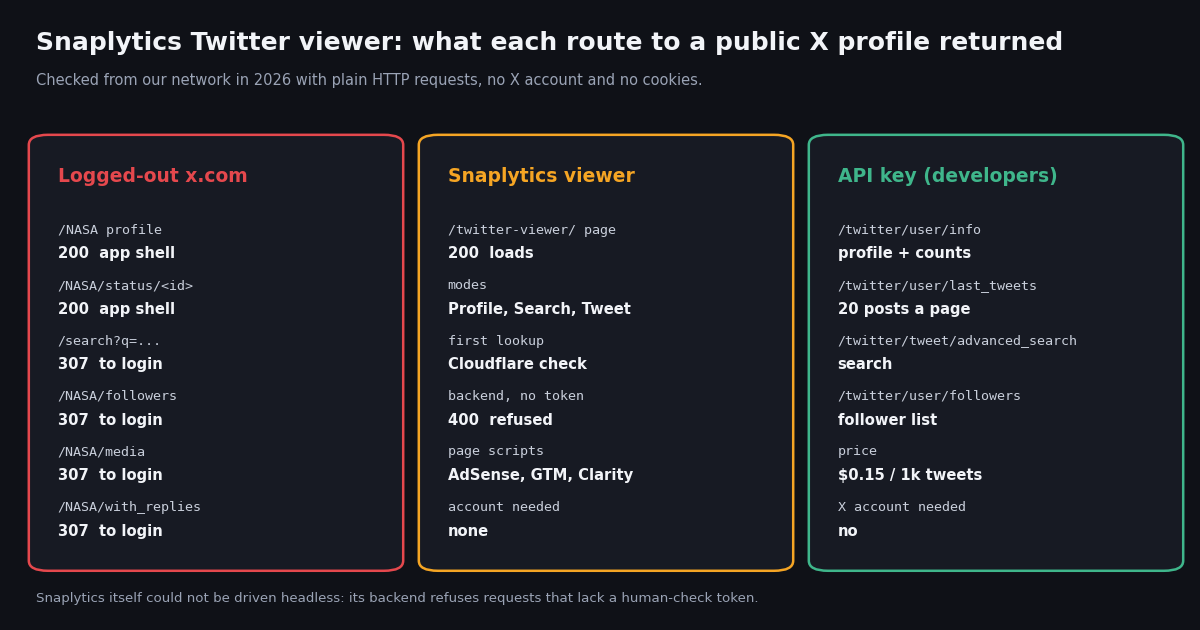
We checked the site from our own network in 2026 with plain HTTP requests and no cookies, then read the JavaScript its viewer page loads. Here is what each step returned.
The human check is the gate. The viewer's script sends every lookup to a separate backend host with a Cloudflare Turnstile token in a request header. Turnstile is Cloudflare's CAPTCHA-free check: it usually runs silently in your browser and only sometimes shows a checkbox. Without a token, the backend answered our request with HTTP 400 and the message "Please hard refresh the page (Ctrl+F5 or Cmd+Shift+R) or open in incognito mode and try again."
What that means for you. If you see that hard-refresh message in the page, your verification token is missing or expired, not the account you searched for. A hard refresh or a private window usually gets a fresh check. If the check never completes (strict content blockers and some privacy browsers block Cloudflare's challenge script), the viewer cannot load anything.
What we could not verify. Because the backend only answers browsers that pass the human check, we could not complete a lookup from a headless session, so we cannot vouch for how fresh or complete its results are on a given day. We describe what it shows from the page and from the rendering code it ships, not from a screenshot of a result. Treat it as a tool that was up when we checked, not as a guaranteed service.
It is not scriptable. The same gate means you cannot point an RSS reader, a spreadsheet or a script at Snaplytics. If you need repeatable access, that is the job of an API key, covered further down.
What Snaplytics shows vs what logged-out x.com shows
The reason viewers exist at all is that x.com shows less and less to people who are not signed in. We requested the main routes of a large public account (NASA) from the same network, with no cookies, and recorded what x.com returned.
From the code it runs. The viewer renders a profile's name, handle, bio, location, website, verified flag, full-size avatar and banner, and post, following and follower counts. For each post it renders text, time, photos, videos (served through a Snaplytics video proxy), GIFs, quoted posts, reposts and pinned status, plus likes, reposts, replies, quotes, views and bookmarks. A "load more" button pages back through older posts.
What it cannot show. The page's own FAQ says detailed follower lists are restricted, Spaces need an account, and some age-restricted content may still need a signed-in account. Its code treats a private (protected) profile as an error. None of this is a limitation of Snaplytics specifically: protected posts are visible only to approved followers, and no third-party viewer can see them without an approved account.
Neither tells you who viewed what. X does not publish a list of who looked at a profile, and a viewer site does not notify the account owner either. Our page on whether X shows who viewed your profile explains what the owner can and cannot see.
What a viewer page actually puts in front of you: 12 public accounts
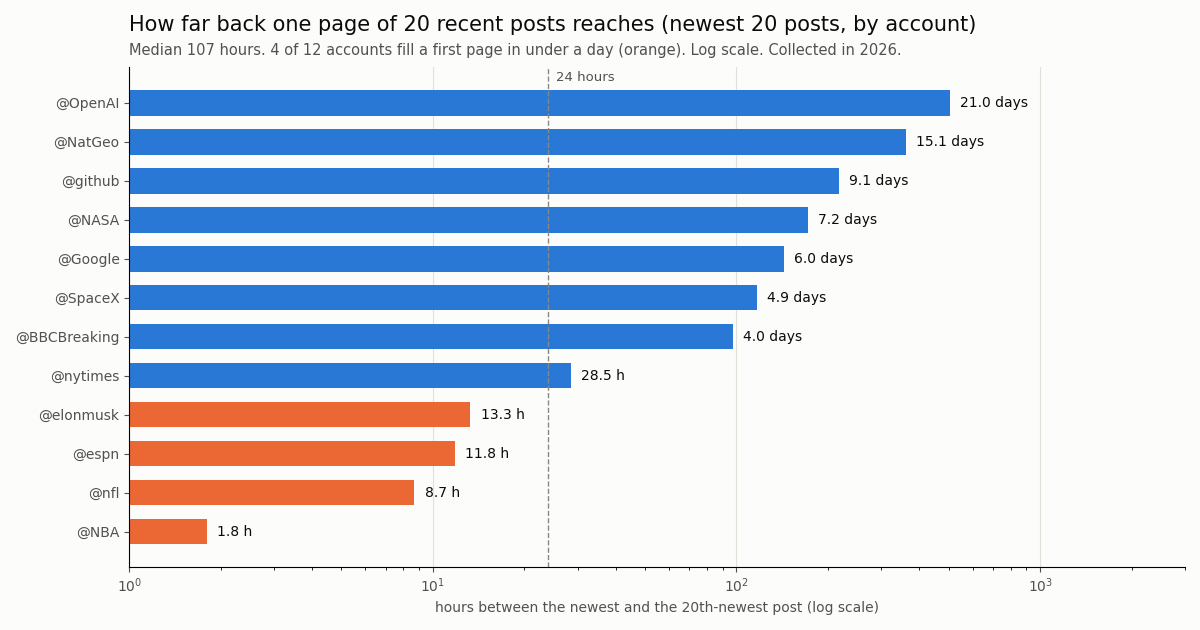
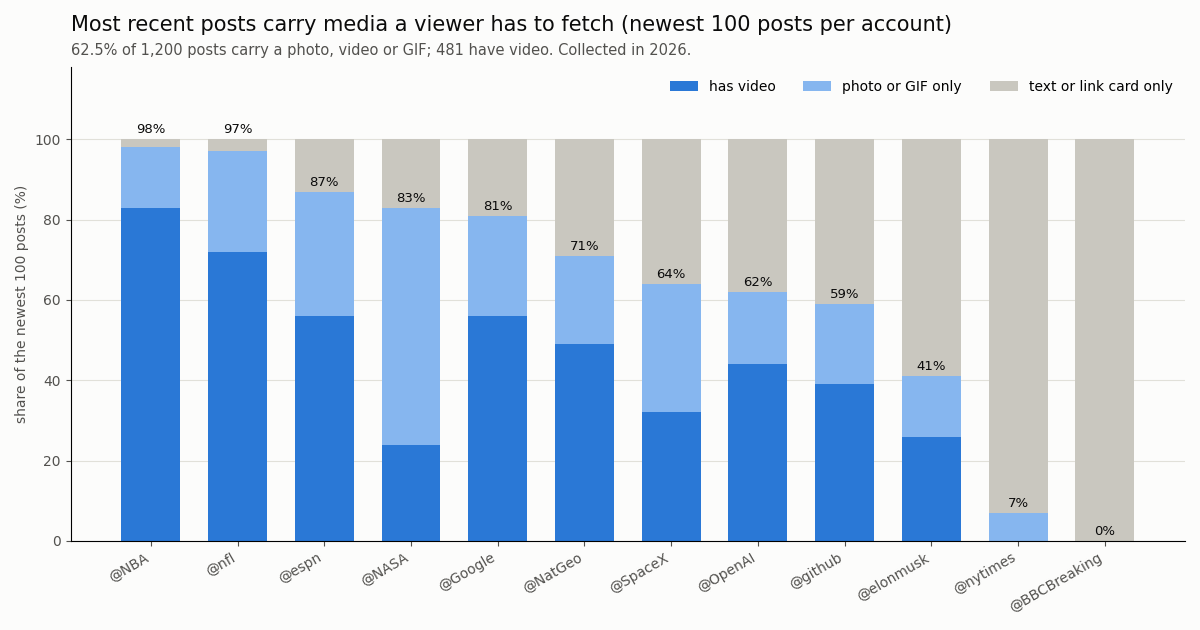
A viewer's first screen is one page of recent posts. To see how much that covers, we pulled the newest 100 posts (excluding replies, the same view a profile page gives) from 12 public organization and public-figure accounts, 1,200 posts in total, collected in 2026.
One page goes back anywhere from hours to weeks. The newest 20 posts spanned a median 107 hours, from 1.8 hours on @NBA to 21.0 days on @OpenAI. 4 of the 12 accounts filled a whole first page in under a day, so on a busy sports or news account you will need the "load more" button just to reach yesterday.
Most posts carry media. 62.5% of the 1,200 posts carried a photo, video or GIF, and 481 had video, which is why viewers bundle download buttons. The spread is wide: @NBA and @nfl posted media on 98% and 97% of posts, while @BBCBreaking posted 0% (its posts are headlines with link cards).
A viewer shows a sliver of history. 100 posts was a median 0.11% of each account's lifetime post count. On @nytimes, with 566,495 lifetime posts, 100 posts reached back 8.3 days. A viewer is a window on what is recent, not an archive.
Reposts are part of the picture. 22.8% of posts were reposts of someone else, ranging from 0% on @NBA to 59% on @elonmusk. Viewers that show reposts inline make a timeline look busier than the account's own output.
Is Snaplytics safe to use?
Safe enough for casually reading public posts, with the usual caveats for any ad-supported third-party site. Here is what we found on the page and in the site's own privacy policy.
No X login, no account. The viewer never asks for your X username or password, and the site has no visitor accounts. Never type X credentials into any viewer or downloader site; a legitimate viewer has no reason to ask for them.
Ads and analytics. The viewer page loads Google AdSense, Google Tag Manager, a Microsoft Clarity tag (a behavioral analytics product whose features include session recordings and heatmaps) and the site's own analytics script. The privacy policy says AdSense uses cookies and may personalize ads based on your activity on other sites. The viewer page's marketing copy says "no tracking"; the scripts on the page say otherwise, so read that line generously.
Your lookups leave your browser. Unlike the site's in-browser editors, the viewer sends whatever you type (a handle, a search term, a post URL) to the operator's backend. The privacy policy says such requests carry your IP address, time and user agent and may be logged. Do not search for anything you would not want associated with your IP address.
Downloads. Media you save through a viewer is still someone else's work. Download only what you own or have permission to use.
Accuracy. A third-party viewer can lag, miss posts or fail silently when its own data source is throttled. For anything that matters (a quote in an article, evidence in a dispute), open the post on x.com or fetch it from a source you can cite.
Snaplytics alternatives: what else works without logging in
Mirror and viewer sites come and go. Our xcancel alternative check found xcancel.com suspended with HTTP 451 and other mirrors answering scripts with bot challenges, and most public Nitter instances have stopped working. These are the options that held up.
X's own embed endpoint. X documents a public oEmbed endpoint at publish.x.com/oembed that needs no authentication. In our check it returned the author and an embeddable blockquote for a NASA post URL. It is how blogs embed posts, and it is the most official no-login way to show one post.
Our no-login tools. For specific jobs, our free tools need no X account: the Twitter video downloader saves a post's video, the account age checker and Twitter ID finder look up a profile, the shadowban check tests search visibility, and the follow checker tests whether one account follows another.
Other viewer brands. We also tested the general "Twitter web viewer" sites and the Twillot viewer; see the sibling pages linked below for what each returned. They share the same structural weaknesses: someone else's server, someone else's rate limits, and no guarantee of tomorrow.
Read public X posts with an API key instead of a viewer site
If you keep coming back to a viewer to check the same accounts, a small script is more reliable than any site. twitterapi.io reads public X data over a REST API: no X account, no human check per lookup, and results in JSON you can save. The example in the code block at the end of this page prints a Snaplytics-style profile card and recent posts with their media links.
The two calls a viewer makes. /twitter/user/info returns the profile (bio, location, followers, following, statusesCount, protected). /twitter/user/last_tweets returns 20 posts per page, newest first, with has_next_page and next_cursor for older pages. That is exactly the data behind the profile card and the "load more" button on a viewer page.
Search, which logged-out x.com locks. /twitter/tweet/advanced_search takes the same operators as X search (from:, since:, min_faves: and so on) and returns matching posts, shown in the code below.
Protected accounts stay protected. The API returns only public data. If protected is true, the script at the end of this page stops, because posts from protected accounts are visible only to approved followers.
import os
import requests

BASE = "https://api.twitterapi.io"
HEADERS = {"X-API-Key": os.environ["TWITTERAPI_IO_KEY"]}

# Logged-out x.com/search redirects to the login page. The API returns results directly.
r = requests.get(f"{BASE}/twitter/tweet/advanced_search", headers=HEADERS,
                 params={"query": "from:NASA artemis", "queryType": "Latest"}, timeout=30)
r.raise_for_status()
body = r.json()
for t in body["tweets"]:
    print(t["createdAt"], t["likeCount"], t["url"])
print("more pages:", body["has_next_page"])
What it costs compared with the official X API
A viewer site is free because ads pay for it. An API costs money, but less than people expect for personal use. Here is one "viewer check", meaning one profile plus its 20 newest posts, at each provider's published per-unit price.
The ratio. Per 1,000 posts, X's pay-per-usage rate card works out to $5.00 against $0.15 on twitterapi.io, roughly 33x. X's pay-per-usage tier is capped at 3 million post reads a month, with Enterprise above that.
What our study cost. The whole 12-account study above returned 1,200 posts and 12 profiles over 72 requests, about $0.18 in total. A request that finds nothing still costs the 15-credit minimum ($0.00015).
Getting started. New accounts that pass the automatic bot check get up to $1 of free credits (at most 100,000 credits, no card, one per person or network, expiring after 31 days). Before the first payment the rate limit is 0.2 requests per second, which is plenty for checking a handful of accounts; it rises to 20 once you have paid. Subscriptions start at Starter $29 a month; see the pricing page.
How we collected this
Question. When someone opens a public X account in a no-login viewer, how much time does a page of posts cover, how much of it is media or reposts, and how much of the account's history does it reach?
Accounts. 12 public organization and public-figure accounts: NASA, SpaceX, elonmusk, BBCBreaking, nytimes, espn, NBA, nfl, github, OpenAI, Google and NatGeo.
Method and sample. One /twitter/user/info call and five pages of /twitter/user/last_tweets (replies excluded, newest first) per account: 1,200 posts and 12 profiles, 72 requests, collected in 2026. The window per account runs from its oldest to newest post in the sample, between 0.3 and 97 days. Site checks on Snaplytics and x.com were plain HTTP requests from our network with no cookies.
What this cannot show. The study measures what the public data contains, not what Snaplytics rendered on a given day: we could not complete a Snaplytics lookup headless because of its human check. Busy accounts are overrepresented by design (they are what people look up), and a quieter account's page will reach further back.
Privacy. Aggregates only, organization and public-figure accounts only, no analysis of reposted or quoted authors. The de-identified sample keeps post type, media type, hour and counts, no text or IDs.
"""A no-login "viewer" for one public X account, built on an API key instead of a viewer site.

Prints the profile card (bio, counts) and the newest posts with their media links,
the same things a Snaplytics-style viewer shows, plus pagination for older posts.
No X account is needed. Cost: 18 credits for the profile, 15 credits per post returned.
"""
import os
import sys
import requests

BASE = "https://api.twitterapi.io"
HEADERS = {"X-API-Key": os.environ["TWITTERAPI_IO_KEY"]}


def profile(user_name):
    r = requests.get(f"{BASE}/twitter/user/info", headers=HEADERS,
                     params={"userName": user_name}, timeout=30)
    r.raise_for_status()
    body = r.json()
    if body.get("status") == "error" or not body.get("data"):
        sys.exit(f"lookup failed: {body.get('msg')}")   # e.g. "user not found"
    return body["data"]


def recent_posts(user_name, pages=2):
    cursor = ""
    for _ in range(pages):
        r = requests.get(f"{BASE}/twitter/user/last_tweets", headers=HEADERS,
                         params={"userName": user_name, "cursor": cursor}, timeout=30)
        r.raise_for_status()
        body = r.json()
        for t in body["data"]["tweets"]:
            yield t
        if not body.get("has_next_page"):
            break
        cursor = body["next_cursor"]


def media_links(t):
    src = t.get("retweeted_tweet") or t
    out = []
    for m in (src.get("extendedEntities") or {}).get("media", []):
        if m.get("type") == "photo":
            out.append(m["media_url_https"])
        else:  # video or animated_gif: pick the highest-bitrate mp4 variant
            mp4 = [v for v in m.get("video_info", {}).get("variants", []) if v.get("content_type") == "video/mp4"]
            if mp4:
                out.append(max(mp4, key=lambda v: v.get("bitrate", 0))["url"])
    return out


if __name__ == "__main__":
    name = sys.argv[1] if len(sys.argv) > 1 else "NASA"
    p = profile(name)
    if p.get("protected"):
        sys.exit("protected account: posts are only visible to approved followers")
    print(f"{p['name']} (@{p['userName']})  followers={p['followers']:,}  "
          f"following={p['following']:,}  posts={p['statusesCount']:,}")
    print(p.get("description", ""))
    for t in recent_posts(name, pages=2):
        kind = "repost" if t.get("retweeted_tweet") else "post"
        print(f"\n[{kind}] {t['createdAt']}  views={t.get('viewCount')}  likes={t['likeCount']}")
        print(t["text"][:200])
        for link in media_links(t):
            print("  media:", link)
        print("  ", t["url"])
Questions readers ask
What is Snaplytics?
Snaplytics is a free online tools site at snaplytics.io with downloaders, viewers and generators for Instagram, X, Snapchat, TikTok, LinkedIn, Discord, YouTube and other platforms, with no signup. By its own About page it began as an analytics service for Snapchat stories, that product no longer exists, and the company has changed hands. The Twitter (X) viewer is one of its tools.
Does the Snaplytics Twitter viewer still work?
When we checked it in 2026 the viewer page loaded and its backend was up, but every lookup requires a Cloudflare Turnstile human check first. Without it, the backend returns a "Please hard refresh the page" message. We could not complete a lookup from a headless session, so we cannot vouch for result freshness on a given day.
Why does Snaplytics say "Please hard refresh the page"?
That is the message its backend returns when a lookup arrives without a valid human-check token. Hard refresh (Ctrl+F5 or Cmd+Shift+R) or open a private window to get a new check. Strict content blockers that stop Cloudflare's challenge script will keep the viewer from loading anything.
Is Snaplytics safe?
It does not ask for your X login, and the site has no visitor accounts. The viewer page does load Google AdSense, Google Tag Manager and a Microsoft Clarity tag, and every handle or search term you enter is sent to the operator's server along with your IP address. Fine for casually reading public posts; never enter X credentials into any viewer site.
Can Snaplytics see private (protected) X accounts?
No. Its code treats a private profile as an error, and posts from protected accounts are visible only to approved followers. No third-party viewer can show them.
Does the account owner know I viewed their profile through Snaplytics?
X does not show anyone a list of profile visitors, and a third-party viewer does not notify the owner either. That is not a license to monitor private individuals: X's rules on targeted harassment still apply to what you do with what you see.
Can Snaplytics show someone's followers?
It shows follower and following counts, not the lists. Its own FAQ says detailed follower lists are restricted, and logged-out x.com redirects the followers page to the login screen. Follower lists of public accounts are available through an API key.
What is the best Snaplytics alternative?
It depends on the job. For one post, X's own oEmbed endpoint works without authentication. For single tasks, our free tools need no X account. For repeat checks or search, an API key is the reliable option: twitterapi.io reads public data at $0.15 per 1,000 tweets with no X account.
Continue
- X API pay-per-usage pricing (docs.x.com): post and user read prices, 3M monthly cap
- X oEmbed API (docs.x.com): publish.x.com/oembed, no authentication
- Cloudflare Turnstile documentation: how the human check works
- Microsoft Clarity overview (Microsoft Learn): session recordings and heatmaps
- twitterapi.io docs: GET /twitter/user/last_tweets
- twitterapi.io docs: GET /twitter/user/info
- Twitter (X) API overview: the hub for reading X data
- Twitter (X) viewer API: build your own read-only viewer
- Twitter web viewer sites tested
- Twillot Twitter viewer: what it is and whether it works
- xcancel alternatives that still work
- Nitter alternatives: project status and instance probe
- Nitter instances: which ones still respond
- Does X show who viewed your profile?
- Free Twitter (X) video downloader, no login
- All free no-login Twitter (X) tools
- twitterapi.io pay-per-result pricing
- 01X Radar Explained: Twitter (X) Keyword Monitoring, Tiers, Limits and an API Alternative
- 02Twitter (X) Stalker Tools: What They Can See, What They Can't, and Where the Line Is
- 03Tweeload: What the Twitter (X) Video Downloader Does, and Whether It Is Safe
- 04Twillot Twitter (X) Viewer: What It Is, Whether It Works, and Is It Safe?
- 05Twitter (X) Web Viewer: How to View Tweets Without an Account
- 06Twitter (X) Viewer API — A Developer's Read-Only Guide
- 07Building a Tweet Tracker via API — A Developer Guide
- 08Twitter (X) Snowflake IDs: the 64-bit Layout and How to Decode One
Stop reading. Start building.
Starter credits cover real testing on real data. Google sign-in, no card, no application queue.
Get an API key