X Radar Explained: Twitter (X) Keyword Monitoring, Tiers, Limits and an API Alternative
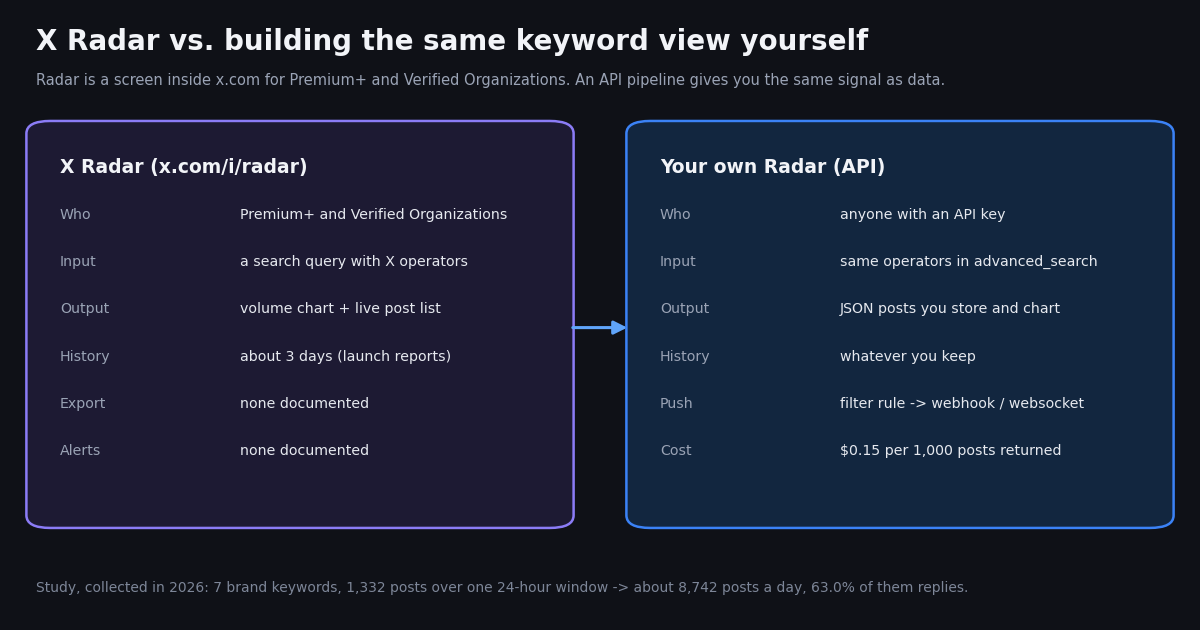
"X Radar" is the name X gave its keyword-tracking screen for paying subscribers. It sits inside the X app and website, it is aimed at people who want to watch a brand, a product or a topic, and it replaced a business-only feature called Insights. This page explains what Radar does, who can open it, what it does not do, and how to get the same view as data when you do not have (or do not want) a Premium+ seat. Note that several unrelated products share the name, including weather-radar apps and a paintball chronograph; this page is only about the X feature.
We could not open Radar from a Premium+ account for this page, so everything about the Radar screen itself comes from X's own announcement posts, X's help center (via a public archive capture, since help.x.com does not load for automated fetches) and launch coverage, each named where it is used. Everything about volumes and costs comes from our own measurement: we ran seven brand keywords through the search API over one 24-hour window, collected in 2026, and charted what a Radar-style view would have shown.
What X Radar is and who gets it
Radar is the successor to Insights. On October 22, 2024 the @PremiumBusiness account on X posted: "Introducing Radar, the next iteration of our Insights feature. Monitor keywords, track conversations, and stay on top of trends you care about. Radar is now available to Verified Organizations globally with a limited version offered to Premium+ users." A few days earlier, X had started rolling Radar out to select Premium+ subscribers and described it as "an early version" with more to come (TechCrunch, October 21, 2024).
Before the rename, Insights had been sold to businesses: TechCrunch reported it at $1,000 a month, or $833.33 a month billed annually, which kept it out of reach for most individuals. Radar moved a version of that tool into the consumer subscription.
Price. At Radar's launch, Premium+ cost $16 a month or $168 a year on the web (TechCrunch, October 2024). X has changed Premium pricing since and now shows localized prices; its help page says subscriptions start at $3 a month in some countries (for the lowest tier). We could not load X's live price page from our tooling, so check x.com/i/premium_sign_up for the price in your country before you decide.
Where it lives. Radar opens at x.com/i/radar for eligible accounts (the address third-party guides give; we could not open it without a Premium+ seat).
What Radar tracks and what it shows
Radar starts from a search query. X's own description at launch: "Create a query and let Radar track real-time updates" and "Focus on any topic using advanced search capability." The query language is the normal X search syntax, so the operators you already know work: exact phrases in quotes, OR between alternatives, -word to exclude, min_faves:100 for an engagement floor, url: to match a domain and @handle to match mentions.
The volume chart. For each saved query Radar draws how many posts matched over time. Launch coverage described it as tracking conversation volume and conversation velocity, which is the point of the feature: you see a spike as it starts rather than after it reaches the trending list.
The live post list. Next to the chart is the stream of matching posts, newest first, each clickable through to the post on X. This is the part most people actually use: a filtered, real-time search that refreshes on its own.
Business framing. X's business account pitched it as a brand-monitoring tool: "Tap into Radar to monitor what people are saying about your brand and identify trends before anyone else." Typical uses are watching a brand or product name, a competitor, an event hashtag or a breaking story.
Everything Radar shows is something the search index already holds. Radar's contribution is the chart and the auto-refresh, inside the app, for one human looking at one screen.
Radar's limits: history, keywords, export, alerts
X has not published a specification for Radar, so the honest answer to most limit questions is "not documented". Here is what we could and could not confirm.
Why the three-day window matters. A volume chart is most useful when you can compare this week with last month. A three-day window answers "is something happening right now?" but not "is this bigger than the launch in spring?" For that you need to store the history yourself.
Why no export matters. If the goal is a weekly report, a dashboard in your own BI tool, sentiment scoring or a Slack ping when volume doubles, a screen you cannot export from is a dead end. These are the cases where teams move to the API, and they are what the rest of this page measures.
We list help.x.com (help.x.com/en/using-x/x-premium) as the authoritative place for the current tier list; it does not load for automated fetches, so we read it through a public web-archive capture taken in 2026.
What a Radar view would chart: seven brand keywords, one day
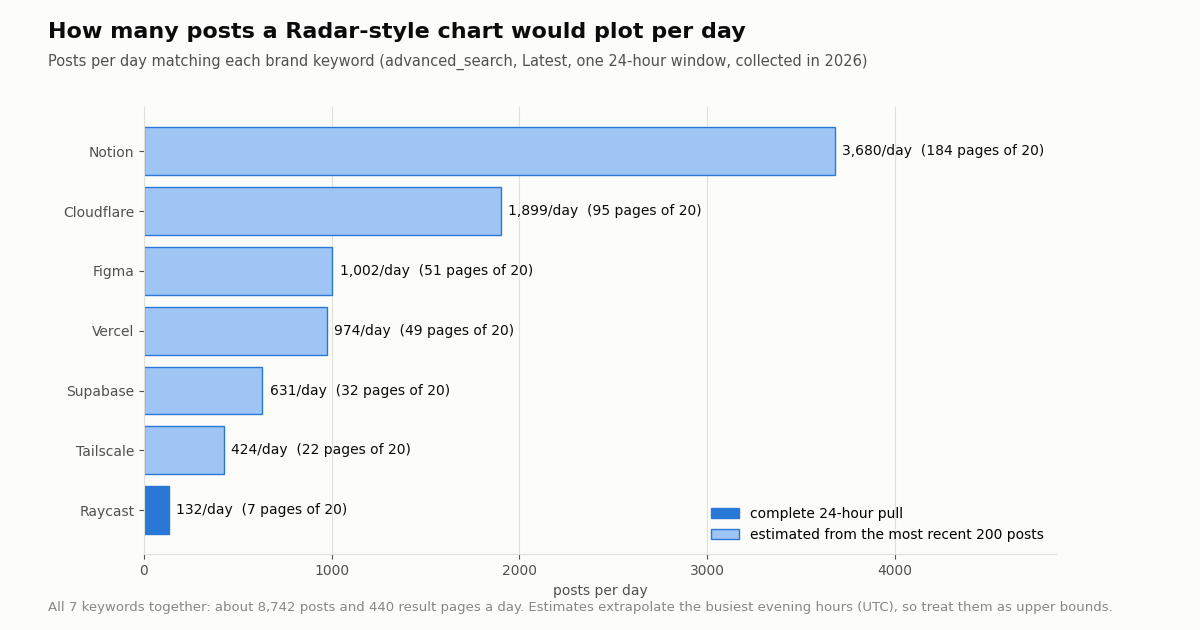
To see what Radar's volume line looks like in numbers, we ran seven well-known product names through /twitter/tweet/advanced_search with queryType=Latest over the same 24-hour UTC window: Supabase, Vercel, Tailscale, Raycast, Figma, Cloudflare and Notion. Each keyword got up to 10 pages (200 posts). Raycast fit in 8 pages, so its day is complete; the other six had more, so their daily volume is estimated from how many hours their latest 200 posts covered.
The spread is wide. A niche developer tool like Raycast produced 132 matching posts in a day, which a single person can read. Cloudflare ran at about 79.1 posts an hour and Notion at about 153.3, which no one reads by hand; at that rate a chart is the only usable view, and that is exactly the niche Radar fills.
Pages are the real unit of work. Search returns up to 20 posts per page, so a complete day for all seven keywords is about 440 pages (8,742 posts). That is small for a script and a lot for a person scrolling.
A caveat on the estimates. The window ended in the UTC evening, when US posting is high, so the six estimated keywords extrapolate their busiest hours across the whole day. Read them as upper bounds. Raycast, the one complete pull, ranged from 0 to 16 posts per hour across the day.
What the matching posts actually are
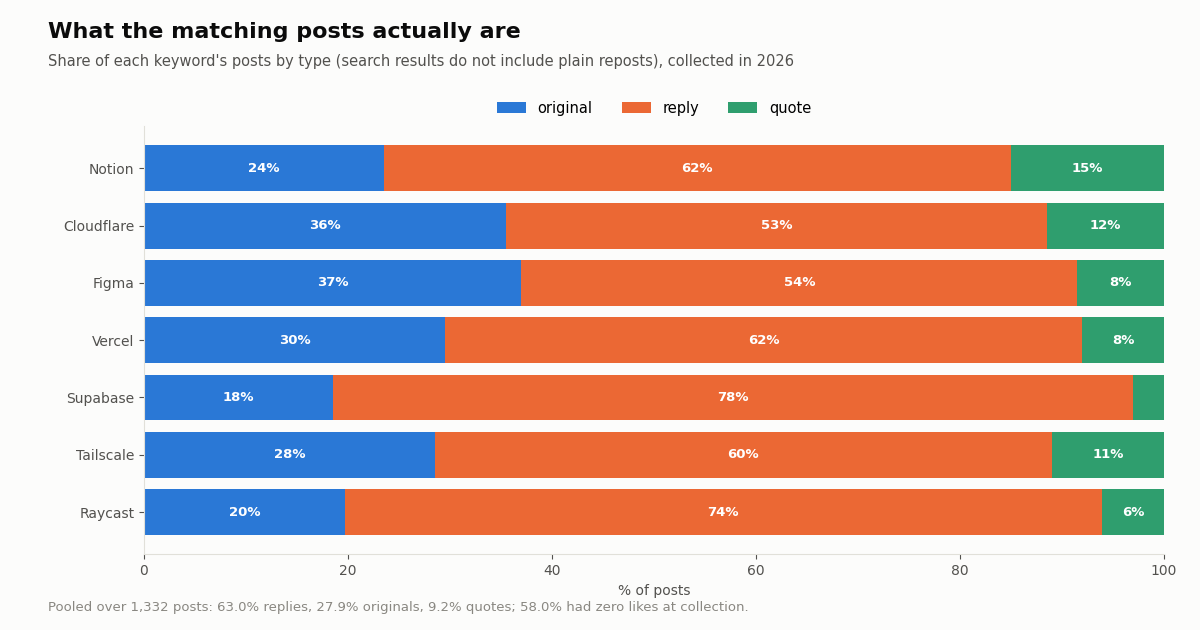
A volume line hides what is inside it. Across the 1,332 posts we collected, 63.0% were replies, 27.9% were original posts and 9.2% were quotes. Plain reposts did not appear at all: X search results leave out native reposts, so a Radar-style count measures people writing the word, not people sharing a post that contains it.
Replies dominate. For Supabase, 78.5% of matching posts were replies, mostly people answering each other in threads about the product. If what you want is "new things said about my brand", filter to originals and quotes (-filter:replies in the query) and the volume drops by more than half.
Most posts get no engagement. 58.0% of all matching posts had zero likes when we collected them, and only between 2.0% and 7.5% per keyword had ten or more. Adding min_faves:10 turns a firehose into a shortlist.
Languages vary by brand. English led everywhere, but Tailscale's matches were 13.0% Chinese and 11.0% Japanese, and Notion's were 18.5% Japanese. Pooled, the top languages were en 73.9%, ja 8.2%, es 3.7%, zh 3.5%. A lang:en filter would hide a real part of the conversation for some brands.
Brand names are also ordinary words. "Notion" matches every post that uses the word notion, which is part of why its volume is so high. Radar has the same problem, since it runs the same search. Use exact phrases, the brand's handle (@NotionHQ) or a product term ("Notion AI") to narrow it.
Monitor X keywords without Premium+: three API paths
Radar is one screen for one person. When you want history, export, alerts or many keywords, build the view from the API instead. No X account is needed for reads; you need an API key. There are three common patterns, and the existing guides linked below cover each in depth.
1. Poll search on a schedule. Call /twitter/tweet/advanced_search with your query plus since_time:<unix> and until_time:<unix>, page through next_cursor until has_next_page is false, and store the posts. A cron job every few minutes is enough for most keywords. In our run the date-style form since:YYYY-MM-DD_HH:MM:SS_UTC returned only the first hour of the window, while the unix-time operators returned the full window, so we recommend since_time / until_time.
2. Push with a filter rule. Register the query once with /oapi/tweet_filter/add_rule (tag, value up to 255 characters, interval_seconds from 0.05 to 86,400, default 60), activate it with /oapi/tweet_filter/update_rule and is_effect: 1, and matching posts are delivered to the webhook URL set in your dashboard, or over a websocket. This is the Twitter Stream product: nothing to schedule on your side.
3. Alert on thresholds. Either path feeds a small rule: if the posts in the last hour exceed twice the trailing average, send a Slack or email message. That is the feature Radar does not have.
The short example below creates and activates a filter rule for one keyword. The full polling script (hourly counts to CSV, post types, languages, top posts) is in the code block at the end of this page.
import os
import requests

API = "https://api.twitterapi.io"
H = {"X-API-Key": os.environ["TWITTERAPI_IO_API_KEY"]}

value = '("Tailscale" OR "tailnet") -filter:replies'   # same syntax as search, max 255 characters
r = requests.post(f"{API}/oapi/tweet_filter/add_rule", headers=H,
                  json={"tag": "radar-tailscale", "value": value, "interval_seconds": 300}, timeout=30)
r.raise_for_status()
rule_id = r.json()["rule_id"]

# A new rule is inactive until update_rule is called with every field and is_effect=1
r = requests.post(f"{API}/oapi/tweet_filter/update_rule", headers=H,
                  json={"rule_id": rule_id, "tag": "radar-tailscale", "value": value,
                        "interval_seconds": 300, "is_effect": 1}, timeout=30)
r.raise_for_status()
print(requests.get(f"{API}/oapi/tweet_filter/get_rules", headers=H, timeout=30).json())
What it costs to track keywords via API vs the official X API
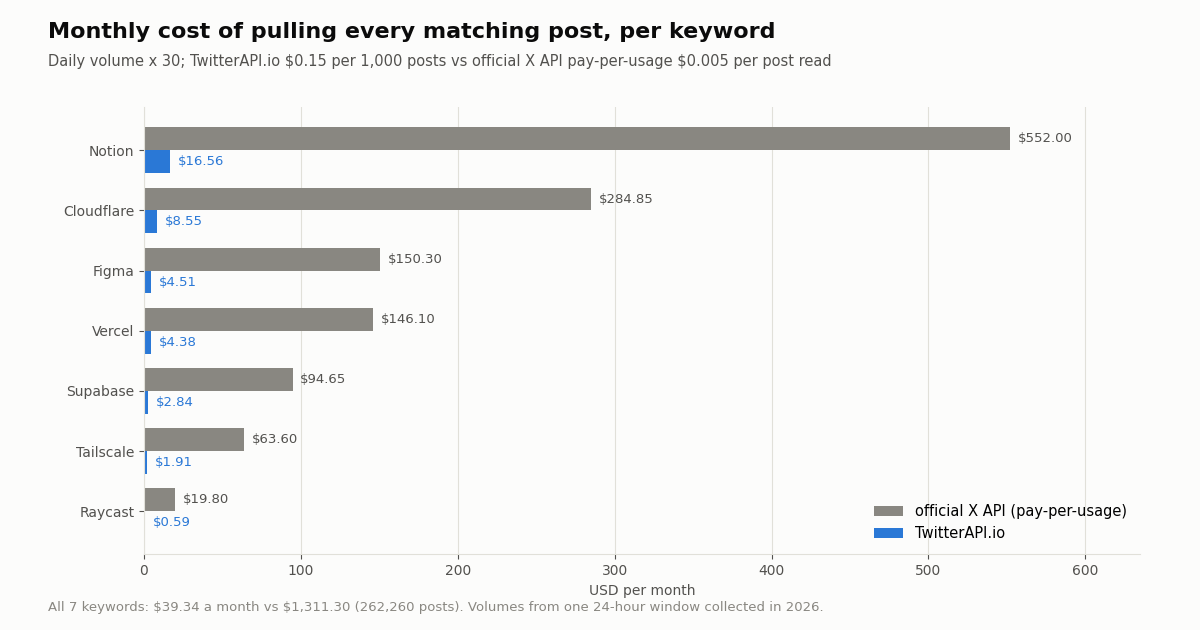
Search is billed per post returned: 15 credits per tweet, which is $0.15 per 1,000 tweets, with a minimum of 15 credits per request. A full 20-post page costs $0.003, and a check that finds nothing costs the $0.00015 minimum. The official X API's pay-per-usage rate card (docs.x.com/x-api/getting-started/pricing) charges $0.005 per post read, deduplicated within a UTC day, and caps pay-per-usage at 3 million post reads a month. Per 1,000 posts that is $0.15 vs $5, about 33x.
Using the measured daily volumes, here is what pulling every matching post for a month would cost (daily volume x 30):
Polling overhead is small. Checking one keyword every 5 minutes adds at most $1.30 a month in empty checks (every 60 seconds: $6.48), because a check that finds nothing is billed at the minimum. For a high-volume keyword almost every check returns posts, so the per-post price dominates.
You rarely need every post. Filtering to originals and quotes, or adding min_faves:, cuts the volume, and the bill with it. With the reply share we measured (63.0% pooled), dropping replies alone cuts the bill by about the same share.
The comparison with Radar is not like for like. A Premium+ subscription is a flat fee for one person's screen with about three days of history. The API is a metered data feed you store and reuse. For one person glancing at one brand, Radar is simpler. For a team, a report, a product feature or more than a handful of keywords, the API is the tool. See the pricing page for credit packs and plans.
Radar or the API: which one to use
Use Radar when you already pay for Premium+ (or a Verified Organization), you want to watch a handful of topics by eye, and the last few days are all you care about. It needs no code and shows the posts in the app where you can reply to them.
Use the API when you need any of: history beyond a few days, a CSV or database you control, alerts, more keywords than you want to check by hand, sentiment or language breakdowns, or the data inside your own product or dashboard. None of those are documented Radar features.
Use both if you like: the same query string works in Radar and in advanced_search, so a query you tune in Radar can be pasted into a filter rule unchanged, as long as it fits in 255 characters.
One point of confusion is worth clearing up: Radar is not a data product and does not compete with API providers. It is a view in X's app. The comparison on this page is between watching a chart and owning the data behind it.
How we collected this
Question. What would a Radar-style keyword chart show for typical brand keywords, and what does it take, in requests and dollars, to rebuild that view from the API?
Query. Seven product names as single-word searches: Supabase, Vercel, Tailscale, Raycast, Figma, Cloudflare, Notion. /twitter/tweet/advanced_search, queryType=Latest, with since_time / until_time bounding one 24-hour UTC window.
Sample. 1,332 posts from 73 requests (including 5 pilot requests that tested the time operators), collected in 2026, at a total cost of about $0.21. Up to 10 pages per keyword; Raycast's day was complete, the other six were capped at 200 posts and their daily volume is estimated from the hours those 200 posts covered.
What it cannot show. One day is not a trend: launches, outages and news spikes change volumes by multiples. The estimates over-weight the UTC evening. Single-word queries include unrelated uses of the word. We did not open Radar itself, so we cannot say whether Radar's counts match search counts exactly.
Privacy. Keyword searches return posts by private individuals. Raw pages were kept only in a temporary folder on the collection machine and never published; the published data holds counts and shares only, and the de-identified sample has no post IDs, URLs, text or handles. Only the brands' own product names are named.
"""radar_diy.py - a Radar-style keyword view from the API: hourly volume, post types, languages.

    pip install requests
    export TWITTERAPI_IO_API_KEY=...
    python radar_diy.py "Tailscale" 24
"""
import collections
import csv
import os
import sys
import time
from datetime import datetime, timezone

import requests

API = "https://api.twitterapi.io"
H = {"X-API-Key": os.environ["TWITTERAPI_IO_API_KEY"]}


def search_window(keyword, since_ts, until_ts, max_pages=50):
    """All posts matching keyword between two unix timestamps, newest first."""
    query = f"{keyword} since_time:{since_ts} until_time:{until_ts}"
    cursor, posts = "", []
    for _ in range(max_pages):
        r = requests.get(f"{API}/twitter/tweet/advanced_search", headers=H,
                         params={"query": query, "queryType": "Latest", "cursor": cursor}, timeout=30)
        if r.status_code == 429:
            time.sleep(5)
            continue
        r.raise_for_status()
        body = r.json()
        posts.extend(body.get("tweets") or [])
        if not body.get("has_next_page"):
            break
        cursor = body.get("next_cursor") or ""
    return posts


def kind(t):
    if t.get("retweeted_tweet"):
        return "repost"
    if t.get("isReply"):
        return "reply"
    return "quote" if t.get("quoted_tweet") else "original"


def main(keyword, hours):
    until_ts = int(time.time()) // 3600 * 3600          # last full hour
    since_ts = until_ts - hours * 3600
    posts = search_window(keyword, since_ts, until_ts)
    per_hour = collections.Counter()
    for t in posts:
        created = datetime.strptime(t["createdAt"], "%a %b %d %H:%M:%S %z %Y")
        per_hour[created.astimezone(timezone.utc).strftime("%Y-%m-%d %H:00")] += 1
    with open(f"radar_{keyword.lower()}.csv", "w", newline="") as f:
        w = csv.writer(f)
        w.writerow(["utc_hour", "posts"])
        for hour in sorted(per_hour):
            w.writerow([hour, per_hour[hour]])
    kinds = collections.Counter(kind(t) for t in posts)
    langs = collections.Counter(t.get("lang") or "und" for t in posts)
    print(f"{keyword}: {len(posts)} posts in {hours} h")
    print("types:", dict(kinds))
    print("top languages:", langs.most_common(3))
    top = sorted(posts, key=lambda t: t.get("likeCount") or 0, reverse=True)[:5]
    for t in top:
        print(t.get("likeCount"), t["url"])


if __name__ == "__main__":
    main(sys.argv[1], int(sys.argv[2]) if len(sys.argv) > 2 else 24)
Questions readers ask
What is X Radar?
Radar is a keyword-monitoring screen in the X app and website (x.com/i/radar). You enter a search query and it shows a volume chart over time plus a live list of matching posts. X introduced it in October 2024 as the next iteration of its Insights feature.
Is X Radar free?
No. At launch X made it available to Verified Organizations globally and, in a limited version, to Premium+ subscribers. X's help page lists Radar Search among Premium+ benefits; Basic and Premium do not include it.
How much does Premium+ cost for Radar?
At Radar's launch, Premium+ was $16 a month or $168 a year on the web, per TechCrunch. X now shows localized prices that differ by country, and we could not load the live price page for this article, so check x.com/i/premium_sign_up for the current price where you are.
How far back does X Radar go?
Launch coverage reported that Radar showed about three days of history. X has not published an official figure. If you need longer history, store the posts yourself from the search API.
Can I export data from X Radar?
X has not documented any export option, alert feature or API for Radar. To get the data into a spreadsheet, database or dashboard, pull it from a search API and save it yourself.
Is there an X Radar API?
No. Radar is a UI feature. The closest equivalent in code is a search endpoint with the same query syntax: /twitter/tweet/advanced_search with since_time and until_time, or a filter rule that pushes matching posts to your webhook.
How can I monitor X keywords without Premium+?
Poll /twitter/tweet/advanced_search on a schedule or register a filter rule with /oapi/tweet_filter/add_rule and activate it with update_rule. Reads need an API key, not an X account. Billing is $0.15 per 1,000 posts returned; new accounts that pass the automatic bot check get up to $1 of free credits (at most 100,000 credits, no card, one per person or network, expiring after 31 days).
Why is my brand's volume so high on Radar?
Single-word brand names also match ordinary uses of the word, and replies make up most matches: 63.0% of the posts in our seven-keyword study were replies. Use exact phrases, the brand's handle, -filter:replies or min_faves: to narrow it.
Continue
- X (@PremiumBusiness): Introducing Radar, the next iteration of Insights (October 2024)
- X (@XBusiness): Radar for Premium+ users and Verified Organizations
- X Help Center: About X Premium (tiers; Radar Search under Premium+)
- TechCrunch: X rolls out its real-time search tool Radar to Premium+ subscribers
- X API docs: pay-per-usage pricing
- TwitterAPI.io docs: add a tweet filter rule
- X API guide: endpoints, pricing and access
- Twitter keyword alerts: a developer guide
- Monitoring Twitter via API: polling, webhooks and storage
- X API options for social listening
- How to search mentions on Twitter (X)
- Send matching tweets to Discord with a filter rule
- Twitter Stream: real-time keyword and account filter rules
- TwitterAPI.io pricing and credit packs
- 01TweetDeck (X Pro) Alternatives in 2026: Columns, Monitoring and Scheduling for Twitter (X)
- 02Twitonomy Review: What the Twitter (X) Analytics Tool Still Does, and an API Alternative
- 03llms.txt for API docs, measured on two Twitter (X) API doc sets
- 04Botometer in 2026: What It Scored, Its Status, and a Live Alternative for Twitter (X)
- 05Grok Connectors: Add a Custom MCP Connector for Live Twitter (X) Data
- 06How to Search Twitter (X) for Images: Operators, What They Return, and the API Route
- 07Twitter (X) Access Token: The 4 Credential Types, Which Endpoints Need Which, and How to Get and Validate Each
- 08Build a Polymarket Bot That Tracks Twitter (X) Tweet-Count Markets
Stop reading. Start building.
Starter credits cover real testing on real data. Google sign-in, no card, no application queue.
Get an API key