Twillot Twitter (X) Viewer: What It Is, Whether It Works, and Is It Safe?
This page is for people who typed "twillot twitter viewer" because they want to read someone's public X (Twitter) posts without signing in to X, and want to know whether Twillot is the right tool and whether it is safe. If you are a developer who wants to build a read-only viewer into your own app, the companion guide on the Twitter (X) viewer API covers that path; here we stay on the user side.
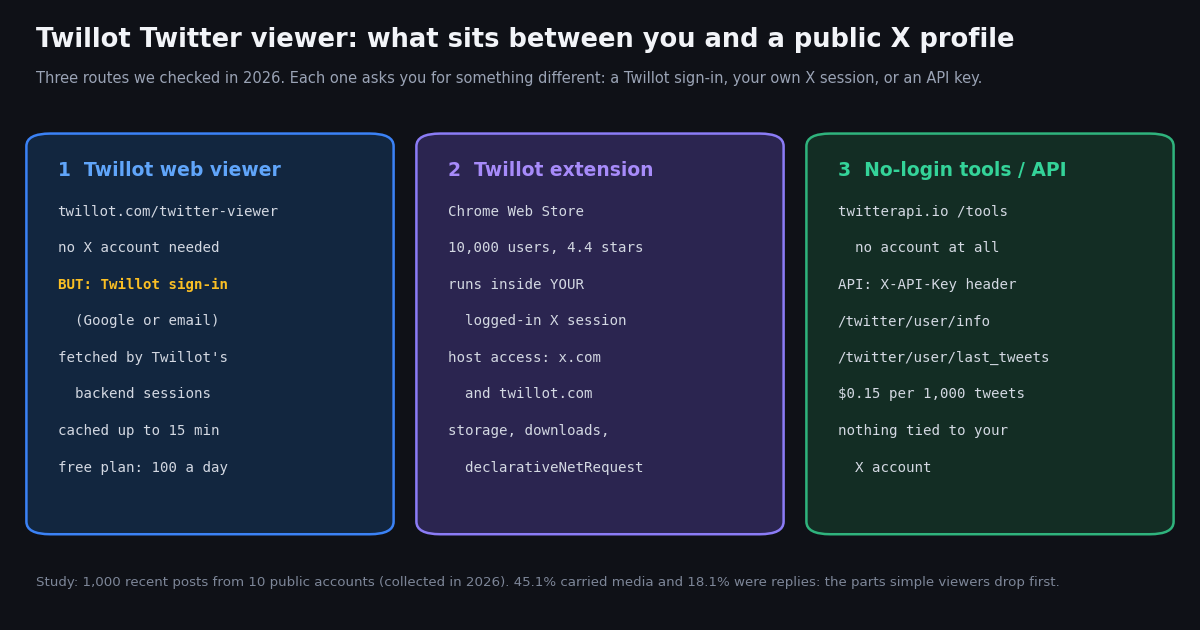
We did not copy a feature list. In 2026 we opened twillot.com, its viewer page, its pricing and free-tools pages and its Chrome Web Store listing ourselves, rendered a viewer profile page in a real browser, and read the extension's manifest to see exactly which permissions it requests. Everything we saw is in the sections below, including the one thing the marketing copy does not lead with: the viewer asks for a Twillot sign-in before it shows a profile.
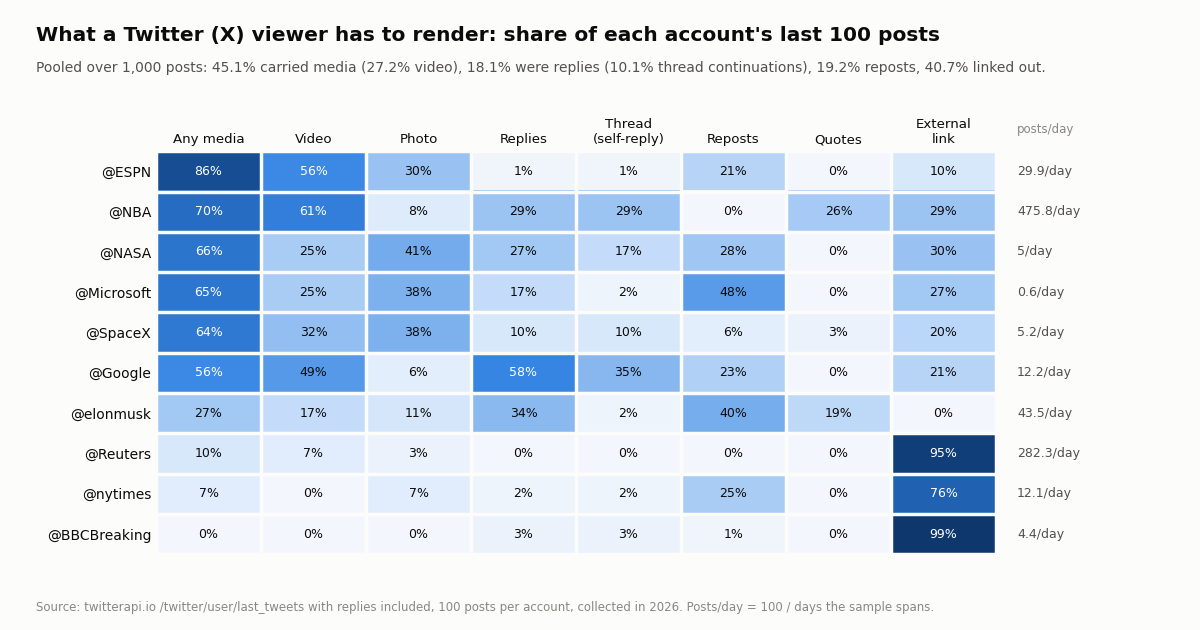
We also measured what a viewer actually has to handle. We pulled the latest 100 posts, replies included, from 10 public organization and public-figure accounts and counted how many carry video, photos, threads, reposts and outbound links. Those numbers explain why viewers so often show a half-empty profile, and what to check before you trust one.
What is Twillot?
Twillot is an independent tool for X (Twitter) users, run from twillot.com with the X handle @mytwillot and the contact address listed on the site. Its footer says plainly that it is not affiliated with X. The homepage title describes it as an "X bookmark manager with search, folders, and export", and that is the core product: a browser extension that syncs your bookmarks, likes, posts and replies into a searchable workspace, sorts them into folders (optionally with AI), and exports them to CSV, JSON, Markdown, PDF or Obsidian.
The Chrome Web Store listing, which we opened in 2026, names the extension "Twitter Bookmarks Search & Export" from Twillot, shows about 10,000 users and a 4.4 rating from 105 reviews, marks it as Featured, and notes that it was "created by the owner of the listed website" and that the publisher has "a good record with no history of violations". The listed version was 11.0.10, the package is about 76 KiB, and it offers in-app purchases. The developer is shown as a non-trader, which, as the listing itself warns, means EU consumer rights do not apply to purchases from it.
The Twitter viewer is a separate, smaller piece. It lives on the website, not in the extension, at twillot.com/twitter-viewer, and it is one of several free web tools Twillot lists alongside a thread reader with PDF export, a media downloader, an inactive-following cleaner, an X Lists manager and a connected-apps reviewer. People searching "twillot twitter viewer" are almost always looking for that web page, so most of this review is about it, with a section on the extension because the two are sold together.
In one line: Twillot is a bookmark and archive manager that also offers a free public-profile viewer; it is not a Nitter-style mirror and not an official X product.
Does the Twillot Twitter viewer work? What we saw
We checked each Twillot page ourselves and recorded the HTTP status and what loaded. The site was up: every page below answered HTTP 200, with no third-party ad network scripts in the HTML we downloaded (we searched for the common Google ad tags and found none). Analytics run through PostHog, sent to a Twillot subdomain.
The sign-in wall. The landing page invites you to paste an @username or a link and promises you can "view public content immediately" with "no registration". When we rendered the profile page for @NASA in a real browser, it drew a gray placeholder card and opened a dialog reading "Welcome back. Sign in to your account to continue", with "Continue with Google" and "Continue with Email" buttons. The page's own script confirms the behavior: when you are not signed in, it remembers the profile you asked for and opens the sign-in dialog instead. We did not create an account, so we cannot tell you how the profile view looks after signing in.
What that means for you. The viewer keeps its main promise of not needing an X account. It does not keep the stronger promise some listicles repeat, that it needs no account at all. Signing in with Google gives Twillot your Google account email, which matters if your reason for using a viewer is to stay anonymous.
How it fetches posts. Twillot's viewer page explains that it gets past X's login prompt "by routing requests through authenticated sessions on our backend", so your browser never contacts X directly. It says it shows only public tweets, profiles and media, does not access private or protected accounts or DMs, applies per-IP and per-session rate limits, and caches popular profiles and tweets for up to 15 minutes. That design is the same one Nitter-style mirrors use, and it carries the same weakness: if X restricts the accounts behind it, the viewer stops working until they are replaced.
Twillot viewer limits and pricing
The viewer is free to start, but it is metered. Twillot's pricing page lists a "Twitter Viewer daily quota" on every plan. The page does not define what one unit of quota is (a profile opened, a page of posts, or a single post), and we could not test it without signing in, so treat these as Twillot's labels rather than measured limits.
The prices above are what the pricing page displayed when we checked, alongside a "50% OFF" yearly badge and a note that prices may change once features marked TBD launch. Payments run through Paddle, according to the site's own scripts. The paid tiers are aimed at the bookmark manager (cloud backup, Markdown and PDF export, batch media download, list management); the viewer quota rises with them.
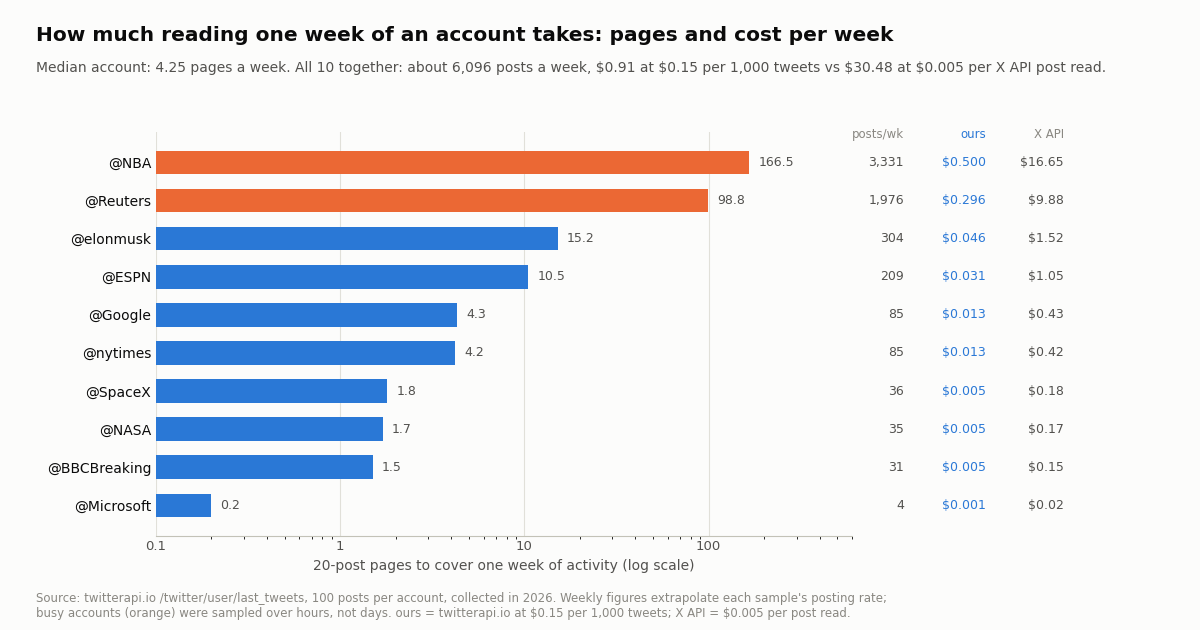
How fast a quota goes. Our study below found that the median public account in our sample needs about 4.25 pages of 20 posts to cover one week, while a busy news or sports account can need around 100 to 166 pages a week. If a quota unit turns out to be a page of posts, a free daily quota covers casual checking of a few quiet accounts and not much more. If it is per profile opened, it is generous for personal use.
Is Twillot safe? The extension's permissions, line by line
The web viewer runs on Twillot's servers, so the safety question there is mostly about your sign-in data and Twillot's privacy policy. The extension is different: it runs inside your browser, on x.com, in your logged-in session. We downloaded the published package from the Chrome Web Store update service and read its manifest.json (version 11.0.10, Manifest V3). This is what it declares.
Content scripts on every X page. The manifest also injects scripts into every x.com/* page, once at document start and once at document end, and into www.twillot.com. In plain terms, while you browse X with the extension enabled, Twillot's code runs inside the X page with your session. That is how it can sync bookmarks without asking for your password, and it is also why you should only install it if you trust the publisher. The listing states: "Your X password is never required. Twillot uses your active X session, only for the data you choose to sync. Synced data is stored in your browser."
What the permissions do not include. There is no cookies, tabs, history, webRequest or all-sites host access in the manifest we read. The host access is limited to X and Twillot's own domain, which is narrower than many X helper extensions. Chrome's own permission documentation describes each entry above, and Google's listing says the publisher has no history of violations.
The account-action risk. The extension's Task Center can bulk delete posts, unlike, unfollow and remove followers, and the listing says tasks are paced and pause when X rate-limits them. Those actions run as your X account. X can rate-limit, lock or suspend accounts that act at machine speed, so if you use the bulk tools, keep batches small and leave pauses between them.
Privacy policy. The policy linked from the site names Hong Kong as the company's country, describes the usual cookies, web beacons and usage data (IP address, browser, pages visited), and on the Chrome listing the developer declares it will not sell your data or use it outside the extension's core function. We found no ads on the pages we downloaded. Overall, nothing we saw looked unsafe; the trade-off is trust in a small independent publisher with deep access to your X session.
What a Twitter viewer has to render: a study of 1,000 posts
Viewer reviews usually stop at "it loads". The real test is whether a viewer shows the posts people actually publish, and that depends on how much of a timeline is video, threads, reposts and links. So we measured it on 10 public accounts, including @elonmusk, the account Twillot's own viewer page uses as its demo.
Accounts differ a lot. @ESPN carried media on 86% of its last 100 posts and @NBA on 70% (61% video), while @BBCBreaking carried none and linked out on 99%. @Google's timeline was 58% replies, 35% of them continuing its own threads, so a viewer that hides replies shows less than half of what @Google actually posted. @elonmusk's sample was 40% reposts and 19% quotes, which means a viewer that does not render quoted posts misses a fifth of the context.
Engagement is concentrated on originals. The 627 original posts in the sample (not replies, not reposts) had a median of 452,661 views each. If you are checking an account through a viewer, those are the posts worth seeing in full, with their media.
What to check in any viewer, Twillot included. Open an account you know well and compare: does video play, do quoted posts appear, are replies available, and do threads read in order? If two of the four fail, the viewer is showing you a partial profile.
Twillot alternatives compared, and which to use
If the Twillot sign-in, the daily quota or the extension's access to your X session does not suit you, these are the realistic alternatives. Third-party sites are named with their address as plain text; we do not link to them.
No-login tools. Our free tools under /tools need no sign-in of any kind: look up an account's numeric ID, check how old an account is, see where an account is based, download a public video you have the right to use, or export a following list. They answer one question each rather than showing a whole feed.
Nitter and mirror sites. Nitter-style mirrors such as xcancel.com, nitter.net and other public instances work the same way as Twillot's backend, with real X sessions behind them, and they break for the same reasons. Our xcancel and Nitter pages track which ones still answered in 2026, and the Nitter instances list is the place to find one that is up today.
Other web viewers. Sites such as twitterviewer.net, sotwe.com and twstalker.com offer similar logged-out viewing. In our earlier mirror checks some answered scripted requests with a challenge page; results in a normal browser vary. Check any of them against the four-point test above before relying on it.
Logged-out x.com. X itself still shows many public profile pages to logged-out visitors, but search and some threads redirect to the login screen, and protected accounts and likes are never visible. Likes have been private to everyone except the liker since X's change of June 2024.
Which one fits you. The short version, by what you are actually trying to do:
You want to glance at one public profile today. Try logged-out x.com first, then the Twillot viewer if you do not mind signing in to Twillot with Google or email.
You want no sign-in of any kind. Use a public Nitter instance that is currently up, or our no-login tools for a specific answer (ID, age, location, video).
You want to organize your own bookmarks and likes. That is what the Twillot extension is built for, and its permission set is narrow for what it does. Install it only if you are comfortable with its scripts running inside your X session.
You follow many accounts, need history, or want an export. A viewer is the wrong tool; its daily quota and 15-minute cache are designed for browsing. Pull the data through an API: no X account, every field, and a predictable bill. The next section shows the code.
You are trying to see a protected account or someone's likes. No viewer can do this honestly. Twillot states it does not access protected accounts, and X made likes private in June 2024. A site that claims otherwise is asking you to trust it with something it cannot deliver.
Read public X profiles through an API instead
If you want a viewer that answers to you instead of a third party's quota, the same data is two API calls. /twitter/user/info returns the profile (name, bio, follower counts, protected flag), and /twitter/user/last_tweets returns up to 20 posts per page, newest first, with has_next_page and next_cursor for paging and includeReplies=true if you want replies too. No X account is involved, so nothing is tied to your own profile.
The script at the end of this page writes a simple local HTML viewer for any list of public accounts: profile header, latest posts, photos inline, video links, quoted posts and a reply marker, the four things our study shows viewers most often drop. One profile plus one page of 20 posts costs $0.00018 + $0.003 = $0.00318.
Write actions (posting, liking, following) are also available through an authenticated session if you ever need them: one /twitter/user_login_v2 login ($0.10, with a proxy you supply) returns login_cookies, and each action is then $0.002. Those calls act as that X account, so X can rate-limit, lock or suspend it; keep a human pace, expect the session to need re-login now and then, and note that every HTTP 200 call is billed. For reading public profiles, none of that is needed.
import os, requests

HEADERS = {"X-API-Key": os.environ["TWITTERAPI_IO_KEY"]}

# Profile header: name, bio, followers, protected flag
r = requests.get("https://api.twitterapi.io/twitter/user/info",
                 params={"userName": "NASA"}, headers=HEADERS, timeout=30)
profile = r.json().get("data") or {}
print(profile.get("name"), profile.get("followers"), "protected:", profile.get("protected"))

# Latest 20 posts, replies included
r = requests.get("https://api.twitterapi.io/twitter/user/last_tweets",
                 params={"userName": "NASA", "includeReplies": "true"}, headers=HEADERS, timeout=30)
for t in (r.json().get("data") or {}).get("tweets", []):
    media = [m.get("type") for m in (t.get("extendedEntities") or {}).get("media", [])]
print(t["createdAt"], "reply" if t.get("isReply") else "post", media, t["text"][:80])What does reading X data cost compared with the official X API?
A viewer hides its costs in quotas and caches. With an API you see them. We extrapolated each account's posting rate in our sample to one week and priced that week on two rate cards: twitterapi.io at $0.15 per 1,000 tweets returned (15 credits per tweet), and the official X API pay-per-usage price of $0.005 per post read from docs.x.com.
Per 1,000 tweets that is $0.15 against $5.00, about 33x less on the twitterapi.io rate card. The X API's pay-per-usage tier is capped at 3 million post reads a month, with Enterprise above that. Every request on twitterapi.io has a 15-credit minimum ($0.00015), so a check that finds nothing new still costs that floor; checking one account every 5 minutes for a month is about $1.30 in empty-check minimums alone, every 60 seconds about $6.48.
New accounts that pass the automatic bot check get up to $1 of free credits (at most 100,000 credits, no card, one per person or network, expiring after 31 days), which covers this whole study several times over. Purchased credits never expire. Plans and rate limits are on the pricing page.
The busy-account caveat. For @NBA and @Reuters, 100 posts covered only a few hours, so their weekly figures assume that pace holds all week. Treat them as an upper range; quiet accounts like @Microsoft (0.6 posts a day in our sample) cost a fraction of a cent a week.
How we collected this
Question. What does a Twitter (X) viewer have to render to show a public account faithfully, and how much reading does one week of an account take?
Accounts. Nine public organization accounts (@NASA, @SpaceX, @nytimes, @BBCBreaking, @Reuters, @NBA, @ESPN, @Google, @Microsoft) and one public figure (@elonmusk, the demo account on Twillot's viewer page).
Method and sample. Collected in 2026 with twitterapi.io's /twitter/user/last_tweets (includeReplies=true, 5 pages of 20, newest first) and one /twitter/user/info call per account: 60 requests, 1,000 posts and 10 profiles, at a cost of about $0.15. Window: each account's most recent posts at collection time, from a few hours (@NBA, @Reuters) to several months (@Microsoft).
What the sample cannot show. How Twillot or any other viewer actually renders these posts (we did not sign in to Twillot), protected accounts, likes, or what a logged-in X home timeline ranks. Weekly figures extrapolate a short sample and are estimates.
Site checks. Twillot's pages and Chrome Web Store listing were opened directly; the viewer profile page was rendered in a real browser; the extension manifest was read from the package Chrome serves for installation.
Privacy. Aggregates only. Organization and public-figure accounts only; replies are counted, but the accounts replied to were not analyzed or stored.
"""A tiny personal Twitter (X) viewer: writes one local HTML page per public account.

Shows the four things viewers most often drop: photos, video, quoted posts and replies.
No X account needed. Cost per account: 1 profile ($0.00018) + 20 posts per page ($0.003).
"""
import html
import os
import requests

HEADERS = {"X-API-Key": os.environ["TWITTERAPI_IO_KEY"]}
ACCOUNTS = ["NASA", "SpaceX"]   # public accounts you want to read
PAGES = 1                         # 20 posts per page
OUT_DIR = "viewer"


def get_profile(username):
    r = requests.get(
        "https://api.twitterapi.io/twitter/user/info",
        params={"userName": username},
        headers=HEADERS,
        timeout=30,
    )
    r.raise_for_status()
    body = r.json()
    if body.get("status") == "error":
        raise SystemExit(f"@{username}: {body.get('msg')}")
    return body.get("data") or {}


def get_posts(username, pages=PAGES):
    posts, cursor = [], ""
    for _ in range(pages):
        r = requests.get(
            "https://api.twitterapi.io/twitter/user/last_tweets",
            params={"userName": username, "includeReplies": "true", "cursor": cursor},
            headers=HEADERS,
            timeout=30,
        )
        r.raise_for_status()
        body = r.json()
        posts += (body.get("data") or {}).get("tweets", [])
        if not body.get("has_next_page"):
            break
        cursor = body.get("next_cursor") or ""
    return posts


def media_html(t):
    out = []
    for m in (t.get("extendedEntities") or {}).get("media", []):
        if m.get("type") == "photo":
            out.append(f'<img src="{html.escape(m["media_url_https"])}" width="240">')
        else:
            variants = [v for v in (m.get("video_info") or {}).get("variants", []) if v.get("content_type") == "video/mp4"]
            if variants:
                best = max(variants, key=lambda v: v.get("bitrate", 0))
                out.append(f'<a href="{html.escape(best["url"])}">[{m.get("type")}]</a>')
    return " ".join(out)


def post_html(t):
    label = "reply" if t.get("isReply") else ("repost" if t.get("retweeted_tweet") else "post")
    quoted = t.get("quoted_tweet") or {}
    quote = ""
    if quoted:
        qa = (quoted.get("author") or {}).get("userName", "")
        quote = f"<blockquote>@{html.escape(qa)}: {html.escape(quoted.get('text') or '')}</blockquote>"
    return (
        f"<article><small>{html.escape(t.get('createdAt') or '')} | {label} | "
        f"{t.get('likeCount', 0)} likes | {t.get('viewCount') or 0} views | "
        f"<a href=\"{html.escape(t.get('url') or '')}\">open on X</a></small>"
        f"<p>{html.escape(t.get('text') or '')}</p>{media_html(t)}{quote}</article><hr>"
    )


if __name__ == "__main__":
    os.makedirs(OUT_DIR, exist_ok=True)
    for handle in ACCOUNTS:
        p = get_profile(handle)
        if p.get("protected"):
            print(f"@{handle} is protected; only approved followers can see its posts")
            continue
        posts = get_posts(handle)
        header = (
            f"<h1>{html.escape(p.get('name') or handle)} (@{html.escape(handle)})</h1>"
            f"<p>{html.escape(p.get('description') or '')}</p>"
            f"<p>{p.get('followers', 0):,} followers | {p.get('statusesCount', 0):,} posts</p>"
        )
        path = os.path.join(OUT_DIR, f"{handle}.html")
        with open(path, "w", encoding="utf-8") as f:
            f.write("<meta charset='utf-8'>" + header + "".join(post_html(t) for t in posts))
print(f"wrote {len(posts)} posts to {path}")Questions readers ask
What is Twillot?
Twillot is an independent tool, not affiliated with X, whose main product is a Chrome extension for searching, organizing and exporting your own X bookmarks, likes and posts. Its Chrome Web Store listing showed about 10,000 users and a 4.4 rating from 105 reviews when we checked in 2026. The Twitter viewer at twillot.com/twitter-viewer is a free side tool for reading public profiles.
Is the Twillot Twitter viewer really free and anonymous?
It is free to start and does not need an X account, but it is not account-free. When we opened a profile in it, the page showed a Twillot sign-in dialog (Google or email) before any posts appeared. The free plan lists a Twitter Viewer daily quota of 100; paid plans raise it to 1,000, 5,000 or 10,000.
Is Twillot safe to use?
Nothing we saw looked unsafe: the store listing reports no history of violations, the site showed no ad networks, and the extension's manifest asks only for storage, downloads, declarativeNetRequest and host access to x.com and twillot.com. The trade-off is that its scripts run on every X page inside your logged-in session, so install it only if you trust the publisher, and go slowly with bulk delete or unfollow tasks, which act as your account.
Can Twillot show private (protected) accounts or someone's likes?
No. Twillot's own viewer page says it does not access private or protected accounts or DMs. Likes have been private on X to everyone but the liker since June 2024. No honest viewer can show either; only approved followers can see a protected account's posts.
Why does Twillot sometimes show old posts?
Twillot says it caches frequently requested profiles and tweets for up to 15 minutes to reduce load, so a post published a few minutes ago may not appear yet. Refresh after the cache window, or open the post on x.com directly.
Does Twillot need my X password?
No. The web viewer uses Twillot's own backend sessions, and the extension uses your existing logged-in X session in the browser. The Chrome listing states that your X password is never required and that synced data is stored in your browser.
What is a good Twillot alternative with no sign-in at all?
For one-off answers, twitterapi.io's free tools need no account of any kind (ID lookup, account age, location, video download). For reading a timeline, a working public Nitter instance or logged-out x.com profile pages. For many accounts or exports, an API with no X account, priced at $0.15 per 1,000 tweets versus $0.005 per post read on the official X API.
Will X notice if I view a profile through Twillot?
X has no profile-visitor list, so the account owner is not told who viewed their public profile, whether through Twillot, a mirror or x.com itself. Twillot's servers do see what you look up, and so does Twillot if you signed in to it.
Continue
- Chrome for Developers: permissions list and install warnings (storage, downloads, declarativeNetRequest)
- Chrome for Developers: what host permissions and content-script matches allow
- Chrome for Developers: the declarativeNetRequest API
- X API pay-per-usage pricing (docs.x.com): $0.005 per post read, 3M monthly cap
- twitterapi.io docs: Get User Last Tweets (userName, includeReplies, cursor; 20 per page)
- twitterapi.io docs: Get User Info
- Twitter (X) API overview: the hub for reading X data
- Twitter (X) viewer API: build a read-only viewer into your app
- Twitter web viewer options tested without an account
- xcancel alternatives that still work
- Nitter alternatives: project status and instance probe
- Working Nitter instances list
- Free no-login Twitter (X) tools
- Does X show who viewed your profile?
- Twitter (X) video downloader for public posts
- Bulk-download X media through the API
- twitterapi.io pay-per-call pricing
- 01X Radar Explained: Twitter (X) Keyword Monitoring, Tiers, Limits and an API Alternative
- 02Twitter (X) Stalker Tools: What They Can See, What They Can't, and Where the Line Is
- 03Snaplytics Twitter (X) Viewer: What It Is, Whether It Works, and Safer Options
- 04Tweeload: What the Twitter (X) Video Downloader Does, and Whether It Is Safe
- 05Twitter (X) Web Viewer: How to View Tweets Without an Account
- 06Twitter (X) Viewer API — A Developer's Read-Only Guide
- 07How to Chart Twitter (X) Data
- 08Twitter (X) Analytics Tools — Side-by-Side Comparison
Stop reading. Start building.
Starter credits cover real testing on real data. Google sign-in, no card, no application queue.
Get an API key