Twitter (X) Stalker Tools: What They Can See, What They Can't, and Where the Line Is
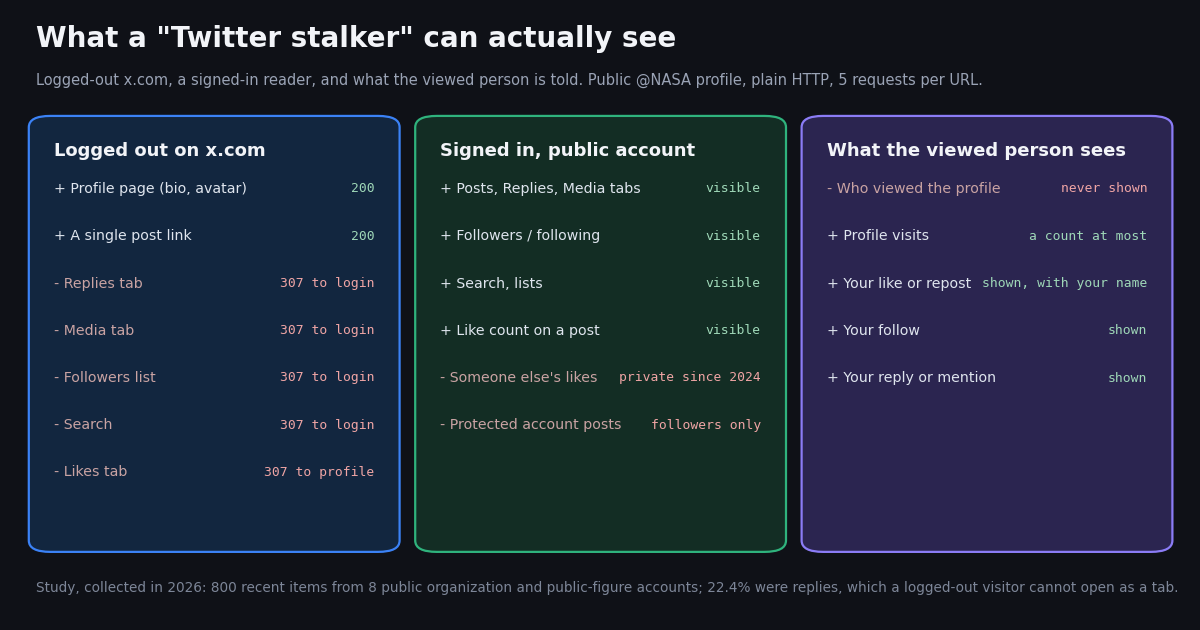
People search "Twitter stalker" for three different reasons: to read someone's X (Twitter) posts without an account, to check a profile without being noticed, or because they worry someone is watching them. This page answers all three with what we measured ourselves, not with a list of viewer sites. It is the consumer-facing page; if you are a developer building a read-only viewer into a product, the separate Twitter (X) viewer API developer guide covers endpoints, caching and cost in depth.
In 2026 we checked what logged-out x.com actually serves for a public profile, what happens on twstalker.com, and, on eight public organization and public-figure accounts, how much of their activity sits in the parts a logged-out reader cannot open. We also spell out what the person you look at can and cannot see, where ordinary curiosity turns into harassment, and the legitimate tools for tracking brands, competitors and public figures.
One thing this page will not do is explain how to covertly monitor a private individual. That is not a technical limitation; it is where X's rules and stalking law draw the line, and we explain that line plainly below.
What is a "Twitter stalker" tool?
In search, "Twitter stalker" is mostly a product category, not a crime: it refers to third-party websites that let you browse public X profiles, posts and media without signing in. The best-known is TwStalker (twstalker.com), which third-party reviews describe as a site for viewing public X profiles, posts and trends without an account. Others in the same family are Nitter front ends and sites such as sotwe and xcancel, which we covered in our xcancel and Nitter alternative pages.
None of these sites is affiliated with X, and none has special access. They fetch the same public pages and data any visitor could request, then show them in their own layout, usually surrounded by ads. That has two consequences. First, they can never show more than X makes public: no protected posts, no private likes, no direct messages, no list of who viewed a profile. Second, they break whenever X tightens what logged-out traffic can see, which is why so many of them come and go.
A safety note. The news site LatestLY (latestly.com) warned that links promoted as "twstalker viral video" lead to deceptive pages with credential phishing, malware and forced ad redirects. Whatever viewer you try, never enter your X password or install an extension it pushes.
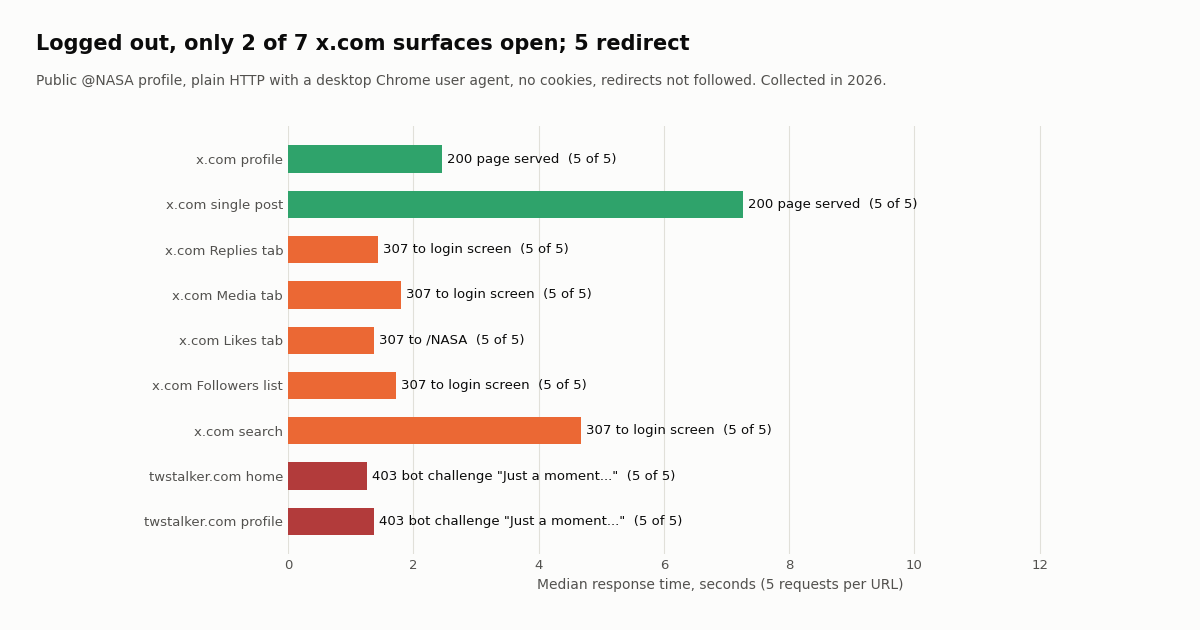
What we saw on twstalker.com. In our 2026 check, both the home page and a profile URL (twstalker.com/NASA) returned HTTP 403 with a "Just a moment..." bot-challenge page on 5 of 5 plain HTTP requests, the same result our earlier xcancel check recorded. A full browser may pass that challenge; scripts, RSS readers and link previews do not. We did not test it in a browser in this session, so we make no claim about what it shows past the challenge.
What you can see on X without an account (we checked)
Most people do not need a stalker site at all for the basics, because x.com still serves public profiles and individual posts to logged-out visitors. What it no longer serves is everything around them. We sent five plain HTTP requests to each surface of the public @NASA profile, with a normal desktop Chrome user agent, no cookies, and redirects not followed, and recorded the status codes.
So a logged-out reader can look at a public profile and open any post someone links to, but cannot browse the account's replies, its media grid, who follows it, or search for its posts. Our check is HTTP-level: it records what x.com serves and where it redirects, not how the JavaScript timeline renders in your browser, which X can change at any time and can vary by region.
What logged-in users see that you do not. Signed in, any public account's Posts, Replies and Media tabs, followers and following lists, lists and search results are visible. That is the honest answer to most "stalker" searches: for public accounts, a free X account shows more than any third-party viewer can, and it is the official way to do it.
What no tool can see: protected accounts, likes, DMs and views
Some things are not hidden behind a login; they are private to everyone except specific people. No viewer site, browser trick or API changes that, and any site claiming otherwise is either wrong or after your login.
Protected accounts. X's help center (help.x.com/en/safety-and-security/public-and-protected-posts) says protected posts are visible only to the account's approved followers, do not appear in third-party search engines such as Google, and can be searched on X only by the owner and their followers. New followers must be approved. A "stalker" site cannot open them.
Likes. Since June 2024, likes on X are private for everyone. X's engineering team announced it was "making Likes private for everyone to better protect your privacy", as CBS News reported. You can see your own likes; the author of a post can see who liked it; nobody can browse another person's Likes tab. The like count of an account is still public as a number (favouritesCount in a profile object), but not the list. Our page on why you cannot see likes on Twitter covers the details.
Direct messages, bookmarks, drafts, muted and blocked lists. These belong to the account owner. They never appear on a profile and are not part of any public data.
Who viewed a profile. X does not record or show a list of profile visitors to anyone, so no tool can reveal it in either direction: you cannot see who viewed you, and nobody can see that you viewed them.
Can someone see that you viewed their Twitter profile?
No. Simply opening a profile or reading a post does not notify the account and does not put your name anywhere the account can see. X has no profile-visitor list; at most an account sees aggregate counts, such as total views of a post, with no names attached. Our explainer on whether X shows who viewed your profile goes into what the analytics screen does and does not show, and why "who viewed my profile" apps are fake.
What the person does see is anything you do. These actions are visible to them and, for public accounts, to everyone:
That is also the honest answer to the variant "how to stalk someone on Twitter without them knowing". Reading public posts does not alert anyone. But if the goal is to keep watching one specific private person who has not chosen to be public, or who has blocked or muted you, this page is not going to help you do that, and the next section explains why.
The ethics and the legal line
Reading public posts is what X is for. The line is crossed by the purpose and the pattern, not by the act of reading. Three references define it.
X's own rules. The X Rules (help.x.com/en/rules-and-policies/x-rules) say you may not share abusive content, engage in the targeted harassment of someone, or incite other people to do so. The private content policy (help.x.com/en/rules-and-policies/personal-information) bars sharing or threatening to expose someone's private information, such as a home address or non-public contact details, without permission. X states that this policy does not apply to public figures in the same way, which is one reason tracking a CEO's public posts is different from tracking a classmate.
Stalking law. In the US, the federal stalking statute (18 U.S.C. 2261A) covers using "any interactive computer service or electronic communication service" in a course of conduct, with intent to harass, intimidate or injure someone or to place them under surveillance for those purposes, that causes or would reasonably be expected to cause substantial emotional distress. States and other countries have their own cyberstalking and harassment laws. Repeatedly watching and contacting someone who has blocked you, building a file of their movements, or creating new accounts to get around a block are the patterns those laws describe.
A practical test. Would the person reasonably expect what you are doing? A journalist following a senator's public account, a marketer tracking a competitor's launches, a fan reading a celebrity's posts: yes. Watching an ex who blocked you, logging a coworker's activity, or monitoring someone who has asked you to stop: no. If you are on the other side and feel watched, the reporting flows linked from the X Rules page, blocking, and protecting your posts are the tools X provides, and local police take documented online stalking seriously.
How much do logged-out readers miss? Our study of 8 public accounts
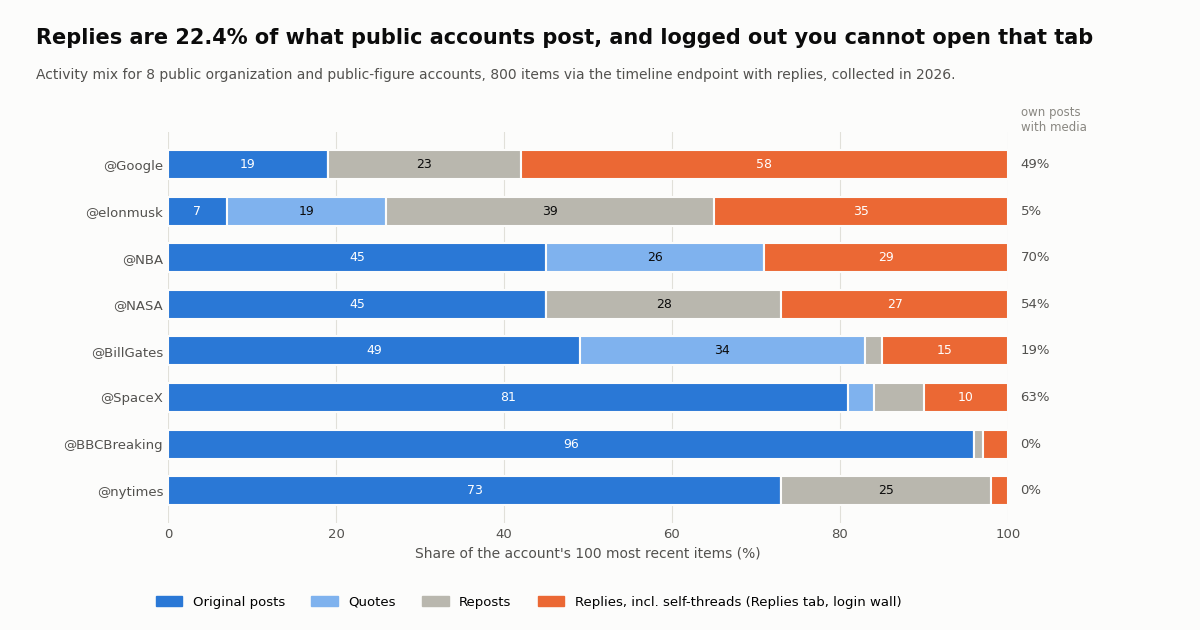
To put a number on the logged-out gap, we pulled the 100 most recent items (posts, replies, reposts and quotes) from each of 8 public organization and public-figure accounts through the timeline endpoint with replies included, 800 items in total, and classified each one. Replies are what a logged-out visitor cannot open as a tab; media posts are what the Media tab collects.
Replies are a big part of the picture for some accounts. Across the sample, 179 of 800 items (22.4%) were replies. For @Google they were 58% of recent activity, mostly customer-style answers, and for @elonmusk 35%. A logged-out reader looking at those profiles sees a slice of what the account actually does. For news accounts the gap is tiny: @BBCBreaking (3%) and @nytimes (2%) almost never reply.
Not every reply is a conversation with someone else. 98 of the 179 replies were the account answering itself, which is how X threads are built; 81 (10.1% of all items) were replies to other accounts. @NBA's and @SpaceX's replies were all self-threads in this sample.
Media is concentrated in sports, space and brands. 33.7% of the accounts' own posts carried a photo, video or GIF, from 70% for @NBA to 0% for @nytimes and @BBCBreaking, whose posts are links with preview cards (cards are not counted as media here).
Legitimate tracking: brands, competitors, public figures, journalists
There are plenty of good reasons to follow an X account closely: watching a competitor's product announcements, tracking what a public figure says about your industry, archiving a government agency's posts, or covering a breaking story. Those are public accounts acting in public, and the right tools are built for exactly that.
No-login lookups. Our free tools under /tools answer one-off questions about public accounts without an X login: when an account was created (account age checker), whether one account follows another (follow checker), and when a post was published from its ID (timestamp tool).
Real-time monitoring. For a fixed list of brand or competitor accounts, Twitter Stream pushes their new posts to you in seconds, so you do not poll at all. If you prefer to build it yourself, one advanced search with from: operators covers many accounts per call; the snippet below asks for the last hour of posts from three public accounts.
Cost, compared honestly. On twitterapi.io, tweet endpoints cost 15 credits per tweet returned, $0.15 per 1,000 tweets, and a profile costs $0.18 per 1,000. Checking one account's profile plus its 20 latest items is about $0.0032. On the official X API pay-per-usage rate card (docs.x.com/x-api/getting-started/pricing) the same check is $0.11: $0.010 per user read plus $0.005 per post read. That is $0.15 versus $5 per 1,000 posts, about 33 times. An empty polling pass costs the 15-credit minimum, $0.00015, so checking every 5 minutes for a month is about $1.30 before any posts are returned. New accounts that pass the automatic bot check get up to $1 of free credits (at most 100,000 credits, no card, one per person or network, expiring after 31 days); no X account is needed for reads.
What the API does not change. A read API returns what is public: the same posts, replies and counters a signed-in user could see on a public profile, in structured form. It does not return private likes, DMs or profile visitors, and this page does not cover protected accounts. Use it for organizations, public figures and your own accounts.
import os
import time

import requests

API = "https://api.twitterapi.io"
HEADERS = {"X-API-Key": os.environ["TWITTERAPI_IO_API_KEY"]}
WATCH = ["Google", "NASA", "SpaceX"]          # public brand / competitor accounts only
since = int(time.time()) - 3600             # last hour

query = " OR ".join(f"from:{a}" for a in WATCH) + f" since_time:{since}"
cursor, seen = "", 0
while True:
    r = requests.get(f"{API}/twitter/tweet/advanced_search", headers=HEADERS,
                     params={"query": query, "queryType": "Latest", "cursor": cursor}, timeout=30)
    r.raise_for_status()
    body = r.json()
    for t in body.get("tweets", []):
        seen += 1
        print(t["createdAt"], "@" + t["author"]["userName"], t["url"])
    if not body.get("has_next_page"):
        break
    cursor = body["next_cursor"]
print(seen, "new posts")   # an empty pass still bills the 15-credit minimum ($0.00015)
How we collected this
Question. How much of a public X account's activity can a logged-out reader open, what does logged-out x.com serve, and does twstalker.com respond to a plain client?
Accounts. 8 public organization and public-figure accounts: @NASA, @SpaceX, @nytimes, @Google, @NBA, @BBCBreaking, @elonmusk, @BillGates. No private individuals were sampled, and reply targets were only counted as self or other, never analyzed.
Method. For each account, one /twitter/user/info call and up to 5 pages of /twitter/user/last_tweets with includeReplies=true (newest first, 20 items per page). Each item was classified as a repost, a reply (and whether the reply was to the account itself), a quote, or an original post, and we noted whether the account's own posts carried photo, video or GIF media. Separately, five plain HTTP requests per URL to the logged-out x.com surfaces of the public @NASA profile and to twstalker.com, with a desktop Chrome user agent, no cookies, and redirects not followed.
Sample and cost. 800 timeline items and 8 profiles from 48 API requests, about $0.12 at our own prices. Collected in 2026.
Window. The most recent 100 items per account at collection time, so the window varies: under a day for @NBA, which posts very often, and roughly three years for @BillGates, who posts rarely.
What the sample cannot show. Eight large public accounts are not a census of X, and 100 items is one moment in each account's history. Our logged-out check is HTTP-level, from one network, and does not execute JavaScript, so it shows what x.com serves and where it redirects, not how the timeline renders in a given browser or region. We did not test twstalker.com in a full browser, and we did not test protected accounts.
Privacy. Aggregates only, organization and public-figure accounts only. The de-identified per-item sample carries account, item type, media flag, hour and counts, with no post text, IDs or URLs.
If you think someone is stalking you on X
Because X has no visitor list, there is no way to see who has been looking at your profile, and any app that offers to show it is fake or harvesting your login. What you can control is what they can see and how they can reach you.
Protect your posts. With protected posts, only approved followers see what you post, and the posts drop out of search engines. Followers you approved before switching keep access unless you remove or block them.
Block and mute. Blocking stops an account from following you and viewing your posts while it is signed in; muting hides it from your view without telling it. Remember that public posts stay visible to logged-out visitors on the profile page, which is why protecting posts matters if the concern is serious.
Check what is public. Your likes are already private. Review your bio, location, linked sites and old media posts for details that reveal where you live or work.
Document and report. Keep screenshots with dates and post links, report targeted harassment and private-information sharing through X's reporting flows, and, if you feel unsafe, contact local police; documented online conduct is the evidence stalking laws rely on.
"""public_account_watch.py - a legitimate "who posted what" report for PUBLIC brand,
competitor or public-figure accounts. It reads each account's profile counters and its
recent activity (posts, replies, reposts, quotes, media) and prints the mix.

    pip install requests
    export TWITTERAPI_IO_API_KEY=...      # from the twitterapi.io dashboard; no X account needed
    python public_account_watch.py NASA SpaceX Google

Cost: one profile = 18 credits ($0.00018); each tweet returned = 15 credits ($0.00015),
so a full 20-tweet page is $0.003. Two pages per account is about $0.006.
Use it for organizations and public figures. Do not point it at private individuals.
"""
import os
import sys

import requests

API = "https://api.twitterapi.io"
HEADERS = {"X-API-Key": os.environ["TWITTERAPI_IO_API_KEY"]}
PAGES = 2  # up to 20 items per page


def profile(user):
    r = requests.get(f"{API}/twitter/user/info", headers=HEADERS,
                     params={"userName": user}, timeout=30)
    r.raise_for_status()
    body = r.json()
    if body.get("status") != "success" or not body.get("data"):
        raise SystemExit(f"@{user}: {body.get('msg')}")   # unknown user -> "user not found"
    return body["data"]


def recent_activity(user, pages=PAGES):
    items, cursor = [], ""
    for _ in range(pages):
        r = requests.get(f"{API}/twitter/user/last_tweets", headers=HEADERS,
                         params={"userName": user, "includeReplies": "true", "cursor": cursor},
                         timeout=30)
        r.raise_for_status()
        body = r.json()
        items += (body.get("data") or {}).get("tweets", [])
        if not body.get("has_next_page"):
            break
        cursor = body.get("next_cursor", "")
    return items


def kind(t):
    if t.get("retweeted_tweet"):
        return "repost"
    if t.get("isReply"):
        return "reply"
    if t.get("quoted_tweet"):
        return "quote"
    return "original"


for user in sys.argv[1:] or ["NASA"]:
    p = profile(user)
    if p.get("protected"):
        print(f"@{user} is protected: skipping (its posts are for approved followers only)")
        continue
    items = recent_activity(user)
    mix = {"original": 0, "reply": 0, "repost": 0, "quote": 0}
    media = 0
    for t in items:
        mix[kind(t)] += 1
        if not t.get("retweeted_tweet") and (t.get("extendedEntities") or {}).get("media"):
            media += 1
    total = len(items) or 1
    print(f"@{p['userName']}  followers={p['followers']:,}  posts={p['statusesCount']:,}  "
          f"media={p['mediaCount']:,}  likes given={p['favouritesCount']:,}")
    print("   " + "  ".join(f"{k} {100 * v / total:.0f}%" for k, v in mix.items())
          + f"  with media {media}")
    for t in items[:3]:
        print(f"   {t['createdAt']}  [{kind(t)}]  likes={t['likeCount']}  {t['url']}")
Questions readers ask
What is TwStalker?
TwStalker (twstalker.com) is a third-party website, not affiliated with X, that shows public X profiles and posts to people who are not logged in. It cannot show protected posts, private likes, DMs or profile visitors. In our 2026 check, it returned a 403 bot-challenge page to every scripted request, so it does not work from scripts or feed readers; a browser may get through.
Can someone see if I look at their Twitter profile?
No. X does not notify people when their profile or posts are viewed and has no profile-visitor list. At most they see anonymous totals such as a post's view count. They do see likes, reposts, quotes, replies, mentions and follows, all with your name attached.
Can I see someone's Twitter without an account?
Partly. In our 2026 check, logged-out x.com served a public profile page and any single post link, but redirected the Replies tab, Media tab, followers list and search to the login screen on every request. A free X account shows the rest of a public profile; protected accounts stay visible only to approved followers.
Can a stalker site show a private (protected) Twitter account?
No. X's help center says protected posts are visible only to approved followers and do not appear in third-party search engines. Sites or apps claiming to unlock protected accounts are either wrong or trying to get your login or install something; do not enter your X password anywhere but x.com.
Can you see what someone liked on Twitter?
Not any more. Since June 2024, likes on X are private for everyone: only you can see your own likes, and the author of a post can see who liked it. An account's total like count is still public as a number, but nobody can browse another person's Likes tab.
Is it illegal to stalk someone on Twitter?
Reading public posts is not illegal. Targeted harassment breaks the X Rules, and a pattern of watching or contacting someone with intent to harass or intimidate them that causes substantial emotional distress can be criminal stalking, for example under the US federal statute 18 U.S.C. 2261A and state cyberstalking laws. If someone has blocked you or asked you to stop, respect that.
What is a legitimate way to track a brand or public figure on X?
Follow the account, use X lists, or use monitoring tools. For many public accounts at once, Twitter Stream pushes new posts in seconds, and an API search with from: operators returns new posts for about $0.15 per 1,000 tweets on twitterapi.io, versus $0.005 per post read on the official X API rate card. Keep it to organizations, public figures and accounts you own.
How do I stop someone from stalking my X account?
Protect your posts so only approved followers see them, block the account, review your profile for personal details, and keep dated screenshots. Report targeted harassment or exposure of private information through X's reporting flows, and contact local police if you feel unsafe.
Continue
- X Help Center: About public and protected posts (followers only, not in search engines)
- The X Rules: abuse and targeted harassment
- 18 U.S. Code 2261A, stalking (Cornell LII)
- CBS News: X makes likes private for everyone (June 2024)
- twitterapi.io docs: Get User Last Tweets (includeReplies, 20 per page)
- X API pay-per-usage pricing ($0.005 per post read, $0.010 per user read)
- Twitter (X) API hub: endpoints, pricing and guides
- Does X show who viewed your profile? What the analytics really show
- Twitter (X) viewer API: a developer guide to read-only viewing
- xcancel alternatives that still work, tested
- Nitter alternatives for reading X without an account
- Working Nitter instances and their status
- Why you cannot see likes on Twitter (X) since 2024
- Twitter web viewers compared
- Free Twitter (X) account age checker, no login
- Free follow checker: does one account follow another
- Tweet timestamp tool: when a post was published
- Twitter Stream: real-time monitoring for brand and competitor accounts
- twitterapi.io pricing: pay only for the data returned
- 01X Radar Explained: Twitter (X) Keyword Monitoring, Tiers, Limits and an API Alternative
- 02Snaplytics Twitter (X) Viewer: What It Is, Whether It Works, and Safer Options
- 03Tweeload: What the Twitter (X) Video Downloader Does, and Whether It Is Safe
- 04Twillot Twitter (X) Viewer: What It Is, Whether It Works, and Is It Safe?
- 05Twitter (X) Web Viewer: How to View Tweets Without an Account
- 06Can You Edit a Tweet? How Editing Works on X
- 07How to Use LangChain with the Twitter (X) API
- 08Twitter (X) Automation — Complete Guide to API-Driven Workflows
Stop reading. Start building.
Starter credits cover real testing on real data. Google sign-in, no card, no application queue.
Get an API key