Trae vs Cursor in 2026: Plans, Models, Agents and MCP Compared
- Short answer: Trae for a dollar-for-dollar usage balance, a broad built-in model list and parallel cloud agents; Cursor for the larger ecosystem and Grok-first plans bundled with X.
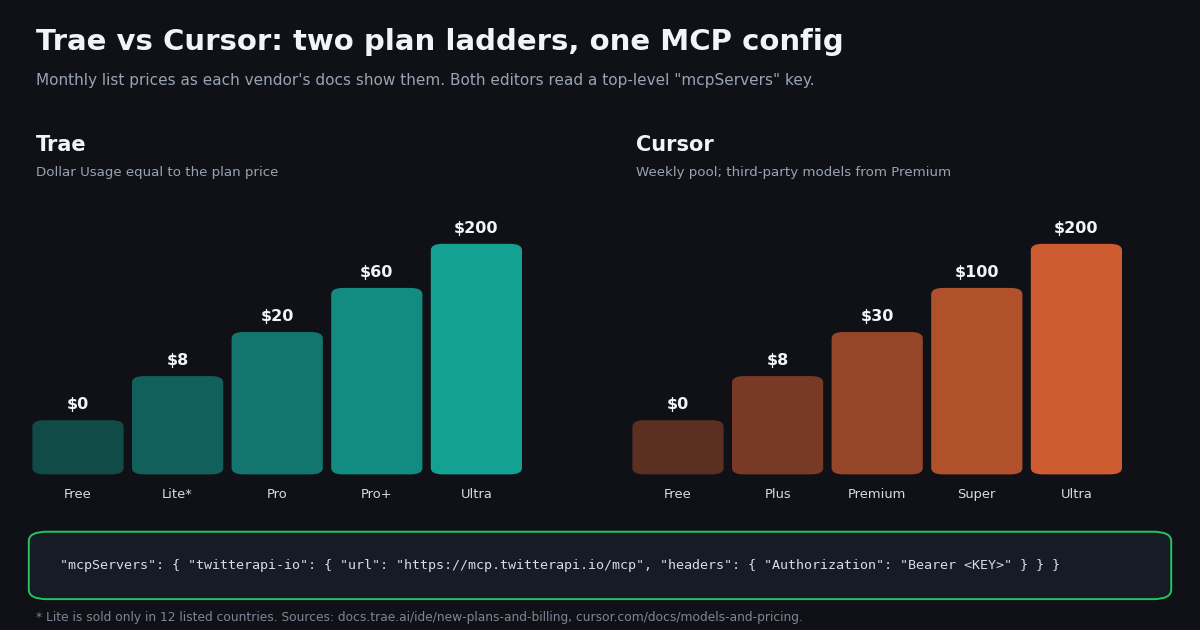
- Price ladders: Trae $0 / $8 Lite / $20 Pro / $60 Pro+ / $200 Ultra; Cursor $0 / $8 Plus / $30 Premium / $100 Super / $200 Ultra. Annual: Trae $200 Pro, Cursor $300 Premium.
- Models: Trae ships GPT, Gemini, Grok, Kimi, GLM, DeepSeek, MiniMax and Seed models but no built-in Claude (bring your own key). Cursor Plus runs only Grok and Composer; Claude, GPT and Gemini start at Premium.
- Overage: Trae On-Demand Usage bills at the provider's standard API price, charged every $3. Cursor bills third-party models at API list price from prepaid credit.
- MCP: both use
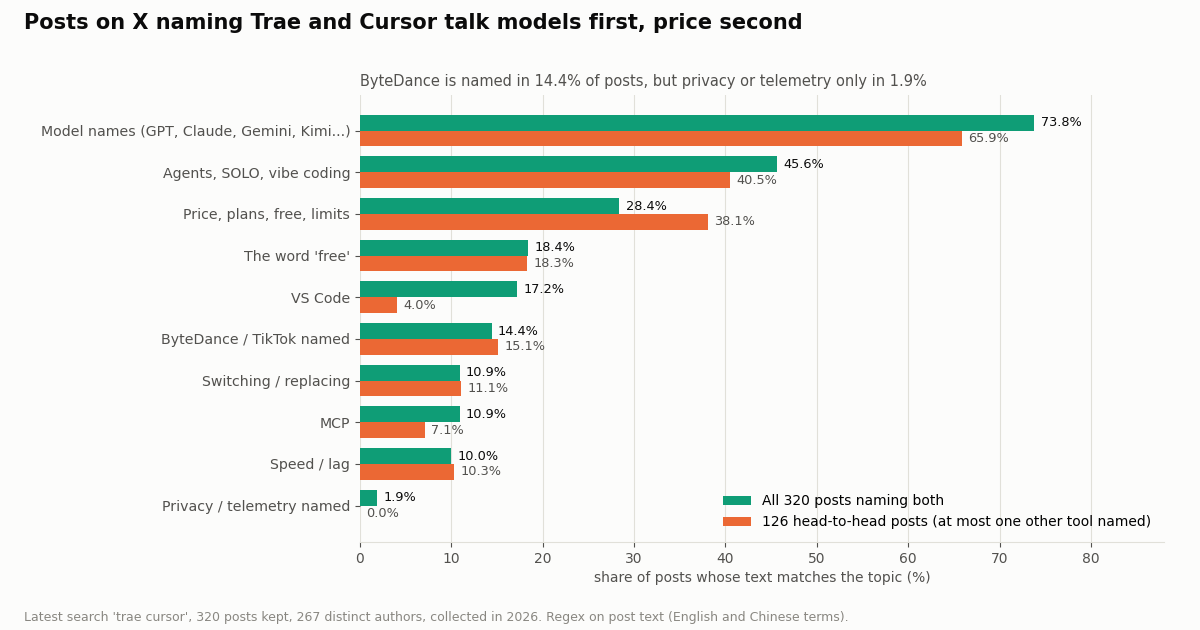
mcpServerswithurl+headers. Trae: Settings > MCP or.trae/mcp.json. Cursor:~/.cursor/mcp.json. Only Cursor supports${env:NAME}for keys. - What X says: of 320 recent posts naming both, 73.8% name a model, 28.4% talk price, 14.4% name ByteDance. Our study cost $0.12 for 820 tweets.
Cursor is a VS Code-based AI editor, and Trae's IDE is widely described as VS Code-based too; both now sell agent work by the token rather than by the request. Under that similarity sit real differences: how much usage each dollar of subscription buys, which models are built in, whether you can bring your own keys, how agents run in the cloud, and how MCP servers are configured. This page compares them on those points, using plan tables and docs fetched this session from each vendor, and closes with a measured look at how both tools show up on X.
This is the editor-choice page. For Cursor's tier-by-tier plan detail see our Cursor pricing guide; for Cursor against Google's and Cognition's editors see Antigravity vs Cursor and Windsurf vs Cursor. Here Cursor's plans get one table and the space goes to Trae and to the head-to-head, including the one JSON block that puts live X (Twitter) data into either editor's agent.
53.8%
Trae vs Cursor at a glance
Both products changed a lot this year, so start with what each one is today. The all-new TRAE merges the former TraeCode and TraeWork apps into one product with two modes: Agent Mode, where you orchestrate several agents across projects and hand off repeatable jobs to Automation, and IDE Mode, a full editor for deep work inside one project. Trae's docs say it runs on desktop, web and mobile, with tasks that follow you between devices. Cursor is a VS Code-based editor built around its agent, now sold as part of The X Subscription, which Cursor's docs describe as one subscription for Grok, Cursor and X with a usage pool shared between Grok and Cursor.
Where the two really differ. Trae turns your subscription into a dollar balance and lets you spend it on a wide model list, which suits people who want to try many models or lean on lower-priced ones. Cursor keeps its own models (Grok and Composer) in a weekly pool and charges for everyone else's models on top, which suits people who are happy with Grok or who already plan to pay for Premium. Trae's paid plans are sold only in the countries listed in its docs (the United States, the United Kingdom, most of the EU, Japan, Brazil, India and others), so check your region before you plan around it.
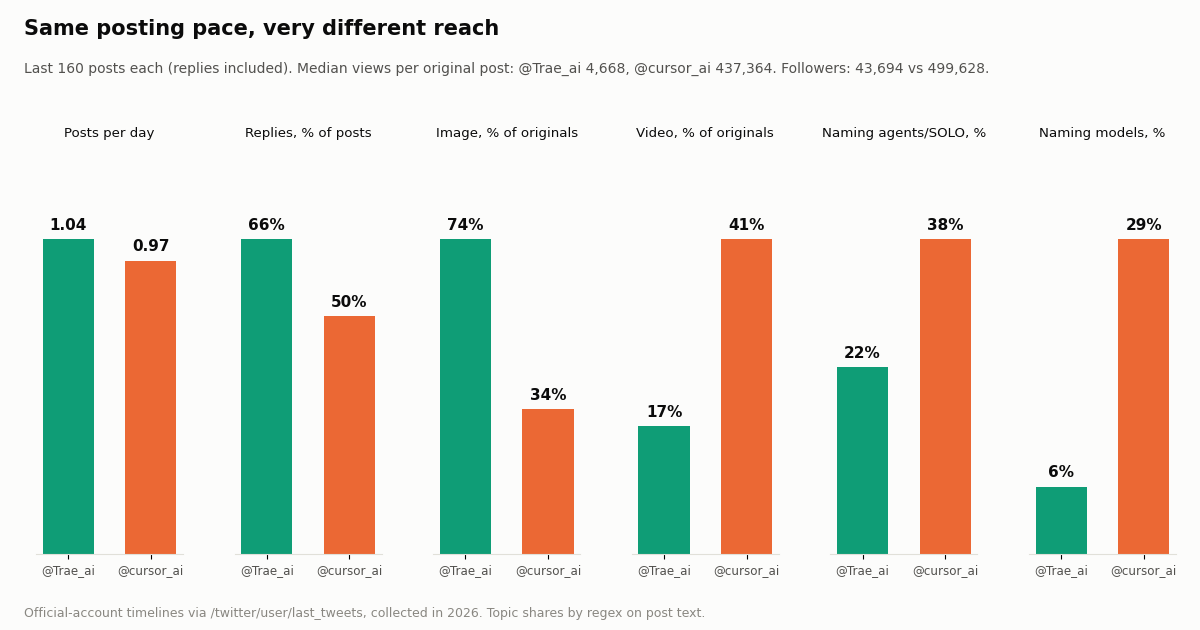
Who talks about which. On X, Cursor's official account has 11 times Trae's followers, and its original posts get a median of 437,364 views against 4,668 for Trae's, about 94 times more. Popularity is not quality, but it does mean more tutorials, rules files and community MCP examples are written for Cursor first.
Trae pricing: plans, Dollar Usage and On-Demand Usage
Trae's docs list five plans. Prices below are exactly as the plan table on docs.trae.ai/ide/new-plans-and-billing shows them; taxes may apply in some US jurisdictions.
Dollar Usage is the unit. Trae's pricing FAQ defines Usage as "the dollar-denominated balance included in your plan, consumed as you make AI requests." Every request is billed by the tokens it processes, converted into dollars and deducted from that balance; the cost per request depends on the model, the prompt and the context size. On paid plans the balance refreshes each period. Trae's own pages disagree about Free: the plans FAQ in the docs describes a limited allowance each month, after which AI chat stops for the rest of the month, while the FAQ on the pricing page calls it a one-time allowance that does not reset monthly. Treat Free as a trial-sized balance.
Model choice and queues by plan. Free runs in Auto mode only, with a standard queue and limited autocompletion. Paid plans add manual model selection, the fast queue and unlimited autocompletion, and the plan table lists SOLO mode for paid tiers and early access to new models at the top. For beta models Trae says access is prioritized by plan level: Ultra, then Pro+, then Pro.
On-Demand Usage. Lite, Pro, Pro+ and Ultra users can switch on On-Demand Usage in the Trae console. Usage beyond the monthly balance is then billed by token "according to the official standard API pricing of the model provider" and charged each time the accrued amount reaches $3, again when you switch it off, and at the end of the membership period. If a payment fails, AI features stop until it goes through.
Small print worth knowing. Lite is sold only in Thailand, Indonesia, Vietnam, the Philippines, India, Pakistan, Turkey, Malaysia, Brazil, Colombia, Peru and Nigeria. Trae's FAQ says there is no student plan or discount. Refunds are possible within 24 hours of purchase if no usage was consumed. Once you switch from monthly to annual you cannot switch back. Existing subscribers on the older plans get price protection on recurring monthly renewals and an offer of 50% off a new annual plan, so a colleague paying an older Pro price is not a sign the current table is wrong. Trae's public pricing page renders its plan cards in the browser; the figures here come from the docs table, which is the text Trae links from that page.
Cursor pricing in one table, and how the two bills compare
Cursor's plans, as cursor.com/docs/models-and-pricing lists them this session, excluding tax. Our Cursor pricing guide goes through each tier in depth, so here is only what you need for the comparison.
Plus is narrower than it looks. Cursor's docs say Plus excludes Auto, Cloud Agents, Automations, Bugbot, third-party models and your own API keys. To run Claude, GPT or Gemini models in Cursor you need Premium, and those requests bill at the provider's API list price from prepaid credit on top of the subscription.
Trae's $20 is a balance; Cursor's $30 is a pool plus a meter. On Trae Pro, $20 of subscription becomes $20 of token spend on whichever built-in model you pick. On Cursor Premium, $30 buys four times the Plus pool of Cursor's own models, and every third-party model call is metered separately. If most of your work runs on GPT or Gemini models, Trae Pro is the lower floor ($20 against $30 plus usage). If Grok and Composer are enough, Cursor Plus at $8 includes a usage pool, while Trae's $8 Lite plan is only for sale in 12 countries.
Same model, two listed prices. Both vendors say third-party models bill at the provider's API list price. Cursor prints its per-million-token table, for example GPT-5.6 Luna at $0.20 input and $1.20 output, Gemini 4 Argon at $2 and $10, and Claude Sonnet 5.5 at $2 and $10. Trae prints separate US and non-US rate tables in its models doc. Neither vendor adds a published markup on the individual plans, so the real difference is what the subscription itself includes.
What people on X focus on. Price, plans, limits or the word free appear in 28.4% of the 320 posts that name both editors, and in 38.1% of the 126 posts that compare just the two. The word free on its own appears in 18.4%, a trace of Trae's early reputation as the free alternative.
Models: Trae's wide built-in list vs Cursor's Grok-first plans
Trae's models doc lists the following as available after upgrading to the new plans: GPT-6.1-Sol, GPT-6-Astra, GPT-6-Sol, GPT-6-Luna, GPT-5.6-Sol, GPT-5.6-Terra, GPT-5.6-Luna, GPT-5.5, GLM-5.2, DeepSeek-V4-Flash, Kimi-K2.7-Code and Kimi-K3. Its rate tables also include Gemini-3.1-Pro-Preview, Gemini-3-Flash-Preview, Grok-4.7, MiniMax-M3, DeepSeek-V4-Pro and ByteDance's own Seed-2.1-Turbo, priced at $0.50 input and $2.50 output per million tokens in the non-US table.
No built-in Claude in Trae. Claude models do not appear in Trae's built-in list. Trae's custom-model screen (Settings > Models > Add Model) accepts a preset provider with your API key or a fully custom endpoint, and its docs name an Anthropic Messages API format for "the Claude series" with https://api.anthropic.com as the example base URL. So Claude in Trae means your own Anthropic key and Anthropic's bill.
Cursor's split. Cursor Plus runs only Cursor's own models: Grok 4.7, 4.6, 4.5 and Composer 2.5, at fixed settings. Premium and above unlock third-party models, including Claude Sonnet 5.5, GPT-5.6 models and Gemini 4 Argon, at the prices Cursor lists. Cursor's docs say Plus excludes your own API keys; the page mentions bring-your-own-key only in the Teams and Enterprise context.
Models dominate the conversation. 73.8% of the posts on X that name both editors also name a model or the word model, more than any other topic we measured. Many are Chinese-language posts comparing which Claude or GPT version each editor offers; Chinese is 40.6% of the sample and English 49.1%.
Agents and workflow: Trae Agent Mode and SOLO vs Cursor Agent
Trae's agent story is built around Agent Mode in the merged app. Its docs describe managing several projects in one workspace, running agents on different tasks in parallel, running local tasks across multiple directories or over SSH on a remote machine, and switching to IDE Mode when you need to edit and debug by hand. Paid plans run cloud tasks concurrently: 2 on Free, then 10, 15 and 20 on Pro, Pro+ and Ultra. Automation hands repeatable jobs (status updates, routine checks, test summaries, reports) to agents, a Marketplace adds Plugins and Skills, and My Artifacts keeps code changes, documents, slides and other outputs together instead of buried in chat history.
Cursor's agent lives inside the editor and, from Premium, in the cloud: Cloud Agents, Automations and Bugbot are listed as Premium features and excluded from Plus. If you work mostly in one repository and want the agent next to your cursor, both products cover it; if you want to fan work out across projects and check on it from a phone, Trae's docs describe that workflow directly.
What builders mention. Agents, SOLO or vibe coding appear in 45.6% of posts naming both editors. Switching talk (moving, replacing, going back) appears in 10.9%, and speed or lag in 10.0%, so on X the comparison is mostly about models, money and agents rather than editor feel.
The ByteDance question. Trae is widely reported to come from ByteDance, and its pricing page routes enterprise buyers to BytePlus. That origin is named in 14.4% of the posts naming both editors, while the words privacy, telemetry or spy appear in only 1.9%. If data handling matters to your team, read each vendor's privacy policy and data-retention terms for your region before choosing; neither product's plan table answers it.
MCP in Trae and Cursor: the same JSON, two different homes
Both editors read MCP servers from a JSON object with a top-level mcpServers key, and both accept a local server (command, args, env) or a remote one (url, headers). That means a remote server block written for Cursor pastes into Trae unchanged, and Trae's docs explicitly suggest it: in the manual dialog, Raw Config (JSON) opens Trae's mcp.json so you can paste servers you already configured in another IDE.
Trae specifics. In the IDE or Agent window, open Settings > MCP, then Add > Create from Market for a listed server or Add > Create Manually for your own. Project servers need the Project MCP switch turned on first, then a mcp.json file in .trae/ at the project root; Trae loads it when the capability is needed. In the Agent window you also choose a runtime: a Local MCP server works only in local and worktree tasks, a Cloud MCP server only in cloud tasks. Trae's built-in agent, called Agent, gets every configured server automatically, and custom agents pick servers and individual tools in the Tools - MCP section. Timeouts are set as START_MCP_TIMEOUT_MS and RUN_MCP_TIMEOUT_MS, inside env for stdio servers and inside headers for HTTP servers, as in the block shown with this section.
Cursor specifics. Cursor resolves ${env:NAME} inside url and headers, so the API key can live in your shell environment and a project-level .cursor/mcp.json can be committed. It supports OAuth with PKCE for servers that need it and lists tools, prompts, resources, roots, elicitation and MCP Apps among supported features.
The practical difference is secrets. Because Trae resolves only ${workspaceFolder}, a remote server's Authorization header sits in plain text in Trae's config. Keep the key in the global config rather than in a committed .trae/mcp.json, and rotate it if the file is ever shared.
MCP on X. 10.9% of the posts naming both editors mention MCP, and 7.8% are tool roundups that list several MCP clients side by side.
{
  "mcpServers": {
    "twitterapi-io": {
      "url": "https://mcp.twitterapi.io/mcp",
      "headers": {
        "Authorization": "Bearer YOUR_TWITTERAPI_IO_KEY",
        "START_MCP_TIMEOUT_MS": "60000",
        "RUN_MCP_TIMEOUT_MS": "60000"
      }
    }
  }
}Step by step: add live X (Twitter) data to Trae or Cursor
TwitterAPI.io runs a hosted MCP server at https://mcp.twitterapi.io/mcp that takes your TwitterAPI.io API key as a Bearer token. It gives the agent tools for tweet search, user lookup, followers, replies and trends. You get the key with a Google sign-in and no X developer account is needed; new accounts that pass the automatic bot check get up to $1 of free credits (at most 100,000 credits, no card, one per person or network, expiring after 31 days).
In Trae. Step 1. Copy your API key from the dashboard. Step 2. Open Settings > MCP, click Add > Create Manually and paste the remote block below with your key in place of YOUR_TWITTERAPI_IO_KEY (in the Agent window, choose Local for local tasks or Cloud for cloud tasks). Step 3. Click Confirm and check that the server appears in the list. Step 4. In a chat with the built-in Agent, ask for X data by name ("use twitterapi-io to search X for..."); for a custom agent, tick the server and its tools under Tools - MCP.
{ "mcpServers": { "twitterapi-io": { "url": "https://mcp.twitterapi.io/mcp", "headers": { "Authorization": "Bearer YOUR_TWITTERAPI_IO_KEY" } } } }
In Cursor. Step 1. Export the key in your shell profile as TWITTERAPI_IO_KEY. Step 2. Save the block shown with this section as ~/.cursor/mcp.json (all projects) or .cursor/mcp.json (one project). Step 3. Enable the server in Cursor's MCP settings and approve the tools you trust. Our Cursor setup guide covers the local npx alternative and common errors.
Prompts that work in both. "Search X for posts from the last day that mention our package name and group the bug reports." "Pull the last 40 posts from @Trae_ai and list every feature they announced." "Find who replied to this post and summarize the questions." Each runs as one or more tool calls, billed by the tweets they return.
Writes are a separate product. Posting, liking, following or sending a DM from an agent runs through an authenticated session: one /twitter/user_login_v2 login ($0.10, with a proxy you supply) returns login_cookies, and each action such as /twitter/create_tweet_v2 or /twitter/follow_user_v2 then costs 60 credits ($0.0006). The call acts as that account, X can rate-limit, lock or suspend it, the session can need a fresh login, and each HTTP 200 call is billed, so keep an agent that writes at a human pace and behind your approval.
{
  "mcpServers": {
    "twitterapi-io": {
      "url": "https://mcp.twitterapi.io/mcp",
      "headers": {
        "Authorization": "Bearer ${env:TWITTERAPI_IO_KEY}"
      }
    }
  }
}What X shows: posts naming both editors, and the two official accounts
We pulled the most recent posts matching trae cursor from X's Latest search: 500 posts, of which 383 contain both words. Because trae is also a Spanish and Portuguese verb (it means brings), we dropped 63 posts in those languages that did not name the product unambiguously, leaving 320 posts from 267 distinct authors. They span about 358 days, or 0.9 posts a day, which matches the small and falling search volume for this comparison.
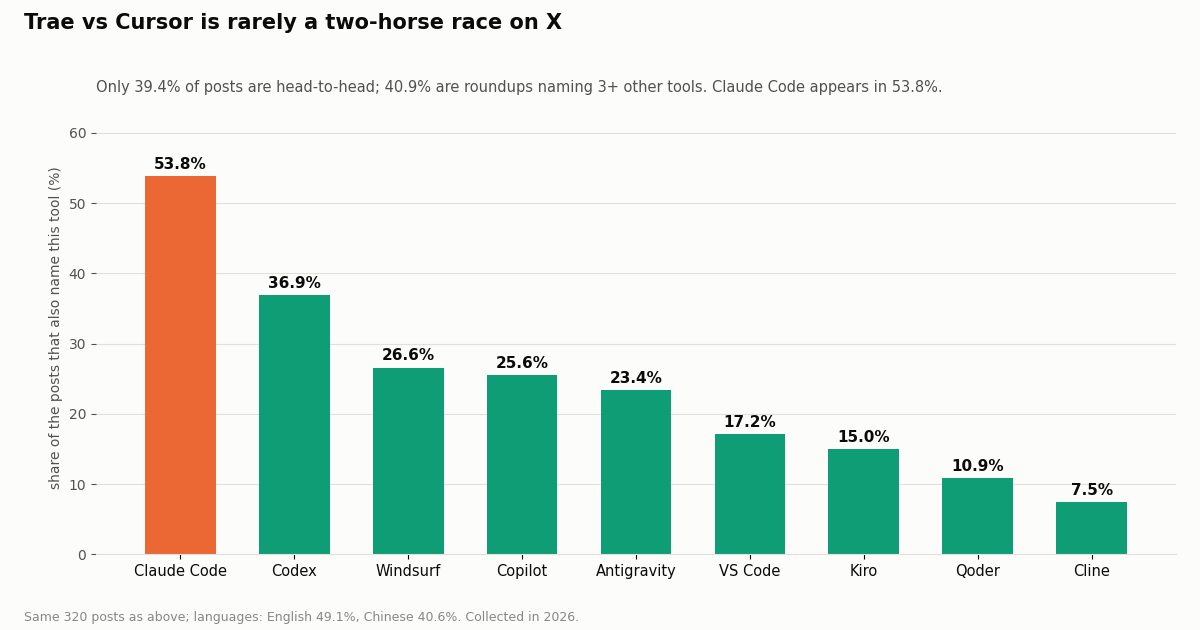
It is rarely just two editors. Only 39.4% of these posts compare Trae and Cursor with at most one other tool; 40.9% are roundups naming three or more others. Claude Code shows up in 53.8% of posts, more often than Codex (36.9%), Windsurf (26.6%), Copilot (25.6%) or Antigravity (23.4%). In practice, people choosing between Trae and Cursor are often also deciding whether they want an editor at all or a terminal agent.
Head-to-head posts lean on price. In the 126 head-to-head posts, price or plans come up 38.1% of the time against 28.4% across all posts, and VS Code drops to 4.0%. When people compare just these two, the question is usually what each one costs for the models they want.
We also read the last 160 posts of each official account, replies included. Both post about once a day (1.04 for @Trae_ai over 154 days, 0.97 for @cursor_ai over 165 days), but they use the account differently.
Trae answers; Cursor ships. 66.2% of @Trae_ai's posts are replies, and its originals are mostly images (74.1%). @cursor_ai replies less (50.0%), puts video on 41.1% of originals, and names models in 28.8% of its own posts against 6.2% for Trae. Engagement per view is closer than reach: a median of 5.06 likes per 1,000 views for Trae and 8.46 for Cursor.
Why this matters for you. If you follow an editor on X for release notes, Cursor's feed carries more launch video; Trae's feed is closer to a support channel. For either account, the same two endpoints we used (/twitter/user/last_tweets and /twitter/tweet/advanced_search) let you watch the changelog and the community reaction from a script or an agent.
How we collected this, what it cost, and which editor to pick
Question. How do the official Trae and Cursor accounts differ on X, and what do people talk about when they name both editors in one post? Accounts and query. @Trae_ai and @cursor_ai (organization accounts) via /twitter/user/info and /twitter/user/last_tweets with replies included, 8 pages each; and /twitter/tweet/advanced_search with trae cursor -filter:retweets and queryType=Latest, 25 pages. Window. The most recent posts at collection time: about 154 and 165 days of timeline, and about 358 days of search results. Collected in 2026. Sample. 320 timeline posts and 320 search posts kept (after the Spanish and Portuguese verb filter). Method. Case-insensitive regex on post text, with English and a few Chinese terms; topics are not exclusive, so shares do not add to 100%.
What the sample cannot show. Regex counts mentions, not sentiment or quality; a post naming a model may praise or complain. Latest search returns what X's search index surfaces, not every post. Neither the follower counts nor the views say which editor writes better code, and we did not benchmark either editor. Privacy. Aggregates only. Search authors are private individuals, so their posts are counted, never quoted or named; the de-identified sample holds no ids, URLs, text or handles.
What it cost. 43 requests returned 820 tweets and 2 profiles, for $0.12 on TwitterAPI.io (15 credits per tweet returned, $0.15 per 1,000 tweets; 18 credits per profile). The same reads on the official X API pay-per-use rate card ($0.005 per post read, $0.010 per user read, docs.x.com/x-api/getting-started/pricing) would cost $4.12, about 33 times more per 1,000 tweets ($5 against $0.15). X's pay-per-use plan is capped at 3 million post reads a month, with Enterprise above that.
Bottom line. Both editors are capable agent IDEs with ladders that start at $0 and top out at $200. Trae gives you more model choice per dollar on its paid plans and a dollar balance that is easy to reason about; Cursor gives you Claude without your own key from $30, a much larger community, and the convenience of keys in environment variables. Whichever you choose, the same mcpServers block connects it to live X data.
"""trae_vs_cursor_on_x.py - compare the official Trae and Cursor accounts on X and measure
what people say when they name both editors in one post.

    pip install requests
    export TWITTERAPI_IO_API_KEY=...     # from the twitterapi.io dashboard
    python trae_vs_cursor_on_x.py
"""
import os
import re
import statistics

import requests

BASE = "https://api.twitterapi.io"
HEADERS = {"X-API-Key": os.environ["TWITTERAPI_IO_API_KEY"]}

TOPICS = {
    "Models": r"claude|sonnet|gpt|gemini|grok|kimi|glm|deepseek|\bmodels?\b",
    "Agents / SOLO": r"\bagents?\b|agentic|\bsolo\b|vibe ?cod",
    "Price / free": r"pric|\$\d|limits?\b|credits?\b|subscription|\bplans?\b|\bfree\b",
    "MCP": r"\bmcp\b",
    "Switching": r"switch|migrat|cancel|went back|back to|uninstall|replac|instead of",
}
# "trae" is also a Spanish / Portuguese verb, so in those languages require an unambiguous product mention.
ROMANCE = {"es", "pt", "ca", "gl", "it"}
PRODUCT = re.compile(r"(?i:@trae_ai|trae\.ai|\btrae\s?(ide|ai|solo|work|code)\b)|\bTRAE\b")


def timeline(user, pages=8):
    """Newest-first posts of one account, replies included (20 per page)."""
    cursor, out = "", []
    for _ in range(pages):
        r = requests.get(f"{BASE}/twitter/user/last_tweets", headers=HEADERS,
                         params={"userName": user, "includeReplies": "true", "cursor": cursor}, timeout=30)
        r.raise_for_status()
        body = r.json()
        out.extend((body.get("data") or {}).get("tweets", []))
        if not body.get("has_next_page") or not body.get("next_cursor"):
            break
        cursor = body["next_cursor"]
    return out


def search(query, pages=25):
    """Latest posts matching an X search query (up to 20 per page)."""
    cursor, out = "", []
    for _ in range(pages):
        r = requests.get(f"{BASE}/twitter/tweet/advanced_search", headers=HEADERS,
                         params={"query": query, "queryType": "Latest", "cursor": cursor}, timeout=30)
        r.raise_for_status()
        body = r.json()
        out.extend(body.get("tweets", []))
        if not body.get("has_next_page") or not body.get("next_cursor"):
            break
        cursor = body["next_cursor"]
    return out


def names_both(t):
    text = t.get("text", "")
    if not (re.search(r"\btrae\b", text, re.I) and re.search(r"\bcursor\b", text, re.I)):
        return False
    return t.get("lang") not in ROMANCE or bool(PRODUCT.search(text))


def share(tweets, rx):
    return 100.0 * sum(1 for t in tweets if re.search(rx, t.get("text", ""), re.I)) / max(len(tweets), 1)


if __name__ == "__main__":
    for user in ("Trae_ai", "cursor_ai"):
        posts = timeline(user)
        originals = [t for t in posts if not t.get("isReply") and not t.get("retweeted_tweet")]
        views = [t.get("viewCount") or 0 for t in originals]
        replies = sum(1 for t in posts if t.get("isReply"))
        print(f"@{user}: {len(posts)} posts, {100 * replies / max(len(posts), 1):.0f}% replies, "
              f"median views per original {statistics.median(views) if views else 0:,.0f}")

    found = [t for t in search("trae cursor -filter:retweets") if names_both(t)]
    print(f"\n{len(found)} recent posts name both Trae and Cursor")
    for label, rx in TOPICS.items():
        print(f"  {label:<14} {share(found, rx):5.1f}%")
    likes = [t.get("likeCount") or 0 for t in found]
    if likes:
        print(f"  median likes   {statistics.median(likes):.0f}")
Researching this?Free starter credits cover end-to-end testing — Google sign-in, no card. Get a key.
Questions readers ask
Is Trae better than Cursor?
Neither is better for everyone. Trae gives every paid plan a dollar balance equal to its price, a wide built-in model list and parallel cloud tasks; Cursor has a larger community, Claude built in from Premium, and Grok and Composer on its $8 Plus plan. Pick on the models you need and your budget.
Is Trae free?
Trae has a Free plan at $0 with a limited Dollar Usage allowance, Auto mode only and limited autocompletion. Trae's docs describe the allowance as monthly while its pricing page FAQ calls it one-time, so treat it as a trial-sized balance. Paid plans are Lite $8 (12 countries only), Pro $20, Pro+ $60 and Ultra $200 monthly.
Which is cheaper, Trae or Cursor?
It depends on the models. Cursor Plus at $8 is the lower entry price if Grok and Composer are enough. For GPT and Gemini models, Trae Pro at $20 includes $20 of usage, while Cursor needs Premium at $30 plus API list price for those models. Both top out at $200.
Does Trae support Claude?
Claude is not in Trae's built-in model list. You can add it as a custom model in Settings > Models with your own Anthropic API key, using Trae's Anthropic Messages format. Cursor includes Claude models from its Premium plan.
Can I reuse my Cursor MCP config in Trae?
Yes for most servers. Both use a top-level mcpServers key with command, args and env for local servers or url and headers for remote ones. Trae's Raw Config (JSON) button opens its mcp.json so you can paste them. Replace any ${env:NAME} values with the literal key, because Trae resolves only ${workspaceFolder}.
Who makes Trae?
Trae is widely reported to be built by ByteDance, and its pricing page sends enterprise buyers to BytePlus. In our sample of posts on X naming both editors, ByteDance or TikTok is named in 14.4% of them.
Does Trae have a student discount?
Not at the moment. Trae's plans FAQ says it does not currently offer a student plan or discount. Refunds are available within 24 hours of purchase if you have not used any usage.
How do I give Trae or Cursor access to live X (Twitter) data?
Add TwitterAPI.io's hosted MCP server (the remote URL shown in the MCP steps above) with your API key as a Bearer token in the Authorization header. Reads bill $0.15 per 1,000 tweets returned and need no X developer account.
Continue
- Trae docs: plans and billing (Free, Lite, Pro, Pro+, Ultra; Dollar Usage)
- Trae docs: On-Demand Usage ($3 billing increments, provider API pricing)
- Trae docs: add MCP servers (mcpServers, .trae/mcp.json, url + headers)
- Trae docs: built-in models, rate tables and custom models
- Cursor docs: models and pricing (plans, pool, third-party models)
- Cursor docs: Model Context Protocol (mcp.json, transports, interpolation)
- Twitter (X) API guide: endpoints, pricing and access
- Cursor pricing explained, plan by plan
- Antigravity vs Cursor: plans, models and MCP compared
- Windsurf vs Cursor compared
- Set up the Twitter (X) MCP server in Cursor
- What an MCP server is and how it works
- TwitterAPI.io pricing: pay per tweet returned
- 01Pipedream Pricing in 2026: Connect Plans, Credits and the Workflows Shutdown
- 02Cloudflare Pay per Crawl: How the HTTP 402 Handshake Works, and What It Means for Twitter (X) Data
- 03ScrapingBee Pricing in 2026: Plans, Credit Costs and Alternatives
- 04Firecrawl Pricing: Plans, Credit Costs and What an X (Twitter) URL Costs
- 05LunarCrush API: What It Returns, What It Costs, and When Raw Twitter (X) Data Is the Better Input
- 06Kiro vs Cursor in 2026: Plans, Spec-Driven vs Agent-First, and X (Twitter) Data via MCP
- 07How to Use Cursor with the Twitter (X) API
- 08Cursor vs Claude Code: Plans, MCP Setup and Headless Runs Compared for Twitter (X) Data Work
Writing about something you built with TwitterAPI.io? Our community rewards program pays API credits for honest tutorials, build logs and videos.
Stop reading. Start building.
Starter credits cover real testing on real data. Google sign-in, no card, no application queue.
Get an API keyAlready building with TwitterAPI.io? Publish an honest tutorial or build log about it and earn up to $200 a month in API credits.