TweetDeck (X Pro) Alternatives in 2026: Columns, Monitoring and Scheduling for Twitter (X)
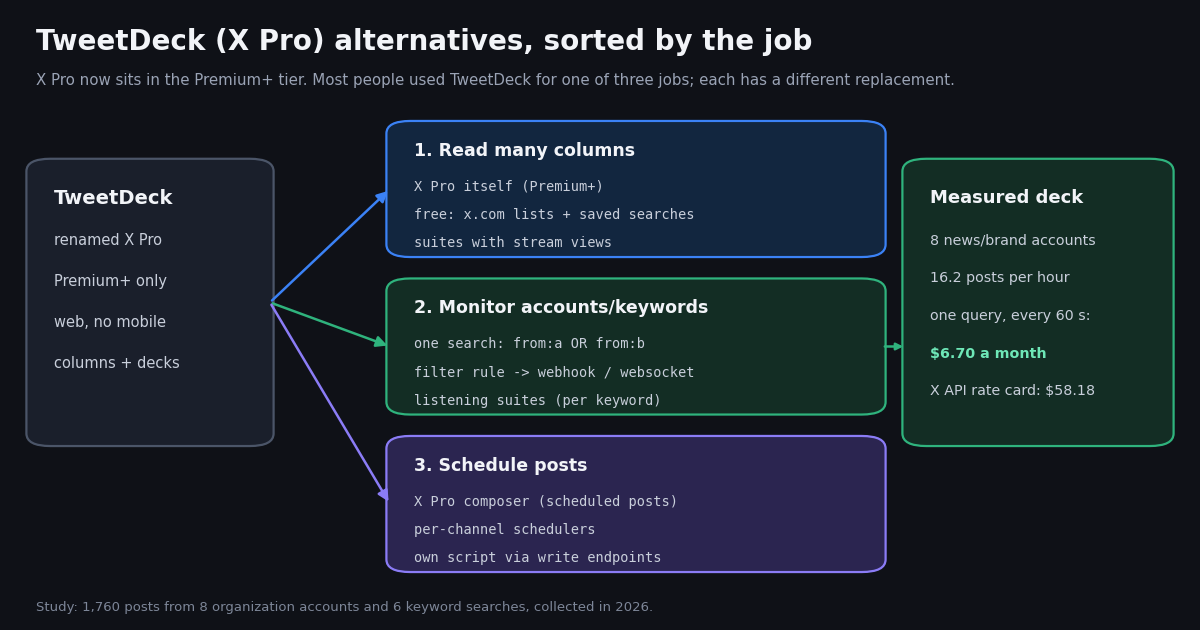
TweetDeck was the free, multi-column Twitter client that newsrooms, social media teams and traders kept open all day. Twitter bought it on May 25, 2011, announced on July 4, 2023 that it would require a verified, paying account, renamed it X Pro, and made it a Premium feature in August 2023. In 2026 the requirement moved up again: X's own Premium help page (help.x.com/en/using-x/x-premium) now lists "Access to X Pro" in the section titled "Only for Premium+ Tier". That is why people search for a TweetDeck alternative: the tool is still there, but the price of a seat changed from free to $40 a month in the US.
This page sorts the alternatives by the job TweetDeck was doing for you, because no single product replaces all three jobs: reading many timelines side by side, monitoring accounts and keywords for things you must not miss, and scheduling posts. For each job we name the realistic options and the prices we could verify on the vendor's own pricing page this year (where a price could not be verified, we say so and leave it out). For the monitoring job we also measured, on 1,760 real posts collected in 2026, how fast typical deck columns move and what refreshing them costs through an API.
We sell an X (Twitter) data API, so read the monitoring section with that in mind: it is one option among several, and the study shows where it is the wrong tool (for example, a single quiet account polled on its own every minute costs more on our per-call minimum than on X's per-post price).
What happened to TweetDeck: X Pro, Premium and now Premium+
The short history, with the dates that matter for anyone still holding an old TweetDeck workflow:
What X Pro is today. X's help article "About X Pro" (help.x.com/en/using-x/x-pro) describes a rebuilt version with a full post composer (threads, media, polls, scheduled posts), advanced search, top or latest ordering per column, column types for profiles, topics, explore, events and bookmarks, and "Decks" that group columns into workspaces. It also says Pro is not available on mobile and needs a viewport over 500 by 500 pixels, and that the Teams feature is still being redesigned.
What it costs. X's Premium help page lists three tiers. On the web in the United States: Basic $3 a month ($32 a year), Premium $8 a month ($84 a year), Premium+ $40 a month ($395 a year), plus tax; prices vary by country. Only Premium+ includes X Pro. A team of five people who each need their own X Pro seat therefore pays five Premium+ subscriptions, five times $40, every month.
How we verified this. help.x.com does not serve automated fetches, so we read the archived copy of both help pages (Internet Archive captures from this year) and cross-checked the Premium+ move against the Wikipedia article. If X changes the tier list again, the help page URL above is the place to check.
Job 1: reading many columns side by side
If what you miss is the screen full of timelines, the honest ranking is short.
X Pro itself (Premium+). The only product that gives you X's own columns, Decks and real-time refresh inside x.com. If you are on X for work every day and one seat is enough, $40 a month buys the original experience with nothing to rebuild.
Free: x.com lists, saved searches and pinned tabs. A list of 20 accounts is a column; a saved advanced search (for example from:Reuters OR from:AP or "your brand" -filter:replies) is another. You lose the side-by-side layout, but browsers can tile several x.com tabs. For a handful of columns this costs nothing and stays inside X's own app.
Social media management suites with stream views. Hootsuite, Sprout Social and similar suites show feeds from several networks in one dashboard and add scheduling, an inbox and reports. They are priced per seat. On their own pricing pages this year: Hootsuite's paid plans start at $99 (Standard), $199 (Professional) and up to $399 (Advanced), with a 14-day trial (hootsuite.com/plans); Sprout Social lists Essentials at $79 per seat a month billed annually ($99 billed monthly), then $199, $299 and $399 per seat, with listening sold as an add-on (sproutsocial.com/pricing). That is more than Premium+ for one person, and worth it only if you also need the other networks, approvals or reporting.
What none of them fix. A column view is only as useful as the column is readable. Our study below found that a column for a broad keyword such as bitcoin or openai moved at more than 600 posts an hour, roughly ten per minute. Nobody reads that in TweetDeck or anywhere else; the column needs a narrower query or an automated filter.
Job 2: monitoring accounts and keywords so nothing is missed
Many teams used TweetDeck as a monitoring screen: a column for the brand name, one for each competitor, one for a newsroom list, with notifications on. That job does not need a human-sized column layout. It needs a query, a refresh schedule and somewhere for matches to land (Slack, email, a dashboard, a database).
Listening suites. Built for brand monitoring with sentiment and reports, priced by keyword and mention volume. Brand24's pricing page (brand24.com/prices) lists Individual at $199 a month billed annually ($249 monthly) for 3 keywords, 2,000 mentions a month and updates every 12 hours; real-time updates start on the Pro plan at $399 a month billed annually ($499 monthly) with 12 keywords and 40,000 mentions. Check the mention cap against our measured rates before buying: a single nvidia column produced about 169,000 posts a month at the rate we measured.
X Pro with notifications. Works for a few accounts a person can watch, and it keeps everything inside X. It does not send anything to other systems.
An API-backed feed (polling). One /twitter/tweet/advanced_search call per column per refresh, with since_time: so only new posts come back. Quiet accounts can share one column: from:Reuters OR from:AP OR from:BBCBreaking is one call, not three. This is what the code on this page does.
An API-backed feed (push). A tweet filter rule (/oapi/tweet_filter/add_rule) stores the column query on our side, checks it at the interval you choose, and pushes matching posts to your webhook URL or a websocket connection. Accounts can also be added to real-time account monitoring through Twitter Stream (/oapi/x_user_stream/add_user_to_monitor_tweet), which covers original posts, quotes, replies and reposts from those accounts.
The rest of this page measures what a monitoring deck actually has to keep up with, then prices the polling version on our API and on the official X API.
Job 3: scheduling posts
TweetDeck's scheduled tweets were the feature many solo users relied on. X Pro's new composer includes scheduled posts, so a Premium+ seat covers it. Outside X:
Per-channel schedulers. Buffer's pricing page (buffer.com/pricing) lists a free plan with up to 3 channels and 10 scheduled posts per channel, Essentials at $5 a month per channel and Team at $10 a month per channel, and lists X / Twitter as a supported channel. Typefully is widely used by X writers for drafting and scheduling threads; its pricing page did not return plan prices to our fetch, so we do not state one (typefully.com/pricing).
A scheduler that dropped X. Hypefury, long a TweetDeck-era favorite for scheduling threads, now answers its own FAQ question "Does Hypefury still support X/Twitter?" with "Nope! Hypefury no longer supports X" (hypefury.com/pricing). Several alternatives lists still recommend it for X; check before you migrate.
Your own script. If you already run code, a post can be published through an authenticated session: one /twitter/user_login_v2 login ($0.10, with a proxy you supply) returns login_cookies, and each /twitter/create_tweet_v2 post is then $0.002. The call acts as that account, so X can rate-limit, lock or suspend it; keep a human pace, expect the session to need a re-login now and then, and note that every HTTP 200 call is billed. Our guide to building a Twitter scheduler covers the full loop.
The study: how fast does a monitoring deck move?
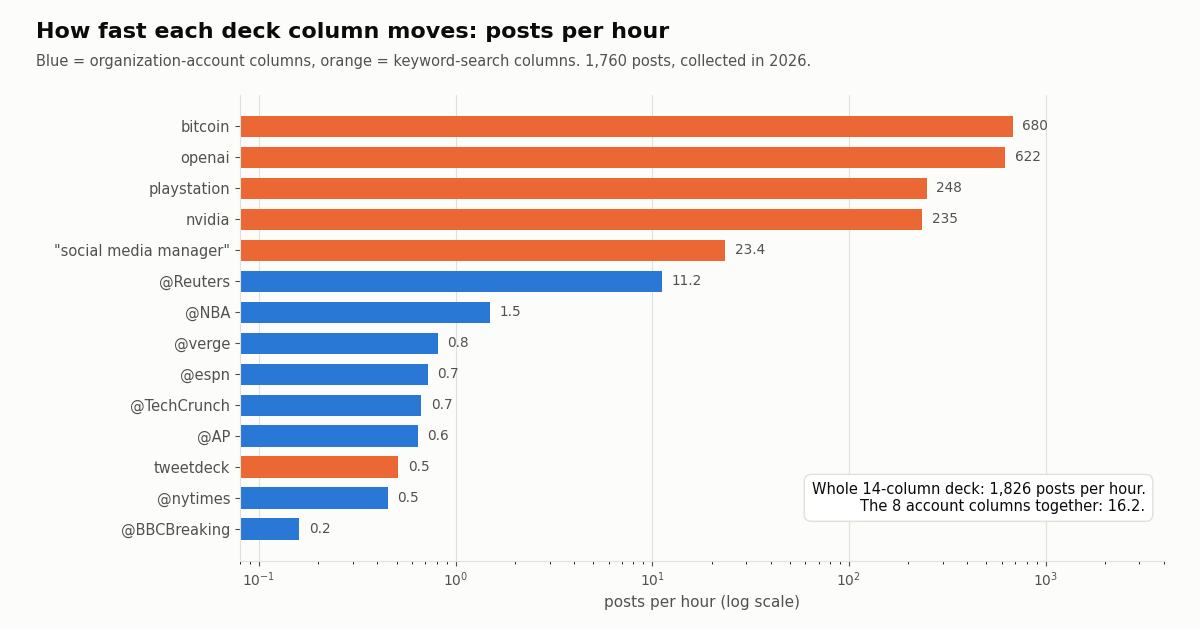
We built a 14-column deck the way a social or comms team would: eight organization accounts (Reuters, AP, BBC Breaking, The New York Times, The Verge, TechCrunch, NBA, ESPN) and six keyword searches (three brand names, a broad market term, a hiring phrase, and tweetdeck itself). For each column we pulled its most recent posts and measured posts per hour over the span the sample covers.
The spread is four orders of magnitude. BBC Breaking posted 0.16 times an hour (about one post every six hours), Reuters 11.21, and the busiest keyword column 680. The eight account columns together produced 16.2 posts an hour; the whole 14-column deck about 1,826, or 1,314,634 a month.
What that means for a TweetDeck replacement. Account columns are readable by a person; most refreshes find nothing. Broad keyword columns are not readable at all, which is where filters (language, minimum likes, no replies, specific phrases) or an automated rule earn their keep. The "social media manager" column, at about 23 an hour, sits in between: a person can skim it, a script can triage it.
What refreshing the deck costs per month: our API vs the official X API
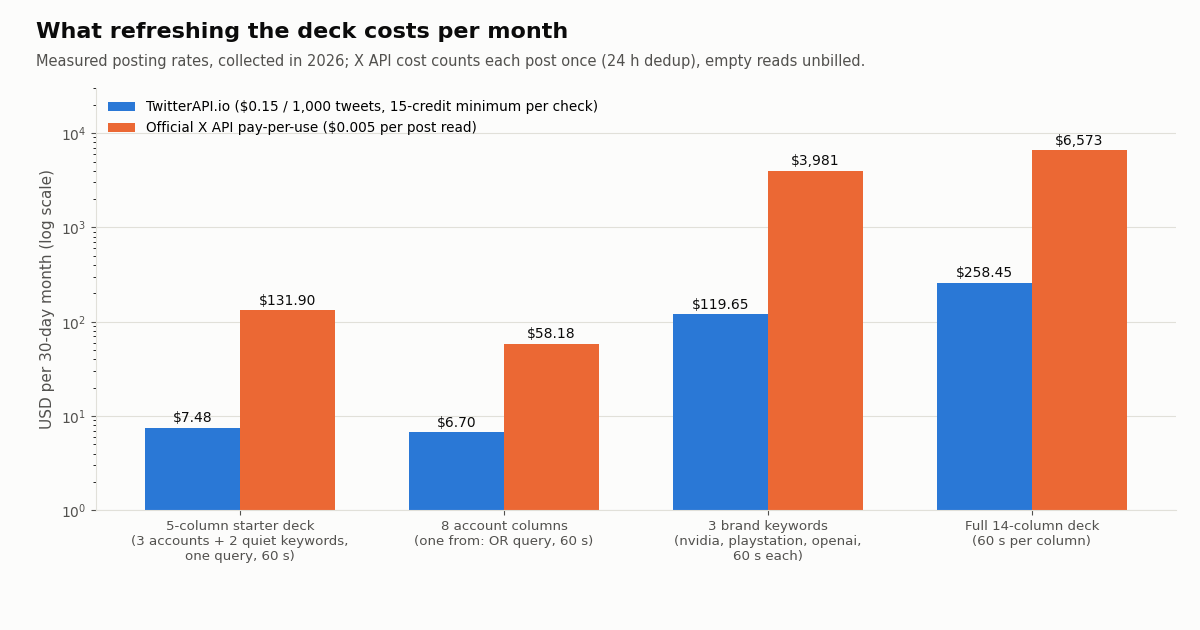
Prices used: TwitterAPI.io charges 15 credits per tweet returned, $0.15 per 1,000 tweets, with a 15-credit minimum per request, so a refresh that finds nothing costs $0.00015 and a full 20-post page costs $0.003. The official X API pay-per-use rate card (docs.x.com/x-api/getting-started/pricing) charges $0.005 per post read, deduplicates the same post within a 24-hour UTC window, and caps pay-per-usage at 3 million post reads a month. That is $5 versus $0.15 per 1,000 posts, about 33 times. Empty reads return no post, so we count them as free on X's side.
Where the official API is the better price. Polling a quiet account on its own every 60 seconds costs the minimum on almost every call: 99.7% of refreshes for BBC Breaking find nothing, so that one column costs $6.48 a month on our API (the $6.48 polling floor) against $0.58 on X's per-post price. The fix is the one in the table: fold quiet accounts into one search, or poll them less often. Eight accounts in one search cost $6.70, barely above the floor of a single column.
Where the per-post price dominates. Busy keyword columns return posts on nearly every call, so the bill tracks volume: the three brand keywords at about 796,118 posts a month cost $119.65 on our API and $3,980.58 on X's rate card. The full deck, at 1,314,634 posts a month, stays under X's 3 million pay-per-use cap but costs $6,573.14 there against $258.45 on ours.
Compared with a seat. For one person who only reads, X Pro at $40 a month is simpler than any of this. The API route makes sense when the deck has to feed something other than a human: alerts in Slack, a shared dashboard for a team without buying a Premium+ seat each, or an archive. See the pricing page for plans; subscriptions start at $29 a month, and purchased credits never expire.
Build the monitoring deck: poll columns, or push them with a filter rule
The script in the code block at the end of this page is a terminal deck: a dictionary of named columns, each a search query, refreshed every 60 seconds with since_time: and a seen-ids set so a post is printed once. Quiet accounts share a column. Replace the print with a Slack or email call and it becomes an alert feed.
If you would rather not run a loop, the same column can live on our side as a tweet filter rule. The rule's value uses the same search syntax (up to 255 characters, so roughly 10 to 12 from: handles per rule), interval_seconds sets how often it is checked (60 if omitted), and a new rule is inactive until you call update_rule with is_effect: 1. Matches are delivered to the webhook URL set in the dashboard or over a websocket connection.
Which to pick. Polling is easiest to start, runs anywhere, and makes the cost of every refresh visible. A filter rule removes the loop and the state file and suits columns you want delivered somewhere permanently. Both read public posts with no X account and no X developer approval.
"""Turn one deck column into a push feed: a tweet filter rule that sends matches
to your webhook URL (set it in the twitterapi.io dashboard) or a websocket.

    pip install requests
    export TWITTERAPI_IO_API_KEY=...
"""
import os

import requests

API = "https://api.twitterapi.io"
H = {"X-API-Key": os.environ["TWITTERAPI_IO_API_KEY"]}


def add_column_rule(tag, value, interval_seconds=60):
    """value uses advanced-search syntax, max 255 characters."""
    r = requests.post(f"{API}/oapi/tweet_filter/add_rule", headers=H,
                      json={"tag": tag, "value": value, "interval_seconds": interval_seconds}, timeout=30)
    r.raise_for_status()
    body = r.json()
    if body.get("status") == "error":
        raise RuntimeError(body.get("msg"))
    rule_id = body["rule_id"]
    # New rules start inactive: send every field again with is_effect=1 to switch it on
    r = requests.post(f"{API}/oapi/tweet_filter/update_rule", headers=H,
                      json={"rule_id": rule_id, "tag": tag, "value": value,
                            "interval_seconds": interval_seconds, "is_effect": 1}, timeout=30)
    r.raise_for_status()
    return rule_id


def list_rules():
    r = requests.get(f"{API}/oapi/tweet_filter/get_rules", headers=H, timeout=30)
    r.raise_for_status()
    return r.json()


if __name__ == "__main__":
    rid = add_column_rule("newsroom", "from:Reuters OR from:AP OR from:BBCBreaking OR from:nytimes")
    print("active rule", rid)
    print(list_rules())
What people say about TweetDeck now
The tweetdeck keyword column was itself part of the study. It was the quietest search we ran: 160 posts covered about 13 days, 0.51 an hour. 46.2% were in English and 34.4% in Japanese, a sign of how much of the remaining TweetDeck audience is in Japan. 11.9% of the posts also named X Pro and 10.6% mentioned Premium, paying or a subscription; only 1.2% used the words alternative or replacement.
About half (51.2%) came from accounts with fewer than 1,000 followers, so this is everyday users rather than marketers talking. We report aggregates only and did not store or quote any of these posts.
Reading the signal. People still say TweetDeck years after the rename, and many of them are discussing whether it is worth paying for. That matches the search data behind this page: the brand term is searched far more than X Pro.
How we collected this
Question. What would a multi-column TweetDeck or X Pro style monitoring deck have to keep up with, and what would refreshing it cost per month through an API?
Accounts and queries. Eight public organization accounts (Reuters, AP, BBCBreaking, nytimes, verge, TechCrunch, NBA, espn) through /twitter/user/last_tweets (replies excluded, up to 100 posts each), and six keyword searches (tweetdeck, nvidia, playstation, openai, bitcoin, "social media manager") through /twitter/tweet/advanced_search with queryType=Latest (up to 160 posts each).
Window and size. The most recent posts of each column at collection time, collected in 2026: 1,760 posts in 88 requests, about $0.26 of API credit. Each column's rate is its post count divided by the hours between its oldest and newest post.
Cost model. TwitterAPI.io per column per month = 43,200 one-minute refreshes x (posts per minute + chance of an empty refresh) x $0.00015, treating arrivals as random (Poisson); the observed share of empty minutes matched the model within a point for every account column. Official X API = posts per month x $0.005.
What the sample cannot show. The busy keyword rates come from windows of 15 to 45 minutes at one time of day, so a monthly figure extrapolates them; news and sports accounts swing with events. We did not measure how many posts a filtered query (language, likes, no replies) would drop. X Pro's own refresh behavior and limits are not public, so we do not compare against it.
Privacy. Aggregates only. Organization timelines are stored compressed in our study folder; keyword-search pages contain private individuals, so those raw pages were kept out of the repository and only de-identified rows (hour, language, media flag, follower band) were saved.
"""x_deck.py - a terminal "deck": several columns (accounts or keyword searches),
each refreshed every 60 s, new posts printed under their column name.

    pip install requests
    export TWITTERAPI_IO_API_KEY=...      # twitterapi.io dashboard; reads need no X account
    python x_deck.py                      # Ctrl+C to stop

Cost model: one advanced_search call per column per pass. A call that returns nothing
costs the 15-credit minimum ($0.00015); each post returned costs $0.00015.
Fold quiet accounts into ONE column ("from:a OR from:b ...") so they share one call.
"""
import os
import time
from datetime import datetime

import requests

API = "https://api.twitterapi.io"
HEADERS = {"X-API-Key": os.environ["TWITTERAPI_IO_API_KEY"]}
EVERY = 60          # seconds between passes
MAX_PAGES = 3       # safety cap per column per pass (one page = up to 20 posts = $0.003)

COLUMNS = {
    "Newsroom": "from:Reuters OR from:AP OR from:BBCBreaking OR from:nytimes",
    "Tech press": "from:verge OR from:TechCrunch",
    "Brand": '"tweetdeck" OR "x pro" -filter:retweets',
    "Hiring": '"social media manager" lang:en -filter:replies',
}


def parse_time(s):
    # createdAt looks like "Mon Oct 19 21:36:44 +0000 2026", not ISO 8601
    return datetime.strptime(s, "%a %b %d %H:%M:%S %z %Y")


def fetch(query, since_time):
    """Posts newer than since_time for one column, newest first."""
    tweets, cursor = [], None
    for _ in range(MAX_PAGES):
        params = {"query": f"({query}) since_time:{since_time}", "queryType": "Latest"}
        if cursor:
            params["cursor"] = cursor
        r = requests.get(f"{API}/twitter/tweet/advanced_search", headers=HEADERS, params=params, timeout=30)
        if r.status_code == 429:                       # over your rate limit: wait and retry next pass
            time.sleep(5)
            break
        r.raise_for_status()
        body = r.json()
        page = body.get("tweets") or []
        tweets.extend(page)
        if not page or not body.get("has_next_page") or not body.get("next_cursor"):
            break
        cursor = body["next_cursor"]
    return tweets


def main():
    since = {name: int(time.time()) - 900 for name in COLUMNS}   # first pass: the last 15 minutes
    seen = set()
    while True:
        for name, query in COLUMNS.items():
            started = int(time.time())
            new = [t for t in fetch(query, since[name] - 30) if t["id"] not in seen]   # 30 s overlap
            since[name] = started
            for t in sorted(new, key=lambda t: parse_time(t["createdAt"])):
                seen.add(t["id"])
                who = t["author"]["userName"]
                text = " ".join(t["text"].split())[:180]
                print(f"[{name}] @{who}: {text}  ({t['likeCount']} likes)  {t['url']}")
        if len(seen) > 50000:
            seen = set(list(seen)[-10000:])
        time.sleep(EVERY)


if __name__ == "__main__":
    main()
Questions readers ask
Is TweetDeck still free?
No. TweetDeck became X Pro in 2023 and required a paid, verified account from August 2023. X's Premium help page now lists access to X Pro only under the Premium+ tier, which costs $40 a month or $395 a year on the web in the US (prices vary by country). Wikipedia dates the move from Premium to Premium+ to March 26, 2026.
How much does X Pro cost?
X Pro is not sold separately; it comes with X Premium+. X's Premium help page lists the US web price of Premium+ as $40 a month or $395 a year, plus tax. The cheaper Basic ($3) and Premium ($8) tiers do not include X Pro.
What is the best free TweetDeck alternative?
For reading, x.com itself: put the accounts you follow closely into lists and save advanced searches for brands or topics, then open them in tiled browser tabs. For scheduling, Buffer's free plan covers up to 3 channels with 10 scheduled posts each. For monitoring, a script on an API costs money but very little for quiet accounts; new accounts get up to $1 of free credits (at most 100,000 credits, no card, one per person or network, expiring after 31 days) after passing an automatic bot check.
Does X Pro work on mobile?
No. X's About X Pro help article says Pro is not available on mobile and needs a browser window larger than 500 by 500 pixels.
Does Hypefury still work with Twitter (X)?
Not according to Hypefury. Its pricing page FAQ answers "Does Hypefury still support X/Twitter?" with "Nope! Hypefury no longer supports X" and lists Bluesky, Threads, LinkedIn, Instagram and TikTok instead.
Can I monitor Twitter keywords without X Pro?
Yes. Any tool that runs an X search on a schedule does it: a listening suite, or a script that calls an API search with since_time so only new posts return. On TwitterAPI.io the search endpoint is /twitter/tweet/advanced_search, and a filter rule (/oapi/tweet_filter/add_rule) can push matches to your webhook instead. No X account is needed for reads.
How many accounts can I watch in one column or rule?
A search column is limited by query length, not by a fixed account count. A tweet filter rule's value can be up to 255 characters, about 10 to 12 from: handles joined with OR; for more accounts, split them across rules or use real-time account monitoring through Twitter Stream.
Is polling an API every minute expensive?
It depends on how busy the column is. On TwitterAPI.io a refresh that finds nothing costs the $0.00015 minimum, so one column every 60 seconds has a floor of $6.48 a month and every 5 minutes $1.30. In our study, eight news and brand accounts combined into one search cost $6.70 a month at 60 seconds; busy keyword columns cost more because each post returned is billed.
Continue
- X Help Center: About X Pro (formerly TweetDeck): features, Decks, no mobile, 500 px viewport
- X Help Center: X Premium tiers, Access to X Pro under Premium+, price table by country
- Wikipedia: TweetDeck history (2011 acquisition, July 2023 verification notice, X Pro rename, March 26, 2026 Premium+ move)
- X API pay-per-use pricing: $0.005 per post read, 24 h dedup, 3M post-read cap
- TwitterAPI.io docs: add a webhook/websocket tweet filter rule
- TwitterAPI.io docs: pricing units and the per-request minimum
- X (Twitter) API overview: endpoints, pricing and access
- Build a Twitter (X) post scheduler with an API
- Twitter (X) tools for research, monitoring and growth
- Twitter (X) monitoring: accounts, keywords and alerts
- Developer guide to Twitter keyword alerts
- Twitter Stream: real-time account and keyword monitoring
- TwitterAPI.io pricing and plans
- 01X Radar Explained: Twitter (X) Keyword Monitoring, Tiers, Limits and an API Alternative
- 02Twitonomy Review: What the Twitter (X) Analytics Tool Still Does, and an API Alternative
- 03llms.txt for API docs, measured on two Twitter (X) API doc sets
- 04Botometer in 2026: What It Scored, Its Status, and a Live Alternative for Twitter (X)
- 05Grok Connectors: Add a Custom MCP Connector for Live Twitter (X) Data
- 06Apify Twitter (X) Scraper — A Developer's Alternative Comparison
- 07TweetStats Alternative: How to Graph Your Tweet Stats Now That TweetStats Is Gone
- 08xcancel Not Working? The xcancel Alternatives That Still Work
Stop reading. Start building.
Starter credits cover real testing on real data. Google sign-in, no card, no application queue.
Get an API key