Twitonomy Review: What the Twitter (X) Analytics Tool Still Does, and an API Alternative
Twitonomy was, for a long stretch of Twitter's history, the free analytics dashboard people recommended when someone asked how to see an account's tweet stats, its most-used hashtags and who it talks to. Search for it today and the results are a mix of old blog reviews, software directory listings that may be out of date, and at least one vendor post claiming it shut down. None of that tells you what the product does right now.
So we checked first-hand. We loaded twitonomy.com, its sign-in page, its terms of service and privacy policy, and the app store listings it links to, and wrote down exactly what each one says. Then we rebuilt the report Twitonomy became known for (profile stats, tweet activity, post-type split, hashtags, mentions, engagement and best time to post) from raw X data for six organization accounts, and published the numbers, the charts and the code. This page is the result: what Twitonomy still does, where it stops, and the API route for each report if you need more than it offers.
What Twitonomy still does today (checked first-hand)
We fetched each public page of twitonomy.com this session and read it line by line. Here is what is on the record, with no guessing about the parts behind the login.
The homepage pitch has narrowed to follower and list management. The homepage headline is still "Twitter #analytics and much more", but the feature list underneath is about people, not tweets: browse, search and filter the accounts you follow and that follow you; a Followers Report and a Following Report; find people you follow who do not follow back and followers you do not follow back; locate followers and followings on a world map; track follower growth over time; monitor users on your favorite lists; browse and edit list membership; and use other users' lists to find people to engage with. Hashtag reports, mention reports and per-tweet analytics are not on the public feature list anymore.
Export is one click, to Excel. The homepage promises export and backup of followers, following, list members and subscribers "in just one click", with download to Excel. The terms add an important limit: the export features ("Download & Print", "Download") support Latin characters only, so names and bios in Japanese, Arabic, Korean, Cyrillic or any other non-Latin script will not export cleanly.
It is a small, long-running company. The footer reads copyright 2026 Diginomy Pty Ltd. The terms state Twitonomy is not affiliated with Twitter. A developer subdomain that still shows up in search results (dev.twitonomy.com) served an expired TLS certificate when we requested it.
The mobile apps appear to be gone. The homepage still says "Now available on iPhone and Android" and links to an App Store listing and a Google Play listing. Both returned HTTP 404 (not found) when we requested them this session. We could not confirm from Diginomy when or why they were removed.
What we could not verify. We did not sign in with an X account, because the sign-in grants write access to that account (next section). That means we cannot tell you from first-hand use how much tweet history the logged-in reports reach, what the in-app export caps are, or the current Premium price. Treat anything you read elsewhere on those three points as unverified unless it comes from inside the product.
Sign-in, free vs Premium, and the API limits behind it
Sign-in is OAuth 2.0 with your X account. The sign-in page says "Get started, sign in with your Twitter account" and notes you will sign in with whichever X account your browser is currently logged in to. The authorize link it builds requests these scopes: users.read, tweet.read, tweet.write, follows.read, follows.write, mute.read, mute.write, like.read, like.write, list.read, list.write, block.read, block.write and offline.access. In plain words: the app asks to read your account and also to post, follow and unfollow, like, edit lists, mute and block on your behalf, and to keep that access while you are away (offline.access). That is consistent with its unfollow and list-management features, but it is a much bigger grant than an analytics reader needs. The privacy policy confirms the connection gives access to your timeline, followers and following lists, lists, profile details and account settings, and not to your Direct Messages or password.
The sign-in page shows a standing outage notice. Under the button it reads: "Twitter is currently experiencing issues. If you cannot sign in to your Twitonomy account or if it does not work properly, please try again later."
Free vs Premium, from the terms of service. The terms describe two levels. The free version shows ads (you may not block them) and is limited to one free account per person or legal entity. Twitonomy Premium is billed in advance, monthly or yearly, is prepaid and non-transferable, and has no refunds, including for partial months. Cancellation runs through the Premium subscription section of the account page or by email. The public pages we could reach do not print a Premium price, so we do not quote one.
The data ceiling is the X API tier Twitonomy pays for. The terms say Twitonomy "uses data provided by and is subject to the limits of the Twitter API (v2 Basic)" and that application and individual rate limits apply. Whatever the logged-in reports show, they can only reach as far as that API access allows, shared across every Twitonomy user. X's current developer pricing page (docs.x.com/x-api/getting-started/pricing) now describes pay-per-usage pricing (for example $0.005 per post read) capped at 3 million post reads a month, with Enterprise above that.
Twitonomy vs an API-built report: where each one fits
Twitonomy and a data API are different kinds of product, so the comparison is about fit rather than a winner on every line. Twitonomy is a point-and-click dashboard for your own account. An API gives you the raw posts and profiles behind such a dashboard for any public account, and you decide what to compute and where to keep it.
Where an API-built report wins. It works on any public account without anyone's X login, so you can benchmark competitors, clients or a list of 50 brands, not just yourself. It returns every field on every post, so the report is whatever you can compute, not a fixed set of screens. It keeps the history you collect: run it weekly and you own a time series that no dashboard can take away. And it exports text in any script, because the CSV is yours.
One neutral note. If you only want to clean up your own following list (find non-followers, unfollow inactive accounts, tidy your lists) and you never want to touch code, Twitonomy's free tier is built exactly for that, and an API does not replace a ready-made unfollow screen. The write actions that kind of clean-up needs also exist on the API side, but they run through a logged-in session of your own account, which is a different trade-off (covered in the FAQ).
The Twitonomy-style profile report, rebuilt for six organization accounts
To show what the API route produces, we ran the classic profile report for six well-known organization accounts: @NASA, @nytimes, @github, @vercel, @Cloudflare and @stripe. For each one we pulled the profile once with /twitter/user/info and up to nine pages (about 180 posts) of the timeline with /twitter/user/last_tweets and includeReplies=true, newest first. That gave 980 posts in total, collected in 2026. @vercel's timeline ended after 80 posts (the endpoint reported no further page), which covered 181.6 days; every other account filled all nine pages.
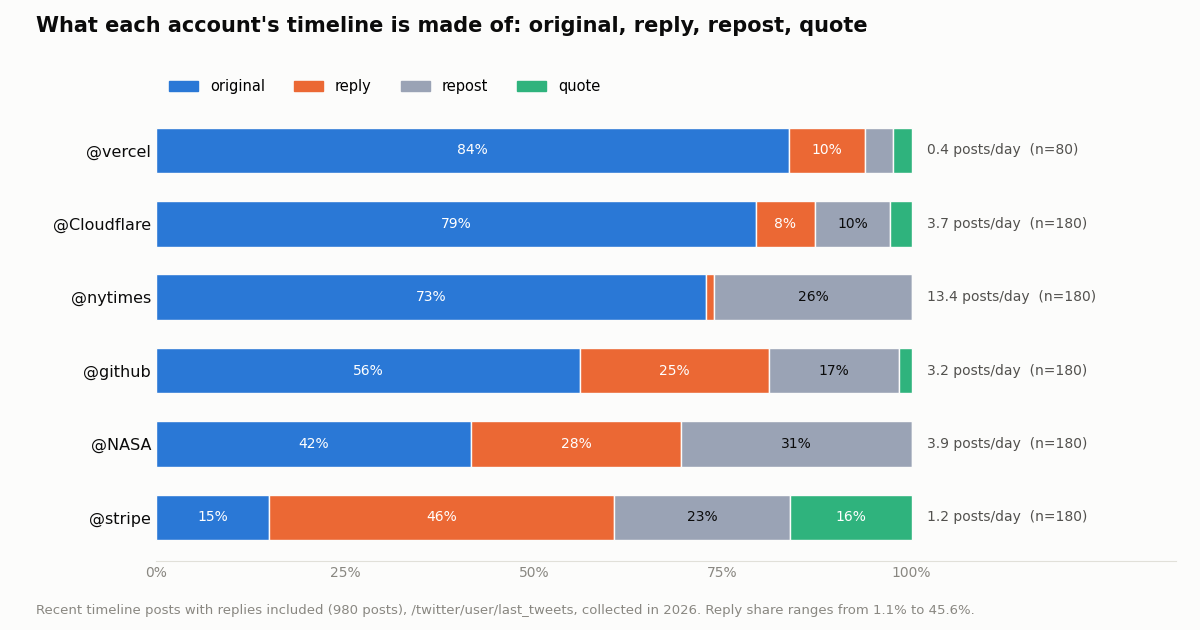
Profile stats and tweet activity. Posts per day is posts in the sample divided by the days between the oldest and newest post. The reply and repost shares come from each post's isReply flag and whether it carries a retweeted_tweet. Median engagement per post is likes + reposts + replies + quotes on the account's own posts (reposts excluded, since their counts belong to someone else).
The spread is the point of a profile report. @nytimes posted 13.4 times a day and almost never replied (1.1%), a broadcast account. @stripe posted 1.2 times a day but 45.6% of that was replies and another 16.1% quotes; only 15.0% were standalone posts, a conversation account. @NASA reposted heavily (30.6% of its timeline, mostly from its own mission accounts). Those are three different social strategies, and a follower count alone would not show any of them.
Hashtags, mentions and engagement: the reports Twitonomy no longer lists
Hashtag and mention reports do not need a separate endpoint. Every post object carries entities.hashtags and entities.user_mentions, so counting them across a timeline is a few lines of code. We counted them on the accounts' own posts (reposts excluded) and left out self-mentions. Mentioned accounts are named only when they are organizations or public figures with at least 100,000 followers; smaller accounts are counted but not named.
Hashtags turned out to be a campaign tool, not a habit. @Cloudflare put a hashtag on 53.7% of its posts, almost all of them event tags (#BirthdayWeek 49 times, #CloudflareConnect 29); @github used one on 10.7% of posts, led by #GitHubUniverse; @NASA, @nytimes, @vercel and @stripe used none at all in the sample. The mention table reads like an org chart: @NASA mentions @Space_Station 65 times, @nytimes mentions @TheAthletic 37 times, @github mentions @code (the VS Code account) 14 times. Two top spots went to smaller accounts we do not name: @stripe's most-mentioned account (8 mentions) and @Cloudflare's (5), so the table shows their top named mention instead.
Engagement needs views to be comparable. Raw likes favor big accounts, so a fair report divides by reach. Every post carries viewCount, which gives engagement per 1,000 views:
By that measure @Cloudflare (5.8) and @stripe (4.9) out-engage @NASA (3.6) and @nytimes (1.7) per view, even though NASA's median post is seen 666,355 times. To measure the same ratio for a single post or a single account by hand, the engagement rate calculator on this site does it in the browser.
import os, requests

BASE = "https://api.twitterapi.io"
HEADERS = {"X-API-Key": os.environ["TWITTERAPI_IO_API_KEY"]}

def mentions(user, pages=5):
    """Posts that mention @user, newest first, 20 per page."""
    out, cursor = [], ""
    for _ in range(pages):
        r = requests.get(f"{BASE}/twitter/user/mentions",
                         headers=HEADERS, params={"userName": user, "cursor": cursor}, timeout=30)
        body = r.json()
        out += body.get("tweets", [])
        if not body.get("has_next_page"):
            break
        cursor = body.get("next_cursor", "")
    return out

def hashtag_window(tag, since_unix, until_unix, pages=10):
    """Every post with #tag in a time window (Latest order), for a hashtag report."""
    q = f"#{tag} since_time:{since_unix} until_time:{until_unix}"
    out, cursor = [], ""
    for _ in range(pages):
        r = requests.get(f"{BASE}/twitter/tweet/advanced_search", headers=HEADERS,
                         params={"query": q, "queryType": "Latest", "cursor": cursor}, timeout=30)
        body = r.json()
        out += body.get("tweets", [])
        if not body.get("has_next_page"):
            break
        cursor = body.get("next_cursor", "")
    return out
Best time to post: hour-of-day activity and what it earned
Twitonomy-style dashboards show when an account posts. That is half the answer; the other half is whether posts at that hour do better. We did both from the same data: createdAt gives the hour, the counts give the engagement.
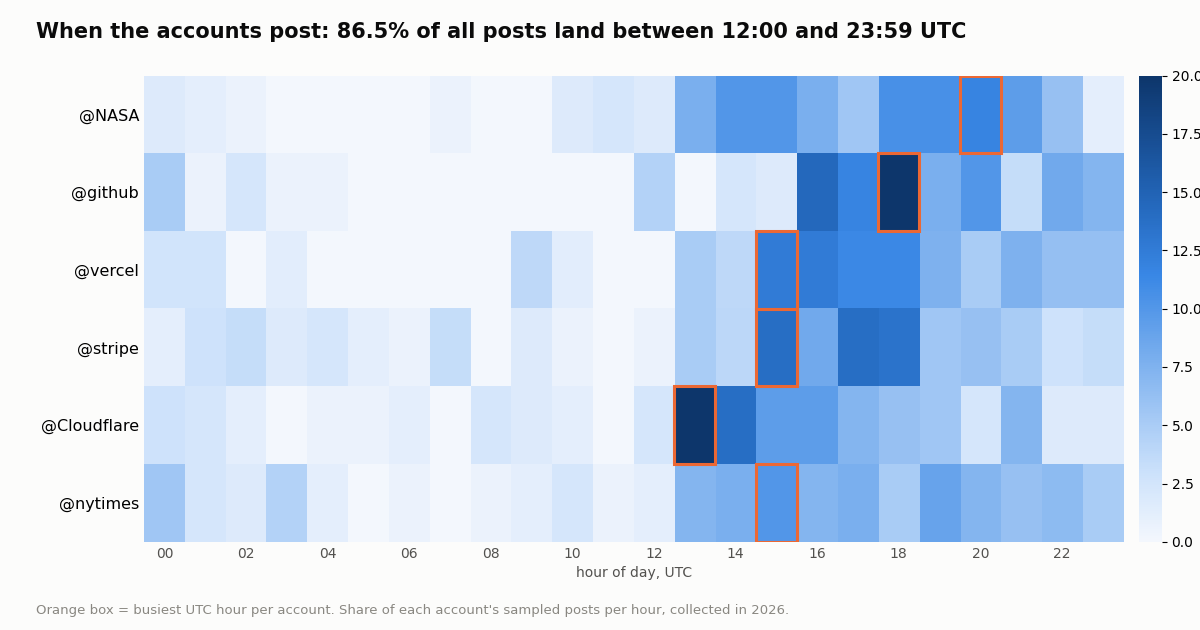
When they post. 86.5% of all 980 posts landed between 12:00 and 23:59 UTC, the US working day. The busiest hour across all six accounts was 18:00 UTC. Per account: @Cloudflare peaks at 13:00 UTC, @vercel, @stripe and @nytimes at 15:00, @github at 18:00 and @NASA at 20:00.
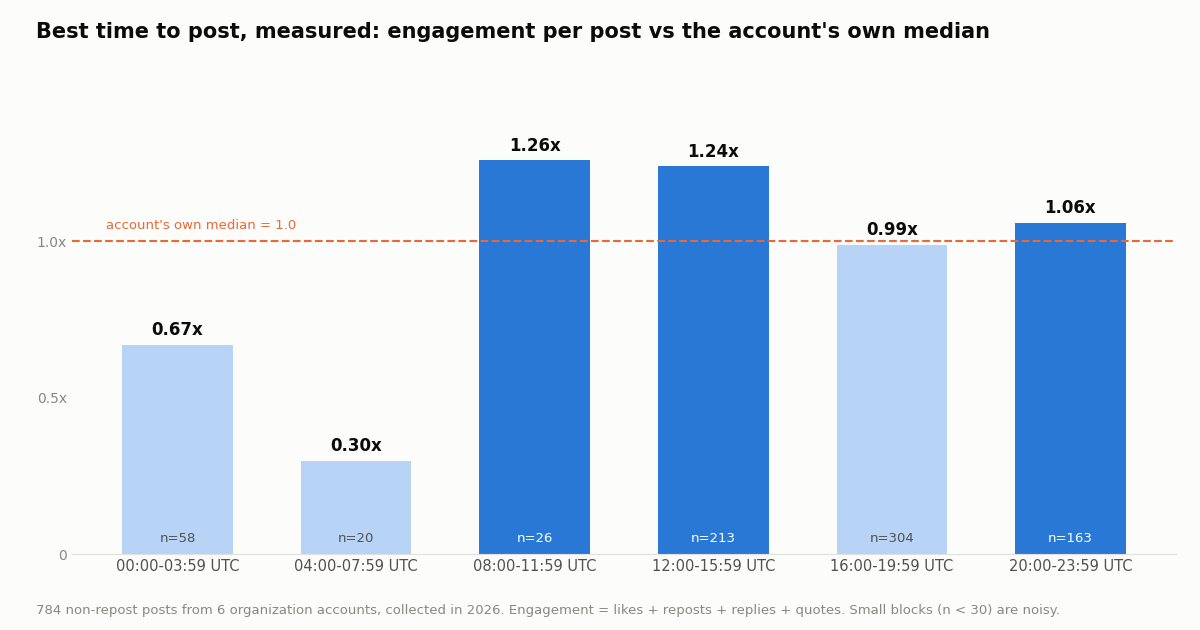
What it earned. Big accounts would swamp a pooled average, so we scored each post against its own account's median engagement (1.0x = a normal post for that account) and took the median per four-hour UTC block.
The busiest block (16:00 to 19:59 UTC, 304 posts) performed at 0.99x, while the block before it (12:00 to 15:59, 213 posts) earned 1.24x. Late-night UTC posts did worst (0.67x and 0.3x). The 08:00 to 11:59 block scored 1.26x but on only 26 posts, too few to trust. For six organization accounts that is a reasonable rule of thumb (post in the US morning, not late at night), but the real lesson is the method: run the same script on your own account and your own competitors, because a best time is specific to an audience.
Each Twitonomy report, mapped to an endpoint and a price
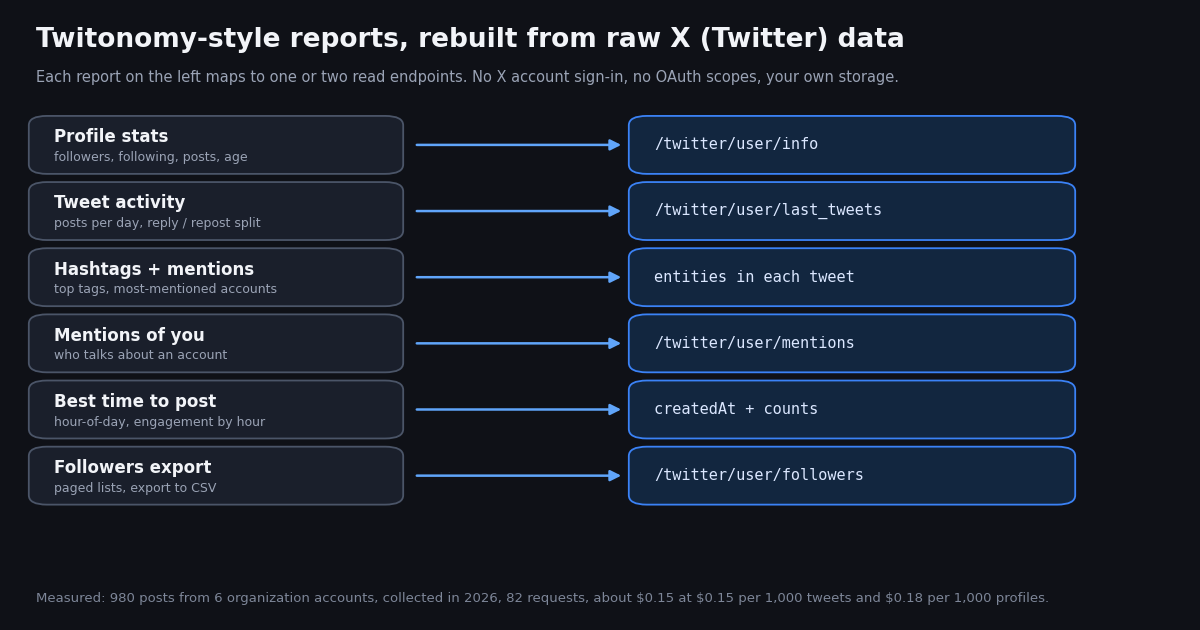
Every report in the Twitonomy family comes from a handful of read endpoints. None of them needs an X account or OAuth; you send an X-API-Key header and pay only for the data returned.
What our study cost. 82 requests: 32 profile lookups (the six accounts plus the most-mentioned handles, checked to decide which could be named), 50 timeline pages returning 980 posts. That is 15,291 credits, about $0.15 at $1 = 100,000 credits. One full account report (profile + 180 posts) is 2,718 credits, about $0.027.
Against the official X API. X's pay-per-usage rate card (docs.x.com/x-api/getting-started/pricing) charges $0.005 per post read and $0.010 per user read. The same 180-post report there is 180 x $0.005 + $0.010 = $0.91 per account, against about $0.027; per 1,000 tweets it is $5 against $0.15, about 33x. The X API also requires a developer account and app, and its pay-per-usage plan is capped at 3 million post reads a month.
New accounts that pass the automatic bot check get up to $1 of free credits (at most 100,000 credits, no card, one per person or network, expiring after 31 days), enough to run this report for dozens of accounts. Purchased credits never expire; subscriptions start at Starter $29 a month for teams that want a monthly plan, and the rate limit is 0.2 requests per second before the first payment and 20 once paid.
Exporting followers without the Latin-only limit
Export is the Twitonomy feature people still mention most, so it deserves its own answer. /twitter/user/followers returns about 200 full profiles per page, with screen_name, name, description, location, created_at, followers_count, following_count, statuses_count and more, and a next_cursor for the next page. Writing them to CSV with Python's csv module keeps every character, whatever the script, because the file is UTF-8.
Followers and followings bill per user returned (1 to 3 credits per user, depending on the page tier), so a 10,000-follower export is a few dollars at most. For a single list without code, the follow-list export tool on this site does the same job in the browser.
A note on what to do with the export. A follower file is personal data about real people. Keep it for analysis (audience size, location mix, account ages, signs of automation such as default profiles or zero posts), not for bulk outreach.
import csv, os, requests

BASE = "https://api.twitterapi.io"
HEADERS = {"X-API-Key": os.environ["TWITTERAPI_IO_API_KEY"]}

def export_followers(user, max_pages=50):
    """Write a follower list to CSV, about 200 profiles per page, following next_cursor."""
    cursor, rows = "", 0
    with open(f"{user}_followers.csv", "w", newline="") as f:
        w = csv.writer(f)
        w.writerow(["screen_name", "name", "followers_count", "following_count",
                    "statuses_count", "created_at", "location", "description"])
        for _ in range(max_pages):
            r = requests.get(f"{BASE}/twitter/user/followers", headers=HEADERS,
                             params={"userName": user, "cursor": cursor}, timeout=30)
            body = r.json()
            for u in body.get("followers", []):
                w.writerow([u["screen_name"], u["name"], u["followers_count"], u["following_count"],
                            u["statuses_count"], u["created_at"], u.get("location", ""),
                            u.get("description", "")])
                rows += 1
            if not body.get("has_next_page"):
                break
            cursor = body.get("next_cursor", "")
    return rows
How we collected this
Question. Can a Twitonomy-style profile report (profile stats, posts per day, post-type split, top hashtags, most-mentioned accounts, engagement per post, hour-of-day activity) be rebuilt from raw API data, and what does it look like and cost?
Accounts. Six public organization accounts: @NASA, @nytimes, @github, @vercel, @Cloudflare, @stripe.
Window and sample. The most recent posts of each account at collection time, replies included: up to nine pages of /twitter/user/last_tweets (about 180 posts) per account, 980 posts in total (784 excluding reposts), plus one /twitter/user/info call per account. Collected in 2026. Per-account windows differ, from 13.4 days (@nytimes) to 181.6 days (@vercel).
Method. Reply = isReply; repost = post carries retweeted_tweet; quote = post carries quoted_tweet; engagement = likes + reposts + replies + quotes on the account's own posts; hashtags and mentions from entities; hours in UTC from createdAt. The analysis script, protocol, aggregated results and de-identified rows are published with the study.
What the sample cannot show. Six large organization accounts are not a random sample of X, and about 180 recent posts per account is a snapshot, not a year. Counts are as of collection time; posts keep gaining views and likes after that. The best-time numbers mix six audiences and some blocks have few posts. We did not sign in to Twitonomy, so nothing here measures its logged-in reports.
Privacy. Aggregates only. Only organization accounts were analyzed; mentioned handles are named only when they are organizations or public figures with at least 100,000 followers, and smaller accounts are counted, never named.
"""twitonomy_style_report.py - a Twitonomy-style profile report for any public X (Twitter) account,
built from raw API data: profile stats, posts per day, original/reply/repost/quote split, top hashtags,
most-mentioned accounts, engagement per post and an hour-of-day histogram. Writes a CSV of every post.

    pip install requests
    export TWITTERAPI_IO_API_KEY=...      # from the twitterapi.io dashboard
    python twitonomy_style_report.py NASA --pages 9

Cost: 18 credits for the profile + 15 credits per post returned. 9 pages (about 180 posts) is
about 2,718 credits, roughly $0.027 per account report.
"""
import argparse
import collections
import csv
import os
import statistics
import sys
from datetime import datetime, timezone

import requests

BASE = "https://api.twitterapi.io"
HEADERS = {"X-API-Key": os.environ["TWITTERAPI_IO_API_KEY"]}


def get(url, params):
    r = requests.get(url, headers=HEADERS, params=params, timeout=30)
    r.raise_for_status()
    body = r.json()
    if body.get("status") == "error":
        sys.exit(f"API error: {body.get('msg')}")
    return body


def profile(user):
    return get(f"{BASE}/twitter/user/info", {"userName": user})["data"]


def timeline(user, pages):
    """Newest first, replies included, 20 posts per page; follows next_cursor."""
    posts, cursor = [], ""
    for _ in range(pages):
        body = get(f"{BASE}/twitter/user/last_tweets",
                   {"userName": user, "includeReplies": "true", "cursor": cursor})
        posts += body.get("data", {}).get("tweets", [])
        if not body.get("has_next_page"):
            break
        cursor = body.get("next_cursor", "")
    return posts


def kind(t):
    if t.get("retweeted_tweet"):
        return "repost"
    if t.get("isReply"):
        return "reply"
    if t.get("quoted_tweet"):
        return "quote"
    return "original"


def created(t):
    return datetime.strptime(t["createdAt"], "%a %b %d %H:%M:%S %z %Y").astimezone(timezone.utc)


def main():
    ap = argparse.ArgumentParser()
    ap.add_argument("user")
    ap.add_argument("--pages", type=int, default=9)
    a = ap.parse_args()

    p = profile(a.user)
    posts = timeline(a.user, a.pages)
    if not posts:
        sys.exit("no posts returned (protected, suspended or empty account)")
    times = [created(t) for t in posts]
    days = max((max(times) - min(times)).total_seconds() / 86400, 1 / 24)
    split = collections.Counter(kind(t) for t in posts)
    own = [t for t in posts if kind(t) != "repost"]
    eng = [t.get("likeCount", 0) + t.get("retweetCount", 0) + t.get("replyCount", 0)
           + t.get("quoteCount", 0) for t in own]
    tags, mentions = collections.Counter(), collections.Counter()
    for t in own:
        ent = t.get("entities") or {}
        tags.update("#" + h["text"] for h in ent.get("hashtags", []) or [])
        mentions.update("@" + m["screen_name"] for m in ent.get("user_mentions", []) or []
                        if m.get("screen_name", "").lower() != a.user.lower())
    hours = collections.Counter(x.hour for x in times)

    print(f"@{p['userName']}  followers {p['followers']:,}  following {p['following']:,}  "
          f"lifetime posts {p['statusesCount']:,}")
    print(f"{len(posts)} posts over {days:.1f} days = {len(posts) / days:.1f} per day")
    print("split:", {k: f"{100 * v / len(posts):.1f}%" for k, v in split.items()})
    if eng:
        print(f"median engagement per post: {statistics.median(eng):,.0f}")
    print("top hashtags:", tags.most_common(5))
    print("most-mentioned:", mentions.most_common(5))
    print("posts by UTC hour:", [hours.get(h, 0) for h in range(24)])

    with open(f"{a.user}_posts.csv", "w", newline="") as f:
        w = csv.writer(f)
        w.writerow(["id", "created_utc", "type", "likes", "reposts", "replies", "quotes", "views", "text"])
        for t, ts in zip(posts, times):
            w.writerow([t["id"], ts.isoformat(), kind(t), t.get("likeCount", 0), t.get("retweetCount", 0),
                        t.get("replyCount", 0), t.get("quoteCount", 0), t.get("viewCount") or 0,
                        t.get("text", "")])
    print(f"wrote {a.user}_posts.csv")


if __name__ == "__main__":
    main()
Questions readers ask
Is Twitonomy still working?
Yes, as of our check: twitonomy.com, its sign-in page, terms and privacy policy all load, and the footer reads copyright 2026 Diginomy Pty Ltd. The public feature list now centers on follower, following and list management plus Excel export. The sign-in page carries a notice that Twitter is experiencing issues and to try again later if sign-in fails, and the iPhone and Android store listings linked from the homepage returned 404.
Is Twitonomy free?
There is a free version. Twitonomy's terms say the free version shows ads that you may not block and that one person or legal entity may hold only one free account. A Premium plan exists, billed monthly or yearly in advance, prepaid, with no refunds.
How much does Twitonomy Premium cost?
We could not verify a price: the public pages we checked (homepage, sign-in, terms, privacy) do not print one. The terms only say Premium is billed in advance monthly or yearly with no refunds. Check inside the product before you rely on any figure quoted elsewhere.
Is it safe to sign in to Twitonomy with my X account?
It is a standard OAuth 2.0 sign-in, so Twitonomy never sees your password, and its privacy policy says it cannot read your Direct Messages. But the scopes it requests include write access: posting, follows, likes, lists, mutes and blocks, plus offline access. You can review and revoke connected apps in your X settings under connected apps at any time.
What is the best Twitonomy alternative for analyzing any account, not just mine?
For any public account, a data API is the direct replacement: /twitter/user/info for profile stats and /twitter/user/last_tweets for the timeline give everything a profile report needs, without anyone's X login. The script on this page prints posts per day, the reply and repost split, top hashtags, most-mentioned accounts, median engagement and an hour-of-day histogram, and saves every post to CSV, for about $0.027 per 180-post account.
Can I export Twitter followers like Twitonomy did, with non-Latin names?
Yes. /twitter/user/followers returns about 200 full profiles per page with a next_cursor, and writing them to a UTF-8 CSV keeps every script. Twitonomy's own terms say its export features support Latin characters only. Followers bill at 1 to 3 credits per user returned.
Can the API also unfollow or manage lists like Twitonomy?
Write actions exist, but they run through an authenticated session of your own X account: one /twitter/user_login_v2 login ($0.10, with a proxy you supply) returns login_cookies, and each follow or unfollow call (for example /twitter/follow_user_v2) is then $0.002, billed per HTTP 200 call. The call acts as that account, so X can rate-limit, lock or suspend it; keep a human pace, and expect the session to need a fresh login now and then. Reads need no X account at all.
How does this compare with the official X API for a Twitonomy-style report?
X's pay-per-usage rate card charges $0.005 per post read and $0.010 per user read, so a 180-post report is about $0.91 per account and 1,000 tweets cost $5. On twitterapi.io the same report is about $0.027 and 1,000 tweets cost $0.15, roughly 33x less, and no X developer account is needed for reads.
Continue
- X API pay-per-usage pricing ($0.005 per post read, $0.010 per user read, 3M post-read monthly cap)
- X developer docs: OAuth 2.0 authorization code flow with PKCE and scopes
- twitterapi.io API reference: Get User Info (followers, following, statusesCount, createdAt)
- twitterapi.io API reference: Get User Last Tweets (20 per page, newest first, includeReplies)
- twitterapi.io API reference: Get User Mentions (20 per page, cursor pagination)
- twitterapi.io API reference: Get User Followers (up to 200 profiles per page)
- X (Twitter) API overview: endpoints, pricing and limits
- Twitter profiler: profile any X account from raw data
- Twitter (X) analytics: what to measure and how
- TwitterAPI.io vs Tweet Binder: an honest comparison
- TweetHunter review: price, limits and a DIY route
- Hashtag analytics with the X API
- Twitter engagement rate calculator
- Export a Twitter following list to CSV
- Pay-per-call pricing: $0.15 per 1,000 tweets
- 01X Radar Explained: Twitter (X) Keyword Monitoring, Tiers, Limits and an API Alternative
- 02TweetDeck (X Pro) Alternatives in 2026: Columns, Monitoring and Scheduling for Twitter (X)
- 03llms.txt for API docs, measured on two Twitter (X) API doc sets
- 04Botometer in 2026: What It Scored, Its Status, and a Live Alternative for Twitter (X)
- 05Grok Connectors: Add a Custom MCP Connector for Live Twitter (X) Data
- 06Twitter (X) Data Collection — A Developer's API Guide
- 07Building a Tweet Tracker via API — A Developer Guide
- 08Twitter (X) API Error Handling — Production Best Practices
Stop reading. Start building.
Starter credits cover real testing on real data. Google sign-in, no card, no application queue.
Get an API key