Botometer in 2026: What It Scored, Its Status, and a Live Alternative for Twitter (X)
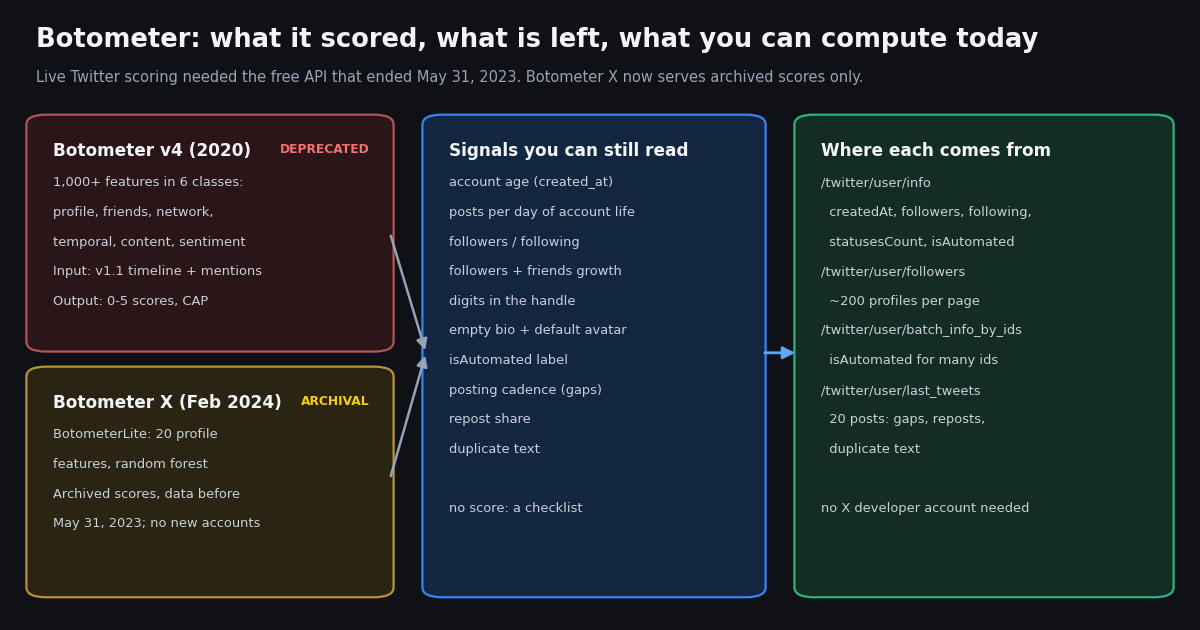
People search "botometer" for three reasons: to check a suspicious account, to find out whether the tool still works ("is botometer down"), or to call its API from Python for research. This page answers all three with what we verified this session on the Botometer site, its RapidAPI listing, its GitHub repository and PyPI, and then does what Botometer no longer does for X: compute the same public signals on live data. It is a reference and a runnable replacement, not a general guide to bots; for that, our pages on what Twitter bots are and on the share of X accounts that are bots go further.
To keep the numbers honest, we ran the replacement on real data: the newest 600 followers of the OSoMe lab's own account (@OSoMe_IU) and the newest 600 followers of @NASA, 1,200 profiles in all, plus the latest posts of 52 sampled followers (1,007 posts). Everything below is aggregates; no individual account is called a bot.
Is Botometer down? What its site and API say today
Botometer is up, but it is not the tool most older tutorials describe. The site at botometer.osome.iu.edu now shows two panels: Botometer Blue for Bluesky accounts and Botometer X for "old Twitter accounts", in the site's own description. The Botometer X panel carries one line that explains everything else: "Botometer X is currently in archival mode, and the results were pre-calculated based on historical data collected before May 31, 2023."
The FAQ spells out what archival mode means. No sign-in: you do not need an X account to look up a score. Incomplete data: the historical data has a cutoff of May 31, 2023, "when Twitter ended its free API"; accounts created after that date have no records, and accounts created before it "may or may not have records". Outdated results: a score reflects the account as it was when the score was calculated, and each one carries a timestamp. Unknown bias: the collected sample "may have unknown biases", for example active accounts may be more likely to be included.
Two more lines from the FAQ matter for anyone using an old score today. Botometer X returns one overall score, not the sub-scores the original Botometer returned. And because its model was trained before tools such as ChatGPT were released, the FAQ says it does not have the ability to detect bots supercharged by AI. The same FAQ notes that Botometer "sometimes categorizes organizational accounts as bot accounts" and recommends using the tool "to complement, not to replace, your own judgment".
So when someone asks whether Botometer is down: the website and API answer, but for X they answer from an archive. A blank result for a new account is the archive working as designed, not an outage.
What Botometer scored, version by version
Botometer started as BotOrNot. Its FAQ lists the versions, and each new model produced scores that the team says are not comparable to the previous one, so a 2019 score and a 2024 score for the same account measure different things.
Botometer v4 is the version most guides mean. According to the "Botometer 101" tutorial by Yang, Ferrara and Menczer, it considered over 1,000 features in six classes: user profile, friends, network, temporal, content and language, and sentiment. You fed it the account's v1.1 user object, its latest 200 posts and 100 search results mentioning it, and it returned an overall score plus sub-scores for six bot types: astroturf, fake_follower, financial, self_declared, spammer and other. Raw scores ran 0 to 1, display scores 0 to 5, and it added a Complete Automation Probability (CAP), the probability that an account with that score or higher is automated.
BotometerLite, the model behind Botometer X, is much smaller. The AAAI 2020 paper by Yang, Varol, Hui and Menczer describes 20 features from the user object alone: 8 raw fields (statuses_count, followers_count, friends_count, favourites_count, listed_count, default_profile, profile_use_background_image, verified) and 12 derived ones, including tweet frequency (posts divided by account age in hours), follower, friend, favorite and list growth rates, the followers-to-friends ratio, the length of the screen name, name and description, the number of digits in the screen name and name, and a screen-name likelihood score. A random forest turns those into one score. That is why it could score huge numbers of accounts cheaply, and why it needs nothing but a profile.
The Botometer 101 tutorial also gives the usage advice that still applies to any score or checklist: 0.5 is the most common threshold in the literature, but results can change with the threshold, so run the analysis at several; compare score distributions across groups rather than trusting one account's number; and do not use bot scores to call people names.
The Botometer API and botometer-python today
The API lives on RapidAPI under the listing "Botometer Pro" (rapidapi.com/OSoMe/api/botometer-pro). The current endpoint is /botometer-x/get_botscores_in_batch: you POST up to 100 user_ids or usernames and get back a list of bot_score (0 to 1; the website multiplies by 5), timestamp, user_id and username. The listing warns that you may get fewer scores than you asked for (the archive is incomplete) or more (several accounts may have used the same username over time), and that if you send both an id and a username for the same account you get duplicates to remove yourself.
The legacy endpoints are still described on the same listing, both marked deprecated: Check account (/4/check_account, Botometer v4) and Check accounts in bulk (/litev1/check_accounts_in_bulk, BotometerLite). Both expected you to fetch the Twitter data yourself with the old v1.1 API and POST it, which is the step that stopped working for most researchers in 2023.
The Python client is botometer on PyPI, version 2.0.1, maintained in the osome-iu/botometer-python repository on GitHub, whose last commits date from June 2024. Its README describes it as the "Botometer X Python API" and works with a RapidAPI key only; no X developer account is needed because no X data is fetched. The minimal call is below.
# pip install botometer   (2.0.1, Botometer X client; needs a RapidAPI key subscribed to "Botometer Pro")
import botometer

bomx = botometer.BotometerX(rapidapi_key="YOUR_RAPIDAPI_KEY")

# up to 100 accounts per call; the @ is optional; ids are safer than usernames
results = bomx.get_botscores_in_batch(usernames=["@OSoMe_IU", "botometer"])
for r in results:
    # bot_score is 0-1 (x5 for the website's 0-5 scale); timestamp = when it was computed
    print(r["username"], r["user_id"], round(r["bot_score"] * 5, 1), r["timestamp"])

# Accounts created after May 31, 2023 are simply missing from the result list.Bot Sentinel and other bot scores
Bot Sentinel is the other name people pair with Botometer. It was a separate project, a browser extension and account-rating service created by Christopher Bouzy, not an OSoMe tool. We tried to check its current state first-hand this session, and its site (botsentinel.com) returned a browser challenge to our automated fetch, so we could not confirm what it offers for X accounts today. The documented part of its history: in August 2022, Twitter said it would revoke Bot Sentinel's access to its APIs, citing its API policies.
The broader point is the one OSoMe makes on its own site: any classifier trained on a fixed dataset loses accuracy as the platform changes, and every score is a snapshot. Botometer's team shipped four versions between 2014 and 2020 for that reason, and says each new model's scores are not comparable to the old ones. A score from 2023 says how an account looked in 2023.
What has not changed is the raw material. Account age, posting volume, follower and following counts, profile completeness, posting rhythm and text reuse are still public, still readable, and still the same signals these models were built on. The next sections compute them on live data.
The signals you can still compute, and where each one comes from
Each row maps a Botometer-era signal to a field you can read today without an X developer account. The isAutomated row is new: it is X's own automated-account label (described at help.x.com/en/using-x/automated-account-labels), which /twitter/user/info and /twitter/user/batch_info_by_ids return as a boolean.
Three details save you a debugging session. /twitter/user/info returns createdAt in ISO 8601 (2010-09-06T13:31:27.000000Z for @OSoMe_IU), while tweets and follower rows use the classic Thu Oct 16 12:34:56 +0000 2026 format, so parse both. Follower rows are snake_case (followers_count, following_count, statuses_count) and do not include isAutomated, which is why the audit batches ids through /twitter/user/batch_info_by_ids. And an unknown username comes back as HTTP 200 with status: "error" and msg: "user not found", not a 404.
We did not use the tweet source field: TwitterAPI.io returns it empty when X does not provide the posting app, which is the usual case, so it is not a usable signal.
What the signals look like on 1,200 real follower profiles
We pulled the newest 600 followers of @OSoMe_IU (the lab behind Botometer) and of @NASA, read isAutomated for all 1,200 through /twitter/user/batch_info_by_ids, and computed every profile signal above. The two lists behave like two different populations, which is the first lesson for anyone setting a threshold.
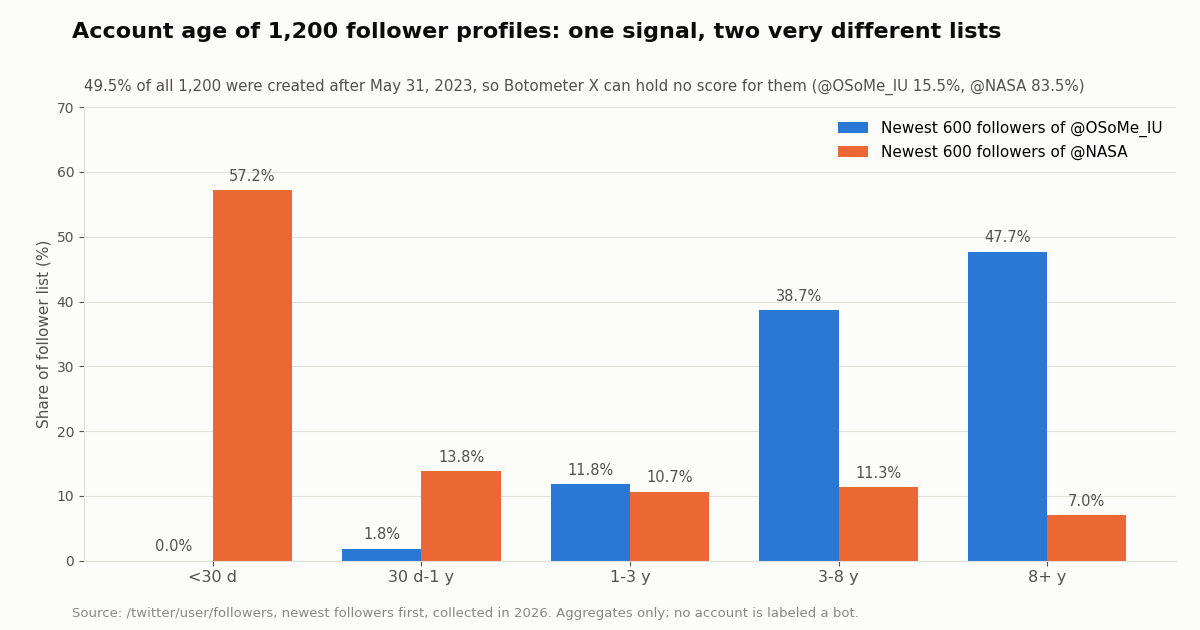
Account age splits the lists. The median @NASA follower in our pull was 2.4 days old and 57.2% were under 30 days; not one of the newest 600 @OSoMe_IU followers was that new, and their median age was 2,688.8 days, about seven years. A newest-followers list of a very large account is mostly people who just signed up, and a rule that treats "new account" as a bot tell would flag most of them.
Botometer X would be blind to half the sample. 49.5% of all 1,200 profiles (83.5% for @NASA) were created after May 31, 2023, so the archive cannot hold a score for them by definition.
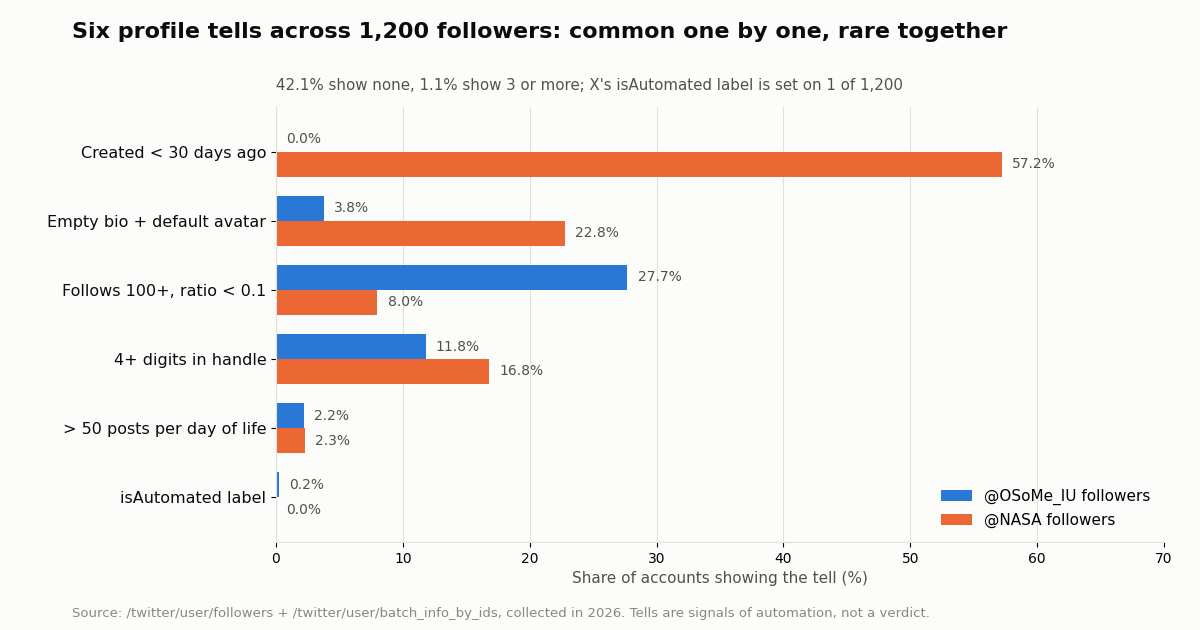
X's own label is rare. isAutomated was true for 1 of 1,200 accounts. X's rules require the label for fully automated accounts, and it names the human-run account responsible, but it is set up by the bot's operator, so its absence proves nothing; its presence is a direct statement from whoever runs the account.
Six tells instead of one score
A transparent checklist is easier to defend than a single opaque number. Our script counts six profile tells, each with the threshold printed so you can change it: created fewer than 30 days ago; more than 50 posts per day of account life; following 100 or more accounts with a followers-to-following ratio below 0.1; four or more digits in the handle; an empty bio together with the default avatar; and X's isAutomated label. None of them proves anything alone, and several describe ordinary new users.
Single tells are common: 28.6% of the 1,200 were under 30 days old, 17.8% followed 100 or more accounts with a ratio below 0.1, and 14.3% had four or more digits in the handle. Combinations are rare: only 1.1% showed three or more. That shape is the practical argument for reading several signals together and looking at the account by hand before drawing any conclusion.
The lists differ here too. The follow-heavy pattern was more common among @OSoMe_IU followers (27.7% versus 8.0%), where long-standing accounts that follow many researchers are normal; the empty-bio-plus-default-avatar pattern was more common among @NASA's newest followers (22.8% versus 3.8%), which fits accounts created days earlier.
Timeline signals: cadence, reposts and duplicate text
Profile fields are cheap; timelines show behavior. From the 1,200 followers we drew a random sample of 60 public accounts with at least 20 posts and read one page of /twitter/user/last_tweets each (20 latest posts, replies excluded by default). 52 returned five or more posts, 1,007 posts in total.
Two readings. First, fast cadence is not rare: 17.3% of sampled accounts had a median gap under five minutes across their last 20 posts, which is what a burst of reposting by a person looks like as well as a scheduler. Second, the duplicate-text tell, a staple of spam detection, found nothing here: no sampled account repeated an original post among its latest 20. That is a property of this audience, not proof the tell is useless; on keyword spam it is often the strongest signal. It is also why the script prints the raw numbers next to the tells.
Twenty posts span very different windows: the median sampled account needed 224.3 days to post 20 times. For low-volume accounts, read more pages (each next_cursor page is another 20 posts at $0.003) before judging cadence.
Cost: Botometer X, the official X API, and this approach
Botometer X is the lowest-cost option on paper, because its Basic plan is free for 5,000 accounts a month. The catch is the data: archived scores only, and none for accounts created after May 31, 2023. For a current read you have to fetch the data yourself, and that is where the rate card matters.
Per 1,000 tweets that is $5 on the official X API rate card (docs.x.com pay-per-usage pricing) against $0.15 here, about 33x. Our whole study, 1,200 follower profiles, 1,200 batch profile reads for isAutomated and 1,007 posts, cost between $0.38 and $0.4: follower rows bill at 1 to 3 credits per user returned, profiles at 18 credits each, tweets at 15 credits each, and $1 = 100,000 credits.
New accounts that pass the automatic bot check get up to $1 of free credits (at most 100,000 credits, no card, one per person or network, expiring after 31 days); purchased credits never expire. Before the first payment the rate limit is 0.2 requests per second, which is enough for the single-account check but slow for an audience audit; after a first payment it is 20 requests per second. Subscriptions start at $29 a month on the pricing page. Reads need no X account.
"""botometer_alternative.py - compute Botometer-style public signals for an X (Twitter)
account, or for the newest followers of an account, from live data.

It does not produce a bot score. It prints the raw signals and a checklist of
"tells" (signs of automation) so you can judge with the evidence in front of you.

    pip install requests
    export TWITTERAPI_IO_API_KEY=...        # from the twitterapi.io dashboard
    python botometer_alternative.py check OSoMe_IU
    python botometer_alternative.py followers NASA 400
"""
import os
import re
import statistics
import sys
from collections import Counter
from datetime import datetime, timezone

import requests

BASE = "https://api.twitterapi.io"
HEADERS = {"X-API-Key": os.environ["TWITTERAPI_IO_API_KEY"]}


def parse_time(value):
    """user/info returns ISO 8601; tweets and follower lists use the classic Twitter format."""
    if not value:
        return None
    if value[:4].isdigit():
        return datetime.fromisoformat(value.replace("Z", "+00:00"))
    return datetime.strptime(value, "%a %b %d %H:%M:%S %z %Y")


def normalize(text):
    text = re.sub(r"https?://\S+|@\w+", "", text or "")
    text = re.sub(r"[^\w\s]", "", text.lower())
    return re.sub(r"\s+", " ", text).strip()


def profile_signals(created_at, followers, following, statuses, handle, bio, avatar, automated):
    now = datetime.now(timezone.utc)
    age_days = max((now - parse_time(created_at)).total_seconds() / 86400, 1 / 24)
    ratio = followers / max(following, 1)
    signals = {
        "account_age_days": round(age_days, 1),
        "posts_per_day_of_life": round(statuses / age_days, 3),
        "followers_following_ratio": round(ratio, 3),
        "followers_growth_per_day": round(followers / age_days, 3),
        "following_growth_per_day": round(following / age_days, 3),
        "digits_in_handle": sum(c.isdigit() for c in handle or ""),
        "bio_length": len(bio or ""),
        "default_avatar": "default_profile" in (avatar or ""),
        "isAutomated": bool(automated),
    }
    tells = []
    if age_days < 30:
        tells.append("created fewer than 30 days ago")
    if signals["posts_per_day_of_life"] > 50:
        tells.append("more than 50 posts per day of account life")
    if following >= 100 and ratio < 0.1:
        tells.append("follows 100+ accounts, followers/following below 0.1")
    if signals["digits_in_handle"] >= 4:
        tells.append("4 or more digits in the handle")
    if signals["bio_length"] == 0 and signals["default_avatar"]:
        tells.append("empty bio and default avatar")
    if signals["isAutomated"]:
        tells.append("carries X's automated-account label")
    return signals, tells


def timeline_signals(tweets):
    """Cadence, repost share and duplicate text from the latest posts."""
    times = sorted(parse_time(t["createdAt"]) for t in tweets)
    gaps = [(b - a).total_seconds() / 60 for a, b in zip(times, times[1:])]
    reposts = sum(1 for t in tweets if t.get("retweeted_tweet"))
    originals = [normalize(t.get("text")) for t in tweets if not t.get("retweeted_tweet")]
    originals = [o for o in originals if len(o) >= 15]
    dupes = sum(n for n in Counter(originals).values() if n > 1)
    signals = {
        "posts_checked": len(tweets),
        "median_gap_minutes": round(statistics.median(gaps), 1) if gaps else None,
        "repost_share": round(reposts / len(tweets), 2) if tweets else None,
        "duplicate_text_share": round(dupes / len(originals), 2) if originals else 0.0,
    }
    tells = []
    if signals["median_gap_minutes"] is not None and signals["median_gap_minutes"] < 2:
        tells.append("median gap between posts under 2 minutes")
    if (signals["repost_share"] or 0) >= 0.9 and len(tweets) >= 10:
        tells.append("90%+ of recent posts are reposts")
    if signals["duplicate_text_share"] >= 0.3:
        tells.append("30%+ of original posts repeat the same text")
    return signals, tells


def check_account(username):
    r = requests.get(f"{BASE}/twitter/user/info", headers=HEADERS, params={"userName": username}, timeout=30)
    r.raise_for_status()
    body = r.json()
    if body.get("status") != "success" or not body.get("data"):
        raise SystemExit(f"{username}: {body.get('msg')}")    # unknown users come back as HTTP 200 + msg
    u = body["data"]
    signals, tells = profile_signals(u["createdAt"], u.get("followers", 0), u.get("following", 0),
                                     u.get("statusesCount", 0), u.get("userName"), u.get("description"),
                                     u.get("profilePicture"), u.get("isAutomated"))
    r = requests.get(f"{BASE}/twitter/user/last_tweets", headers=HEADERS, params={"userName": username}, timeout=30)
    r.raise_for_status()
    tweets = (r.json().get("data") or {}).get("tweets") or []      # newest first, 20 per page
    if tweets:
        t_signals, t_tells = timeline_signals(tweets)
        signals.update(t_signals)
        tells += t_tells
    return signals, tells


def audit_followers(username, limit=400):
    """Aggregate tells across the newest followers of an account (one page is ~200 profiles)."""
    rows, cursor = [], ""
    while len(rows) < limit:
        r = requests.get(f"{BASE}/twitter/user/followers", headers=HEADERS,
                         params={"userName": username, "cursor": cursor, "pageSize": 200}, timeout=30)
        r.raise_for_status()
        page = r.json()
        rows += page.get("followers") or []
        if not page.get("has_next_page") or not page.get("next_cursor"):
            break
        cursor = page["next_cursor"]
    rows = rows[:limit]
    automated = {}
    for i in range(0, len(rows), 100):             # isAutomated is not in follower rows: batch it
        ids = ",".join(str(f["id"]) for f in rows[i:i + 100])
        r = requests.get(f"{BASE}/twitter/user/batch_info_by_ids", headers=HEADERS, params={"userIds": ids}, timeout=60)
        r.raise_for_status()
        for u in r.json().get("users") or []:
            automated[str(u["id"])] = u.get("isAutomated")
    counts, per_account = Counter(), Counter()
    for f in rows:
        _, tells = profile_signals(f["created_at"], f.get("followers_count", 0), f.get("following_count", 0),
                                   f.get("statuses_count", 0), f.get("screen_name"), f.get("description"),
                                   f.get("profile_image_url_https"), automated.get(str(f["id"])))
        counts.update(tells)
        per_account[min(len(tells), 3)] += 1
    print(f"Newest {len(rows)} followers of @{username}")
    for tell, n in counts.most_common():
        print(f"  {100 * n / len(rows):5.1f}%  {tell}")
    for k in range(4):
        label = {0: "0 tells", 1: "1 tell", 2: "2 tells"}.get(k, "3+ tells")
        print(f"  {100 * per_account[k] / len(rows):5.1f}%  of followers show {label}")


if __name__ == "__main__":
    mode, name = sys.argv[1], sys.argv[2].lstrip("@")
    if mode == "check":
        signals, tells = check_account(name)
        for k, v in signals.items():
            print(f"{k:28} {v}")
        print(f"\n{len(tells)} tell(s):", "; ".join(tells) or "none")
        print("Tells are signs of automation to review by hand, not a verdict.")
    else:
        audit_followers(name, int(sys.argv[3]) if len(sys.argv) > 3 else 400)
Questions readers ask
Is Botometer still working?
Yes, but for X (Twitter) it only serves archived scores. Botometer X is "in archival mode": scores were pre-calculated from data collected before May 31, 2023. Accounts created after that date have no record, and older accounts may or may not have one. Live scoring continues for Bluesky accounts as Botometer Blue.
Why does Botometer say no results for an account?
Most often because the account was created after May 31, 2023, or was simply not in the historical sample. That is the archive working as designed, not an outage. In our 2026 sample of 1,200 follower profiles, 49.5% were created after the cutoff.
Is there still a Botometer API?
Yes. It is hosted on RapidAPI under the listing "Botometer Pro". The Botometer X endpoint, /botometer-x/get_botscores_in_batch, takes up to 100 user ids or usernames per request. The Basic plan is free for 50 requests a month, Pro is free with a credit card for 50 requests a day plus $1 per 100 extra, and Ultra is $50 a month for 250 requests a day. The v4 and BotometerLite endpoints are marked deprecated.
How do I use Botometer in Python?
Install the official client with pip install botometer (version 2.0.1), subscribe to Botometer Pro on RapidAPI, then call botometer.BotometerX(rapidapi_key=...).get_botscores_in_batch(usernames=[...]) or user_ids=[...]. Each result has bot_score (0 to 1), timestamp, user_id and username. No X developer account is needed.
What does a Botometer score mean?
It is a classifier output, not a probability. Botometer X returns 0 to 1 through the API and shows 0 to 5 on the website; higher means more bot-like. The Botometer 101 tutorial notes that 0.5 is the most common threshold but results can change with the threshold, so test several and compare groups rather than judging one account by one number.
What is the best Botometer alternative for X accounts?
For a current read, compute the public signals yourself from live data: account age, posts per day, follower ratio, growth rates, handle digits, profile completeness, posting cadence, repost share and duplicate text, plus X's isAutomated label. The script on this page does that with /twitter/user/info and /twitter/user/last_tweets, at $0.18 per 1,000 profiles and $0.15 per 1,000 tweets.
Is Bot Sentinel still available?
We could not confirm it first-hand: its site returned a browser challenge to our automated check. Bot Sentinel was a separate project from Botometer, created by Christopher Bouzy. In August 2022 Twitter said it would revoke Bot Sentinel's API access, citing its API policies.
Can these signals prove an account is a bot?
No. They are signs of automation to review, and several describe ordinary new users. In our study a single tell was common but only 1.1% of 1,200 profiles showed three or more. Look at the account itself before drawing a conclusion, and do not publicly label people based on a score or checklist.
Continue
- osome-iu/botometer-python on GitHub: Botometer X Python API README, RapidAPI usage, response fields
- PyPI: botometer 2.0.1
- Yang, Varol, Hui, Menczer: Scalable and Generalizable Social Bot Detection through Data Selection (BotometerLite, AAAI 2020)
- Yang, Ferrara, Menczer: Botometer 101, social bot practicum for computational social scientists
- X API pricing (pay-per-usage rate card)
- TwitterAPI.io docs: user info (createdAt, isAutomated)
- Twitter (X) API overview: endpoints and pricing
- What Twitter (X) bots are and how they work
- What percentage of Twitter (X) is bots: every published estimate
- Twitter account age checker (free tool)
- Twitter follower tracking with the API
- Twitter follow checker (free tool)
- Docs: batch user info by ids (isAutomated)
- Pay-per-call pricing
- 01X Radar Explained: Twitter (X) Keyword Monitoring, Tiers, Limits and an API Alternative
- 02TweetDeck (X Pro) Alternatives in 2026: Columns, Monitoring and Scheduling for Twitter (X)
- 03Twitonomy Review: What the Twitter (X) Analytics Tool Still Does, and an API Alternative
- 04llms.txt for API docs, measured on two Twitter (X) API doc sets
- 05Grok Connectors: Add a Custom MCP Connector for Live Twitter (X) Data
- 06Twitter (X) Webhooks — A Real-Time API Guide
- 07Twitter (X) profiler: how to profile an account in 2026
- 08Twitter API for Trending Topics
Stop reading. Start building.
Starter credits cover real testing on real data. Google sign-in, no card, no application queue.
Get an API key