Databricks Twitter (X) Pipeline: Load Tweets into a Delta Table in 2026
- The old way is gone: Spark tutorials built on
TwitterUtils.createStream(Apache Bahir + twitter4j) read the v1.1statuses/filterstream, deprecated by X on March 14, 2023. Replace the stream with a scheduled pull or a push into cloud storage. - Batch route: a Databricks Job runs a notebook every hour that calls
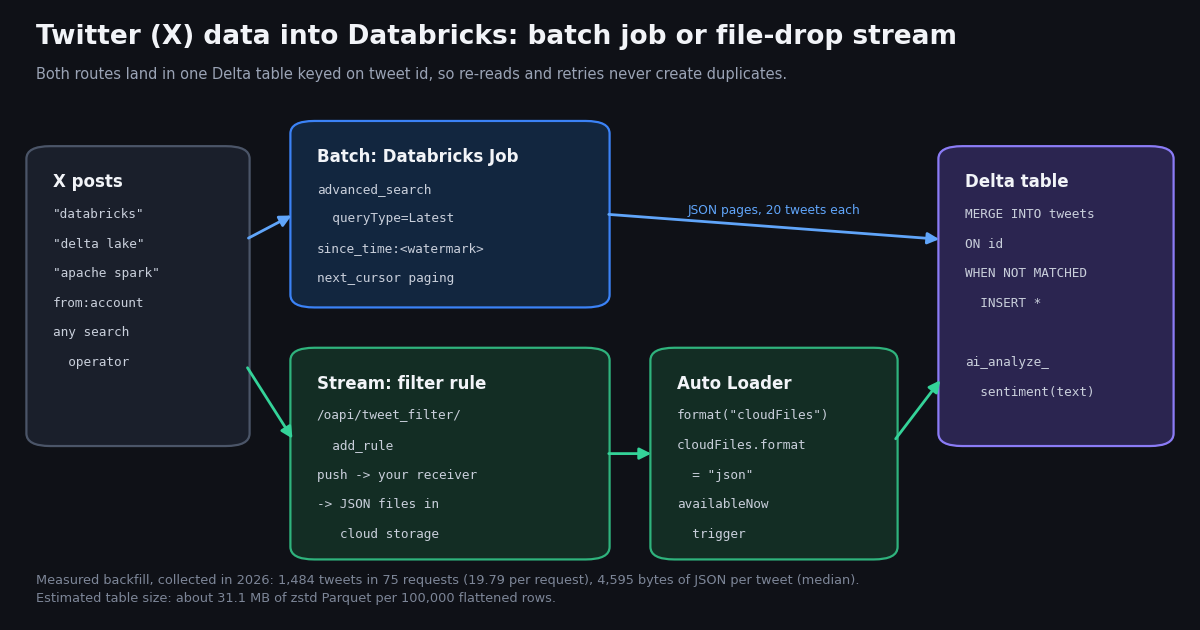
/twitter/tweet/advanced_searchwithsince_time:<watermark>, followsnext_cursor, and runsMERGE INTO x_tweets ON id AND topic. Full notebook below. - Measured backfill: 1,484 tweets in 75 requests (19.79 per request), median 4,595 bytes of JSON per tweet, collected in 2026.
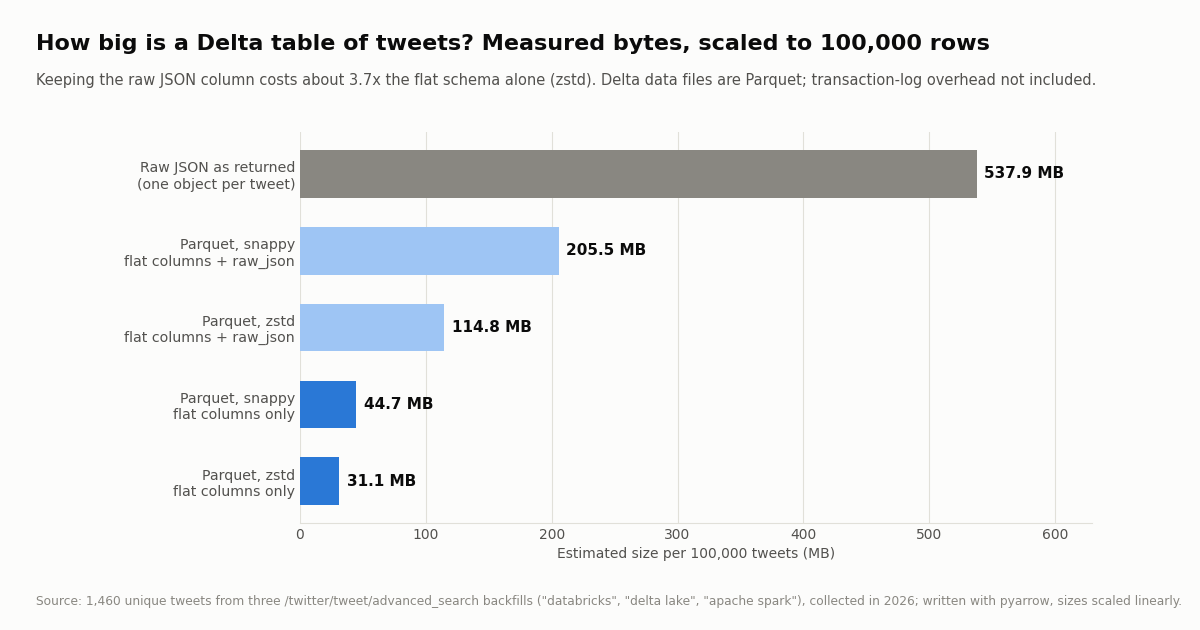
- Table size (estimated): about 31.1 MB per 100,000 tweets for the flat schema with zstd Parquet, 114.8 MB with a
raw_jsoncolumn, versus 537.9 MB of raw JSON files. - Cost: $0.15 per 1,000 tweets returned, so 100,000 tweets = $15 and about 5,054 requests; the official X API rate card lists $0.005 per post read ($500 for the same 100,000).
- Why MERGE matters: re-reading page 1 of one topic returned 20 of 20 tweets already stored, and 24 tweets matched two topic queries. Append-only loads double-count; a MERGE keyed on
(id, topic)does not.
Search for a Databricks Twitter tutorial and you will find notebooks that open a live tweet stream with TwitterUtils.createStream, push it through Event Hubs or Kafka, and print hashtag counts. They were written for the v1.1 streaming API. That endpoint is deprecated, the developer apps they assume now sit on pay-per-use pricing, and none of them write to a Delta table in a way that survives a rerun. Connector vendors fill the rest of the results, and several of them only cover X Ads reporting, not public posts.
This guide is the working replacement: one Databricks notebook you can paste and schedule, the Delta schema it writes, the MERGE that makes it idempotent, a near-real-time variant through Auto Loader, and SQL that runs sentiment on the result. Every size and cost number comes from a real backfill we ran through the same API in 2026, so you can size the table and the bill before you create the job.
31.1 MB for a flat 18-column schema (zstd Parquet), 114.8 MB with the raw JSON kept, measured on a 1,484-tweet backfill in 75 requests, collected in 2026.
Why Databricks Twitter streaming tutorials stopped working
The classic pattern looked like this: a Scala or PySpark notebook created a StreamingContext, called TwitterUtils.createStream(ssc, auth) with four OAuth 1.0a credentials, and received a DStream of tweets every few seconds. Databricks' own reference-apps repository on GitHub still contains this code: its twitter_classifier app collects tweets with org.apache.spark.streaming.twitter.TwitterUtils from the Apache Bahir spark-streaming-twitter 2.0.0 package and twitter4j-core 4.0.5. The repository is not archived, but its last push was in October 2024 and the Twitter code is far older.
Underneath, twitter4j's stream was the v1.1 statuses/filter endpoint at stream.x.com/1.1/statuses/filter.json. X's developer changelog records its deprecation on March 14, 2023 ("Today, we are deprecating the statuses/filter endpoint in the X API v1.1"), and the migration guide on docs.x.com points to the v2 filtered stream at api.x.com/2/tweets/search/stream with rules managed separately. No change to your Spark code fixes that: the data source is gone.
The v2 filtered stream still exists, but on X's pay-per-use plan it allows one connection, it needs an approved developer account plus a Project and an App, and every post it delivers is a billable post read at $0.005 on X's rate card. A Spark cluster holding a long-lived HTTP connection open is also an expensive way to receive a few hundred posts a day. For a lakehouse, the better shape is a short scheduled job that pulls what is new and merges it, plus an optional push route for the few cases that need minutes, not hours.
What to replace, piece by piece. TwitterUtils.createStream becomes a paged search call with a time watermark. The DStream micro-batch becomes a Databricks Job run. saveAsTextFile becomes MERGE INTO a Delta table. Event Hubs or Kafka in the middle becomes optional: only the push route needs a landing zone, and plain cloud storage is enough for Auto Loader.
Two routes into Databricks, and how to choose
Both routes end in the same Delta table, keyed on tweet id. They differ in who does the polling and how fresh the rows are.
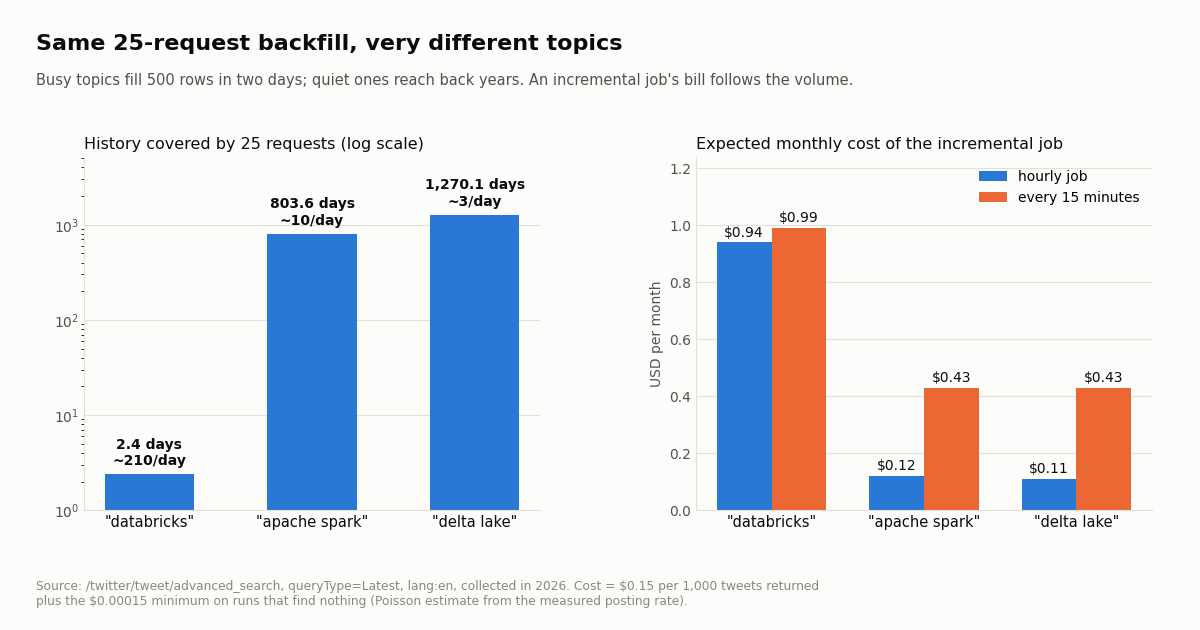
Start with batch. Analytics workloads in a lakehouse (dashboards, weekly topic reports, model features) rarely need rows faster than hourly, and batch is the only route that can also backfill. Our measured topics show why the schedule rarely matters for cost: a busy topic like "databricks" produced about 210 English posts a day, which costs the same whether you collect it hourly or every 15 minutes, because you pay per tweet returned.
Add the push route when minutes matter. Brand or incident monitoring that feeds an alert table is the typical case. The receiver is tiny, and Auto Loader handles file discovery, schema inference and exactly-once file processing through its checkpoint.
Step 1: the Delta table and the API key secret
Store the API key in a Databricks secret scope so it never appears in notebook source or job parameters. With the Databricks CLI (version 0.205 or later), databricks secrets create-scope twitterapi creates the scope and databricks secrets put-secret --json '{"scope": "twitterapi", "key": "api_key", "string_value": "<key>"}' stores the value. The notebook reads it with dbutils.secrets.get(scope="twitterapi", key="api_key"); Databricks makes an effort to redact secret values printed in notebook output, but anyone with read permission on the scope can still read the secret, so scope permissions are the real control.
The table keeps the fields people actually query as typed columns and the full tweet object as a string, so you can add a column later without re-calling the API. The column list below is what the notebook creates; the names on the right are the exact keys in each tweet object the search returns.
Parse createdAt in Python, not in Spark SQL. The format starts with a weekday name, and Spark's datetime pattern reference states that the day-of-week symbol E can only be used for formatting, not for parsing with to_timestamp. datetime.strptime(value, "%a %b %d %H:%M:%S %z %Y") gives a timezone-aware value that PySpark stores correctly as a UTC timestamp.
Do you need raw_json? It is the expensive column. In our measurement it multiplied the zstd Parquet size by about 3.7x. Keep it in a bronze table if you expect schema changes; drop it from the silver table analysts query.
-- What the notebook writes, and two checks worth scheduling next to it.
DESCRIBE TABLE main.social.x_tweets;

-- Rows per topic per day (a gap of zero rows on a busy topic means the job or the key failed)
SELECT topic, date_trunc('DAY', created_at) AS day, count(*) AS tweets
FROM main.social.x_tweets
GROUP BY ALL
ORDER BY day DESC, topic;

-- Duplicates should always be zero: the MERGE key is (id, topic)
SELECT id, topic, count(*) AS n
FROM main.social.x_tweets
GROUP BY id, topic
HAVING count(*) > 1;Step 2: the incremental notebook (watermark, cursor, MERGE)
The full notebook is in the code block at the end of this guide; this section explains the three decisions inside it.
The watermark. For each topic the notebook reads max(created_at) from the table and searches from that moment minus a 10-minute overlap, using the since_time: operator (Unix seconds) inside the query string. The overlap catches posts that were indexed a little late. On the first run there is nothing stored, so it reaches back FIRST_RUN_DAYS instead.
The cursor loop. /twitter/tweet/advanced_search takes query, queryType (Latest or Top) and cursor (empty for the first page), and returns a top-level tweets array of up to 20 tweets plus has_next_page and next_cursor. The loop stops when a page is empty, when has_next_page is false, or at MAX_PAGES. An HTTP 429 means you went over your account's requests-per-second limit (0.2 per second before the first payment, 20 once paid), so the loop waits and retries; any other HTTP error fails the job run, which is what you want Databricks to alert on.
Do not stop paging on the first old tweet. Latest returns each page newest-first, but in our deep backfills not every page was strictly older than the one before it: on the quiet "delta lake" query 41 of 484 tweets (8.5%) were newer than the oldest tweet already seen on an earlier page, and 1.2% on "apache spark". On the busy "databricks" query, which only covered two days, there were none. Bounding the search with since_time: and letting the API say when it is done avoids losing those rows.
The MERGE. Each batch becomes a DataFrame, is de-duplicated on (id, topic), and is merged: matched rows get fresh engagement counts, new rows are inserted with INSERT *. The de-duplication is required, not cosmetic: Databricks documents that MERGE fails with DELTA_MULTIPLE_SOURCE_ROW_MATCHING_TARGET_ROW_IN_MERGE when two source rows match the same target row. Keying on (id, topic) rather than id alone keeps a tweet that matches two of your queries in both topics; in our sample 24 of 1,484 tweets did.
Why not append-only? Because every overlap is a duplicate. When we re-read the first page of the "databricks" query right after the backfill, 20 of 20 tweets (100.0%) were already stored. An append-only table would double-count each of them in every engagement sum.
MERGE INTO main.social.x_tweets AS t
USING x_batch AS s
ON t.id = s.id AND t.topic = s.topic
WHEN MATCHED THEN UPDATE SET
  t.like_count = s.like_count, t.retweet_count = s.retweet_count,
  t.reply_count = s.reply_count, t.quote_count = s.quote_count,
  t.view_count = s.view_count, t.bookmark_count = s.bookmark_count,
  t.ingested_at = s.ingested_at
WHEN NOT MATCHED THEN INSERT *;Step 3: schedule it as a Databricks Job, and backfill history
Create a job with one notebook task pointing at the notebook, then add a Scheduled trigger. Simple mode runs every N hours or minutes; Advanced mode lets you set the time zone and edit Quartz cron syntax (for example 0 0 * * * ? for the top of every hour). Two details from the Databricks Jobs docs matter here: the scheduler enforces at least 10 seconds between runs regardless of the cron expression, and it "is not intended for low-latency jobs", so a run can start several minutes late. Choose UTC if you run hourly, because daylight-saving-aware zones can skip or shift an hourly run when the clocks change.
Hourly or every 15 minutes? You pay per tweet returned, so the posts themselves cost the same on any schedule. The difference is the runs that find nothing, each billed at the $0.00015 minimum. From the posting rates we measured, an hourly job on the quiet "delta lake" topic would come back empty about 88.2% of the time, and its expected bill is $0.11 a month hourly versus $0.43 every 15 minutes. For "databricks" (about 210 posts a day) it is $0.94 versus $0.99. Databricks bills the compute for each run separately, so compare these figures with your own job-run cost before choosing a tighter schedule.
Backfill in windows. For history, run the same fetch with both since_time: and until_time: in one-day windows. Each window is short, restartable, and merged on the same key, so a failed day can simply be rerun. The snippet below reuses the notebook's functions.
How far back you can go depends on the topic, not the request count. The same 25 requests reached 2.4 days into the past on "databricks", 803.6 days on "apache spark" (to 2024) and 1,270.1 days on "delta lake" (to 2023). Size a backfill from a quick count of a single recent day, not from the calendar.
Throughput. 100,000 tweets is about 5,054 requests at the 19.79 tweets per request we measured. Before the first payment the account limit is 0.2 requests a second (about 7.0 hours for that backfill); once paid it is 20 a second (about 4.2 minutes of request time), with 50 on Scale and 500 on Business. Our own collection, through a throttled client shared with other jobs, moved about 361 tweets a minute.
# Backfill in one-day windows: each window is its own short, restartable search.
# Reuses fetch(), to_row(), SCHEMA and the MERGE from the notebook above.
from datetime import datetime, timedelta, timezone

def backfill(topic, query, start, end):
    day = start
    while day < end:
        since = int(day.timestamp())
        until = int(min(day + timedelta(days=1), end).timestamp())
        tweets, pages = fetch(f"{query} until_time:{until}", since)
        if tweets:
            rows = [to_row(t, topic, datetime.now(timezone.utc)) for t in tweets]
            spark.createDataFrame(rows, SCHEMA).dropDuplicates(["id", "topic"]).createOrReplaceTempView("x_batch")
            spark.sql(MERGE_SQL)          # defined in the notebook above
        print(day.date(), len(tweets), "tweets,", pages, "requests")
        day += timedelta(days=1)

backfill("databricks", '"databricks" lang:en',
datetime(2026, 1, 1, tzinfo=timezone.utc), datetime.now(timezone.utc))Near-real-time: filter rule, receiver, cloud storage, Auto Loader
When an alert table has to be minutes fresh, move the polling to TwitterAPI.io's side. Create a rule with POST /oapi/tweet_filter/add_rule (tag, value in the same syntax as the search, up to 255 characters, and interval_seconds, documented from 0.05 to 86,400 with a default of 60). A new rule is inactive: activate it with POST /oapi/tweet_filter/update_rule, sending rule_id, tag, value, interval_seconds again and is_effect: 1. Matching tweets are then POSTed to the webhook URL set in your dashboard.
Databricks should not be that webhook URL. Put a small HTTPS receiver in front (a cloud function or a container) that checks the x-api-key header against your key, answers 200 straight away, and writes the request body unchanged as one JSON file per delivery to a landing prefix in S3, ADLS or GCS. Our webhook guide documents the delivery body as a JSON object whose tweets array holds the same tweet objects the search returns; confirm that against one real delivery from the dashboard's test button before you depend on the column paths.
Auto Loader then reads the landing prefix as a stream: format("cloudFiles") with cloudFiles.format set to json and a cloudFiles.schemaLocation for schema tracking, written with a checkpointLocation so each file is processed once. With trigger(availableNow=True) the stream processes whatever has landed and stops, which lets you schedule it like a batch job every few minutes instead of paying for an always-on cluster. Land into a bronze table, then reuse the same MERGE INTO ... ON id AND topic to move rows into the table the batch route fills.
The cost model is the same. Every rule check costs at least $0.00015 whether it finds anything or not, and each delivered tweet is billed like a searched one. A rule checked every 60 seconds runs 43,200 checks in a 30-day month, a floor of $6.48 before any tweets. That is why the batch route is the default.
# Near-real-time route: a filter rule pushes matches to a small receiver you host, the receiver
# writes each delivery as one JSON file to cloud storage, and Auto Loader picks the files up.
# The readStream / writeStream shape follows the Databricks Auto Loader docs.
from pyspark.sql import functions as F

landing = "s3://my-bucket/x-webhook/landing/"          # where the receiver writes files
checkpoint = "s3://my-bucket/x-webhook/_checkpoint/"

raw = (spark.readStream
       .format("cloudFiles")
       .option("cloudFiles.format", "json")
       .option("cloudFiles.schemaLocation", checkpoint)
       .load(landing))

# Each delivery holds a tweets array; one row per tweet, keyed on id downstream.
tweets = (raw.select(F.explode("tweets").alias("t"))
             .select(F.col("t.id").cast("string").alias("id"),
                     F.col("t.text").alias("text"),
                     F.col("t.createdAt").alias("created_at_raw"),
                     F.col("t.author.id").cast("string").alias("author_id"),
                     F.to_json("t").alias("raw_json")))

(tweets.writeStream
 .option("checkpointLocation", checkpoint)
 .trigger(availableNow=True)        # process what has landed, then stop: schedule it like a batch job
.toTable("main.social.x_tweets_bronze"))What a real backfill measured: requests, bytes and table size
We ran the batch route's fetch for three developer topics, 25 pages each, with queryType=Latest and lang:en, and wrote the flattened rows to Parquet (the file format under every Delta table) with zstd and snappy compression. The study cost about $0.23 in API usage.
Bytes per tweet. Serialized compactly, a tweet object was a median 4,595 bytes (mean 5,379, 95th percentile 12,338); a full 20-tweet page was about 105 KB. Quoted tweets, media variants and link cards make up the long tail. Stored as newline JSON files, 100,000 tweets would be about 537.9 MB.
Table size per 100,000 tweets (estimated). Flattened to the 18-column schema without raw_json, the Parquet came to 311.2 bytes per tweet with zstd and 446.9 with snappy: about 31.1 MB and 44.7 MB per 100,000 rows. Adding raw_json raised that to 114.8 MB (zstd) and 205.5 MB (snappy). These are scaled from 1,460 measured rows and exclude the Delta transaction log, so treat them as estimates.
At these rates the API bill for 100,000 tweets is about 33x lower on TwitterAPI.io ($15 versus $500), and storage stays small: a year of the "databricks" topic at about 210 posts a day is roughly 77,000 rows, around 24 MB at the measured zstd rate for the flat columns.
Analyze it in Databricks SQL: sentiment and topic trends
Once rows land, Databricks AI Functions can label them without exporting anything. ai_analyze_sentiment(text) returns positive, negative, neutral or mixed (or NULL when it cannot decide). Per the Databricks docs it is in Public Preview, needs Databricks Runtime 15.4 LTS or above, is not available on Classic SQL warehouses, requires a workspace region that supports AI Functions for batch inference, and is tuned for English, which is one reason the queries on this page filter on lang:en. For custom labels or prompts, ai_query calls a Foundation Model API endpoint you choose, and ai_classify and ai_extract cover classification and field extraction.
Label new rows only. AI functions are billed as model inference, so score each tweet once: write labels into their own small table and merge on (id, topic), as below, instead of recomputing a view over the whole history every time a dashboard refreshes.
Filter replies before scoring. In our sample 33.0% of "databricks" posts were replies, many of them short fragments that score as neutral and dilute topic-level shares. Keep them in the table, but score and chart original posts and replies separately.
Weight by reach, not by count. A sentiment share computed per tweet treats a post with 40 views the same as one with 400,000. Summing view_count per label, as the second query does, is a quick correction; for deeper sentiment methods see our sentiment analysis guide in the links below.
-- Sentiment on the new rows only (ai_analyze_sentiment: Public Preview, Databricks Runtime 15.4 LTS+,
-- not on Classic SQL warehouses; returns positive, negative, neutral, mixed or NULL; tuned for English)
CREATE TABLE IF NOT EXISTS main.social.x_tweets_sentiment (id STRING, topic STRING, sentiment STRING);

MERGE INTO main.social.x_tweets_sentiment AS t
USING (
  SELECT id, topic, ai_analyze_sentiment(text) AS sentiment
  FROM main.social.x_tweets
  WHERE created_at >= current_timestamp() - INTERVAL 1 DAY
    AND NOT is_reply
) AS s
ON t.id = s.id AND t.topic = s.topic
WHEN NOT MATCHED THEN INSERT *;

-- Share of each label per topic per day, weighted by views
SELECT x.topic, date_trunc('DAY', x.created_at) AS day, s.sentiment,
       count(*) AS tweets, sum(x.view_count) AS views
FROM main.social.x_tweets x
JOIN main.social.x_tweets_sentiment s USING (id, topic)
GROUP BY ALL
ORDER BY day DESC, x.topic, tweets DESC;How we collected this
Question. What does one real backfill of X search results into a Databricks lakehouse look like in requests, bytes, table size and cost, and how different are busy and quiet topics?
Queries. "databricks" lang:en, "delta lake" lang:en and "apache spark" lang:en on /twitter/tweet/advanced_search with queryType=Latest, following next_cursor for 25 pages each, plus one re-read of the first "databricks" page to measure overlap: 76 requests and 1,504 tweets returned in total.
Window and sample. The latest matching posts at collection time, collected in 2026. Per-topic windows run from the oldest to the newest tweet returned and differ widely, as the table shows. Posting rates for the two deep topics use the 7 days before their newest tweet.
Method. Raw pages were flattened with Python into the schema on this page and written with pyarrow to Parquet using zstd and snappy; file sizes were measured and scaled linearly to 100,000 rows. We did not run a Databricks workspace for this measurement, so Delta transaction-log overhead, file compaction and Databricks' own compression defaults are not included. Monthly job costs are expected values from the measured posting rates (Poisson model for empty runs), not observed bills.
What the sample cannot show. Three English developer topics are not a general rate for all of X; a brand or news topic can be orders of magnitude busier. Out-of-order counts describe these runs, not a guarantee about how search ordering behaves elsewhere. Engagement counts change after collection, which is why the MERGE updates them.
Privacy. Aggregates only. The 806 distinct authors in the sample are mostly private individuals: raw pages stayed on the collection machine and were deleted, and the published sample holds only de-identified rows (topic, language, flags, text length, byte size) with no ids, handles, texts or links.
# Databricks notebook source
# twitter_to_delta.py - incremental load of X (Twitter) search results into a Delta table.
# Run it as a Databricks Job (hourly, UTC). Re-runs are safe: rows are merged on (id, topic).
#
# One-time setup with the Databricks CLI (0.205 or later):
#   databricks secrets create-scope twitterapi
#   databricks secrets put-secret --json '{"scope": "twitterapi", "key": "api_key", "string_value": "<your key>"}'
#
# Cluster or serverless notebook with the requests package (preinstalled on Databricks Runtime).
import json
import time
from datetime import datetime, timedelta, timezone

import requests
from pyspark.sql import types as T

spark.conf.set("spark.sql.session.timeZone", "UTC")

API = "https://api.twitterapi.io"
KEY = dbutils.secrets.get(scope="twitterapi", key="api_key")
TABLE = "main.social.x_tweets"          # catalog.schema.table
TOPICS = {                              # topic label -> X search query
    "databricks": '"databricks" lang:en',
    "delta_lake": '"delta lake" lang:en',
}
OVERLAP_S = 600       # re-read the last 10 minutes of each topic; MERGE drops the repeats
FIRST_RUN_DAYS = 2    # how far back the very first run reaches
MAX_PAGES = 500       # safety stop per topic per run (500 pages = up to 10,000 tweets)
FMT = "%a %b %d %H:%M:%S %z %Y"   # createdAt looks like "Thu Oct 16 12:34:56 +0000 2026"

spark.sql(f"""
CREATE TABLE IF NOT EXISTS {TABLE} (
  id STRING, topic STRING, created_at TIMESTAMP, author_id STRING, author_followers BIGINT,
  lang STRING, text STRING, like_count BIGINT, retweet_count BIGINT, reply_count BIGINT,
  quote_count BIGINT, view_count BIGINT, bookmark_count BIGINT, is_reply BOOLEAN,
  conversation_id STRING, has_media BOOLEAN, url_count INT, hashtags ARRAY<STRING>,
  raw_json STRING, ingested_at TIMESTAMP
) USING DELTA
""")

SCHEMA = T.StructType([
    T.StructField("id", T.StringType()), T.StructField("topic", T.StringType()),
    T.StructField("created_at", T.TimestampType()), T.StructField("author_id", T.StringType()),
    T.StructField("author_followers", T.LongType()), T.StructField("lang", T.StringType()),
    T.StructField("text", T.StringType()), T.StructField("like_count", T.LongType()),
    T.StructField("retweet_count", T.LongType()), T.StructField("reply_count", T.LongType()),
    T.StructField("quote_count", T.LongType()), T.StructField("view_count", T.LongType()),
    T.StructField("bookmark_count", T.LongType()), T.StructField("is_reply", T.BooleanType()),
    T.StructField("conversation_id", T.StringType()), T.StructField("has_media", T.BooleanType()),
    T.StructField("url_count", T.IntegerType()), T.StructField("hashtags", T.ArrayType(T.StringType())),
    T.StructField("raw_json", T.StringType()), T.StructField("ingested_at", T.TimestampType()),
])


def watermark(topic):
    """Unix seconds to search from: newest stored tweet minus the overlap, or FIRST_RUN_DAYS ago."""
    w = spark.sql(f"SELECT max(created_at) AS w FROM {TABLE} WHERE topic = '{topic}'").first().w
    if w is None:
        return int((datetime.now(timezone.utc) - timedelta(days=FIRST_RUN_DAYS)).timestamp())
    return int(w.replace(tzinfo=timezone.utc).timestamp()) - OVERLAP_S


def fetch(query, since):
    """Page /twitter/tweet/advanced_search (20 tweets per page) until has_next_page is false."""
    session = requests.Session()
    session.headers["X-API-Key"] = KEY
    cursor, pages, tweets = "", 0, []
    while pages < MAX_PAGES:
        r = session.get(f"{API}/twitter/tweet/advanced_search",
                        params={"query": f"{query} since_time:{since}", "queryType": "Latest", "cursor": cursor},
                        timeout=60)
        if r.status_code == 429:          # over your account's requests-per-second limit
            time.sleep(5)
            continue
        r.raise_for_status()
        body = r.json()
        page = body.get("tweets") or []
        tweets.extend(page)
        pages += 1
        if not page or not body.get("has_next_page") or not body.get("next_cursor"):
            break
        cursor = body["next_cursor"]
    return tweets, pages


def to_row(t, topic, now):
    author = t.get("author") or {}
    ent = t.get("entities") or {}
    media = (t.get("extendedEntities") or {}).get("media") or []
    return (
        str(t["id"]), topic, datetime.strptime(t["createdAt"], FMT), str(author.get("id") or ""),
        int(author.get("followers") or 0), t.get("lang") or "", t.get("text") or "",
        int(t.get("likeCount") or 0), int(t.get("retweetCount") or 0), int(t.get("replyCount") or 0),
        int(t.get("quoteCount") or 0), int(t.get("viewCount") or 0), int(t.get("bookmarkCount") or 0),
        bool(t.get("isReply")), str(t.get("conversationId") or ""), bool(media),
        len(ent.get("urls") or []), [h.get("text", "") for h in (ent.get("hashtags") or [])],
        json.dumps(t, ensure_ascii=False), now,
    )


# New rows are inserted; rows seen before get fresh engagement counts.
MERGE_SQL = f"""
MERGE INTO {TABLE} AS t
USING x_batch AS s
ON t.id = s.id AND t.topic = s.topic
WHEN MATCHED THEN UPDATE SET
  t.like_count = s.like_count, t.retweet_count = s.retweet_count,
  t.reply_count = s.reply_count, t.quote_count = s.quote_count,
  t.view_count = s.view_count, t.bookmark_count = s.bookmark_count,
  t.ingested_at = s.ingested_at
WHEN NOT MATCHED THEN INSERT *
"""

now = datetime.now(timezone.utc)
for topic, query in TOPICS.items():
    since = watermark(topic)
    tweets, pages = fetch(query, since)
    if not tweets:
        print(f"{topic}: nothing new since {since} ({pages} request)")
        continue
    rows = [to_row(t, topic, now) for t in tweets]
    # MERGE fails if two source rows match one target row, so drop repeats inside the batch first
    batch = spark.createDataFrame(rows, SCHEMA).dropDuplicates(["id", "topic"])
    batch.createOrReplaceTempView("x_batch")
    spark.sql(MERGE_SQL)
    print(f"{topic}: {len(tweets)} tweets in {pages} requests merged into {TABLE}")
Researching this?Free starter credits cover end-to-end testing — Google sign-in, no card. Get a key.
Questions readers ask
Does the Databricks Twitter streaming tutorial with TwitterUtils still work?
No. TwitterUtils.createStream (Apache Bahir's spark-streaming-twitter with twitter4j) read the v1.1 statuses/filter stream, which X deprecated on March 14, 2023. Replace it with a scheduled notebook that pages a search API and merges into Delta, or with a push route that lands JSON files for Auto Loader.
Is there a native Databricks connector for X (Twitter)?
Not among the managed connectors Databricks names. The Lakeflow Connect overview lists sources such as Salesforce, HubSpot, Google Ads, Meta Ads, TikTok Ads and Slack, with no X entry. Third-party ETL vendors sell connectors, several of them for X Ads reporting rather than public posts. For public posts, a Python notebook calling an HTTP API is the usual route, and the one on this page is about 130 lines.
How do I avoid duplicate tweets in my Delta table?
Use MERGE INTO ... ON t.id = s.id (plus AND t.topic = s.topic if one table holds several queries) and de-duplicate each batch first, because MERGE fails when two source rows match the same target row. In our test, re-reading one search page returned 20 of 20 tweets already stored, so append-only loads double-count quickly.
How much storage do 100,000 tweets take in Delta Lake?
In our measurement, about 31.1 MB with zstd Parquet (44.7 MB with snappy) for 18 flat columns, and 114.8 MB (zstd) if you keep the full tweet JSON in a string column. These are estimates scaled from 1,460 measured rows and exclude the Delta log.
How much does it cost to pull 100,000 tweets into Databricks?
On TwitterAPI.io, $0.15 per 1,000 tweets returned, so $15 in about 5,054 requests, plus your Databricks compute. The official X API's pay-per-use rate card lists $0.005 per post read, or $500 for the same volume, with a cap of 3 million post reads a month.
Can I stream tweets into Databricks in real time?
Close to it. A filter rule on TwitterAPI.io checks your query on an interval (default 60 seconds) and POSTs matches to a receiver you host; the receiver writes JSON files to cloud storage, and Auto Loader with trigger(availableNow=True) or a continuous stream loads them. The Databricks Jobs scheduler itself is not meant for low-latency work.
Can Databricks run sentiment analysis on tweets?
Yes. ai_analyze_sentiment(text) returns positive, negative, neutral or mixed. It is in Public Preview, needs Databricks Runtime 15.4 LTS or above, is not available on Classic SQL warehouses and is tuned for English. ai_query lets you use your own prompt with a Foundation Model API endpoint.
Do I need an X developer account or app?
Not for reading. TwitterAPI.io reads need only an API key, sent as the X-API-Key header; new accounts that pass the automatic bot check get free starter credits (no card, one per person or network, expiring after 31 days). The official X API requires an approved developer account, a Project and an App.
Continue
- Databricks docs: MERGE INTO (Delta Lake), including the multiple-source-row error
- Databricks docs: Auto Loader with Unity Catalog (cloudFiles, schemaLocation, availableNow)
- Databricks docs: scheduled job triggers (Quartz cron, 10-second minimum, not for low latency)
- Databricks docs: ai_analyze_sentiment function (return values, requirements)
- X developer docs: filtered stream migration from v1.1 statuses/filter
- X developer docs: pay-per-usage pricing (post read and user read rates, monthly cap)
- X (Twitter) API overview: endpoints, pricing and limits
- What is left of the Twitter streaming API, and what replaced it
- Twitter (X) webhooks for real-time tweet delivery
- Twitter sentiment analysis methods and pitfalls
- Exporting a Twitter dataset for research
- TwitterAPI.io pricing per tweet and per profile
- 01Twitter (X) Account Locked: Why It Happens and How to Unlock It
- 02The Library of Congress Twitter (X) Archive: What Happened and Can You Access It?
- 03Twitter (X) CRM: Sync X Profiles and Buying Signals into HubSpot or Salesforce
- 04Twitter (X) Likes API: What You Can Read, Like and Unlike in 2026
- 05Twitter (X) in Looker Studio: Build the Dashboard Without a Paid Connector
- 06Usernames for Twitter (X): The Rules, 48 Ideas, and How to Check Availability in 2026
- 07Antigravity vs Cursor: Plans, Models and a Twitter (X) MCP Setup in Both
- 08Codex Pricing in 2026: ChatGPT Plans, Usage Limits, Credits and API-Key Costs
Writing about something you built with TwitterAPI.io? Our community rewards program pays API credits for honest tutorials, build logs and videos.
Stop reading. Start building.
Starter credits cover real testing on real data. Google sign-in, no card, no application queue.
Get an API keyAlready building with TwitterAPI.io? Publish an honest tutorial or build log about it and earn up to $200 a month in API credits.